Integrating AI Copilot with Project Management Tools: Transforming Workflow Efficiency
Do your project managers still spend 15-20 hours weekly on administrative tasks? That's half their time wasted on documentation instead of strategic work. AI copilot tools can cut much of this manual load for your team with little to no drawbacks. But first, you'll want to understand their capabilities and how to implement them properly. This guide reveals what you need to know about AI Copilot integration and where project management is heading.
AI copilots transform project management by automating routine tasks and providing intelligent insights. Integration turns scattered workflows into streamlined operations where AI handles the heavy lifting.
Key Integration Benefits
Automated Task Management – AI assigns tasks, sets priorities, and tracks progress automatically.
Intelligent Scheduling – Optimizes timelines based on team capacity and dependencies.
Predictive Analytics – Forecasts project risks and suggests proactive solutions.
Natural Language Interface – Manage projects through conversational commands instead of manual clicks.
Smart Resource Allocation – Distributes workload efficiently across team members.
aqua cloud integrates AI copilot capabilities directly into project management workflows for automated task assignment, predictive analytics, and intelligent scheduling. Teams experience 50% faster project completion with AI-driven optimization.
Organizations implementing AI copilots report ROI between 112-457% over three years. AI in project management addresses inefficiencies that drain your productivity and delay projects. Manual processes create bottlenecks while communication gaps cause missed updates. Microsoft Project Copilot solutions tackle these fundamental challenges for your organization:
Administrative work drains the time you could have spent on strategy: Your team may be burning 15-20 hours weekly on documentation and status updates. Half the job gets spent on non-strategic work chasing information that already exists in Microsoft 365 environments.
Poor data governance delays your AI adoption: According to McKinsey research, 60% of organizations remain stuck in the pilot phase. The technology works fine, but they haven’t addressed the underlying data chaos first.
Communication breakdowns delay critical information: Blockers mentioned in your Tuesday meetings don’t reach project tracking tools until Friday. Resources get double-booked because your team lacks real-time visibility into availability.
Outdated data masks emerging problems: Budget overruns and timeline risks go unnoticed when you’re working with last week’s numbers instead of current insights. By the time problems surface, fixes cost significantly more.
You respond to problems rather than preventing them in advance: Traditional methods force your team to respond after problems occur rather than identifying risks early when they’re easier to address.
The core problem might be that your team works hard but focuses on the wrong activities. This includes maintaining outdated Gantt charts, tracking dependencies in unwieldy spreadsheets, and manually compiling reports.
While AI copilots level up project management, QA processes face similar challenges. QA teams often spend more time documenting tests than improving product quality. aqua cloud, an AI-driven test and requirement management software, addresses this with its domain-trained AI Copilot. The system understands project context and generates test cases and requirements from documentation, chats, or even voice notes in seconds. aqua allows you to manage test scenarios and defects, while also providing access to community and support materials, extended analytics, dashboards, Agile environment, and more. With aqua, administrative overhead drops by up to 98% while ensuring complete traceability between requirements, tests, and defects. aqua integrates with tools like Jira, Azure DevOps, Jenkins, Selenium, and 12+ other tools from your tech stack via REST API for complete workflow coverage.
An AI copilot is an intelligent assistant powered by large language models. The technology can understand context, process natural language, and provide decision support in various ways for your team.
Unlike traditional automation that executes predefined rules, AI copilots interpret intent and learn from patterns. They adapt recommendations based on changing project conditions. Think of the difference between cruise control and advanced driver assistance. Traditional automation maintains set parameters. Copilot for project management gives you an intelligent system that monitors conditions and adjusts to changes while actively supporting navigation.
Project management Copilot connects to your organizational data ecosystem. This includes SharePoint documents, Teams conversations, Confluence wikis, and task management platforms. When you ask: “What’s blocking the mobile app launch?” the copilot does far more than a keyword search. The system understands the inquiry is about impediments to a specific project. Then it connects scattered information across platforms and delivers contextual answers. Copilots process information like a human brain would, except they can analyze thousands of documents in seconds.
These tools learn from successful project patterns across organizations and industries, building on collective wisdom that would take years to accumulate manually. When you’re generating project plans, you build on insights from thousands of similar initiatives rather than starting from scratch.
Feature
Traditional Automation
AI Copilots
Operation
Executes predefined rules and workflows
Understands context and adapts to changing situations
Input processing
Limited to specific trigger-action sequences
Processes natural language and interprets user intent
Learning capability
No learning or improvement over time
Learns patterns from organizational data and feedback
Adaptability
Requires manual updates when processes change
Adjusts recommendations based on new information automatically
Integration
Works in isolation from other systems
Connects across entire technology ecosystem
Task complexity
Handles repetitive tasks only
Assists with complex decision-making and strategic planning
Response type
Executes fixed actions
Provides contextual insights and recommendations
Data utilization
Uses only structured data inputs
Analyzes structured and unstructured data across platforms
Context awareness
No understanding of project goals or priorities
Interprets objectives and adjusts suggestions accordingly
Error handling
Stops when encountering unexpected inputs
Adapts approach when facing ambiguous or incomplete information
Traditional automation is a tape recorder playing back programmed instructions. AI copilots are like experienced colleagues who understand how things work, surfacing relevant information and improving your judgment without replacing you.
Adoption and Change Management. The issue with companies trying to adopt new technologies is that they tend to bring in legacy baggage into modern solutions, such as SharePoint, OneDrive, and Teams, as examples. Copilot is a lot more difficult, as this is such a transformative technology akin to the launch of the internet.
AI copilot integration with management tools delivers measurable value across critical areas for your team, returning time to you for strategic work:
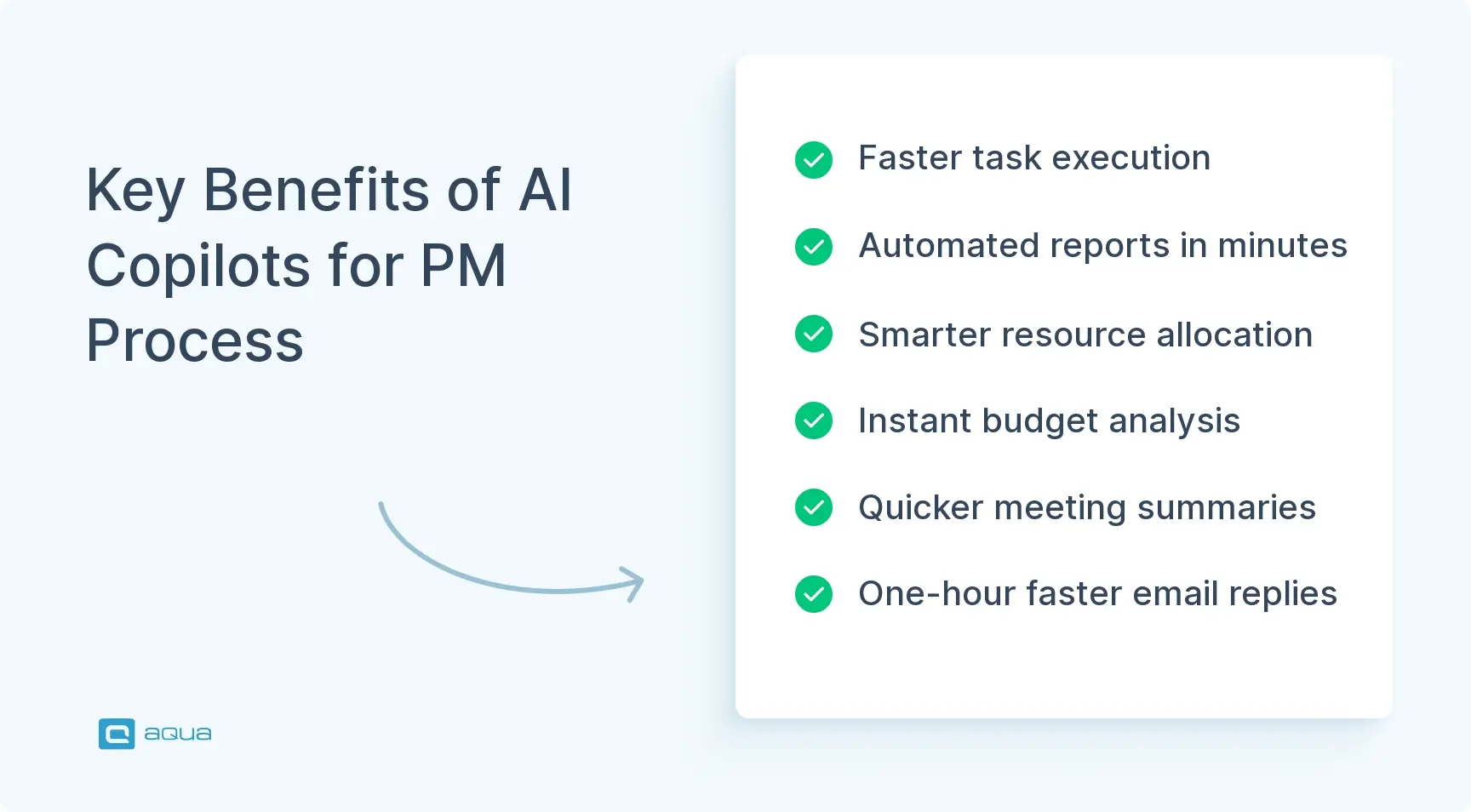
Better decision-making with current data: Using Copilot for project management pulls current data across your projects, eliminating guesswork for your team. Variance analysis that consumed Friday afternoons now takes 30 seconds. Your PM can ask “Why are we 15% over budget on infrastructure?” and receive cost driver breakdowns instantly, assuming the copilot has access to trustworthy project data.
Automated task execution saves hours daily: AI copilot integration with project management tools generates comprehensive work breakdown structures from single-paragraph briefs. According to Forrester’s Total Economic Impact study, your team can reduce initial project planning from 12-16 hours to 2-3 hours.
Smarter resource allocation: Instead of manually juggling assignments, copilots analyze your team’s workload patterns and skill sets to suggest optimal allocations. They forecast capacity crunches weeks ahead for your PMs when fixes remain inexpensive.
Meeting efficiency recovers hours weekly: Automatic transcription and action item extraction save 45 minutes per meeting. Your team spends less time documenting discussions and more time acting on decisions.
Quick documentation replaces hour-long efforts: Status reports requiring 4+ hours now start with AI-generated drafts you can refine in 30 minutes. Over a year, that’s 780-1,040 hours per PM returned to strategic work.
Faster email responses: Research from Microsoft shows high-email roles save approximately one hour daily when copilots draft responses based on project context.
Copilot project management handles the administrative weight that prevents strategic work, which means you can shift from report-writing to driving successful outcomes. Similar AI test automation advantages are changing quality assurance processes.
How to Implement AI Copilots into Project Management Frameworks
Successful AI copilot deployment for your organization follows a methodical approach. The key is starting small, validating value, and then scaling systematically:
Step 1: Establish data governance foundation
Before licensing copilots for your team, you’ll need to audit your data environment. Start by identifying where project documentation lives, such as SharePoint or OneDrive. Your next priority is fixing permission structures because files shared with “everyone in the company” create security issues when they should be team-restricted. You’ll also want to apply sensitivity labels to confidential information and clean up digital clutter.
According to McKinsey’s AI adoption research, 60% of organizations stay stuck in pilot phase specifically because they skipped data governance. This foundational work is essential for your organization.
Step 2: Launch focused pilot with 50-200 users
Your next step involves selecting “lighthouse” departments that represent different roles and workflows. Look for teams living in Microsoft 365 with clear, measurable pain points. Infrastructure teams drowning in status reports make ideal pilots. Product managers spending half their week in meetings represent another good option for your organization.
The key here is providing intensive, role-specific training with real scenarios. Skip generic button-clicking tutorials. Instead, show infrastructure PMs how to ask “Analyze cost variance for Q4 and identify the top three drivers” and receive actionable answers. This approach helps you validate ROI before making a full financial commitment.
British Columbia Investment Corporation saved 2,300+ hours in their pilot. Additionally, 84% of users reported double-digit productivity gains. That’s concrete proof for your leadership.
Step 3: Measure pilot outcomes rigorously
At this stage, you need to establish metrics and ways to track them for your team. Gather information about adoption rates, time savings, quality improvements, and user satisfaction. These metrics reveal what works and where you need course correction. It’s useful to know that organizations measuring methodically see 3-5x faster time to value. Those rushing deployment without validation tend to struggle more.
Step 4: Scale department by department
After you’ve learned what works and fixed what doesn’t, you’re ready to expand. Roll out to additional departments progressively while maintaining a 1:100 champion-to-user ratio so your people have peer support. Each expansion wave should tackle new use cases for your organization.
The first wave typically focuses on individual productivity for your team members. Think email drafting and document creation. The second wave then addresses team collaboration, like meeting summaries and shared project planning. By the time you reach enterprise scale, the expansion becomes easier because the approach is proven.
Step 5: Maintain ongoing change management
Think of AI as an organizational change rather than just an IT project. Your leadership must visibly use the tools and champion adoption across teams. Training can’t be one-and-done, so plan to provide monthly office hours and share success stories regularly with your team.
Consider creating prompt libraries that show role-specific best practices. You’ll also want to cultivate peer champions who save 8-9 hours weekly and can demonstrate value to colleagues. Microsoft’s internal Cloud Operations rollout used data center-specific training examples. Adoption soared because people saw immediate work relevance.
Measure everything throughout your process since metrics tell you what’s working and where adjustment is needed. Just as strategies for QA team collaboration require continuous measurement and adjustment, your AI copilot implementation demands ongoing evaluation.
The Future of AI in Project Management
Today’s copilots are version 1.0 of increasingly autonomous systems that will transform how your team works. Current Copilot project management tools function as assistants. You prompt, they respond, and you decide. By 2028, according to IDC projections, AI agents will proactively monitor your projects, flag risks, and update stakeholders for you. They’ll execute routine workflows without prompting. We’re looking at 1.3 billion AI agents by 2028, which means agents will be doing work while you and your team focus on strategy.
This transition reshapes daily practice for your team. Today, you request status report drafts, review them, tweak content, and send. Tomorrow’s agents will continuously monitor metrics and detect at-risk milestones for you. They’ll draft stakeholder communications and route them for your approval before morning coffee. The shift moves from “AI helps when I ask” to “AI handles routine so I focus on exceptions.”
Technology evolves rapidly beyond text interfaces as models powering these systems gain complex reasoning capabilities. OpenAI’s o1 and o3-mini models optimize for multi-step logic, exactly what debugging project plans require. Organizations using reasoning-focused models report 40% faster problem resolution versus earlier AI generations.
I've been trying out different ways to manage my projects between Loop and planner with my Teams summary. Lately, I've been taking all the actions identified after meetings and moving the ones I care about into a master list in Loop Component for each project. Then, in my meeting agendas, I will include that component in the meeting minutes. So, it's one consolidated list that can be updated with each meeting.
Your role shifts from coordinator to strategist: When agents handle routine project administration, you get to spend more time on stakeholder relationships, team development, and moving initiatives forward.
Continuous adaptation becomes necessary: The teams winning in 2027 will be those constantly exploring new capabilities, experimenting with autonomous workflows, and staying ahead of the curve.
Skill requirements evolve: Prompt engineering becomes table stakes for your team. Understanding how to design agent workflows, set appropriate boundaries for autonomous operation, and integrate AI into team culture becomes the differentiator.
Companies doing PM the old way will struggle attracting talent who have experience with modern tools in a couple of years. They’ll be slower to market and less responsive to change, which is exactly what you want to avoid.
Agents automate task tracking and risk flagging, but can’t replace your judgment on cutting scope versus pushing deadlines. They can’t navigate contentious stakeholder meeting politics or inspire burned-out teams through tough sprints. The future means humans empowered by AI for work requiring genuine insight, creativity, and leadership.
Project management now significantly relies on AI tools that free teams from administrative overhead. This same change is happening in quality assurance. aqua cloud, a dedicated, AI-driven test and requirement management solution, provides a unified repository for all testing assets. The platform has AI automation that can generate test cases, requirements, documentation, and test data in seconds. With Jira integration, customizable workflows, scripts, defect reporting, and real-time dashboards, aqua offers unmatched functionality while helping your team align with project management frameworks. The domain-trained AI Copilot understands project context and learns from documentation to deliver increasingly relevant results over time. aqua empowers QA teams to move from manual test creation to strategic quality oversight. Organizations using aqua report saving substantial time on administrative tasks while achieving 100% test coverage. aqua integrates with major platforms, including Jenkins, Jira, GitHub, and others, via REST APIs.
Boost QA management efficiency by 80% with aqua's AI
AI copilots can boost your project management by saving substantial working hours weekly and delivering significant ROI for your organization. These tools free your teams from administrative tasks to focus on strategic work that drives real outcomes. Success requires you to invest in data governance before deployment. You also need to treat adoption as organizational change rather than technology rollout and measure value rigorously. Teams still manually building Gantt charts are competing with one hand tied while others sprint ahead. The Copilot shift for project management is here. The question for you is whether you’ll lead the transformation or scramble to catch up.
Microsoft Copilot integrates with your existing project management platforms such as Microsoft Project, Planner, and Teams. The system enhances these platforms by automating documentation, generating insights from project data, and assisting with planning tasks. The AI works within current workflows by connecting to organizational data across Microsoft 365, providing contextual support wherever you manage projects.
How to integrate AI in project management?
Your first step involves establishing data governance by auditing where project information lives and fixing permissions. Once that foundation is in place, you can launch a focused pilot with 50-200 users from teams with clear pain points. Provide role-specific training during this phase. It’s important to measure adoption rates, time savings, and ROI rigorously. After validating success, the next step is scaling department by department while maintaining peer champions for support. Throughout this process, treat implementation as organizational change. Your team will need ongoing training and visible leadership adoption.
Can Copilot generate a Gantt chart?
AI Copilot assists with Gantt chart creation by analyzing project requirements, suggesting task breakdowns, and identifying dependencies. The system recommends timelines based on similar successful projects. While Copilot doesn’t directly render visual Gantt charts, the technology generates the underlying structure and data. This feeds into AI Copilot Integration project management tools like Microsoft Project for your team. The copilot significantly reduces planning time by drafting comprehensive work breakdown structures that you can refine and visualize.
What are the security considerations when integrating AI Copilot with management tools?
Critical security considerations for your organization include data governance to ensure proper file permissions and access controls. Sensitivity labeling for confidential project information matters, along with compliance with organizational data policies. AI copilots access data based on user permissions, so fixing permission structures before deployment prevents inappropriate information exposure. Your organization should audit data environments and implement role-based access controls. You’ll also want to establish AI usage policies. Regular review of what data the copilot can access maintains security while enabling functionality for your team.
How can AI Copilot improve collaboration in project management platforms?
AI Copilot improves collaboration by automatically transcribing meetings and extracting action items for your team. The system generates summaries so team members quickly catch up on discussions. Copilots also draft status updates that synthesize input from multiple sources. They surface relevant information from past conversations when needed. The technology breaks down communication silos by connecting data across platforms like Teams and SharePoint. This ensures blockers mentioned in one channel reach appropriate tracking systems. Your stakeholders get real-time visibility into project status across the board.
Stefan is an entrepreneur who deeply believes in technology. With his company, andagon Group, he’s been empowering businesses around the world to build better software through their quality assurance services and products since 2001. Stefan has cultivated a knack for tailoring aqua to seamlessly integrate…
Pavel, a Quality Assurance Consultant and Author, brings deep expertise to solving complex testing challenges. His background in software development has helped organizations transform their QA practices from reactive to proactive. Beyond consulting, Pavel develops best practice guides and case studies for aqua cloud that…
Home » 'How to' guides » Integrating AI Copilot with Project Management Tools: Transforming Workflow Efficiency
Do you love testing as we do?
Join our community of enthusiastic experts! Get new posts from the aqua blog directly in your inbox. QA trends, community discussion overviews, insightful tips — you’ll love it!
We're committed to your privacy. Aqua uses the information you provide to us to contact you about our relevant content, products, and services. You may unsubscribe from these communications at any time. For more information, check out our Privacy policy.
X
🤖 Exciting new updates to aqua Intelligence are now available! 🎉