The gap between Jira and aqua TMS
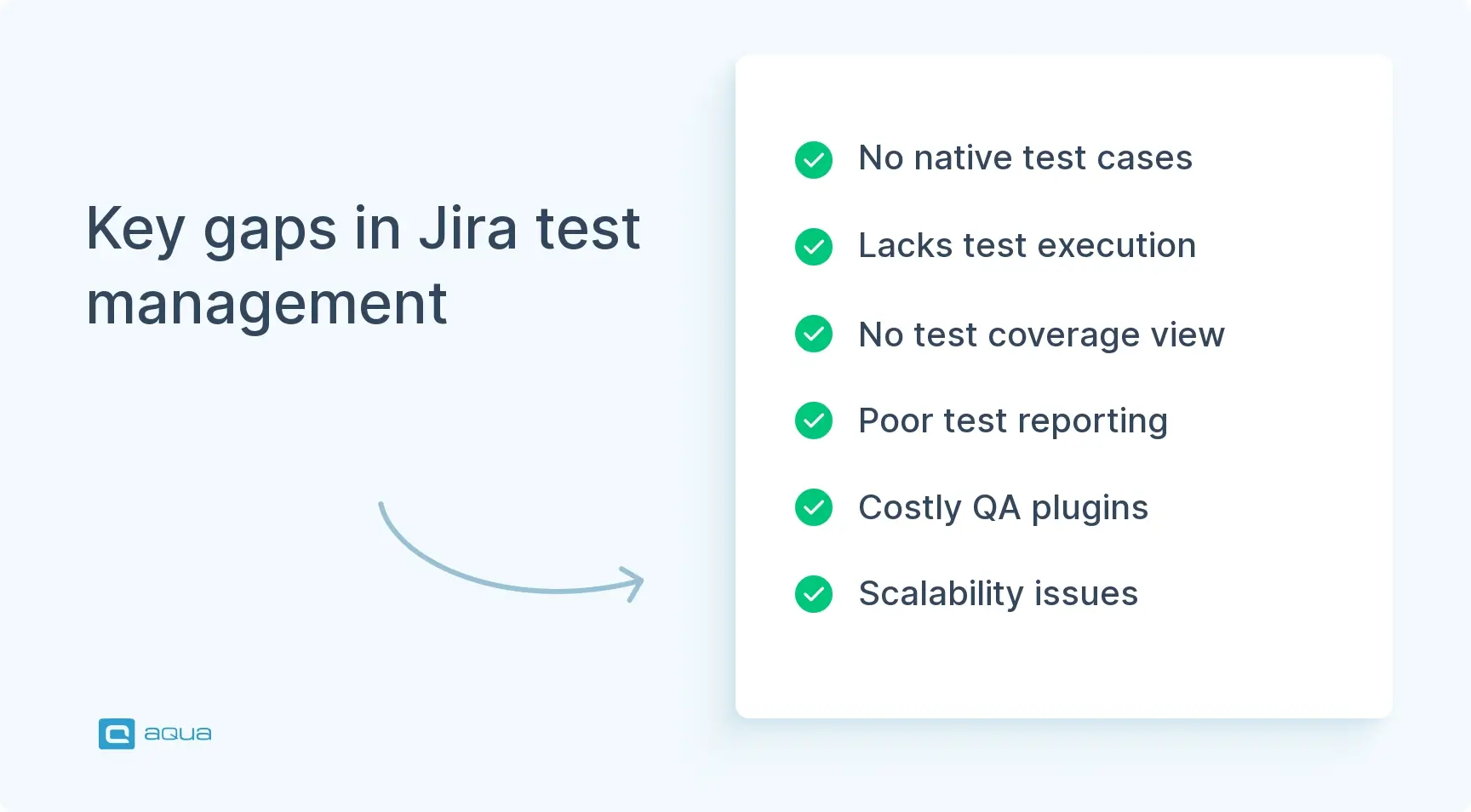
Here are the key Jira functionality omissions that aqua addresses:
Jira lacks test-centric features — in fact, it does not have native test management functionality at all. There is no such thing as test cases in Jira. You can’t execute test cases. You can’t check the execution history of a test case, because there are no test cases and no test execution functionality. Naturally, grouping individual test cases into test scenarios that replicate use cases is impossible as well. You can’t see test coverage and can’t use metrics built upon it either.
“Fake” test cases can’t be properly organised. The Atlassian marketplace offers item templates that try to introduce a Jira testing workflow by repurposing Jira user stories into “test cases”. While you can indeed use custom fields to enter a test case name and even describe steps in a free text editor, this is still not a test case. You can’t natively complete test steps one by one, track results properly, or realistically hope to export these cases once you need a proper QA tool after all.
Test reports are not supported by Jira either. Even if you go along these subpar makeshift “Jira workflow improvements”, it will be hard to make sense of manual test results with poor formatting and no continuity. Even worse, you can’t hope to bring in results from automated testing into Jira, let alone make them synergetic with manual testing performed like that.
QA plugins for Jira are a money sink. The backend limitations mean that you should buy plugin licences for everyone in your Jira, even if they are not even a tech person. These costs rack up pretty fast, and you’re getting an inferior product compared to a test management solution.
Complexity will become a burden. Between hacky ways to create test cases or work around QA plugins, you will likely create quite an administrative overhead. This will get in the way of scaling your testing, onboarding new employees, and making the release cycles leaner when needed.These may seem like basic features, but they are essential for proper test management. Your testers will be wasting a lot of time on a setup that is barely scalable. Potential QA candidates will be running away once you show them this maze of a testing infrastructure. If it’s developers who perform QA, their potential frustration will only be exacerbated by a clunky and inefficient approach to it. Neglecting proper testing also means that you’re not really getting the advertised ALM experience from your Jira workflow management setup.
Benefits of enriching Jira with aqua TMS
The benefits of introducing aqua TMS into your toolchain go beyond changing workflow in Jira for the better. They give you a solid quality assurance structure, enhance it with cutting-edge functionality, and improve the entire application lifecycle. aqua is a dedicated test management solution with a tight Jira integration, and here is what that brings:
- Connect testing and development seamlessly with our 2-way Jira-aqua sync. Your QA team works in aqua’s specialised environment while devs stay in familiar Jira territory — all changes instantly mirror across both platforms. You will achieve a proper workflow alignment beforehand. Many teams rush implementation and wonder why statuses don’t match up, so take time to map each step carefully. Your sprint velocity will thank you when defects flow smoothly without the usual back-and-forth confusion.
- Native AI test generation gives an unmatched efficiency boost: you save over 12 hours/week per every tester. aqua utilises the tech behind ChatGPT to create and update tests for your requirements. You can optionally let aqua AI learn from your project to get the most relevant tests possible
- AI requirements generation is a major leap even over Jira’s core functionality. Use your voice to narrate required functionality, and aqua AI will turn it into a complete ticket. You can tweak the output via precise prompts or give a custom command to capture the requirement right
- Workflows take away the pain of managing hundreds of tests manually while adhering to internal policies. Set up the item lifecycle once, and everyone on the team will always know when it is their turn to act, assist, or approve. This both reduces menial work and helps regulatory compliance in sensitive industries, where any key infrastructure change absolutely needs a stamp of approval. The aqua’s functionality has all advantages of Jira workflow automation with extra focus on QA.
- Seamlessly link your test automation to project workflows with aqua’s integration capabilities. Connect with Selenium, JMeter, or Ranorex, then push execution results straight into your test runs. When failures happen, aqua can automatically create Jira defects – complete with links to specific test cases and contextual data. This keeps dev and QA teams perfectly aligned without the usual back-and-forth headaches that waste valuable sprint time.
- Tool specialisation and interoperability are a great infrastructural advantage. Your devs can continue working in Jira while testers can opt for the standalone version of aqua, a market leading test management solution. The necessary data and item statuses can be synced in real-time while both devs and QA benefit from mature core functionality that suits their job best.
- Dashboards with KPI Alerts functionality shift the paradigm from looking at dashboards to making them watch over your project. You can set up intelligent alerts, such as too many Safari bugs in a build of iOS-centric application or a Critical issue for legacy but still popular devices.
- Insightful QA reporting is something that Jira can’t provide at all. aqua takes it to the next level: you can use any data, transform it with scripts, pick from 100+ widgets or create your own, and share reports even outside your company if needed.
- On-Premise commitment is something that Jira lacks but aqua continuously displays for 10+ years. While Jira drops On-Premise support by 2024, aqua’s On-Premise with its 40+ banking & government clients are here to stay. Should the need to keep On-Premise make you switch away from Jira, you can still integrate aqua with a new solution or use aqua as your ALM.
User acceptance testing becomes a breeze when conducting it with aqua. Make test cases for requirements stored in Jira, then invite end-users to go through them and raise issues in a user-friendly aqua workspace. You can set over 100 permissions to limit information access; UAT participants enjoy basic aqua licences that are offered for free. Thanks to the data sync between aqua and Jira, you can avoid buying expensive short-term Jira seats just for a short round of UAT.
As you can see, aqua TMS will change Jira workflow for the better but also go much further. Apart from making Jira the gateway to great quality assurance, you also gain a standalone AI-powered test management solution — it is both cutting-edge and mature. It truly is the best of both worlds.
Make your QA shine alongside Jira
Steps to integrate Jira and aqua TMS
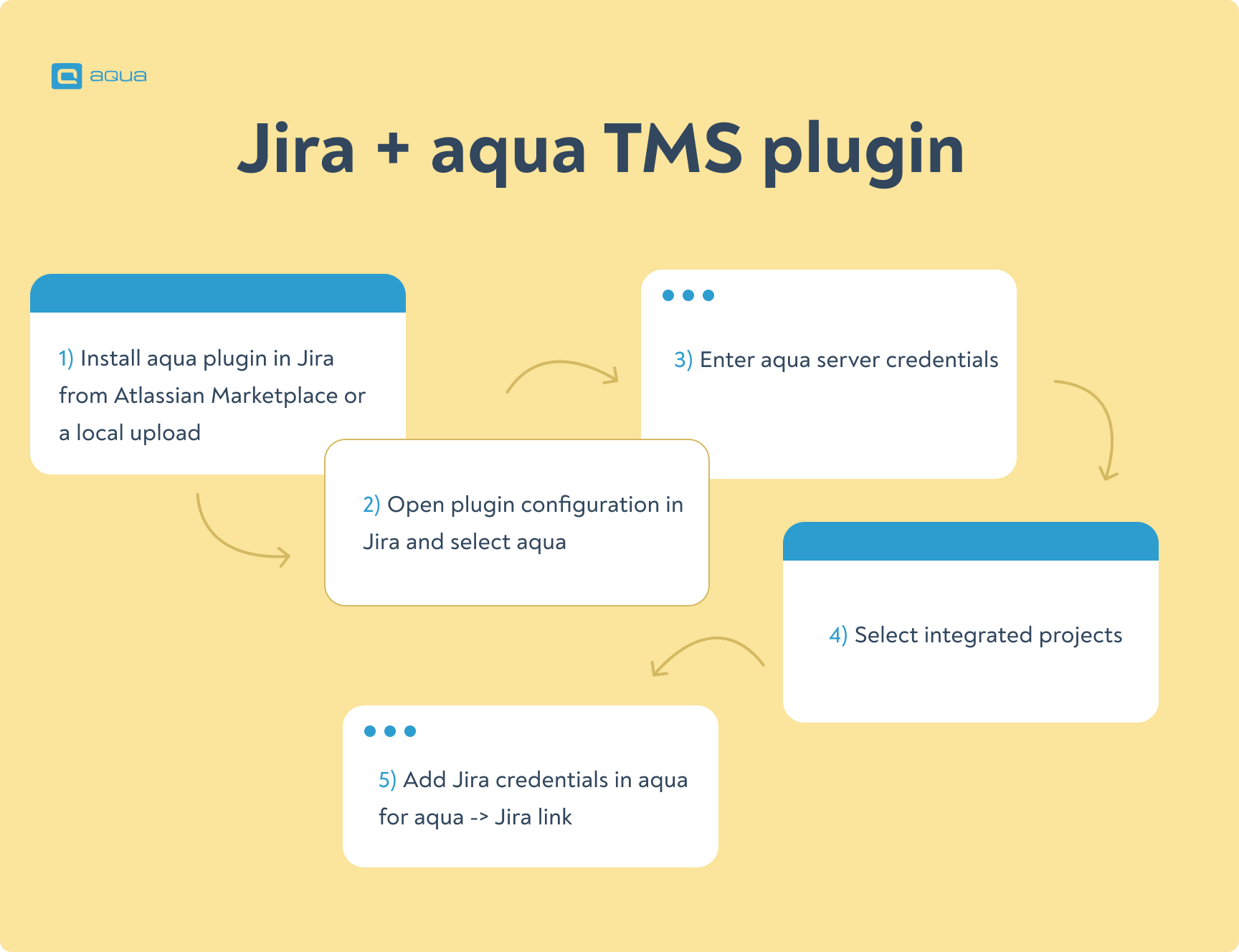
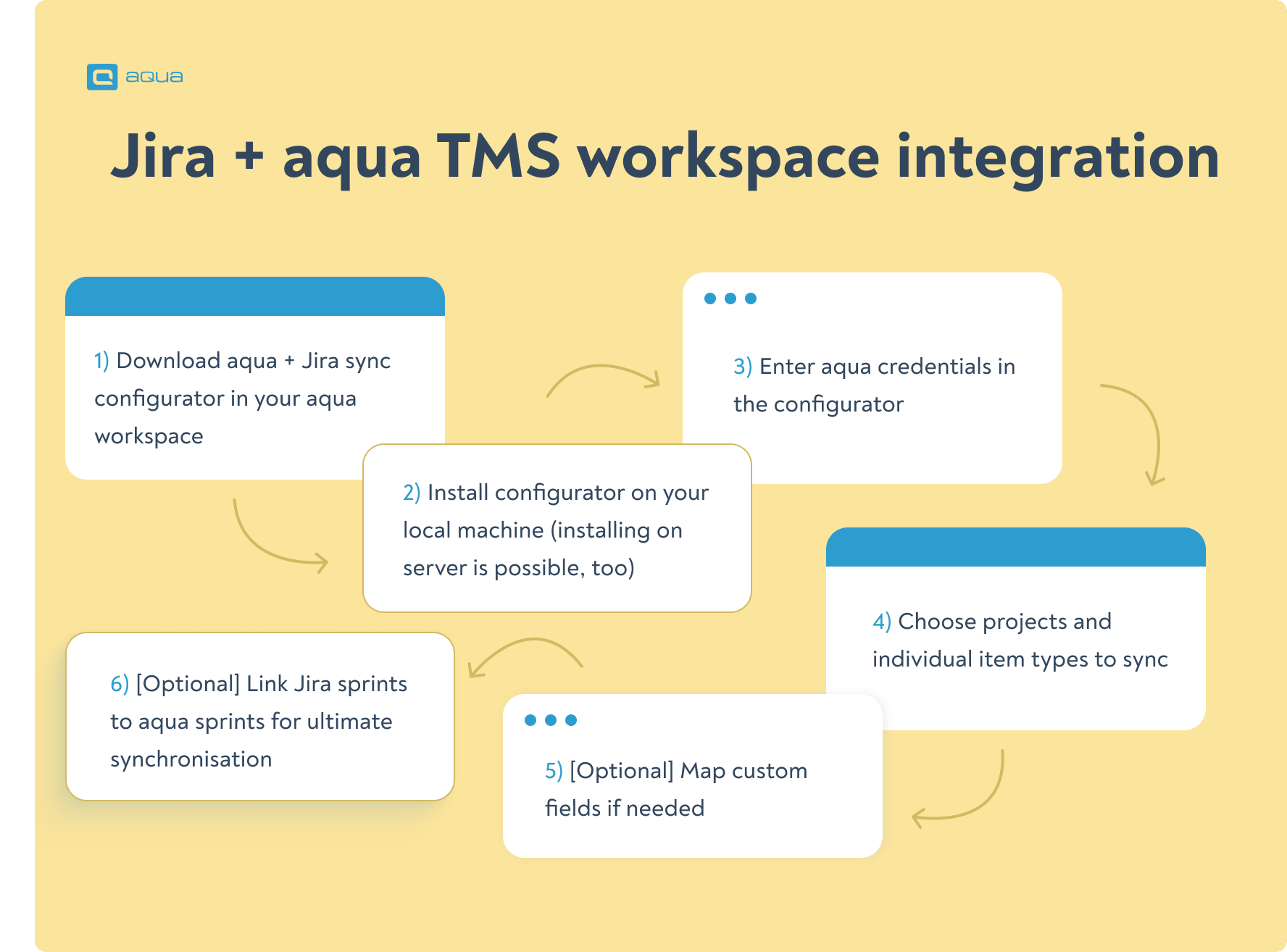
Here is how you connect Jira with aqua in 10 minutes and at no extra cost.
Jira + aqua TMS plugin
Jira + aqua TMS workspace integration
Both routes for aqua + Jira integration are simple, save a lot of time, and provide granularity for your needs. If you have any questions, our customer success team is happy to help.
Best Practices for Jira and TMS Integration
Getting Jira and aqua TMS working together effectively starts with clear goals. Ask yourself: what specific problem needs fixing? Traceability gaps? Clunky defect reporting?
Map only essential connections between systems – don’t sync everything. Too many synchronised fields create a mess. Decide which system ‘owns’ what data. Let Jira handle requirements and bugs, while aqua manages test cases and execution details.
Alignment is key. Make sure status changes in one system accurately reflect in the other – nothing confuses teams faster than conflicting statuses. Many teams stumble by not testing their integration setup first. Always run a small pilot project before rolling out company-wide.
Using official connectors rather than DIY solutions cuts implementation time nearly in half – and saves countless headaches down the road. With proper setup, dev and QA teams gain that elusive ‘single source of truth’ they’ve been searching for.
Common Pitfalls and How to Prevent Them
While Jira-aqua integration boosts connectivity between QA and development, watch out for some sneaky issues. Misconfigured fields or complex workflows can trash your data – and we’ve seen sync overload slow systems to a crawl in large deployments.
Keep it simple. Sync only what truly matters – test cases, defects and requirements typically give you 80% of the value with 20% of the overhead. Check those integration logs weekly; they’ll reveal problems before users start complaining.
Deleting linked issues without checking the other system first could be a major trap. This breaks your traceability chain – leaving teams hunting for connections that no longer exist.
Set aside 30 minutes to train teams on proper linking procedures. When everyone follows the same playbook – whether creating new items or handling auto-synced data – you’ll see fewer issues cropping up and more reliable reporting across tools.
Conclusion
Jira does not have native QA functionality, and any potential workaround endangers both the quality and the timeline of your project. The best answer to that is aqua, a modern TMS that can work within Jira, alongside Jira, or perform separately but stay synced. Going with aqua is also an excellent insurance for your infrastructure, especially for companies requiring On-Premise support.
The best QA solution for teams using Jira






 Bankingaqua ALM helps banks increase testing productivity by over 50%