Regression Testing Templates: Benefits and How to Use
Code changes always carry some level of risk. Without proper testing structures, you often discover breaks in production rather than during QA. [Regression testing](https://aqua-cloud.io/regression-testing/) templates provide a structured framework that helps verify that new changes haven't broken existing functionality and are good to be used in the production environment. This guide covers what makes them effective, why your team need them, and how to build one that works for your workflow.
Regression testing templates make testing a repeatable process by verifying that software changes haven’t broken existing functionality.
Well-designed templates contain core components: test case ID, test scenario, detailed steps, test data, expected results, actual results, status, priority, and execution tracking.
Teams using regression testing templates report fewer production incidents and higher confidence in deployments.
Maintenance is critical for template effectiveness, requiring quarterly reviews to update test cases as features evolve and get deprecated.
Watching critical bugs slip through to production while your team scrambles to figure out what broke? Discover the right template frameworks that can help transform scattered, inconsistent testing into a structured system that scales with your releases. 👇
What is Regression Testing?
Regression testing is re-running functional and non-functional tests to confirm that previously developed and tested software still performs correctly after a change. When developers push updates, add new features, or fix existing issues, regression testing answers one essential question: did we break anything that was already working?
The concept is straightforward, but execution requires careful planning. After all, you’re verifying that it works properly with everything else in your system. This type of testing becomes even more necessary in Agile and DevOps environments where release cycles compress, and changes happen daily rather than quarterly.
There are several approaches to regression testing, each suited to different scenarios and constraints. Understanding these variations helps you pick the right strategy for your regression test plans.
Manual Regression Testing
Manual regression testing puts your QA engineers in the driver’s seat—they’re the ones clicking through your interface, entering data, and checking whether everything behaves as it should. Sure, it’s hands-on work, but that’s exactly why it shines for exploratory testing and those UI elements that seem to change with every sprint. The real advantage? A well-crafted manual regression testing template gives your team step-by-step instructions that anyone can follow. Due to that, everyone’s on the same page, executing tests the same way, every time.
It is often hard to track and manage all the items that need to be regression tested, so we are looking for a template.
Unlike manual testing, (automated regression testing)[https://aqua-cloud.io/difference-between-manual-and-automated-testing/] takes the repetitive work off your team’s plate. Scripts and tools handle the execution, compare what actually happens against what should happen, and immediately flag anything that looks off. The speed advantage is obvious. Automation handles test cases that would take your team hours to run manually, and it scales great when you’re testing across multiple environments with regression suite testing. Automation works best in areas with stable functionality and predictable inputs. When you build templates for automation, you’ll focus on script references, test data sets, and expected response codes rather than manual steps.
Visual Regression Testing
Visual regression testing catches UI changes that other methods might miss. It takes screenshots of your application and compares them against baseline images to detect unintended visual changes. That subtle CSS shift that breaks your layout on mobile? Visual regression testing catches it. This approach complements functional testing by ensuring your app not only works correctly but looks right too.
Each testing type serves a purpose, and most mature QA processes use a combination. The key is knowing when to deploy each approach and having regression testing templates that support your chosen methods.
Managing regression tests without a proper structure quickly becomes overwhelming, especially as your product grows. aqua cloud, an AI-driven test and requirement solution, provides a comprehensive environment that helps you create, organize, and maintain regression testing templates. No more scattered spreadsheets or knowledge silos. The platform’s AI Copilot trains on your project’s documentation to automatically generate regression test cases from your requirements. Unlike generic AI tools, aqua’s domain-trained AI understands your specific context and generates project-relevant test scenarios that truly reflect your application’s needs. The platform also offers centralized test case management with version control, real-time collaboration features, and detailed analytics dashboards that give you complete visibility into your testing progress. aqua integrates seamlessly with popular tools like Jira, Azure DevOps, GitHub, Slack, and 10+ other tools, keeping your entire workflow connected and efficient.
Achieve 97% documentation time saving with aqua’s AI-powered test management
Code is fragile by nature. A single change can trigger a cascade of failures across your application. Regression testing is helpful against regression bugs that erode user trust and drain resources. In modern development environments, particularly Agile and DevOps setups, the pace is relentless. Without solid regression testing practices backed by well-structured templates, teams find themselves in perpetual firefighting mode, patching production bugs instead of building new features.
Regression testing does more than catch bugs. It safeguards the business functions that matter most: checkout flows, user authentication, and data processing pipelines. Break any of these, and you’re looking at real consequences. Security patches need especially thorough regression testing. They touch core system components, which means a single oversight can break functionality across unrelated parts of your application. A regression testing plan template helps you maintain quality without sacrificing velocity, ensuring that speed doesn’t come at the cost of stability.
The risks of neglecting regression testing are substantial. Production incidents damage user trust and create support headaches. They can result in financial losses if they impact revenue-generating features. Your team ends up in reactive mode, constantly putting out fires instead of proactively building quality into the product. Structured regression testing templates have become standard practice for high-performing QA teams for exactly this reason.
Understanding Regression Testing Templates
A regression testing template is your team’s structured blueprint for verifying that software changes haven’t broken existing functionality. It’s a standardized document that captures what needs testing, how to test it, and what results you expect. This testing recipe book ensures consistency, whether you’ve got three people on your QA team or thirty.
What makes these templates valuable is their ability to transform chaotic, ad-hoc testing into a repeatable process. Without a regression test template, you have to rely on institutional knowledge: that one person who “just knows” what to test before each release. When that person goes on vacation or leaves the company, your testing process goes with them. Templates democratize knowledge and make it accessible to anyone on the team.
A well-designed regression testing template contains several core components that work together to create comprehensive test coverage:
Component
Purpose
Example
Test Case ID
Unique identifier for tracking and reference
TC-REG-001
Test Scenario
Brief description of what’s being tested
User login with valid credentials
Test Steps
Detailed instructions for executing the test
1. Open login page
2. Enter username
3. Enter password
4. Click Submit
User redirected to dashboard, welcome message displayed
Actual Result
What actually happened during test execution
As expected / User not redirected (Bug ID: BUG-456)
Status
Current state of the test case
Pass / Fail / Blocked / Not Executed
Priority
Importance level for execution order
High / Medium / Low
Last Executed
Date and time of most recent test run
2024-01-15 14:30
Executed By
Team member who ran the test
Jane Smith
A regression testing strategy template offers flexibility. Teams adapt these templates based on their needs. Some add fields for browser versions when testing web apps, while others include API endpoint details for backend testing. A regression excel template might work perfectly for small teams, while larger organizations might opt for test management tools that use these same structural principles.
What separates a mediocre template from a great one is how well it supports your actual workflow. If your template requires ten minutes of data entry per test case, nobody’s going to use it consistently. The best regression testing template example balances comprehensiveness with practicality.
Another important bit of info is that your template should get modified throughout the project. Yet, this measure needs tight management to avoid any confusion. This is normally done through version control functionality. When you add new features or retire old ones, your regression testing templates need updating to reflect the current reality.
Benefits of Using a Regression Testing Template
Templates provide a practical foundation for running QA operations that hold up under pressure. When you standardize regression testing through templates, you fundamentally change how your team operates. Here’s what happens when you implement solid regression testing templates:
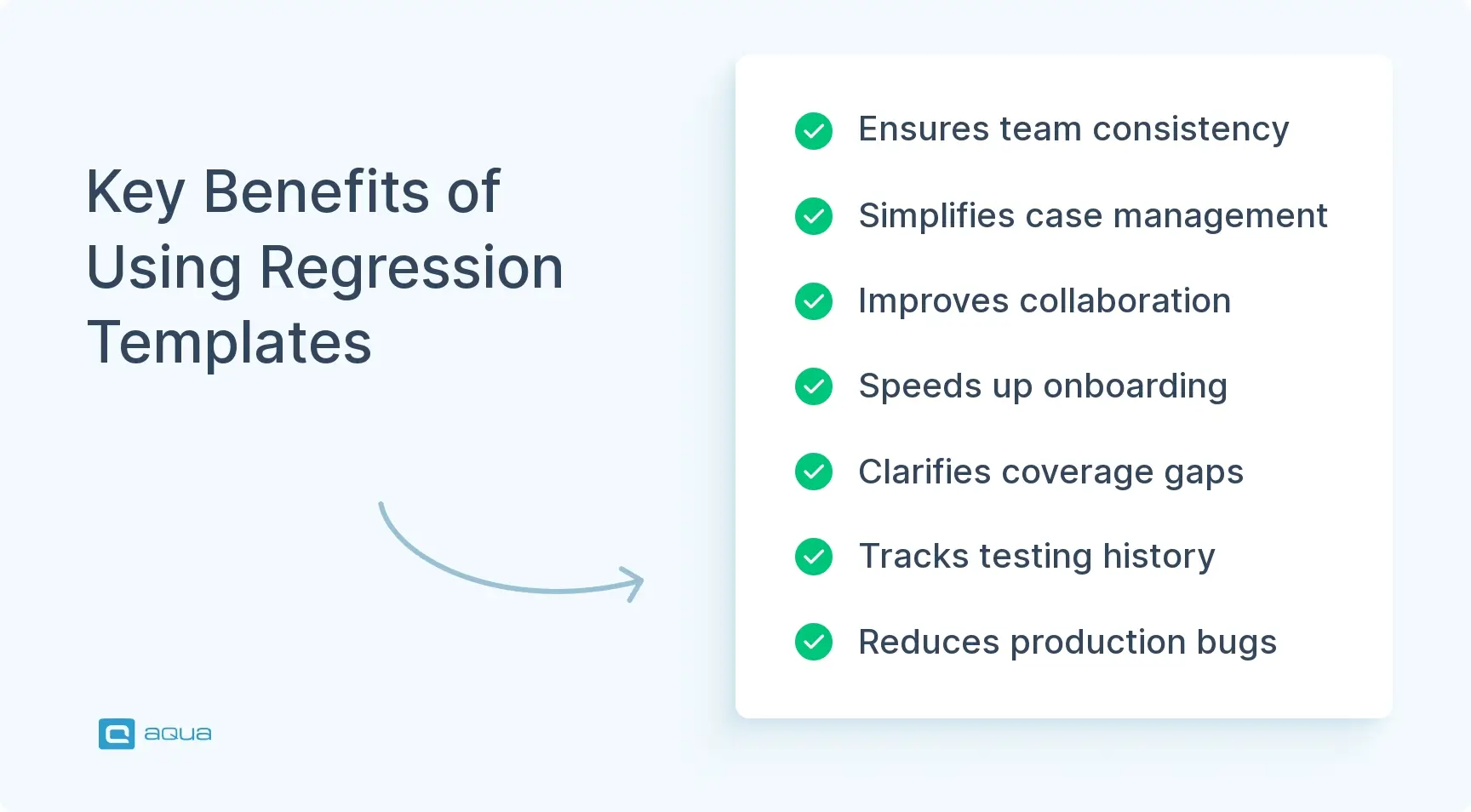
Consistency across the team: Different team members execute tests the same way, following the same steps and checking the same criteria. That junior QA engineer who started last month can run regression tests as reliably as your most experienced team member because the template removes ambiguity.
Simplified test case management: Instead of hunting through scattered documents, chat messages, and personal notes to figure out what needs testing, everything lives in one structured format. You can quickly assess coverage, identify gaps, and prioritize test execution.
Improved collaboration: Everyone speaks the same language. Developers can review test cases and understand exactly what QA is verifying. Product managers can see test coverage and feel confident about scope. When bugs appear, the template provides context: what was tested, when it was tested, and what the results were.
Faster onboarding: New QA team members become productive in days rather than weeks because templates provide clear guidance without requiring deep product knowledge.
Better test coverage visibility: Templates make it obvious what’s covered and what’s not. You can spot coverage gaps at a glance rather than discovering them after bugs escape to production.
Easier maintenance: When features change, updating a template is straightforward. You modify one standardized document rather than hunting down scattered test notes.
Historical tracking: Templates create an audit trail. You can see how test results have evolved over time, identify patterns in failures, and make data-driven decisions about where to focus testing efforts.
Scalability: As your application and team grow, templates scale with you. Adding new test cases follows the same pattern and maintains consistency even as complexity increases.
Reduced production incidents: Teams using regression testing templates report fewer production incidents, faster release cycles, and higher confidence in their deployments.
The ROI becomes clear quickly. Your regression testing report template provides documentation that proves quality is built into your process rather than bolted on as an afterthought.
How to Create a Regression Testing Template
Building an effective regression testing template requires understanding your team’s workflow and product needs. You’re creating a tool that people will actually use, not a monument to theoretical best practices. Here’s how to build a template that serves your team:
Identify what needs testing: Focus on critical user paths, core functionality, and areas that have historically been buggy. Interview developers about integration points that tend to break. Talk to customer support about recurring issues. This reconnaissance shapes your template’s scope.
Choose your format: A regression excel template works great if your team is small or those just starting with structured testing. It’s accessible, easy to share, and everyone knows how to use Excel. Larger teams might need test management tools, but the underlying structure remains the same.
Define your core fields: Start with the basics: test case ID, test scenario, steps, expected results, actual results, and status. Add priority levels so you can triage when time gets tight. Include execution date and tester name for accountability and historical tracking.
Structure test cases logically: Group related tests together. All authentication tests in one section, payment processing in another. This organization makes it easier to execute related tests in sequence and identify coverage gaps within specific feature areas.
Write clear, actionable test steps: Avoid vague instructions like “test the login.” Instead, specify exactly what to do: “Enter ‘testuser@example.com’ in the username field, enter ‘Password123’ in the password field, click the ‘Sign In’ button.”
Include prerequisites and test data: Document what needs to be in place before testing starts. Does the test require a specific user account? Particular data in the database? Certain browser settings? Call this out explicitly.
Add bug tracking integration: When tests fail, you need a way to link them to bug reports. Include a field for bug IDs so you can quickly see which failed tests have associated tickets.
Build in flexibility: Different test cases need different levels of detail. Your template should accommodate both simple smoke tests and complex multi-step scenarios.
Customize for your context: If you’re testing web applications across multiple browsers, add browser version fields. Mobile app testing needs device type and OS version. API testing might need fields for endpoint URLs and expected status codes.
Plan for ongoing maintenance: Establish a quarterly review process to update your regression testing plan template. Assign ownership to someone who ensures outdated test cases get removed and new critical features get added.
Start with a pilot: Pick one feature area and create templates for it. Get feedback from the team. What works? What feels cumbersome? Iterate based on actual usage before scaling.
Your template is a document that evolves with your team. The first version won’t be perfect, and that’s fine. It just needs to be better than the chaotic, inconsistent approach you’re replacing.
We run our regression test multiple times a day. Every time the environment is available, we pull the next code in. We do it after we've done smoke, static, functional, and before we do performance. For some systems, particularly those with batch, we tend to run 1 or 2x a day on schedule
The right template depends on your team structure, product complexity, and automation maturity. Here’s a breakdown of proven templates that your team actually use in production environments:
1. Basic Regression Test Plan Template
Perfect for small teams or startups just establishing structured testing. This straightforward template helps transition from ad-hoc testing to a structured approach without overwhelming complexity.
You’ll want this template when you need a fundamental structure for manual test execution and result tracking. It works well if you are moving away from informal testing processes but aren’t ready for complex automation frameworks.
Key components:
Test case ID and scenario description
Step-by-step test instructions
Expected and actual results fields
Pass/fail status tracking
Execution date and tester name
Simple priority classification
2. Automated Regression Testing Template
Teams using automation frameworks like Selenium, Cypress, or Playwright find this template helpful in managing their technical testing details. Rather than focusing on manual steps, this template emphasizes script management and execution parameters.
The template integrates directly with CI/CD pipelines, making it useful, in the first place, for teams practicing continuous integration and deployment. With the automated regression testing template, you can track which scripts run when, what data they use, and how they validate results.
Key components:
Script names and file locations
Test data files and configurations
Environment setup requirements
Execution parameters and assertions
Expected response codes and validation rules
Integration points with CI/CD pipelines
3. Risk-Based Regression Template
When you can’t test everything before a release deadline, this template helps you make strategic decisions about test prioritization. It factors in business impact, technical complexity, and historical data to guide your testing efforts.
Your team can use this approach to focus limited testing resources on the areas that matter most. By tracking risk ratings and usage patterns, you can confidently skip low-risk tests when time runs short.
Key components:
Risk rating fields
Business impact scores
Usage frequency data
Change complexity assessment
Historical defect density
Customer-facing feature flags
4. Exploratory Regression Template
Session-based testing requires a different approach than scripted regression tests. This template gives testers the freedom to explore areas potentially affected by changes while still maintaining enough structure to document findings effectively.
Unlike traditional templates with rigid step-by-step instructions, this one focuses on charter definition and detailed observation notes. Testers work within defined time boxes and scopes, then document what they discover along the way.
Key components:
Session charter and objectives
Time-boxing parameters
Area/feature scope definition
Detailed observation notes
Questions and concerns raised
Follow-up action items
5. Mobile Regression Testing Template
Mobile testing comes with unique challenges: device fragmentation, varying OS versions, different screen sizes, and unpredictable network conditions. This template accounts for all these variables in a structured way.
You’ll need this when testing across diverse mobile devices and scenarios. The template helps track which device-OS combinations have been tested and documents any platform-specific issues that emerge.
Key components:
Device types and models
OS versions and build numbers
Screen resolutions and orientations
Network conditions
Battery and memory consumption metrics
Platform-specific gesture testing
6. API Regression Testing Template
Backend and API testing require different documentation than UI testing. This template focuses on request/response validation and service layer integration points rather than user-facing interactions.
If your team is working on microservices or API-first architectures, you will find this template essential. It tracks technical details like endpoints, authentication methods, and expected response structures.
Key components:
Endpoint URLs and HTTP methods
Request headers and authentication tokens
Request payload examples
Expected response codes
Response body validation rules
Curl commands or Postman collection references
7. Cross-Browser Regression Template
Web applications need verification across multiple browsers and versions to ensure consistent functionality and appearance. This template systematically tracks compatibility testing across the browser landscape.
Beyond just functional testing, it helps document rendering differences and performance variations between browsers. You can quickly identify if issues are browser-specific or application-wide.
Key components:
Browser/version compatibility matrix
Viewport sizes and resolutions
Browser-specific test notes
CSS rendering validation
JavaScript compatibility checks
Performance metrics per browser
The best template for your team is the one that gets used consistently. Start simple, gather feedback, and evolve it based on real usage patterns rather than theoretical completeness. Also, don’t get stuck with the publicly available templates you can find online. Strip them of anything that is of no use to you, and add what the team needs instead. Guide you template choosing and modifying with the key components provided above.
Effective regression testing requires structure, consistency, and adaptability. These qualities can be challenging to maintain as your product evolves. aqua cloud, an AI-powered test and requirement management platform, is all you need to make regression testing a streamlined process. With aqua’s customizable templates, you can standardize test execution across your entire team while maintaining the flexibility to adapt as your product changes. The platform’s nested test case structure allows you to create reusable components that update everywhere when changed once. This dramatically reduces maintenance overhead. When combined with aqua’s domain-trained AI Copilot, which leverages your project’s documentation to generate contextually accurate test cases, you can achieve complete regression coverage. The unified repository keeps all your test artifacts organized and accessible. Plus, aqua’s extensive integrations with tools like Jenkins, GitLab, TestRail, and Selenium ensure your QA workflow connects smoothly with your existing dev ecosystem.
Benefit from 100% regression coverage while saving up to 70% of test design time
Regression testing templates turn scattered testing knowledge into a documented process that anyone on your team can follow. They reduce production incidents, speed up release cycles, and let your team spend more time building features instead of fixing preventable bugs. Whether you start with a basic Excel spreadsheet or invest in specialized test management tools, the important step is simply getting started. Iterate based on how your team actually uses the template, not on theoretical perfection. If your team maintains these templates consistently, you will see fewer emergency patches, shorter QA cycles, and testing processes that support growth instead of slowing it down.
Regression testing is the practice of re-running tests to verify that previously working software still functions correctly after changes. It ensures new code, bug fixes, or updates haven’t broken existing features. This testing acts as a safety net and catches unintended side effects before they reach production. Teams perform regression testing after every significant code change to maintain system stability and user experience consistency.
How do you prioritize test cases in a regression testing template?
Prioritize test cases based on business criticality, usage frequency, and change risk. High-priority tests cover critical user paths like authentication, payments, and core workflows. Medium-priority tests address frequently used features, while low-priority tests cover edge cases and rarely used functionality. Consider historical defect data: areas prone to bugs warrant higher priority. During time constraints, execute high-priority tests first to ensure critical functionality remains intact.
What metrics should be tracked using a regression testing template?
Track test execution rate, pass/fail ratios, defect detection rate, and test coverage percentage. Monitor time to execute test suites and defect resolution time. Track which features have the highest failure rates to identify problematic areas. Include metrics on test case maintenance frequency and automation coverage percentage. These metrics help assess testing effectiveness, identify bottlenecks, and justify resource allocation for QA activities.
How often should regression testing templates be updated?
Update templates quarterly at a minimum, or whenever major features are added or deprecated. Conduct reviews after significant releases to remove obsolete test cases and add new ones. When defects escape to production, update templates to include tests that prevent similar issues. Assign ownership to ensure someone maintains template relevance. Regular updates prevent template bloat while ensuring coverage remains aligned with current product functionality and business priorities.
Robert has several years of experience in process optimisation and test management. He is an expert in defining and implementing workflows by adapting aqua to the clients’ processes.
Pavel, a Quality Assurance Consultant and Author, brings deep expertise to solving complex testing challenges. His background in software development has helped organizations transform their QA practices from reactive to proactive. Beyond consulting, Pavel develops best practice guides and case studies for aqua cloud that…
Home » Test Automation » Regression Testing Templates: Benefits and How to Use
Do you love testing as we do?
Join our community of enthusiastic experts! Get new posts from the aqua blog directly in your inbox. QA trends, community discussion overviews, insightful tips — you’ll love it!
We're committed to your privacy. Aqua uses the information you provide to us to contact you about our relevant content, products, and services. You may unsubscribe from these communications at any time. For more information, check out our Privacy policy.
X
🤖 Exciting new updates to aqua Intelligence are now available! 🎉