About JSON Input: Your JSON input should contain an array of objects consisting of name/value pairs. It can also be a single object of name/value pairs or a single object with single property with an array of name/value pairs. It can also be in JSONLines/MongoDB format with each JSON record on separate lines. You can also use JavaScript array notation.
Limit: Maximum 1000 records allowed.
Hover over the info icon for details about JSON input format
Step 1: Select your input
Examples:
Step 2: Generate output
Result Data
Converting JSON to CSV is just one step in your data workflow. What happens when you need to validate that converted data or test how your systems handle different file formats? aqua cloud brings all these data quality tasks into one platform with powerful import/export capabilities. aqua’s centralized approach lets you validate transformations against expected results. The platform also offers to track changes with audit logs and automatically generate test data based on text, documentation, or even voice notes using aqua’s domain-trained AI Copilot. The AI learns from your project documentation to make context-aware suggestions that are significantly more precise than generic tools. aqua connects with tools you already use, like Jira, Confluence, Jenkins, and Azure DevOps, through 12 integrations plus REST API. For teams converting data formats regularly, aqua centralizes validation and testing in one platform.
Generate project-specific test data in seconds with aqua’s AI Copilot
JSON is a lightweight, human-readable data format that represents structured information using key-value pairs and arrays.
At the same time:
CSV is a simple text format that stores tabular data where values are separated by commas or other delimiters.
JSON (JavaScript Object Notation) is ideal for hierarchical data with objects inside objects and arrays inside arrays, making it flexible and adaptable for evolving datasets as defined by IETF RFC 8259. It captures complex relationships like nested profiles or dynamic API responses but can be harder to parse and prone to inconsistent field types.
CSV, defined by RFC 4180, is its flat, tabular opposite with rows and columns of comma-separated values. It is lightweight, universally compatible, and perfect for spreadsheets or SQL imports, but cannot represent hierarchies and often struggles with arrays, missing fields, or delimiter inconsistencies.
Here’s when each format shines:
Choose JSON when you’re dealing with semi-structured data that has nested objects or arrays, when your schema changes frequently, or when you’re feeding data into systems that support semi-structured types like Snowflake’s VARIANT or BigQuery’s JSON columns.
Choose CSV when your data is naturally tabular (metrics, fact tables, export reports) or when you need maximum compatibility with legacy systems, spreadsheet tools, or partners who just want a simple file they can open and understand.
The bridge between these worlds? A JSON to CSV converter that flattens hierarchy into rows and columns without losing the story your data tells.
What Does a JSON to CSV Converter Do?
A JSON to CSV converter is a data transformation tool that takes hierarchical, semi-structured JSON and turns it into a flat, tabular CSV file. The tool restructures data so that nested objects become dot-path columns (like user.address.city), arrays get exploded into multiple rows or serialized into single fields, and every record ends up in a uniform table with consistent column headers.
The converter tackles JSON’s flexibility by inspecting your data to discover all possible fields, deciding how to represent arrays, and filling in NULLs where data is missing. It maps JSON keys to CSV column names, applies type conversions (booleans to true/false, timestamps to ISO-8601 strings), and writes out RFC-4180-compliant CSV with proper quoting and escaping.
Here’s what a JSON to CSV converter online handles:
Nested object flattening. Converts hierarchical paths into column names.
Array transformation. Explodes arrays to multiple rows or serializes them as strings.
Schema discovery. Identifies all unique keys across variable JSON objects.
Type conversion. Casts JSON data types to CSV-friendly representations.
NULL handling. Manages missing or optional fields consistently.
Encoding support. Ensures UTF-8 output and handles character escaping.
How Does a JSON to CSV Converter Work?
The conversion process follows a series of steps that transform JSON’s flexibility into predictable CSV output:
Step 1: Parsing and validation
The converter reads your JSON input (single array of objects, newline-delimited JSON, or streamed feed) and validates it against RFC 8259 to catch syntax errors. Modern tools handle UTF-8 encoding by default and can ingest data from local files, URLs, or cloud storage buckets.
Step 2: Schema discovery
The converter scans all JSON objects to collect the union of keys across records. If one object has user.name and another has user.email, the output CSV includes both columns, with NULLs where values are missing. Type conflicts get resolved through consistent casting.
Step 3: Flattening
Nested objects become dot-path columns: address.city, metadata.tags. Arrays require a choice: explode them into multiple rows, index fixed positions (phones[0], phones[1]), or serialize as JSON strings within single cells.
Step 4: Type conversion
Booleans become true/false, numbers preserve precision, and timestamps standardize to ISO-8601. Missing fields produce empty cells or NULL markers. The converter ensures every row has the same number of columns.
Step 5: CSV writing
Your tabular data gets written using RFC 4180 rules: consistent delimiters, quoted special characters, proper escaping, and uniform line endings. High-performance converters use streaming parsers to handle multi-gigabyte files without loading everything into memory.
The end result? Your hierarchical JSON is now a flat, analysis-ready CSV file. It’s completely ready to drop into Excel, feed into a SQL database, or hand off to a partner who just needs clean data.
Why Use a JSON to CSV Converter?
Converting JSON to CSV gives you speed, simplicity, and universal compatibility. Open the file in any spreadsheet tool without plugins or special knowledge. Legacy systems that can’t parse JSON will read CSV without issues. Non-technical stakeholders can slice data in Excel immediately. Flat tables are simpler: no nested arrays to untangle, no confusion about field structure. Every column represents one clear data point.
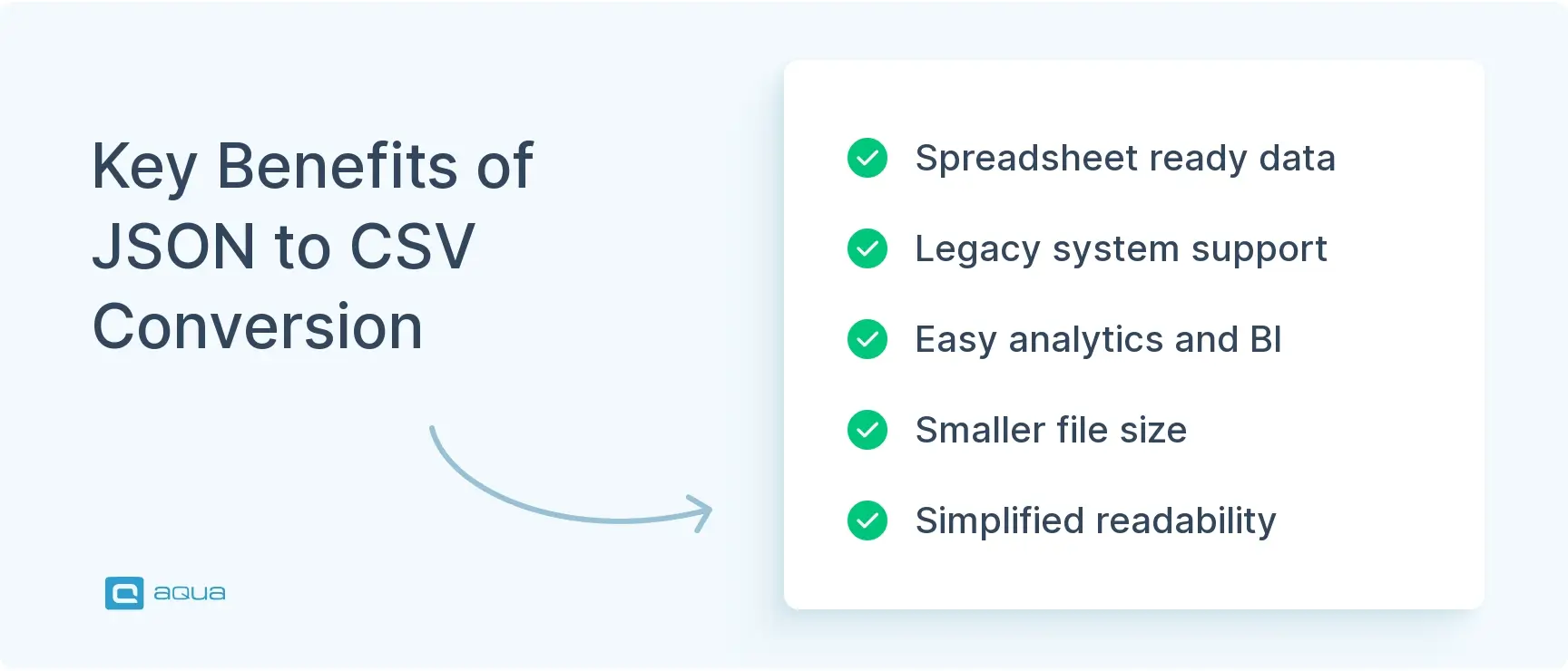
Here are the standout benefits:
Spreadsheet compatibility. Access in Excel, Google Sheets, or LibreOffice without custom scripts.
Legacy system integration. CSV is the lingua franca for systems that predate modern APIs.
Simplified analytics. Flat tables work seamlessly with SQL queries, pivot tables, and BI dashboards.
Smaller file sizes. CSV strips metadata and nesting overhead, often resulting in more compact files.
Human readability. Open a CSV in a text editor and see your data immediately (no parsing required).
Bulk operations. Easier to batch-import CSV into databases and data warehouses.
Real-world scenarios where this matters:
Finance reporting
Pulling API data from Stripe for monthly reports? The JSON payload has nested transaction details. Flatten it into columns like line_items.0.product_name and metadata.order_source, and your finance team can run pivot tables without engineering help.
Data migration
Moving records from a NoSQL database (JSON exports) into a SQL warehouse? The converter flattens the hierarchy, validates types, and prepares CSV files that match your target schema. Learn more about data migration solutions.
ETL pipelines
Converting JSON logs or events into CSV makes it simple to load data into BI tools like Tableau or Power BI. Using a JSON to CSV converter makes this accessible to anyone without specialized tools.
Converting JSON to CSV handles format compatibility, but what about validating the accuracy of your transformed data? aqua cloud provides a complete testing solution for data transformations. Build validation workflows to verify your conversions produce the expected outputs. Import test data directly from CSV files and manage testing across development and production environments. aqua’s domain-trained AI Copilot generates test cases automatically, even for complex JSON structures. The AI learns from your project documentation to create tests that match your specific data model and validation needs. aqua connects with your existing workflow through integrations with Jira, Jenkins, Azure DevOps, Selenium, and other popular tools via REST API. aqua cuts test data creation time by up to 43%. At the same time, advanced reporting and customizable dashboards give you visibility into data quality issues before they affect production.
Achieve 100% validation coverage for your data transformations
JSON to CSV conversion connects flexible data structures with the simplicity of tabular structure that spreadsheets and legacy systems demand. You’ve seen how converters parse hierarchical JSON, flatten objects, and arrays. Such tools also handle type conversions and emit RFC-compliant CSV files. Whether you’re exporting API data for a finance report or migrating records between systems, the right converter ensures your data is clean and ready for transfer and analysis. Choose tools that fit your workflow: json2csv, jq for quick CLI tasks, DuckDB for SQL-driven pipelines, pandas for notebook flexibility, or online converters like aqua’s JSON to CSV converter for one-off conversions.
Is it safe to use an online JSON to CSV converter?
For non-sensitive, public data, an online JSON to CSV converter is convenient. For proprietary or confidential data, prefer local tools (json2csv, jq, DuckDB, pandas) or cloud-native solutions that keep data within your security perimeter.
What's the difference between JSON and CSV formats?
JSON is hierarchical and schemaless, great for nested data and APIs. CSV is flat and tabular, ideal for spreadsheets and legacy systems. JSON preserves structure; CSV maximizes compatibility and simplicity.
Can I convert large JSON files to CSV?
Absolutely. Use streaming tools like DuckDB, Apache Arrow, or pandas with chunked reading (read_json(..., lines=True, chunksize=10000)) to handle multi-gigabyte files without exhausting memory. For distributed workloads, Spark or cloud ETL services like AWS Glue scale effortlessly. A JSON to CSV converter online might have size limitations, so check before uploading very large files.
Home » 'How to' guides » aqua JSON to CSV Converter: Easy Data Transformation
Do you love testing as we do?
Join our community of enthusiastic experts! Get new posts from the aqua blog directly in your inbox. QA trends, community discussion overviews, insightful tips — you’ll love it!
We're committed to your privacy. Aqua uses the information you provide to us to contact you about our relevant content, products, and services. You may unsubscribe from these communications at any time. For more information, check out our Privacy policy.
X
🤖 Exciting new updates to aqua AI Assistant are now available! 🎉
We use cookies and third-party services that store or retrieve information on the end device of our visitors. This data is processed and used to optimize our website and continuously improve it. We require your consent fro the storage, retrieval, and processing of this data. You can revoke your consent at any time by clicking on a link in the bottom section of our website.
For more information, please see our Privacy Policy.
This website uses cookies to improve your experience while you navigate through the website. Out of these, the cookies that are categorized as necessary are stored on your browser as they are essential for the working of basic functionalities of the website. We also use third-party cookies that help us analyze and understand how you use this website. These cookies will be stored in your browser only with your consent. You also have the option to opt-out of these cookies. But opting out of some of these cookies may affect your browsing experience.
Necessary cookies are absolutely essential for the website to function properly. These cookies ensure basic functionalities and security features of the website, anonymously.
Cookie
Duration
Description
cookielawinfo-checkbox-analytics
11 months
This cookie is set by GDPR Cookie Consent plugin. The cookie is used to store the user consent for the cookies in the category "Analytics".
cookielawinfo-checkbox-functional
11 months
The cookie is set by GDPR cookie consent to record the user consent for the cookies in the category "Functional".
cookielawinfo-checkbox-necessary
11 months
This cookie is set by GDPR Cookie Consent plugin. The cookies is used to store the user consent for the cookies in the category "Necessary".
cookielawinfo-checkbox-others
11 months
This cookie is set by GDPR Cookie Consent plugin. The cookie is used to store the user consent for the cookies in the category "Other.
cookielawinfo-checkbox-performance
11 months
This cookie is set by GDPR Cookie Consent plugin. The cookie is used to store the user consent for the cookies in the category "Performance".
viewed_cookie_policy
11 months
The cookie is set by the GDPR Cookie Consent plugin and is used to store whether or not user has consented to the use of cookies. It does not store any personal data.
Functional cookies help to perform certain functionalities like sharing the content of the website on social media platforms, collect feedbacks, and other third-party features.
Performance cookies are used to understand and analyze the key performance indexes of the website which helps in delivering a better user experience for the visitors.
Analytical cookies are used to understand how visitors interact with the website. These cookies help provide information on metrics the number of visitors, bounce rate, traffic source, etc.
Advertisement cookies are used to provide visitors with relevant ads and marketing campaigns. These cookies track visitors across websites and collect information to provide customized ads.






 Bankingaqua ALM helps banks increase testing productivity by over 50%