Migrate from TestRail: A Comprehensive Guide to Seamless Migration
So your team has outgrown TestRail? Maybe the functionalities are lacking, or you're struggling with integrations that don't seem to work. Whatever the reason, you're looking for a switch and wondering how to implement a successful TestRail migration without losing test cases, attachments, or any other data. This TestRail migration guide walks you through exactly that, from prep work to validation. We'll cover why teams migrate, how to prep your data, which methods fit your project size, and what to check once you're up and running.
TestRail migrations typically boil down to three methods: CSV export for small projects, API-based imports for mid-size projects needing intact structures, and custom scripts for enterprise setups with complex hierarchies.
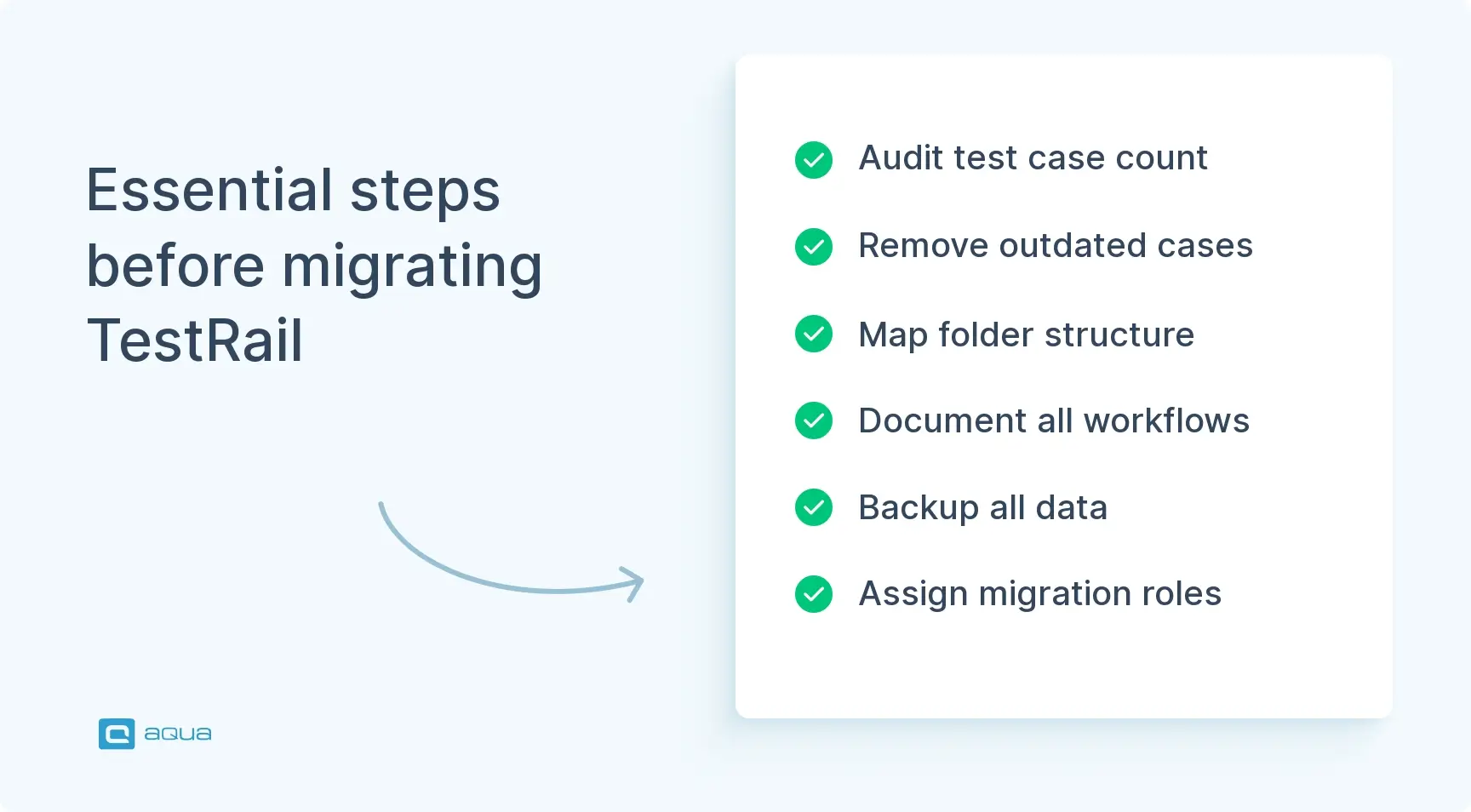
The preparation phase demands a data audit, cleaning of outdated test cases, documentation of current workflows, securing backups, and mapping team responsibilities.
Post-migration validation must verify case counts match exactly, folder structures remain intact, attachments and formatting converted properly, integrations still work, and user permissions transferred correctly.
Teams should run a pilot project first, communicate the timeline clearly to all stakeholders, migrate during off-peak hours, and keep TestRail accessible for 2-4 weeks after migration.
Most teams can complete the TestRail migration in a single day if they’ve done proper preparation and chosen the right migration method for their project size 👇
Why Do You Need to Migrate from TestRail?
The core issue is that TestRail was built for a different era of testing. Modern QA teams need speed, flexibility, and tools that work with CI/CD pipelines. Modern test management platforms are stepping up with native integrations, better automation hooks, and more modern UI.
Here are the key indicators, from both technical and business standpoints, that signal it’s time to consider a TestRail migration:
Automation bottlenecks: Your team maintains scripts because TestRail’s automation hooks don’t integrate cleanly with your CI/CD pipeline
Integration maintenance overhead: Keeping Jira, Azure DevOps, or other tools in sync requires constant workarounds or dedicated maintenance effort
Scalability limits: Performance degrades as test case volume grows, or pricing jumps sharply as you add users and projects
Rigid project structure: TestRail’s fixed hierarchy doesn’t flex to match agile workflows, sprint structures, or multi-team setups
Attachment and media handling: Large test suites with screenshots or file attachments become slow and unwieldy
Lack of real-time collaboration: Teams working simultaneously on test design experience conflicts or lost work
Reporting gaps: Generating meaningful cross-project reports or traceability matrices requires significant manual effort or third-party tools
AI and modern tooling absence: No native AI-assisted test generation, meaning test design remains a fully manual, time-intensive process
For a detailed breakdown of how aqua cloud compares to TestRail across these dimensions, and why it’s beneficial to migrate to aqua, visit our aqua vs TestRail comparison page.
While planning your TestRail migration, it’s worth considering which platform will increase your testing capabilities. aqua cloud, an AI-powered test and requirement management solution, stands out for solving the core limitations that drive teams away from TestRail in the first place. With aqua, you get a dedicated XML import that preserves your entire test structure. You also gain access to AI-powered test case generation that saves at least 12.8 hours per tester per week, with 42% of AI-generated cases requiring no human adjustment at all. Unlike TestRail, where AI is restricted to Cloud plans and covers only test case generation, aqua’s Copilot works across the full QA lifecycle: generating tests from requirements, images, PDFs, and voice input and grounding every suggestion in your own project documentation. On top of that, aqua includes native defect management, compliance features, and REST API integration with 14+ software solutions in your tech stack.
Not all test management platforms are the same. The choice depends on your team’s size, workflow, and priorities. Below are five tools worth considering, starting with aqua cloud.
1. aqua cloud
aqua cloud is an AI-powered test and requirement management platform founded in Germany, with a track record serving regulated industries including banking, insurance, and government. Unlike many newer entrants, aqua covers the full ALM lifecycle in a single platform: requirements, test management, and defect tracking. Both cloud and on-premise deployments are supported, and the architecture is built for compliance-heavy enterprise environments.
Dedicated XML import preserves your full TestRail folder hierarchy, test cases, and attachments
AI Copilot generates test cases from requirements, voice notes, documentation, chats, images, and PDFs, free on all Cloud plans
Native defect management included, no separate tool required
Compliance features available without Enterprise-tier pricing
On-premise, cloud, and custom deployment options supported
REST API integration with 14+ tools, including Jira, Jenkins, Selenium, Azure DevOps, and JMeter
Free licenses available for manual testers and non-technical stakeholders
Fully customizable reporting with KPI alerts, pivot tables, and self-updating dashboards
What separates aqua from other migration targets is how much of the TestRail gap it closes in one move. Native defect management and requirements traceability remove the cost and maintenance overhead of running separate tools. The AI Copilot is trained on your own project documentation, so test cases are grounded in your actual codebase and workflows, not generic templates. Your team can feed it voice recordings, Confluence docs, Jira tickets, PDFs, and plain text, and it generates structured test cases from all of them. Teams report saving at least 12.8 hours per tester per week, with 42% of AI-generated cases requiring no manual adjustment. For a detailed breakdown, see the aqua vs TestRail comparison.
Zephyr is a Jira-native test management platform with one of the largest install bases on the Atlassian Marketplace. In 2024 SmartBear added HaloAI for converting manual tests into automated ones without writing code, alongside a Zephyr Automate add-on for parallel and cross-browser execution.
Integrates directly into Jira, keeping test cases alongside development tickets
HaloAI converts manual tests to automated ones without scripting
Zephyr Automate add-on supports parallel and cross-browser test execution
Works with Jenkins and Selenium for broader automation pipelines
A Jira license is required and On-Premise support has been discontinued, which rules it out for teams with hosting or data residency requirements. HaloAI focuses on test automation conversion rather than test case generation from requirements. For a side-by-side breakdown, see aqua vs Zephyr.
3. PractiTest
Founded in 2008 in Tel Aviv, PractiTest is a cloud-based test management platform covering the full QA lifecycle. It launched SmartFox in early 2024, an AI assistant that generates test cases from requirements and Jira user stories. SOC-2 and ISO 27001 certified.
SmartFox AI generates test cases from requirements and Jira user stories
Test Value Score uses ML to score tests by impact
Execution prioritization based on value, risk, and historical data
Integrates with Jira, GitHub, Jenkins, and Azure DevOps
PractiTest is cloud-only with no On-Premise option, which is a constraint for teams with data residency or internal hosting requirements. Per-user pricing scales steeply as teams grow. See the aqua vs PractiTest comparison for more detail.
4. Kualitee
Launched in 2016 by Kualitatem, Kualitee has expanded from a test case management tool into a broader ALM platform. Its AI assistant Hootie generates test cases from text requirements, Jira tickets, UI screenshots, and PDF BRDs, and logs defects automatically when a test fails. Available as cloud and on-premise.
Hootie AI generates test cases from requirements, Jira tickets, screenshots, and PDF BRDs
AI-powered test execution: Hootie runs cycles, updates statuses, and logs defects automatically
Cloud and on-premise deployment available
Jira, Jenkins, GitLab, and Selenium integrations supported
Teams expecting to scale should verify whether Kualitee’s reporting depth and compliance coverage meet their longer-term needs. See the aqua vs Kualitee comparison.
5. Qase
Founded in 2017, Qase is a cloud-native test management platform aimed at Agile and DevOps teams. Its AI agent AIDEN, included in all paid plans since Q1 2025, generates test cases from requirements and converts manual tests to automated ones without code.
AIDEN generates test cases from Jira, GitHub, and plain text requirements
Converts manual tests to automated ones without code, with one-click execution
Parallel multi-browser execution in Qase cloud
CI/CD pipeline integration via GitHub Actions
Qase is cloud-only, so it is not suitable for teams with On-Premise requirements. Coverage for large-scale compliance documentation or complex cross-project reporting is worth validating before committing. See the aqua vs Qase comparison.
Preparation Before Migrating from TestRail
Jumping straight into migration is how you end up with duplicates and other migration-related issues. Before anything else, this TestRail migration guide recommends treating the preparation phase as seriously as the migration itself. Start with an audit by opening TestRail and honestly assessing what you’ve got, including:
Number of test cases across all projects
Active vs. legacy test cases (unused for 6+ months)
Folder and section structure depth
Custom fields in use
Attachment volume and file sizes
Projects with 10,000+ cases or heavy media files need different TestRail migration strategies than leaner setups. Reviewing [test case migration tips] (https://aqua-cloud.io/test-cases-scenarios-migration-to-tms/) before this phase can help you avoid the most common data loss scenarios. Now’s also the time to clean house. Archive outdated test cases, standardize naming conventions so everything imports cleanly, document your current workflows and templates, and back up everything before any data moves.
Your pre-flight checklist should hit these marks:
Inventory your data: Count test cases, measure attachment sizes, list all custom fields and note which ones are actively used
Clean the vault:Archive dead projects, consolidate templates, and standardize naming conventions across sections
Document the setup: Screenshot workflows, export field mappings, and note all active integration points with tools like Jira or CI/CD systems
Secure backups: Take a full XML export, download attachments separately, and record API key references and configuration settings
Map your team: Identify who owns which projects, who needs migration access, and who is responsible for post-import validation in each area
My company has been working with TestRail for more than a decade but the current requirement asked for by the client is apparently not met by TestRail so thinking of moving to an alternative. We have over 1000 test cases and the migration will be a pain.
Community question on https://www.reddit.com/r/softwaretesting/comments/1gvjxsp/moving_on_from_testrail_for_customization/
My company has been working with TestRail for more than a decade but the current requirement asked for by the client is apparently not met by TestRail so thinking of moving to an alternative. We have over 1000 test cases and the migration will be a pain.
You’ve got options when it comes to moving your TestRail data, and the right one depends entirely on your project’s scale and complexity. Migration to aqua cloud from TestRail boils down to three core approaches, each trading off between speed and fidelity.
1. CSV Export
Best for quick moves on lightweight projects. CSV is fast, simple, and requires zero technical setup. But keep in mind that it loses embedded images, custom field mappings, and rich formatting in the process. Use this method for proof-of-concept migrations or when moving legacy projects that don’t need full data fidelity.
Works well for sub-1,000 test case projects with minimal attachments
Folder hierarchy gets flattened and custom fields convert to plain text
No API credentials or scripting required
2. API-Based Import
The standard approach for most teams, and the method aqua cloud is built around. It handles mid-sized projects, roughly 1,000 to 10,000 cases, with attachments, folder structures, and custom fields intact. aqua connects to TestRail via API and pulls attachments automatically during the import, meaning your test structure arrives in one piece. The tradeoff is that attachments slow things down, and only one import can run at a time per aqua instance.
Preserves section hierarchy, attachments, and markdown-to-HTML formatting
Requires API access enabled in TestRail and a generated API key
Best balance of speed, reliability, and data completeness for most teams
3. Custom Scripts for Large Projects
When you’re migrating 10,000+ test cases across projects, off-the-shelf tools for migration may hit their limits fast. Custom API scripts give you the flexibility to handle edge cases such as conditional field mapping, batch processing, or parallel imports across environments. In practice, this approach requires technical chops or a dev on your team, but delivers complete control over data transformation logic. It’s the right call for heavily customized TestRail instances or when merging projects during migration.
Handles complex nested structures and non-standard field configurations
Allows batching and conditional logic during data transformation
Higher setup cost, but maximum flexibility for enterprise-scale moves
Understanding your data volume and structural complexity upfront determines which path you take.
Step-by-Step Guide to Migration: TestRail to aqua cloud
The migration described in this guide uses aqua’s built-in XML import, which is the API-based method covered above. This is the recommended approach for most teams. It works by exporting your TestRail project as an XML file, then importing that file into aqua, with an optional API connection to pull attachments across automatically. No third-party tools or custom scripts are required.
The process breaks into two phases: preparing your export from TestRail, then importing it into aqua. This is the core of any practical TestRail migration guide. Here’s the explicit instruction to follow:
Step 1: Export Your Project from TestRail as XML
Open your TestRail instance and navigate to the project you want to migrate. XML is the only format aqua currently supports for TestRail migrations. It preserves the nested section hierarchy that CSV and Excel exports flatten, giving you significantly more accurate results on the aqua side.
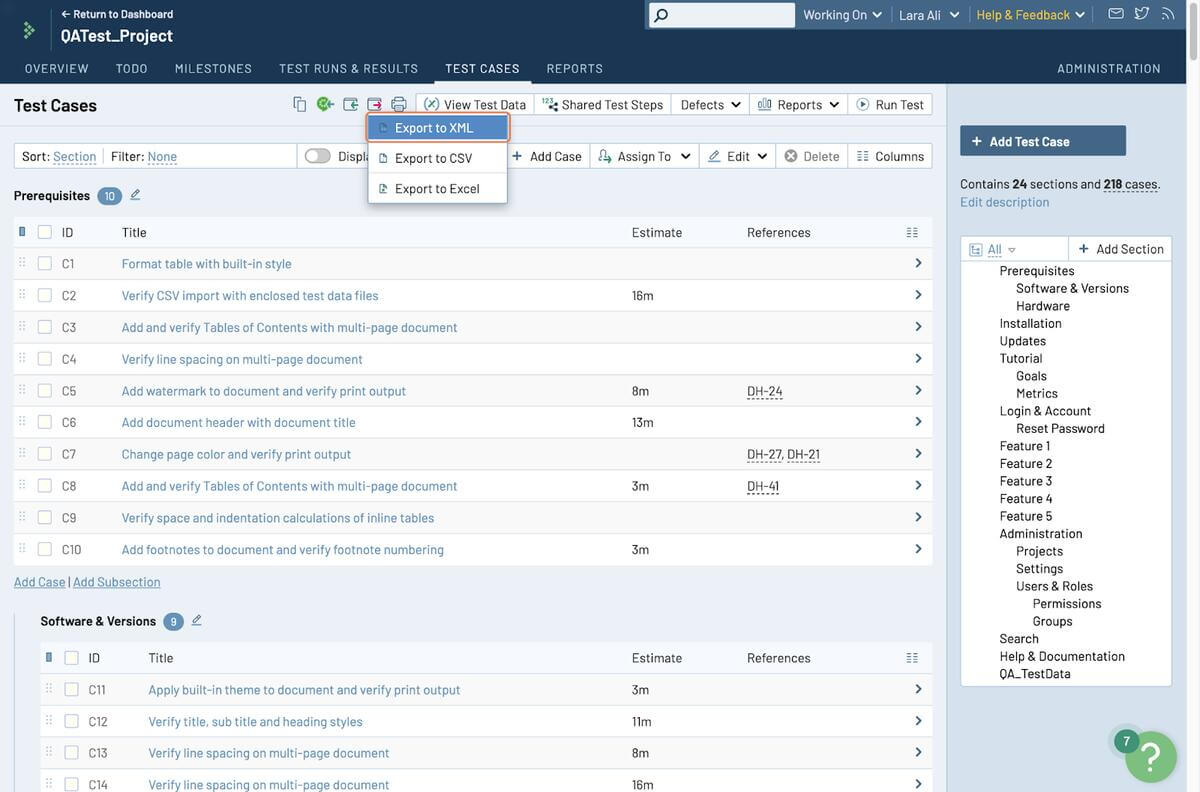
Open your TestRail project and go to the “Test Cases” view
Click the export icon in the toolbar
Select “Export to XML” from the dropdown
If you only need to migrate test cases without attachments, this export is all you need and you can proceed directly to Step 3. If you want to bring attachments and screenshots along, continue to Step 2.
Step 2: Enable API Access in TestRail (Required for Attachments)
This is a one-time admin configuration that allows aqua to connect to your TestRail instance and pull attachments automatically during import.
Click your username in the top right and select “My Settings”
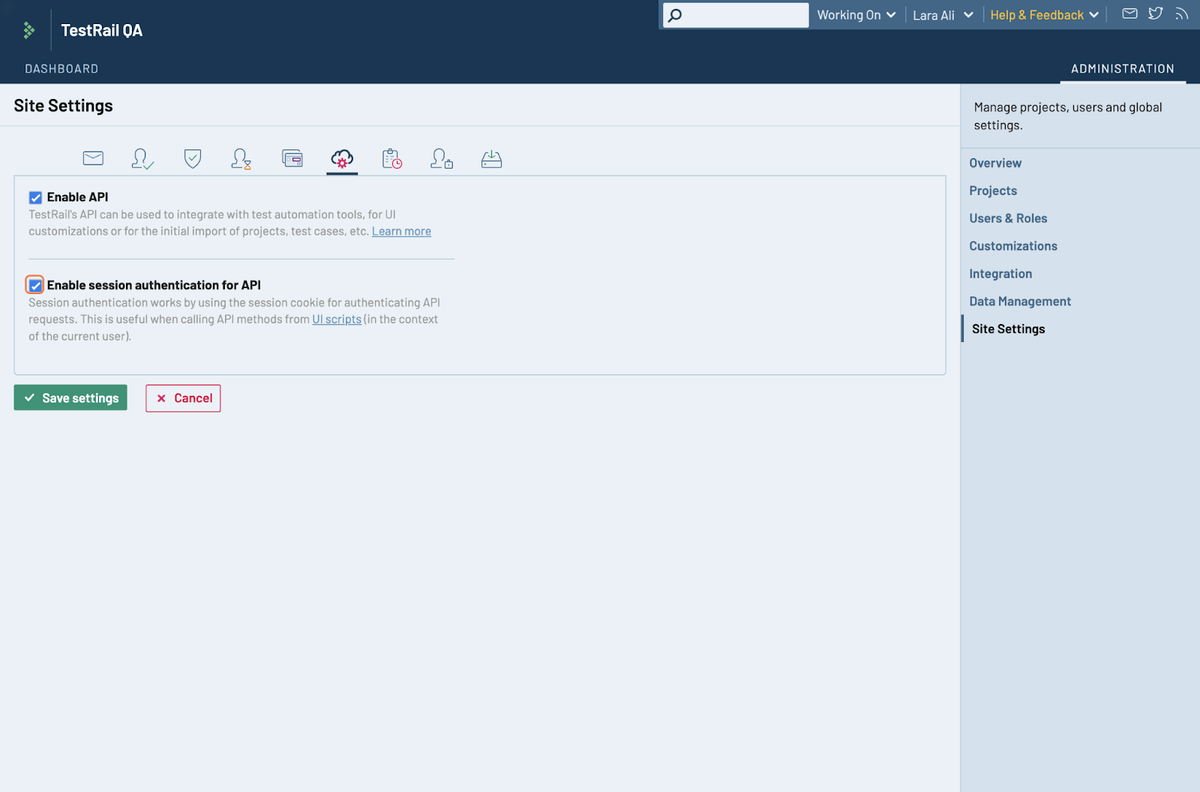
Select the “Administration” tab, then click “Site Settings”
Click the “API” tab
Enable both “Enable API” and “Enable session authentication for API”
Click “Save Settings”
Navigate back to “My Settings” and go to the “API Keys” tab
Click “Add Key”, give it a descriptive name such as “aqua migration”, and click “Generate Key”
Copy the key immediately and store it securely, as it is only shown once
Click “Add Key” to confirm, then click “Save Settings” to activate it
With API access enabled, aqua can pull attachments directly from your TestRail instance during import.
Step 3: Set Up Your Target Project or Folder in aqua
Before importing, you need a destination in aqua. You can import into a new project or into an existing project or folder.
To create a new project:
In the left panel, click the “+” icon next to “Projects”
Name your project and save it
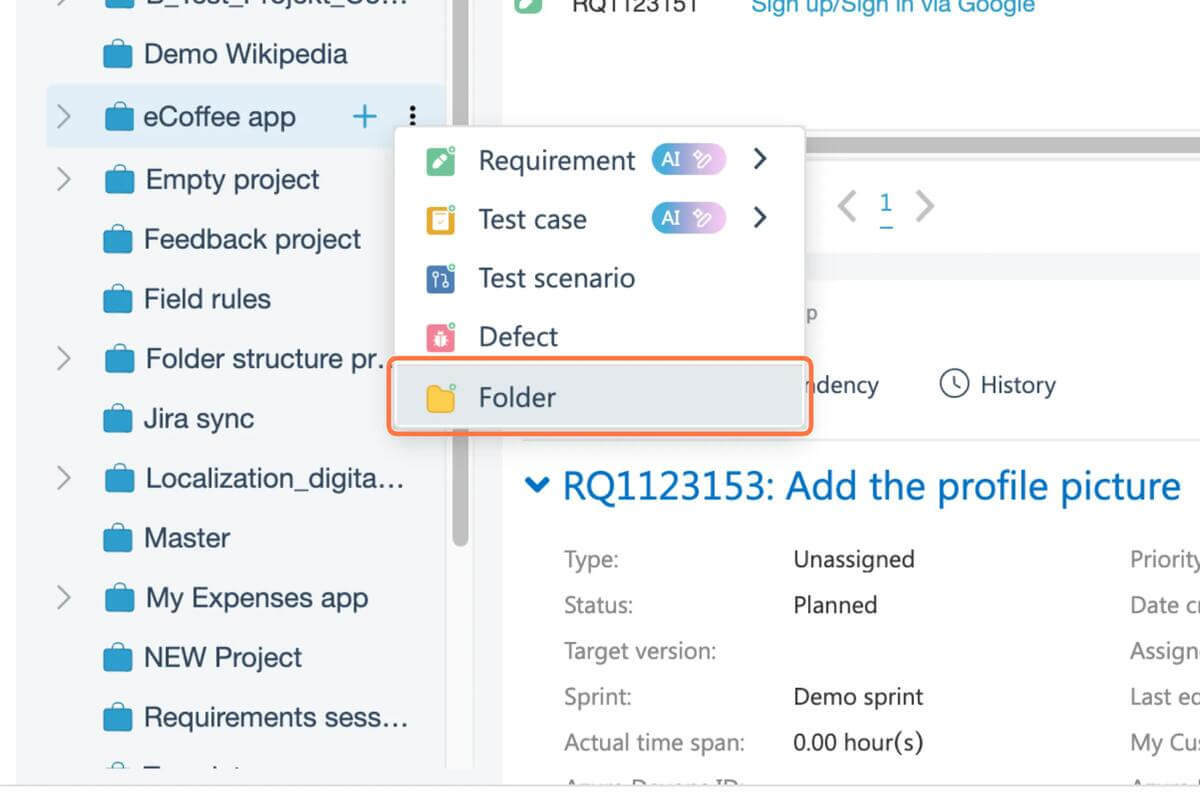
To import into a specific folder within a project:
Navigate to the target project
Click the “+” icon next to the project name and select “Folder”
Name the folder and save it
aqua maps TestRail’s section hierarchy directly to its folder structure, so your organizational logic carries over. If you want TestRail sections to land in a specific folder rather than the project root, select or create that folder before triggering the import.
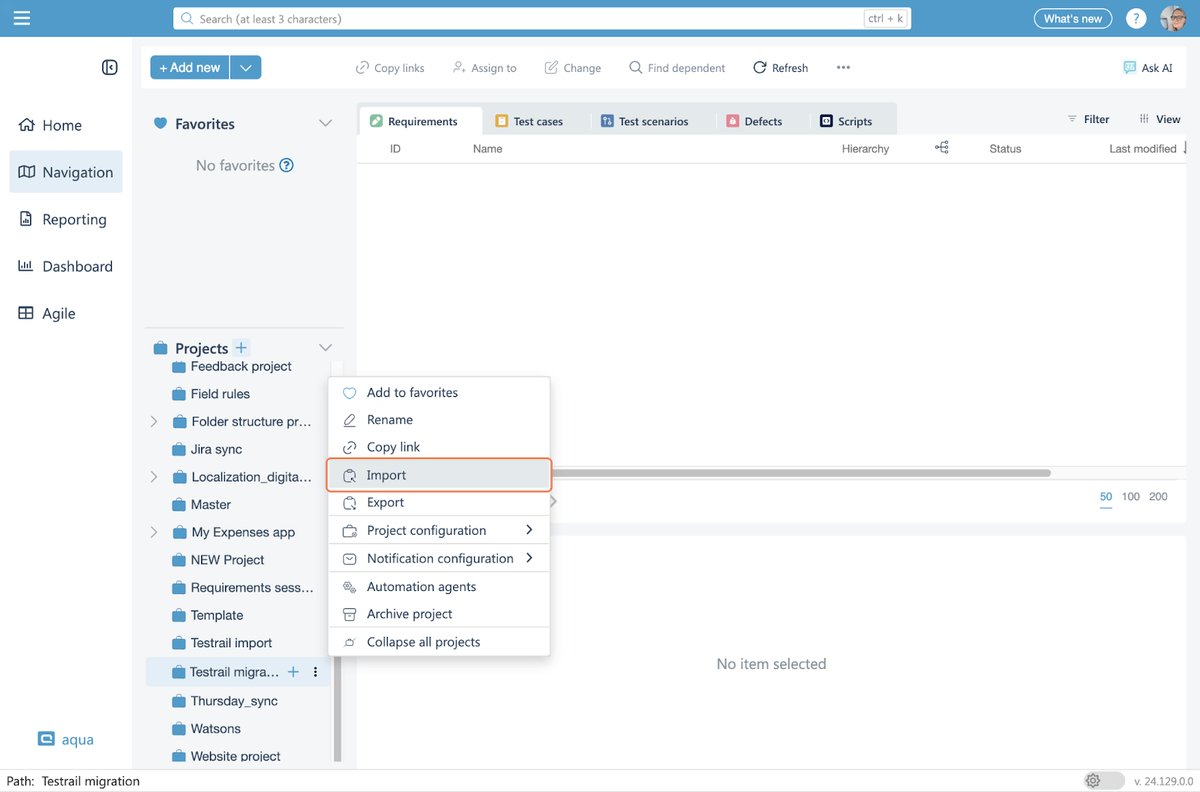
Step 4: Trigger the Import
With your destination ready, right-click (or click the three-dot menu) next to the project or folder and select “Import”. In the dialog that appears:
Select “Testrail file (xml)” as the import source
Upload the XML file you exported from TestRail
If you’re migrating without attachments, click “Import” and you’re done
To include attachments and images:
Check “Include all images and files during import”
Fill in your TestRail instance URL, email address, and the API key you generated
Click “Test connection” to verify the credentials before proceeding
Click “Import” to start the migration
Step 5: Monitor and Validate
The migration runs in the background. Duration depends on project size and attachment volume. Note that only one import per aqua instance is allowed at a time, so if you’re migrating multiple projects, queue them sequentially. Once the import completes, validate the results:
Test case counts match your TestRail export exactly
Section hierarchy has mapped correctly to aqua folders
Attachments are rendering as expected inside test cases
Markdown formatting has converted cleanly to HTML
Custom field values are appended to test case descriptions
A few things worth knowing about what aqua currently supports on import: the default TestRail templates (Test Case Text, Test Case Steps, and Exploratory Session) are all handled. Section hierarchy maps to aqua folders, and markdown converts to HTML. Test plans and custom field mapping are not yet supported. Any enabled fields in test cases will be appended to the test case description so no data is lost, but they won’t map to aqua’s native fields automatically.
These steps with corresponding screenshots are provided in TestRail migration documentation by aqua cloud.
Post-Migration Validation
You’ve handled the import successfully. Congratulations! However, post-migration validation is where you catch the gotchas before your team does.
Count your test cases in aqua and compare against TestRail. They should match exactly. If you’re short by 200 cases, something didn’t import, and it’s time to investigate. You should also check folder structures next: TestRail sections should map to aqua folders with the same hierarchy, so click through a few levels deep to confirm nesting stayed intact.
Then, it’s highly advised to check the integrity of QA itself. Open a handful of test cases, especially ones with attachments or custom fields. Are images showing up, and did markdown formatting convert to HTML cleanly? Spot-check at least 10% of your cases, focusing on edge cases with multiple attachments, long step lists, or heavy formatting. Integration checks come next: if you had Jira linked to TestRail, verify those connections are reconfigured in aqua.
You may also consider running a test case execution to confirm that workflows trigger correctly. Don’t forget to check that user permissions and team roles were set up properly.
Overall, your post-migration checklist should cover:
Data integrity: Case counts match, attachments present, formatting preserved
Best Practices for a Successful Migration from TestRail
These practices are drawn from teams who’ve been through this process and know where things tend to break down. For a broader perspective on running QA well after the move, the best practices in test management guide covers what to focus on once you’re up and running in your new platform.
Run a pilot migration before committing at scale. Basically, you need to pick a medium-complexity project and migrate it first. Then, validate structure, attachments, and integrations, then get stakeholder sign-off. This pilot becomes your reference point for subsequent projects and builds confidence that your process works.
Communicate the migration plan to all stakeholders in advance. Your team needs to know what’s happening, when, and what changes post-migration. For example, you may consider sending a heads-up email a week out, a reminder two days before, and a confirmation once validation is complete. Include screenshots of the new interface and links to training docs.
Phase large migrations instead of moving everything at once. Batch projects in groups of 3-5 and validate each batch before proceeding. This limits the impact if something goes wrong and keeps the team from being overwhelmed by a single cutover event.
Assign migration champions per team. Designate one person per team to own validation of their project’s data and support teammates through the transition. This distributes accountability and ensures issues get the attention of a technical expert in charge of the migration.
Keep TestRail accessible during the transition period. Don’t decommission immediately. Instead, you should run parallel access for 2-4 weeks while teams adjust, so anyone who needs to reference historical data or pre-migration context can do so without raising a support ticket.
Extra tips from the aqua cloud team:
Schedule the import during off-peak hours.
Document your process as you go.
Clean as you validate.
Plan for attachment-heavy projects to take longer.
The platform you migrate to will determine whether this move becomes a genuine improvement. aqua cloud, an AI-driven test and requirement management platform, addresses the limitations that drive teams away from TestRail: no native defect management, compliance features locked behind Enterprise pricing, and AI restricted to Cloud-only test case generation. With aqua, project management is all built in, removing the cost and maintenance overhead of running separate tools. The platform’s intuitive interface, centralized test asset management, and flexible pricing structure ensure you won’t face the same scalability challenges that pushed you away from TestRail. The AI Copilot, trained on your own project documentation, covers the entire QA lifecycle and is free on all Cloud plans. Besides, integrations with Jira, Azure DevOps, Jenkins, Selenium, and your CI/CD pipeline are all supported.
Start saving 70% documentation time after migration from TestRail to aqua
With the right preparation and a suitable method selection, you’ll have your test cases, attachments, and team workflows running in a modern platform. Leverage a thorough audit, pick the migration approach that matches your scale, and validate once the data is successfully imported. Teams that nail this TestRail migration can benefit from a suite of concrete strategic advantages, which depend on their new provider. Your testing stack needs a tool that keeps pace with how you work, so don’t hesitate to switch to aqua cloud.
Can you easily migrate from TestRail to aqua cloud?
Yes, for most teams it’s a same-day operation. aqua’s dedicated XML import preserves folder structure, test case hierarchy, and attachments via API connection. Where it gets more complex is with custom templates or large projects above 10,000 cases, which may need phased imports. For standard setups: export XML, import to aqua, validate, done.
How do you migrate from TestRail to aqua cloud step by step?
Export your TestRail project as XML, then in aqua right-click your target project and select “Import”. Choose “Testrail file (xml)”, upload the export, and if you want attachments, enable that option and provide your TestRail instance URL, email, and API key. Test the connection, click “Import”, then validate case counts and folder structure once it completes.
What happens to custom fields during TestRail migration?
Custom fields don’t map to aqua’s native fields automatically, as fields mapping is not yet supported. Instead, any enabled custom field values from your TestRail test cases are appended to the test case description in aqua. This ensures no data is lost, but you may need to manually reconfigure fields in your new aqua project setup after migration.
Does migrating test management tools disrupt active testing cycles?
The best practice is to freeze edits in TestRail 24 hours before migration, run the import during off-peak hours or a weekend, and keep TestRail accessible in read-only mode for 2-4 weeks post-migration. This gives teams time to reorient without losing access to historical data mid-cycle.
What should I do if my TestRail project has test plans?
Test plan migration is not currently supported by aqua’s import tool. Only test cases, sections, and attachments transfer over. Before migrating, document your active test plans manually or export them separately for reference. Your test cases will import correctly; you’ll need to recreate the test plan structure natively in aqua after the import is complete.
Home » 'How to' guides » Migrate from TestRail: A Comprehensive Guide to Seamless Migration
Do you love testing as we do?
Join our community of enthusiastic experts! Get new posts from the aqua blog directly in your inbox. QA trends, community discussion overviews, insightful tips — you’ll love it!
We're committed to your privacy. Aqua uses the information you provide to us to contact you about our relevant content, products, and services. You may unsubscribe from these communications at any time. For more information, check out our Privacy policy.
X
🤖 Exciting new updates to aqua AI Assistant are now available! 🎉
We use cookies and third-party services that store or retrieve information on the end device of our visitors. This data is processed and used to optimize our website and continuously improve it. We require your consent fro the storage, retrieval, and processing of this data. You can revoke your consent at any time by clicking on a link in the bottom section of our website.
For more information, please see our Privacy Policy.
This website uses cookies to improve your experience while you navigate through the website. Out of these, the cookies that are categorized as necessary are stored on your browser as they are essential for the working of basic functionalities of the website. We also use third-party cookies that help us analyze and understand how you use this website. These cookies will be stored in your browser only with your consent. You also have the option to opt-out of these cookies. But opting out of some of these cookies may affect your browsing experience.
Necessary cookies are absolutely essential for the website to function properly. These cookies ensure basic functionalities and security features of the website, anonymously.
Cookie
Duration
Description
cookielawinfo-checkbox-analytics
11 months
This cookie is set by GDPR Cookie Consent plugin. The cookie is used to store the user consent for the cookies in the category "Analytics".
cookielawinfo-checkbox-functional
11 months
The cookie is set by GDPR cookie consent to record the user consent for the cookies in the category "Functional".
cookielawinfo-checkbox-necessary
11 months
This cookie is set by GDPR Cookie Consent plugin. The cookies is used to store the user consent for the cookies in the category "Necessary".
cookielawinfo-checkbox-others
11 months
This cookie is set by GDPR Cookie Consent plugin. The cookie is used to store the user consent for the cookies in the category "Other.
cookielawinfo-checkbox-performance
11 months
This cookie is set by GDPR Cookie Consent plugin. The cookie is used to store the user consent for the cookies in the category "Performance".
viewed_cookie_policy
11 months
The cookie is set by the GDPR Cookie Consent plugin and is used to store whether or not user has consented to the use of cookies. It does not store any personal data.
Functional cookies help to perform certain functionalities like sharing the content of the website on social media platforms, collect feedbacks, and other third-party features.
Performance cookies are used to understand and analyze the key performance indexes of the website which helps in delivering a better user experience for the visitors.
Analytical cookies are used to understand how visitors interact with the website. These cookies help provide information on metrics the number of visitors, bounce rate, traffic source, etc.
Advertisement cookies are used to provide visitors with relevant ads and marketing campaigns. These cookies track visitors across websites and collect information to provide customized ads.