What is Component Testing: Ultimate Guide with Examples
Have you ever wondered why some QA teams seem to catch bugs before they become a headache? The secret might lie in how they approach testing individual pieces of their software. Component testing sits right at that sweet spot between granular unit tests and full-system testing and gives you focused results without the overhead of testing everything at once. It's about making sure each part works properly before you connect the full puzzle. Looking to step up your software quality without drowning in the endless testing cycle? Let’s cover everything you need about component testing in one article.
Component testing (sometimes also called module testing) is the process of checking individual software components in isolation to verify they work as intended. Think of it as quality control for each ingredient before you cook the entire meal.
Unlike higher-level testing, component testing targets specific, self-contained modules of code – a single function, class, or microservice – without worrying about how it interacts with the rest of the system. This focused approach helps you catch issues early when they’re still cheap and straightforward to fix.
The beauty of component testing is that it sits between unit testing (which examines the smallest bits of code) and integration testing (which checks how components work together).
While there’s some overlap with unit testing, component testing typically focuses on slightly larger code units that still function independently. Understanding the difference between component testing vs unit testing is crucial – where unit tests focus on individual functions or methods, component tests evaluate more complex modules with multiple interacting parts.
The Importance of Component Testing
Component testing delivers concrete benefits that directly impact your development lifecycle:
Early bug detection: Find and squash issues when they’re isolated and easier to fix
Focused troubleshooting: When a test fails, you know exactly which component to investigate
Cost efficiency: Fixing bugs at the component level costs dramatically less than after integration
Faster development cycles: By testing components as they’re built, you avoid massive end-stage testing bottlenecks
Simplified debugging: Issues are contained within a single component, making the source much easier to identify
For example, imagine working in a fintech company where you discovered a calculation error in the payment processing module through component testing in software testing. If you only caught it during system testing, you would have needed to solve complex interactions between multiple systems rather than fixing one isolated component.
Objective of Component Testing
The primary goal of component testing is straightforward: to verify that each software component correctly implements its specifications and behaves as expected in isolation.
But drilling down, component testing aims to:
Validate that the component fulfils its functional requirements
Ensure the component handles edge cases and error conditions gracefully
Verify internal processing and data flow work correctly
Confirm that the component’s interfaces behave according to specifications
Establish a foundation of reliable components before integration
Unlike higher test levels that focus on user experience or system behaviour, component testing specifically targets the technical correctness of individual modules. It asks: “Does this specific piece of software do what it’s supposed to do without relying on other parts of the system?”
When is Component Testing Performed?
Component testing happens relatively early in the development lifecycle, typically right after coding a component and before integration with other components. More specifically, component testing occurs:
After developers complete coding of an individual component
Before integration with other components begins
During code reviews as a quality gate
When modifying existing components (regression testing)
The timing matters here. Component testing represents one of your first opportunities to catch defects. In a DevOps or CI/CD environment, automated component tests often run after every code commit to provide immediate feedback to developers.
Now, components as unit tests should better to be written in the meantime as TDD and BDD approach suggests. It' always difficult to start to write these tests blindly on a codebase which was not designed to be testable and which is stable. But moreover it's not the role of the QA but of the dev. However if you really have to start on this, adopt a user oriented approach and focus on the reusable components first. You have to mount your component in isolation with the mecanisms provided by your framework, mock all the external contributors (services, nested comp0nents, ...) of your and try to mimic the user behaviour.
A structured approach to component testing delivers the most reliable results. Here’s a practical process to follow:
Test Planning: Identify components to test, define scope, and establish acceptance criteria. Creating a comprehensive component test plan is crucial for success.
Test Environment Setup: Create isolated environments with any necessary test doubles (mocks/stubs)
Test Data Preparation: Generate appropriate test data covering normal and edge cases
Test Design: Create test cases based on component specifications
Test Execution: Run the tests against the component in isolation
Results Analysis: Evaluate test results against expected outcomes
Defect Reporting: Document any failures and report bugs to development
Regression Testing: Re-test after fixes to verify corrections
For maximum effectiveness, the test environment should isolate the component by replacing external dependencies with controlled test doubles (mocks or stubs). This ensures you’re testing just the component itself, not its interactions with other parts of the system.
To fully realise the benefits of component testing, it’s essential to use a platform that not only supports test isolation and traceability but also fits seamlessly into your development ecosystem. aqua cloud provides a centralised test case repository where each component test can be directly linked to its requirement, ensuring full visibility and accountability. Its nested test cases enable easy reuse across modules, and with the help of the AI Copilot, you can generate new test cases from requirements in seconds. aqua also integrates effortlessly with tools like Jira, Azure DevOps, Selenium, and Jenkins, making it a perfect fit for CI/CD pipelines and agile teams looking to embed component testing into their everyday workflows. So it is an all-around solution, not only for your component testing, but for all your test management efforts.
Have 200% more efficiency with an AI-powered Test Management Solution
Component testing isn’t a one-size-fits-all approach. Different testing types target various aspects of a component’s functionality:
Functional Testing
Functional component testing verifies that the component correctly implements its specified functionality. This black-box testing approach focuses on what the component does, not how it does it.
Key characteristics:
Tests component against functional requirements
Treats the component as a black box
Focuses on inputs, outputs, and behaviour
Doesn’t require knowledge of internal implementation
For example, testing that a password validation component correctly accepts valid passwords and rejects invalid ones based on specified rules.
Structural Testing
Structural component testing (white-box testing) examines the internal structure and implementation of the component. It aims to exercise various code paths, decision points, and internal processing.
Key characteristics:
Requires knowledge of internal code structure
Focuses on code paths and branches
Aims for high code coverage
Tests internal logic and calculations
For instance, ensuring every branch of an if/else chain in a tax calculation component gets executed with appropriate inputs.
Interface Testing
Interface testing verifies that a component’s interfaces work correctly, both the interfaces it exposes to other components and those it uses to communicate with external systems.
Key characteristics:
Focuses on component entry and exit points
Tests parameter passing and return values
Validates error handling at interfaces
Ensures compatibility with expected consumers
This might involve checking that an API component accepts parameters in the correct format and returns responses according to its specification.
State-Based Testing
State-based testing examines how components manage and transition between different states, ensuring they behave correctly regardless of their current state.
Key characteristics:
Tests state transitions and behaviours
Verifies state-dependent functionality
Checks for state corruption or leakage
Tests initialisation and cleanup processes
For example, testing that a connection management component correctly handles transitions between connected and disconnected states.
Best Strategies for Component Testing
Here’s what separates developers who love testing from those who see it as a chore: strategy.
You’ve probably experienced both sides of this. There are days when writing tests feels productive and satisfying – you’re catching bugs before they happen, your code feels solid, and refactoring becomes fearless. Then there are the other days, where you’re spending hours writing tests that feel pointless, or worse, tests that give you false confidence while real issues slip through.
The difference isn’t talent or experience – it’s approach. Effective component testing is about understanding which techniques to use when, how to structure your tests for maximum impact, and where to focus your limited time and energy.
The strategies below will help you shift from testing as an obligation to testing as a competitive advantage:
White-Box vs. Black-Box Approaches
Component testing can be approached from different perspectives:
White-Box Testing:
Uses knowledge of internal structure to design tests
Aims for comprehensive code coverage
Can reveal implementation errors that might not surface in black-box tests
Requires access to source code and understanding of implementation
Black-Box Testing:
Tests component based only on specifications and expected behaviour
Focuses on functionality rather than implementation
Can reveal mismatches between specifications and implementation
Can be performed without knowledge of internal code
A balanced approach often yields the best results. Start with black-box tests to verify the component meets its specifications, then add white-box tests to ensure comprehensive coverage of internal logic.
Test-driven development integrates component testing directly into the development process:
Write tests before implementing the component
Run tests (they should fail since the component isn’t implemented)
Implement just enough code to make the tests pass
Refactor while ensuring tests continue to pass
This ensures components are testable by design and meet their specifications from the start.
Component Isolation Techniques
Effective component isolation is crucial for meaningful testing:
Dependency Injection: Design components to receive dependencies rather than creating them internally
Mocking Frameworks: Use frameworks like Mockito (Java), pytest-mock (Python), or Sinon.js (JavaScript) to create test doubles
Stubs and Drivers: Create simplified versions of dependencies or calling code to control the component’s environment
In-memory Test Doubles: Replace external resources like databases with in-memory versions for faster, more reliable tests
These techniques allow you to test components in isolation without the complexity of their real-world dependencies.
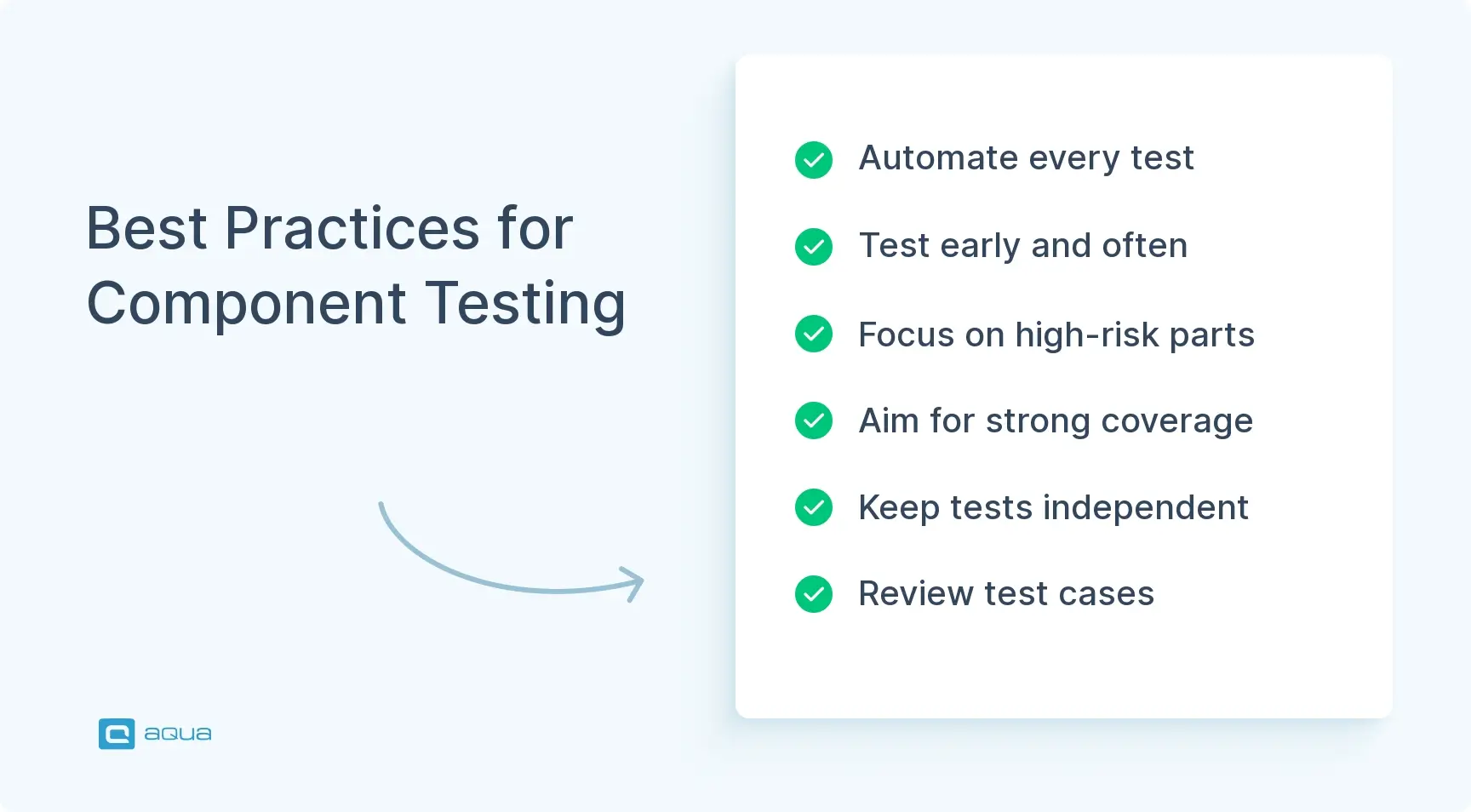
Best Practices for Component Testing
Follow these best practices to enhance your component testing effectiveness:
Automate aggressively: Create automated tests that run quickly and reliably with each build
Test early and often: Start component testing as soon as code is written, not as an afterthought
Focus on high-risk components first: Prioritise critical or complex components that are more likely to contain defects
Aim for high but practical coverage: Strive for strong code coverage (80%+) while recognising diminishing returns beyond certain thresholds
Maintain independence between tests: Each test should be self-contained and not depend on other tests
Use clear naming conventions: Name tests descriptively so failures clearly indicate what functionality broke
Test boundary conditions: Include tests for edge cases, not just the happy path
Keep tests small and focused: Test one aspect of behaviour per test for clearer failure diagnosis
Version control your tests: Treat test code with the same care as production code
Review test cases: Have peers review test cases to ensure comprehensive coverage
Component testing is often performed by developers themselves, so fostering a culture where testing is valued equally with feature development is essential.
Automation in Component Testing
Automation is at the centre of efficient component testing. Here’s how to use it effectively:
Start with critical components that change frequently
Focus on tests that provide the most value (risk-based approach)
Integrate with your CI/CD pipeline for continuous feedback
Set up notifications for test failures
Track test coverage and maintain it as code evolves
Remember that automation isn’t just about running tests – it’s about integrating testing into your development workflow to catch issues immediately.
Component Testing Challenges
Even when you understand the theory and follow best practices, you’ll inevitably run into roadblocks that make you question whether all this testing effort is worth it. Maybe you’re staring at a component with so many dependencies that mocking feels impossible. Or perhaps you’re dealing with legacy code that wasn’t designed with testing in mind, and every attempt to add tests feels like you’re fighting the architecture itself.
These challenges are real, and they’re more common than most testing tutorials let on. Once you recognise these patterns, you can develop strategies to work through them. Here are the most frequent obstacles you’ll encounter and how to tackle them:
Dependency Management
Challenge: Components often depend on other components or external systems, making true isolation difficult.
Solution: Use dependency injection and mocking frameworks to replace real dependencies with test doubles. Design components with testability in mind, keeping dependencies explicit and injectable.
Test Environment Configuration
Challenge: Setting up consistent, isolated test environments can be complex, especially for components with many dependencies.
Solution: Use containerization (Docker) to create reproducible environments, leverage in-memory databases when possible, and automate environment setup as part of test execution.
Maintaining Test Coverage
Challenge: As components evolve, maintaining comprehensive test coverage becomes increasingly difficult.
Solution: Integrate code coverage tools into your CI pipeline, establish coverage thresholds that must be maintained, and make test updates part of your definition of done for any code changes.
Realistic Test Data
Challenge: Creating representative test data that covers all scenarios without becoming unwieldy.
Solution: Use data generation tools, parameterised tests to cycle through variations, and property-based testing to automatically explore the input space.
Flaky Tests
Challenge: Tests that sometimes pass and sometimes fail (flaky tests) undermine confidence in the testing process.
Solution: Design tests to be deterministic, avoid dependencies on timing or external systems, and isolate test state to prevent interference between tests.
Component testing helps you catch issues early, but it only works if your process is consistent, traceable, and scalable. That’s where aqua cloud comes in. It simplifies dependency management through integrations with Selenium, Jenkins, and in-memory execution support, while offering a centralised view of your entire test architecture. From auto-generated requirements, test cases, and test data via AI Copilot to deep Jira and Azure DevOps integrations, aqua ensures every component is tested, tracked, and versioned with precision. Add powerful coverage insights and reusable nested test cases, and you get a test management system that keeps your component testing fast, stable, and resilient, even at scale.
Supercharge your component testing efforts with 100% AI-powered solution
Component Testing vs Unit Testing vs Integration Testing
These different testing levels are often confused. Here’s how they compare:
Aspect
Component Testing
Unit Testing
Integration Testing
Scope
Individual modules or components
Smallest testable parts (functions, methods)
Interactions between components
Focus
Component behaviour and interfaces
Specific code units in isolation
Communication between multiple components
Dependencies
Often uses mocks/stubs for dependencies
Heavy use of mocks/stubs
Uses real dependencies or limited stubs
Who Performs
Developers or QA engineers
Primarily developers
Developers and/or QA team
When Performed
After component development, before integration
During/immediately after coding
After component testing, before system testing
Test Environment
Isolated component environment
Highly controlled unit environment
Partial system environment
Coverage
Component functionality and structure
Code paths within units
Component interactions and interfaces
The key distinction: unit tests examine the smallest code units, component tests verify self-contained modules, and integration tests check how components work together. Understanding component testing vs integration testing is essential – while a component test evaluates an individual module in isolation, integration testing specifically verifies how components interact with each other. Similarly, knowing the differences between component test vs unit test approaches helps teams apply the right testing methodology at the right level of complexity.
Limitations of Component Testing
While valuable, component testing has limitations you should be aware of:
Doesn’t catch integration issues: Problems that occur when components interact may go undetected
Limited user perspective: Doesn’t verify the system from an end-user’s viewpoint
Potential for over-mocking: Excessive use of test doubles may not represent real-world behaviour
Environment differences: Components may behave differently in production environments
Resource constraints: Creating and maintaining comprehensive component tests requires time and effort
Doesn’t verify non-functional requirements: Performance, security, and scalability typically require different testing approaches
Risk of implementation focus: May test “how” rather than “what” if not carefully designed
To address these limitations, component testing should be part of a broader testing strategy that includes integration, system, and acceptance testing.
Conclusion
Component testing gives you a real edge when it comes to building solid, reliable software. By checking each part on its own before it gets mixed in with everything else, you catch problems early, when they’re easier (and cheaper) to fix. But it’s not about doing it in isolation. The real power comes when you balance component testing with unit, integration, and system tests, each one covering different risks. As tools get smarter with AI and systems grow more complex, component testing still does what it’s always done best: giving you confidence that the basics are working as they should. If you want fewer surprises later, start by testing the critical pieces early.
Component testing is the practice of testing individual software modules or components in isolation to verify they work correctly before being integrated with other components. It focuses on validating that each component meets its specifications and behaves as expected independently.
What are the 4 levels of component testing?
The four main levels or types of component testing are: functional testing (verifying the component meets functional requirements), structural testing (examining internal code paths), interface testing (ensuring component interfaces work correctly), and state-based testing (checking the component handles different states properly).
What is the difference between API testing and component testing?
API testing specifically focuses on verifying the interfaces (endpoints, requests, and responses) of application programming interfaces, while component testing is broader, examining the entire functionality of a software component—which might include its API but also internal processing, state management, and other behaviours.
What does a component tester do?
A component tester verifies that individual software components function correctly in isolation. They create test cases, set up test environments with appropriate mocks/stubs, execute tests, analyse results, report defects, and verify fixes—all focused on validating the behaviour of specific components before they’re integrated with others.
Is component testing the same as unit testing?
While often used interchangeably, they’re slightly different. Unit testing typically targets the smallest testable parts (individual functions or methods), while component testing focuses on slightly larger, self-contained modules that may contain multiple units but still function independently of the larger system.
Is component testing the same as integration testing?
No. Component testing verifies individual components in isolation (often using mocks for dependencies), while integration testing specifically examines how multiple components work together, focusing on their interactions and communication rather than isolated functionality.
Home » Test Automation » What is Component Testing: Ultimate Guide with Examples
Do you love testing as we do?
Join our community of enthusiastic experts! Get new posts from the aqua blog directly in your inbox. QA trends, community discussion overviews, insightful tips — you’ll love it!
We're committed to your privacy. Aqua uses the information you provide to us to contact you about our relevant content, products, and services. You may unsubscribe from these communications at any time. For more information, check out our Privacy policy.
X
🤖 Exciting new updates to aqua AI Assistant are now available! 🎉
We use cookies and third-party services that store or retrieve information on the end device of our visitors. This data is processed and used to optimize our website and continuously improve it. We require your consent fro the storage, retrieval, and processing of this data. You can revoke your consent at any time by clicking on a link in the bottom section of our website.
For more information, please see our Privacy Policy.
This website uses cookies to improve your experience while you navigate through the website. Out of these, the cookies that are categorized as necessary are stored on your browser as they are essential for the working of basic functionalities of the website. We also use third-party cookies that help us analyze and understand how you use this website. These cookies will be stored in your browser only with your consent. You also have the option to opt-out of these cookies. But opting out of some of these cookies may affect your browsing experience.
Necessary cookies are absolutely essential for the website to function properly. These cookies ensure basic functionalities and security features of the website, anonymously.
Cookie
Duration
Description
cookielawinfo-checkbox-analytics
11 months
This cookie is set by GDPR Cookie Consent plugin. The cookie is used to store the user consent for the cookies in the category "Analytics".
cookielawinfo-checkbox-functional
11 months
The cookie is set by GDPR cookie consent to record the user consent for the cookies in the category "Functional".
cookielawinfo-checkbox-necessary
11 months
This cookie is set by GDPR Cookie Consent plugin. The cookies is used to store the user consent for the cookies in the category "Necessary".
cookielawinfo-checkbox-others
11 months
This cookie is set by GDPR Cookie Consent plugin. The cookie is used to store the user consent for the cookies in the category "Other.
cookielawinfo-checkbox-performance
11 months
This cookie is set by GDPR Cookie Consent plugin. The cookie is used to store the user consent for the cookies in the category "Performance".
viewed_cookie_policy
11 months
The cookie is set by the GDPR Cookie Consent plugin and is used to store whether or not user has consented to the use of cookies. It does not store any personal data.
Functional cookies help to perform certain functionalities like sharing the content of the website on social media platforms, collect feedbacks, and other third-party features.
Performance cookies are used to understand and analyze the key performance indexes of the website which helps in delivering a better user experience for the visitors.
Analytical cookies are used to understand how visitors interact with the website. These cookies help provide information on metrics the number of visitors, bounce rate, traffic source, etc.
Advertisement cookies are used to provide visitors with relevant ads and marketing campaigns. These cookies track visitors across websites and collect information to provide customized ads.