User interface testing is arguably the most impactful type of testing, certainly so for B2C companies. It’s the UI that your customers interact with to pay you some money and/or paid some money to interact with. Now, how do you keep them happy?
UI test automation allows your team to validate interface behavior faster and with consistent results across environments.
Combining manual checks with ui test automation improves coverage and helps your team catch both visual and interaction defects.
Early UI validation helps your team detect layout, responsiveness, and usability issues before they reach production.
Automated UI tests support repeatable regression testing, which becomes critical as your product grows.
Reliable UI testing depends on clear test scenarios, stable selectors, and regular updates when the interface changes.
If your team still finds UI issues days before release, the problem is rarely effort. It is the lack of a clear, repeatable validation baseline that runs every time the interface changes.👇
As for definition, user interface testing indeed covers the graphic interface of software presented to customers. This is what they see when trying to get things done with your software, and they won’t truly appreciate the effort you put into a solid back-end if the UI is lagging behind. UI tests are a natural extension of the UX quality assurance done by a user acceptance testing tool.
Importance of UI Testing
UI testing ensures that your users can interact with the interface without visual errors or broken functionality affecting their experience. Let’s look at a couple of examples from food delivery apps.
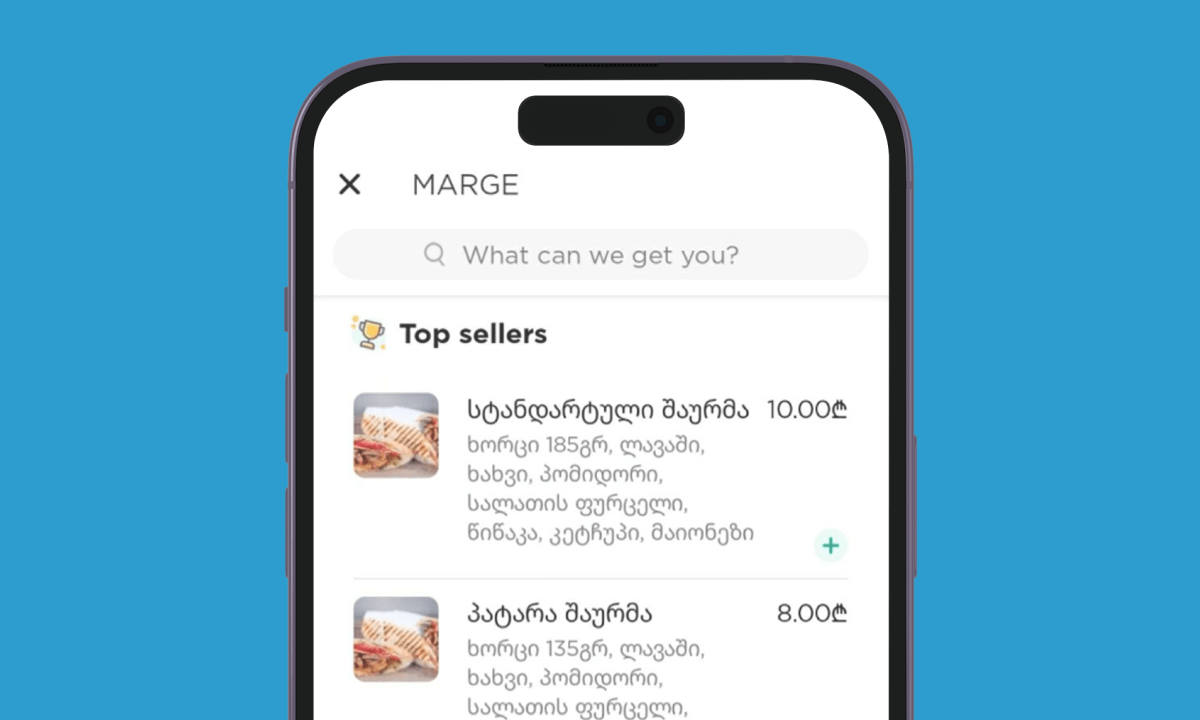
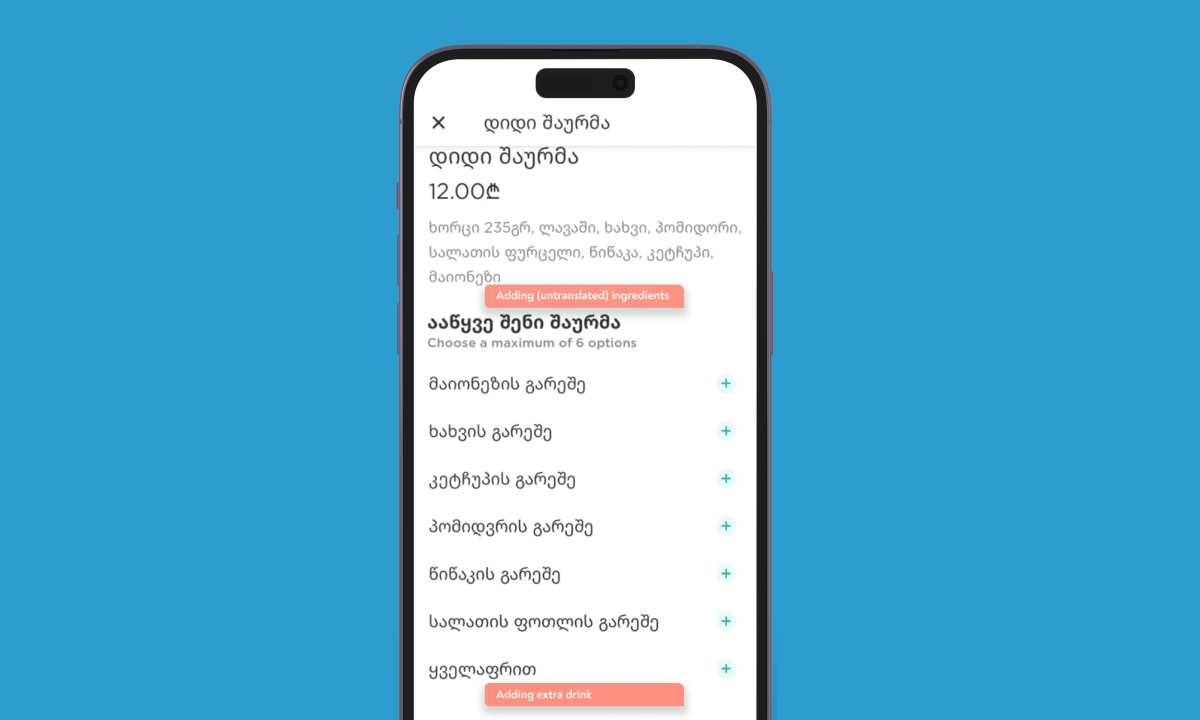
Glovo’s Android app infamously doesn’t handle item translation properly. Category names can be translated into the language of your interface, but item names stay in the local language. Yes, pictures are usually enough to pick your restaurant meal and even groceries. But these last-minute upsell options in the cart? The odds of getting extra money are slim when a foreigner can’t understand what product or bump in quality they are offered to add.
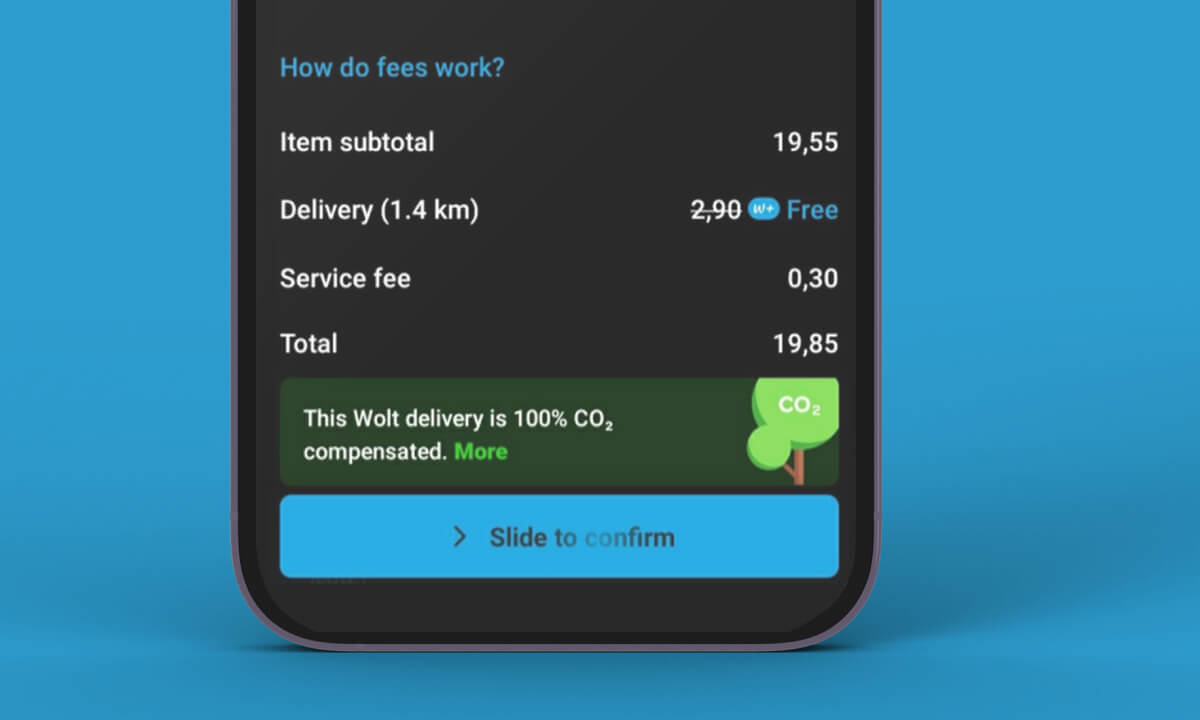
Another delivery service, Wolt, requires you to swipe across the screen as the final step of making an order. This is quite a robust option to avoid accidental touches, especially when Wolt doesn’t let you cancel an order at any stage. Proper test cases for UI are pretty big in Wolt’s case: the revenue goes to 0 if the app doesn’t register the swipe gesture properly.
You’ve got breathing room if your revenue streams are diversified, but here’s the thing: customers now poke around everywhere. They’ll start checkout on mobile, finish on desktop, maybe even bounce to your app halfway through.
Immediate tip: Set up cross-platform user journey testing by mapping one complete customer action (like purchasing) across all your touchpoints. Companies doing this see nearly doubled conversion rates.
The pitfall is testing platforms in isolation. Your mobile UI might be flawless, but if the handoff to desktop feels clunky, you’re losing people at the most critical moment—right before they buy. Some endeavours are in the position to take this diversification to the next level:
“You'll notice in certain images that there still exist some hardware buttons in the capsule right below the displays; this is also to ensure that in case the displays are unusable for whatever reason, the astronauts can still use hardware buttons to initiate critical actions, such as responding to a fire in the cabin.”
Wendy Shimata, manager of the SpaceX Dragon software team,
UI tests types
UI testing includes both manual validation and ui test automation, depending on how your team balances speed, coverage, and maintenance effort. Manual testing lets you poke around like a real user would, catching those weird edge cases that make users throw their hands up. Automated scripts handle the boring stuff – login flows, form submissions, the works.
Start with automating your most repetitive test cases first. Teams doing this combo approach see bug detection rates nearly double compared to using just one method. The sweet spot? Use automation for your core user journeys, then throw in manual testing for anything new or complex.
Data errors: check if clients can enter the requested data in the right format and what happens if they deviate from it
Navigational elements: verify that users can switch between the screens and go around them correctly
Menu items: make sure that only relevant menu items are displayed to the user
Progress: validate that all lengthy actions communicate the time it would take to complete them (via timer, bar, or anything else that your UI designer picked)
Filters: verify that public or hidden labels are indeed used to make filters show the right items only
Element alignment: positioning matches what the designer intended to have
Error messages: user get clear error responses if they made a mistake when submitting something and/or if there is an issue with the service
Speed up your web UI testing with a Chrome extension test recorder
UI testing has different goals than let’s say unit testing, so the benefits are somewhat unique as well.
Ensures that your designer’s vision is implemented correctly. Design in software development is after all about getting (extra) revenue from customers, not just looks. It is unfair to draw any conclusion if the engineering team did not fully implement what the designer intended
Preserves your solution’s value proposition. Depending on the software, UI quirks can make a huge dent in your revenue if things are not working properly. Imagine how much money a ride hailing app loses if the “confirm address” button stops working
Supports the regression testing effort. Should some changes to the code break existing functionality, going over existing functionality is a nice way to spot any new issues
Provides extra perspective. QA specialists may not have the same business goals or aesthetics in mind when going over a new build. This is good: your designer(s) will get extra feedback from people who may have more experience with the specific software niche and/or view general concepts differently
Visual Regression and Accessibility Testing
Visual regression and accessibility testing help your team ensure that UI updates do not break layouts and that the interface remains usable for all users. Visual regression testing spots those sneaky layout shifts and colour changes that slip through after updates. Your brand consistency depends on it. Tools like Percy or Applitools automatically compare screenshots between releases, and open-source options work too if the budget’s tight.
You need to start by testing your most critical user flows first: login, checkout, whatever drives your business. Accessibility testing opens your product to everyone, including the nearly 15% of people with disabilities. Axe-core can automatically flag missing alt text and contrast problems, but don’t stop there. Try using your site with just a keyboard and you’ll be surprised what breaks.
One red flag to watch: if automated tools find zero accessibility issues, they’re probably not configured right. Real inclusion needs human testing too. Folding both into your workflow isn’t just good karma—it protects your reputation and expands your market reach substantially. Start small, test one flow visually and one page for accessibility this week.
Whether you are looking for precision or scale, your UI testing could use a touch of artificial intelligence. We have prepared an overview of AI testing trends to help you see where you could save time the most. ChatGPT-like solutions are a major aid, but there are more options available.
Learn the 5 AI testing trends to save 12.8 hrs/week per specialist
"*" indicates required fields
Manual vs Automated UI: step-by-step comparison
UI testing in software testing can be performed either manually or using automated tools. Each approach has its advantages and disadvantages, and the choice depends on various factors such as project requirements, budget, time constraints, development stage and the complexity of the application. Let’s describe manual and automated UI testing approaches and their step-by-step processes.
Manual UI Testing:
UI manual testing involves human intervention to verify the correctness of the user interface. Testers must interact with the application manually, explore various functionalities, and verify the expected behaviour.
Step-by-step process:
Test Planning: Identify the scope of testing, including the features and functionalities to be tested. Create test cases based on requirements and user stories.
Environment Setup: Set up the testing environment, including necessary hardware, software, and test data.
Test Execution: Execute test cases manually by interacting with the UI elements such as buttons, forms, menus, etc. Perform actions like clicking, typing, dragging, and dropping to simulate user interactions.
Observation and Verification: Observe the application’s response and verify if it matches the expected behaviour. Check for UI inconsistencies, layout issues, responsiveness, and usability.
Defect Reporting: Document any issues encountered during testing, including steps to reproduce, screenshots, and other relevant details. Use a bug-tracking system to report defects to the development team.
Regression Testing: Perform regression testing to ensure that fixes for reported issues do not introduce new defects or impact existing functionalities.
Test Closure: Review the test results and ensure all test cases have been executed. Provide feedback to stakeholders and finalise the testing process.
Automated UI Testing:
Automated UI testing involves using specialised tools to automate the execution of test cases. It helps reduce human effort, increase test coverage, and improve efficiency.
Step-by-step process:
Tool Selection: Choose an appropriate UI automation testing tool based on compatibility with the application, programming language support, ease of use, and reporting capabilities.
Planning Stage: Develop a comprehensive test plan that outlines the testing objectives, scope, resources, timelines, and deliverables. This stage includes defining test cases, identifying test data requirements, and setting up a test environment.
Test Script Development: Write test scripts using the selected automation tool. This involves identifying UI elements using locators such as IDs, classes, XPath, etc., and performing actions like clicking, typing, and verifying element properties.
Test Data Preparation: Prepare test data required for executing automated test cases. This may include creating mock data, configuring test environments, and setting up test data sources.
Test Execution: Run the automated test scripts using the automation tool. Monitor the execution process and analyse test results for any failures or errors.
Result Analysis: Review test results to identify failed test cases and investigate the root causes of failures. Analyse logs, screenshots, and other artefacts generated during test execution.
Defect Reporting: Report any defects found during automated testing to the development team. Include detailed information such as steps to reproduce, environment details, and logs.
Maintenance: Maintain the automated test suite by updating test scripts as per changes in the application UI or functionality. Add new test cases to cover additional features or scenarios.
Both manual and automated UI testing have pros and cons, and the choice between them depends on the project’s specific requirements and constraints. While manual testing provides flexibility and human intuition, automated testing offers repeatability, scalability, and faster feedback. Combining both approaches is often beneficial for achieving comprehensive test coverage and ensuring a complete UI testing strategy.
“Nearly all UI tests are simply running code that is calling API functions in the background. The majority of the time in the test is simply finding and interacting with the elements. Very little of it tests the back end functionality.”
Effective UI testing depends on how your team structures test scenarios, maintains automation, and aligns testing with real user behavior. Here are some ideas to make your UI testing a smooth and beneficial time.
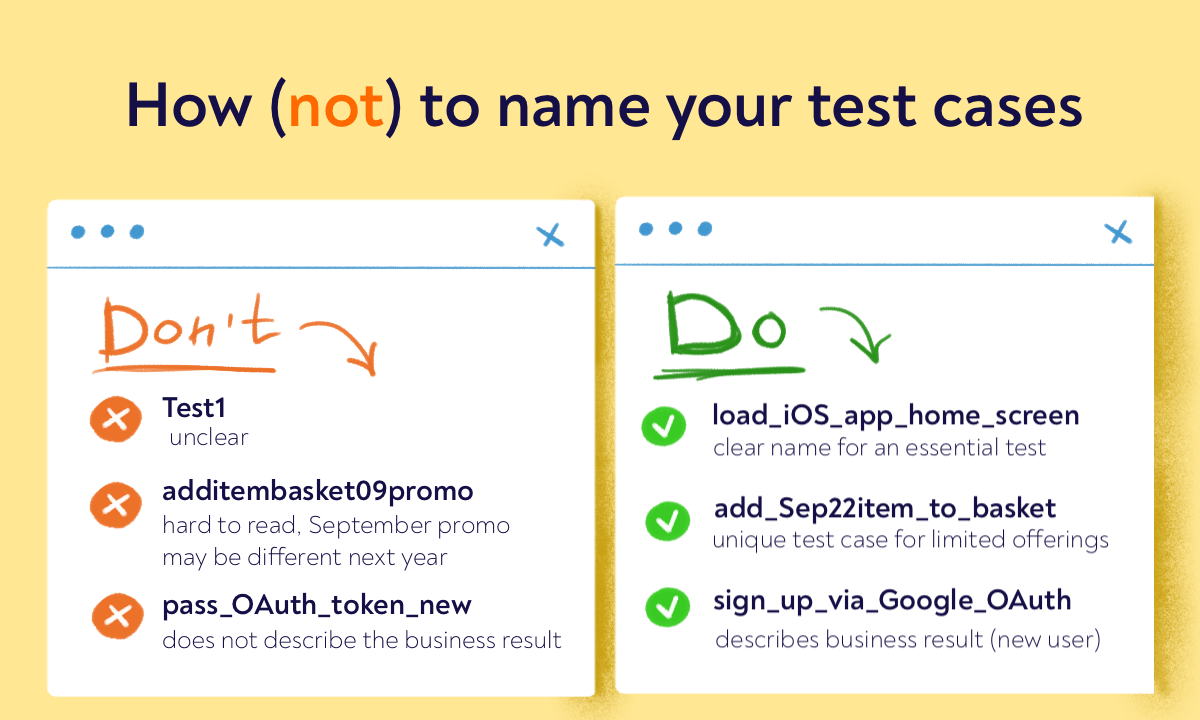
Get the naming convention right. Even if random names for UI tests are a smaller issue than it is for other tests, web UI automation testing needs a structure to work off.
Unleash nitpicking. While some small QA issues go untouched because they are not worth the hassle, UI testing is where you can’t let that slide. If the logo is one pixel off the intended placement, your dev has to fix that.
Don’t brush off edge cases. It is tempting to ignore rare configurations, but they may still be relevant for your industry and/or line of software
Use the latest tech available. A growing trend is using a browser extension for testing website UI. Even if your company runs manual tests only, you will benefit a lot from keeping the test steps and the tested website in the same browser tab. This is how our Chrome extension speeds up manual UI testing by 42%.
Get a testing strategy template that enables us to release 2 times faster
"*" indicates required fields
Steps of user interface testing
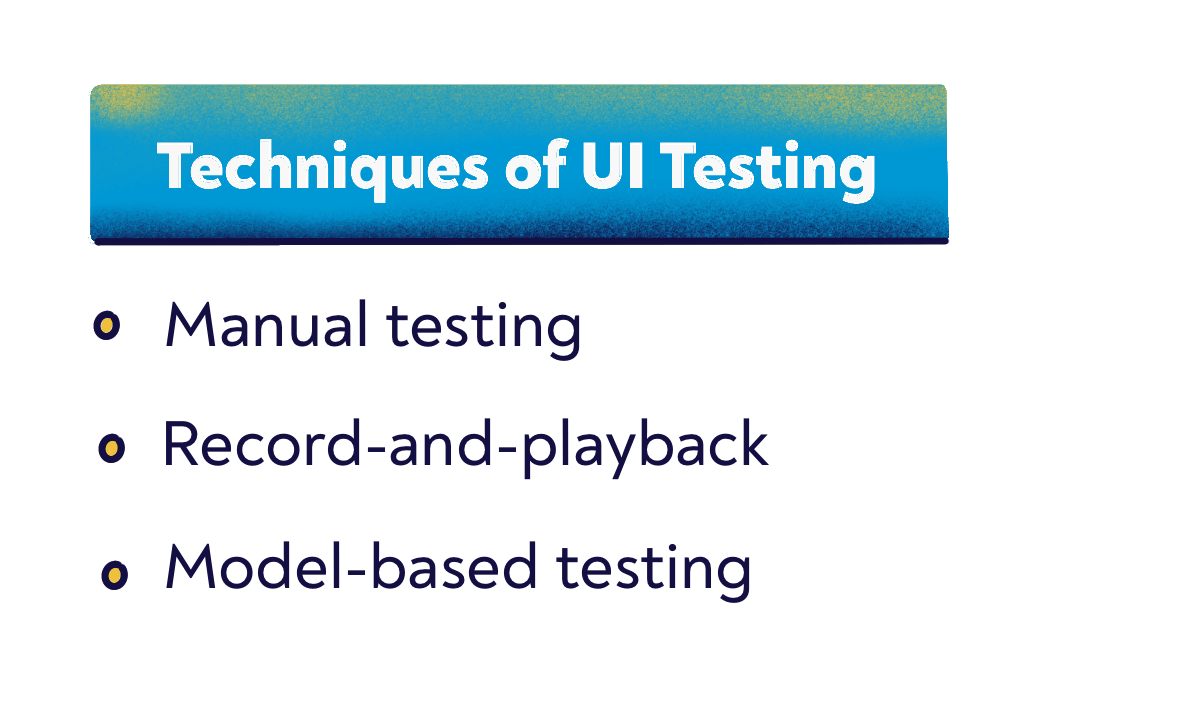
UI testing follows general QA fundamentals of creating test cases, running them, and reporting spotted defects with some documentation. Instead, let’s talk about three primary UI testing techniques, from simple to the most complex one.
Manual testing
Manual testing implies hand execution of all the test cases. You will usually have a bug reporting tool to store bugs and report defects, but all inputs will be done manually. This is the easiest path but also quite time-consuming.
Record-and-playback
Record-and-playback testing takes your manual tests to a scale beyond what one QA tester and even the entire team can do manually. An automation tool automatically walks through different parts of your software, records all steps, and automatically verifies whether these tests yielded the expected outcome. The implementation effort is well worth the extra time and money that you save compared to manual testing.
Model-based testing
The model-based testing actually adds a layer of abstraction to UI testing. Your engineers will be making a simplified version of your solution to generate test cases that target it. This approach works best for digging into fundamentals of how the UI functions rather than user-facing bits.
Common UI Edge Cases and How to Test Them
Those sneaky edge cases? They’re where UI nightmares actually live. You know the ones: interfaces that look perfect until someone tilts their phone, hits airplane mode mid-action, or pastes a 500-character username that breaks your entire layout.
Remember, different screen sizes and orientations (test on actual devices, not just browser resize), spotty network conditions, crazy-long text inputs with emojis or special characters, empty data states that show… nothing, and high DPI settings that make buttons disappear. Don’t forget keyboard accessibility, because if you can’t tab through your interface, you’re blocking users.
So you need to use browser dev tools to throttle your network to ‘Slow 3G’ and watch your app struggle. Teams doing this regularly catch nearly 40% more UI bugs before release.
Third-party integrations failing silently while your core app keeps humming along like nothing happened. Set up automated tests that simulate these conditions across different browsers and locales — it’s less exciting than feature work, but it’ll save you from those 2 AM ‘the site is broken’ messages.
Looking to manage manual checks and ui test automation in one place?
UI Testing Checklist: What to Verify Before Every Release
A release-ready UI must meet defined expectations across visual consistency, behavior, performance, and accessibility.To make that measurable, your team needs a clear definition of what “correct UI” looks like in real conditions.
The checklist below translates that into concrete requirements your team can verify before every release.
Visual and layout consistency:
Layout consistency should be maintained across all supported screen sizes and resolutions, with no overlap, misalignment, or unexpected shifts.
Spacing, margins, and alignment should follow design specifications and remain consistent across pages and components.
Fonts, colors, icons, and images should match the design system and render correctly in all environments.
UI elements should remain fully visible and properly scaled at different viewport sizes and zoom levels.
Functional behavior and interactions:
Navigation flows should allow users to move between screens without broken links or incomplete transitions.
Interactive elements like buttons, links, and dropdowns should respond correctly to clicks, taps, and keyboard input.
Forms should accept valid input, enforce validation rules, and prevent incorrect data submission.
Error messages should appear when expected, clearly explain the issue, and guide the user toward correction.
Confirmation states should reliably reflect completed actions and provide clear feedback.
Responsiveness and cross-platform support:
The interface should adapt to mobile, tablet, and desktop layouts without losing usability or functionality.
UI rendering should remain consistent across supported browsers and their versions.
The interface should behave consistently across operating systems used by your audience.
Performance and real-world conditions:
UI components should load within acceptable performance thresholds defined for your product.
Loading indicators should appear during data fetching and disappear once content is ready.
The interface should remain stable under slow or unstable network conditions.
No visual flickering, layout shifts, or delayed rendering should affect user interactions.
Accessibility and usability requirements:
All interactive elements should be accessible through keyboard navigation in a logical order.
Text and UI elements should meet contrast requirements for readability.
Labels and instructions should clearly explain expected user actions and inputs.
Screen readers should correctly interpret key interface elements used in core flows.
Integrations and edge case handling:
Third-party UI components should render correctly and behave consistently within the interface.
The UI should handle empty states, large datasets, and extreme inputs without breaking layout or behavior.
The interface should display fallback states when APIs fail or return incomplete data.
Rapid or repeated user actions should not cause inconsistent states or UI failures.
Best UI testing tools
Here are the best UI testing tools you should give a chance:
aqua: cloud aqua is an ideal solution for centralising manual and automation testing processes, offering comprehensive features for test planning and execution management. With aqua, you can efficiently manage test cases, track test execution, and generate insightful reports, streamlining the testing workflow. Aqua also provides built-in integrations with popular frameworks and tools such as Selenium, Cypress, and Ranorex, ensuring seamless collaboration and maximizing testing efficiency.
Ranorex: Ranorex is a powerful UI testing tool known for its robust capabilities in automating desktop, web, and mobile applications. With its user-friendly interface and advanced features, Ranorex simplifies test automation, enabling testers to create and execute tests efficiently. aqua has one of the best integrations with Ranorex in the market, enhancing test management capabilities by seamlessly integrating Ranorex tests into your testing process. This integration ensures smoother collaboration between testers and developers, further optimizing the testing workflow.
Selenium WebDriver is one of the most widely used UI testing tools. It supports multiple programming languages such as Java, Python, C#, etc., and can automate web browsers across different platforms. With its robust API, Selenium allows you to interact with web elements, perform actions like clicking buttons and entering text, and validate expected outcomes.
Appium is an open-source tool for automating mobile applications on iOS, Android, and Windows platforms. It supports various programming languages and test frameworks, making it flexible and easy to integrate into existing testing environments. Appium allows you to write cross-platform tests using the WebDriver protocol, enabling consistent testing across different mobile devices and operating systems.
TestComplete is a comprehensive UI testing tool offering various functional, regression, and load testing features. It supports desktop, web, and mobile application testing across various platforms. TestComplete provides a user-friendly interface, scriptless test creation, and robust object recognition capabilities, making it suitable for manual and automated testing workflows.
Cypress is a modern JavaScript-based testing framework designed specifically for web applications. It provides a fast, reliable, and easy-to-use testing experience with its unique architecture and built-in features like automatic waiting, real-time DOM snapshots, and time-travelling debugger. Cypress allows testers to write tests using familiar technologies like Mocha and Chai, making it accessible to developers and QA engineers.
Robot Framework: Robot Framework is a generic open-source automation framework that supports acceptance testing and robotic process automation (RPA). It offers a keyword-driven approach to test automation, allowing testers to write tests in a simple, readable format using plain English keywords. Robot Framework provides extensive libraries for testing web applications, APIs, databases, and more, making it highly versatile and suitable for various testing scenarios.
These are just a few examples of user interface testing tools, each with its strengths and weaknesses. When choosing a tool to test UI, you should consider factors like the technology stack, test requirements, team expertise, and budget constraints.
Conclusion
UI testing is very important for preserving and increasing the revenue of your business. Advanced user interface testing techniques add complexity early but ultimately give you a much easier and cheaper QA workflow. Good UI testing also makes your product better through extra insight into how users interact with the software.
UI testing refers to quality assurance procedures covering the graphic interface of software. It is what people see when they interact with a software solution.
What is the difference between GUI and UI testing?
These terms are often used interchangeably. When they are not, GUI testing usually refers to the purely visual presentation (e.g. correct backgrounds and fonts) while UI testing covers the experience of interacting with the customer-facing part of software.
How do you automate UI test cases?
There are two primary angles. First, you automate user inputs to quickly trigger the tested screens. Second, you automate validation of whether the screens render and behave correctly. You can do just one or both.
What tools are used for UI testing?
Selenium is the most popular test automation tool to automate user inputs and/or validation. Teams also use a test management solution like aqua to store and track these Selenium tests alongside manual tests.
Which tools are used for UI testing?
Commonly used UI testing tools can be divided into 2 groups:
1. Automation Frameworks:
Selenium WebDriver: Widely used for web browser automation, offering cross-platform support and robust capabilities for interacting with UI elements.
Appium: Specifically designed for mobile application testing across iOS, Android, and Windows platforms, providing flexibility and integration with various programming languages.
Cypress: Tailored for modern web application testing, Cypress offers fast, reliable testing capabilities with features like automatic waiting and real-time DOM snapshots.
2. Test Management Tools:
aqua: aqua is a comprehensive test management tool for both manual and automated testing processes. With aqua, you can efficiently plan, execute, and track tests, ensuring the quality and functionality of user interfaces. Its built-in integrations with popular automation frameworks like Selenium WebDriver, Appium, and Cypress streamline testing workflows and enhance team collaboration.
What is the difference between UI testing and UX testing?
UI testing verifies that interface elements work correctly and appear as expected across devices and browsers. It focuses on buttons, forms, navigation, and visual consistency. UX testing evaluates how users experience the product in practice. It looks at whether users can complete tasks easily, how intuitive the interface feels, and whether the overall flow makes sense without confusion.
When in the development cycle should UI testing be performed?
UI testing should run throughout the development lifecycle, starting from early feature implementation and continuing through integration and release preparation. Your team can include ui test automation in CI/CD workflows to validate changes continuously. This approach helps detect issues earlier and keeps the interface stable as new features are introduced.
Robert has several years of experience in process optimisation and test management. He is an expert in defining and implementing workflows by adapting aqua to the clients’ processes.
EFL teacher turned content QA Specialist and talented writer, Denis has been working with European and American IT companies for 6 years. Denis has excelled in curating and implementing quality strategies tailored to the nuances of each project. Other than building processes and typing away,…
Join our community of enthusiastic experts! Get new posts from the aqua blog directly in your inbox. QA trends, community discussion overviews, insightful tips — you’ll love it!
We're committed to your privacy. Aqua uses the information you provide to us to contact you about our relevant content, products, and services. You may unsubscribe from these communications at any time. For more information, check out our Privacy policy.
X
🤖 Exciting new updates to aqua Intelligence are now available! 🎉