Boost your QA team productivity with better meetings
About 7 months ago, My coworker wrote a post on LinkedIn about how we improved our application releases. And today, I want to share different advice about how to improve meetings.
About 7 months ago, my coworker wrote a post on LinkedIn about how we improved our application releases. And today, I want to share different advice about how to improve meetings.
So, our team struggled to get the best out of our work. Sometimes it took too long to find a solution to our challenges. We knew that we needed to work differently, and we knew what we wanted first of all: an effective meeting with our development and QA teams.
Then one day, I was sitting after a meeting with my coworker, and he said something that changed everything: “I really can’t remember anything after a meeting if it’s longer than 2 hours. Too much information, blind spots and chit-chat, yo. It feels like wasted time with a zero result.”
That’s when it dawned on me — we were doing it all wrong! We measured software team productivity by how much time people spent at their desks or how many hours they worked each week. But what did that really tell us about their effectiveness?
Secrets of effective meetings with testers team
So here is a spoiler — it’s not how you measure the productivity of testers.
As it stands today, meetings are still a major part of every project. If a QA lead wants to make better use of their time and boost productivity, they should definitely look into improving how they are involved in project meetings, bringing together the whole team.
I’ve put together some of my favourite tips to boost testers’ productivity and for making meetings as productive as possible:
Syncing on Priorities and Team Wellbeing
The best meetings go beyond task tracking; they help your team sync on the big picture and surface what’s actually blocking progress. When you regularly check in on shifting priorities and upcoming sprint challenges, everyone stays aligned on what matters most.
Dedicate 10-15 minutes each meeting to ask ‘What’s slowing us down?’ and ‘Are we still focused on the right things?’ But don’t stop there. Remote QA teams especially need a judgment-free zone to voice concerns and frustrations. Studies show teams with regular wellbeing check-ins see nearly 40% fewer burnout incidents. End each meeting by asking if anyone needs support or has lingering worries. It transforms sterile status updates into actual human connections that boost both productivity and morale.
1) Set goals for each meeting and make sure everyone is clear about what those goals are
How many times have you found yourself in a meeting where the team is stuck on an issue, and you can tell that the whole thing is going nowhere?
We’ve found that making sure everyone is prepared for meetings is key. It’s also important to remember that every meeting has its own unique purpose, so it’s important to keep an eye on what the goal of each meeting is before jumping into things.
2) Keep meetings short and sweet
Especially when it comes to QA engineers, developers and project managers, because they have so many other things to do in their day-to-day tasks other than meeting with you (and each other). So keep it quick and get right down to business.
Your QA team meetings will run smoother when you timebox updates to 90 seconds per person – throw a visible timer up on screen and watch how focused everyone gets. Teams using this approach see meeting times nearly cut in half while actually catching more critical blockers.
The real magic happens in those quick offline conversations right after. When someone can’t finish their thought in 90 seconds, that’s usually your signal that it needs dedicated time anyway.
Start tomorrow by setting that timer and sticking to it, you’ll be surprised how much clearer those daily updates become.
When everyone is ready to wrap their stand-up up, make sure you’re all on the same page and have the same information.
3) Include a list of action items at the end of each meeting
It might be as old as the world and not too witty but sending follow-ups is essential. Seriously, it is like getting a prescription after a doctor’s appointment. Like you talked everything through, great, but what should I do now?!
So follow-ups can help you ensure everyone understands what they’re supposed to accomplish during the meeting beforehand. And they’re not wasting time trying to figure out what’s going on or what they’re supposed to do once they get there
Making Learning Part of Every QA Meeting
You need to dedicate just 10-15 minutes of each session to knowledge sharing; whether that’s a quick demo of a testing tool someone discovered, dissecting an odd bug that stumped the team, or throwing in a mini-workshop on automation tricks. One week, you might do a ‘weirdest bug we found’ showcase, the next, someone walks through a new testing approach they tried.
The magic happens when this becomes routine rather than optional.
Ask one person per meeting to share something they learned that week. No slides needed — just 5 minutes of ‘here’s what I figured out.’ You’ll be surprised how quickly this small habit builds team confidence and keeps everyone current with testing trends that actually matter.
4) Use tools as your backup
Lucky us, we work for aqua cloud and don’t struggle to choose a better test management software. So I won’t tell you ‘if you have a different tool, so bla bla bla’. Just my experience working with aqua.
The first step is to set up metrics that matter most to you and your company. For example, if you want to know if there are any bottlenecks in your testing process or you are trying to painlessly prepare a QA team for test automation, roll out the report based on these metrics — it will give you great insight.
Another option is to turn your test management tool into your meeting’s command centre – it’s simpler than you think. Start meetings by pulling up shared dashboards or live Jira filters on screen, then update everything in real-time as you talk through issues.
Discussing changes, but waiting until later to log them is a bad move. When you update items during the actual conversation, miscommunication drops nearly in half and those annoying follow-up emails? Gone.
Your first step: next meeting, share your screen with the tool open and edit as you go. Watch how much clearer everything becomes when the system reflects decisions instantly.
If this is not a regular call (daily, weekly) but a situative meeting, its result should be a specific decision or change, action plan, responsible parties. Otherwise, this meeting was in vain. Even the determination “not to change anything” might be a decision, but it must be reasonable and clearly voiced.
Meetings are not held for sweet conversations. They are held to make a decision, where this decision depends on several persons.
Conclusion
Meetings shouldn’t be a chore that ends with everyone in the room wondering, “What was the point of that?” Instead, they should always end with a concrete action plan for what the QA team will accomplish during the next planning phase.
I decided to try something different for my next meeting to improve QA team productivity: instead of asking them what they had done during the week (which didn’t give me any real insight into their performance), I asked them what they would focus on the next week, and then let them explain why this focus would help our company succeed. And, oh boy! It worked out!
Improve the quality of your meetings with aqua's project management functionality
What can decrease the productivity of testing team?
Several factors can impact the productivity of a testing team. Insufficient resources, such as limited access to testing tools or inadequate staffing levels, can slow down progress. Unclear or ambiguous requirements may lead to confusion and inefficiencies in test case creation and execution. Poor communication within the team or with other stakeholders can result in misunderstandings and delays. A lack of automation in repetitive testing tasks can consume valuable time and effort. Additionally, excessive rework caused by unresolved defects or frequent changes to the software can impede productivity by requiring testers to revisit and retest previously completed work.
What is productivity in QA?
Productivity in QA refers to the ability of the quality assurance team to efficiently complete their tasks while maintaining high standards of quality. It is a part of the equation for how well the QA team is able to test the software application and identify defects while also reducing the time and resources required to complete the testing process.
How is QA productivity measured?
QA productivity is typically measured using a combination of metrics, including: Defect Density, Test Case Execution Time, Test Case Pass/Fail Rate, Code Coverage, Defect Resolution Time, Time to Market, Return on Investment (ROI).
How can QA increase productivity?
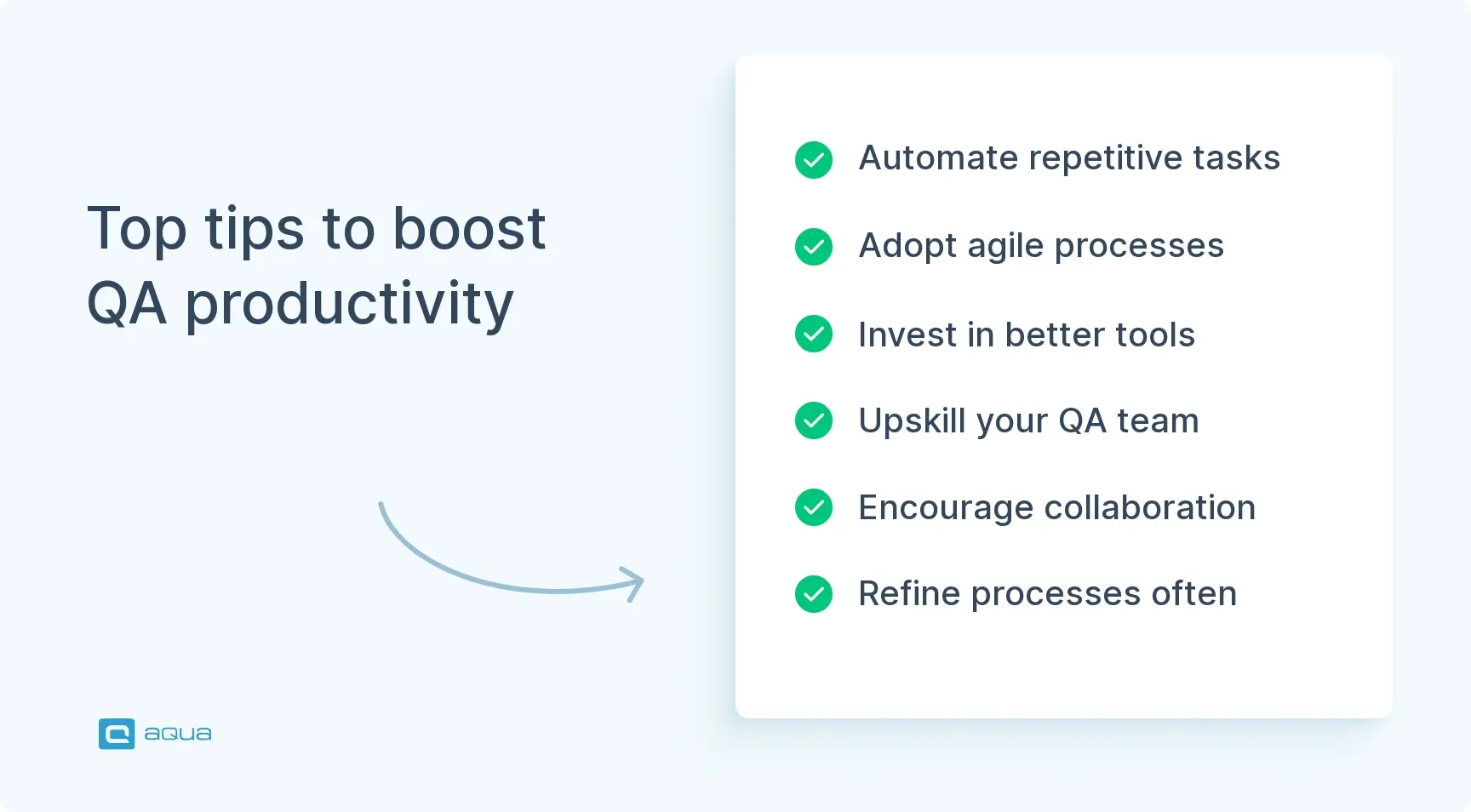
QA productivity can be increased by:
Automating repetitive tasks and test cases
Implementing agile methodologies and continuous testing
Investing in better testing tools and techniques
Cross-training and upskilling QA team members
Encouraging collaboration and communication within the team
Continuously reviewing and refining processes to eliminate waste and inefficiencies
Creating a culture of continuous improvement and learning
Enhancement of the aqua product is Martin’s main responsibility and biggest mission. His expertise covers ITIL Process Consulting, Change Management, Quality Assurance, Quality Management, and Requirements Management. Martin works in QA services for regulated industries for more than 18 years being an irreplaceable leader at…
Home » Best practices » Boost your QA team productivity with better meetings
Do you love testing as we do?
Join our community of enthusiastic experts! Get new posts from the aqua blog directly in your inbox. QA trends, community discussion overviews, insightful tips — you’ll love it!
We're committed to your privacy. Aqua uses the information you provide to us to contact you about our relevant content, products, and services. You may unsubscribe from these communications at any time. For more information, check out our Privacy policy.
X
🤖 Exciting new updates to aqua Intelligence are now available! 🎉