Mobile App Functional Testing: Types, Importance & Best Practices
Imagine a scenario where your mobile app looks flawless but still has performance drops and even failures in critical stages like checkout or form submission. Usually, it’s due to the lack of functional testing for mobile apps and [QA practices](https://aqua-cloud.io/10-best-practices-effective-test-management/) you might be failing to use. This guide covers what mobile functional testing actually is, as well as the specific defect patterns and practices and the role of Agile in it. It will also help you define your necessary QA changes and implement them successfully.
Mobile functional testing verifies app behavior across the full spectrum of mobile realities, including interruptions, permission changes, network drops, and screen rotations.
Device diversity significantly complicates mobile testing, with hundreds of device models, multiple OS versions, and varying hardware capabilities that all impact functional performance.
Mobile users are less forgiving than desktop users, with studies showing that functional failures during onboarding directly translate to uninstalls and wasted acquisition costs.
Effective mobile testing requires a layered approach combining smoke tests, regression testing, exploratory testing, usability testing, and localization testing to catch different defect types.
Most mobile app failures occur during state transitions. What real-world scenarios should your testing cover? Read the full guide below 👇
What is Mobile Functional Testing?
Mobile functional testing verifies that your application behaves according to business requirements and user expectations across the full spectrum of mobile realities. Screens must load correctly, controls must respond as intended, data must flow through the stack without corruption, and user journeys must complete without logical or state-related failures.
Beyond individual feature validation, mobile functional testing covers the full app lifecycle: launch sequences, background-to-foreground transitions, interrupted flows, push-triggered navigation, and offline-to-online recovery. Deep link routing, in-app permission handling, multi-step sign-ups, checkout flows, and state persistence after rotation all fall within scope too.
On mobile, the operating system, hardware, connectivity, and device posture directly influence functional outcomes. An app that works perfectly in a clean test environment can fail when a user receives a call during payment confirmation or resumes a partially completed form after a network switch. As a product owner or engineering lead, these are the gaps that show up in your app store reviews before your team ever spots them internally.
Key Components of Mobile App Functional Testing
User interface validation: Every screen, control, and input field must behave correctly under varying device configurations and user interactions.
State management verification: The app must maintain correct state across lifecycle events, orientation changes, and system interruptions.
Business logic confirmation: Core features, including registration, authentication, transactions, and data sync must deliver the right outcomes for valid, invalid, and edge-case inputs.
Integration testing: APIs, third-party services, backend systems, and external handoffs must return expected responses and handle errors gracefully.
Device compatibility checks: The app must work across supported OS versions, screen sizes, hardware capabilities, and OEM customizations.
Most functional defects live in non-linear behavior. Your test cases need to cover what happens when the user denies a previously granted permission, rotates mid-transaction, opens a deep link into a stale cache, or submits a form twice because the network lagged. That’s what your users will find if your team doesn’t find it first.
When it comes to orchestrating functionality testing, the right platform can make all the difference. aqua cloud, an AI-powered test and requirement management solution, helps you to tackle the unique challenges of mobile testing. From managing lifecycle transitions to tracking complex test matrices across devices and OS versions, everything should get covered. With aqua’s domain-trained actana AI, your team can generate mobile-specific test cases in seconds. The smart solution can handle easily-missed scenarios like interruptions, permission changes, and network variability. Teams using aqua report saving 12+ hours per week per tester while achieving greater test coverage. Another great thing about aqua is that with it, your developers, QA specialists, and product owners all work from the same source of truth, with end-to-end traceability from requirements to test execution. aqua integrates with Jira, Confluence, Selenium, Jenkins, JMeter, Ranorex, and 12+ other tools out of the box, via a REST API.
Boost functional testing effectiveness by 80% with actana AI
The Importance of Functional Testing for Mobile Applications
Skipping or rushing functional testing for mobile applications is expensive in ways that don’t always show up on a sprint burndown chart. When functional defects escape to production, the consequences are measurable and multi-layered, and they land squarely on your business metrics.
1. Lost revenue from broken transactions
A payment failure affecting even 2% of transactions at scale translates directly into lost revenue. Users who experience a failed purchase rarely try again, and as a business owner, that’s not a conversion problem you can fix with better marketing. They simply open a competitor’s app instead.
2. Wasted user acquisition spend
Mobile acquisition costs range from $3 to $10+ per install, depending on vertical and region. If a new user hits a validation error during sign-up, that spend is gone with nothing to show for it. Functional failures during onboarding turn paid installs into abandoned sessions, and your growth numbers take the hit.
3. App store rating damage
App store reviews are public, permanent, and recency-weighted. A wave of one-star reviews citing “app crashes during checkout” will depress your average rating and suppress organic discovery. As a C-level executive, consider the downstream effect: climbing back from a 3.2-star rating to 4.5+ can take months of sustained positive feedback, even after your team ships the fix.
4. Engineering velocity loss
When functional defects escape to production, your team spends cycles firefighting incidents instead of building features. Support handles repetitive tickets about known issues. Release velocity slows because everyone’s afraid to ship.
5. Compliance and legal exposure
Functional failures in consent flows, data deletion, or regional legal requirements (GDPR, CCPA, COPPA) create regulatory risk that extends well beyond a bad review. For organizations operating across multiple markets, this is an area your legal and compliance teams cannot afford to discover in production.
Illustrative Example: The Android 12 Cart Bug
Imagine your team ships an update that breaks cart recovery on Android 12 devices. The issue surfaces only when users background the app mid-checkout and return later, because cart state isn’t persisting correctly due to how Android 12 changed process death handling. Your test suite covered the checkout flow, but not the interrupted-checkout-after-backgrounding scenario. The bug hits 15% of your Android user base during a product launch week. Revenue drops, support tickets spike, and your team rushes a patch while trying to understand why existing tests missed it entirely.
Differences Between Mobile and Desktop Testing
Desktop testing assumes a stable environment: consistent input methods, reliable connectivity, predictable screen sizes, and an OS that largely stays out of the way. Mobile breaks every one of those assumptions. Your users tap, swipe, and voice-command their way through your app on devices with varying hardware and shrinking batteries. Operating systems can kill background processes without warning, connectivity drops mid-session, and calls interrupt purchases. The testing scope your team needs to cover is fundamentally wider than anything a desktop test plan accounts for.
Here’s the overview of key discrepancies between mobile and desktop testing:
Aspect
Desktop Testing
Mobile Testing
Input methods
Keyboard and mouse, predictable and precise
Touch, gestures, voice, external keyboards, variable and context-dependent
Drops mid-subway tunnel, switches between Wi-Fi and LTE, offline queues required
User tolerance
Higher, desktop users accept some friction
Near zero, mobile users uninstall when something doesn’t immediately work
Device fragmentation alone changes the testing equation dramatically for your QA team. Android spans hundreds of device models, multiple OS versions, OEM-specific customizations, varying RAM levels, and different chipsets. A flow that works on a flagship Samsung may break on a budget Xiaomi with limited memory. A feature behaving correctly on iOS 16 might fail on iOS 15 due to permission model changes, and your users on older devices will be the first to notice.
Touch interfaces introduce unique functional risks that have no desktop equivalent: gesture ambiguity (tap vs. long press vs. swipe), accidental touches, controls too small to hit reliably, keyboards obscuring part of the screen, and rotation resetting UI state mid-flow.
Network variability is another mobile-specific functional concern desktop tests rarely cover. Your app needs to handle partial data loads, retry logic, offline queues, and stale cache states without breaking core flows. On mobile, losing connectivity mid-request and recovering on a different network two minutes later is a normal Tuesday.
Types of Mobile Functional Testing
Mobile functional testing is a collection of focused testing types, each targeting different risk areas. Your team should layer these approaches strategically across the release cycle, using each type where it creates the most value.
Smoke Testing
Smoke testing is a fast, shallow validation that a build is stable enough for deeper testing. Think of it as the “does the app launch, log in, and complete one critical flow without crashing” check your team runs before investing time in full regression or exploratory work.
How it works:
Executes a minimal set of high-priority scenarios (app launch, core transaction, key integrations).
Runs on every new build, typically in under 15 minutes.
Acts as a binary gate: pass means proceed to deeper testing, fail means the build goes back to engineering.
Covers the most critical OS versions and one representative device per platform.
Input: New build delivered to QA.
Output: Pass/fail verdict on whether the build is stable enough to test further.
Regression Testing
Regression testing verifies that previously working functionality still works after code changes. On mobile, your team’s regression scope needs to include lifecycle handling and permission flows. Compatibility across the supported device matrix matters too.
How it works:
Covers all stable core user journeys and high-risk integration points.
Runs automatically on every commit or nightly build as part of CI/CD pipelines.
Detects when a change in one module inadvertently breaks backgrounding behavior, deep link routing, or state restoration in another area.
Alerts your team before broken builds reach QA, let alone production.
Input: Code changes (new features, bug fixes, refactors).
Output: Confirmation that existing functionality has not regressed, with a specific list of newly failing scenarios.
Exploratory Testing
Exploratory testing is structured improvisation: your testers investigate the app without rigid scripts, uncovering unexpected behaviors, edge cases, and scenarios that automated tests don’t cover.
How it works:
Testers investigate mobile-specific risks: OS prompt timing, background/resume inconsistencies, timing bugs, multi-app handoffs, and layout anomalies on uncommon devices.
Sessions are time-boxed (typically 60–90 minutes) with a defined focus area but no predefined steps.
Findings are logged as charters covering what was explored, what was found, and what was not covered.
Particularly effective at finding high-severity defects that would never appear in a scripted test suite, including the kind that reach your most vocal users first.
Input: A build, a focus area (e.g., “checkout flow under interruption”), and a skilled tester.
Output: Defect reports, edge-case documentation, and coverage gaps for follow-up automation.
Usability Testing
Usability testing confirms that the app is learnable, intuitive, and efficient for your target users. The goal is to ask whether real people can actually complete tasks without friction.
How it works:
Conducted with real users or representative testers, often during feature development or pre-release validation.
Evaluates navigation clarity, control discoverability, feedback loops, error messaging, and cognitive load.
On mobile, frequently uncovers functional issues disguised as UX problems, like a submit button positioned below the keyboard fold that becomes invisible during form entry.
Validates that functional correctness translates into actual user success.
Input: Representative users, task scenarios, and a testable build.
Output: User success/failure rates, friction points, and actionable findings that inform both UX and functional fixes.
Localization Testing
Localization Testing confirms that your app works correctly across different languages, regions, date formats, currencies, and cultural conventions. Translation is only part of it since functional behavior needs to adapt correctly to each locale too.
How it works:
Validates that form validation handles non-Latin characters, locale-specific number formats, and international phone number patterns.
Tests date pickers, currency displays, and right-to-left layout behavior for correctness in each supported locale.
Verifies that locale-specific legal requirements (GDPR consent flows in Europe, for example) function correctly in regional builds.
Checks that string expansions in translated languages don’t overflow UI containers or truncate critical labels.
Input: Localized builds and test accounts configured for each target locale.
Output: Functional defect reports tied to specific locale/language combinations, plus layout and validation issues unique to regional settings.
There's no universally good answer - it will always depend. Personally, I would group the scenarios into categories: Scenarios that take short/ long time to execute manually and can be automated with low effort, and those that take short/ long time to execute manually and can be automated with a lot of effort.
Common Issues Detected Through Mobile Functional Testing
Mobile functional testing surfaces a consistent set of defect patterns, many of which are unique to, or are amplified by, the mobile environment. Knowing what to look for helps you design better test cases and prioritize coverage where it matters most for your users.
1. UI and Layout Bugs
Controls cut off or inaccessible on certain screen sizes, buttons that don’t respond to touch in specific areas, text overflowing containers, or interactive elements overlapping and creating ambiguous tap targets. These are functional blockers. So, if your user can’t tap a button because it’s off-screen, the flow is broken regardless of how well the underlying logic works.
Solution: Explicitly test on low-end devices, large-screen/tablet configurations, and accessibility text sizes. Include split-screen and foldable modes in your device matrix. Validate layouts in both portrait and landscape orientations before every release.
2. Navigation and Routing Errors
Back buttons navigating to unexpected screens, deep links failing to route users to the correct in-app location, broken notification links, tab state not persisting across restarts, and navigation stacks corrupted after backgrounding.
Solution: Build a dedicated regression suite around all navigation entry points, e.g., deep links, push notifications, external app handoffs, and back-stack scenarios. Automate these checks to run on every build, as they are frequently broken by unrelated code changes your team makes elsewhere.
3. Input Validation Issues
Accepting invalid data formats, failing to enforce required fields, allowing boundary-value violations, providing misleading error messages, or breaking entirely for international input formats (non-Latin characters, international phone numbers, locale-specific dates).
Solution: Design validation test cases that explicitly cover locale variants, autofill behavior, voice input, and edge-value inputs. Test with accounts configured for multiple regions to catch format-specific failures before they reach your global users.
4. State Management Defects
These includes users seeing stale information after backgrounding and resuming or losing draft input after screen rotation. Such defects may also include submitting a transaction twice due to slow network handling or finding session state lost after the OS kills the app to reclaim memory.
Solution: Explicitly test all critical flows under interruption: rotate mid-form, background mid-checkout, kill and relaunch mid-session. Automate these scenarios as part of your regression suite since they are consistently missed by happy-path testing and tend to surface only when your users encounter them.
5. Permission and Capability Failures
Apps crashing when users revoke camera access mid-flow, features failing silently when location permissions are denied, or functionality assuming biometric hardware exists without checking first.
Solution: Test every permission-dependent feature in three states: permission granted, permission denied, and permission revoked after initial grant. Your app must detect permission state at runtime, request access contextually, and degrade gracefully when unavailable, so your users always have a clear path forward.
6. Offline and Network-Related Bugs
Infinite loading states when the network is unavailable, duplicate submissions from misfiring retry logic, failure to cache critical data for offline use, stale UI not refreshing when connectivity returns, and poor handling of partial data loads.
Solution: Include network-simulation scenarios in your test suite: complete offline, slow connection (2G throttling), mid-request drop, and reconnect after a switch from cellular to Wi-Fi. Verify that retry logic is idempotent and that your users receive clear, actionable offline messaging.
7. Integration Defects
Timeout handling failures, incorrect error mapping (showing a generic “something went wrong” instead of actionable guidance), optimistic UI updates not reconciled with actual server responses, and race conditions when multiple requests compete.
Solution: Test all API integrations against error states explicitly, e.g., 401 expired tokens, 503 service unavailable, slow response times, and partial payloads. Mock third-party services in your test environment to control error injection and avoid flaky tests caused by external API instability your team can’t control.
How to Perform Mobile App Functional Testing
Mobile functional testing done well means systematically validating that your core user journeys work correctly under realistic conditions.
Step 1: Define Critical Journeys and Scope
Identify the must-work flows that, if broken, constitute a launch blocker or revenue-threatening defect for your business. For most apps, this includes:
Prioritize based on business impact, user frequency, feature novelty, and historical defect density. A rarely used admin panel doesn’t need the same coverage depth as your checkout flow, and your team’s time is better spent where your users spend theirs.
Step 2: Build Your Device and OS Coverage Matrix
You can’t test on every device, but your team needs a rational coverage plan:
Include the oldest supported OS version and the latest major release for both iOS and Android.
Include at least one low-end device (limited RAM, older CPU) and one flagship device per platform.
Include tablet or large-screen configurations if your app targets those form factors.
Prioritize based on your actual user analytics
Real devices are non-negotiable for final validation, especially for hardware-dependent features like camera, biometrics, GPS, and push notifications. Cloud device farms extend coverage, but your team should maintain a curated set of physical devices for release gates.
Step 3: Design for Mobile-Specific Risks
Go beyond happy-path test cases and explicitly design scenarios around the conditions your users actually encounter:
Permission changes: Deny after previously granting, revoke mid-flow.
Network variability: Full offline, slow connection, network switch mid-request.
Lifecycle events: Rotate mid-form, kill and relaunch, resume after hours in background.
State transitions: Deep link into stale state, double-submit from slow network, navigate back through complex stack.
These are the scenarios where mobile apps fail most often, and they are rarely covered by generic functional test templates your team might inherit or adapt.
Step 4: Prepare Controlled Test Environments and Data
Set up test accounts representing different user states that reflect the real breadth of your user base:
New users, returning users with saved data, premium subscribers.
Use backend stubs or mock services to control external dependencies. Environments should be resettable between test runs since unreliable test data is the most common cause of flaky tests.
Use lower-layer tests (unit, integration, API) wherever business logic can be validated without spinning up the full UI. It’s faster, more stable, and easier for your team to maintain.
Step 6: Validate on Real Devices Before Release
Simulators and emulators are development tools, not release gates. Hardware behavior, system notifications, biometric flows, and network transitions all behave differently on actual devices. Test on the devices your users actually use, not the ones that happen to be convenient for your team.
Step 7: Track Metrics That Reflect Real Quality
Skip vanity metrics like “number of test cases executed” and focus on what actually tells you whether your users can complete critical journeys:
Defect leakage to production on core flows.
Escaped defects by device class and feature area.
Pass rate of release-gating scenarios.
Flaky test percentage (target: below 2%).
Device/OS coverage against your actual user base analytics.
These metrics give your team and your stakeholders a clear picture of release readiness, not just testing activity.
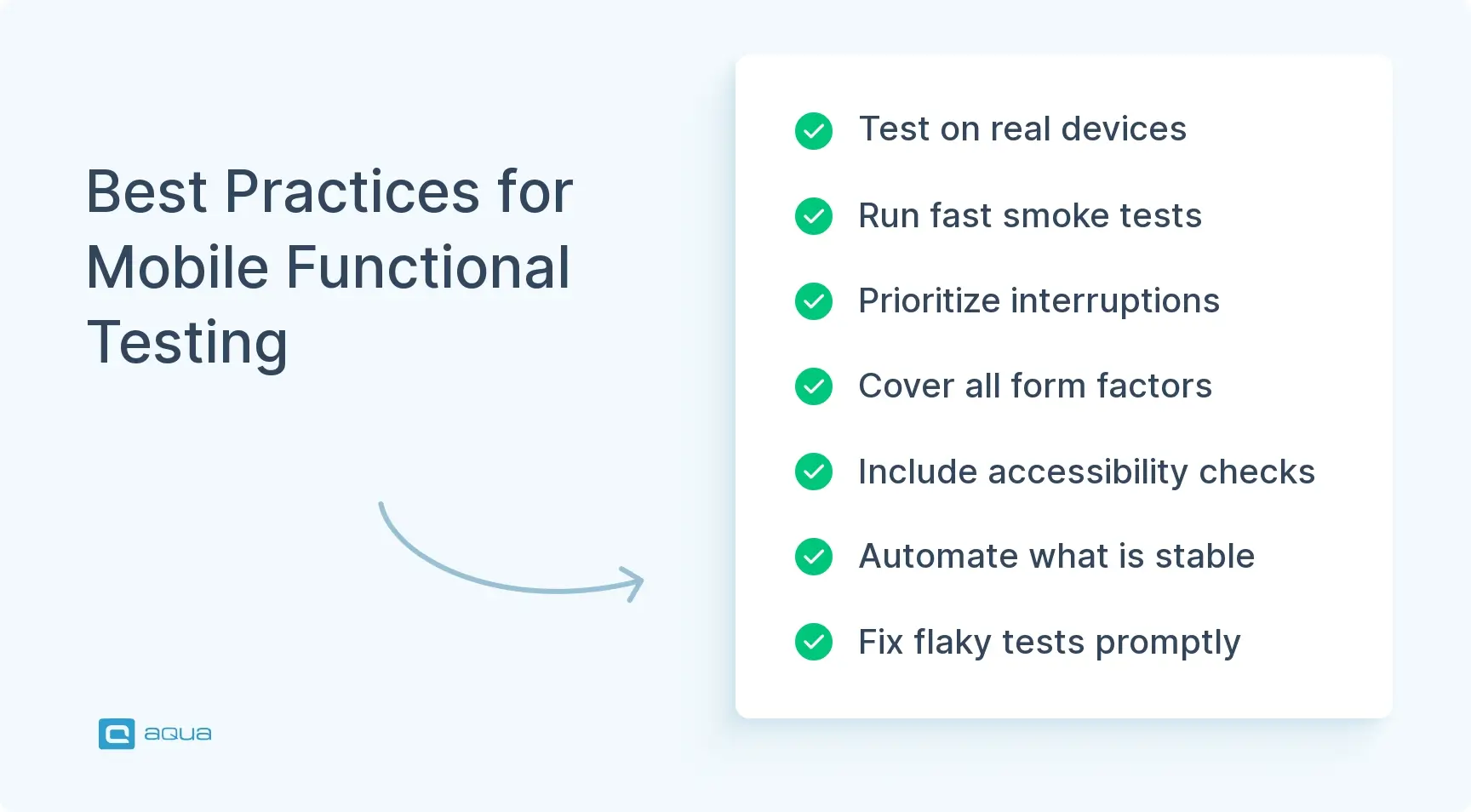
Best Practices for Effective Mobile Application Testing
Below are the best practices that separate high-performing mobile QA teams from those constantly firefighting production issues. As you evaluate your current process, consider which of these your team has fully adopted and where the gaps are.
Test on real devices for release validation. Simulators and emulators don’t replicate gesture accuracy, system notifications, biometric prompts, camera behavior, GPS, real network transitions, or thermal performance. Cloud device farms like Firebase Test Lab help your team scale coverage, but a core set of physical devices that mirror your actual user base remains essential for release confidence.
Make your smoke suite ruthless and fast. Smoke tests should prove shippability in under 15 minutes. If the build doesn’t pass smoke, it doesn’t proceed to deeper testing, period. This prevents broken builds from wasting your team’s QA cycles and keeps the pipeline moving.
Prioritize interruption and lifecycle testing. Explicitly test what happens when your users background the app during a critical flow, rotate mid-transaction, receive a call during checkout, lose connectivity mid-request, or return after the OS killed the app. These are normal mobile usage patterns, and your test suite should reflect that.
Design for all form factors. Tablets, foldables, split-screen modes, and landscape orientation create different functional realities for your users. Test adaptive layout behavior explicitly: does the UI respond correctly to mid-flow rotation? Does the app handle fold/unfold without losing state? Do controls remain accessible in split-screen mode?
Include accessibility-minded functional checks. Test with screen readers enabled, validate keyboard navigation, check that touch targets meet minimum size requirements, and verify that forms announce validation errors audibly. Accessibility defects often surface as functional blockers that affect a meaningful segment of your user base.
Build test logic at the lowest possible layer. Business rules, validation logic, and integration contracts don’t need a full UI journey every time. A healthy distribution for your team: 60–70% lower-layer tests (unit, integration, API), 20–30% focused UI automation, 10–20% manual exploratory and scenario-based testing.
Control your test environments and data deliberately. Flaky tests almost always trace back to uncontrolled environments or unstable test data. Use dedicated test accounts with predictable states, mock third-party services, and keep environments resettable between runs.
Triage flaky tests immediately. When a test flakes, fix the root cause, improve stability, or delete it if it’s not adding value. Tolerating a 10% flake rate creates compounding technical debt that slows your whole team down over time.
Align with platform-specific quality standards. Apple’s App Review Guidelines and Android’s large-screen quality guidelines include functional requirements that can block your release or suppress store visibility. Your test cases should account for these platform expectations, on top of your internal acceptance criteria.
Run exploratory sessions every release cycle. Automation confirms what you expect; exploratory testing finds what you don’t. Dedicate time each cycle to skilled testers on your team who explore mobile-specific risks without rigid scripts, because this is where high-severity edge cases surface before your users do.
Apply automated functional testing for mobile apps using tools that simulate real user interactions, network conditions, and device states. Automation dramatically increases your team’s regression coverage while cutting manual repetition, especially across multi-device matrices.
For hybrid apps and PWAs, add mobile web-specific scenarios that validate offline capabilities, responsive layouts, and touch interactions within the native wrapper context.
Return on investment will most of the time go down significantly around the 80% mark as you will have to code out all the special use cases and or overcome product/technical challenges with effort.
What is the Role of Functional Testing in Agile and DevOps Mobile App Practices?
Lastly, in Agile environments, including mobile development, a functional testing framework is embedded in every sprint, not saved for the end. Your team validates stories as they’re completed, writes test cases before code is written, and catches defects while they’re still cheap to fix. This keeps quality issues from accumulating into a pre-release crisis that lands on your desk the week before launch.
DevOps extends this by wiring functional testing directly into CI/CD pipelines. Every commit triggers a build, smoke tests run automatically, and regression packs execute nightly. If functional tests fail, the build doesn’t reach staging or production. Cloud device farms allow parallel execution that compresses suite runtime from hours to minutes, making thorough validation compatible with your team’s fast release schedules.
Effective mobile testing normally handles complex device matrices, scenarios around interruptions, state transitions, and more. That’s exactly why maintaining a healthy mix of automated and manual approaches across your team is essential here. aqua cloud, an AI-driven test and requirement management solution, brings all of this together in one platform. With aqua’s actana AI, your team can instantly generate test cases covering mobile-specific risks, from permission changes and network variability to device fragmentation and lifecycle management. Teams using aqua report up to 97% time savings in test creation while achieving more comprehensive coverage across mobile device matrices. aqua also has deep integrations to Jira, Confluence, Jenkins, Selenium, Ranorex, JMeter, and 12+ other tools out of the box, plus a REST API for other third-party connections.
Achieve 100% traceability and save up to 12.8 hours per tester per week
Mobile app functional testing proves your app works under the chaotic conditions of real-world mobile use: interrupted flows, permission changes, network drops, and OS-level interventions. The teams that ship reliably prioritize critical journeys, test on real devices, layer coverage intelligently, and treat functional validation as a continuous discipline. The cost of getting it wrong is lost revenue and frustrated users. Altogether, it far exceeds the investment required to do it right.
What is functional testing for mobile applications?
Functional testing for mobile applications verifies that every feature behaves according to business requirements under real-world conditions, including interruptions, permission changes, network variability, and lifecycle transitions. It goes beyond happy-path validation to confirm your app handles the full complexity of actual mobile device usage.
What is the mobile app testing process?
The mobile app testing process covers defining critical user journeys, building a device/OS coverage matrix, and designing mobile-specific test scenarios. From there, your team executes layered testing (smoke, regression, exploratory, usability), validates on real devices, and tracks quality metrics like defect leakage and release-gating pass rates.
What is a common testing method for mobile apps?
Regression testing is the most widely used method, ensuring that code changes don’t break previously working functionality. It’s typically automated and runs within CI/CD pipelines. Exploratory testing is equally critical for finding edge cases and mobile-specific defects that scripted tests miss, and the two methods are most effective when your team uses them together.
How can automated functional testing improve mobile app quality?
Automated functional testing provides fast, repeatable validation of core flows across multiple devices and OS versions simultaneously. It catches regressions within minutes of a code change, eliminates manual repetition on stable scenarios, and frees your testers to focus on high-value exploratory and scenario-based work that automation can’t cover.
What are the challenges of functional testing on different mobile devices and OS versions?
The primary challenges are device fragmentation (hundreds of hardware configurations) and OS version differences, where permission models, lifecycle handling, and UI behavior all vary. OEM customizations alter standard Android behavior further, and replicating real-world conditions like network transitions, thermal throttling, and system interruptions on emulators remains genuinely difficult.
Home » Test Automation » Mobile App Functional Testing: Types, Importance & Best Practices
Do you love testing as we do?
Join our community of enthusiastic experts! Get new posts from the aqua blog directly in your inbox. QA trends, community discussion overviews, insightful tips — you’ll love it!
We're committed to your privacy. Aqua uses the information you provide to us to contact you about our relevant content, products, and services. You may unsubscribe from these communications at any time. For more information, check out our Privacy policy.
X
🤖 Exciting new updates to aqua AI Assistant are now available! 🎉
We use cookies and third-party services that store or retrieve information on the end device of our visitors. This data is processed and used to optimize our website and continuously improve it. We require your consent fro the storage, retrieval, and processing of this data. You can revoke your consent at any time by clicking on a link in the bottom section of our website.
For more information, please see our Privacy Policy.
This website uses cookies to improve your experience while you navigate through the website. Out of these, the cookies that are categorized as necessary are stored on your browser as they are essential for the working of basic functionalities of the website. We also use third-party cookies that help us analyze and understand how you use this website. These cookies will be stored in your browser only with your consent. You also have the option to opt-out of these cookies. But opting out of some of these cookies may affect your browsing experience.
Necessary cookies are absolutely essential for the website to function properly. These cookies ensure basic functionalities and security features of the website, anonymously.
Cookie
Duration
Description
cookielawinfo-checkbox-analytics
11 months
This cookie is set by GDPR Cookie Consent plugin. The cookie is used to store the user consent for the cookies in the category "Analytics".
cookielawinfo-checkbox-functional
11 months
The cookie is set by GDPR cookie consent to record the user consent for the cookies in the category "Functional".
cookielawinfo-checkbox-necessary
11 months
This cookie is set by GDPR Cookie Consent plugin. The cookies is used to store the user consent for the cookies in the category "Necessary".
cookielawinfo-checkbox-others
11 months
This cookie is set by GDPR Cookie Consent plugin. The cookie is used to store the user consent for the cookies in the category "Other.
cookielawinfo-checkbox-performance
11 months
This cookie is set by GDPR Cookie Consent plugin. The cookie is used to store the user consent for the cookies in the category "Performance".
viewed_cookie_policy
11 months
The cookie is set by the GDPR Cookie Consent plugin and is used to store whether or not user has consented to the use of cookies. It does not store any personal data.
Functional cookies help to perform certain functionalities like sharing the content of the website on social media platforms, collect feedbacks, and other third-party features.
Performance cookies are used to understand and analyze the key performance indexes of the website which helps in delivering a better user experience for the visitors.
Analytical cookies are used to understand how visitors interact with the website. These cookies help provide information on metrics the number of visitors, bounce rate, traffic source, etc.
Advertisement cookies are used to provide visitors with relevant ads and marketing campaigns. These cookies track visitors across websites and collect information to provide customized ads.