Bug Priority & Severity Calculator: Free Tool for QA Testers
You are staring at a backlog packed with bugs. Some will stop your release cold. Others are annoying but survivable. A few are basically cosmetic. The question that actually matters: which ones do you fix first? This bug priority calculator takes the guesswork out of that decision. Put in what you know about the bug, get back a clear call on what needs attention now and what can wait.
Fill in the factors on the left to calculate bug priority
P?
—
—
Priority Score—
P4P3P2P1
Factor Breakdown
⏱
Recommended SLA
—
Recommended Actions
Copied!
Looking at a backlog full of bugs can feel overwhelming, especially when you’re trying to decide which ones need immediate attention. While our bug priority calculator offers a solid starting point, what if you had a complete system that not only helped prioritize bugs but also streamlined their entire lifecycle? aqua cloud’s defect management module transforms chaotic bug tracking into an advantage. With customizable workflows that enforce severity and priority assignments, you’ll always know which issues deserve your immediate attention. The visual bug reporting captures screenshots, videos, and system logs, giving developers everything they need to reproduce and fix issues faster. What’s more, aqua’s domain-trained AI Copilot can help generate test cases and documentation, reducing the manual workload while keeping everything in context with your specific project needs. Teams using aqua report up to 35% reduction in defect resolution time while maintaining full traceability between requirements, tests, and bugs.
Cut bug resolution time by 35% with intelligent prioritization and visual reporting
Start with severity. This is the technical side: how badly does the bug break things? Rate it based on actual impact, from critical issues like data loss or full crashes, down to minor cosmetic problems that do not affect functionality.
Then assess priority. This is the business side: how urgently does it need fixing given who it affects and when? A bug can be technically severe but low priority if it only hits a feature three people use once a quarter. Or it can be minor but urgent if it is sitting on your login page the day before a product launch.
Once you input both, the bug priority checker cross-references them and outputs a recommended action: fix now, schedule this sprint, or push to backlog. Every team member uses the same criteria, which is the point. No more debates about whether Bug #347 deserves immediate attention. The calculator runs the same logic every time.
Bug Severity vs Bug Priority: What is the Difference
Teams mix these up constantly, and it causes real problems.
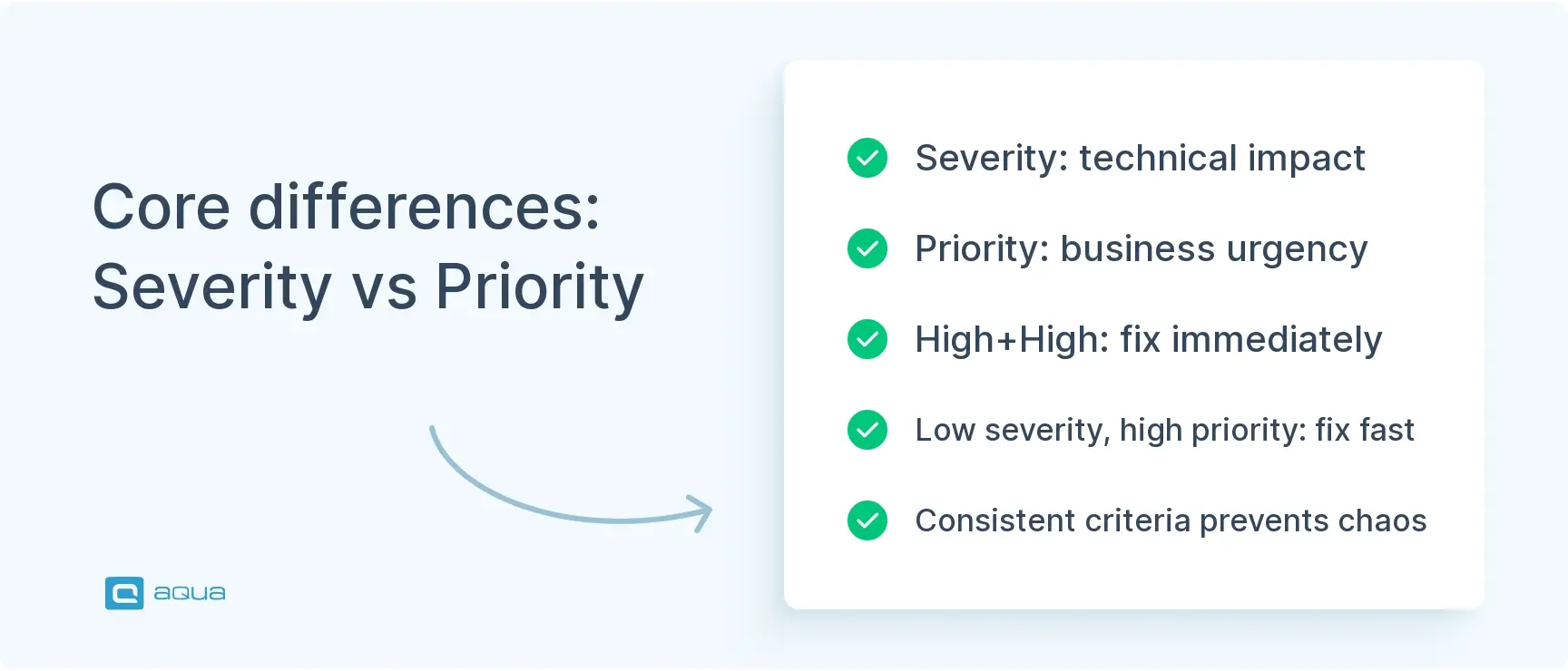
Bug severity is a technical measurement. It answers: how broken is this? Severity is assessed by QA engineers and developers who understand the system. A critical severity bug corrupts data or crashes the application. A minor severity bug is a typo in an error message. The bug severity checker gives you an objective read on the technical impact, independent of any business context.
Bug priority is a business decision. It answers: when do we fix this? Priority factors in user experience, market timing, customer commitments, and brand risk. A spelling mistake on your homepage during a major launch has low severity but will get fixed immediately because thousands of people are looking at it. A crash in a deprecated module used by three customers has high severity but might sit in the backlog for weeks.
The interplay between the two is where the real decisions happen:
High severity + high priority: Payment processing failure. Fix it now, today, full stop.
High severity + low priority: Crash in a rarely-used legacy report. Schedule it, but it is not an emergency.
Low severity + high priority: Typo on the homepage during launch week. Embarrassing enough to jump the queue.
Low severity + low priority: Misaligned icon in admin settings. Backlog, no rush.
Using a bug severity calculator alongside priority assessment keeps these categories clean and consistent across your team. For a deeper look at how this fits into the bigger picture, defect management strategies are worth building out alongside your triage process.
Why Bug Prioritization Actually Matters
Poor prioritization is expensive in ways that are easy to underestimate.
Fixing bugs post-release costs four to five times more than catching them during development. That number gets worse when developers are constantly pulled off planned work to patch production fires. Every unplanned interrupt costs roughly 23 minutes of productive time just to get back into flow. Multiply that across a team and you are bleeding hours every day without shipping anything meaningful.
The user impact is quieter but just as damaging. Most users do not report bugs. They just leave. When a bug that could have been caught earlier drives users away, no amount of post-release patching wins them back.
Teams that implement systematic bug triage with a reliable bug priority checker consistently report faster release cycles because they stop treating everything like an emergency. Developers get clearer priorities, less context-switching, and more time actually building. One common pattern: companies cut their post-release hotfix rate significantly just by adding structured priority assessment during sprint planning. Effective bug tracking tools make this sustainable at scale.
Common Pitfalls in Bug Prioritization
Treating everything as high priority. When there is no framework, gut instinct and whoever is loudest in standup drive the decisions. Developers learn quickly that priority labels are noise, not signal, and start ignoring them. The backlog becomes meaningless.
Ignoring user impact data. A technically severe bug hitting 0.5% of users in a monthly workflow should not automatically jump ahead of a moderate bug hitting 80% of users every day. Without data on who is actually affected, these calls get made blind.
Chasing easy wins. Knocking out cosmetic bugs feels productive because the tickets close fast. Meanwhile, the complex high-impact bugs sit untouched because they are intimidating. Short-term velocity, long-term quality erosion.
Misalignment between QA, dev, and product. When teams are not working from the same criteria, priority becomes political. Developers quietly re-prioritize based on what is interesting to work on. Product lobbies for their features. QA tries to hold the line. Everyone loses. Bug reporting standards and shared triage criteria fix most of this before it starts.
Skipping triage for small teams. It is tempting to think structured prioritization is only for large teams. It is not. Bug tracking for small teams benefits just as much from consistent criteria, maybe more, because there are fewer people to absorb the cost of bad decisions. Avoiding common pitfalls in QA management is easier when you build good habits early.
Conclusion
The difference between teams that ship clean software on time and teams that live in permanent firefighting mode usually comes down to one thing: how they prioritize bugs. A bug priority calculator gives you a consistent, objective system that the whole team can work from. Severity tells you the technical impact. Priority tells you the business urgency. Together they give you a backlog that is a strategic roadmap rather than a dumping ground. Use the data, make the call, move on.
Now that you understand the importance of systematic bug prioritization, it’s time to move beyond calculators to a comprehensive solution that transforms your entire quality assurance process. aqua cloud brings together everything you need for effective defect management: customizable severity and priority workflows, real-time dashboards that highlight bottlenecks, and seamless integrations with tools like Jira and Azure DevOps. With aqua’s end-to-end traceability, every defect links directly to its originating test case, eliminating those communication breakdowns that plague cross-functional teams. The visual bug reporting with aqua Capture ensures developers have all the context they need, while custom templates standardize reporting across your organization. And unlike basic bug tracking tools, aqua’s domain-trained AI Copilot learns from your project documentation to help generate test cases and identify potential issues before they become costly problems. Teams using aqua have reduced QA costs by up to 32% while shipping higher quality products faster. Stop playing “bug roulette” with your releases and start building a systematic approach to quality that scales with your organization.
Save 32% on QA costs while delivering higher quality releases with aqua cloud
Start by separating severity from priority. Use a bug severity checker to get an objective read on the technical impact first: does the bug crash the system, break a core feature, or is it cosmetic? Then layer in the business context. How many users does it affect? How often do they hit it? Is it blocking revenue, damaging brand trust, or sitting in a rarely-used corner of the product? When you calculate bug severity and cross-reference it with business impact, priority becomes a data-driven decision rather than a debate. A shared rubric that the whole team agrees on upfront is what makes this consistent sprint after sprint.
How to prioritize bug fixes?
To calculate bug priority, you need to first run every new bug through the same triage process. Check bug severity first, then assess business priority using consistent criteria: user impact, frequency, revenue risk, and timing. Bugs that are both high severity and high priority get fixed immediately. Mixed cases, high severity but low priority or the reverse, need a quick team discussion using the same bug priority calculator so the call is documented and visible. Schedule medium-priority bugs into upcoming sprints rather than leaving them in an ambiguous backlog. Anything low on both dimensions goes to the backlog with a clear label so it does not pretend to be urgent. The goal is a backlog that reflects real decisions, not accumulated avoidance. Pairing this process with solid defect management strategies keeps it sustainable as your product scales.
How can automation improve bug priority assessment?
Automation removes the inconsistency that comes from manual triage at scale. When you connect a bug priority calculator to your CI/CD pipeline, every new defect gets an initial severity score automatically based on predefined rules, error type, affected module, and test failure patterns. This gives your team a starting point rather than a blank slate, which speeds up triage meetings significantly. Automated tagging through effective bug tracking tools can also flag when a bug matches patterns from previously high-impact defects, surfacing priority signals that a manual review might miss. The human call still matters for business context, but automation handles the repetitive classification work so QA teams can focus on the edge cases that actually need judgment.
What factors influence changes in bug priority during a sprint?
Priority is not static. Several things can shift it mid-sprint. A new customer commitment or upcoming demo can elevate a low-priority bug overnight if it sits in a visible part of the product. User feedback and support ticket volume are strong signals: if a bug suddenly generates a spike in complaints, that is real data to reassess. Changes in release scope matter too. If a feature gets cut, bugs related to it may drop in priority immediately. On the technical side, a bug that seemed isolated can get elevated if a developer discovers it is connected to a deeper architectural issue. Running a quick check bug priority review at the start of each sprint, and again mid-sprint if significant changes happen, keeps your backlog honest. Good bug reporting practices make these reassessments faster because the context needed to make the call is already documented in the ticket.
Robert has several years of experience in process optimisation and test management. He is an expert in defining and implementing workflows by adapting aqua to the clients’ processes.
Nurlan, a QA Coordinator & Quality Standards Officer, takes pride in orchestrating seamless QA operations. His expertise in coordinating QA-focused projects and integrating QA solutions has consistently yielded top-tier client satisfaction. Aside from a full-time QA coordinator, Nurlan's role involves creating compelling content that educates…
Home » 'How to' guides » Bug Priority & Severity Calculator: Free Tool for QA Testers
Do you love testing as we do?
Join our community of enthusiastic experts! Get new posts from the aqua blog directly in your inbox. QA trends, community discussion overviews, insightful tips — you’ll love it!
We're committed to your privacy. Aqua uses the information you provide to us to contact you about our relevant content, products, and services. You may unsubscribe from these communications at any time. For more information, check out our Privacy policy.
X
🤖 Exciting new updates to aqua Intelligence are now available! 🎉