Quality Assurance is a nuanced and developing area that can’t be neglected. The more advanced and feature-rich your product is, the more potential points of failure you need to look out. Let’s look at some of the key test management pitfalls so that your product does not have to stare down at them.
QA teams that embed quality checks during feature planning reduce bug escape rates by nearly 50% compared to those who push testing to the final sprint.
Effective QA requires formal tracking systems where developers and testers can document, discuss, and trace the lifecycle of bugs in a centralized location.
The “Three Amigos” approach brings together product owners, developers, and QA specialists before coding begins to align on acceptance criteria and catch potential issues early.
AI-powered test management solutions can optimize test suites by prioritizing the most critical tests and generating new test cases faster than human testers.
Standardized naming conventions and test documentation processes are crucial for maintaining an organized test suite that new team members can easily navigate.
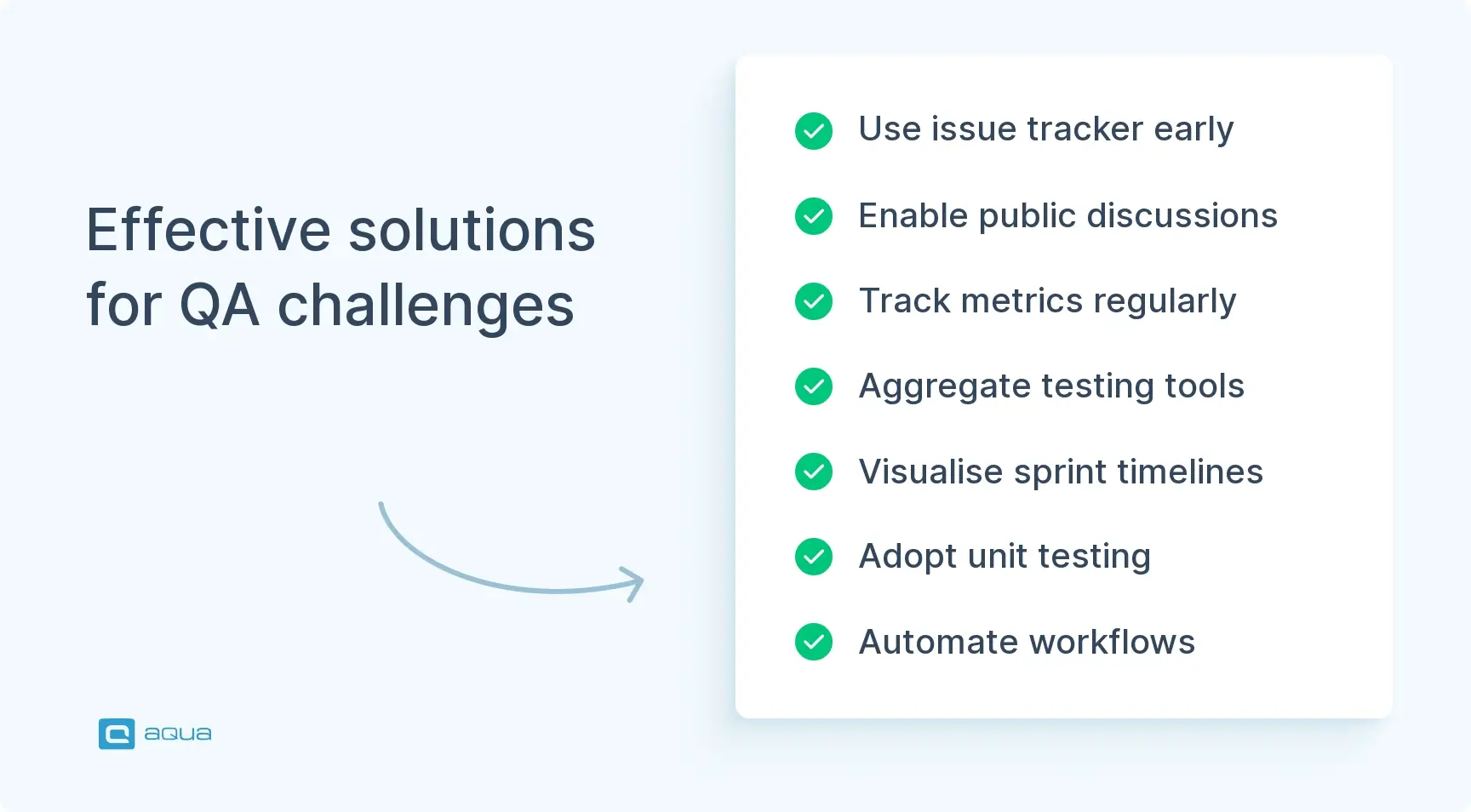
Quality Assurance often becomes an afterthought when deadlines loom, but the most effective teams make it part of their development DNA from day one. These quality management challenges rarely announce themselves early, but they’re simple to catch once you know where to look. Discover how to solve the ten most common QA management problems in the article below 👇
Signs Your QA Process Needs an Overhaul
A QA process rarely collapses overnight. It wears down through small workarounds that accumulate until a release ships broken or a customer reports something the team should have caught first. Left unaddressed, these problems with quality assurance carry a real cost: the Consortium for Information and Software Quality estimated that poor software quality drained $2.41 trillion from the US economy in a single year, with most of that tied up in unresolved technical debt.
Look for these patterns before they reach that stage:
Bugs resurface in features marked as tested. The pattern usually traces back to gaps in test documentation, not one-off oversights.
Developers and testers debug the same issue across multiple channels.Slack, email, and a ticketing tool each carry a piece of the conversation, with no single place to trace how it got resolved.
No one can say how long a QA cycle takes. Without that number, sprint planning turns into guesswork.
New hires need weeks to navigate the test suite. Inconsistent naming and duplicate test steps slow down anyone who wasn’t there when it was built.
QA only starts once development wraps up. Testing becomes a final gate that blocks releases late, often the root cause behind every pattern above.
None of this calls for a full rebuild. It calls for shared tracking, defined workflows, and metrics like deployment frequency and defect escape rate that show whether testing keeps pace with development.
Failing to know the state of your QA
Not knowing the state of your QA means bugs reach production before anyone catches them. But teams embedding quality checks during feature planning cut bug escape rates nearly in half. This shift from reactive testing to proactive risk-spotting transforms your entire delivery flow. They may literally lack dedicated people to find and report issues, and devs simply have to make sure that software runs at all. This often brings awkward workarounds that are not easy to pinpoint and resolve a few months later.
This video also covered additional QA management issues and the ways to solve them.
Even if you don’t have the resources to fix QA issues at the moment, you need to be aware of them. A few smaller issues may result in a severe defect, and now you can’t trace those smaller issues to do a quick fix. Onboarding QA specialists, once you have the resources, will be a bit frustrating and inefficient when they don’t know quite what to fix and/or which fixes to prioritise.
What you need here is to start listing defects early in an issue tracker solution. You may use a dedicated bug tracker or adopt an Application Lifecycle Management tool that works for both software development and quality assurance. The second approach is better if you pay for a development issue tracker or know that you will have to upgrade anyway.
Proven ALM that saves hours on both development and QA management
Developer and QA communication breaks down when bug details get lost between chats, calls, and tickets. Troubleshooting complex issues may require a dev and QA specialist to go over the same defect several times. This gets pretty chaotic if done on work messengers or, even worse, verbally.
Your best option here is to utilise the discussions functionality of the tool that you use for QA problem management. Public communication is how both the people involved and their colleagues can trace the lifecycle of the bug and pick up the mantle if needed. Opting for the issue tracker over company messenger will also help developers focus on non-QA tasks, then come back to a defect when they have the time.
Building Stronger QA–Developer Collaboration with 'Three Amigos' and Embedded Teams
Solid QA–developer collaboration catches bugs early and cuts down friction. Here’s a tactic that’s proven effective: the ‘Three Amigos’ meeting.
Before any coding starts, bring together the product owner, a developer, and a QA specialist to quickly align on acceptance criteria and edge cases, think 15 minutes, not an hour. Instead of treating QA as the final checkpoint, embed QA directly into your development squad. This shift makes quality everyone’s job from story kickoff through release.
Developers start writing better tests when they’re working alongside QA daily rather than throwing code over the wall. Start simple: try one ‘Three Amigos’ session this week for your next user story and watch how much clearer your requirements become.
I think one of the hardest parts of QA management in real projects is balancing quality with tight deadlines. Teams often need to test thoroughly while releases are happening quickly, which can create pressure.
You measure QA progress with metrics that show whether testing catches issues that matter, not everything at once. Did you improve the quality by squashing some UI bugs that didn’t affect functionality but were very noticeable? Was fixing a potentially critical issue a good way to apply the effort if the problem never occurred?
You need meaningful QA metrics that actually move the needle. Track deployment frequency, change failure rates, and defect escape rates. These three give you real visibility into whether your testing process supports rapid, quality releases. Companies using these focused metrics see quality improvements nearly double within months. You’ll spot bottlenecks fast and can adjust before small issues become release-blocking disasters. Find 11 more ideas in our separate article.
Most QA teams juggle several tools at once: one main issue tracker plus a handful of specialized testing solutions. Selenium or Selenium-based solutions are almost always used for automated testing, and then there are test type-specific tools like JMeter or Ranorex. Staying on top of test reports across several tools gets pretty hard.
Our recommendation is to pick an issue tracker that can aggregate input from test automation tools and other QA software. Native integrations with popular tools are convenient but scarce. Most vendors, however, will give you the option to integrate any QA tool via REST API. Ask (and try) before you buy.
Unclear timeline
A QA timeline turns unclear once testing has no defined milestones of its own, separate from development. It can, however, be frustrating for stakeholders to see that QA is taking longer than expected — simply because it is the last hurdle before release. This is how you brew frustration from missing a deadline or deploying an unpolished build, contributing to test management problems.
Formalising the QA timeline would be a great start, but it is even better to visualise it. A lot of modern test management solutions offer sprint planning that you can align with the developer’s schedule. Simplified planning is another advantage to adopt an ALM.
Managing Last-Minute Changes to Requirements
Last-minute requirement changes are routine, and they force QA teams into fast trade-offs on test coverage. But you can handle these curveballs without your team losing their minds. Start by setting expectations upfront. Make it crystal clear that late changes mean trade-offs in test coverage.
When changes hit, rank your tests by risk and business impact first. Skip the nice-to-haves and focus on what could actually break user workflows. Then tell stakeholders exactly what you’re NOT testing before anything goes live. Create a simple ‘change impact’ template that forces requesters to identify what they’re willing to sacrifice. Most people requesting changes haven’t thought through the real cost. Once they see it laid out, they often realise their ‘urgent’ change can actually wait until the next sprint.
Subpar pre-QA builds
Pre-QA builds turn subpar when developers skip basic checks before handing code to testers. There are cases when they may send obviously flawed code just to move on. This results in extra work for testers, and you also now have to think how to manage QA team’s frustration.
Unit testing is a great solution that will save everyone’s time. Devs can make simple tests to catch obvious flaws early and receive fewer bug reports from the QA team. Testers won’t have to nudge devs for simple fixes and have more time to go over less obvious potential problems.
Unactionable bug reports
A bug report becomes unactionable once it’s missing the steps, context, or evidence needed to reproduce the issue. New team members will need time to soak it in. Non-technical stakeholders or even external people with occasional problems will probably not abide either. Incomplete bug reports make your team spend extra time reproducing and solving issues.
The best way to make actionable bug reports is to visualise them. One emerging trend is using solutions that can record test execution of a test case or simply take a video of what happens on a user’s screen when they have an issue. We recommend trying a solution called Capture to get a glimpse of how great this tech is.
Long idle time
Devs make code, testers find bugs, devs fix them, testers look for more bugs… This is the usual QA flow until testers can’t find any issues that the product team would be uncomfortable to fix at a later stage. The problem is that devs can be waiting for testers’ response for too long (and vice versa).
The solution is simple: establish workflows that specify exact QA steps and how long they should ideally take. This will work much better if your test management solution allows you to configure such workflows natively and for example auto-nudge colleagues that are taking too long. It’s often okay that they do, but it’s a shame when somebody simply forgets about a ticket assigned to them.
Chaotic test suite
A test suite turns chaotic once naming, structure, and documentation vary from one tester to the next. It is hard for new team members to navigate tests that have inconsistent naming, while seemingly duplicate test steps are confusing if you want to reuse them somewhere else.
Getting a good naming convention would be a great start to tidy up your test suite. You can go on to define how test steps are created and what testers should write in the description of every test case. Test management solutions can help you here, but the key success factor here is good fundamentals from QA management.
Ever-growing scope
Scope keeps growing because every new feature and fix adds more tests to an already large suite. One full run of automated tests can still take up to an hour, and one time won’t be enough. At some point, there are just too many tests to test too many things.
A modern answer is artificial intelligence. You can use AI-powered test management solutions to optimise your existing test suite or enlarge it faster than human testers ever could. You will find such features in tools from both long-time and emerging vendors.
Proven ALM solution with AI test generation and prioritisation
Increasing QA team efficiency involves implementing automation to streamline repetitive tasks, providing ongoing training to enhance skills, establishing standardised processes for consistency, and fostering collaboration and communication among team members to ensure clarity and alignment on project objectives. These approaches optimise testing efforts and contribute to higher-quality software delivery and improved overall team productivity.
What are the challenges for a QA manager?
Challenges for a QA manager include:
Balancing manual and automated testing
Ensuring adequate test coverage
Integrating testing into Agile development processes
Managing limited resources (e.g. time, budget, personnel)
Staying up-to-date with new technologies and industry trends
Maintaining efficient test execution and reporting processes
Collaborating with development and business teams
How to manage a QA team?
To manage a QA team, a QA lead should:
Clearly communicate team goals and expectations
Assign tasks and responsibilities to team members
Provide training and development opportunities
Encourage collaboration and communication within the team
Enable friction-free partnership with developers
Establish metrics to measure team performance
Monitor progress and provide feedback regularly
Foster a culture of continuous improvement
Stay current with industry trends and best practices
What is the main purpose of QA management?
The main purpose of QA management is to ensure the delivery of high-quality software products that meet software requirements and customer expectations. This is achieved by planning, designing, and executing efficient and effective testing processes and procedures.
How do you know if your QA process is failing?
Watch for repeat bugs in areas marked as tested, growing friction between developers and testers, and releases slipping because QA starts too late. If your team can’t say how long a QA cycle takes, that’s a clear warning sign too.
What's the difference between a QA problem and a QA risk?
A QA problem is something already happening, like unclear bug reports or a chaotic test suite. A QA risk hasn’t occurred yet but could, like a last-minute requirement change breaking test coverage before release.
Robert has several years of experience in process optimisation and test management. He is an expert in defining and implementing workflows by adapting aqua to the clients’ processes.
EFL teacher turned content QA Specialist and talented writer, Denis has been working with European and American IT companies for 6 years. Denis has excelled in curating and implementing quality strategies tailored to the nuances of each project. Other than building processes and typing away,…
Home » Best practices » Top 10 QA management problems and their solution
Do you love testing as we do?
Join our community of enthusiastic experts! Get new posts from the aqua blog directly in your inbox. QA trends, community discussion overviews, insightful tips — you’ll love it!
We're committed to your privacy. Aqua uses the information you provide to us to contact you about our relevant content, products, and services. You may unsubscribe from these communications at any time. For more information, check out our Privacy policy.
X
🤖 Exciting new updates to aqua Intelligence are now available! 🎉