Is your team shipping code every sprint without knowing if it works for users as intended? Black box testing checks what your users actually see: buttons, forms, APIs, the complete front-facing experience, and more. With the right tools, you detect and fix inefficiencies like poor optimization or overcomplicated UI before they reach production. This guide covers what black box testing is, when you need it, and which tools deliver results.
Black box testing validates software functionality from the outside looking in, focusing on inputs and outputs without examining source code or internal logic.
Modern black box testing tools integrate with CI/CD pipelines through APIs and command-line interfaces.
Black box testing solutions need a management environment like aqua cloud for a more unified QA workflow.
Choosing between the 13 black box testing tools depends largely on your specific testing needs and team’s technical capabilities. Check out the detailed comparisons below 👇
What is Black Box Testing?
Black box testing validates software functionality from the outside looking in: testing inputs and outputs without examining source code or internal logic.
This approach focuses on what your application does, not how it does it. You feed specific inputs based on requirements and specifications, then verify the outputs match expectations. If a login form should accept valid credentials and reject invalid ones, black box testing confirms exactly that. Beyond that, the methodology mirrors real-world usage patterns because you’re simulating what actual users experience.
Key characteristics of black box testing:
No access to source code or internal application structure
Focus on functional requirements and user specifications
Tests based on expected behaviors and documented requirements
Validates external interfaces, APIs, user interactions, and system outputs
Independent of implementation details or programming language
Accessible to non-technical testers and business analysts
Illustrative example:
Consider an e-commerce checkout flow: you’re testing whether users can add items to their cart, apply discount codes, enter payment details, and receive order confirmations. Black box testing validates this entire journey without examining the payment processing algorithm or database queries running behind the scenes. If the flow breaks at any point, you’ve caught a bug that would’ve frustrated real customers. As a result, this methodology proves particularly valuable when testing third-party integrations or legacy systems.
Black Box Testing is what refers to the testing carried out without any poking the application artifact. And this testing is also called as api integration testing.
Black box testing shines during specific phases of your development lifecycle and organizational contexts. Understanding when to apply this methodology ensures you’re testing efficiently and catching the right issues at the right time.
Black box testing is ideal for:
E-commerce platforms validating checkout flows and payment processing
SaaS applications ensuring feature accessibility and correct behavior across user roles
Mobile apps testing user interactions and cross-device compatibility
Enterprise systems validating complex business workflows and integration points
Third-party integrations where source code access is unavailable
Regulated industries requiring independent validation and compliance testing
Legacy systems where internal code is poorly documented or difficult to access
After unit tests confirm individual components work in isolation, black box testing validates how those components work together from a user’s perspective. You’re checking whether the assembled pieces actually deliver the promised functionality. However, components passing unit tests don’t guarantee your integrated system works correctly, which is where black box testing becomes essential for your team.
Black box testing tools provide a significant window into the user experience of your application, but managing these tests can quickly become a logistical challenge. Yet, you still need a unified platform for all your QA efforts. This is where aqua cloud, an AI-driven test and requirement management platform, truly shines. It offers a comprehensive test management solution designed specifically for modern QA workflows. aqua’s domain-trained AI Copilot with RAG learns from your project’s documentation to generate deeply relevant, context-aware test scenarios. WIth aqua, you are free to apply techniques like boundary value analysis and equivalence partitioning automatically. Teams using aqua report saving up to 97% of their test creation time while achieving more comprehensive coverage than manual methods. The platform integrates with Jira, Azure DevOps, Jenkins, and 12+ other tools from your tech stack.
Key testing scenarios where black box approaches excel:
System testing: Once your developers integrate all modules, you need end-to-end validation ensuring the complete application behaves as specified. Black box techniques prove their worth here by testing entire workflows like user registration, data processing pipelines, multi-step business transactions, and cross-module interactions. In doing so, you’re confirming the system handles real-world scenarios rather than just theoretical component interactions.
Regression testing: When your developers push new features or bug fixes, you need confidence that existing functionality still works. Automated black box regression suites run through critical user paths, catching any accidental breakage. This becomes essential when release cycles compress because you can’t manually verify every feature before each deployment. Fortunately, automated black box testing tools handle it in minutes.
User acceptance testing (UAT): Before shipping to production, stakeholders and end users validate whether your application meets business requirements. They’re testing from their perspective as people trying to accomplish specific tasks, not as engineers. In this context, black box testing provides the framework for this validation without requiring technical expertise from business stakeholders.
API testing: You’re verifying endpoints return correct responses for given requests without caring about backend implementation. Does the /api/users endpoint return user data in the specified format? Does it handle authentication correctly? As it turns out, black box testing answers these questions by treating the API as a black box: send requests, validate responses, done.
Security testing: DAST (Dynamic Application Security Testing) shows black box testing at work. You’re probing applications from the outside, attempting SQL injection and cross-site scripting without source code access. Specifically, AI penetration testing tools simulate how actual attackers operate, making them ideal for identifying vulnerabilities users or malicious actors could exploit.
Top 13 Black Box Testing Tools
The right black box testing tool can transform your QA process from a bottleneck into a competitive advantage. Each tool below serves specific testing needs, from AI-powered automation to security scanning and performance testing. With that in mind, let’s explore the top solutions that help your team validate software functionality without touching source code.
1. aqua cloud
While not being a testing automation tool, aqua cloud delivers AI-powered test management built for modern teams. This platform combines test case management, automation, and collaboration features into a single workspace that is actually useful across the entire QA. Due to having your entire workflow centralized, you are not juggling multiple tools or struggling with clunky interfaces. With aqua, everything from requirements traceability to defect tracking is present in one place.
The AI assistant by aqua is another great feature of this solution. It can generate test cases from your requirements documentation and voice notes. More than that, it suggests edge cases you might’ve missed, and helps maintain test coverage as your application evolves. Think of it as having a QA expert assisting you in multiple ways, except this one operates 24/7 and processes tasks faster than any human could. Beyond that, the platform supports both manual and automated testing workflows, adapting to how your team actually works rather than forcing you into rigid processes.
Key features:
AI-powered test case generation from requirements
Centralized test management for all testing types
Real-time collaboration for distributed teams
Integration with Jira, Azure DevOps, Jenkins, and CI/CD platforms
Automated test execution triggering on code commits
Comprehensive traceability from requirements to defects
Customizable dashboards and analytics
For teams implementing black box testing strategies, aqua cloud is the central hub that brings everything together. While individual testing tools handle execution, whether that’s Selenium for web automation, Appium for mobile testing, or specialized security scanners, aqua cloud orchestrates the entire testing lifecycle. You’re managing test cases, tracking execution results, linking defects to requirements, and generating reports all from a unified platform. As a result, this eliminates the chaos of scattered test documentation and disconnected defect tracking that complicated workflow for many QA teams.
Testsigma provides no-code test creation using plain English. You write tests in natural language, and the AI translates your instructions into executable tests that run across web, mobile, and API endpoints.
Self-healing capabilities keep your tests running when developers rename elements or restructure pages. When a button’s ID changes, Testsigma recognizes it through visual cues and context. This makes Testsigma one of the best black box testing tools for teams prioritizing low maintenance overhead.
Key features:
Natural language test creation
AI-powered self-healing for reduced maintenance
Cross-platform support for web, mobile, and API
Cloud execution infrastructure with parallel testing
CI/CD pipeline integration
3. Selenium
Selenium is an open-source framework for web automation. This framework supports Java, Python, C#, JavaScript, and Ruby so you’re writing tests in whatever language your team already knows. The WebDriver architecture drives real browsers, meaning your tests interact with applications exactly like users do. Another great thing about Selenium is that it has a native integration with aqua cloud, described earlier in the list.
The large community surrounding Selenium provides documentation and solutions to common testing challenges. As a result, this community support helps teams address issues they encounter during implementation.
Key features:
Multi-language support including Java, Python, C#, JavaScript, and Ruby
Real browser automation via WebDriver
Cross-browser testing across Chrome, Firefox, Safari, and Edge
Selenium Grid for parallel execution
Integration with TestNG, JUnit, and pytest frameworks
4. Ranorex Studio
Ranorex Studio offers both no-code recording and script-based testing. The recorder captures user interactions and generates tests automatically. Behind the scenes, Ranorex generates C# or VB.NET code you can customize when recorder-generated tests need enhancement.
Desktop, web, and mobile application support covers multiple testing scenarios from a single platform. This versatility is important when your team tests across multiple apps without but still doesn’t want to have separate toolsets for each.
Key features:
Test recorder for automated test generation
Support for desktop, web, and mobile applications
Centralized object repository for maintenance
Built-in reporting with screenshots and logs
Enterprise features including version control integration
5. Appium
Appium provides mobile application testing by supporting both iOS and Android from a single framework. You write tests once using standard WebDriver protocols, then run them across platforms without platform-specific modifications.
The framework uses native automation frameworks: XCUITest for iOS and UIAutomator for Android. This means your tests interact with applications as native code would.
Key features:
Cross-platform mobile testing for iOS and Android
No app modifications required
Multi-language support including Java, Python, JavaScript, Ruby, and C#
Real device and emulator support
CI/CD pipeline integration for automated mobile testing
6. TestComplete
TestComplete provides desktop and web testing through both script-free recording and advanced scripting capabilities. The approach lets your team start with recorded tests then enhance them with code when needed.
AI-powered object recognition identifies UI elements when they change, reducing maintenance effort for your team. TestComplete uses visual recognition and contextual information to locate elements.
Key features:
Hybrid recording and scripting approach
AI-powered object recognition
Data-driven and keyword-driven testing frameworks
Visual regression testing with screenshot comparison
Support for desktop and web applications
7. IBM Rational Functional Tester (RFT)
IBM RFT provides enterprise-grade testing for Java, .NET, and web applications. The test recorder captures user interactions and generates scripts in Java or VB.NET, providing a foundation you can extend with custom logic.
Integration with the broader IBM engineering ecosystem creates an ALM solution for organizations already invested in IBM tools. For organizations in regulated industries, RFT provides audit trails and compliance reporting.
Key features:
Enterprise-grade testing for Java, .NET, and web apps
IBM ecosystem integration with Rational Team Concert and Quality Manager
Advanced data-driven testing capabilities
Detailed audit trails and compliance reporting
Role-based access control for large teams
8. Gremlin
Gremlin focuses on chaos engineering for microservices and distributed systems. Rather than testing whether individual components work correctly, Gremlin validates system resilience by intentionally injecting failures.
The platform integrates with Kubernetes, Docker, and major cloud providers for injecting failures into your containerized environments. You can target specific services or simulate cascading failures to measure system behavior under stress.
Key features:
Chaos engineering for distributed systems
Kubernetes, Docker, and cloud provider integration
Controlled experiments with safety guardrails
Network latency, server crash, and resource exhaustion simulation
Blast radius limits and automatic rollback conditions
9. StackHawk
StackHawk provides dynamic application security testing that integrates into your development workflow. The tool integrates into CI/CD pipelines and scans on every build.
The scanner crawls your applications, exercising functionality while probing for common vulnerabilities like SQL injection and cross-site scripting. Tests run without requiring source code access, making this one of the true black box penetration testing tools in action.
Key features:
Dynamic application security testing (DAST)
CI/CD pipeline integration for continuous scanning
Vulnerability detection without source code access
Results displayed in pull requests
Configuration as code for evolving security testing
10. Apache JMeter
JMeter handles performance and load testing for web applications, APIs, and various protocols. You’re simulating hundreds or thousands of concurrent users to measure how your applications perform under stress.
The protocol support extends beyond HTTP to include databases and message queues. You can test complete system performance including backend services, not just web frontends.
Key features:
Performance and load testing for web apps and APIs
Support for HTTP, databases, message queues, and FTP
User behavior modeling with thread groups
Distributed testing from multiple machines
Open-source and free
11. Burp Suite
Burp Suite provides web application security testing tools. The intercepting proxy sits between your browser and target applications, letting you manipulate requests, analyze responses, and identify security flaws.
The scanner probes for common vulnerabilities once you’ve mapped your application structure through manual exploration. Automated scanning works alongside manual testing with the proxy to uncover business logic flaws and complex vulnerabilities.
Key features:
Intercepting proxy for request and response manipulation
Automated vulnerability scanning for SQL injection, XSS, and OWASP Top 10
Customized fuzzing and brute-force attacks with Intruder
Community (free) and Professional (paid) editions
Used in penetration testing workflows
12. Reflect
Reflect uses AI for test automation. You describe tests in natural language, and the platform generates, executes, and maintains them. The self-healing engine adapts tests when your UI changes without human intervention.
The focus on behavior over implementation keeps your tests stable through UI changes. Reflect understands what tests are trying to accomplish and adjusts to UI changes.
Key features:
AI-powered test generation from natural language
Self-healing engine for automatic test adaptation
Visual testing with screenshot comparison
Cloud execution across browsers and viewports
Low-maintenance automation
13. Mobot
Mobot provides mobile testing using mechanical robots that interact with real devices. These robots tap, swipe, type, and perform other gestures on actual phones and tablets, catching issues that emulators and device farms miss.
The service operates as outsourced testing, meaning you’re not building and maintaining robot infrastructure yourself. You specify test scenarios, Mobot’s team configures robots, and you receive test results with video evidence of issues.
Key features:
Physical robot testing on real mobile devices
Gesture, sensor, and physical interaction validation
Outsourced testing service model
Coverage across diverse devices, OS versions, and configurations
Video evidence of test execution and issues
Most of my roles involved black box, manual testing, but these same techniques can be applied to the manual space, and often times are just as effective. (They are, however, never as comprehensive as an automated suite can truly be.)
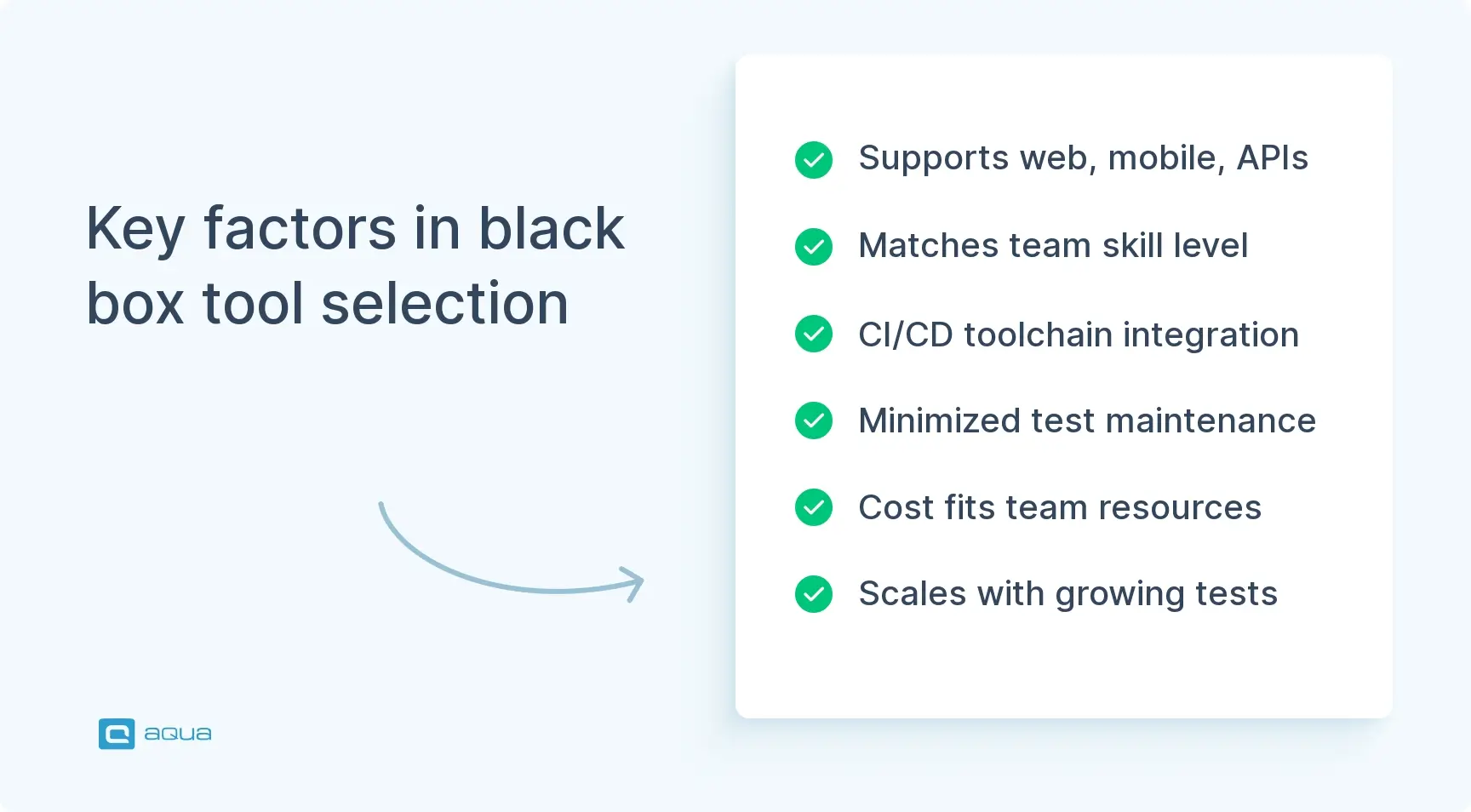
What to Pay Attention to When Choosing Black Box Testing Software
Selecting the right test automation software requires careful evaluation of how different solutions align with your specific needs. The wrong choice leads to wasted time and frustrated team members. Conversely, the right choice accelerates your testing efforts while fitting naturally into your existing workflows.
Consider these critical factors when evaluating tools used for black box testing:
Application coverage requirements: Does the tool support web, mobile, desktop, or API testing based on your application portfolio? Cross-platform support matters when you’re testing diverse application types. Beyond that, you need a tool that handles your current testing needs while scaling to future requirements as your application landscape evolves.
Team technical capabilities: Consider whether your team has programming expertise or needs no-code solutions. Tools requiring scripting skills won’t help teams lacking development resources. Conversely, overly simplified tools might limit what your experienced automation engineers can accomplish. The key point is matching tool complexity to your team’s actual skill level.
Integration with existing toolchain: Verify compatibility with your CI/CD pipeline and defect tracking system. Seamless integration prevents manual status updates and context switching. In reality, tools that don’t integrate well create information silos and slow down your entire development process.
Maintenance burden and self-healing capabilities: Evaluate how much effort maintaining tests requires as your applications evolve. Self-healing features significantly reduce ongoing maintenance costs. In particular, tests that break with every UI change consume resources better spent on new test creation and actual quality improvement.
Licensing costs and total cost of ownership: Factor in licensing fees, infrastructure costs, training expenses, and ongoing support costs. Open-source tools have lower licensing costs but may require more skilled resources. What’s crucial here is calculating the true cost including the time your team spends learning, implementing, and maintaining the solution.
Scalability to meet growth: Ensure the tool scales as your test suites grow and teams expand. Today’s 100 tests become tomorrow’s 10,000 tests, so plan accordingly. A tool that works well for small suites but chokes on large ones will become a bottleneck as your testing matures. This ties into your long-term testing strategy and growth projections.
As you evaluate which black box testing tools fit your specific needs, consider how a unified test management platform could transform your entire QA process. aqua cloud, an AI-powered tool for requirement and test management, brings together all aspects of testing. from test generation to execution tracking and comprehensive analytics. What truly sets aqua apart is its domain-trained AI Copilot that grounds every suggestion in your actual project documentation, making each generated test case remarkably precise and relevant to your specific application. Teams using aqua report not only 97% time savings in test creation but also achieving 100% requirements coverage and drastically reduced maintenance burden thanks to reusable test components and self-healing capabilities. With native integrations across Jira, Selenium, and multiple of your other dev tools, aqua eliminates context switching and keeps your entire team synchronized.
QA black box testing tools validate software from your user’s perspective without requiring source code access. Whether you’re choosing AI-powered platforms or specialized security tools, the goal remains constant: catching user-facing bugs before users encounter them. Ultimately, the right tool selection depends on your application types, team capabilities, and testing objectives. Start with tools matching your current needs, then evolve your testing approach as your applications grow and requirements shift. Investment in solid black box testing delivers clear returns through reduced production incidents, faster release cycles, and improved user satisfaction.
EN Validation Failed
Missing keywords (4): black box penetration testing tools | tools for black box testing | qa black box testing tools | black box tool
How do black box testing tools integrate with CI/CD pipelines?
Multiple tools serve different black box testing needs. Selenium dominates web automation and Appium leads mobile testing. For security testing, StackHawk and Burp Suite excel. Ultimately, the best choice depends on your application type and team skills.
What are black box testing techniques?
Key techniques include equivalence partitioning for testing representative values from input groups, boundary value analysis for testing partition edges, decision table testing for validating complex business logic, state transition testing for verifying system state changes, and use case testing for covering user workflows.
How do black box tools integrate with CI/CD pipelines?
Tools integrate through command-line interfaces or APIs that trigger tests automatically on code commits. Results flow back through standardized formats like JUnit XML. Failed tests halt deployments and notify developers, while successful runs allow automated deployment continuation.
What are common challenges when using black box testing tools and how to overcome them?
Flaky tests failing intermittently are the biggest challenge. Overcome this with explicit waits and retry logic. Test maintenance grows as UIs change, so address this through self-healing tools and centralized object repositories. Meanwhile, resource limitations constrain scope, which you can mitigate with low-code tools and prioritized high-value tests.
Join our community of enthusiastic experts! Get new posts from the aqua blog directly in your inbox. QA trends, community discussion overviews, insightful tips — you’ll love it!
We're committed to your privacy. Aqua uses the information you provide to us to contact you about our relevant content, products, and services. You may unsubscribe from these communications at any time. For more information, check out our Privacy policy.
X
🤖 Exciting new updates to aqua AI Assistant are now available! 🎉
We use cookies and third-party services that store or retrieve information on the end device of our visitors. This data is processed and used to optimize our website and continuously improve it. We require your consent fro the storage, retrieval, and processing of this data. You can revoke your consent at any time by clicking on a link in the bottom section of our website.
For more information, please see our Privacy Policy.
This website uses cookies to improve your experience while you navigate through the website. Out of these, the cookies that are categorized as necessary are stored on your browser as they are essential for the working of basic functionalities of the website. We also use third-party cookies that help us analyze and understand how you use this website. These cookies will be stored in your browser only with your consent. You also have the option to opt-out of these cookies. But opting out of some of these cookies may affect your browsing experience.
Necessary cookies are absolutely essential for the website to function properly. These cookies ensure basic functionalities and security features of the website, anonymously.
Cookie
Duration
Description
cookielawinfo-checkbox-analytics
11 months
This cookie is set by GDPR Cookie Consent plugin. The cookie is used to store the user consent for the cookies in the category "Analytics".
cookielawinfo-checkbox-functional
11 months
The cookie is set by GDPR cookie consent to record the user consent for the cookies in the category "Functional".
cookielawinfo-checkbox-necessary
11 months
This cookie is set by GDPR Cookie Consent plugin. The cookies is used to store the user consent for the cookies in the category "Necessary".
cookielawinfo-checkbox-others
11 months
This cookie is set by GDPR Cookie Consent plugin. The cookie is used to store the user consent for the cookies in the category "Other.
cookielawinfo-checkbox-performance
11 months
This cookie is set by GDPR Cookie Consent plugin. The cookie is used to store the user consent for the cookies in the category "Performance".
viewed_cookie_policy
11 months
The cookie is set by the GDPR Cookie Consent plugin and is used to store whether or not user has consented to the use of cookies. It does not store any personal data.
Functional cookies help to perform certain functionalities like sharing the content of the website on social media platforms, collect feedbacks, and other third-party features.
Performance cookies are used to understand and analyze the key performance indexes of the website which helps in delivering a better user experience for the visitors.
Analytical cookies are used to understand how visitors interact with the website. These cookies help provide information on metrics the number of visitors, bounce rate, traffic source, etc.
Advertisement cookies are used to provide visitors with relevant ads and marketing campaigns. These cookies track visitors across websites and collect information to provide customized ads.






 Bankingaqua ALM helps banks increase testing productivity by over 50%