Regression Testing Checklist: Step-by-Step Guide for QA Teams
You push a minor fix on a Tuesday. By Wednesday morning, users cannot log in. The fix was in the payment gateway. The login has nothing to do with the payment gateway. Except it does, somewhere, in a way nobody documented. That is the problem [regression testing](https://aqua-cloud.io/regression-testing/) exists to solve. Not with hope, but with a checklist that forces you to look beyond the obvious before every release.
Regression testing verifies that new code changes don’t break previously working functionality, serving as a safety net during bug fixes, feature additions, code refactoring, and infrastructure updates.
A regression testing checklist systematically identifies which tests to run based on code changes, ensuring consistent coverage across team members and preserving institutional knowledge about fragile components.
Effective regression strategies prioritize test cases by business impact, focusing on critical paths that would stop operations if broken, integration points between systems, and historically problematic modules.
The best approach combines automated regression tests for stable, repetitive functionality with targeted manual testing for high-risk areas and complex user scenarios.
Proportional testing response is key – matching testing intensity to the risk introduced by each change rather than testing everything with every update.
Without a structured regression testing approach, you’re essentially gambling with each deployment – that minor UI fix could silently break your payment system. Learn how to build a regression testing strategy that actually works for your team 👇
What Is Regression Testing
Regression testing is the practice of re-running tests on previously working functionality after code changes. The goal is catching side effects before users do.
You need it after bug fixes, feature additions, refactoring, infrastructure updates, and third-party integrations. A security patch in your authentication module should not break password resets. A new checkout step should not silently corrupt shipping calculations. A database query optimisation should not take down your audit log. These are not hypotheticals. They are the kind of incidents that regression testing exists to prevent.
The difference between teams that catch these issues internally and teams that find out from users is not luck. It is process.
You know how crucial it is to catch regression bugs before they reach production, but maintaining a comprehensive regression testing process can be time-consuming and prone to human error. This is where a modern test management system like aqua cloud transforms your approach. With aqua, you can centralize all your test assets in a single repository, making it easy to create reusable test components for your regression suite and ensure nothing critical falls through the cracks. The platform’s AI-powered test case generation capabilities, driven by aqua’s domain-trained Actana AI with RAG grounding, can automatically suggest regression test cases based on your requirements and existing documentation, saving your team countless hours of manual work while ensuring better coverage. Unlike generic AI tools, Actana AI understands your specific project context, creating test cases that speak your team’s language and address your application’s unique risk areas.
Save up to 97% of your testing time with a regression suite that truly understands your project
Why a Regression Testing Checklist Matters for Senior QA Teams
If you have been in QA long enough, you have experienced this: a tester runs regression on a build, marks it green, and something still breaks in production. Not because the tester was careless, but because there was no shared definition of what regression coverage actually means for that release.
A regression testing checklist solves three things that experience alone cannot.
Consistency across people. When your senior QA runs regression, it covers the same ground as when your newest hire does. Not because they have the same institutional knowledge, but because the checklist captures that knowledge explicitly.
Coverage of the non-obvious. Six months ago you discovered that updating the email template library broke notification preferences. Without a checklist, who remembers that connection when you are upgrading libraries again? The checklist does. It turns hard-learned lessons into permanent guardrails.
Audit trail. When something breaks in production, you need to know what was tested and what was not. A completed checklist is your evidence. An undocumented “we ran regression” is not.
Regression Testing Checklist Template
Use this as your starting structure. Adapt it to your stack, release cadence, and risk profile.
Pre-Regression Preparation
[ ] Identify all code changes in this release and document impacted modules
[ ] Review previous regression findings for affected areas
[ ] Confirm test environment matches production configuration
[ ] Verify test data is current and complete
[ ] Confirm all unit and integration tests are passing before regression begins
[ ] Identify which test cases are automated and which require manual execution
[ ] Assign ownership for each test area
Core Functionality
[ ] User authentication: login, logout, session management
[ ] Password reset and account recovery flows
[ ] User registration and email verification
[ ] Role-based access control for all permission levels
[ ] Core business workflows from start to finish
[ ] Data creation, editing, and deletion across primary entities
[ ] Search and filtering across all primary modules
[ ] Pagination and sorting behaviour
Integration Points
Integration points are where regression bugs hide most reliably. Cover every place two systems talk to each other.
[ ] API endpoints affected by code changes
[ ] Third-party service integrations (payment gateways, email providers, analytics)
[ ] Database transactions for modified queries or schema changes
[ ] Authentication cannot be bypassed on modified endpoints
[ ] Authorisation checks enforced for role-restricted features
[ ] Input validation present on all modified form fields
[ ] Sensitive data not exposed in API responses or logs
[ ] CSRF protection intact on modified forms
Data Integrity
[ ] Data migrations executed correctly with no record loss
[ ] Calculations and aggregations return correct results
[ ] Reporting and export functions produce accurate output
[ ] Audit logs capture all required actions
[ ] Cascading operations (delete, update) behave as expected
Post-Regression Sign-Off
[ ] All critical and high-priority test cases passed
[ ] Known failures documented with risk assessment
[tml] Automation suite updated to cover newly discovered scenarios
[ ] Regression findings logged and triaged
[ ] QA sign-off documented with coverage summary
How to Build a Regression Testing Strategy That Scales
Running every test on every build is not a strategy. It is a bottleneck. Senior QA teams think in tiers.
Tier one: run on every build. Your critical path. Authentication, core business workflows, payment processing, data integrity checks. If these break, the release does not ship. Automate as much of this tier as possible.
Tier two: run before every release. Important but not immediately critical functionality. Reporting, admin tools, secondary workflows, integration edge cases. These get full coverage before any release goes out.
Tier three: run on major releases or quarterly. Lower-risk areas, rarely-used features, legacy functionality with stable code. These still need coverage but not on every cycle.
The triggers matter as much as the tiers. A hotfix for a UI typo warrants smoke testing of the affected area plus its immediate dependencies. A database schema change demands full regression across every module touching that data. A third-party library upgrade needs regression across every integration point that library touches. Match testing intensity to the risk introduced by the change, not to a fixed schedule.
AI regression testing is changing how teams handle test selection at scale. Impact analysis tools that automatically identify which test cases are relevant to a given code change reduce the manual effort of tier assignment and keep coverage accurate as the codebase evolves.
Selecting Test Cases for Your Regression Suite
The quality of your regression suite comes down to selection criteria. More tests is not better. More relevant tests is better.
Start with historical failure data. Which modules break most often? Which integrations have caused production incidents? These earn permanent spots in your tier-one suite regardless of how stable they appear right now. Stability is temporary. Coverage is a policy.
Prioritise integration points over isolated units. Unit tests catch isolated logic failures. Regression tests catch the failures that happen when systems interact. Focus your regression coverage on API contracts, shared data models, and cross-module workflows. That is where the side effects live.
Cover error handling explicitly. Happy path tests are necessary but not sufficient. Your regression suite should verify that the application fails gracefully under bad input, missing dependencies, and unexpected states. These scenarios are often the first to break when code changes and the last to get tested.
Include performance baselines for modified areas. A query that runs in 50ms before a change and 800ms after is a regression even if it returns correct results. Performance regression is real regression and belongs in the checklist.
Good regression test suite management means reviewing and pruning your suite regularly. Tests that never fail and cover stable, unchanged code may be candidates for a lower tier. Tests that catch production-level issues deserve investment in reliability and maintenance.
Regression Testing in Agile Environments
In agile teams shipping every sprint, regression cannot be a phase. It has to be continuous.
The practical approach is a layered automation strategy. Fast automated smoke tests run on every commit. A broader automated regression suite runs on every build that passes smoke. Manual regression targets the high-risk, high-complexity areas that automation does not cover well, typically UI-heavy flows and exploratory validation of recent changes.
Sprint retrospectives should include regression findings. If the same module keeps generating regression failures, that is a signal about code quality or test coverage in that area, not just a testing problem. Regression testing in Agile works best when developers and QA treat regression findings as shared information rather than a handoff outcome.
Definition of Done should include regression sign-off for any story that modifies existing functionality. This is not bureaucracy. It is the difference between discovering a regression in the sprint it was introduced versus discovering it three sprints later when the trail has gone cold.
Common Regression Testing Mistakes Senior QAs Make
Even experienced teams fall into patterns that limit regression effectiveness.
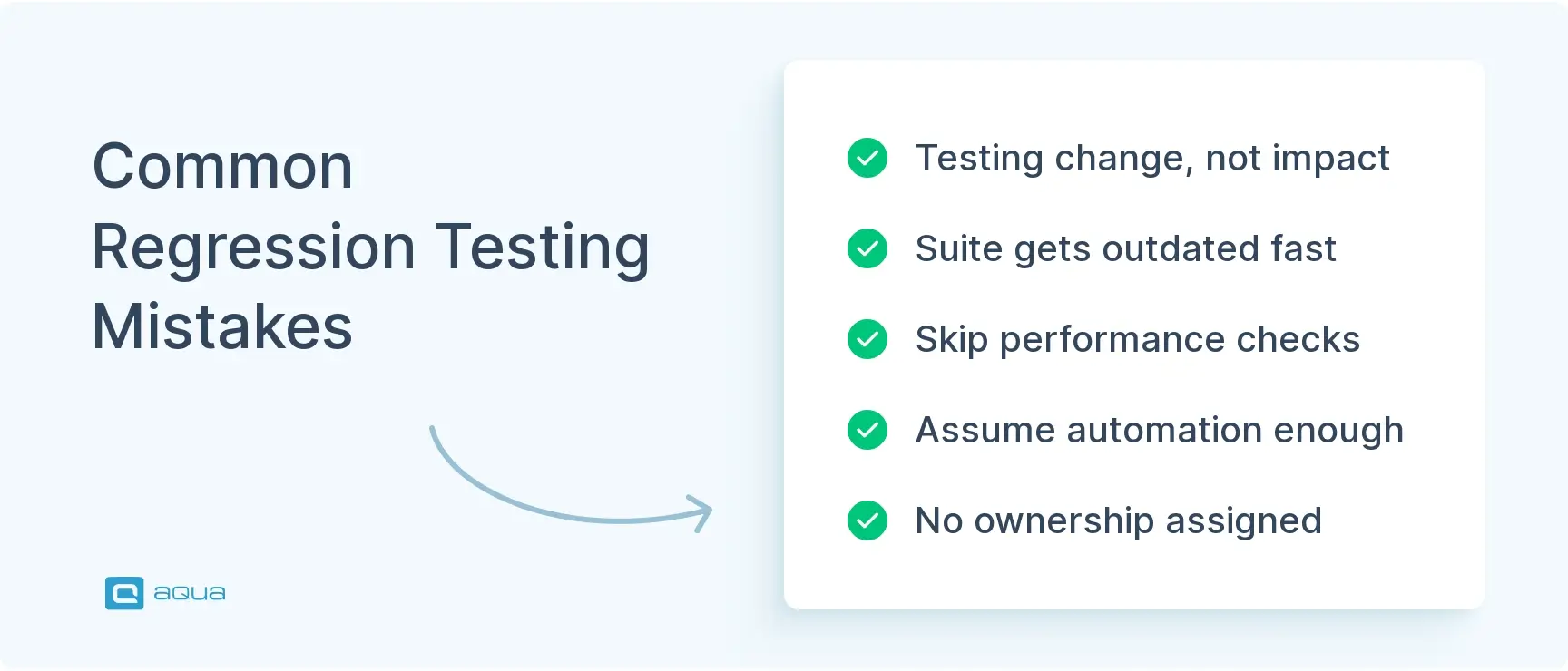
Testing the change, not the impact. The most common mistake. You fix a bug in module A and test module A. But module A shares a service with modules B and C. The regression checklist forces you to map impact, not just verify the fix.
Letting the suite go stale. A regression suite that has not been reviewed in six months is covering yesterday’s application. New features, deprecated flows, and changed business logic all need to be reflected in the checklist. Quarterly reviews at minimum.
Skipping performance regression. Functional correctness gets checked. Response time degradation does not. Build performance baselines into your checklist for any area with modified queries or data processing logic.
Treating automation coverage as regression coverage. Automated tests run. That does not mean they cover the right things. Review what your automated suite actually validates, not just what percentage of tests pass.
No ownership on checklist items. A checklist without named owners is a wishlist. Every item needs someone accountable for completing and signing off on it before the release gates close.
Building and maintaining an effective regression testing checklist is essential, but it’s only half the battle. The right test management platform can elevate your regression strategy from good to exceptional. aqua cloud offers everything you need to transform your regression testing process – from centralized test asset management and reusable test components to powerful integrations with Jira, CI/CD pipelines, and automation tools. With a unique domain-trained Actana AI, you can generate comprehensive regression test cases directly from your requirements and project documentation, ensuring they’re contextually relevant and aligned with your specific testing needs. The platform’s dynamic test scenarios reference core test cases without duplication, meaning you can update once and see changes everywhere. This approach to regression testing fundamentally improves quality while reducing the cognitive load on your team. And with customizable dashboards and automated reporting, you’ll always have visibility into your regression coverage, execution history, and emerging risk areas.
Achieve 100% regression coverage with AI-powered test management that adapts to your changing codebase
A regression testing checklist is not process overhead. It is your team’s shared memory of what breaks, what matters, and what needs verification before every release. Build it around your actual risk profile, keep it current, and make sign-off explicit. The teams that ship with confidence are not the ones running the most tests. They are the ones running the right tests, consistently, with clear ownership and documented outcomes. Start with the template here, adapt it to your stack, and update it every time production teaches you something new.
A regression testing checklist is a structured document that defines exactly what needs to be verified after code changes to confirm that previously working functionality still works. It covers the test cases to run, the modules to verify, the integration points to check, and the sign-off criteria that need to be met before a release moves forward. The difference between a regression testing checklist and a general test plan is specificity. The checklist is tied to your actual application, your actual risk areas, and your actual failure history. It is your team’s shared memory of what breaks and what needs to be checked every time something changes. Without it, regression coverage depends on whoever is running the tests that day and what they happen to remember.
What should be included in the regression testing checklist?
A solid regression test checklist covers seven areas. Core functionality including authentication, primary user workflows, and data operations. Integration points covering every place two systems communicate, API contracts, third-party services, and database transactions. UI and cross-browser behaviour for modified components. Performance baselines for areas with changed queries or data processing logic. Security checks confirming authorisation and input validation are intact on modified endpoints. Data integrity verification for calculations, exports, and audit logs. And a post-regression sign-off section with named owners and a documented coverage summary. The depth of each section should reflect your application’s risk profile. A regression testing checklist template is a starting point, not a final answer. Adapt it based on what has broken in production before and what your application’s most critical paths actually are.
How can automation be integrated into a regression testing checklist?
The most effective approach is a layered model. Fast automated smoke tests run on every commit and cover the most critical paths. A broader automated regression suite runs on every build that passes smoke and covers tier-one and tier-two functionality. Manual regression targets the areas automation handles poorly, typically complex UI flows, exploratory validation, and scenarios requiring human judgement. Your regression testing checklist should explicitly mark which items are automated, which are manual, and which need both. This prevents the assumption that a passing automated suite equals complete regression coverage. AI regression testing tools can also help with impact analysis, automatically identifying which test cases are relevant to a specific code change rather than running the full suite every time. For teams running regression testing in Agile sprints, automation integrated into the CI pipeline is what makes continuous regression practical without becoming a bottleneck.
What are common pitfalls to avoid when creating a regression testing checklist?
The most damaging pitfall is scoping the checklist to the change rather than its impact. A fix in module A that shares a service with modules B and C needs regression coverage across all three, not just the module that was touched. Second is letting the checklist go stale. A checklist that reflects how the application worked six months ago is actively misleading. Build a review cadence into your release process and update it whenever production incidents reveal uncovered areas. Third is treating checklist completion as binary. Items marked done with no documented outcome tell you nothing useful. Each section should capture what was tested, what passed, what failed, and what risk was accepted. Fourth is missing performance regression. Functional correctness gets verified. Response time degradation after a query change often does not. Include performance baselines for any area with modified data processing logic. Finally, avoid checklists without named owners. Every item needs someone accountable. Good regression test suite management depends on ownership being explicit, not assumed.
Home » 'How to' guides » Regression Testing Checklist: Step-by-Step Guide for QA Teams
Do you love testing as we do?
Join our community of enthusiastic experts! Get new posts from the aqua blog directly in your inbox. QA trends, community discussion overviews, insightful tips — you’ll love it!
We're committed to your privacy. Aqua uses the information you provide to us to contact you about our relevant content, products, and services. You may unsubscribe from these communications at any time. For more information, check out our Privacy policy.
X
🤖 Exciting new updates to aqua AI Assistant are now available! 🎉
We use cookies and third-party services that store or retrieve information on the end device of our visitors. This data is processed and used to optimize our website and continuously improve it. We require your consent fro the storage, retrieval, and processing of this data. You can revoke your consent at any time by clicking on a link in the bottom section of our website.
For more information, please see our Privacy Policy.
This website uses cookies to improve your experience while you navigate through the website. Out of these, the cookies that are categorized as necessary are stored on your browser as they are essential for the working of basic functionalities of the website. We also use third-party cookies that help us analyze and understand how you use this website. These cookies will be stored in your browser only with your consent. You also have the option to opt-out of these cookies. But opting out of some of these cookies may affect your browsing experience.
Necessary cookies are absolutely essential for the website to function properly. These cookies ensure basic functionalities and security features of the website, anonymously.
Cookie
Duration
Description
cookielawinfo-checkbox-analytics
11 months
This cookie is set by GDPR Cookie Consent plugin. The cookie is used to store the user consent for the cookies in the category "Analytics".
cookielawinfo-checkbox-functional
11 months
The cookie is set by GDPR cookie consent to record the user consent for the cookies in the category "Functional".
cookielawinfo-checkbox-necessary
11 months
This cookie is set by GDPR Cookie Consent plugin. The cookies is used to store the user consent for the cookies in the category "Necessary".
cookielawinfo-checkbox-others
11 months
This cookie is set by GDPR Cookie Consent plugin. The cookie is used to store the user consent for the cookies in the category "Other.
cookielawinfo-checkbox-performance
11 months
This cookie is set by GDPR Cookie Consent plugin. The cookie is used to store the user consent for the cookies in the category "Performance".
viewed_cookie_policy
11 months
The cookie is set by the GDPR Cookie Consent plugin and is used to store whether or not user has consented to the use of cookies. It does not store any personal data.
Functional cookies help to perform certain functionalities like sharing the content of the website on social media platforms, collect feedbacks, and other third-party features.
Performance cookies are used to understand and analyze the key performance indexes of the website which helps in delivering a better user experience for the visitors.
Analytical cookies are used to understand how visitors interact with the website. These cookies help provide information on metrics the number of visitors, bounce rate, traffic source, etc.
Advertisement cookies are used to provide visitors with relevant ads and marketing campaigns. These cookies track visitors across websites and collect information to provide customized ads.