Security Testing in Agile Environment: Ultimate Guide
You're shipping code faster than ever. Sprint cycles move at breakneck speed. Your product owner pushes features out the door. But in agile, security vulnerabilities don't care about your sprint velocity. This guide shows you how to build security into your agile process without turning sprints into a nightmare of bureaucracy.
You’re shipping code faster than ever. Sprint cycles move at breakneck speed. Your product owner pushes features out the door. But security vulnerabilities don’t care about your sprint velocity. This guide shows you how to build security into your agile process without turning sprints into a bureaucratic nightmare.
Importance of Security Testing in Agile Environment
Agile methodologies changed how we build software, but they also created a problem. When you’re shipping code every two weeks, security can’t be an afterthought tacked on at the end. Traditional security testing where a separate team swoops in after development wraps doesn’t work anymore. By the time they find something, you’ve already built three more features on top of that vulnerable foundation.
Security testing in agile projects shifts that mindset. Instead of waiting until the end, you catch issues while the code’s still fresh in everyone’s minds. Your developers haven’t moved on to five other stories. The context is right there. Fixes become faster and less painful. When security becomes everyone’s job, your entire crew gets sharper at spotting potential holes before they ship.
Security testing in agile project environments requires a proactive approach that integrates seamlessly with iterative development cycles. When implemented correctly, agile security testing becomes part of your team’s standard operating procedure.
Think about the cost of a breach versus the cost of prevention. A single security incident can tank your company’s reputation, trigger regulatory fines, and send customers running. Meanwhile, building security into your agile workflow prevents the accident before it happens. Here’s why it matters:
Risk mitigation at scale – Each sprint introduces new code. New code means new attack surfaces. Testing continuously means you’re not accumulating security debt that’ll bite you later.
Compliance made easy – Regulations like GDPR, HIPAA, or PCI-DSS aren’t going anywhere. Baking security testing into your sprints means you’re building audit trails as you go, not scrambling before an inspection.
Faster time to market – Finding bugs early is exponentially cheaper than finding them in production. You’re actually moving faster because you’re not backtracking to fix critical vulnerabilities.
Team ownership – When QA, developers, and security folks collaborate from day one, everyone becomes accountable. No more finger-pointing when something breaks.
Customer trust – Your users expect their data to be safe. Continuous security testing shows you’re serious about protecting what they’ve trusted you with.
You wouldn’t skip unit tests or code reviews. Don’t gamble with security. The agile approach to security creates an environment that evolves with your product, keeping pace with both your innovation and the threats trying to exploit it. Understanding current agile testing trends helps you stay ahead.
Security in agile is a strategic advantage when implemented correctly. While your team is dealing with sprint deadlines and feature requests, your security testing can’t afford to be an afterthought. This is where aqua cloud transforms your testing approach. By integrating security testing directly into your agile workflow, aqua provides a centralized platform where security requirements, test cases, and defects stay connected and visible throughout each sprint. With granular permissions and comprehensive audit trails, you maintain security while moving at agile speed. aqua’s domain-trained AI Copilot takes this further by automatically generating security test cases from your requirements, catching edge cases and vulnerabilities that manual authoring might miss, saving your team over 12 hours per week while improving coverage.
Accelerate security testing without sacrificing quality or compliance with aqua cloud
Agile teams are phenomenal at delivering features quickly, but that speed creates blind spots. When you’re racing through sprints, security gaps appear. These are the actual vulnerabilities that show up in retrospectives after someone’s already exploited them. Recognizing these patterns is half the battle.
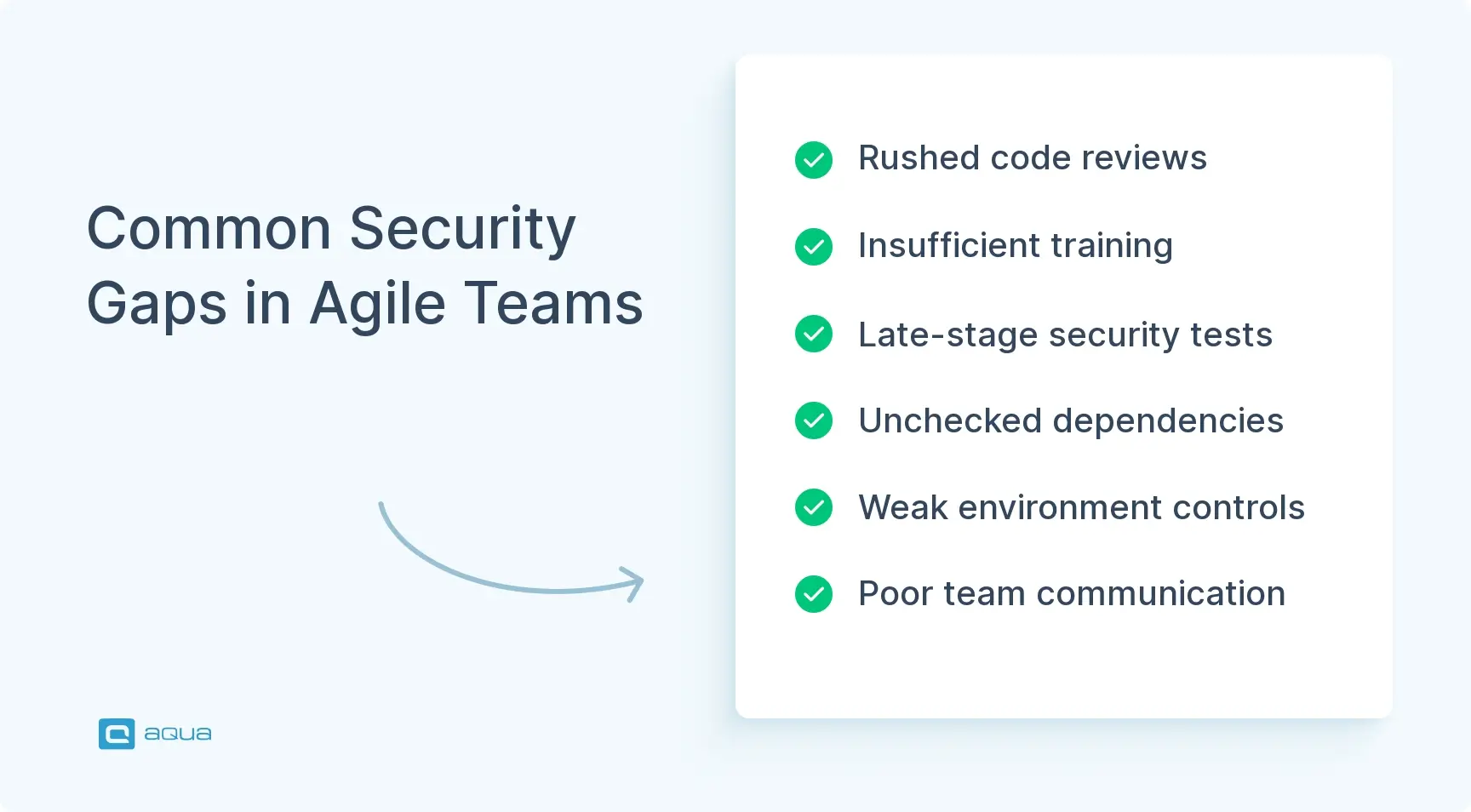
Speed without guardrails creates chaos. Most teams assume their code’s secure because nothing’s broken yet. That’s like assuming your house is burglar-proof because no one’s robbed it. Security weaknesses accumulate silently until they don’t. Here are the most common culprits:
Rushed code reviews – When you’re trying to close out a sprint, thorough security reviews get skipped. Developers merge pull requests with a quick glance. They miss injection flaws or authentication bypasses that’d be obvious with more scrutiny.
Insufficient security training – Your developers are builders, not security experts. Without proper training on secure coding practices, they write vulnerable code without even knowing it. SQL injection, XSS, and insecure API endpoints slip through because the team doesn’t know what to look for.
Late-stage testing – Even teams that do security testing often save it for the end of the sprint or worse, the end of the release cycle. By then, refactoring becomes a massive headache. Minor issues get labeled “known limitations” and kicked down the road.
Third-party dependencies – Your package.json or requirements.txt is basically a trust exercise with strangers on the internet. Teams pull in libraries without vetting them for known vulnerabilities. Suddenly you’re shipping someone else’s security nightmare.
Inconsistent environment security – Development environments are rarely as locked down as production. Hardcoded credentials, debug endpoints left active, and loose access controls in staging create easy entry points for attackers.
Communication breakdowns – Security teams and dev teams often speak different languages. When security folks raise concerns too late or in overly technical terms, developers tune out or deprioritize the fixes.
These gaps happen when you move fast without the right safety measures. Once you spot them, they’re fixable. Building awareness across your team about these common pitfalls is the first step toward closing the holes before they become headlines.
Key Security Testing Practices in Agile
Agile security testing requires cultivating habits that become part of your team’s DNA. The best practices are the ones your team actually uses every single sprint without having to think about it. When security becomes muscle memory, you’re genuinely protecting your product.
The shift from traditional security to agile security testing requires rethinking how, when, and who does the testing. Less comprehensive end-of-cycle penetration tests. More incremental, continuous validation. Your security posture improves sprint by sprint, feature by feature.
Shift-Left Security
Move security considerations to the earliest stages of development. During planning, design, and even user story creation. When your team discusses a new feature, security requirements should be part of the acceptance criteria. You avoid painting yourself into a corner where fixing security issues requires rebuilding entire features.
Threat Modeling in Sprints
Give your team a structured way to think like attackers. Before writing code, gather for a quick session where you sketch out what could go wrong with the feature you’re building. What data flows through it? Where might someone inject malicious input? Who should have access? These 30-minute conversations save weeks of rework later.
Automated Security Scanning
Integrate seamlessly into your CI/CD pipeline. Tools like static application security testing (SAST) and dynamic application security testing (DAST) run automatically with every build. They catch low-hanging fruit. Insecure configurations, known vulnerable dependencies, obvious injection points. Your pipeline fails the build if critical issues are detected. This forces immediate attention. Explore security testing with AI for more advanced automation approaches.
For startups in particular, agile security testing platforms startups can leverage offer a streamlined solution that fits limited budgets and technical resources. These platforms combine multiple testing types in user-friendly interfaces that don’t require a dedicated security team to operate.
Security Champions within Teams
Democratize security knowledge. Instead of relying on a distant security team, designate someone on each squad who has extra training. They serve as the go-to person for security questions. They bridge the gap, translating security concerns into actionable development tasks and keeping the team informed about emerging threats.
Regular Security Retrospectives
Bring security discussions into your existing agile ceremonies. During sprint retrospectives, don’t just talk about velocity and blockers. Discuss what security issues came up, what you learned, and how you’ll prevent similar problems next sprint. This creates a feedback loop where your team continuously improves their security awareness.
Collaborative Threat Response
When security issues are discovered, treat them as urgent bugs. Prioritize security vulnerabilities alongside feature work. Give them appropriate weight in sprint planning. A critical security flaw shouldn’t wait three sprints for a fix just because the backlog’s full.
These practices work because they respect how agile teams operate. They don’t require massive process overhauls or separate security sprints. They embed security into what you’re already doing. Protection becomes a natural outcome of your workflow.
Types of Security Testing in Agile
Security testing is a toolkit. Different types catch different classes of vulnerabilities. The smartest agile teams use a blend that fits their context. You wouldn’t use a hammer for every construction job. Don’t rely on a single testing approach to secure your application. Understanding what each type brings to the table helps you deploy the right technique at the right time.
In agile environments, these testing types need to be lightweight and repeatable. You’re integrating quick, focused checks that deliver immediate feedback. The goal is coverage without creating bottlenecks. Find issues while they’re still cheap to fix.
Static Application Security Testing (SAST) – Analyzes your source code without executing it. Scans for patterns that typically indicate vulnerabilities. Catches issues like hardcoded secrets, SQL injection opportunities, and insecure cryptographic implementations. SAST runs fast and fits perfectly in your build pipeline. Developers get instant feedback on their commits.
Dynamic Application Security Testing (DAST) – Tests your running application from the outside. Simulates how an attacker might probe for weaknesses. Identifies runtime issues like authentication flaws, session management problems, and server misconfigurations. DAST catches what SAST misses. Vulnerabilities that only appear when your code’s actually running.
Interactive Application Security Testing (IAST) – Combines elements of SAST and DAST. Uses agents embedded in your application to monitor behavior during testing. Provides real-time feedback with lower false positives. Ideal for agile teams that want accurate results without extensive manual verification.
Dependency Scanning – Your third-party libraries and frameworks can harbor known vulnerabilities. Dependency scanners check every package in your project against vulnerability databases. They alert you when you’re using components with published security issues. Non-negotiable given how much modern applications rely on external code.
Container and Infrastructure Scanning – If you’re deploying with containers or using infrastructure-as-code, these scanners check your Docker images, Kubernetes configs, and cloud setups for security misconfigurations. They catch things like exposed ports, excessive permissions, and unpatched base images.
Penetration Testing – While traditional pen testing is often too slow for agile cycles, focused sprint-level penetration tests on new features can be incredibly valuable. Have someone manually attempt to break what you’ve built. The ultimate reality check for whether your defenses hold up. Check out this penetration testing workflow guide for practical implementation tips.
Security Code Reviews – Peer reviews with a security lens let experienced eyes catch logic flaws and subtle vulnerabilities that automated tools miss. When done as part of your pull request process, they’re quick and highly effective at knowledge sharing.
Many agile security testing platforms combine several of these approaches in a single solution. This makes comprehensive security testing more accessible without requiring specialized expertise in each methodology. Teams can leverage AI for penetration testing to augment their existing security efforts.
Each of these testing types serves a purpose. The strongest agile security testing strategy layers them together. Automated tools handle the repetitive scanning. Human expertise focuses on the nuanced, context-specific threats. This combination ensures you’re actually making your application harder to compromise.
Integrating Security Testing into Agile Workflow
Integration is where theory meets reality. You can have the best security tools and intentions. But if they don’t fit smoothly into how your team actually works, they’ll get ignored or worked around. Make security testing so frictionless that it becomes invisible. Something that just happens as part of building software.
Your agile workflow already has established rhythms. Sprint planning, daily standups, development, code reviews, CI/CD pipelines, and retrospectives. Security testing needs to slot into these existing practices without disrupting flow. When done right, your team will just see it as how you build things.
Sprint planning integration – During planning sessions, include security acceptance criteria for user stories. If you’re building a new login feature, explicitly state requirements like “passwords must meet complexity standards” or “implement rate limiting on login attempts.” This makes security non-negotiable from the start.
CI/CD pipeline automation – Embed automated security scans directly into your continuous integration pipeline. Every commit triggers SAST scans, dependency checks, and unit tests that include security test cases. Failed security checks should break the build just like failed unit tests do. This forces immediate attention rather than creating backlog debt.
Pull request checkpoints – Configure your repository to require security tool approvals before merging. When a developer opens a PR, automated scans run and flag issues right in the code review interface. Reviewers can see security findings alongside code quality feedback. Security becomes part of the standard review conversation.
Environment hardening – Ensure all environments follow security baselines. Dev, staging, and production. Use infrastructure-as-code to enforce consistent configurations. This prevents the common problem where code works fine in production but has security holes in development that never got caught.
Regular security sync-ups – Add a five-minute security check-in to your weekly team meetings. Discuss any security findings from the previous week. Share lessons learned. Raise concerns about upcoming features. Keeping security visible in regular conversations prevents it from becoming someone else’s problem.
Automated reporting and dashboards – Use dashboards that show security metrics alongside other engineering metrics. Track trends like time-to-fix for vulnerabilities, number of issues found per sprint, and security test coverage. Visibility drives accountability and helps teams celebrate improvements.
The secret to successful integration is remembering that your team’s time is precious. Tools that generate massive false-positive reports or require constant manual triage will get abandoned. Choose solutions that provide clear, actionable feedback. Fit naturally into tools your team already uses. IDEs, GitHub/GitLab, Slack, or JIRA. When security testing feels like a helpful teammate, adoption becomes effortless.
Conclusion
Security testing in agile environments makes speed and safety work together. The teams that get this right have built systems where security checks happen automatically, feedback arrives instantly, and fixing issues becomes part of normal development. You’re embedding protection into the steps you’re already taking. When you see security as a shared responsibility woven into daily work, your sprints get faster, and your code gets stronger. Say no to these 2 a.m. security incident calls and step into a safe agile sprint with the principles mentioned above.
As we’ve seen, effective security testing in agile environments requires seamless integration into existing workflows, comprehensive traceability, and the right tools to keep pace with rapid development cycles. aqua cloud offers exactly this combination: a complete test management platform designed specifically for agile teams tackling security challenges. With its AI Copilot powered by project-specific RAG grounding, aqua transforms your requirements into comprehensive test cases that speak your project’s language, automatically identifying potential security gaps and edge cases. Teams using aqua report saving over 12 hours per week while achieving up to 100% requirement coverage. Deep integration with tools like Jira and Azure DevOps ensures your security testing stays synchronized with development, while ISO 27001 certification and flexible deployment options satisfy even the strictest compliance needs. Why struggle with disconnected tools when you can have a unified platform that makes security testing a natural part of your agile process?
Achieve 100% security requirement coverage with context-aware AI and seamless agile integration
What is the best approach to security testing in agile?
The best approach combines shift-left practices, automation, and collaboration. Start by building security requirements into user stories during sprint planning. Automate repetitive testing through your CI/CD pipeline using SAST, DAST, and dependency scanning tools. Designate security champions on each team to bridge knowledge gaps. Run threat modeling sessions before building new features, and treat security vulnerabilities with the same urgency as critical bugs. The key is making security continuous rather than episodic, integrating it so seamlessly that it doesn’t slow down delivery.
How can automated tools be integrated into agile security testing workflows?
Automated security tools integrate most effectively through your CI/CD pipeline and development tools. Configure your pipeline to run security scans on every commit – SAST for code analysis, dependency scanners for vulnerable libraries, and DAST for runtime testing. Connect these tools to your pull request process so findings appear directly in code reviews. Use IDE plugins that flag security issues while developers write code, catching problems before they’re even committed. Set up dashboards that aggregate results and track trends across sprints. The goal is zero-friction automation that delivers actionable feedback at the exact moment developers can most easily fix issues.
What are common challenges when implementing security testing in agile environments?
The biggest challenges are cultural and organizational, not technical. Teams often resist slowing down for security, viewing it as someone else’s job. Security tools can generate overwhelming numbers of false positives, leading to alert fatigue and tools getting disabled. There’s frequently a skills gap – developers aren’t trained in security, and security professionals don’t understand agile workflows. Budget constraints mean teams lack proper tooling or dedicated security resources. Integration issues arise when security testing doesn’t fit existing workflows, creating friction. Overcoming these requires executive buy-in, proper training, carefully selected tools with low false-positive rates, and making security everyone’s responsibility rather than just the security team’s burden.
Home » Best practices » Security Testing in Agile Environment: Ultimate Guide
Do you love testing as we do?
Join our community of enthusiastic experts! Get new posts from the aqua blog directly in your inbox. QA trends, community discussion overviews, insightful tips — you’ll love it!
We're committed to your privacy. Aqua uses the information you provide to us to contact you about our relevant content, products, and services. You may unsubscribe from these communications at any time. For more information, check out our Privacy policy.
X
🤖 Exciting new updates to aqua AI Assistant are now available! 🎉
We use cookies and third-party services that store or retrieve information on the end device of our visitors. This data is processed and used to optimize our website and continuously improve it. We require your consent fro the storage, retrieval, and processing of this data. You can revoke your consent at any time by clicking on a link in the bottom section of our website.
For more information, please see our Privacy Policy.
This website uses cookies to improve your experience while you navigate through the website. Out of these, the cookies that are categorized as necessary are stored on your browser as they are essential for the working of basic functionalities of the website. We also use third-party cookies that help us analyze and understand how you use this website. These cookies will be stored in your browser only with your consent. You also have the option to opt-out of these cookies. But opting out of some of these cookies may affect your browsing experience.
Necessary cookies are absolutely essential for the website to function properly. These cookies ensure basic functionalities and security features of the website, anonymously.
Cookie
Duration
Description
cookielawinfo-checkbox-analytics
11 months
This cookie is set by GDPR Cookie Consent plugin. The cookie is used to store the user consent for the cookies in the category "Analytics".
cookielawinfo-checkbox-functional
11 months
The cookie is set by GDPR cookie consent to record the user consent for the cookies in the category "Functional".
cookielawinfo-checkbox-necessary
11 months
This cookie is set by GDPR Cookie Consent plugin. The cookies is used to store the user consent for the cookies in the category "Necessary".
cookielawinfo-checkbox-others
11 months
This cookie is set by GDPR Cookie Consent plugin. The cookie is used to store the user consent for the cookies in the category "Other.
cookielawinfo-checkbox-performance
11 months
This cookie is set by GDPR Cookie Consent plugin. The cookie is used to store the user consent for the cookies in the category "Performance".
viewed_cookie_policy
11 months
The cookie is set by the GDPR Cookie Consent plugin and is used to store whether or not user has consented to the use of cookies. It does not store any personal data.
Functional cookies help to perform certain functionalities like sharing the content of the website on social media platforms, collect feedbacks, and other third-party features.
Performance cookies are used to understand and analyze the key performance indexes of the website which helps in delivering a better user experience for the visitors.
Analytical cookies are used to understand how visitors interact with the website. These cookies help provide information on metrics the number of visitors, bounce rate, traffic source, etc.
Advertisement cookies are used to provide visitors with relevant ads and marketing campaigns. These cookies track visitors across websites and collect information to provide customized ads.






 Bankingaqua ALM helps banks increase testing productivity by over 50%