System Testing: Types, Process, and Best Practices for QA Teams
Your team takes responsibility and signs off on components. But signing off on the product? A different story. Checkout still breaks in production after every unit test passed, usually over a schema change or a service configured differently in staging than in production. Release delays and emergency patches follow, and they reach your quarterly commitments long before anyone files a defect. Below is what system testing covers, which types apply to your product, how the process runs, and which tools support it.
System testing evaluates your fully integrated application end-to-end.
Unlike unit or integration tests, system testing catches failures that only surface when components interact, such as incompatible schemas, race conditions, distributed transaction errors, and botched timeout policies.
The process requires clear system boundaries, entry criteria, realistic test environments that mirror production topology and data scale, and exit criteria beyond simple pass rates.
Effective system testing uses layered strategies, prioritizes high-risk workflows over coverage numbers, includes failure paths and edge cases, and validates complete business outcomes including side effects like database changes and audit logs.
Production incidents should feed back into test strategy to add missing coverage, strengthen assertions, improve environment realism, and create a continuous improvement loop.
See how to build system testing that catches those failures before release 👇
What Is System Testing?
Teams often confuse system testing with a plain end-to-end click-through, then wonder why production still breaks after everything “passed.” System testing in software engineering is the level where your team validates the complete integrated product against both functional requirements and non-functional expectations like performance and security.
The practical challenge is scope. Without a defined boundary, two engineers can test the “same” system and cover different ground, leaving real blind spots nobody notices until an incident forces the question. System testing in software testing is primarily black-box: test design starts from requirements and observable behavior, though your team may still use logs, traces, and service metrics to diagnose failures without making internal implementation the object of the test itself.
For a closer look at how this level differs from checking one system against its own spec, see system integration testing.
<strong>Before you write a single test case, define the system boundary.</strong> A clear line between what’s in scope and what isn’t stops your team from assuming someone else owns the integration points, and gives you a ready answer when stakeholders ask why a scenario wasn’t covered.
That boundary typically covers internal applications and services, databases, caches, and message queues. It also extends to supported browsers and devices, external APIs and authentication infrastructure, and your observability stack.
Microservices and cloud-native architectures make these boundaries harder to pin down, since your product can span multiple repositories and deployment pipelines. Document what’s in, what’s out, and how you’re handling third-party dependencies before testing starts.
aqua cloud is an AI-powered test and requirement management solution. It centralizes test cases, requirements, test scenarios, execution results, defects, and automation in one repository with full traceability, replacing the scattered spreadsheets and disconnected tools most teams rely on today. aqua Intelligence uses RAG grounding to learn from your own project documentation, standards, and terminology, so generated test cases stay relevant to your product instead of reading as generic output. For complex system-level scenarios covering edge cases and failure paths, aqua Intelligence helps your team build them faster and track coverage against requirements instantly. Native integrations with Jira, including bidirectional sync, along with Jenkins, Azure DevOps, and Confluence, keep your system tests inside the pipeline your team already runs.
Build smarter, project-specific system tests with 100% traceability and Intelligence AI
Teams frequently treat these three levels as interchangeable, which leaves real coverage holes: everyone assumes another stage already checked something that nobody actually tested. Unit tests confirm a single function works. Integration testing confirms components exchange data correctly. System testing confirms the complete integrated system behaves correctly under realistic conditions. UAT confirms the business accepts what got built.
Aspect
Integration testing
System testing
UAT
Scope
Interfaces between components
Complete integrated system
Business requirements
Primary goal
Validate data and control flow
Validate functional and non-functional behavior
Confirm business acceptance
Environment
Controlled integration environment
Production-like environment
User-facing acceptance environment
Typical owners
Developers and QA
QA, developers, SRE, security
Product owners and business users
Main evidence
Interface and contract results
End-to-end results, logs, metrics and traces
Formal acceptance or sign-off
These levels build on one another rather than replace each other. A build that passes integration testing still needs system testing to confirm it behaves correctly under load and handles failure paths. A build that passes system testing still needs UAT, since technical correctness and business acceptance are separate questions with separate owners. If you’re weighing scope against a related discipline, our breakdown of system vs functional testing covers where the boundary sits. With that boundary clear, the next question is what actually goes wrong when this level gets skipped.
System testing and acceptance testing are actually not test techniques, but rather test levels: System testing is where you test all functionality for example. This is a thorough test of that also test negatives and detailed test cases.
Skipping or rushing system testing rarely saves your team time. It moves the cost downstream, where it becomes more expensive to pay, both in engineering hours and in customer trust.
Components can pass their isolated tests cleanly while the assembled system chokes on incompatible data formats or race conditions that only appear once everything runs together. Your API might return correct responses in development, then collapse under production load or expose security holes in authentication flows that nobody caught earlier. Real users add further risk. They submit duplicate orders, abandon half-finished transactions, and switch browsers mid-session, triggering edge cases your business rules never covered.
Configuration differences add another layer of risk your team can’t ignore. Environment variables, feature flags, and routing policies can alter behavior without touching a single line of source code. Testing in a realistic environment is how you catch those discrepancies before customers do.
The financial case is direct too. Fixing an authentication bypass or data corruption issue in production costs far more than catching it during system testing, once you factor in emergency patches, incident response, and reputation damage. Stakeholders need defensible data to approve releases, and system test results, performance measurements, and requirement coverage give them exactly that.
System Testing Types
Software system testing spans at least eight distinct disciplines, each with its own tooling, ownership, and failure modes. Treating them as one generic activity is a common reason coverage gets missed in the first place.
Type
What It Checks
Common Focus
Functional
Complete workflows end-to-end
Payments, registration, order processing, audit logs
A few of these deserve extra attention. Performance testing splits into load testing at expected demand and stress testing to find breaking points. Spike and endurance runs catch traffic surges and memory leaks that only appear over long sessions. Reliability testing goes further still, deliberately injecting node failures and dependency timeouts to check whether your system maintains data consistency and meets recovery objectives. No team runs all eight system testing types on a single release, which is why the next section covers how to sequence them into a repeatable process.
The System Testing Process
AI-generated image.
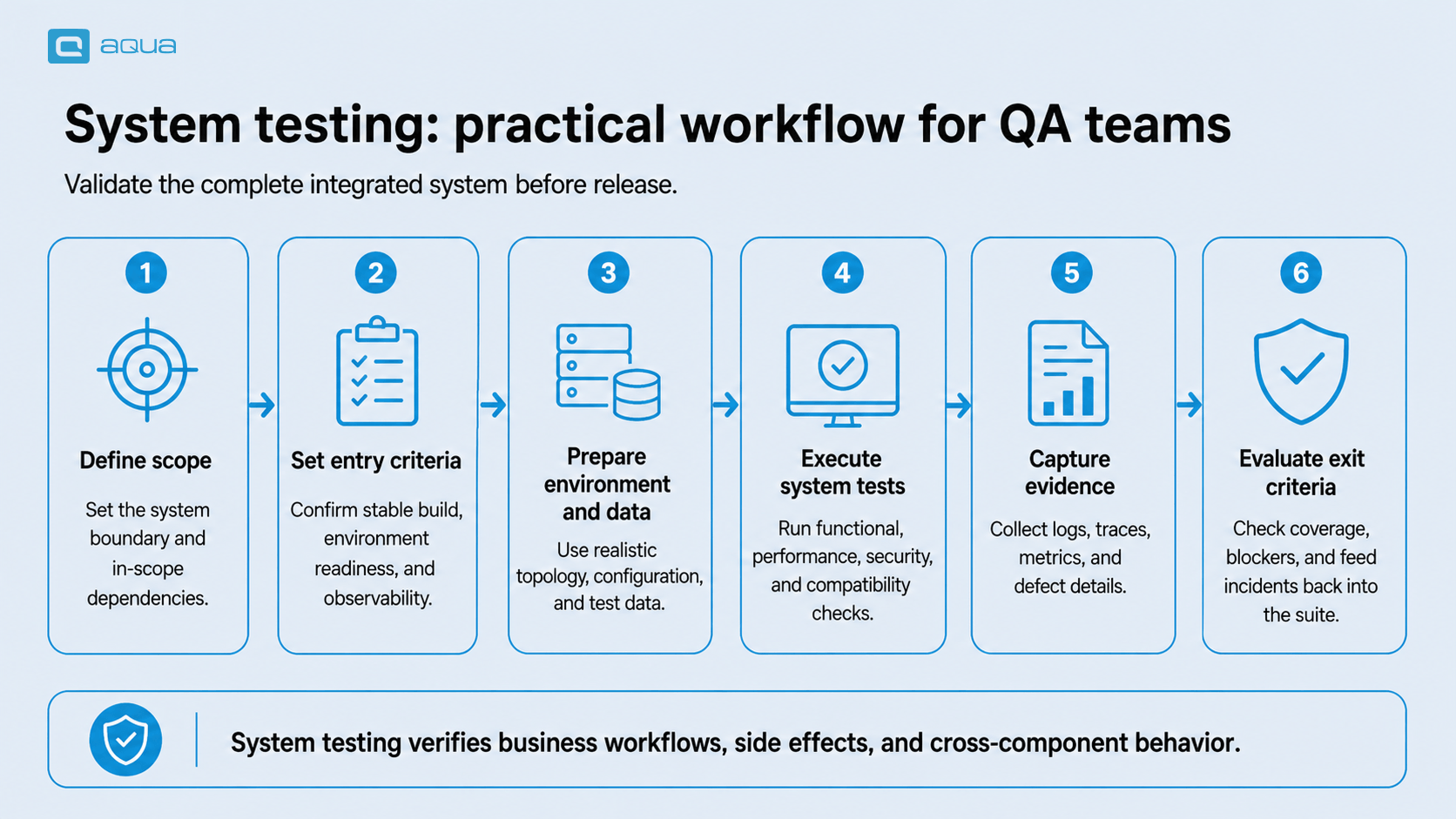
The process breaks down into six steps, from defining scope through feeding production incidents back into the next release cycle. Skipping a step early typically increases cost later, when a defect reaches a stage that should have detected it.
Define scope. Your team begins by establishing the system boundary: applications, services, databases, integrations, environments, and third-party dependencies that fall inside scope. Clear scope reduces ownership issues and makes coverage decisions easier to explain to stakeholders.
Set entry criteria. Before system testing begins, your team confirms that the build, environment, configuration, test data, and observability capabilities are sufficiently mature for meaningful validation. This prevents engineering capacity from being spent on builds that are not yet ready for system-level evaluation.
Prepare the environment and test data. Your team aligns the testing environment with production wherever differences could affect reliability, performance, security, or compatibility. Test data should represent realistic workflows, edge cases, and failure conditions while supporting secure and repeatable execution.
Execute system tests. Your team evaluates complete business workflows alongside non-functional risks such as performance, resilience, and security. Compatibility, migration, and recovery scenarios round out the coverage. Coverage is generally prioritized around workflows where failure would have the greatest customer, operational, or financial impact.
Capture evidence. Your team supports test outcomes with logs, metrics, and traces, along with timing data and screenshots where relevant. Defects are then assessed by business impact and release urgency, giving stakeholders a clearer view of whether identified issues are acceptable, remediable, or release-blocking.
Evaluate exit criteria. Your team considers requirements coverage, unresolved defects, and performance thresholds against operational risk and the reliability of the available evidence. Production incidents and post-release findings then inform future coverage, environment design, and release controls, creating a continuous improvement cycle.
Who Performs System Testing?
Ownership of QA system testing doesn’t have one fixed answer anymore, and that ambiguity itself causes problems when nobody claims a failing scenario. Responsibility depends on your delivery model, and most organizations split the work across several roles rather than parking it with a single team.
Dedicated QA engineers often own planning, design, and execution in organizations with specialized testing teams, bringing testing expertise and managing test environments and data.
Development engineers increasingly write system-level automated tests themselves in Agile and DevOps environments, sharing responsibility for product quality under a “you build it, you test it” model.
Site reliability engineers bring an operational lens, focusing on resilience, observability, and canary testing that pre-release testing alone can’t replicate.
Security specialists conduct penetration testing and configuration reviews alongside QA and development, keeping security testing active from early design through release.
Product owners, designers, and engineers split ownership further in cross-functional teams: product owners define acceptance criteria, designers validate usability, and engineers build the automation that ties it all together.
Testing responsibility keeps moving away from isolated gatekeeper teams and toward embedded quality practices where everyone on your team shares accountability for release decisions.
Common Tools Used in System Testing
Picking tools before defining scope is a common mistake. The right toolkit follows from what you’re validating and depends on how your team delivers software:
Test automation frameworks: Selenium and Playwright for browser-based testing, Cypress for integrated automation with built-in debugging, REST Assured and Postman for API testing.
Performance and load testing: JMeter and Gatling for concurrent traffic simulation, Locust for Python-based scripting, K6 for developer-friendly performance testing.
CI/CD platforms: Jenkins, GitLab CI, GitHub Actions, and Azure DevOps to run tests across commit, merge, and deployment stages.
Container and orchestration: Docker for consistent environments, Kubernetes for realistic distributed testing at scale.
Observability tools: Grafana and Prometheus for metrics, Elastic Stack for logs, Jaeger and Zipkin for distributed tracing.
Security testing: OWASP ZAP and Burp Suite for dynamic scanning, Snyk for dependency vulnerabilities, SonarQube for code-level issues.
Test data management: Delphix and GenRocket for synthetic data generation, Tonic and K2View for masking production data safely.
The strongest toolchains integrate cleanly and report results consistently, so your team gets clear diagnostic information the moment a test fails. Skip tool sprawl, and pick what solves a real problem for your team instead of what just looks good on a slide. Most teams end up running these tools separately, with test cases, execution results, and defect reports living in different systems with no shared traceability. That disconnect is where a connected platform earns its place in the stack.
Best Practices for Effective System Testing
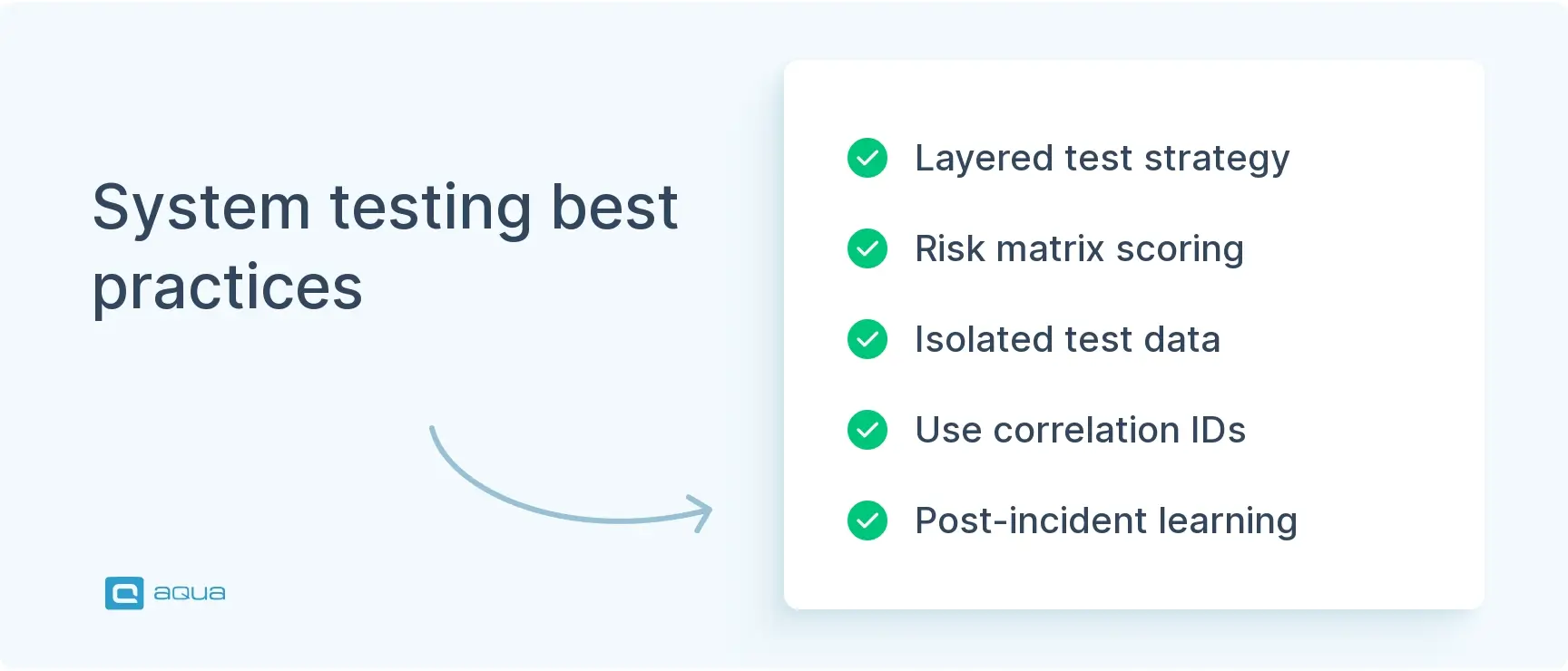
Most teams already know the textbook advice: test early, prioritize by risk, keep tests independent. What actually moves the needle is more specific. These four practices target the failure points that cause the most rework in real system testing suites, from schema drift between services to flaky parallel runs.
1. Anchor your layered strategy on contract tests
Unit tests catch logic errors, but they can’t catch a service that silently changes its response schema. Add consumer-driven contract tests, using a tool like Pact, between services that your system tests depend on. This shrinks your system test suite to the scenarios that genuinely require the full stack running together, instead of using expensive end-to-end runs to catch what a contract test would catch in seconds.
2. Score risk as probability times impact
Build a simple risk matrix for your workflows: likelihood of failure on one axis, business impact on the other. A payment retry path with moderate failure probability and severe impact outranks a rarely-touched admin screen with the same failure probability. Route your limited system testing hours toward the highest-risk quadrant first, and revisit the matrix releases, since risk shifts as the codebase changes.
3. Isolate test data with ephemeral tenants
Shared test accounts are the single biggest source of flaky parallel runs. Provision an ephemeral tenant or namespace per test run, seed it programmatically, and tear it down after execution. Pair this with explicit waits tied to application state, like polling an API until a job status flips, rather than fixed sleep timers, which cause most of the remaining flakiness.
4. Close the loop with correlation IDs and post-incident test additions
Requests that your system tests generate should carry a correlation ID that threads through your logs, traces, and metrics, so a failing test maps directly to a specific trace in Jaeger or Datadog. When a production incident happens, treat the postmortem as a required input to your test backlog. Add the missing scenario, strengthen the assertion that would have caught it, and track how many incidents trace back to coverage your system tests should have included.
System testing tests the properties of the system, or parts of the system. Acceptance testing can choose to focus on similar aspects, but is usually centered around validation. They answer different questions. What's being tested (system) vs what purpose or why are we testing (acceptance).
Common System Testing Challenges and How to Address Them
Even well-planned system testing runs into recurring operational problems, and most trace back to environment and data management rather than test design itself.
Challenge
Operational consequence
Response
Environment drift
Tests pass in QA but fail in production
Version infrastructure and validate configuration
Unstable external services
False failures and blocked execution
Use sandboxes, service virtualization and fallback scenarios
Test-data collisions
Flaky parallel runs
Isolate tenants, accounts and identifiers
Long execution time
Slow release feedback
Separate smoke, regression and scheduled suites
Difficult root-cause analysis
Slow triage across services
Preserve correlation IDs, logs, traces and build metadata
Excessive E2E coverage
Expensive and brittle suite
Keep system tests focused on cross-component business risks
Environment drift makes root-cause analysis harder, since your team can’t tell whether a failure reflects a real defect or a configuration mismatch. Test-data collisions slow down parallel execution, which pushes teams toward fewer, larger test runs that extend execution time further. Fixing the root cause, instead of patching individual symptoms, keeps the suite fast and the results trustworthy.
A system testing strategy is only as effective as the tooling behind it. Most teams manage QA across disconnected systems, with test cases in one place, requirements in another, and automation results scattered across CI logs. aqua cloud, an AI-driven test and requirement management platform, unifies the entire QA process in one platform. aqua Intelligence uses RAG grounding to understand your project’s context, generating comprehensive system test scenarios in seconds with test cases that match your product’s language. Complex workflows are managed through reusable nested test cases, parameterized test data, and environment tracking. The execution tracked across manual and automated system testing runs through real-time dashboards showing coverage and risk exposure. aqua connects through 10+ native automation integrations, including JMeter, PowerShell, MSSQL and Oracle databases, UnixShell, SoapUI, Ranorex, and REST API access. Capture rounds out the evidence trail, recording test execution with video and screenshots.
Save 98% of test creation time with AI-powered system testing
Complex systems are never perfect, and system testing doesn’t try to make them so. It reduces uncertainty and gives your team evidence for release decisions. Treat it as one layer in a broader quality strategy that connects requirements, architecture, and production telemetry. When incidents happen, feed those lessons back into your test strategy so coverage grows alongside your product.
What is the difference between system testing and integration testing?
Integration testing checks that individual components work together correctly, focusing on interfaces between modules. System testing evaluates the fully assembled product end-to-end, covering functional behavior, performance, security, and real user workflows across the whole application.
When is system testing performed in the software development lifecycle?
System testing happens after integration testing, once your team has assembled all components into a complete build. It runs before user acceptance testing and release, typically in a dedicated test environment that mirrors production as closely as possible.
Who is responsible for conducting system testing?
Responsibility varies by team structure. Dedicated QA engineers often lead it in traditional setups, while developers, SREs, and security specialists share the work in Agile and DevOps environments. Many teams now treat it as a shared responsibility.
What types of testing are included under system testing?
System testing covers several disciplines: functional, performance, and reliability/resilience testing; security and usability/accessibility testing; and compatibility, installation/migration, and backup/disaster-recovery testing.
How long does system testing typically take?
Duration depends on your application’s complexity, team size, and automation coverage. Small releases might need a few days, while large enterprise systems with extensive performance and security requirements can take several weeks per cycle.
What is the difference between system testing and user acceptance testing?
System testing verifies that your product meets technical and functional requirements from a QA perspective. User acceptance testing confirms the product meets business needs from the customer or stakeholder perspective, usually as the final step before release.
Pavel, a Quality Assurance Consultant and Author, brings deep expertise to solving complex testing challenges. His background in software development has helped organizations transform their QA practices from reactive to proactive. Beyond consulting, Pavel develops best practice guides and case studies for aqua cloud that…
Nurlan, a QA Coordinator & Quality Standards Officer, takes pride in orchestrating seamless QA operations. His expertise in coordinating QA-focused projects and integrating QA solutions has consistently yielded top-tier client satisfaction. Aside from a full-time QA coordinator, Nurlan's role involves creating compelling content that educates…
Enhancement of the aqua product is Martin’s main responsibility and biggest mission. His expertise covers ITIL Process Consulting, Change Management, Quality Assurance, Quality Management, and Requirements Management. Martin works in QA services for regulated industries for more than 18 years being an irreplaceable leader at…
Home » Testing with AI » System Testing: Types, Process, and Best Practices for QA Teams
Do you love testing as we do?
Join our community of enthusiastic experts! Get new posts from the aqua blog directly in your inbox. QA trends, community discussion overviews, insightful tips — you’ll love it!
We're committed to your privacy. Aqua uses the information you provide to us to contact you about our relevant content, products, and services. You may unsubscribe from these communications at any time. For more information, check out our Privacy policy.
X
🤖 Exciting new updates to aqua Intelligence are now available! 🎉