Workflow Integration Testing: Test Cases, Tools & Best Practices
Duplicate charges and lost orders are typical integration bugs in distributed systems. They appear when data between services is sent in the wrong order or a confirmation is lost. For your team, these bugs are hard to find because unit tests pass and API calls still return 200 OK. As a result, the failure often shows up only in production, where tracing one order across several service logs can take hours. In this guide, you will learn how workflow integration testing works and get 44 test cases with reference data and expected results. Along with them, you will find best practices and tools your team can apply to the next release.
Workflow integration testing covers failures that appear only when connected services run a full business process together.
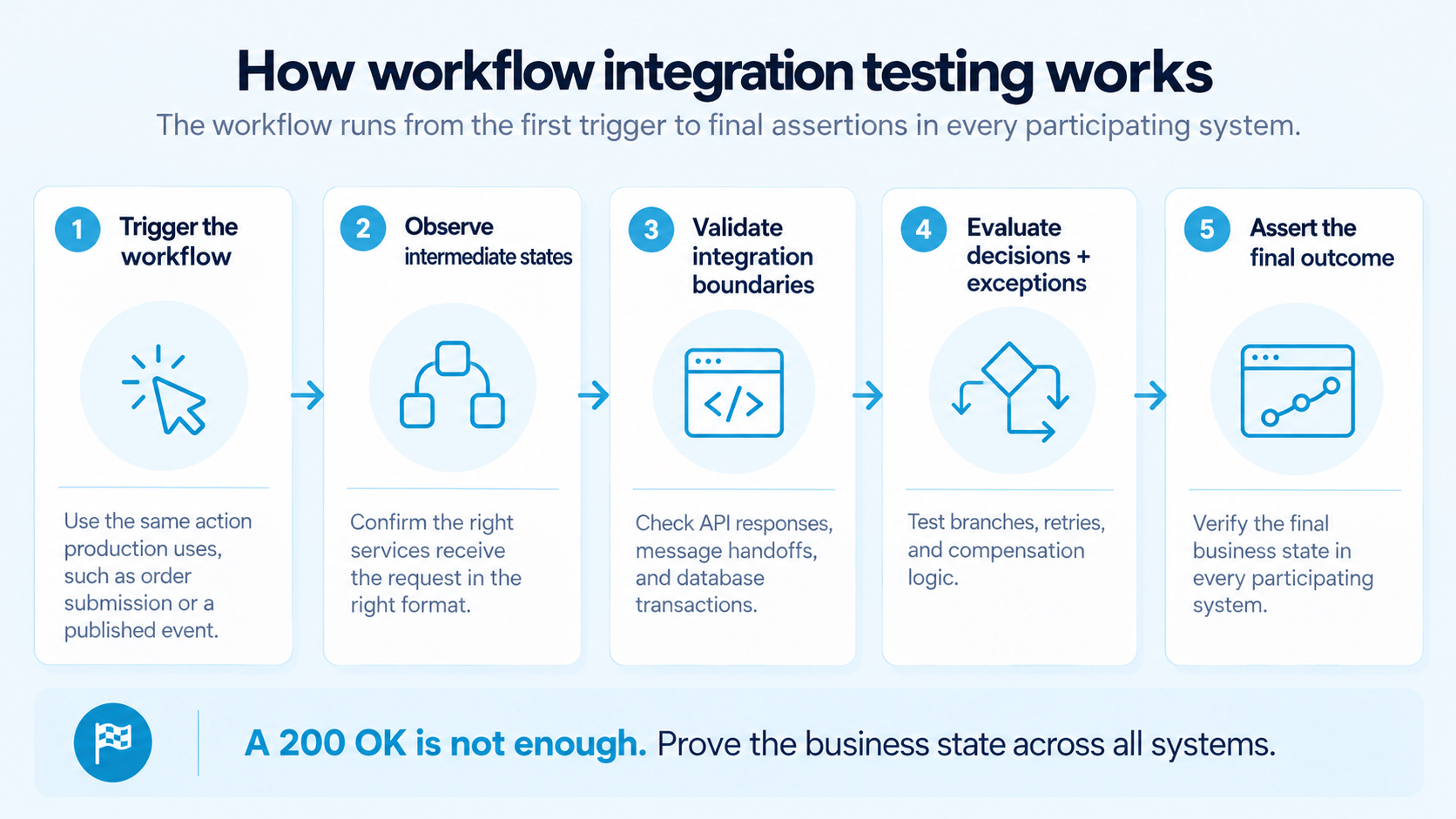
The integration testing workflow runs from the initial trigger to a final assertion in each participating system.
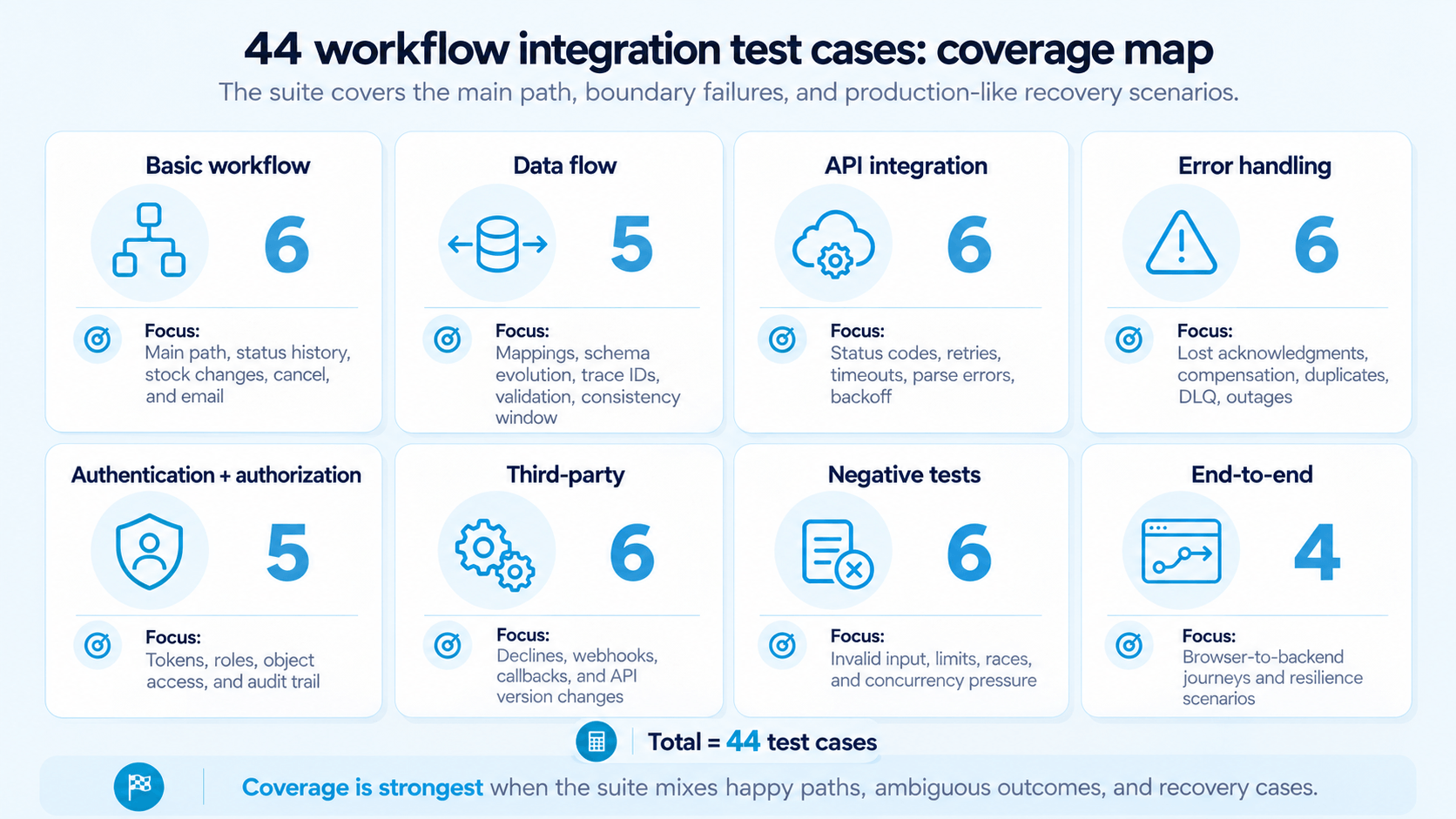
The 44 test cases cover the main path as well as failure handling, each with reference data and an expected result.
Ambiguous failures at integration boundaries, such as a lost payment acknowledgment or a duplicate event, need dedicated test cases with fault injection.
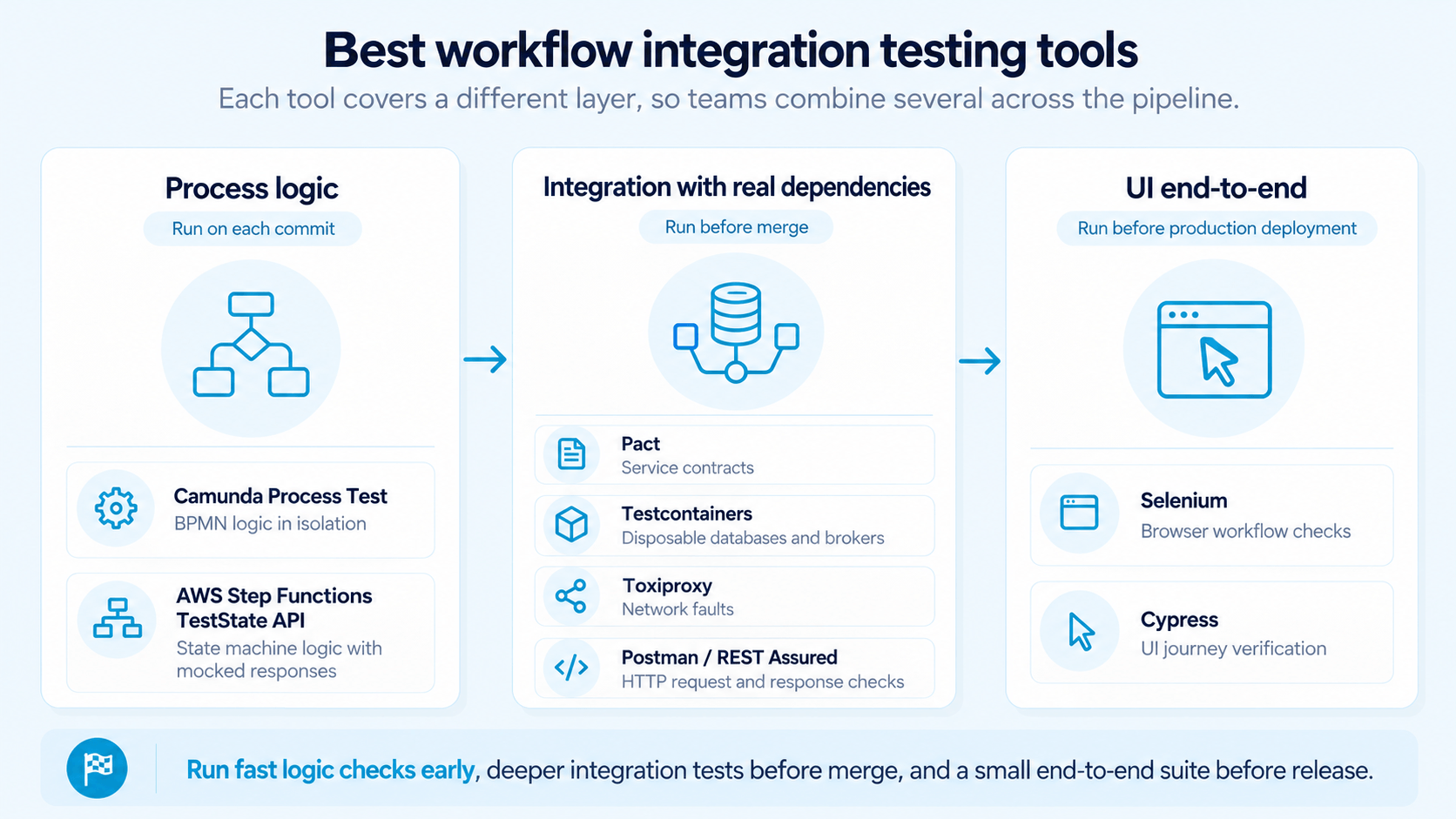
Process logic tests belong on each commit, while full end-to-end tests are reserved for revenue-relevant journeys before release.
What Is Workflow Integration Testing?
In workflow integration testing, you verify that connected services and their databases complete a full business process together, with consistent data after each step. A workflow here means the sequence of operations behind one business outcome, such as placing an order or approving a loan.
Each component in that sequence can pass its own tests and still break the process. For example, the order service may send an amount in cents while the payment service expects a decimal value, which multiplies the charge by 100.
However, workflow integration testing overlaps with two neighboring test levels, and the difference lies in scope and in the typical assertion:
Test type
Focus
Typical check
Integration testing
Data exchange between two or more components
The order service sends a valid payment request to the payment service
Workflow integration testing
One business process across all participating systems
The order ends as “paid” with matching records in payment and inventory
End-to-end testing
The full user journey in a deployed environment
A customer completes a purchase in the browser and receives a confirmation email
In practice, workflow integration testing combines elements of the first two levels. If you want a broader view of how test levels differ, see our guide on functional vs integration testing.
How Workflow Integration Testing Works
AI-generated image.
Workflow integration testing starts from a business process definition and maps which system owns each stage. After that, you run the process the way a real user or event would and check the state at each stage. Typically, the integration testing workflow moves through these phases:
Trigger the workflow with the same action production uses, such as an order submission or a published event.
Observe intermediate states to make sure the expected services receive the request in the right format.
Validate integration boundaries by checking API responses and database transactions at each handoff.
Evaluate decisions and exceptions, including conditional branches and retry policies.
Assert the final outcome in each participating system, including systems that never received the original request.
The final assertion has to cover stored business data, because a 200 OK after order submission does not prove that inventory was reserved. For that reason, your team compares the persisted order status with the payment record. After that, you confirm that the fulfillment request was published.
Integration Testing Workflow Diagram
An integration testing workflow diagram shows the sequence of test stages and the data that moves between systems at each step. Before you write tests, a system integration testing workflow diagram shows your team which integration points need coverage.
For distributed systems, a useful software integration testing workflow diagram marks the following elements, since each maps to a group of test cases:
Entry points such as an API call or a scheduled job, because each trigger needs its own test
Service handoffs, where field mappings can break
Message brokers like Kafka or RabbitMQ, where events can arrive late or twice
Irreversible steps such as payment capture, which need failure tests on both sides
The expected end state in each system, which your team uses for the final assertion
Once the diagram is ready, keep the software integration testing workflow documented in one place and update the diagram whenever your architecture changes. As a result, new team members can trace each test case back to the boundary it covers.
One order-to-cash workflow already needs 44 test cases, and a full application adds many more. aqua cloud, an AI-powered test and requirement management solution, keeps all of them in one repository. With nested test cases, your team defines shared steps, such as the order setup, once. When a shared step changes, the update reaches each test case that uses it. On top of that, aqua Intelligence, a RAG-grounded AI, generates project-specific test cases from your requirements in seconds. Since the AI works from your uploaded documentation, the generated cases use your service names and API contracts. Meanwhile, your project data stays in a secure environment, and users save 12.8+ hours per week on average. Bidirectional Jira sync and the Azure DevOps integration keep test status next to your tickets. Finally, Capture records each workflow run with video and screenshots, so your team can attach evidence to defect reports.
Generate project-specific workflow integration test cases 97% faster with aqua Intelligence
Workflow types differ in how their steps run, so each type tends to fail at a different point. Consequently, your team needs a different first test for each of them:
Sequential workflows such as invoice processing run steps in a fixed order. Here, the main risk is a later stage that starts with incomplete data from an earlier one.
Conditional workflows route requests by business rules. In expense approval, for instance, the exact threshold value needs its own test, since an off-by-one comparison approves claims above the limit without review.
Parallel workflows run steps at the same time, e.g., identity verification and sanctions screening during financial onboarding. In this case, you test what happens when one branch times out after the others complete.
Event-driven workflows exchange messages over brokers like Kafka, which guarantees at-least-once delivery by default according to the Confluent documentation. As a result, duplicate events need their own test cases.
Human-in-the-loop workflows wait for a person, such as a compliance officer who approves a case. Because these steps can take days, your team uses a controlled test clock to check escalation after the deadline.
Workflow Integration Test Cases
AI-generated image.
Workflow integration test cases cover the points where systems hand work to each other, under both normal and failure conditions. All cases in this section use one reference workflow, an order-to-cash process with five services connected over Kafka:
Step
Service
Event published
Reference test data
1
Order service
OrderCreated
Order ORD-1001: 2 × SKU-4471 at €49.95, 1 × SKU-2210 at €50.00, total €149.90
2
Payment service (Stripe test mode)
PaymentCaptured
Amount 14990 in cents, currency EUR
3
Inventory service
StockReserved
SKU-4471 stock 10, SKU-2210 stock 1
4
Fulfillment service
ShipmentCreated
Delivery address Königsallee 1, 40212 Düsseldorf
5
Notification service
None
One confirmation email per order
The expected order status sequence is CREATED 3 PAID 13 RESERVED 13 SHIPPED. Therefore, each test case refers to these statuses, and the expected result includes the system where your team checks them.
Basic Workflow Integration Test Cases
Basic test cases cover the main path from order submission to shipment. Run this group first, because a failure here makes the results of later groups unreliable:
TC-WF-01: Place a valid order. Submit ORD-1001 with the reference data. The order should end as SHIPPED, and the Stripe test dashboard should show one payment of €149.90.
TC-WF-02: Check the status history. Read the order’s status log after TC-WF-01. You should see exactly four transitions in the expected sequence, with no state skipped or repeated.
TC-WF-03: Verify stock changes. After TC-WF-01, SKU-4471 should drop from 10 to 8 units, and SKU-2210 from 1 to 0. A drop to 6 means the StockReserved logic ran twice.
TC-WF-04: Carry data across stages. Compare the delivery address in the ShipmentCreated payload with the checkout input. “Königsallee” must arrive intact, because a UTF-8 encoding error prints it as “Königsallee” on the shipping label.
TC-WF-05: Cancel mid-process. Cancel ORD-1001 after PAID and before SHIPPED. Expect a Stripe refund of €149.90 and the status CANCELLED, while SKU-4471 stock returns to 10.
TC-WF-06: Send one confirmation. After TC-WF-01, the customer should receive exactly one email, and the total in it should match the payment record.
One of my earliest mistake was trying to write e2e tests that cover everything. The more we had the less reliable the pipeline became. Recently we eliminated half of the test suite, moved everything what's possible earlier in the feedback loop (component/unit tests with vitest) and kept only major flows as truly e2e. Faster feedback, more stable pipeline, same level of confidence.
Data flow test cases show whether information keeps its meaning when it crosses a service boundary. Blank and unexpected fields need special care here. According to The Register’s report on the June 2025 Google Cloud outage, a policy change with unintended blank fields crashed Service Control. The failing code path had never been exercised during rollout.
TC-DF-01 b7 Amount mapping
Input: The order service sends a total of 149.90 EUR.
Expected: Stripe receives 14990, since its API takes amounts in the smallest currency unit, and the finance export shows 149.90.
TC-DF-02 b7 Schema evolution
Input: A new OrderCreated version adds an optional field, giftWrap.
Expected: Consumers on the old schema keep processing, and Confluent Schema Registry in BACKWARD mode rejects a breaking change such as a removed customerId.
TC-DF-03 b7 Trace propagation
Input: The checkout request carries a W3C traceparent header.
Expected: The same trace ID appears in the logs of all five services and in the Kafka message headers.
TC-DF-04 b7 Consistent validation
Input: Postal code 4021, a four-digit value, while German postal codes have five digits.
Expected: Checkout rejects it before payment, because the carrier API would reject it only after the customer has paid.
TC-DF-05 b7 Eventual consistency window
Input: Reserve 2 units of SKU-4471.
Expected: The inventory read model shows 8 units within 5 seconds, so the test polls at 500 ms intervals and fails after the limit.
API Integration Test Cases
API integration test cases cover the requests and responses between services. Before the run, your team defines the expected status code and order state, so the result can be compared automatically:
TC-API-01 Send the payment request without the currency field f0 Expected: 400 Bad Request with a field-level error, while the order stays CREATED and no retry fires.
TC-API-02 Make the payment stub return an HTML 502 page with no JSON body f0 Expected: The order service logs a parse error with the trace ID and marks the step as retryable without crashing.
TC-API-03 Return 503 from the payment API, then 422 in a second run f0 Expected: The 503 triggers a retry, while the 422 fails the step and sets the order to PAYMENT_FAILED.
TC-API-04 Return HTTP 429 with the header Retry-After: 30 f0 Expected: The next call goes out no earlier than 30 seconds later.
TC-API-05 Delay the payment response to 12 seconds with a 10-second client timeout f0 Expected: The retry reuses the same Idempotency-Key, so Stripe records one charge.
TC-API-06 Return three consecutive 503 errors f0 Expected: Retries follow exponential backoff starting at 1 second, then stop after the third attempt and raise an alert.
Workflow Error Handling Test Cases
Error handling test cases show whether a failure leaves your data consistent and the workflow recoverable. The first two cases involve ambiguous outcomes, where one system records success and another does not. For this reason, they need step-by-step setup:
TC-ERR-01: Lost payment acknowledgment
Let Stripe test mode capture €149.90 for ORD-1001.
Drop the response on its way back with a fault proxy, e.g., Toxiproxy.
Allow the payment service to retry with the original Idempotency-Key.
Expected: Stripe shows one charge, and the order moves to PAID once.
TC-ERR-02: Inventory fails after payment
Complete payment for ORD-1001.
Set SKU-2210 stock to 0 before the reservation step runs.
Expected: The compensation step refunds €149.90 and sets the order to CANCELLED. After that, the customer receives a cancellation email.
The remaining cases need less setup:
TC-ERR-03: Crash between commit and publish. Stop the order service right after the database commit and before OrderCreated goes out. With a transactional outbox, the event is published after restart. Without one, the order stays in CREATED, and the test exposes the missing outbox.
TC-ERR-04: Poison message. Publish a malformed PaymentCaptured event. The consumer should retry three times and then move it to a dead letter topic such as payments.DLQ, while the next messages keep flowing.
TC-ERR-05: Duplicate event. Publish PaymentCaptured twice with the same event ID. Stock for SKU-4471 should drop to 8 once, and the second event should be logged as a duplicate.
TC-ERR-06: Secondary service outage. Take the notification service down for 10 minutes. Orders should still reach SHIPPED, and the queued emails should go out after recovery.
Authentication and Authorization Test Cases
NIST’s June 2025 guidelines for API protection in cloud-native systems recommend controls across the whole API lifecycle, both before and during runtime. For that reason, security checks can run in the same suite as functional workflow tests. Applied to the reference workflow, those controls lead to the following cases:
TC-SEC-01: Call the payment service without a service token. It should return 401 Unauthorized and expose no order data.
TC-SEC-02: Use a JWT with a 5-minute expiry for an approval step that runs 10 minutes later. The service should refresh the token through the OAuth 2.0 client credentials flow and continue.
TC-SEC-03: Call the approve endpoint for ORD-1001 as a user with the viewer role. Expect 403 Forbidden and an unchanged order status.
TC-SEC-04: As customer A, request the order of customer B by ID. The API should return 403 or 404, because broken object-level authorization ranks first in the OWASP API Security Top 10.
TC-SEC-05: Trigger a refund as a support agent. The audit log should record the agent’s ID as the initiator, since a service account ID hides who approved the refund.
Third-Party Integration Test Cases
Third-party integrations need a separate group, because you control neither their uptime nor their release schedule. According to Uptime Institute’s 2025 Annual Outage Analysis, third-party IT and data center providers account for about two-thirds of publicly reported outages over nine years. Most of these cases run against vendor sandboxes like Stripe test mode:
TC-3P-01: Declined card. Pay with Stripe test card 4000 0000 0000 0002. Pass if: The order ends as PAYMENT_FAILED and stock stays untouched.
TC-3P-02: Insufficient funds. Pay with test card 4000 0000 0000 9995. Pass if: The insufficient_funds decline code maps to a clear customer message.
TC-3P-03: Tampered webhook. Change one field in a signed webhook payload. Pass if: Your endpoint rejects it with 400, and the order status does not change.
TC-3P-04: Replayed webhook. Resend a valid webhook older than 5 minutes, the default tolerance in Stripe’s libraries. Pass if: The signature check rejects it.
TC-3P-05: Missing callback. Block the carrier’s “delivered” webhook. Pass if: The order is flagged for manual follow-up after the agreed limit, e.g., 72 hours.
TC-3P-06: API version upgrade. Pin the current Stripe-Version header, then run the suite against the next version in the sandbox. Pass if: Contract tests flag breaking changes before the production upgrade.
Negative Test Cases for Workflow Integration
In negative test cases, you submit invalid input or unusual timing and check that the workflow rejects it before data is damaged. Race conditions need dedicated cases, since they rarely appear in sequential test runs. The Register’s analysis of the October 2025 AWS outage traces it to a latent race condition between two automation components. That race left a DynamoDB endpoint with an empty DNS record.
TC-NEG-01 | Input: Quantity 0, then −1 | Expected: 422 Unprocessable Entity, and no order record is created
TC-NEG-02 | Input: Quantity 99 and 100 with a limit of 99 | Expected: 99 passes, while 100 fails with a clear limit message
TC-NEG-03 | Input: The string '; DROP TABLE orders;-- in the order note | Expected: The text is stored as a literal value, and the orders table stays intact
TC-NEG-04 | Input: Two parallel orders for the last unit of SKU-2210 | Expected: One order succeeds, the other gets 409 Conflict, and stock never goes below 0
TC-NEG-05 | Input: A shipment request for ORD-1001 while it is still CREATED | Expected: 409 Conflict, and no shipping label is generated
TC-NEG-06 | Input: 20 parallel orders with the database pool limited to 2 connections | Expected: Requests wait or return 503 with Retry-After, and no half-created orders remain
End-to-End Workflow Integration Testing
End-to-end workflow integration testing runs a complete business process from the first trigger to the final outcome in a production-like environment. Because it runs against deployed services, it exposes failures that mocked component tests miss. However, each run is slower and more expensive, so keep this suite small and limit it to journeys that affect revenue:
TC-E2E-01: Checkout to delivery. A customer buys ORD-1001 in the browser, and the flow runs through Stripe test mode and the warehouse to the carrier sandbox. At the end, the finance and warehouse systems should both match the order total of €149.90.
TC-E2E-02: Same return, two channels. Start one return in the mobile app and an identical one in the admin console. Both should produce the same refund amount and the same stock correction.
TC-E2E-03: Broker restart. Restart a Kafka broker while 50 orders are in flight. All 50 should reach SHIPPED without duplicate payments.
TC-E2E-04: Database failover. Trigger a primary database failover during the payment step. The workflow should resume on the replica with one payment per order.
For financial entities in the EU, recovery scenarios such as TC-E2E-04 also have a regulatory side. Article 25 of the Digital Operational Resilience Act, applicable since 17 January 2025, lists end-to-end testing and scenario-based tests among the appropriate tests for a resilience testing program.
In ERP environments, end-to-end flows such as order-to-cash cross several SAP modules, so your team adds module-specific checks to this list. Our guide on integration testing in SAP covers that case in detail.
Best Practices for Workflow Integration Testing
InfoQ’s coverage of the 2025 DORA report notes that AI adoption now has a positive relationship with delivery throughput. At the same time, software delivery instability continues to rise. With more releases, your workflow suite runs more often, so each false result or slow debugging session costs your team more time.
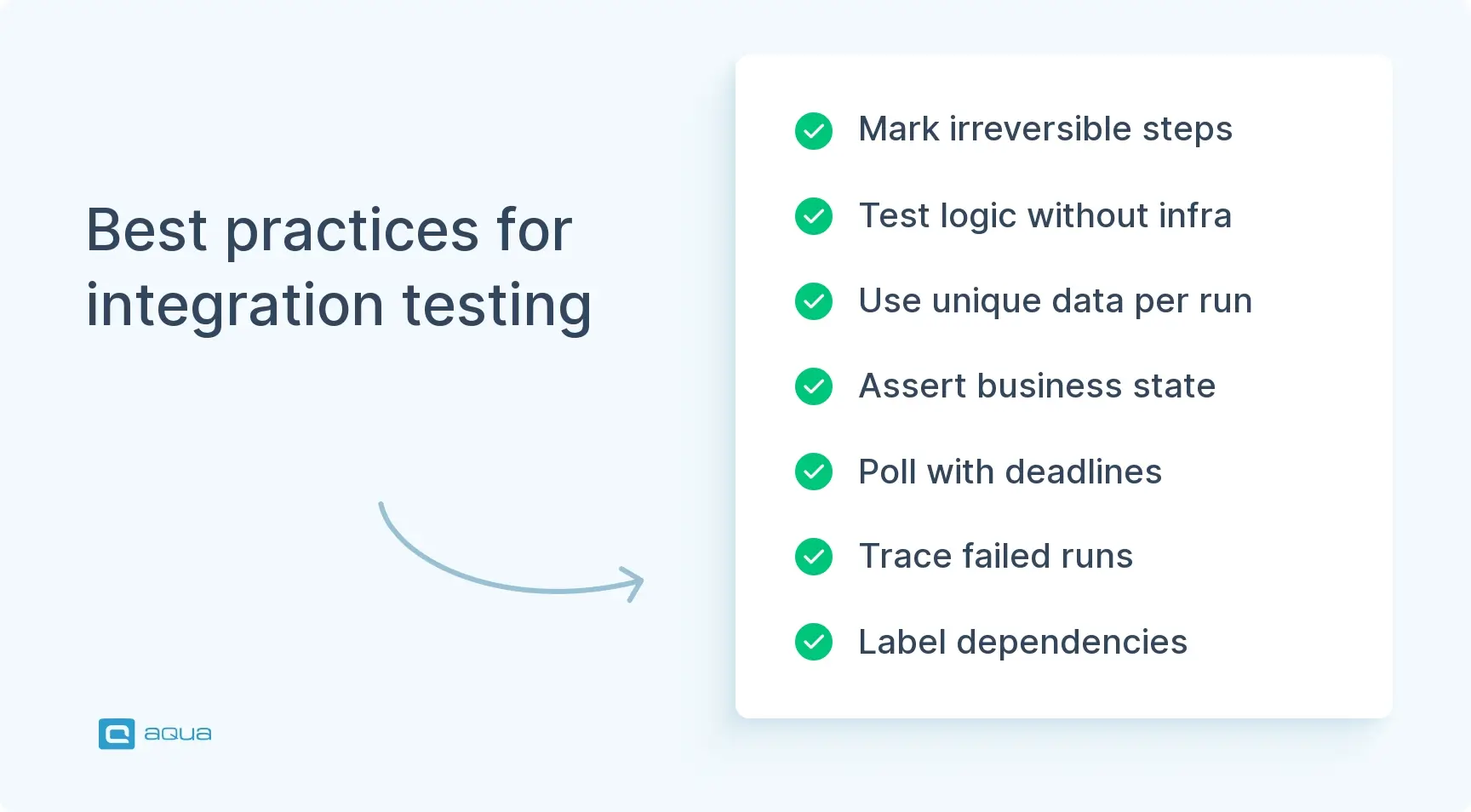
Mark irreversible steps first. A payment authorization can be retried, but a payment capture cannot, so the two need different failure tests.
Test process logic without infrastructure. With Camunda Process Test or the Step Functions TestState API, your team checks branching rules without deployed services, so these tests fit on each commit.
Generate unique data per run. Shared order IDs cause flaky results when parallel runs modify the same records.
Assert business state. Assertions on internal table layouts break after a schema refactor, whereas an assertion on payment status and reserved stock stays valid.
Poll with deadlines. Fixed sleep calls slow the suite and hide performance problems, so poll for the expected state until a deadline tied to your SLA.
Trace failed runs. With correlation IDs collected through OpenTelemetry, your team can see which service first left the expected sequence.
Label real and simulated dependencies. A passing test with all external services mocked proves less than it seems, so record which integrations ran for real.
I do see the value of integration tests in general since our app is quite database heavy and the logic cannot be carried out in the application alone. In addition to that, there is a heavy cartesian effect by the raw number of configuration options we have too.
Each tool in the table covers one layer of workflow execution, so your team will usually combine several of them:
Tool
Test layer
What your team uses it for
Camunda Process Test
Process logic (BPMN)
Running BPMN processes in isolation with simulated workers and controlled time, fast enough for each commit
AWS Step Functions TestState API
State machine logic
Testing states with mocked service responses, including Map and Parallel states since the November 2025 update
Pact
Service contracts
Confirming that a provider returns the fields its consumers expect before deployment
Testcontainers
Infrastructure dependencies
Starting disposable Docker instances of databases or brokers, e.g., PostgreSQL or Kafka, for each test run
Toxiproxy
Network faults
Injecting latency and dropped connections between services for error handling cases like TC-ERR-01
Postman, REST Assured
API integration
Checking request construction and response handling for HTTP calls between services
Selenium, Cypress
UI end-to-end
Confirming that a user can complete the workflow in the browser
According to the AWS announcement, the TestState update works with test frameworks such as Jest and pytest. In addition, the layers differ in speed, so your team can schedule them at different pipeline stages:
Process logic tests on each commit, so branching errors appear in the same pipeline run.
Integration tests with real dependencies before a merge to the main branch.
End-to-end tests for revenue-relevant journeys before each production deployment.
To link each TC ID to the requirement it covers, your team can store the suite in a test management platform such as aqua cloud. There, manual and automated results share one place.
Conclusion
Start with one workflow that moves money or stock, and map its integration points in a diagram. After that, adapt the test case groups above to your own reference data and add the recovery scenarios before your next release.
From lost payment acknowledgments to replayed webhooks, workflow integration test cases need updates whenever a service changes. aqua Intelligence, an AI in aqua cloud, test and requirement management platform, generates context-aware scenarios from your uploaded requirements and specifications. This way, state transitions and boundary values match your architecture. In practice, 42% of AI-generated test cases need zero edits, which cuts manual rework for your team. Real-time dashboards show which requirements still lack coverage, and traceability links each requirement to its test cases and defects. As a result, a failed TC ID points straight to the requirement at risk. Manual and automated tests share one platform, and Jenkins brings your pipeline results into it. For automation, aqua offers 12+ native integrations, such as Ranorex and SoapUI. JMeter covers load tests, while PowerShell and UnixShell scripts run from the same workspace. Database integrations with MSSQL and Oracle complete the setup.
Achieve 100% workflow coverage and save 12.8+ hours weekly with aqua Intelligence
What is workflow integration testing in software testing?
Workflow integration testing is a software testing method focused on how connected services complete one business process together. Your team runs the full workflow, such as order to payment, and checks data consistency at each integration point.
What is the difference between workflow testing and integration testing?
In workflow testing, your team confirms that a business process follows the correct steps and rules. Integration testing focuses on data exchange between components. Workflow integration testing combines both and covers the full integration testing workflow across systems.
What test cases should be included in workflow integration testing?
Start workflow integration testing with basic execution and data flow test cases. After that, add API and error handling cases, followed by security and third-party cases. Negative tests complete the set with invalid input and race conditions.
How do you test data flow between integrated systems?
You trace one order through each system in the system integration testing workflow and compare its values at each handoff. Your team follows that record by its correlation ID, and schema checks show whether field mappings stay correct.
Can workflow integration testing be automated?
Yes, most workflow integration testing can be automated. Process logic and contract tests run well with Camunda Process Test and Pact, while Testcontainers adds real databases to automated runs. For human approval steps, your team can use simulated responses.
Pavel, a Quality Assurance Consultant and Author, brings deep expertise to solving complex testing challenges. His background in software development has helped organizations transform their QA practices from reactive to proactive. Beyond consulting, Pavel develops best practice guides and case studies for aqua cloud that…
Nurlan, a QA Coordinator & Quality Standards Officer, takes pride in orchestrating seamless QA operations. His expertise in coordinating QA-focused projects and integrating QA solutions has consistently yielded top-tier client satisfaction. Aside from a full-time QA coordinator, Nurlan's role involves creating compelling content that educates…
Robert has several years of experience in process optimisation and test management. He is an expert in defining and implementing workflows by adapting aqua to the clients’ processes.
Home » Test Automation » Workflow Integration Testing: Test Cases, Tools & Best Practices
Do you love testing as we do?
Join our community of enthusiastic experts! Get new posts from the aqua blog directly in your inbox. QA trends, community discussion overviews, insightful tips — you’ll love it!
We're committed to your privacy. Aqua uses the information you provide to us to contact you about our relevant content, products, and services. You may unsubscribe from these communications at any time. For more information, check out our Privacy policy.
X
🤖 Exciting new updates to aqua Intelligence are now available! 🎉