15 Best Agile Testing Software for Startups: Complete List
Half your tests just failed, and the PM wants a demo tomorrow. The worst part is that no one on your team can track where or why the suite broke, or what was actually addressed over the past several sprints. The need for a strong, centralized QA system in place always arises unexpectedly. And here you are looking for orchestration and automation that would provide visibility without manual maintenance and overhead. This guide covers 15 of the best Agile testing tools for startups, breaking down what each one does, who it fits, and when to skip it.
Agile-friendly testing tools run on every commit and report failures before merge, so defects surface while the change is still fresh. Since they connect to existing CI pipelines, setup takes days instead of weeks.
Test management becomes necessary once manual coordination between testers and developers consumes more hours than the tool would. After that point, status chasing scales faster than the team does.
Building a testing stack by team stage prevents over-engineering during the MVP phase. As headcount and release complexity grow, the same approach keeps tooling ahead of demand.
License fees represent a small share of total cost, because CI minutes, onboarding time, maintenance hours, and integration work all carry ongoing expense.
Agile Testing Tools for Startups: Quick Comparison
Before diving into all 15 tools individually, here’s a side-by-side view for quick scanning. Use the “When to skip” column to avoid over-buying at your current stage.
Tool
Role in the stack
Best for
Setup level
CI/CD support
Free option
When to skip
aqua cloud
Test management
Growing teams needing traceability
Low
Yes, via API and integrations
Trial available
Very early MVP with no dedicated QA
Qase
Test management
Small QA teams outgrowing spreadsheets
Low
Yes
Free tier
Team already invested in aqua cloud or TestRail
Playwright
UI automation
Web startups, TypeScript teams
Medium
Yes, native
Yes, open source
Backend-only products
Cypress
UI automation
Developer-driven frontend testing
Medium
Yes, native
Yes, open source
Complex multi-tab or multi-domain flows
Vitest
Unit testing
Vite-based projects
Low
Yes
Yes, open source
Non-Vite JavaScript projects
Jest
Unit testing
Node.js and React codebases
Low
Yes
Yes, open source
Vite projects, where Vitest fits better
Postman/Newman
API testing
Mixed technical and non-technical teams
Low
Yes, via Newman CLI
Free tier
Pure code-first API testing preference
Pact
Contract testing
Teams splitting into microservices
Medium
Yes
Yes, open source
Monolithic architecture
Appium
Mobile automation
Cross-platform mobile coverage
High
Yes
Yes, open source
Single-platform mobile apps
BrowserStack
Device/browser cloud
Release validation across environments
Low
Yes
No
Running on every pull request
Grafana k6
Performance testing
Developer-friendly load testing
Medium
Yes
Yes, open source
No performance-sensitive workflows yet
GitHub Actions
CI/CD
Teams already on GitHub
Low
Native
Yes, with usage limits
Non-GitHub-hosted repos
axe-core
Accessibility testing
Automated WCAG checks
Low
Yes, via existing suites
Yes, open source
Manual accessibility audits already cover needs
TestRail
Test management
Enterprise-grade formal reporting
Medium
Yes, via integrations
No
Early MVP without compliance needs
Jenkins
CI/CD
Self-hosted, complex pipelines
High
Native
Yes, open source
Teams that prefer managed CI/CD
Image generated by AI Tool
What Makes a Testing Tool Actually Agile-Friendly
Agile development runs on fast feedback, and your testing tools should match that pace. A test report that arrives three days after the sprint closed isn’t feedback. It’s archaeology.
The right tool plugs directly into your workflow. It runs on every pull request, surfaces failures before merge, and connects bugs back to the story that created them. When something breaks, your team shouldn’t need to clone three repos and rebuild half the stack to understand why. Good tooling hands over logs, screenshots, and network traces so engineers can fix the issue and move on.
Three things separate genuinely Agile tools from imposters:
Time to value. Your team should have meaningful tests running within hours of initial setup.
Maintenance burden. The tool should reduce friction. If it creates a second product for engineers to babysit, it works against your team.
CI integration. Tests that don’t run automatically in your delivery pipeline are a sidecar that gets ignored.
Feature counts don’t matter much here. An unused tool provides zero value, and a high-maintenance one actively slows everyone down.
Whatever you pick, the real fix is just having one source of truth. The main thing to check is how clean the Jira and Github integration actually is in practice vs on paper.
What to Look for When Choosing an Agile Testing Tool
Once your team agrees a tool needs to be Agile-friendly in principle, the next step is a concrete procurement checklist. Here’s what actually matters when comparing specific products:
Price and licensing model: Per-seat, per-test-run, or flat pricing all scale differently as your team grows. Check what happens to the bill at 2x current usage before committing.
Deployment model: Cloud-hosted tools ship faster but may not fit regulated environments. Self-hosted options like Jenkins give your team full control but add infrastructure overhead.
Support and documentation: Community-only support works for experienced teams; regulated or fast-scaling startups usually need vendor SLAs and dedicated onboarding.
Integration depth: Confirm exactly how the tool connects to your existing stack: native integration, CI/CD webhook, or REST API. These are not interchangeable in terms of setup effort.
Team skill match: A tool that requires deep scripting knowledge slows down teams without dedicated QA engineers. Match tool complexity to who will actually maintain it.
Real cost beyond the sticker price: Factor in CI minutes, cloud device usage, maintenance hours, and onboarding time. A free tool that eats 40 hours a month in maintenance has a real cost, paid in your engineering hours.
15 Best Agile Testing Tools for Startups
Normally, QA uses a suite of several software solutions. For example, a single orchestration solution and test case generation tools with multiple automation and niche testing tools combined.
Here are the top instruments for Agile teams to consider adding to their tech stack:
1. aqua cloud
aqua cloud is centralized test and requirement management solution built for teams that need structure and traceability without enterprise overhead. It connects requirements, test cases, automated results, and defects in one platform. Best for growing teams that need clear visibility across manual and automated testing without adding process for its own sake.
aqua cloud was built to fit in the gap between lightweight issue trackers and heavyweight enterprise QA platforms. The platform includes aqua Intelligence, an AI engine built on domain-trained models with RAG grounding, which generates test cases directly from uploaded documentation, Jira stories, or requirements files. Generated from actual project data, the output matches real product behavior and requirements. Core features include requirements traceability, test case versioning, manual and automated execution tracking, defect management, audit-ready reporting, and customizable approval workflows.
aqua integrates directly with several tools covered in this guide. Jira sync runs bidirectionally, keeping defects and stories aligned across both systems. Jenkins and GitHub Actions pipelines push automated test results into aqua through CI/CD integrations, so execution history stays complete without manual uploads. Playwright, Cypress, and Selenium connect through automation agents or the REST API, and Azure DevOps, Confluence, JMeter, SoapUI, and Ranorex are supported as out-of-the-box integrations.
Connects requirements, test cases, automated results, and defects in one place
aqua Intelligence generates test cases from Jira stories, uploaded docs, or requirements files
Bidirectional Jira sync keeps defects and stories aligned across both systems
Full audit trail with approval workflows for regulated environments
Out-of-the-box integrations with Jenkins, Azure DevOps, and CI/CD platforms like GitHub Actions, plus automation agents or REST API support for Playwright, Cypress, Selenium, and 10+ additional frameworks
The worst mistake possible would be to have a lot of tools with duplicating functionalities to end up struggling to have a consistent system across diverse teams. That’s when centralized test management is a must-have. aqua cloud, an AI-powered test and requirement orchestration platform, offers to connect automated results, manual test runs, requirements, and defects in one environment. With aqua Intelligence powered by RAG grounding, test cases are generated directly from project documentation in seconds. Based on actual project data, the output matches how the product works. You’ll save up to 43% of manual test design time, maintain complete traceability from requirement to release, and ship with confidence knowing nothing slipped through. aqua connects natively with Jira via bidirectional sync, Confluence, and REST API, and includes Capture integration that records test execution with video and screenshots automatically. 12+ integrations with other tools, including some of those provided in the blog, are supported.
Get full testing visibility and AI-powered efficiency without overhead
Lightweight test management with transparent pricing and a clean interface. A solid entry point for small QA teams that have outgrown spreadsheets but aren’t ready for heavier platforms. Founded in 2020, Qase was designed to give QA engineers and developers a dedicated workspace without the complexity enterprise tools carry. The pricing model scales with team size, keeping it accessible at the early stages of building your QA function.
Pay-per-user pricing with no hidden add-ons
Test run management with pass/fail tracking
Integrations with Jira, GitHub, and GitLab
3. Playwright
Modern browser automation with automatic waiting, trace recording, and parallel execution. The default choice for most web startups, especially TypeScript-heavy teams. Developed by Microsoft and open-sourced in 2020, Playwright was built specifically for applications that rely on dynamic content, complex authentication flows, and cross-browser consistency, where older automation frameworks struggled. If your stack is TypeScript-first, this is the obvious starting point.
Auto-waiting eliminates most flaky test issues without manual timeouts
Built-in trace viewer for step-by-step failure inspection
Runs Chromium, Firefox, and WebKit in parallel
Native TypeScript support with first-class GitHub Actions integration
4. Cypress
Frontend-focused automation with interactive debugging and component testing support. Ideal when developers write most of the tests and value fast visual feedback during active development. First released in 2014 and later open-sourced, Cypress was created by developers frustrated with slow, unreliable Selenium-based testing. If your team leans heavily on React, Vue, or Angular, the component testing support alone makes it worth evaluating.
Real-time test execution in an interactive browser window
Time-travel debugging via DOM snapshots at each step
Component testing for React, Vue, and Angular
Automatic screenshots and video recording on failure
5. Vitest
Fast unit testing for Vite projects. Vitest uses the existing Vite config, supports mocking and snapshots, and runs significantly faster than alternatives in modern frontend environments. Released in 2021 as part of the Vite ecosystem, it was created to eliminate configuration mismatches between test and production behavior that occurred when running Jest in Vite-based projects. If your project already runs on Vite, you can skip most of the setup entirely.
Zero extra configuration when the project already uses Vite
Watch mode with instant re-runs on file change
Compatible with Jest’s API for easy migration
6. Jest
Mature JavaScript testing with broad ecosystem support. Still the right choice for many Node.js and React codebases outside the Vite world. Created at Facebook and open-sourced in 2014, Jest became the standard JavaScript testing framework for the React ecosystem, largely because its zero-config setup let teams start testing without spending time on infrastructure. If your codebase predates the Vite era, Jest remains the most battle-tested option.
Zero-config setup for most JavaScript projects
Built-in mocking, coverage reporting, and snapshot testing
Runs tests in parallel across CPU cores
7. Postman and Newman
Collaborative API testing that bridges manual exploration and automated execution. Works well when non-engineers on your team need to contribute to API test creation. Postman started as a Chrome extension in 2012 and grew into a full API development and testing platform; Newman was added later to run those same collections in headless CI environments without the desktop application. If your team mixes engineers and less technical contributors, this combination handles both sides.
GUI test builder accessible to non-technical contributors
Newman CLI runs collections in any CI environment
Environment and variable management for multiple deployment targets
8. Pact
Consumer-driven contract testing for microservices. Pact catches breaking changes before the whole stack deploys to staging, making it a valuable addition for teams splitting into services. Originating at REA Group in Australia around 2014, Pact was built to solve a specific problem: microservices teams were breaking each other’s APIs in staging without any warning until integration testing. If your team is splitting a monolith or managing multiple independently deployed services, contract testing pays off fast.
Contracts defined by API consumers and verified by providers
Pact Broker stores and manages contract versions centrally
Prevents breaking changes before they reach staging or production
9. Appium
Open-source mobile automation across iOS and Android. Best when your team needs cross-platform mobile coverage without writing tests in platform-specific languages. Built on the WebDriver protocol and released as open source in 2012, Appium was created to let teams apply existing automation skills to iOS and Android testing instead of maintaining separate, platform-specific codebases for each. Use it selectively for the flows that matter most rather than trying to automate everything.
Single test script covers iOS and Android
Supports native, hybrid, and mobile web apps
Connects to BrowserStack or Sauce Labs for device cloud coverage
10. BrowserStack
Cloud access to real browsers and devices. Use it for release validation, not every pull request. Running it on every build will inflate your CI bill quickly. Founded in 2011, BrowserStack was one of the first cloud services to offer access to real devices, eliminating the need for in-house device labs. Today it covers more than 3,000 browser and device combinations for teams that need cross-environment validation without hardware overhead.
Access to 3,000+ real browser and device combinations
Live interactive testing and automated test execution
Integrates with Playwright, Cypress, and Selenium
11. Grafana k6
Developer-friendly performance testing in JavaScript. Run smoke tests in CI and larger load tests before releases. Originally developed by Load Impact and acquired by Grafana Labs in 2021, k6 was built to replace heavyweight XML-based load testing tools with something developers would actually use. If your team already writes JavaScript tests, adding performance coverage with k6 requires almost no context switching.
JavaScript scripting with built-in HTTP metrics
Thresholds and checks for automated pass/fail decisions in CI
Scales from local smoke tests to distributed cloud load tests
12. GitHub Actions
CI/CD platform that’s free for public repos and includes generous minutes for private ones. The obvious starting point when your team is already on GitHub and wants tests to run automatically on every push. Launched by GitHub in 2018, Actions was built to close the gap between code hosting and automated pipelines. Pipeline configuration lives in the same repository as your code, versioned and reviewed like any other file.
YAML-based pipeline configuration stored in the same repo as code
2,000 free minutes per month for private repos
Large ecosystem of community-built actions for most test frameworks
13. axe-core
Open-source accessibility testing engine. Embed it into existing Playwright or Cypress tests to catch common violations automatically. It won’t replace manual audits for complex flows, but it covers obvious gaps without additional tooling. Developed by Deque Systems, axe-core powers most browser-based accessibility tools and provides a programmable layer for WCAG compliance checks. If your product serves regulated industries or enterprise clients, adding axe-core to your existing suite costs almost nothing in setup time.
Covers WCAG 2.1 A and AA rules automatically
Returns violation details with remediation guidance
Adds under 100ms to each test page load
14. TestRail
Traditional test management with mature features and enterprise pricing. Worth considering at a later stage when your team needs formal test evidence or detailed reporting for compliance purposes. Released by Gurock Software in 2007 and later acquired by Idera, TestRail is one of the oldest dedicated test management platforms still widely used, originally designed for structured, manual-first QA processes before adding automation and CI integrations.
Structured test plans with milestone tracking
Exportable reports for compliance and audit purposes
Integrations with Jira, GitHub, and Jenkins
15. Jenkins
Open-source automation server. Still relevant when your team needs self-hosted CI or complex pipeline logic that managed platforms don’t support well. Created by Kohsuke Kawaguchi at Sun Microsystems in 2004, Jenkins became the dominant open-source CI server and remains the standard in enterprise and regulated environments where self-hosted infrastructure and full pipeline control are requirements.
Pipeline-as-code with Jenkinsfile stored in the repo
Plugin ecosystem covering most test frameworks and cloud providers
Self-hosted deployment with full control over infrastructure
I’ve been in a similar spot, Trello was fine until the team grew and Jira felt like overkill.
EconomistFar666 On https://www.reddit.com/r/devops/comments/1nfw4da/best_agile_project_management_tools_for_startups/
I’ve been in a similar spot, Trello was fine until the team grew and Jira felt like overkill.
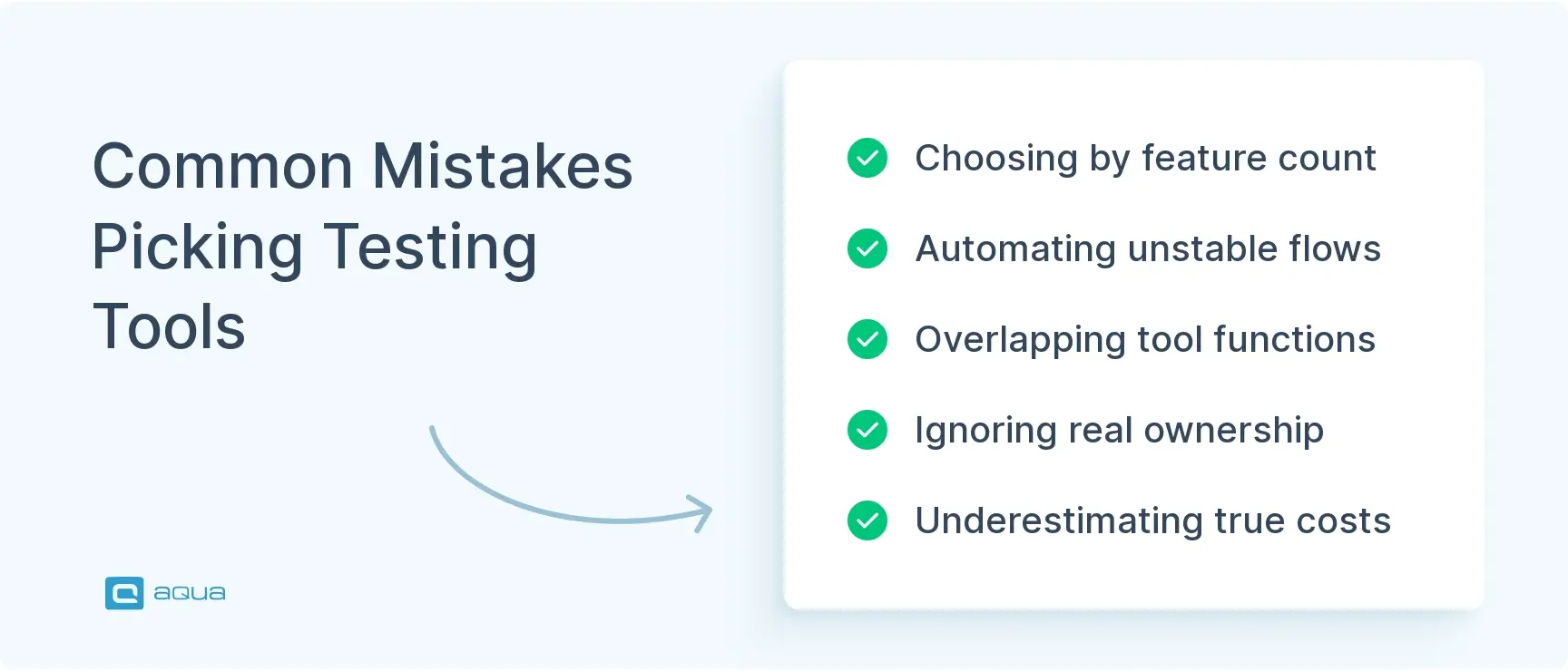
Even with a solid comparison in hand, teams repeat the same selection mistakes:
Choosing by feature count. A team picks the most feature-rich product on the market, then uses roughly 10% of it. The other 90% still shows up in the price and in onboarding time.
Automating unstable workflows. Automation built around features that change every sprint breaks constantly, turning into a permanent maintenance burden instead of saved time. Automate stable flows first.
Adding tools with overlapping roles. Multiple platforms end up storing test cases, results, or defects in parallel, and the source of truth disappears. Check whether an existing tool already covers that role before adding a new one.
Ignoring ownership and total cost. No one owns suite health, and a “free” framework quietly consumes dozens of engineering hours a month in upkeep. Assign clear ownership early and track maintenance time like CI minutes.
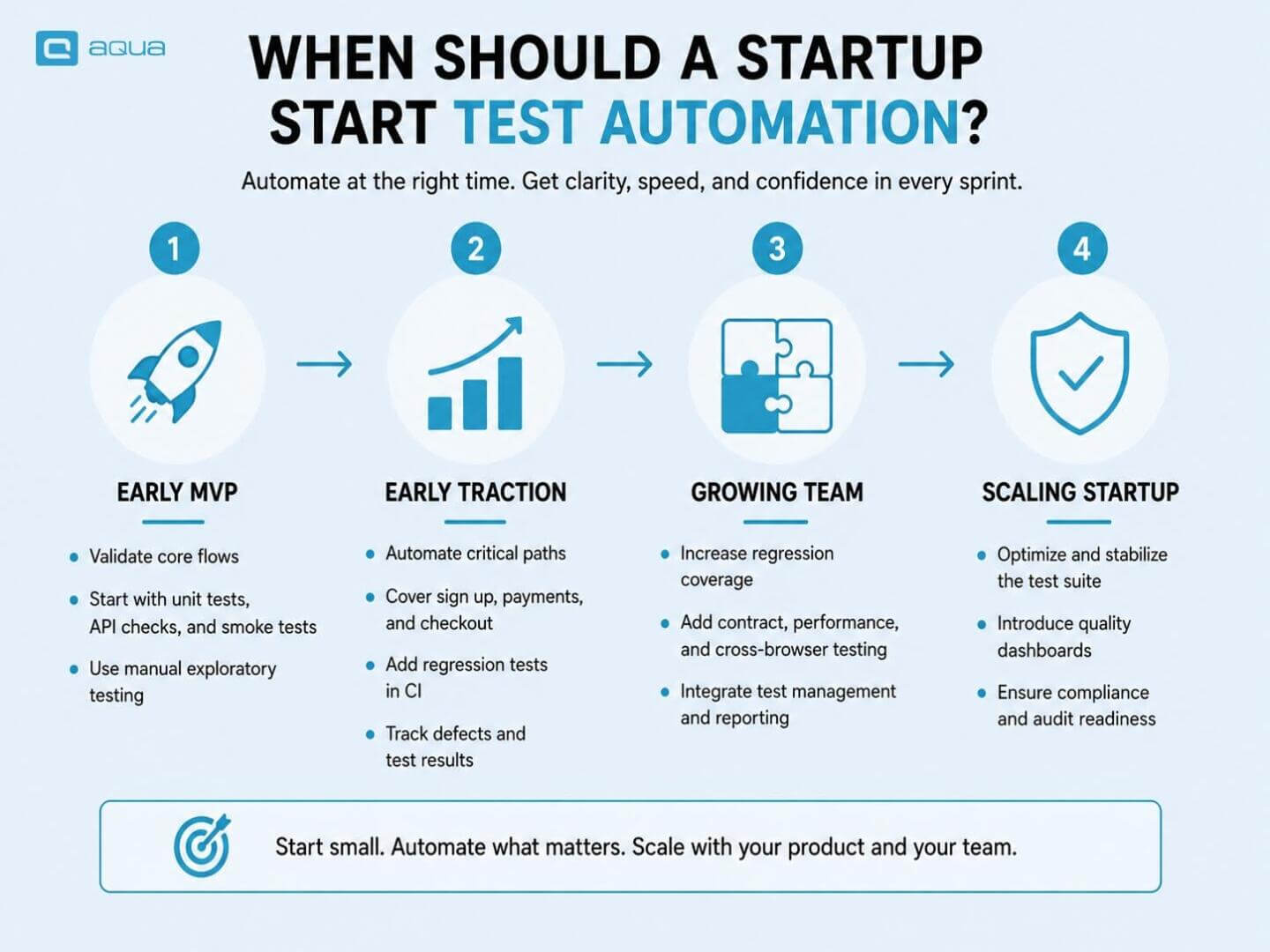
Testing Stack by Team Stage: Quick Reference
Here’s a simple overview of the optimal tool choices based on your team size:
Stage
Unit Testing
UI Automation
API Testing
Test Management
CI/CD
Early MVP (2–8 engineers)
Vitest / Jest
Playwright
Postman
Not needed yet
GitHub Actions
Growing team (3–15 engineers)
Vitest / Jest
Playwright / Cypress
Postman + Pact
aqua cloud / Qase
GitHub Actions
Mobile-first startup
XCTest / Espresso
Appium
Postman
aqua cloud
GitHub Actions / Jenkins
Regulated / Enterprise
Native frameworks
Playwright + Selenium
Pact + Postman
aqua cloud / TestRail
Jenkins / Azure DevOps
How to Build Your Agile Testing Stack by Team Stage
Your testing needs at two people look nothing like your needs at twenty. Build the right stack for the current stage, then expand when the pain shows up.
Early MVP (2–8 Engineers)
At this stage, coverage matters more than process. Focus automation on the paths that break most often and cost most when they do.
Install Vitest or Jest and write unit tests for core business logic, utilities, and data transformation functions first.
Identify 5–10 critical user flows: login, signup, payment, and whatever action defines a successful session in your product.
Automate those flows with Playwright. Skip UI tests for edge cases and secondary paths at this stage.
Write API tests for all endpoints that touch user data, payments, or auth, using Postman collections or code-native tests.
Configure GitHub Actions to run the full suite on every pull request. A failing build should block the merge.
Track bugs in whatever ticketing system your team already uses. Skip dedicated test management until test coordination itself becomes the bottleneck.
Growing Product Team (3–15 Engineers, Dedicated QA)
Structure starts paying off here. Coordination overhead grows faster than team size, and spreadsheet-based tracking breaks down quickly.
Keep existing unit and API frameworks running. Add coverage for new services and endpoints as they ship.
Set up aqua cloud or Qase for test management once manual regression tracking takes more than a few hours per sprint.
Write Pact contract tests for any two services your team deploys independently. Catching API breaking changes in CI costs far less than catching them in staging.
Add k6 smoke tests to CI for performance baselines. Run a full load test against staging before each major release.
Integrate BrowserStack when browser-specific or device-specific bugs start appearing in your support tickets.
Add axe-core to existing Playwright tests. It catches WCAG violations with no meaningful runtime overhead.
Software testing and Agile integration for startups gets considerably more manageable with a proper Agile testing solution. Tools need to communicate with each other, not create new coordination overhead between your team members. A structured Agile testing planning approach at this stage also prevents automation from drifting away from actual sprint priorities.
Mobile-First Startup
Native frameworks cover most of the testing surface. Reserve cross-platform tooling for the flows that actually matter.
Write unit tests with XCTest for iOS and Espresso or Jetpack Compose Test for Android first.
Test all shared backend endpoints with Postman or code-native API tests covering both platforms.
Use Appium for the 5–10 critical cross-platform flows only. Automate native flows with native frameworks wherever possible.
Connect Appium to BrowserStack App Automate to run against a real device matrix without maintaining a hardware lab.
Set up a test management platform to track pass/fail results per device model, OS version, and build number.
Don’t try to automate every manual test. Focus on the paths that make or lose money.
Regulated or Enterprise-Focused Startup
Requirements traceability and documented execution history become prerequisites for enterprise deals.
Map every test case to a requirement before writing a single test. aqua cloud and TestRail both support this with built-in linking.
Configure approval workflows for test execution records. Auditors require documented sign-off, not just passing CI builds.
Add SAST and DAST security scanning to your CI pipeline alongside functional tests.
Run formal performance benchmarks against staging before each release candidate, using k6 or a dedicated load testing tool.
Set up integrations so test results, defect links, and requirement coverage flow automatically into compliance reports.
Budget for compliance reporting features. They tend to be add-ons in many platforms but are standard in aqua cloud.
When it’s time to ship and test status requires reconstructing from Slack threads and some spreadsheets, that’s how you know that your team has outgrown the basics. That’s exactly when aqua cloud, an AI-driven test and requirement generation solution for QA can provide the most value. It connects every test, whether manual or automated, to the requirements they cover and the defects they catch, all in one platform designed for Agile teams that ship frequently. aqua Intelligence, powered by domain-trained models with RAG grounding, generates test cases directly from your project documentation. This means faster coverage, fewer gaps, and test cases that actually match how the product works. 12+ hours saved per user per week on manual documentation and test design. Most teams migrate in a single day and complete onboarding within a week, no months-long implementation projects. aqua integrates natively with Jenkins, Azure DevOps, JMeter, SoapUI, Ranorex, and more than 10 additional native automation frameworks out of the box.
Ship faster with 100% traceability and AI that learns from your actual project
Two or three well-chosen tools that cover your biggest risks with minimal overhead will outperform a bloated stack every time. Start with automation for the workflows that actually matter: authentication, payments, data integrity. Add structure when manual coordination costs more time than the fix requires. That’s how your team builds a testing stack that supports delivery instead of fighting it.
What is the difference between Agile testing tools and regular automated testing tools?
The distinction comes down to how a tool integrates into your workflow. Agile testing tools are designed for continuous integration and fast feedback: tests run on every commit, failures surface immediately, and results connect to existing workflows without a separate process.
Regular automated testing tools, especially older ones, often assume tests run in large batches, maybe overnight or once a week. They generate reports that land in someone’s inbox without blocking a bad build. Some also require manual setup steps that don’t fit a CI pipeline.
Modern tools like Playwright, Cypress, and Vitest are “Agile” because they’re built for the way teams work now: small changes, frequent deploys, automated gates. Older tools can still work in Agile environments, but your team will spend more time bending them to fit the process. Understanding the Agile testing pyramid helps clarify how different test types should be distributed across unit, integration, and UI layers in a CI pipeline.
Do startups need a dedicated Agile testing tool?
Depends on what “dedicated” means. Do you need Playwright or Cypress for browser automation? Yes, unless you’re building a backend-only API. Do you need aqua cloud or Qase for test management? Only after you’ve outgrown spreadsheets, issue tracker comments, and tribal knowledge.
Early-stage startups should automate the obvious stuff: critical user flows, authentication, payments, data integrity. Test management comes later, when coordinating manual and automated results becomes a time sink or when customers start asking for documented evidence.
Skip the tool if it creates more process than protection. Add it when manual coordination starts costing more than the tool itself.
How do Agile testing tools fit into a CI/CD pipeline?
They run automatically when code changes. A pull request triggers your test suite, tests pass or fail, and results block or approve the merge. That’s the basic loop.
The specifics depend on the tools in use. GitHub Actions, GitLab CI, and Jenkins can run nearly anything: unit tests, API tests, browser tests, performance checks, accessibility scans. Playwright and Cypress have first-class CI support. Postman collections run through Newman. k6 scripts run directly in CI. Test management platforms like aqua cloud and Qase receive results through APIs or direct integrations.
The key is keeping tests fast enough that your team doesn’t bypass them. Slow pipelines train people to commit directly to main or merge before tests finish. Keep pull-request checks under ten minutes where possible. Move slower regression suites to post-merge or scheduled runs.
What's the best Agile testing tool for a small startup team?
For most small web teams, start with Playwright. It handles browser automation, runs in CI, supports parallel execution, captures traces for debugging, and doesn’t require months of infrastructure work. Pair it with Vitest or Jest for unit tests and your basics are covered. When evaluating the top testing tools for Agile startups, prioritize tools that deliver immediate value without demanding a dedicated automation engineer just to keep them running.
If your team is frontend-heavy and values interactive debugging, Cypress is a strong alternative. Mobile teams should start with native unit tests and add Appium only for the critical cross-platform flows.
Can a startup run automated testing without a dedicated QA engineer?
Yes. Frameworks like Playwright and Vitest are built for developers. Start with high-value flows like authentication, payments, and data submissions. Focus coverage on what breaks most or costs most when it fails. Avoid chasing a specific coverage percentage before your basics are solid.
How do you choose between Playwright and Cypress?
Playwright handles multi-page flows and cross-browser scenarios more effectively. Cypress gives faster feedback during active development with an interactive interface developers appreciate. If your team writes TypeScript and needs broader browser coverage, Playwright is the stronger default. Cypress works well when developers own most of the test writing.
When should a startup switch from spreadsheets to test management software?
When your team spends more than 30 minutes before each release reconstructing what was tested, it’s time to switch. Clear signals: manual regression grows past one sprint’s capacity, testers and developers track results separately, or customers report bugs that should have been caught.
Pavel, a Quality Assurance Consultant and Author, brings deep expertise to solving complex testing challenges. His background in software development has helped organizations transform their QA practices from reactive to proactive. Beyond consulting, Pavel develops best practice guides and case studies for aqua cloud that…
Robert has several years of experience in process optimisation and test management. He is an expert in defining and implementing workflows by adapting aqua to the clients’ processes.
Home » Test Automation » 15 Best Agile Testing Software for Startups: Complete List
Do you love testing as we do?
Join our community of enthusiastic experts! Get new posts from the aqua blog directly in your inbox. QA trends, community discussion overviews, insightful tips — you’ll love it!
We're committed to your privacy. Aqua uses the information you provide to us to contact you about our relevant content, products, and services. You may unsubscribe from these communications at any time. For more information, check out our Privacy policy.
X
🤖 Exciting new updates to aqua Intelligence are now available! 🎉