WhatsApp messaging is known for local queue delays and then sync complexities upon reconnecting, on top of other chat software-related difficulties. For your team, this matters most if you are working on a WhatsApp integration or a similar messenger. Without the common scenarios in your regression runs, defects are far more likely to reach production.
WhatsApp keeps one conversation state consistent across a phone and up to four linked devices. After reconnection, edits and deletions must still reach the clients that were offline.
Message status moves from pending to sent, then to delivered and read. Your test cases confirm each transition during network failures.
Broadcast lists reach up to 256 recipients, but only contacts who saved the sender’s number receive the message.
Groups support up to 1,024 members, and polls allow 255-character questions with 12 options. Linked devices, however, lack live location and broadcast lists.
In security testing, your team confirms that locked-chat notifications hide sender and content. View Once media must disappear from every device, while sensitive data stays out of logs.
This guide groups 50+ test cases for WhatsApp by feature area and explains the technical purpose behind each group. Each section also covers the negative and multi-device scenarios where most production defects appear.
What Is WhatsApp Testing?
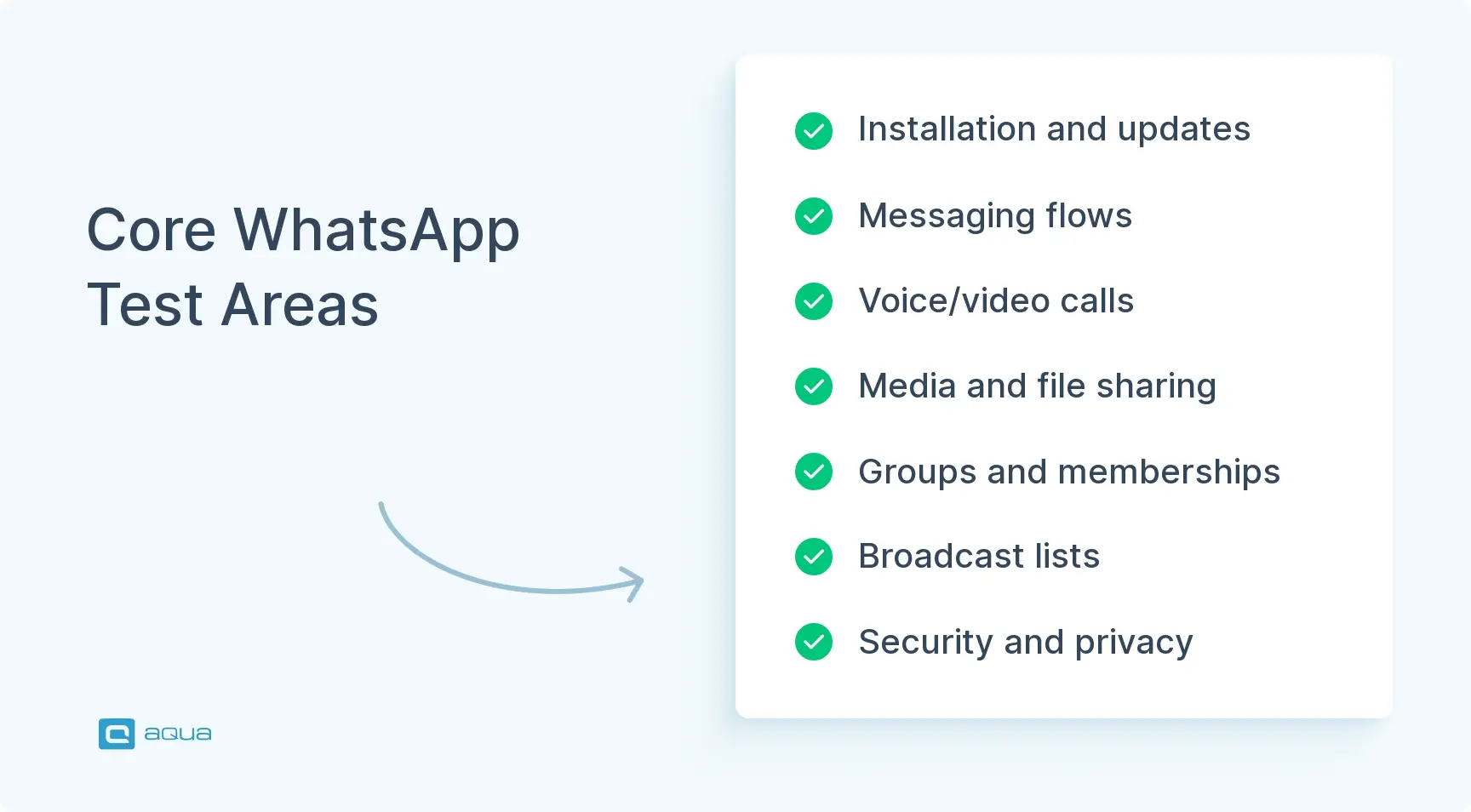
WhatsApp testing validates every user-facing flow, from installation and messaging to privacy and sync, on the phone and each linked device. Most test cases of WhatsApp come down to one observable signal, the message state.
Message States You Will Verify Constantly
AI-generated image.
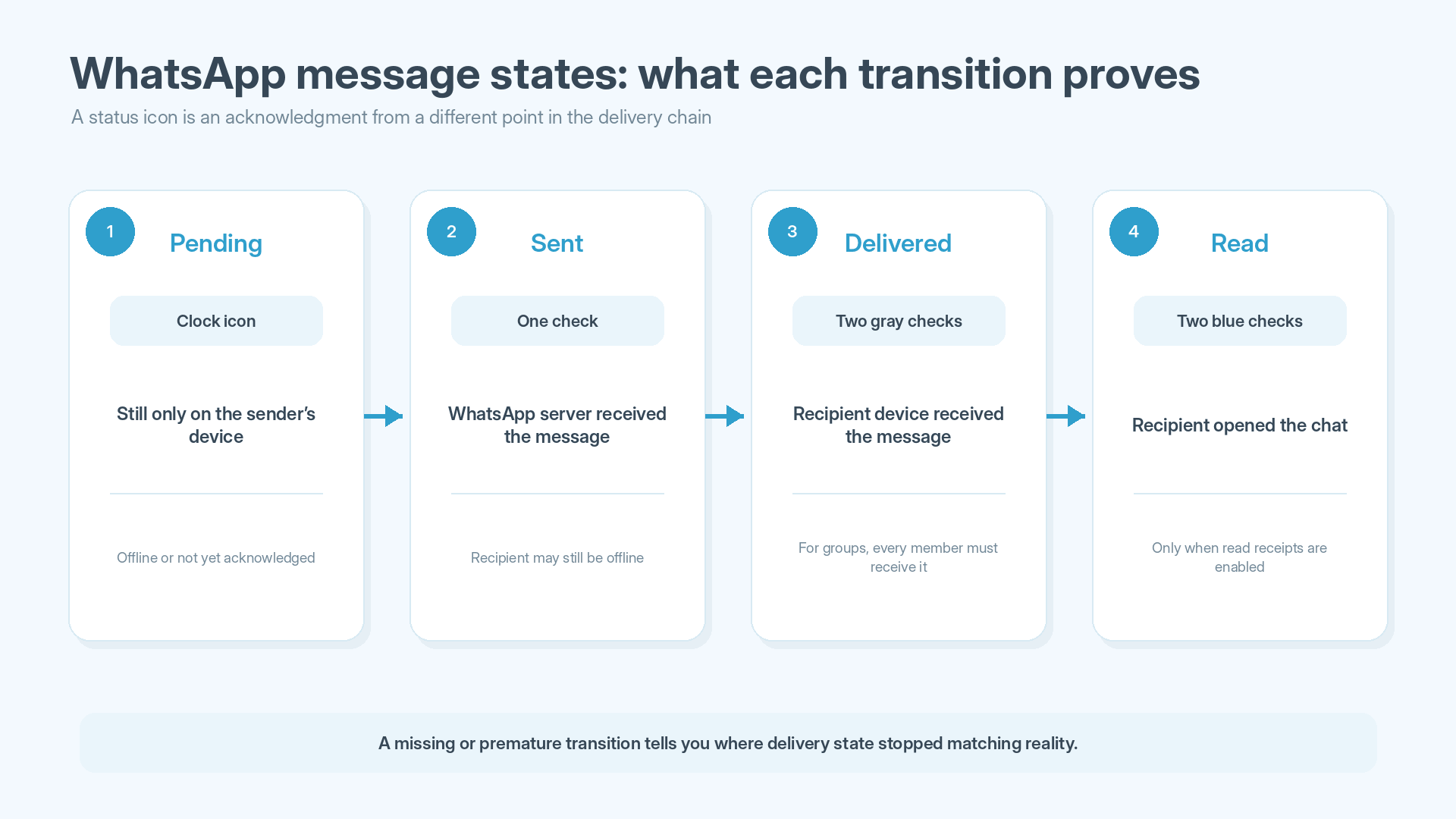
WhatsApp shows four message states, and each one reflects a different acknowledgment in the delivery chain. Nearly every messaging test case checks at least one transition between them:
Pending: A clock icon means the message is still on the sender’s device. The test fails if the message disappears or shows delivery in this state.
Sent: One check confirms that the server received the message. If the recipient is offline, the status must stay here until they reconnect.
Delivered: Two gray checks confirm that the recipient’s device received the message. In group chats, this state appears only after every member’s device has received it.
Read: Two blue checks appear once the recipient opens the chat with read receipts on. With receipts off, this state must never appear in one-to-one chats.
Since each check mark depends on a confirmation from a different party, a missing transition tells your team exactly where the chain broke.
Writing 50+ WhatsApp scenarios like these takes serious time and domain knowledge, especially when they involve multi-device sync and race conditions. aqua cloud, an AI-driven test and requirement management solution, cuts manual work. With aqua Intelligence, a domain-trained AI with RAG grounding, aqua can generate detailed test cases from your requirements or uploaded documentation in seconds. Because aqua’s AI learns from your user stories and technical specs, each test case reflects your application’s actual architecture. Your project data also stays inside a secure environment, which generic AI tools can’t guarantee. Centralized test management and full traceability from requirements to defects keep the whole suite in one place. Users save 12.8+ hours per week on average. On the integration side, aqua connects to Jira with bidirectional sync and to Azure DevOps. Confluence links your documentation, and the REST API covers any other tool in your stack. With the Capture integration, your team also records every test execution with video and screenshots, ready for the defect report.
Generate project-specific test cases for complex applications in seconds with aqua Intelligence
Encryption checks, visibility settings, data leakage, backups
UI and accessibility
Layout, navigation, screen readers, localization
Performance
Rendering, startup, battery, storage growth
Compatibility
OS versions, form factors, networks, MDM
Status
Audiences, expiry, viewer lists
These areas overlap constantly. A locked-chat notification test, for example, touches privacy and UI at once, and defects often appear at such intersections.
How to Write Test Cases for WhatsApp
If you’re learning how to write test cases for WhatsApp, start with specificity, since structured test case management depends on precise conditions. A good case lets any tester reproduce the exact conditions and reach the same pass or fail verdict.
1. Define the Environment and Preconditions
A case titled “Verify messaging works” gives your team no test conditions and no failure criteria. Each reproducible case states:
Platform and OS version, e.g., Android 15 or iOS 18
Network type for each user, such as Wi-Fi or cellular data
Devices involved and the connectivity state of each
Account state, like existing chats or enabled privacy settings
2. Define Observable State Transitions and Expected Results
Every expected result names something a tester can see on screen, such as a check mark or a label:
Example: User A on Android and Wi-Fi sends “Test 01” to User B on iOS and cellular data. B opens the chat 30 seconds later. Expected result: One gray check appears on send and two gray checks once B’s phone receives the message. Two blue checks follow after B opens the chat.
3. Add Cross-Device and Failure-State Variants
Here’s the principle behind most hard WhatsApp defects: each linked device receives its own encrypted copy of every message. As a result, one device can end up in a state the others never saw. A variant of each core case, where devices act at once or one of them is offline, exposes that divergence:
Device A sends a message, and Device B reads it.
Device A edits the message within the 15-minute window.
Device C deletes it for everyone while Device B is offline.
Device B reconnects, and every client must show the same final state.
Single-device test cases miss these synchronization failures, which leave linked devices with stale UI and inconsistent histories.
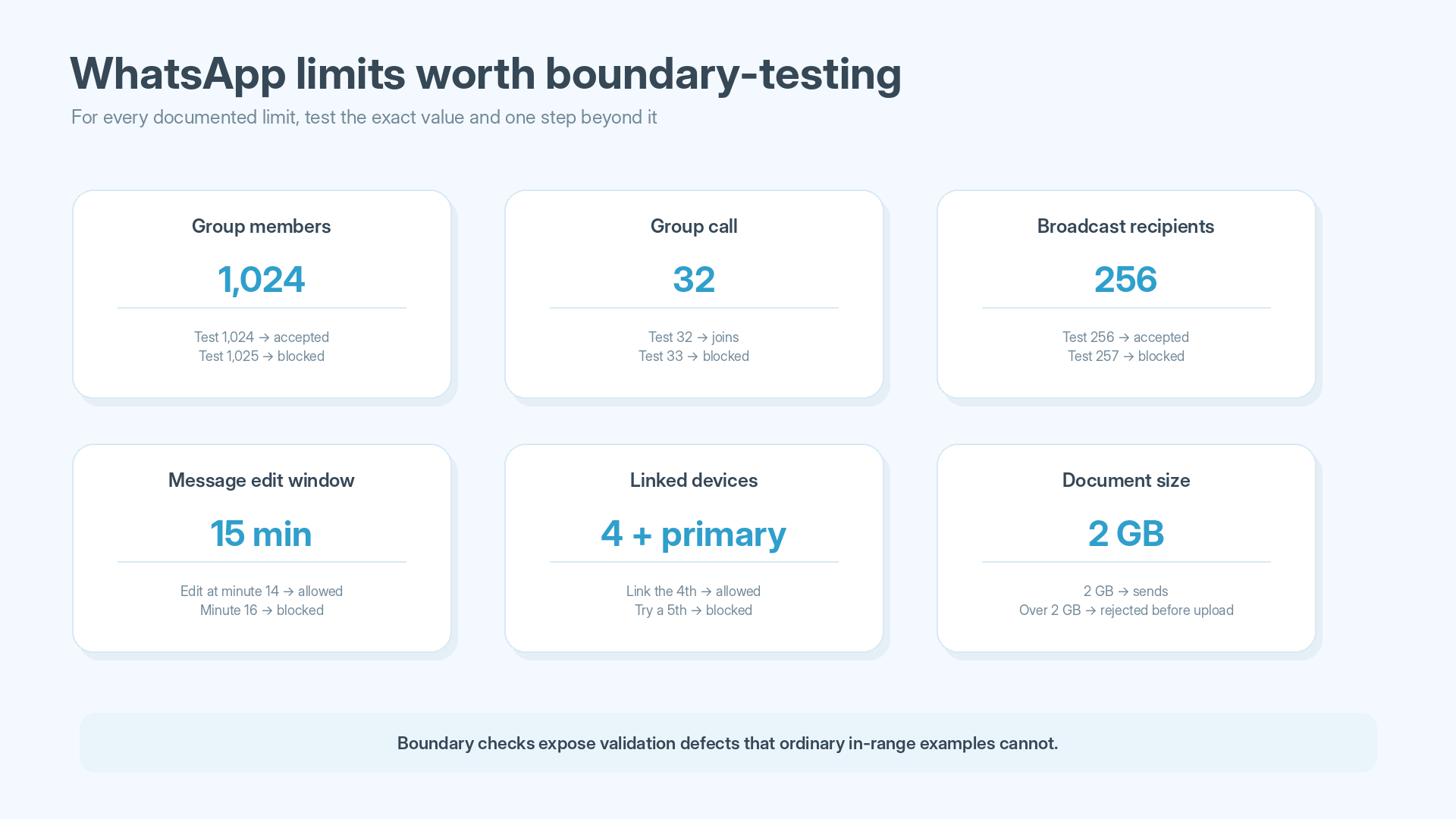
4. Test the Documented Limits, Then Exceed Them
AI-generated image.
Each documented limit gets a test at the value itself and one step above it, since validation logic tends to break there:
Limit
Documented value
Group members
1,024
Group call participants
32
Broadcast list recipients
256
Message edit window
15 minutes
“Delete for everyone” window
About two days
Poll question length and options
255 characters, 12 options
Linked devices
Four, plus the primary phone
Linked device logout after primary phone inactivity
14 days
Document file size
2GB
Unopened View Once media
Expires after 14 days
After the boundary checks, add adverse conditions to the same scenarios:
Network loss in the middle of an upload
An edit attempt after the 15-minute window closes
Deletion while the recipient reconnects
Permission revocation during media selection
Full device storage during a download
Each of these combinations forces the app to recover from a half-finished operation, where retry and cleanup code fails most often. Checkbox-style functional tests rarely reach that code path.
WhatsApp Installation and Update Test Cases
A failed update can lock users out of chats they already have, and store distribution adds failure points of its own. Interrupted downloads and low device storage, for example, affect installs from both the App Store and Google Play.
ID
Test steps
Expected result
TC-INSTALL-01
A tester installs WhatsApp from the App Store and from Google Play on devices with no previous installation.
The app installs and opens to the welcome screen, and registration starts without errors.
TC-INSTALL-02
On first launch, the tester accepts every permission prompt on one device and denies contacts and notifications on another.
Both devices complete registration. On the second device, WhatsApp asks for each denied permission again when a feature needs it.
TC-INSTALL-03
A device running the previous supported version with 500+ messages across 20 chats updates to the current version.
All chats and settings remain after the update, and no re-registration is required.
TC-INSTALL-04
The network drops at 50% of an update download, and the tester retries after reconnecting.
The installed version keeps working after the failed download, and the retry completes the update with chat data intact.
TC-INSTALL-05
Free storage drops below the size the update needs, and the tester starts the update.
The store reports insufficient storage before installing, and the current version keeps running with all chats intact.
Data migration problems commonly appear on the first launch after an update, which makes that launch the right moment for a short smoke run.
WhatsApp Test Cases for Messaging
These test cases for WhatsApp chat cover delivery state and ordering under retries and offline queues. Message mutations, such as edits and deletions, form a second group with their own sync rules.
Delivery, Ordering, and Offline Behavior
The sending app retries a message until the server acknowledges it, and an offline device receives its backlog in one batch after reconnecting. Retries can create duplicates, and a batch can arrive out of order. Check marks must also match the actual delivery state at every step.
ID
Test steps
Expected result
TC-MSG-01
User A on Android and Wi-Fi sends “Test 01” to User B on iOS and cellular data. B opens the chat 30 seconds later.
One gray check appears on send and two gray checks after B’s phone receives the message. Two blue checks follow once B opens the chat.
TC-MSG-02
A’s phone goes into airplane mode, A sends “Test 02”, and airplane mode is turned off two minutes later.
The message shows a clock icon while offline and never a check. After reconnection, it sends automatically without A retyping it.
TC-MSG-03
All of B’s devices are switched off before A sends “Test 03”. B’s phone is switched back on 10 minutes later.
A sees one check for the full 10 minutes. The second check appears only after B’s phone reconnects and receives the message.
TC-MSG-04
A sends “Test 04”, and A’s Wi-Fi is toggled off and on five times within 10 seconds.
B receives exactly one “Test 04” on every device, since retries must not create duplicates.
TC-MSG-05
B stays offline while A sends 50 messages. B’s phone and a linked laptop then reconnect at the same time.
Both of B’s devices show all 50 messages in the same order, and their unread counters match.
Content, Mentions, and Edits
Mixed scripts stress text rendering, and mentions follow their own notification rules. Edits and deletions work differently, since each one is a new event that every device applies to an existing message. A missed event leaves one client showing outdated content.
ID
Test steps
Expected result
TC-MSG-06
A sends a message that mixes emoji from the latest Unicode release with Arabic right-to-left text.
Both scripts render without broken glyphs, and the text direction switches correctly within the line.
TC-MSG-07
B mutes a 10-member group, and A mentions B with “@” in that group.
B still receives a notification, since mentions override group mute.
TC-MSG-08
A edits a sent message at minute 14 and tries a second edit at minute 16.
The first edit appears on all of B’s devices with an “Edited” label. However, the second edit is blocked because the 15-minute window has closed.
TC-MSG-09
A uses “Delete for everyone” while B’s laptop is offline. The laptop reconnects five minutes later.
The laptop shows “This message was deleted” and never displays the original text, even briefly.
Run these test cases for WhatsApp chat across device pairs as well, since rendering and sync behavior differ by platform. The minimum matrix includes:
Android to Android
iOS to iOS
Mobile to Web
Mobile to desktop
Check for instances where performing an action that leads to some sort of processing, that's when you can fiddle with the app (kill the wifi, kill the app, send it to background, recieve a phone call) You can also give the app a bad internet connection.
Calls depend on device hardware and the OS audio session at the same time, which makes them the most hardware-dependent part of WhatsApp. Test cases for WhatsApp calling and test cases for WhatsApp video call cover interruptions along with basic connection.
One-to-One Call Controls and Interruptions
On a phone, the operating system decides where audio goes and which app holds the microphone. Whenever the OS changes those conditions, e.g., when headphones connect or a cellular call arrives, the WhatsApp call must follow without audio loss. Network handovers add another risk, since switching from Wi-Fi to cellular changes the device’s IP address. The call should survive that handover without requiring a redial.
ID
Test steps
Expected result
TC-CALL-01
B answers A’s call and hangs up after two minutes of conversation.
Audio flows both ways without echo, and both call logs show the same duration.
TC-CALL-02
B declines an incoming call from A.
A’s call screen ends at once, and both call logs record the attempt with the correct time.
TC-CALL-03
A calls B, and B doesn’t answer.
The call stops ringing after WhatsApp’s timeout, and B gets a missed-call notification with A’s name and the right time.
TC-CALL-04
Bluetooth earbuds connect to B’s phone during a call and disconnect 30 seconds later.
Audio moves to the earbuds within a few seconds and returns to the earpiece after disconnection, with no one-way audio.
TC-CALL-05
A starts a call on Wi-Fi and walks out of range, so the phone moves to cellular. Later, A returns within Wi-Fi range.
The call survives both handovers. Audio may pause briefly, but neither user has to redial.
TC-CALL-06
A cellular call arrives on B’s phone during a WhatsApp call.
B can decline it and stay on WhatsApp. If B accepts, the WhatsApp call is held or ended according to the OS rules.
TC-CALL-07
B revokes WhatsApp’s microphone permission in system settings and then places a call.
WhatsApp asks for microphone access before connecting and never places a silent call.
Group Calls
In a group call, every participant sends and receives several media streams at once, and bandwidth and CPU load grow with each person who joins. Group cases focus on the 32-participant limit, along with recovery when one member’s connection fails.
ID
Test steps
Expected result
TC-CALL-08
Participants join a group voice call one by one until 32 are in, and a 33rd person is then invited.
All 32 participants hear each other, and the 33rd invitation is blocked.
TC-CALL-09
One participant in a six-person video call loses network access for 20 seconds.
The other five continue without interruption. Meanwhile, the affected participant sees a reconnecting state and rejoins once the network returns.
For each negative test case for WhatsApp calls, add these conditions:
Revoked microphone or camera permissions
Incoming calls in low-battery or battery-saver mode
Poor networks, where call quality should degrade gracefully and the app must not crash
WhatsApp Test Cases for Media and File Sharing
AI-generated image.
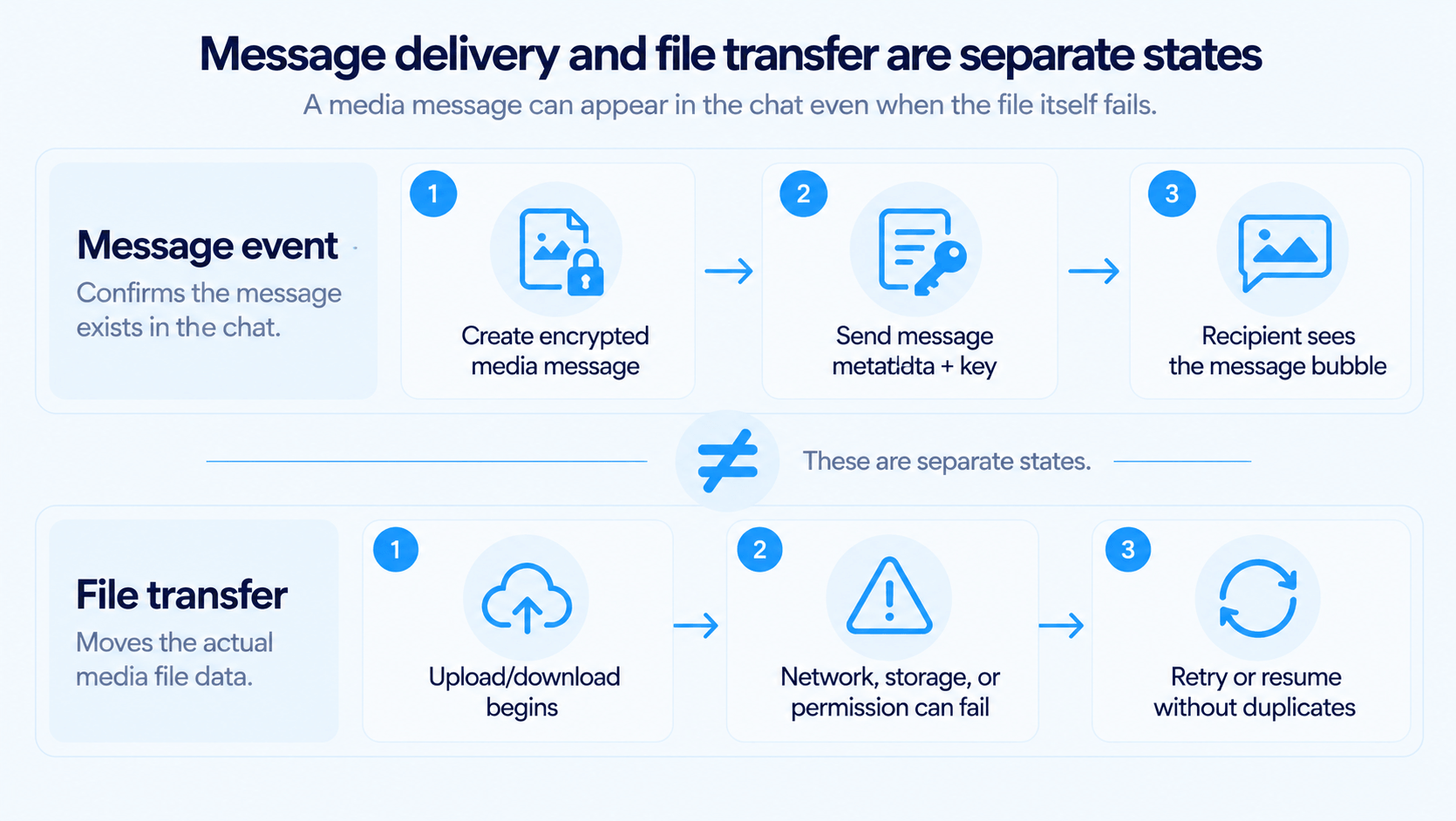
For media, the sending app encrypts each file with a random key and uploads it to WhatsApp’s servers. The message itself carries only that key and a reference to the file. A message can therefore arrive even when the file download fails, which makes delivery and file transfer two separate pass or fail points.
Uploads, Downloads, and Permissions
Since iOS 14 and Android 14, users can grant access to selected photos only, and they can revoke permissions while the app runs. WhatsApp must handle both states without crashing. Large uploads add a separate failure point, since they must resume after network loss without sending the same file twice.
ID
Test steps
Expected result
TC-MEDIA-01
B grants access to selected photos only and opens WhatsApp’s gallery picker.
Only the selected photos appear, and WhatsApp offers a way to change the selection.
TC-MEDIA-02
B revokes photo access in system settings while WhatsApp runs, then returns and attaches a photo.
WhatsApp reopens on the same chat and asks for access again without crashing.
TC-MEDIA-03
B’s free storage drops below 100 MB, and B downloads a 500 MB video.
The download stops with a storage error, and no partial file appears in the gallery.
TC-MEDIA-04
A’s network drops at 50% of a 1 GB video upload and returns one minute later.
The upload resumes or restarts, and B receives exactly one video message.
TC-MEDIA-05
A sends a 2 GB document and then a file slightly over 2 GB.
The 2 GB file sends with a progress bar, and the larger file is rejected before the upload starts.
View Once Media
View Once is one of the few features where the expected result is an absence. Since the recipient’s linked devices also receive the message, the “Opened” state must reach all of them, and none may keep a viewable copy.
ID
Test steps
Expected result
TC-MEDIA-06
A sends a View Once photo. B opens and closes it, then tries to reopen it.
The photo opens once and then shows “Opened” on all of B’s devices. Forward and save options are unavailable.
TC-MEDIA-07
A View Once video stays unopened for 15 days.
The media expires after 14 days and can’t be opened anymore.
Albums, Voice Messages, and Link Previews
Voice messages are recorded and encoded on the device, and albums are grouped before upload. Link previews add one more step, since the sender’s app fetches the target page to build them. Each of these processing steps can alter what the recipient finally sees.
ID
Test steps
Expected result
TC-MEDIA-08
A selects 30 photos and sends them in one action.
They arrive as one album in the original order, and tapping opens a swipeable viewer.
TC-MEDIA-09
A records a 10-minute voice message with recording locked, pausing twice along the way.
B plays one continuous recording with nothing missing, and the waveform matches its length.
TC-MEDIA-10
A sends a link to a page with Open Graph tags and then a link to a page without them.
The first link shows a title and image, and the second shows a plain link. Both open the right URL.
WhatsApp Test Cases for Group Chats
Group messages use a different encryption scheme from one-to-one chats. Each member shares a Sender Key with the group, and whenever a member leaves, the remaining participants discard their Sender Keys and generate new ones. In test cases for WhatsApp group chat, membership changes need explicit access-control checks: a removed user must not receive messages sent after removal.
Membership and Admin Permissions
Admin rights control membership and group settings, and every client enforces them independently. Here’s the tricky part: two admins can act on the same member at the same moment. The group state must then converge to one result on all devices.
ID
Test steps
Expected result
TC-GROUP-01
An admin removes Member C, and the group then exchanges five messages.
C sees a removal notice and receives none of the five messages on any device.
TC-GROUP-02
An admin re-adds C 10 minutes later.
C rejoins, and messages sent during C’s absence don’t appear in C’s chat.
TC-GROUP-03
Two admins add the same contact within the same second.
The contact appears once in the member list, and the chat shows one “added” notice.
TC-GROUP-04
“Send messages” is set to admins only, and a regular member opens the chat.
The input field is replaced with a notice that only admins can send messages.
TC-GROUP-05
“Approve new members” is on, and two contacts join through the invite link. An admin then resets the link.
Both join requests wait for admin approval, and the old link stops working after the reset.
TC-GROUP-06
“Edit group settings” is restricted to admins, and a regular member tries to rename the group from a linked laptop.
The rename is blocked on every device, including clients that cached the old permissions.
Group Limits, Polls, and Read Receipts
Large groups stress the delivery chain, since each message goes to up to 1,024 members and all of their linked devices. Polls and read receipts add shared counters that many members update at once, and concurrent updates are where totals drift.
ID
Test steps
Expected result
TC-GROUP-07
An admin adds members until the group reaches 1,024 and then tries to add one more.
The 1,024th member joins, and the next addition is blocked with a limit message.
TC-GROUP-08
20 members vote within the same five seconds, and five of them change their votes.
Every device shows the same final totals, and no vote counts twice.
TC-GROUP-09
A sends a message in a 50-member group and opens Message info.
“Read by” and “Delivered to” update as members open the message, including members who turned off read receipts.
Communities add another permission layer on top of regular groups, with three areas to cover:
Announcement groups and sub-groups
Event creation inside a community
Admin-level controls and member management across the community structure
WhatsApp Broadcast List Test Cases
A broadcast list sends one message to up to 256 recipients, and each recipient gets it as a regular one-to-one message. Delivery depends on the recipient’s address book, though, since only people who saved the sender’s number receive broadcasts. In these WhatsApp broadcast test cases, recipient eligibility gets the same weight as delivery itself.
ID
Test steps
Expected result
TC-BROADCAST-01
A creates a broadcast list with five contacts on the phone and names it.
The list appears under Broadcast lists with its name and five recipients, and A can add or remove recipients later.
TC-BROADCAST-02
A adds B, who saved A’s number, and C, who didn’t, and then sends a message.
B receives it as a one-to-one message from A, and C never receives it. Message info shows delivery for B only.
TC-BROADCAST-03
A adds 256 recipients to a list and then tries to add a 257th.
The list accepts all 256 recipients and blocks the next addition.
TC-BROADCAST-04
A sends a photo and a PDF to a list with 20 recipients.
Each recipient gets both files in their chat with A, and every download works independently.
TC-BROADCAST-05
B replies to a broadcast message.
The reply appears in A’s one-to-one chat with B, and no other recipient sees it.
TC-BROADCAST-06
After sending a broadcast from the phone, A opens WhatsApp Web and the desktop app.
Linked devices offer no option to create or send to broadcast lists, and your team records how sent broadcasts appear there.
WhatsApp Test Cases for Notifications
Notifications reach the device through Firebase Cloud Messaging on Android and Apple Push Notification service on iOS. Since each OS then applies its own rules for display and storage, the same message can produce different notifications on two phones. Notification test cases for WhatsApp therefore span every app state on both platforms, along with privacy for locked chats.
Delivery Across App States
The app state decides how a notification gets handled. In the foreground, WhatsApp shows it inside the app, while in the background the OS wakes the app or displays the push directly. Battery-saving modes delay those wake-ups and add measurable delays to delivery.
ID
Test steps
Expected result
TC-NOTIF-01
WhatsApp runs in the background on A’s phone, and B sends a message.
A system notification with sender and preview appears within seconds, and tapping it opens B’s chat.
TC-NOTIF-02
A swipes WhatsApp away from recent apps, and B sends a message.
The notification still arrives, and tapping it launches WhatsApp directly into the right chat.
TC-NOTIF-03
A force-stops WhatsApp in Android settings, and B sends a message.
Android doesn’t deliver pushes to force-stopped apps, so no notification appears until A opens WhatsApp. Your team logs this as expected behavior.
TC-NOTIF-04
A’s phone stays idle with battery saver on for 30 minutes, and B then sends a message.
The notification arrives, and your team records the delay per device model.
TC-NOTIF-05
A mutes one chat for 8 hours, and messages arrive in that chat and in another one.
The muted chat stays silent, and its unread count still increases. Meanwhile, the other chat notifies normally.
TC-NOTIF-06
A reads a new message on WhatsApp Web while the phone still shows its notification.
The phone notification clears once the read state syncs.
Privacy and Locked Chats
Once a notification reaches the OS, WhatsApp no longer controls where it gets stored or shown. Android 11 and later can keep a notification history, for example, and lock screens show previews to anyone holding the phone. Locked-chat coverage should include the lock screen and notification history, along with any other place that may retain previews.
ID
Test steps
Expected result
TC-NOTIF-07
A locks a chat with Chat Lock, and B sends a message to it.
A sees only a generic WhatsApp notification with no sender name or message text.
TC-NOTIF-08
A turns on Android notification history and receives five locked-chat messages before opening the history.
The history shows only generic entries, with no sender names or message text.
Run the full set on both Android and iOS, since their notification systems differ in two important ways:
iOS applies stricter preview controls, which changes what appears on the lock screen.
Android offers granular notification channels, so muting and grouping need separate checks there.
WhatsApp Test Cases for User Accounts
Registration failures can block access to the account, while migration and re-registration also change its encryption state.
Registration and Verification
Registration ties the account to a phone number through a six-digit code sent by SMS or voice call. Each code has a lifecycle, e.g., replacement by a newer code, and repeated wrong entries must trigger throttling against brute-force attempts.
ID
Test steps
Expected result
TC-ACCOUNT-01
A new user registers an unused number and enters the six-digit SMS code.
The account activates, and the profile setup screen opens.
TC-ACCOUNT-02
The user requests two codes in a row and then enters the first one.
The first code is rejected, and only the latest code activates the account.
TC-ACCOUNT-03
The user enters a wrong code five times in a row.
WhatsApp enforces a waiting period before the next attempt and shows the remaining time.
Reinstall, Migration, and Number Changes
Moving an account touches the backup and the encryption keys, and every linked device reacts to the change. A migration passes only when data integrity and key changes both check out.
ID
Test steps
Expected result
TC-ACCOUNT-04
The user backs up a chat with 1,000 messages and 50 photos, then reinstalls WhatsApp and restores the backup.
All 1,000 messages and 50 photos return with their original timestamps and order.
TC-ACCOUNT-05
The user registers the same number on a new phone.
The old phone and its linked devices are logged out. Contacts with security notifications on see a security code change notice.
Two-Step Verification and Account Security
Two-step verification adds a six-digit PIN on top of the SMS code. That way, a SIM swap or an intercepted code isn’t enough to take over the account. The PIN and passkeys must protect registration without locking out legitimate users, e.g., someone who forgot the PIN.
ID
Test steps
Expected result
TC-ACCOUNT-06
Two-step verification is on, and the number is registered on a second phone.
Registration asks for both the SMS code and the PIN, and it doesn’t complete without the PIN.
TC-ACCOUNT-07
The user taps “Forgot PIN” with a verified recovery email on file.
WhatsApp emails a reset link, and the PIN resets after the link is opened.
TC-ACCOUNT-08
The user taps “Forgot PIN” without a recovery email.
WhatsApp allows re-registration without the PIN only after a seven-day wait.
TC-ACCOUNT-09
The user creates a passkey and, after logging out, verifies with it on the same phone.
Verification succeeds through the device’s biometric prompt, with no SMS code needed.
Contact Synchronization
WhatsApp builds its contact list from the phone’s address book, so it depends on the Contacts permission and on changes made outside the app. The app must pick up those changes and keep working when the permission is missing.
ID
Test steps
Expected result
TC-ACCOUNT-10
B denies the Contacts permission during setup and grants it later in system settings.
While the permission is denied, chats display phone numbers only. After the grant, contact names appear without a reinstall.
TC-ACCOUNT-11
B renames one contact in the address book and deletes another.
The renamed contact’s chats show the new name. For the deleted contact, the chat history stays, and the header shows the phone number.
TC-ACCOUNT-12
B opens a wa.me link with a number that isn’t saved in the address book.
WhatsApp opens a chat with that number, and messages send without saving the contact first.
WhatsApp Security and Privacy Test Cases
WhatsApp uses the Signal Protocol for end-to-end encryption, so the server can’t read message content. As a result, security test cases for WhatsApp focus on the device, since content gets decrypted and stored there.
Encryption and Contact Controls
Traffic inspection only shows encrypted data, so encryption checks rely on WhatsApp’s own verification tools, such as the 60-digit security code. Blocking belongs in the same group, since a blocked contact must lose every communication channel.
ID
Test steps
Expected result
TC-SECURITY-01
A and B open each other’s contact info and compare the 60-digit security code.
Both phones show identical codes, and scanning the QR code confirms the match.
TC-SECURITY-02
A blocks B, and B then sends a message and places a call.
B’s message stays at one check and never reaches A, and the call doesn’t ring. B also stops seeing A’s last seen.
Visibility and Privacy Settings
Each privacy setting decides which audience sees a piece of account data, and WhatsApp offers several audiences per setting. A valid check views the account from each audience, e.g., a contact and a non-contact.
ID
Test steps
Expected result
TC-SECURITY-03
A sets “Last seen” to “My contacts except” and excludes C.
Other contacts see A’s last seen, and C doesn’t.
TC-SECURITY-04
A turns off read receipts and exchanges messages with B in a one-to-one chat and in a group.
One-to-one messages stay at gray checks on both sides. In the group, read status still appears.
TC-SECURITY-05
A sets “Groups” to “My contacts”, and a non-contact admin tries to add A.
The admin can’t add A directly and has to send a private invitation, which A can accept within three days.
TC-SECURITY-06
A locks a chat with biometrics and tries to open it from the chat list.
The chat opens only after successful authentication.
Data Leakage and Backups
Once content is decrypted on the device, it can leak through logs and the clipboard. Backups add a second risk, since Google Drive and iCloud backups aren’t end-to-end encrypted unless the user turns that option on. Leakage cases therefore track content outside the chat screen:
TC-SECURITY-07: After a chat with unique test strings, your team searches device logs and the app cache. Those strings must never appear in plaintext.
TC-SECURITY-08: Text copied from a message is pasted into another app. Clipboard behavior must follow the platform’s protections, such as the clipboard auto-clear in Android 13 and later.
TC-SECURITY-09: Your team turns on end-to-end encrypted backup with a password and restores on a new phone. The restore fails without the password or 64-digit key and succeeds with it.
TC-SECURITY-10: Cloud storage runs out during a backup. WhatsApp reports the failure, and the previous backup stays restorable.
For a consistent structure, map these cases to OWASP MASVS, the mobile application security standard. Its control groups include authentication and cryptography, along with platform interaction and resilience against tampering.
WhatsApp UI and Usability Test Cases
UI defects in a messenger usually come from content at the edges, like very long names or right-to-left text. Layout and accessibility settings pushed to their extremes expose most of them.
Layout and Navigation
A chat screen renders thousands of rows with different heights, and it has to keep scroll position and state through rotation and navigation. State loss and broken layouts are the typical failures here, especially with real content.
ID
Test steps
Expected result
TC-UI-01
A rotates the phone while typing a 300-character draft.
The draft and the scroll position survive the rotation.
TC-UI-02
A opens a chat with a contact whose 25-character profile name includes emoji.
The name truncates cleanly in the chat header and displays in full in contact info.
TC-UI-03
A sends a 4,000-character message without spaces.
The text wraps inside the bubble, and the chat never scrolls horizontally.
TC-UI-04
A searches for a word that appears in 200 messages across 10 chats.
Results group by chat with highlighted matches, and tapping a result opens that exact message.
Accessibility and Localization
Accessibility settings change text size and the way users move through the interface. Since screen reader users depend on labels and focus order, one unlabeled button can make a feature unusable for them. Each of these checks runs on both Android and iOS:
TC-UI-05, font scaling: At 200% font size on Android or the largest Dynamic Type size on iOS, bubbles and buttons stay readable. No text gets clipped.
TC-UI-06, screen readers: With TalkBack or VoiceOver on, every button has a spoken label, e.g., “Send” or “Attach”. Focus order follows the visual layout, and incoming messages are announced.
TC-UI-07, contrast: Text meets the WCAG 2.2 contrast ratio of 4.5:1 for normal text in both light and dark mode.
TC-UI-08, localization: With Arabic as the system language, the layout mirrors, and dates and times follow the device locale.
WhatsApp Performance Test Cases
Performance problems in WhatsApp grow with account age, because chat databases and media folders keep expanding. A fresh install hides most slowdowns, so realistic account history is a precondition for performance test cases for WhatsApp.
Rendering and Responsiveness
On a 60 Hz screen, each frame has about 16.7 ms to render. Android also shows an “App not responding” dialog when input goes unhandled for five seconds. Both values give scrolling and chat loading measurable targets, especially in chats with tens of thousands of messages.
ID
Load condition
What to measure
TC-PERF-01
Opening a chat with 10,000+ messages
Time until messages appear, plus memory use after opening
TC-PERF-02
Fast scrolling through 5,000 messages
Share of frames slower than 16.7 ms, plus memory growth
TC-PERF-03
Opening a media gallery with 1,000 items
Thumbnail load time and scroll smoothness
TC-PERF-04
Searching all chats for a common word
Time to first result and to the complete result list
TC-PERF-05
Cold start after seven days offline
Startup time against the five-second Android vitals threshold, plus sync duration
Resource Consumption
A messenger runs in the background all day, so battery and data use affect its users every hour. Resource measurements run over hours, each tied to a real usage pattern.
ID
Load condition
What to measure
TC-PERF-06
A 30-minute group video call with 32 participants
Battery drain per minute and CPU load
TC-PERF-07
24 hours in the background with 10 active chats
Battery drain and background data volume
TC-PERF-08
Sending messages on a connection throttled to 2G
Delivery time per message and retry count
TC-PERF-09
Six months of regular use on a test account
Storage growth and cleanup through Manage storage
Baselines on reference devices for each hardware tier, from low-end to high-end, make the results comparable across the device range WhatsApp targets.
WhatsApp Compatibility Test Cases
WhatsApp runs on mobile and desktop platforms, and each one handles background work and notifications its own way. For that reason, compatibility testing spans OS versions and hardware, along with network and enterprise setups. These integration test cases for WhatsApp verify cross-platform functionality.
Operating Systems and Clients
Each Android release tightens background execution and permission rules, and phone makers add their own battery optimizations on top. As a result, the same WhatsApp build can behave differently on two phones running the same Android version.
ID
Configuration
Expected behavior
TC-COMPAT-01
Every Android version WhatsApp supports, from the minimum to the latest release
Messaging and calls work, and background notifications arrive on each version.
TC-COMPAT-02
Samsung and Xiaomi phones with default battery settings, idle for one hour
Notifications still arrive, and your team records any delay per brand.
TC-COMPAT-03
Every iOS version WhatsApp supports
Permissions and widgets work, and incoming calls use the native iOS call screen.
TC-COMPAT-04
WhatsApp Web on Chrome, Firefox, Safari, and Edge
Linking by QR code works, and features match the documented Web feature set.
Devices and Form Factors
Screen shape and input method decide whether the layout and controls stay usable. Foldables change screen size while the app runs, which adds state checks to the usual layout checks.
ID
Configuration
Expected behavior
TC-COMPAT-05
A foldable phone, folded and unfolded during an active chat
The open chat and the draft survive each change.
TC-COMPAT-06
Physical keyboards, swipe typing, and voice dictation
Every input method produces correct text, and Enter sends the message when that setting is on.
Networks and Enterprise Setups
Users reach WhatsApp through mobile networks and VPNs, and corporate users often add proxies and device management on top. Each layer can block or slow the connection, and WhatsApp must recover from a failure at any of them.
ID
Configuration
Expected behavior
TC-COMPAT-07
Switching between Wi-Fi, 5G, 4G, and 2G
Messages queue and send after each switch, with nothing lost or duplicated.
TC-COMPAT-08
A VPN connecting and disconnecting during a chat
The connection recovers within seconds, and pending messages send.
TC-COMPAT-09
An Android work profile managed through mobile device management (MDM)
WhatsApp in the work profile stays separate from the personal installation, and MDM restrictions apply.
WhatsApp Status Test Cases
Status updates are visible to an audience chosen per post, and they expire after 24 hours. These test cases for WhatsApp status target two risks: an update reaching the wrong audience and an update outliving its expiry on a device. You can also run these WhatsApp status test cases as a standalone set before Status releases.
Visibility and Privacy
Status privacy offers three audiences: “My contacts”, “My contacts except”, and “Only share with”. Since the audience is fixed at posting time, a later privacy change must not expose updates that are already live.
TC-STATUS-01, My contacts: A posts a photo status. Contacts saved in A’s phone see it, and a person who saved A’s number without being saved by A doesn’t.
TC-STATUS-02, My contacts except: A excludes C and posts. Every contact except C sees the update.
TC-STATUS-03, privacy change after posting: A posts to “My contacts” and then switches to “Only share with” B. The earlier update stays visible to all contacts until it expires.
Lifecycle and Interactions
Each status update carries its own 24-hour timer, and view data syncs back to the poster from every viewer’s device. Expiry timing and viewer lists get checked together for that reason.
TC-STATUS-04, expiry: A posts at 10:00. The update disappears for all viewers at 10:00 the next day, including devices that were offline then and reconnect later.
TC-STATUS-05, deletion: A deletes an update after three views. It disappears for all viewers, and those views no longer appear anywhere.
TC-STATUS-06, viewer list: Five contacts view an update. The list shows each viewer with a time, except viewers who turned off read receipts.
Positive and Negative Test Cases for WhatsApp
Positive and negative test cases for WhatsApp check the same feature from two sides. With positive test cases for WhatsApp, your team confirms expected behavior under valid input. Each negative test case for WhatsApp, in turn, confirms that invalid input or a failed condition produces clear feedback. Negative cases cover error paths that receive less routine use and may escape ordinary regression runs.
Feature
Positive test case
Negative test case
Messaging
A message to an online contact reaches two blue checks after the contact opens it.
Without internet, the message stays pending with a clock icon and sends after reconnection.
Voice calls
An accepted call carries audio both ways for its full duration.
Without microphone permission, WhatsApp asks for access before connecting.
Groups
A valid contact is added and immediately sees new messages.
Adding member 1,025 is blocked with a limit message.
Backup
A backup with enough cloud space completes and restores on a new phone.
A backup with full cloud storage fails with a clear error, and the previous backup stays intact.
Each pair applies the same test case on WhatsApp twice, once for success and once for failure. Together, the two sides expose functional defects as well as weak error handling.
On the aspect of device on wifi/data, I’d also test how the notification behaves if device is offline (from internet) at time of intended notification event, then after some time it comes back online (whether on wifi or data)
Most WhatsApp testing challenges come from timing issues and from environments your team can’t control. These are the ones that shape your test setup the most:
Timing-dependent defects: Race conditions between near-simultaneous actions on different devices stay hidden in single-user tests. Automation struggles here too, because precise timing control is hard to script.
Delayed failures: Bugs in message expiry or backup restoration may appear days or weeks after the trigger. Short test cycles miss them unless your team moves the device clock forward in dedicated runs.
Network variability: Real users switch between Wi-Fi and cellular and lose signal in transit. Stable lab networks, on the other hand, hide retry and timeout defects.
Platform fragmentation: Android spans many OS versions and manufacturer customizations, each with its own background-execution rules. On iOS, regular updates change permission models and system integration points.
Limited backend access: WhatsApp’s production backend can’t be manipulated. That means your team can’t inject duplicate message IDs or corrupted keys to test error handling.
Ecosystem dependencies: WhatsApp relies on push notification services and cloud backup providers, and every message also passes through network carriers. Since failures there can look like WhatsApp bugs, they need to be ruled out before an issue counts as a WhatsApp defect.
Encrypted content: End-to-end encryption blocks content inspection in transit. Delivery checks therefore require both sender and recipient clients, and API-level validation alone isn’t enough.
Privacy combinations: Chat Lock and View Once interact with disappearing messages and granular privacy settings. As a result, testing every combination across user types quickly becomes expensive.
Group scale: Groups with hundreds or thousands of members take significant resources to set up. That’s a problem, since many group-specific bugs appear only at that size.
To handle these constraints, your team needs a dedicated device lab and network simulation tools. Long soak tests and exploratory sessions then cover the scenarios that scripted checks miss.
Best Practices for WhatsApp Testing
Reliable runs of WhatsApp test cases also depend on repeatable environments and realistic datasets. Production failures, in turn, need a clear path back into regression coverage.
1. Build a Reusable Device and Network Lab. Coordinated scenarios need the same devices and network conditions every time, or results won’t be comparable between runs. Two kinds of setup cover that:
Automated rigs that recreate standard device and network configurations on demand, so regression runs stay repeatable
Manual environments for exploratory sessions across OS versions, where testers provoke timing conflicts by hand
2. Test With Realistic Data Volumes. Fresh installations behave differently from accounts with years of history. Realistic performance runs include:
Chats with 10,000+ messages and galleries with hundreds of items
Search across extensive history
Soak tests of 24 hours or more, which expose memory leaks and battery drain
Alongside functional results, track resource use such as CPU load and storage growth.
3. Verify Security and Privacy Claims Directly. Encryption and visibility control are central to WhatsApp’s product promise, so a security defect damages user trust quickly. Each privacy claim gets its own dedicated test:
Sensitive data doesn’t leak through logs or unprotected backups.
Locked-chat notifications hide both sender and content.
Blocked contacts can’t bypass their restrictions.
View Once media disappears after one viewing.
4. Rerun a Smoke Suite After Every App and OS Update. New Android and iOS releases change permission and background rules, and WhatsApp itself updates frequently. A short smoke suite stored in aqua cloud finds regressions in the highest-risk flows after each app or OS update:
Registration and first launch
Sending and receiving a text and a photo
An incoming call while the app is closed
Backup and restore of a known dataset
5. Build Regression Tests From Production Feedback. Crash reports and user complaints reveal failure patterns that lab setups rarely reproduce. Each user report becomes reproducible once your team captures the full context:
Device model and OS version
Network conditions at the time of failure
Conversation history size and permission states
After that, build a regression test around the exact scenario and keep it in your test management tool next to the original report. Your QA engineers also need regular contact with development and support colleagues to keep this feedback loop running.
The WhatsApp test cases above range from multi-device sync to security checks and performance benchmarks. Managing that depth requires a test management platform built for modern QA. aqua Intelligence uses RAG grounding to generate context-aware scenarios from your uploaded requirements and specifications. As a result, its state transitions and boundary conditions follow your project’s real architecture and terminology. Real-time dashboards show missing coverage and bottlenecks as they appear, and end-to-end traceability links every requirement to its test cases and defects. In practice, 42% of AI-generated test cases need zero edits, so your team spends far less time on manual rework. For automated runs, aqua plugs into Jenkins pipelines and offers 10+ native automation integrations, such as Ranorex and SoapUI. JMeter handles load tests, and PowerShell and UnixShell scripts are supported. Database integrations with MSSQL and Oracle complete the automation setup.
Achieve 100% test coverage and save 12.8+ hours weekly with domain-trained AI
With strong test cases for WhatsApp, your team covers every flow users depend on, from the first installation to backups and broadcasts. The cases in this guide give you a starting set across 13 feature areas. From there, expand coverage where your own defect data concentrates, since exhaustive coverage of WhatsApp isn’t possible. Production telemetry and user reports then show you which scenarios deserve priority in each release.
What are the most important test cases for WhatsApp?
The most important test cases for WhatsApp cover message state transitions and multi-device synchronization. Account verification and locked-chat notifications come next, because failures there block access or expose private data.
How do you write test cases for WhatsApp?
To write test cases for WhatsApp, state the platform and network condition for each scenario, along with the number of devices involved. After that, define the expected result for each message state from pending to read.
What should be tested in WhatsApp messaging?
Test cases for WhatsApp chat should cover delivery states and offline queuing first. Your team should also verify duplicate prevention after reconnection, since unstable networks trigger retries. Edits inside the 15-minute window need a check too.
How can WhatsApp voice and video calls be tested?
Test cases for WhatsApp calling start with accepted and declined calls. After that, your team should switch networks mid-call and connect Bluetooth devices, then run group calls near the 32-participant limit.
What types of security testing are required for WhatsApp?
Security test cases for WhatsApp cover encryption and security-code verification, along with privacy settings and Chat Lock notifications. Following OWASP MASVS, your team should also confirm that message content never leaks through logs or unencrypted backups.
Pavel, a Quality Assurance Consultant and Author, brings deep expertise to solving complex testing challenges. His background in software development has helped organizations transform their QA practices from reactive to proactive. Beyond consulting, Pavel develops best practice guides and case studies for aqua cloud that…
Nurlan, a QA Coordinator & Quality Standards Officer, takes pride in orchestrating seamless QA operations. His expertise in coordinating QA-focused projects and integrating QA solutions has consistently yielded top-tier client satisfaction. Aside from a full-time QA coordinator, Nurlan's role involves creating compelling content that educates…
Enhancement of the aqua product is Martin’s main responsibility and biggest mission. His expertise covers ITIL Process Consulting, Change Management, Quality Assurance, Quality Management, and Requirements Management. Martin works in QA services for regulated industries for more than 18 years being an irreplaceable leader at…
Join our community of enthusiastic experts! Get new posts from the aqua blog directly in your inbox. QA trends, community discussion overviews, insightful tips — you’ll love it!
We're committed to your privacy. Aqua uses the information you provide to us to contact you about our relevant content, products, and services. You may unsubscribe from these communications at any time. For more information, check out our Privacy policy.
X
🤖 Exciting new updates to aqua Intelligence are now available! 🎉