Agile vs DevOps: Key Differences, Similarities, and How They Work Together
Your team closes every sprint on schedule, yet customers still wait six weeks for each new feature? Most of that time usually goes to waste after the sprint review, where each release waits on deployment tickets and a manual regression run. Production bugs then reach your team as support tickets weeks later. Agile leaves these problems untouched, because its scope ends at the sprint review. DevOps picks up from there: Automated pipelines test and release each change, and production monitoring flags new bugs soon after each deployment.
DevOps extends Agile’s short-cycle principles past the sprint and into deployment and production operations.
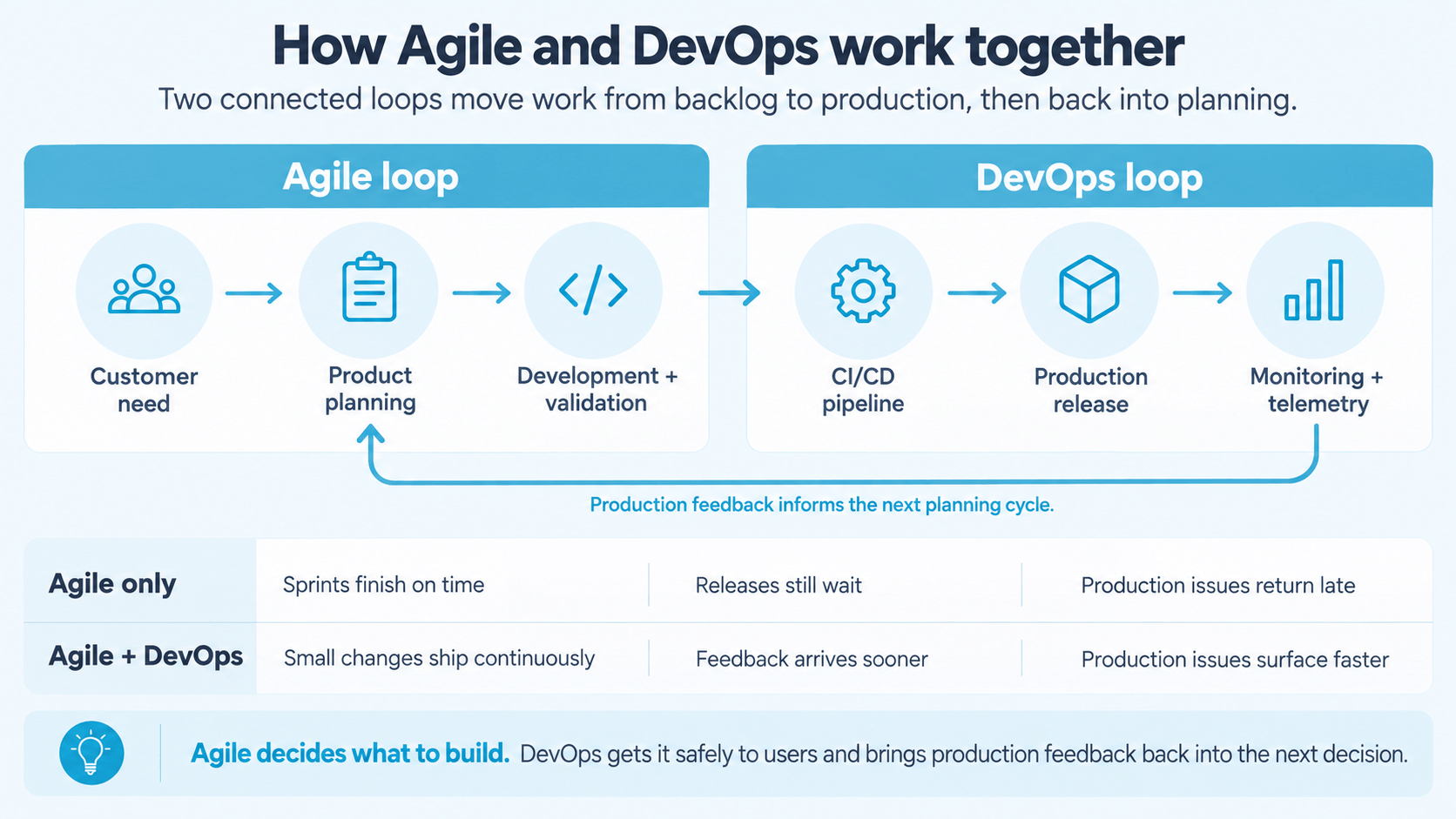
The DevOps feedback loop continues past product validation, adding operational feedback from deployments and production telemetry.
DORA added deployment rework rate as a fifth delivery metric in 2024, and its research shows speed and stability usually improve together.
Because manual handoffs cause the delays and failures DevOps targets, automation is a core DevOps requirement and an optional aid in small Agile setups.
Agile without DevOps often creates a release bottleneck, where features pile up faster than your team can ship them and customer feedback arrives weeks late.
This Agile vs DevOps guide explains how the two approaches differ and where they overlap. It also gives your team a step-by-step plan for combining them, so finished sprint work reaches customers faster.
Agile vs DevOps: Key Differences
Devops is a set of practices, cultural patterns, and behaviors that have proven to lead to successful outcomes when releasing working software to users. Agile is mostly associated with scrum and MVP, it's a product development strategy that emphasizes customer centricity, short release cycles and fast feedback loops.
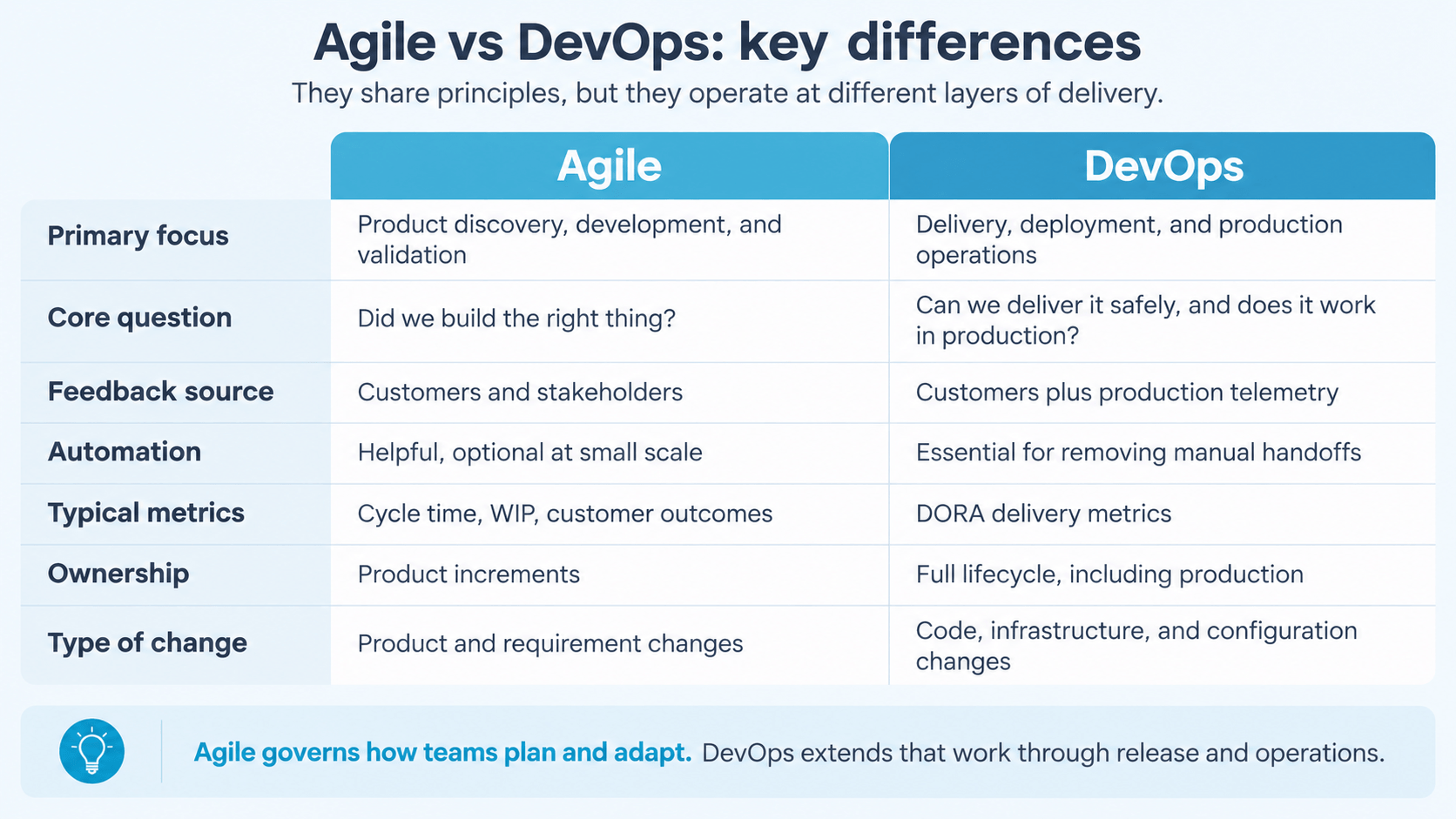
Agile and DevOps differ mainly in scope, and that one difference affects everything from metrics to ownership. The table below breaks the comparison down across seven dimensions that matter most in daily work.
Dimension
Agile
DevOps
Primary focus
Product discovery, development, and validation
Delivery, deployment, and production operations
Core question
Did we build the right thing?
Can we deliver it safely, and does it work in production?
Feedback source
Customers and stakeholders
Customers plus production telemetry
Automation
Helpful, optional at small scale
Essential for removing manual handoffs
Typical metrics
Cycle time, work in progress, customer outcomes
DORA software delivery metrics
Ownership
Product increments
Full lifecycle, including production
Type of change
Product and requirement changes
Code, infrastructure, and configuration changes
Looking at the table as a whole, the two approaches form one sequence. Work passes through discovery and validation under Agile, then through delivery and measurement under DevOps, with the build stage shared by both. Because of that overlap, your team gets the most value when both cycles run together.
The type-of-change row deserves a closer look. Product changes, such as shifting stakeholder priorities, flow through the Agile backlog. A configuration update or an urgent security patch, on the other hand, is a system change that needs the DevOps toolset. Infrastructure as code is central here, and Microsoft identifies it as a practice that makes environment deployment repeatable. Once infrastructure sits in version control, your team can apply Agile discipline to system changes, with small increments and automated rollback.
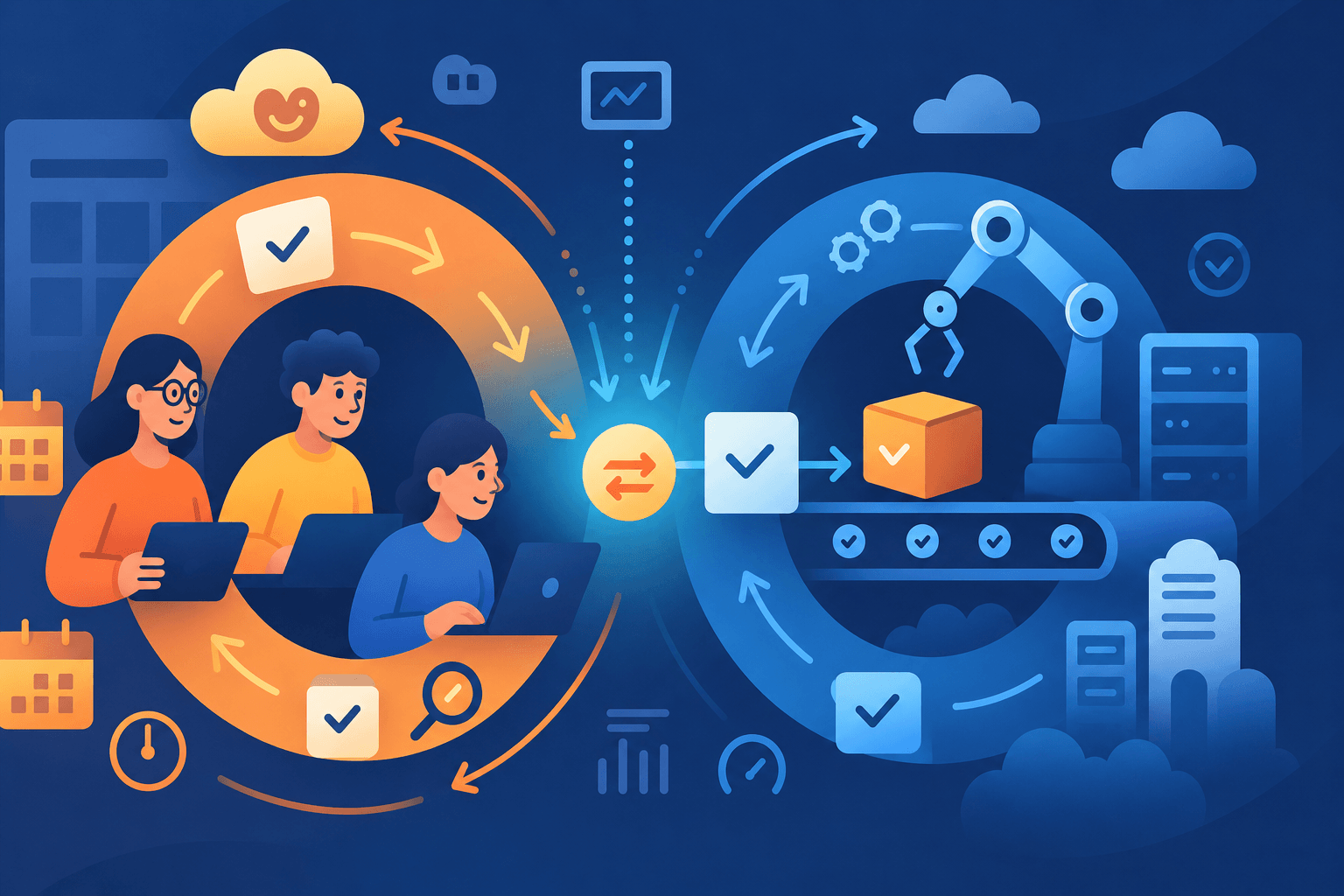
AI-generated image.
If your team runs Agile sprints but every release still feels risky, you need a tool that connects both sides of delivery. aqua cloud, an AI-driven test and requirement management platform, links iterative development with continuous delivery through AI-powered test management. Requirements and their linked test cases stay synchronized across your value stream, which removes the handoff friction that slows your team down. aqua Intelligence, a domain-trained AI with RAG grounding, learns from your project’s own documentation. As a result, the test cases and test data it generates match your product’s context and language. End-to-end traceability also keeps every item connected from sprint planning to production deployment. To fit your existing delivery stack, aqua offers bidirectional Jira sync, native Azure DevOps and Jenkins integrations, as well as the opportunity to connect aqua to 12+ other popular QA solutions. On top of that, there’s Confluence support and a REST API for custom workflows.
Save 12.8 hours per tester per week with aqua’s AI capabilities
Once your team applies Agile values consistently, the effects show up in sprint planning first and in business collaboration soon after. The three benefits below tend to appear earliest, since they follow directly from short iterations:
Faster response to change: Short iterations let your team reprioritize the backlog when requirements or market conditions change.
Earlier customer feedback: Stakeholders review each increment, so wrong assumptions become visible within weeks.
Lower delivery risk: Small increments limit the cost of a wrong decision, since each one covers less scope.
These benefits stop at the point where finished work needs to reach production. Within the sprint itself, aqua’s Agile testing features help your team keep QA inside each iteration.
What Is DevOps?
DevOps is an operating model that extends Agile-style iteration from development into delivery and production operations. The approach emerged because your team can work in fast, well-run sprints while everything around those sprints stays slow. For example, your team might complete usable features every two weeks, with testing inside the sprint and sign-off from the Product Owner. Even so, releasing that software often still requires a chain of manual steps:
A deployment ticket and approval from another department
Manual environment configuration
A scheduled release window and an operations handoff
Several manual verification steps
In this setup, development is iterative, while the path from code to customer stays slow and manual. DevOps targets exactly this part of the value stream. Microsoft, for instance, defines the DevOps lifecycle as the full cycle from planning to operations. Within that lifecycle, the most common practices include:
Version control and continuous integration
Automated testing and continuous delivery
Infrastructure as code
Monitoring and safe deployment techniques
GitLab describes DevOps in similar terms, with a strong emphasis on automation and shared accountability across an expanded lifecycle. What sets DevOps apart, however, is production feedback. Development feedback tells your team whether software meets its specifications. Production feedback, in turn, shows how that software behaves for your customers, with signals such as latency and error rates.
On the organizational side, DevOps also removes the handoff between the people who build software and the people who run it. The phrase “you build it, you run it” sums up this idea well. Under this model, your developers stay responsible for how their code behaves in production, even when a platform group manages the servers. If both concepts are still new to you, our overview of what is Agile and DevOps covers the basics in more detail.
Benefits of DevOps
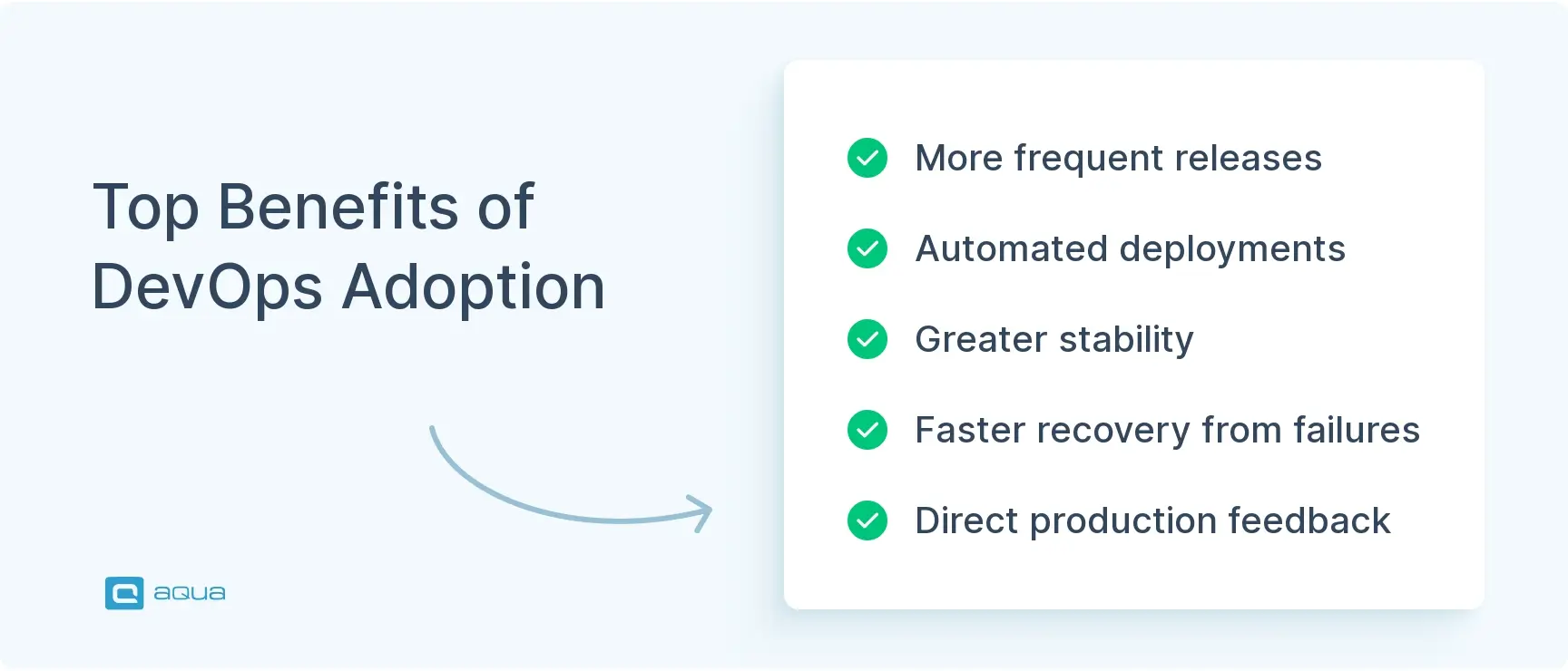
Because DevOps connects development with operations, most of its benefits appear after the code is written. DORA’s long-running research links these delivery capabilities with better organizational performance, and three advantages stand out for your team in particular:
More frequent releases: Automated pipelines move validated changes to production without manual handoffs.
Greater stability: Automated testing and progressive rollouts, such as canary releases, limit the impact of failed changes.
Faster recovery: Monitoring and rollback capability help your team restore service quickly after a failed deployment.
Together, these benefits address the release bottleneck that often appears after Agile adoption. To connect that pipeline with test management, aqua offers native CI/CD integrations, such as its Jenkins integration.
Roles and Ownership in Agile and DevOps
The two approaches also assign ownership differently. In an Agile-only setup, your team owns the product increment, while a separate operations group runs production. DevOps extends that ownership through deployment and production, a model often summarized as “you build it, you run it.” In practice, your developers track how their code behaves in production, and operations joins design discussions earlier.
Your platform engineers and SREs still keep their specialist roles, while accountability for production outcomes becomes shared across the team. This shared ownership matters because code written twice as fast brings little business value if it then waits a month for approval. The relationship between Agile and DevOps becomes clearest here. DevOps gives your team ownership of everything its Agile process produces, from the first commit to live operation.
Agile vs DevOps: Principles and Practices
At the level of principles, Agile and DevOps pursue different goals, and those goals lead to different day-to-day practices. Agile’s twelve principles center on adapting to changing customer needs through close collaboration and frequent delivery. Once delivery becomes frequent, a new question appears: How do changes flow safely from commit to production? DevOps principles answer that question, and Atlassian groups them into the CALMS framework, where culture and measurement carry as much weight as automation. The table below compares both approaches across five practical areas:
Area
Agile
DevOps
Core principle
Adapt to changing customer needs
Optimize end-to-end delivery
Collaboration
Product and development
Development, QA, and operations
Feedback mechanism
Sprint reviews and customer input
Monitoring, alerting, and incident reviews
Main practices
Sprints, backlog refinement, retrospectives
CI/CD, infrastructure as code, observability, progressive delivery
Improvement cycle
Retrospectives after each sprint
Delivery metrics and post-incident learning
Read row by row, the table shows that DevOps practices sit downstream of Agile ones. Sprints and backlog refinement decide what enters the pipeline. From there, CI/CD and observability determine how safely each change reaches users, so both sets of practices can run in parallel in your team.
Feedback Loops in Agile vs DevOps
The clearest difference between Agile and DevOps lies in where each feedback loop stops. Agile asks whether your team built the right thing and what it should build next. DevOps keeps that question and adds two more: Can your team deliver the change safely, and what does production data say about the next fix? Laid side by side, the two loops look like this:
DevOps loop: Plan → Code → Build → Test → Release → Deploy → Operate → Monitor → Learn
A single checkout release shows how both loops work in practice. Suppose your team ships a redesigned checkout flow, and the Product Owner reviews customer feedback and conversion data afterward. That data shows that the shipping step confuses users, so the backlog changes and the next sprint targets that step. In this case, product validation leads the adaptation, which is the Agile loop at work.
Meanwhile, monitoring shows checkout API latency rising from 250 milliseconds to 1.8 seconds after the same release, with error rates climbing. Your team links the spike to the deployment through telemetry and then rolls back or fixes forward. The root cause analysis then feeds into the next round of development, which completes the DevOps loop. Within a single release, customer feedback and operational feedback reinforce each other.
The same distinction explains why a sprint and a deployment are separate concepts. A sprint is a planning cycle, while a deployment is a release to production. Your team might complete several increments in one sprint and deploy each separately. Alternatively, it might close sprints every two weeks and still deploy monthly because releases remain manual. Agile’s principles call for frequent delivery but leave the pipeline undefined, so DevOps practices supply the technical means.
To keep both loops traceable, your team needs one record that links each requirement to its tests and defects. aqua’s test management solution provides that traceability from sprint planning to release.
Automation and Testing in Agile vs DevOps
DevOps depends on automation, because manual handoffs create the delays and failure modes it exists to remove. Agile has no such dependency. For example, your team could run sprints and retrospectives without Jenkins or Terraform and still deliver working software. That approach grows inefficient as the product expands, but it remains possible. A DevOps pipeline, in turn, automates the whole path from commit to production and typically chains the following stages:
Version control → CI → Automated tests → Artifact creation → Security checks → Environment provisioning → Deployment → Validation → Monitoring
That said, automation alone still leaves DevOps incomplete. You can build an excellent pipeline in GitHub Actions or GitLab CI while developers still hand production failures to operations without follow-up. In that case, your organization has delivery automation without the shared ownership that DevOps requires.
Where CI/CD Fits Between Agile and DevOps
CI/CD often appears as a synonym for DevOps, although it is one technical capability within it. Atlassian and Microsoft both list CI/CD among DevOps practices and describe DevOps itself as a wider mix of culture and technology. Within CI/CD, three practices build on each other, with each one taking automation a step further:
Continuous integration: Your team merges changes frequently and validates each one automatically.
Continuous delivery: A repeatable process keeps every validated change ready for release.
Continuous deployment: Qualifying changes go to production automatically.
Even with all three in place, automated pipelines do not change how departments share responsibility, so CI/CD without DevOps culture delivers limited results. Similarly, Agile without CI/CD works for a while, although manual deployments soon fall behind iterative development. Seen from a higher level, the three concepts nest inside each other:
Agile is the product development philosophy that creates demand for fast, iterative delivery.
DevOps is the operating model that meets that demand through shared ownership and production feedback.
CI/CD is the technical implementation that makes continuous delivery possible.
Because of this nesting, your CI/CD tooling works best when it connects directly to the place where your team designs and tracks its tests.
How Testing Differs Between Agile and DevOps
QA sees some of the biggest changes, since each delivery model places testing at a different point in the value stream. Moving from one model to the next, testing starts earlier and runs more often. Comparing the three models side by side makes this progression clear:
Traditional development: Testing starts after development ends.
Agile: Testing happens inside short iterations, so your team finds defects while the work is still in progress.
In DevOps specifically, GitLab associates the approach with automated verification and shift-left testing. Once a pipeline is in place, a single code change might trigger two layers of automated checks before anyone reviews it manually:
Unit, API, and integration tests
Static analysis and security scanning
On top of that, DevOps opens the door to shift-right testing, where your team validates changes under actual production conditions after release. The most common shift-right practices include:
Smoke tests and production monitoring
Progressive rollouts, such as canary releases or blue-green deployments
Across all three models, testing starts progressively earlier, and DevOps extends it past release into production monitoring. For the automated side of this setup, aqua’s test automation management helps your team run automated tests alongside manual ones.
Agile Metrics vs DevOps Metrics
The two approaches measure success at different layers of the lifecycle. Agile metrics track product progress and team health, and on that side your team will usually follow indicators like these:
Cycle time and work in progress
Sprint completion and backlog health
Customer outcomes
Velocity, as an internal planning tool
Of these, velocity deserves a word of caution. It helps your team plan its own sprints, yet it fails as a cross-team productivity KPI because story point scales differ from one group to the next.
Delivery performance, the focus of DevOps, calls for a different set of numbers. The standard reference here is DORA, the research program run by Google Cloud, which expanded its model to five software delivery metrics in 2024. These metrics fall into two groups, throughput and instability, and the table below shows what each one measures for your team.
Metric
Factor
What it measures
Change lead time
Throughput
Time for a change to move from commit to production
Deployment frequency
Throughput
Number of deployments over a given period
Failed deployment recovery time
Throughput
Time to recover from a deployment that needs immediate intervention
Change fail rate
Instability
Share of deployments that need immediate intervention, like a rollback or hotfix
Deployment rework rate
Instability
Share of unplanned deployments caused by a production incident
Deployment rework rate is the newest of the five, and it shows how much delivery capacity goes into unplanned fixes. DORA’s research also found that speed and stability usually improve together, so your team can aim for both at once. For the QA side of measurement, our article on analytics in testing explains how to track quality data next to delivery metrics.
Agile vs DevOps: Key Similarities
Despite their different scope, Agile and DevOps share the same core beliefs about how software should be built and delivered. Both approaches emerged in response to long release cycles and late customer feedback, which is why both treat small, validated steps as the safest way to deliver change. Thanks to that common origin, your team can run them side by side on five shared principles:
Iterative and incremental delivery: Agile splits product work into small increments that your team completes and validates within a sprint. DevOps applies the same logic to releases, so each deployment carries a small change that is easy to review and roll back.
Fast feedback: In Agile, feedback comes from customers and stakeholders at the end of each iteration. DevOps adds automated feedback from the pipeline and from production monitoring, which often arrives within minutes of a change.
Cross-functional collaboration: Agile brings product owners and developers into one team with shared sprint goals. DevOps extends that collaboration to operations and security, which reduces handoffs across the whole value stream.
Continuous improvement: Your team reviews its way of working in Agile retrospectives at the end of every sprint. DevOps adds post-incident reviews and delivery metrics, so improvement decisions also rest on data from production.
Quality built into daily work: Both approaches move testing close to development, so your team finds defects while a change is still small and inexpensive to fix. Testing inside the sprint achieves this in Agile, and a DevOps pipeline extends it with automated checks on every commit.
Because of this shared foundation, the difference between Agile and DevOps comes down to where each approach applies these principles: product planning for Agile, delivery and operations for DevOps. In practice, this overlap lets your team extend existing Agile habits, such as small batches and retrospectives, into the release pipeline.
How Agile and DevOps Work Together
Agile and DevOps work together as two connected stages of one value stream, where decisions made in sprint planning feed directly into the delivery pipeline. Atlassian even describes DevOps as an evolution of Agile practices, which explains why the combination feels natural in practice. The more often your team finishes increments, the more it needs a safe and repeatable way to release them, and DevOps practices address exactly that need. A concrete example shows what this looks like for a single product.
Agile is about doing things in chunks. Reporting on the outcome. And reevaluating the project plan.
Example: One Reporting Dashboard, Two Delivery Models
Imagine your company is building a new reporting dashboard for its SaaS product. The planning and development work stays the same in both scenarios below, so the only variable is how finished work reaches customers.
Agile only. During a two-week sprint, your team develops filtering and export features. QA tests both features before the Product Owner reviews the increment, and customer feedback then updates priorities for the next sprint. Up to this point, Agile works well. The release process, however, still looks like this:
Deployment happens every six weeks.
Operations receives a package and a deployment document.
Someone updates configuration by hand, and QA runs manual regression tests before release.
Production issues return to development as support tickets.
Agile + DevOps. In the second scenario, planning stays iterative, while the delivery path changes completely. Every step between merge and production now runs through automation and monitoring:
Developers merge small changes, and CI builds and tests each one automatically.
Terraform or similar tooling provisions infrastructure consistently.
The pipeline releases approved changes automatically, and automated checks verify production health.
Monitoring detects failures, and telemetry flows back to engineering and product management.
With both approaches in place, your company runs two connected loops: customer → product → development, and production → engineering → delivery. Features reach users sooner, and your team detects and fixes production issues faster. You can see the difference in DORA metrics like deployment frequency and lead time, as well as in how quickly your company responds to market feedback.
AI-generated image.
Agile and DevOps in AI-Assisted Development
AI-assisted coding makes this combination even more relevant, because faster code generation puts more pressure on every later stage of delivery. According to DORA’s 2025 State of AI-assisted Software Development report, 90% of technology professionals now use AI at work. The report describes AI as an amplifier of existing strengths and weaknesses, and it links higher AI adoption with both more throughput and more delivery instability.
For your team, this means a faster code generator leaves testing and review bottlenecks exactly where they were. Agile and DevOps therefore act as two complementary filters for AI-generated work:
Agile keeps faster code generation aligned with actual customer needs and changing priorities.
DevOps limits the release pace to what your team can test and deploy safely.
Without both filters, AI helps your team build the wrong feature sooner or ship unstable code more often. On the QA side, aqua Intelligence helps your testing keep pace with faster development by generating test cases from your project documentation.
How to Implement Agile and DevOps Together
Implementing Agile and DevOps together works best as a series of small, measurable changes across your delivery process. Since your team probably runs some Agile practices already, the starting point is usually the path from finished work to production. The six steps below build on each other, starting with visibility into your delivery process and ending with measurement:
Map the value stream. Your team traces one recent feature from backlog item to production and records how long it waited at each stage. The resulting map shows where work stalls, a delay that sprint metrics like velocity do not show.
Find the biggest handoff or bottleneck. The stage with the longest wait, such as a manual approval or a regression test cycle, becomes the first target. Focusing on one stage keeps the improvement small and easy to measure.
Bring testing into the delivery pipeline. Test cases are linked to requirements, and automated suites run on every merge. As a result, QA feedback reaches developers while the change is still fresh.
Automate build, test, and deployment step by step. Continuous integration on the main branch usually comes first, followed by automated deployment to one test environment. Once that setup runs reliably, your team can extend automation toward production.
Connect production telemetry to the backlog. Alerts and error trends flow into backlog items, so the Product Owner can prioritize fixes next to new features. This connection links operational data directly to product decisions.
Measure product flow and delivery reliability together. Agile indicators like cycle time sit next to DORA metrics like change fail rate. Reviewing both in retrospectives shows whether faster delivery also stays stable.
Step three depends on a direct connection between your test management tool and the tools your developers already use. aqua’s Jira integration offers bidirectional sync, so test progress stays visible in the backlog your team already works in.
Common Challenges When Adopting Agile and DevOps
Several common adoption challenges trace back to a misunderstanding of what each approach covers. The most frequent answer to what is a common misconception about Agile and DevOps is that the two compete, and several practical problems follow from that belief. Depending on where your organization starts, your team is likely to face at least some of the following challenges:
Release bottleneck after Agile adoption: Development speeds up while releases stay manual and infrequent, so the delivery pipeline becomes the main constraint.
Agile reduced to ceremonies: Your team may hold daily stand-ups while ignoring customer collaboration and responsiveness to change. In that case, the rituals remain and the Agile values fade.
Automation without shared ownership: A fully automated pipeline still underperforms when developers hand production failures to operations and move on. DevOps needs collaboration and shared accountability alongside the tooling.
Equating Agile with Scrum and DevOps with CI/CD: Scrum is one framework for Agile values, and CI/CD is one practice within DevOps. Treating them as equivalents narrows both approaches.
Misreading “you build it, you run it”: Developers are not expected to take over operations work. Platform engineers and SREs still specialize, while developers share accountability for production outcomes.
Documentation extremes: Your team may read the Agile Manifesto as permission to skip documentation. The manifesto itself states that comprehensive documentation still has value.
Dropping Agile once pipelines are in place: Your organization may treat DevOps as a replacement for Agile planning. Delivery then gets faster, while product decisions stay rigid.
Fortunately, most of these challenges share a common fix: a clear view of which approach covers which part of the value stream. Once that view is in place, choosing the right starting point for your team becomes much easier.
When to Choose Agile, DevOps, or Both
Your team will likely benefit from both approaches, although the right starting point depends on where your delivery slows down. For that reason, the decision usually comes down to identifying your main bottleneck first.
Agile is the natural starting point when product uncertainty is the main problem. If requirements change often or your team struggles to prioritize, short iterations and regular customer feedback address that issue first. Agile alone can also work for a while in a small product with infrequent releases, since manual deployment effort stays manageable at that size.
DevOps deserves priority once finished work cannot reach production quickly. In that situation, the warning signs are usually easy to spot, and they tend to appear together:
Features pile up faster than your organization can release them safely.
Finished work waits in staging for weeks or months.
Production issues reach your team through customer support tickets.
A practical sequence is to start with Agile and add DevOps once deployment friction becomes the main constraint. DevOps without Agile, by comparison, rarely makes sense on its own. Your organization could automate builds and deployments while planning in waterfall style, although most of that speed would then go unused. Cheap delivery of small changes pays off only when product decisions follow incremental learning, and that part comes from Agile.
For most SaaS products, therefore, the answer is both, with each approach covering its own half of the value stream.
Knowing how Agile and DevOps complement each other is one step, and running both without friction is another. aqua cloud, an AI-driven test and requirement management solution, gives your team a central repository for the discover-build-validate loop and the build-deliver-operate-measure cycle. aqua Intelligence speeds up test creation and grounds every generated artifact in your project documentation through RAG. Your test cases therefore align with your actual requirements and domain language. Real-time dashboards keep progress visible, and full traceability links each requirement to its deployment. With aqua, your team can reach 100% test coverage and cut manual effort by up to 43%. For test automation, aqua connects to 10+ native integrations, including Ranorex, JMeter, SoapUI, PowerShell, UnixShell, and MSSQL and Oracle databases. Capture, aqua’s free Chrome extension, then records every test execution with video and screenshots.
Put Agile and DevOps into practice with 100% coverage and 43% less effort
Agile and DevOps work as two halves of one delivery system. Everything your team discovers and builds through Agile reaches production through DevOps, where it keeps running reliably. Customer feedback and production telemetry then inform the next decision. The practical question for your team is how to connect both, so work flows from idea to production without stalls.
What is the main difference between Agile and DevOps?
The main difference between Agile and DevOps is scope. Agile covers how your team plans and validates products in short iterations. DevOps extends that work into deployment and infrastructure, with feedback coming from production monitoring.
Can Agile and DevOps be used together?
Yes, and they work best together. As Agile increases release frequency, DevOps automation and shared ownership keep each release safe. Combined, Agile and DevOps shorten the path from idea to customer outcome.
Is DevOps replacing Agile?
No. DevOps extends Agile principles into operations and production. Agile remains the basis for product planning and adaptive prioritization. Your team can run Agile development alongside DevOps delivery to cover the full value stream.
Which is better for modern software development: Agile or DevOps?
Neither is better, because they solve different problems. Agile fits product planning and customer collaboration. For automated delivery and operational reliability, DevOps is the right tool. Modern software development needs both, since each alone leaves half the value stream slow.
Enhancement of the aqua product is Martin’s main responsibility and biggest mission. His expertise covers ITIL Process Consulting, Change Management, Quality Assurance, Quality Management, and Requirements Management. Martin works in QA services for regulated industries for more than 18 years being an irreplaceable leader at…
Nurlan, a QA Coordinator & Quality Standards Officer, takes pride in orchestrating seamless QA operations. His expertise in coordinating QA-focused projects and integrating QA solutions has consistently yielded top-tier client satisfaction. Aside from a full-time QA coordinator, Nurlan's role involves creating compelling content that educates…
Pavel, a Quality Assurance Consultant and Author, brings deep expertise to solving complex testing challenges. His background in software development has helped organizations transform their QA practices from reactive to proactive. Beyond consulting, Pavel develops best practice guides and case studies for aqua cloud that…
Home » Test Automation » Agile vs DevOps: Key Differences, Similarities, and How They Work Together
Do you love testing as we do?
Join our community of enthusiastic experts! Get new posts from the aqua blog directly in your inbox. QA trends, community discussion overviews, insightful tips — you’ll love it!
We're committed to your privacy. Aqua uses the information you provide to us to contact you about our relevant content, products, and services. You may unsubscribe from these communications at any time. For more information, check out our Privacy policy.
X
🤖 Exciting new updates to aqua Intelligence are now available! 🎉