What Is Continuous Testing: Benefits, Methodologies and How to Perform
Traditional approaches to enterprise IT, usually based on time-consuming manual processes, have given way in recent years to more flexible, efficient, and result-oriented errors. And with this shift in focus on faster software development cycles, DevOps and Agile methodologies are now essential for any business looking to succeed by discovering digital transformation initiatives.
Continuous testing integrates quality assurance throughout the entire development lifecycle, providing immediate feedback on risks associated with software releases.
Automated testing in CI/CD pipelines reduces manual effort by up to 50% while increasing test coverage and accelerating development speed.
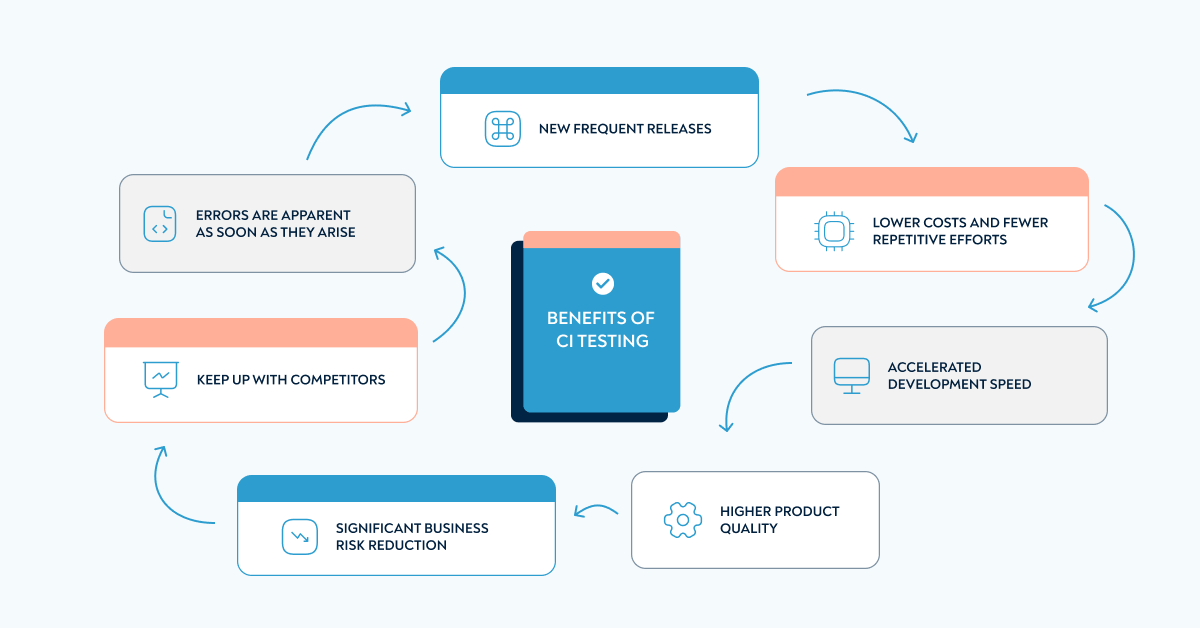
Continuous testing benefits include faster error detection, more frequent releases, lower costs, and significant business risk reduction.
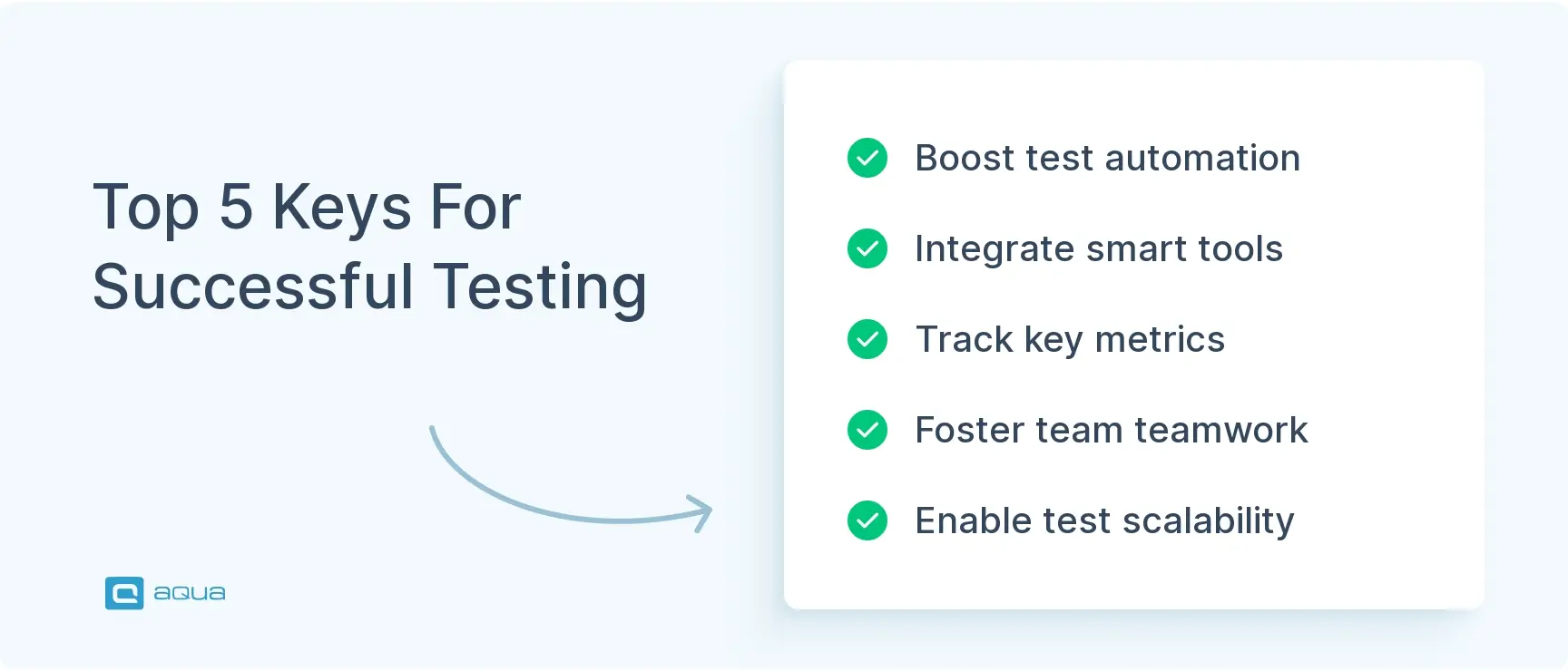
For successful continuous testing implementation, organizations need increased test automation, integrated tools, comprehensive metrics, team collaboration, and scalable testing.
Continuous testing enables DevOps teams to switch from sprint-based releases to daily or twice-daily deployments, dramatically reducing lead time.
Many organizations focus too much on development speed and overlook quality risks, but without proper testing strategy, product failures can have severe business impact. Learn how continuous testing solves this challenge 👇
Traditional approaches to enterprise IT, usually based on time-consuming manual processes, have given way in recent years to more flexible, efficient, and result-oriented errors. And with this shift in focus on faster software development cycles, DevOps and Agile methodologies are now essential for any business looking to succeed by discovering digital transformation initiatives.
But many businesses are too focused on this speed and therefore overlook the extremely high level of risk to themselves. The solution to this problem is continuous testing.
Continuous testing
Continuous testing by definition ensures product quality is deeply rooted in every part of the development process, which should be a priority for every business these days, and links testing to continuous delivery. You’re looking at a ticking time bomb if you skip quality checks throughout your development cycle. Teams that don’t measure continuously see production bugs increase massively compared to those running tests at each stage.
You need to set up automated quality gates that block code progression when test coverage drops below 80%. This simple threshold catches roughly 85% of critical issues before they reach users. But there is a hidden cost. A single production defect can eat up 10x more resources to fix than catching it during development. Your best move is starting with just one quality metric today: test coverage, response times, or error rates, and building from there.
Continuous testing tools will take care of this, significantly reducing the time developers get feedback on their actions. Here, tests are found as a built-in part of the software delivery pipeline to provide quick communication checks about the perceived risks associated with the product. This means removing unnecessary processes from your development and software cycles and using new technologies and tools designed for more flexible workflows to achieve higher quality.
Benefits of CI testing
When you implement continuous integration automated testing into your development, you will see how quickly positive changes start. The resulting benefits will bring you closer to achieving your digital transformation goals, such as:
Here are some ways to perform continuous testing:
Using a manual approach:
There are a few essential things whenever changes occur. Ensuring that your test coverage is on par with industry standards allows you to run a test suite to identify and mitigate any failures. You can also utilise a bug reporting tool for these purposes.
Having clear, concise and well-defined processes is crucial, primarily when your test suites aren’t fully implemented or automated. Moreover, these processes ensure all changes are confirmed through regression testing before being released into production.
An automated approach:
By using a continuous integration server as your test automation tool, you can efficiently run automated tests. There are a few ways we can save time and ensure our changes have been adequately tested. Prior to release, testers can run their tests automatically and display their results. You can also read our article “What is test automation tool?” to find the best automation tools.
By providing an automated approach to managing QA, continuous testing makes interactions between workflows at each stage of the software development life cycle (SDLC) flawless.
Developers receive information for improvements in the compatibility and performance of their code before it’s deployed on time due to the timely integration of continuous feedback loops into user and unit test modules.
This efficient collaboration exterminates any disconnection between team members, accelerating software delivery.
The continuous test ensures a confident release and gives you peace of mind that you have high-quality software, regardless of your chosen approach.
How continuous testing works within DevOps/DevSecOps
Continuous testing fits into DevOps as the automated checkpoint that runs every time new code is pushed. It replaces the old practice of testing as a separate phase that happens afterward. Continuous testing is what elevates DevOps from hamster wheel racing to the smart effort of automatically deploying new code as quickly as possible.
For DevOps, you will be using the automated approach to continuous testing. Once the development team signs off new code, it enters a loop of automated tests to see if it is production-ready. With a good setup, you will get a test report either green-lighting the code or rejecting it. The better error detection you have, the more likely you are to know the probable issues straight from the code.
There are a couple of useful techniques to improve continuous testing. First, ask and even help your devs to implement unit testing. This will both save their time on code reviews and increase the quality of code that reaches the automated testing phase. Then, make your tests self-heal so they automatically adjust to UI and text changes. Self-healing is a feature frequently found in AI-powered testing tools.
As for DevSecOps, continuous testing gets more significance for a slightly different reason. While traditional DevOps values it for speed, DevSecOps benefits from extra precision. Automated tests eliminate the human factor where they can, providing the safety that DevSecOps preaches.
aqua cloud connects every test type in your pipeline, from unit to UAT, in one platform with full traceability
A continuous testing pipeline runs several distinct test types automatically, each catching a different category of defect before code reaches production.
Unit tests check individual functions or methods in isolation. They run first in the pipeline because they execute in seconds and catch the cheapest defects to fix.
Integration tests verify that different modules or services work together correctly. These run after unit tests pass, since there is little value testing module interactions if the modules themselves are broken.
API tests validate that endpoints return the correct data, handle errors properly, and meet response time expectations. Continuous testing solutions typically run these directly against a staging environment on every build.
Regression tests confirm that new changes have not broken existing functionality. In a continuous testing approach, these run automatically on every commit. Teams no longer wait until just before a release to catch regressions.
Performance tests measure how the system behaves under load, tracking response times and resource usage as traffic increases. These typically run on a schedule, since they require more time and infrastructure than functional tests.
Security tests scan for vulnerabilities, check authentication flows, and validate data protection measures. Running these continuously catches security regressions introduced by new code as well as vulnerabilities in the original release.
Smoke tests and UI tests confirm that core user-facing functionality works after each deployment. They run quickly and serve as the final gate before code reaches users.
Each test type plays a distinct role in keeping risk low without slowing delivery down. The right continuous testing solutions run them in parallel where possible. A full suite that once took hours can complete in minutes.
Continuous testing methodologies
Methodology choice does not change when you adopt a continuous testing approach. It changes how often you test and how quickly feedback reaches your team within whichever methodology you already use. That means you’re picking between or combining the same methodologies. These include Waterfall, Agile, and XtremeProgramming. The rule of thumb is to go with the same methodology that your team observes.
That being said, continuous testing enables QA and thus the build cycle to be much more iterative. Our team switched from Scrum sprints to Kanban releases that happen every day if not twice a day. Just like devs, testers now tackle one task at a time and get it production-ready. This dramatically reduced our lead time and could prove the right choice for you.
"Testing" in production IMO is more about monitoring than actually having to "run tests".
Yes, you can do some stuff like GET calls if you're running microservices. But, really having telemetry to gather feedback about your system is what I would consider continuous testing.
Shift-Left and Shift-Right Practices in Continuous Testing
Shift-left and shift-right are two halves of the same continuous testing approach: catching defects earlier in development and catching them again once code reaches real users.
Here’s how the shift-left, shift-right approach works: You start catching issues when they’re cheap to fix. Run static code analysis and unit tests right alongside your development work, not after. But don’t stop there, shift-right takes testing into production itself. Think canary deployments that slowly roll features to real users, or feature flags that let you test in live environments without breaking things.
Set up automated unit tests that run on every commit (that’s your shift-left foundation), then add real user monitoring to catch what automated tests miss. You’ll build a feedback loop that makes your releases both faster and more reliable.
Common Continuous Testing Challenges and How to Overcome Them
Continuous testing introduces challenges that teams rarely anticipate before adopting the practice. Recognising them early makes the transition smoother.
Flaky tests. Tests that pass and fail inconsistently without any code change erode trust in the entire pipeline. Teams start ignoring failures, which defeats the purpose of continuous testing. Address this by isolating flaky tests into a quarantine suite, tracking their failure rate, and fixing or removing them on a fixed schedule. Letting them linger indefinitely only spreads the distrust further.
Environment inconsistency. When test environments do not match production closely enough, tests pass in the pipeline but fail for real users. Infrastructure as Code reduces this risk by defining every environment from the same configuration source.
Slow pipeline performance. As your test suite grows, pipeline run time can stretch from minutes to hours, slowing down every developer waiting on results. Parallelising test execution and splitting suites by risk level keeps run times manageable as coverage expands.
Tool fragmentation. Many teams end up running tests across several disconnected tools, with results scattered across different dashboards. Centralising results in a single continuous testing solution gives your team one place to check status. Nobody needs to stitch reports together manually anymore.
Lack of ownership. When nobody owns the test suite’s health, failures pile up and get ignored. Assigning a specific person or rotating role to monitor pipeline health each sprint keeps failures from accumulating unnoticed.
Test data management. Continuous testing requires fresh, realistic data on every run. Stale or inconsistent data produces unreliable results. Automating data refresh and masking sensitive fields before each test cycle keeps results trustworthy without manual setup each time.
Top 5 Keys For Successful Testing
More test automation
One of the main elements of a successful testing strategy is continuous integration test automation. This kind of automation improves test and error coverage and boosts the speed of releases.
Integration of tools
Proper tools can make automation of your testing easier and they also can solve other problems — reduce manual efforts, gather and verify test results, and cut down redundant actions.
Comprehensive metrics
You need more than basic pass/fail numbers to see what’s really happening with your testing pipeline. Start tracking deployment frequency and lead time for changes alongside your usual defect counts – these DORA metrics will show you patterns that basic QA stats miss entirely.
Throw in the mean time to recovery and change failure rate to your dashboard, then watch for defect escape rates creeping above 5%. Most teams overlook test flakiness as a metric, but it’s often the canary in the coal mine for deeper pipeline issues.
Your first move should be setting up automated tracking for at least three of these indicators, as manual collection kills the whole point of real-time visibility into your delivery performance.
Encourage collaboration
Make sure that both developers and testers have a common ground about the level of quality they need to provide. Encourage transparent and respectful collaboration between teams as it helps to keep the work environment efficient.
Scalability of testing
The more code the more test coverage you need which requires expanding your storage capacity for CI tests. Make use of an ALM software testing tool to reduce test times as much as possible. aqua cloud provides true limitless scalability for better test coverage.
Smart Toolchains and Scalable Test Environments
Your testing setup needs to grow with you and the right toolchain makes that possible. Smart teams run tests parallel to builds using Docker and Kubernetes, then spin up fresh test environments instantly with Infrastructure as Code. Cloud platforms handle the heavy lifting when your test suite explodes in size.
Real-time API connections between your test management and CI/CD pipeline actually moves the needle. This gives you unified dashboards that cut decision time nearly in half. AI tools are getting scary good at fixing broken test scripts automatically and cherry-picking which tests to run based on code changes.
Start simple and containerise one test environment first, then expand. Teams that nail tool interoperability can scale QA across distributed teams without the usual coordination headaches. The payoff is, your quality process stays rock-solid even when your team doubles overnight.
Conclusion
Continuous testing strategy has a lot of advantages allowing you to check the quality of the code immediately after submission whether you use an automated continuous performance test, CI testing or not. It makes a huge contribution to the quality of your software with much more depth and coverage, with more incredible speed and accuracy than can be achieved with any other testing.
Continuous testing means that software testing happens at all stages of the product’s lifecycle, including maintenance and feature additions after the release.
What is the benefit of continuous testing?
The benefit of continuous testing is that it does not take until nearly the release to start spotting issues and resolving them. QA effort starts as early as developers writing their code if unit tests are implemented.
What is the primary purpose of continuous testing?
The primary goal of continuous testing is to deliver software with more polish and at a faster rate than orthodox testing at the end of development cycle would normally allow
What are the key elements of a continuous testing tool?
There is not a single continuous testing tool, as it covers the entire lifecycle of a product created with more specialised software. The necessary elements would be a good DevOps solution such as Jenkins and a test management solution (e.g. aqua).
Which types of tests are used in continuous testing?
A continuous testing pipeline typically runs unit tests, integration tests, API tests, regression tests, performance tests, security tests, and smoke or UI tests. Unit and integration tests run first since they execute quickly and catch the cheapest defects to fix. Performance and security tests often run on a schedule rather than on every single commit, since they require more infrastructure and time. The combination gives your team broad coverage without making the pipeline too slow for daily development.
What are the most common challenges in continuous testing?
The most frequent challenges are flaky tests that erode trust in pipeline results, environment inconsistency between test and production setups, slow pipeline performance as test suites grow, tool fragmentation across disconnected platforms, unclear ownership of test suite health, and unreliable test data. Each challenge has a specific fix: quarantining flaky tests, standardising environments with Infrastructure as Code, parallelising execution, centralising results in one continuous testing solution, assigning clear ownership, and automating data refresh before each run.
Olga is a full-time writer and graphic designer in the IT industry. After gaining interest in FinTech and Quality assurance and her artistic background, she joined aqua in 2021 as a Content Creator. She enjoys spending her free time reading books about various subjects and…
Enhancement of the aqua product is Martin’s main responsibility and biggest mission. His expertise covers ITIL Process Consulting, Change Management, Quality Assurance, Quality Management, and Requirements Management. Martin works in QA services for regulated industries for more than 18 years being an irreplaceable leader at…
Home » Test Automation » What Is Continuous Testing: Benefits, Methodologies and How to Perform
Do you love testing as we do?
Join our community of enthusiastic experts! Get new posts from the aqua blog directly in your inbox. QA trends, community discussion overviews, insightful tips — you’ll love it!
We're committed to your privacy. Aqua uses the information you provide to us to contact you about our relevant content, products, and services. You may unsubscribe from these communications at any time. For more information, check out our Privacy policy.
X
🤖 Exciting new updates to aqua Intelligence are now available! 🎉