Enhancing Manual Testing with AI: Strategies and Insights
Testing teams know the scenario: every sprint brings more features to test, tighter deadlines, and the same number of people to do the work. Manual testing catches the nuanced issues that matter to users, but it's slow and doesn't scale. Traditional automation runs fast but misses the context and creativity that human testers bring. So we need an approach that combines the strengths of both while minimising their weaknesses. If QA teams can close those gaps, testers can focus on exploration and complex scenarios. That’s exactly where AI-powered testing comes into play.
AI for manual testing does not replace human judgment. It removes the repetitive work so testers can focus on what only humans can do: exploratory thinking, context, and creative edge case discovery.
Test case generation, self-healing tests, and AI-assisted exploratory documentation are the three highest-impact areas where you can use AI in manual testing right now.
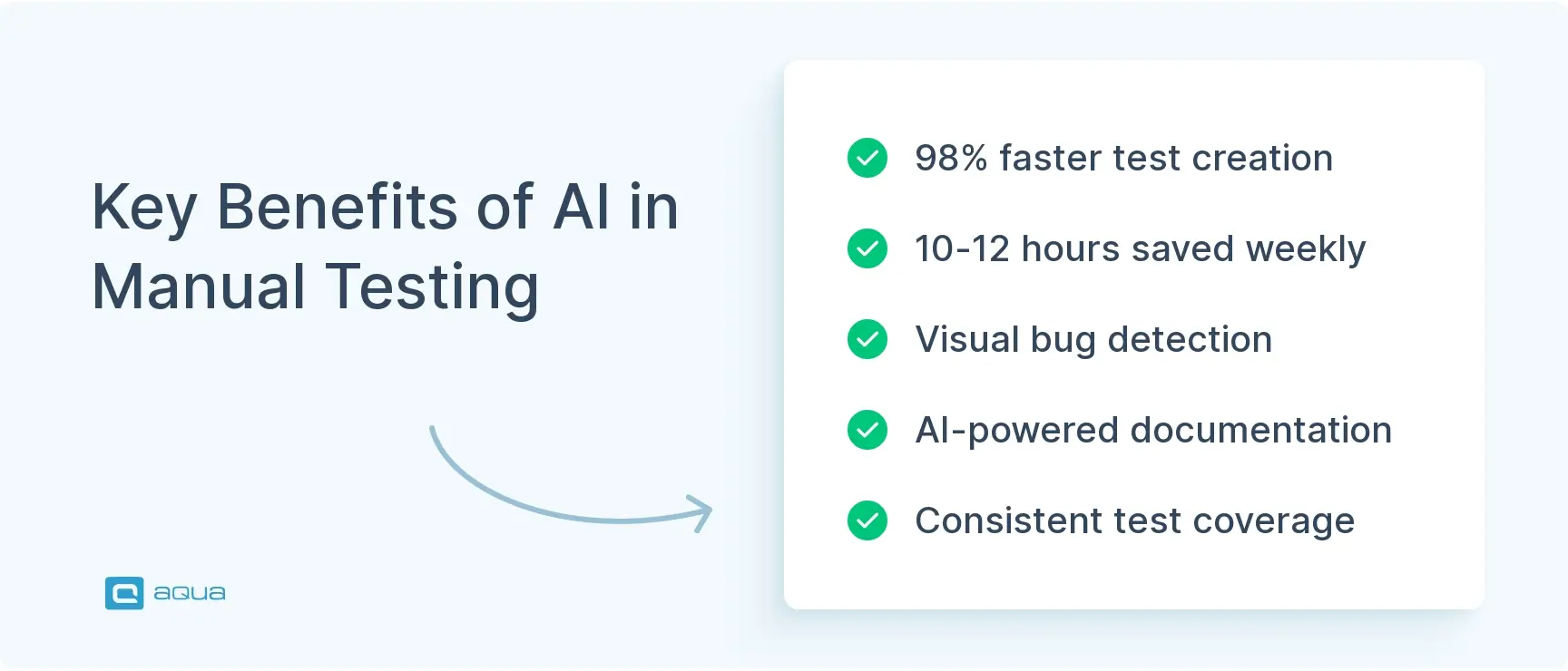
Manual testing by AI augmentation is already standard practice at teams reporting 60% faster releases and 12+ hours saved per tester per week.
AI tools have clear limitations. They miss context, misread business logic, and generate false positives. Human review is not optional.
The best approach is not to automate manual testing out of existence. It is to make every manual tester more effective by handling the mechanical work for them.
Why Manual Testing Still Matters
Manual testing still matters because no AI system can replicate what a skilled tester brings to a product: the ability to notice that something feels wrong, to deviate from a script because something looks off, and to catch the kind of bug that only surfaces when a real person is actually using the software.
For years, there have been predictions about traditional automation replacing manual testing. Now, with the rise of AI, the same idea remains, with a different component: “AI will replace manual testers”. Yet here we are, and manual testing remains essential to delivering quality software. There’s a reason for that.
Manual testing excels where human insight matters most. When you’re exploring an application like a real user would, clicking around, trying unexpected combinations, noticing when something feels off, you’re doing work that no script can replicate. You catch:
The bugs that live in the gaps between requirements
The usability issues that make users frustrated, even when everything technically works
The accessibility problems that traditional automated tests miss entirely.
Think about the last time you found a critical bug during exploratory testing. Maybe it was a workflow that broke when users navigated differently than expected, or a visual element that looked wrong on certain screen sizes. These discoveries happen because you bring context, creativity, and real-world perspective that scripted tests simply don’t have.
But manual testing has real limitations that every QA team feels. It’s time-intensive, especially when you’re manually verifying the same core functionality sprint after sprint. Different testers might approach the same feature differently, leading to inconsistent coverage. And as applications grow more complex, it becomes impossible for human testers to comprehensively cover every scenario and edge case within reasonable timeframes.
This is why the future is about combining human strengths with AI capabilities to create something more effective than either approach alone.
How AI Enhances Human Testing
Quality assurance work involves two distinct types of tasks: creative problem-solving that requires human judgment, and systematic pattern-matching that machines excel at. AI-assisted testing lets you focus on the former while automating the latter.
Intelligent Test Case Generation
Writing comprehensive test cases from scratch takes time, especially when you’re trying to cover all the edge cases and user scenarios. AI can jumpstart this process by analysing your requirements and user stories to suggest test scenarios you might not have considered.
Modern AI tools use natural language processing to convert plain English descriptions into structured test cases. For example, if your user story says “As a customer, I want to filter products by price range,” AI can generate test cases covering boundary values, invalid inputs, and various filter combinations. Tools like aqua cloud can turn these descriptions into executable test scenarios, cutting hours off your test planning.
The key benefit is that AI gives you a comprehensive starting point that you can refine with your domain knowledge and creative thinking. So don’t expect perfection, as AIs can make mistakes too.
This is precisely where aqua cloud’s AI Copilot shines. Unlike generic AI tools, aqua was specifically designed to address the pain points of manual testing. With aqua, you can generate comprehensive test cases from requirements in seconds, automatically apply testing techniques like boundary value analysis and equivalence partitioning, and enjoy self-documenting exploratory sessions. The platform seamlessly integrates AI-powered testing with traditional manual approaches, reducing test case creation time by up to 98% while maintaining the human judgment that’s irreplaceable in quality assurance. If you’re keen for a more traditional automation approach, aqua’s integrations with Selenium, Jenkins, Ranorex and others supercharge your efforts, while Jira, Azure DevOps, and Confluence integrations help you integrate smart testing into your toolkit.
Transform your manual testing with AI that understands QA, saving 10-12 hours per week per tester
That feeling, when you’re manually checking the same visual elements across multiple browsers and screen sizes, is painful. AI excels at this type of systematic comparison work. Visual AI can automatically detect UI inconsistencies, layout problems, and visual regressions that would take you hours to verify manually.
But AI goes beyond just finding visual bugs. Machine learning algorithms can analyse your application’s behaviour patterns and flag anomalies that might indicate underlying issues. They can even predict which areas of your application are most likely to contain defects based on code changes and historical bug patterns.
Tools like Applitools and TestCraft use visual AI to spot subtle UI issues that human eyes might miss after hours of testing, while also classifying bug severity based on potential user impact.
AI-Powered Exploratory Testing Support
Exploratory testing is where your creativity and intuition shine, but AI can serve as an intelligent assistant during these sessions. Instead of replacing your exploratory approach, AI can suggest areas to focus on based on recent code changes, track your coverage in real-time, and automatically document the paths you’ve tested.
Some AI tools can even identify similar areas in your application that might have related issues, helping you discover bug patterns across different features. TestIM’s AI features, for example, help testers discover and document new scenarios during exploratory sessions while maintaining the human-driven nature of the exploration.
Self-Healing Test Maintenance
We’ve all experienced the frustration of minor UI changes breaking multiple test scripts overnight. AI-powered self-healing capabilities can automatically adapt to small interface changes, recognising elements even when their properties shift and reducing the maintenance burden that typically consumes so much testing time.
This means less time spent fixing broken tests and more time available for meaningful testing work. Tools like Mabl incorporate these self-healing capabilities, automatically adjusting to UI changes without requiring manual intervention for every minor interface modification.
AI-assisted testing and its limitations
AI tools can significantly enhance your testing workflow, but they have clear limitations that every QA team should understand before implementation. Knowing these constraints helps you set realistic expectations and plan how to combine AI capabilities with human expertise effectively.
Context and Business Impact: AI can detect that a checkout button changed colour, but it can’t understand whether that change affects your brand consistency or user conversion rates. Understanding the business impact of bugs, whether a defect is critical for your specific user base or just a minor inconvenience, requires domain knowledge that AI lacks.
Creative Problem-Solving: AI works within the patterns it has learned from training data. It won’t think to test what happens when a user tries to purchase an item while their payment method expires mid-transaction, or imagine edge cases based on unusual but real user behaviours that fall outside its training scenarios.
User Experience Evaluation: Determining whether an interface feels intuitive, whether users will find a workflow frustrating, or how accessible a feature is for users with disabilities requires human empathy and understanding that AI cannot replicate.
Implementation Overhead: Adding AI tools to your testing process requires learning new interfaces, understanding how the AI makes decisions, and training team members on both the tools and how to interpret AI-generated results. This learning curve can initially slow down productivity.
Signal vs. Noise: AI tools can generate false positives, flagging changes or anomalies that aren’t actually problems for real users. Distinguishing between genuine issues and AI misinterpretations requires human judgment and can add review overhead.
Data Requirements: AI testing tools need substantial amounts of quality data to function effectively. If your application is new, has limited usage patterns, or operates in a specialised domain, AI may not have enough context to provide meaningful insights.
The Future of Manual Testing, Empowered with AI
The way QA teams work is changing as AI tools mature and become more integrated into daily testing workflows. These trends will shape how you approach testing in the coming years.
Collaborative Testing Workflows: Testing teams are developing new working patterns where AI handles systematic verification tasks while humans focus on creative exploration and strategic decisions. You’ll likely see your role evolving to include more test strategy, AI tool configuration, and interpreting AI-generated insights. The distinction between manual and automated testing is blurring as AI creates a middle ground where human judgment guides intelligent automation.
Democratised AI Testing Tools: AI testing capabilities are becoming accessible to teams without data science backgrounds. Low-code and no-code AI testing platforms let QA professionals configure intelligent testing without writing complex algorithms. Cloud-based AI testing services eliminate infrastructure barriers, making these tools available to smaller teams that couldn’t previously afford enterprise-level AI capabilities.
Proactive Quality Assurance: Instead of just finding existing bugs, AI will increasingly help prevent them. Machine learning models will analyse code changes to predict which areas are most likely to introduce defects, suggest optimal test coverage based on risk analysis, and recommend when specific tests should run. This shift from reactive to predictive testing will help teams catch issues before they reach production.
Natural Language Testing Interfaces: Testing tools are becoming more conversational. You’ll be able to create tests by describing user scenarios in plain English, ask questions about test coverage using everyday language, and receive bug reports that automatically translate technical issues into business impact terms. This reduces the barrier between domain knowledge and test implementation.
Responsibility and Transparency Questions: As AI makes more testing decisions, new challenges emerge around accountability and bias. Teams need to consider who’s responsible when AI misses critical issues, how to ensure AI doesn’t perpetuate testing biases, and which human testing skills remain essential regardless of AI advancement. Maintaining transparency in AI-driven testing decisions becomes crucial for team confidence and regulatory compliance.
How to Choose the Right AI Testing Tool for Manual QA Teams
Not every AI tool is built for manual QA teams. Some are built for automation engineers, some for developers, and some are marketed broadly as QA tools but require coding knowledge to get value from them. Here is what to evaluate before committing.
Does it integrate with how your team already works? If your testers live in Jira or work in a specific test management platform, the AI tool needs to fit into that workflow, not replace it. Friction at the integration point will kill adoption before the tool proves its value.
Does it generate test cases from natural language input? The most practical form of AI for manual testing is one where a tester can paste a requirement or describe a feature in plain English and get a usable test case back in seconds. If it requires structured input or coding, it is not built for manual testers.
Does it keep your data private? AI tools that use your test data to train their models are a compliance risk, especially in regulated industries. Verify explicitly whether your data leaves your environment and how it is handled.
Can non-technical testers use it without help from developers? If onboarding requires a developer to set it up, it will stall. The tool should be operational within hours, not weeks.
Does it show you what it generated and why? Transparency matters. If the tool generates test cases you cannot trace back to requirements, or flags defects without explanation, it creates more work, not less.
Measuring the ROI of AI-Assisted Manual Testing
Before your team commits to an AI tool, you need a way to measure whether it is actually working. The metrics below give you a clear before-and-after picture of the impact of manual testing by AI augmentation.
Time to create test cases per sprint: Track how long it takes your team to write test cases for a typical sprint before and after introducing AI generation. Teams using AI report cutting this from hours to minutes.
Test case coverage per tester per sprint: How many requirements does each tester cover with test cases per cycle? AI should expand this number significantly without increasing working hours.
Defect escape rate: How many bugs reach production that were not caught during manual testing? If AI is helping testers cover more scenarios and edge cases, this number should drop over time.
Rework rate on test cases: How often do testers need to rewrite or heavily edit AI-generated test cases? A high rework rate indicates the tool is not calibrated to your project context. Target less than 20% requiring significant changes.
Time saved on documentation: Exploratory testing sessions should produce structured artifacts automatically when AI is involved. Track how long testers spend writing session notes before and after AI documentation support.
Tester satisfaction: Qualitative but important. If testers find the AI helpful and feel it reduces drudgery rather than adding oversight burden, adoption will stick. If they feel they are reviewing bad output all day, the tool is costing more than it saves.
Conclusion
So AI isn’t here to replace manual testers; it’s upgrading what they can accomplish. The best QA teams will be those who learn to dance with AI, letting it handle the repetitive verification while humans focus on the creative exploration that machines can’t match. The future of testing is intelligently augmented. By embracing AI as a partner rather than a replacement, you can focus on the parts of testing that require human judgment, creativity, and contextual understanding. The question isn’t whether to adopt AI in your manual testing practice, but how to do it in a way that plays to both human and machine strengths. The testing teams that figure this out first will have a serious advantage in delivering higher quality software faster, without burning out their people.
AI can’t fully replace manual testing because it lacks human judgment, creativity, and contextual understanding. However, AI can significantly enhance manual testing by handling repetitive verification tasks, suggesting test cases, identifying visual inconsistencies, and flagging potential issues. The most effective approach combines AI capabilities with human expertise rather than viewing them as competitors.
How to generate manual test cases using AI?
To generate manual test cases using AI:
Feed your requirements, user stories, and specifications into an AI test case generation tool
Use tools with natural language processing to convert functional descriptions into test scenarios
Leverage AI to analyse existing test coverage and suggest gaps
Review and refine AI-generated test cases, adding human context and edge cases
Consider tools like aqua cloud that offer AI-powered test generation features
How to use AI in QA testing?
Incorporating AI into your QA testing workflow can happen in several ways:
Start with AI-powered visual testing to catch UI regressions automatically
Use AI tools to analyse test coverage and suggest additional test cases
Implement self-healing test automation to reduce maintenance burden
Leverage AI for exploratory testing assistance and documentation
Consider AI for test prioritisation based on risk and code changes
Begin with small, focused AI implementations rather than trying to transform everything at once
Invest in upskilling your team to work effectively with AI testing tools
What are the best AI use cases for manual testers?
The highest-impact uses of AI for manual testing are: generating test cases from requirements (saves hours per sprint), auto-documenting exploratory testing sessions so findings become reusable artifacts, suggesting edge cases and boundary conditions the tester may not have considered, and self-healing test maintenance that adapts to minor UI changes without manual script updates. The common thread is that all of these remove mechanical, repetitive work while leaving the judgment-based work with the tester. AI handles the scaffolding; the human handles the thinking.
Can AI-generated test cases be trusted without human review?
No. AI-generated test cases are a strong starting point but they should always go through a human review step before being used in execution. AI generates based on patterns and the input you provide. It does not understand your specific business rules, your users’ real workflows, or the domain context that makes a test case actually useful. Research shows that around 42% of AI-generated test cases require no significant changes, which means roughly 58% need at least some human adjustment. Treat AI output as a first draft, not a finished deliverable.
How can QA teams avoid false positives in AI-assisted testing?
False positives in AI-assisted testing usually come from three sources: poor input quality, tools not calibrated to your application’s context, and over-reliance on pattern matching without domain knowledge. To reduce them: feed the AI well-structured, specific requirements rather than vague descriptions; run AI-generated test cases alongside your existing manual tests rather than replacing them; build a short review step into your workflow where a tester validates AI findings before they are logged as defects; and track your false positive rate over time so you can tune the tool or adjust your prompts. When you use AI in manual testing as a collaborator rather than an authority, false positives become a feedback signal rather than a noise problem.
Embodying the essence of a QA Coordination Maestro, Paul has excelled in curating and implementing quality strategies tailored to the nuances of each project. His expertise in the market of QA and Test Management solutions has contributed to a vast portfolio of successfully managed TMS…
Nurlan, a QA Coordinator & Quality Standards Officer, takes pride in orchestrating seamless QA operations. His expertise in coordinating QA-focused projects and integrating QA solutions has consistently yielded top-tier client satisfaction. Aside from a full-time QA coordinator, Nurlan's role involves creating compelling content that educates…
Home » Testing with AI » Enhancing Manual Testing with AI: Strategies and Insights
Do you love testing as we do?
Join our community of enthusiastic experts! Get new posts from the aqua blog directly in your inbox. QA trends, community discussion overviews, insightful tips — you’ll love it!
We're committed to your privacy. Aqua uses the information you provide to us to contact you about our relevant content, products, and services. You may unsubscribe from these communications at any time. For more information, check out our Privacy policy.
X
🤖 Exciting new updates to aqua Intelligence are now available! 🎉