Version 26.xx delivers a new password expiration policy, a rebuilt AI platform now called aqua Intelligence, along with improvements to Jira integration, Azure DevOps sync, and dashboards, and a range of defect fixes. Version 25.127 is a hotfix release addressing email notification behavior based on customer feedback.
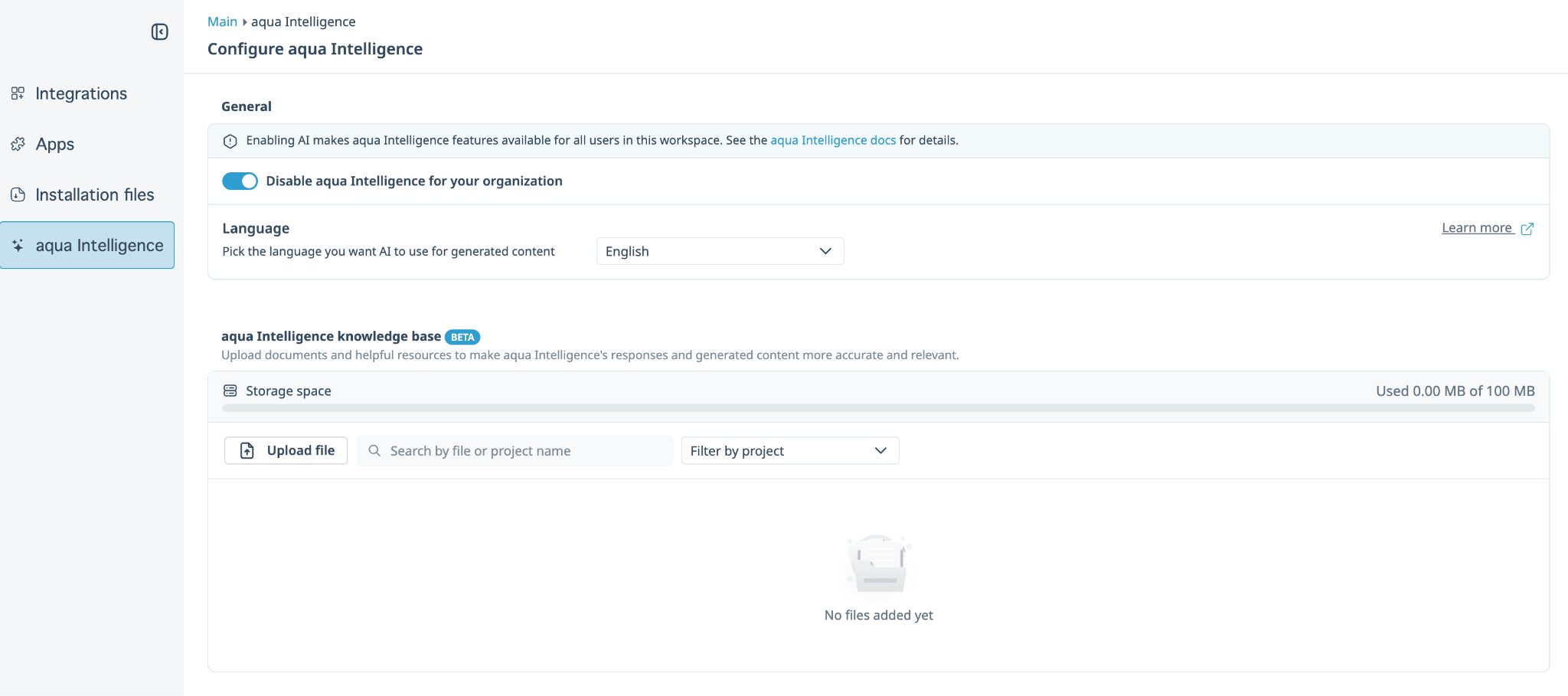
aqua AI Copilot is now aqua Intelligence. The rename reflects a real rebuild of the underlying AI platform, not just a new label: performance and reliability have improved across the board, so the features you already use respond faster and behave more consistently.
Knowledge base uploads are faster and more flexible
Managing files in your knowledge base no longer feels like a bottleneck:
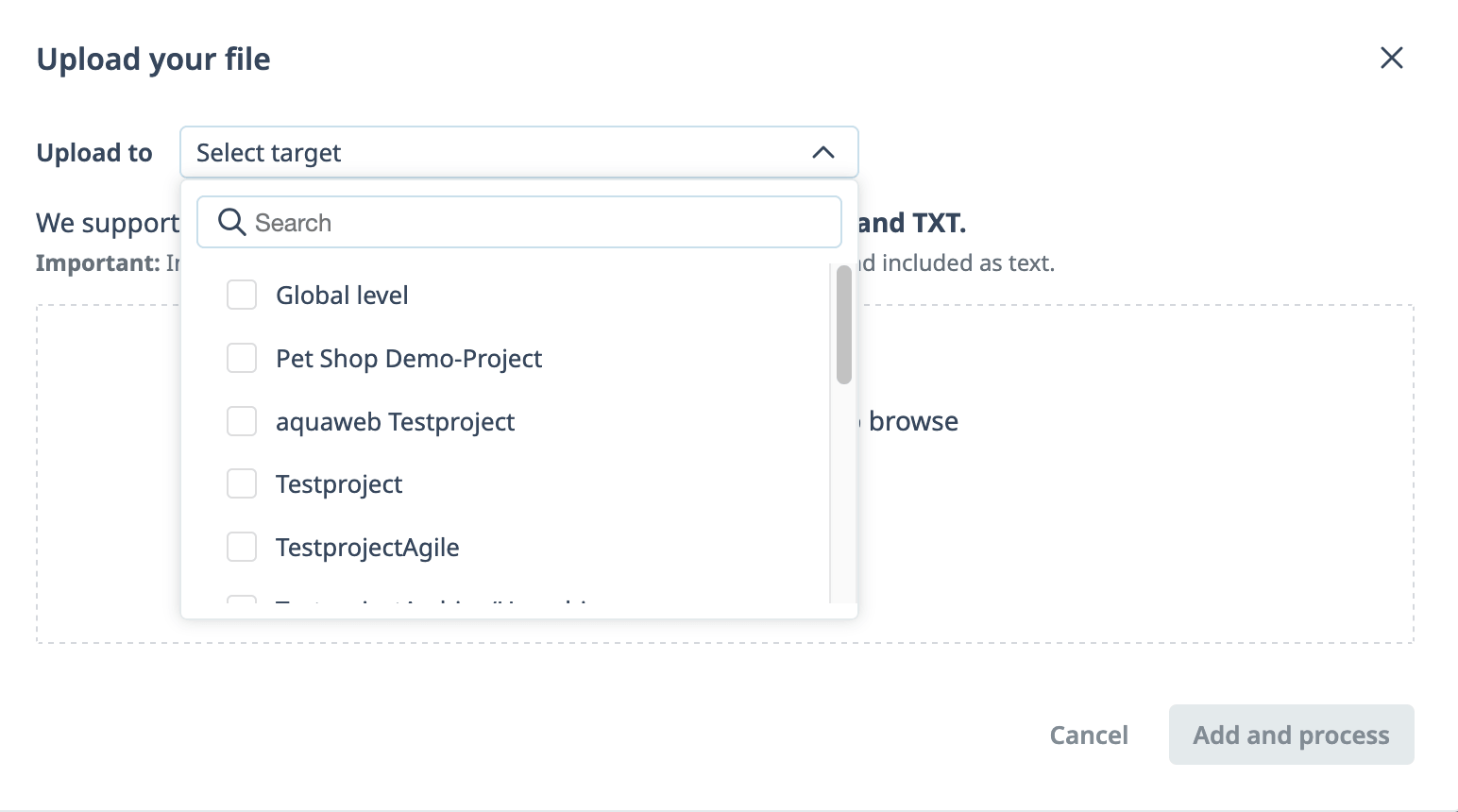
Upload PDF, DOCX, XLSX, Markdown, or TXT files, support has expanded beyond the previous format set
File size limit raised from 10 MB to 100 MB, so larger source documents no longer need to be split up
Search across your uploaded files instead of scrolling through the full list to find one
Processing status updates live (Processing, Ready, Error), so you know a file is ready to use without waiting on an email
Knowledge base re-upload note:
The platform rebuild means previously uploaded knowledge base files are not carried over automatically. After updating, you will need to re-upload your files to the global or project knowledge base. If you need to know what was previously uploaded, contact our support team at support@aqua-cloud.io.
The chat input also shows a live character counter, with a minimum of 4 characters when a file is attached or 35 characters for text-only messages.
Based on customer feedback and multiple requests, we reconsidered our approach to email notifications. This hotfix restores the previous email notification behavior while we work on a more comprehensive solution.
Email notification behavior has been restored to version 25.103. Users will receive email notifications according to the earlier notification logic.
We are continuing to work on email notifications in upcoming releases, with a focus on optimizing default settings and reducing overall email volume while ensuring all relevant notifications are delivered.
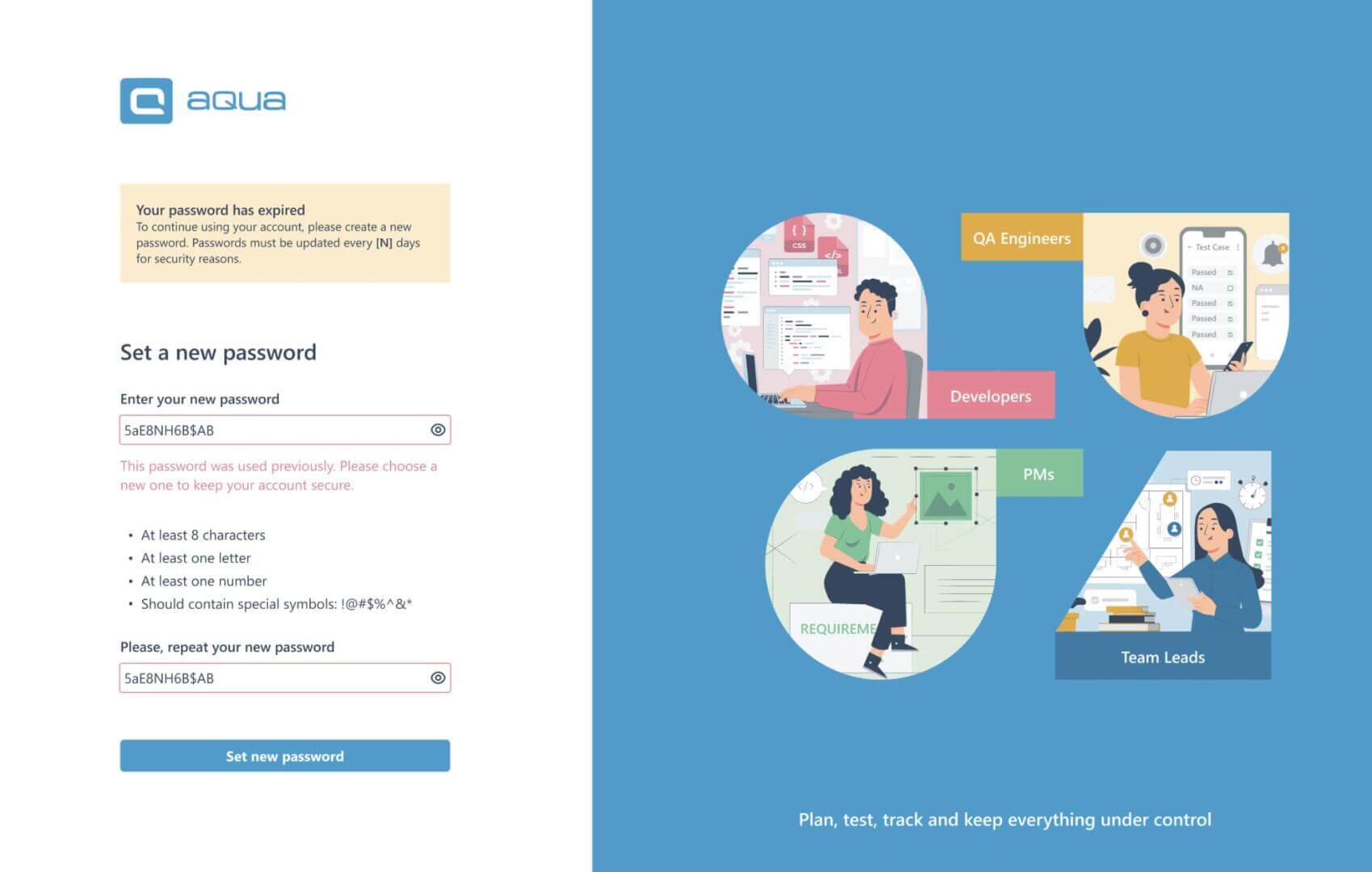
aqua now provides administrator-controlled password expiration policies, available for private cloud and on-premise installations only (not available on aqua SaaS). This is particularly relevant for regulated industries such as financial services, insurance, or the public sector, where periodic credential renewal is mandated by compliance frameworks.
What administrators can configure:
Password expiry period: how frequently users must set a new password
Account lockout: restricts access after repeated failed login attempts (5 attempts and 30 minutes by default)
All three settings are disabled by default and can be enabled independently. A minimum password age of 24 hours also applies, preventing rapid password cycling, except for token-based resets.
How it affects users:
When a password expires, the user is prompted to set a new one on their next login and cannot access the app until they do. The new password cannot be a trivial variation of the old one (for example, Secret123 to Secret124). If this policy is enabled for the first time, all existing users are treated as expired immediately.
Exemptions:
Technical users (API, sync integrations) and externally authenticated users (AD, LDAP, SAML) are not subject to expiration. Administrators can also manually exempt individual users, such as Jira Plugin accounts, via User Administration.
Known limitation: desktop client users whose password has expired must log in via the web client first to change it, after which desktop login works again.
Jira Plugin Migrated to Atlassian Forge platform, With Improved Statistics
The Jira Plugin for Cloud has moved from the Connect framework to Forge, bringing improved security and long-term compatibility. We improved how test cases and test scenarios appear in the plugin, giving you clearer statistics and better visibility into your testing progress directly from Jira.
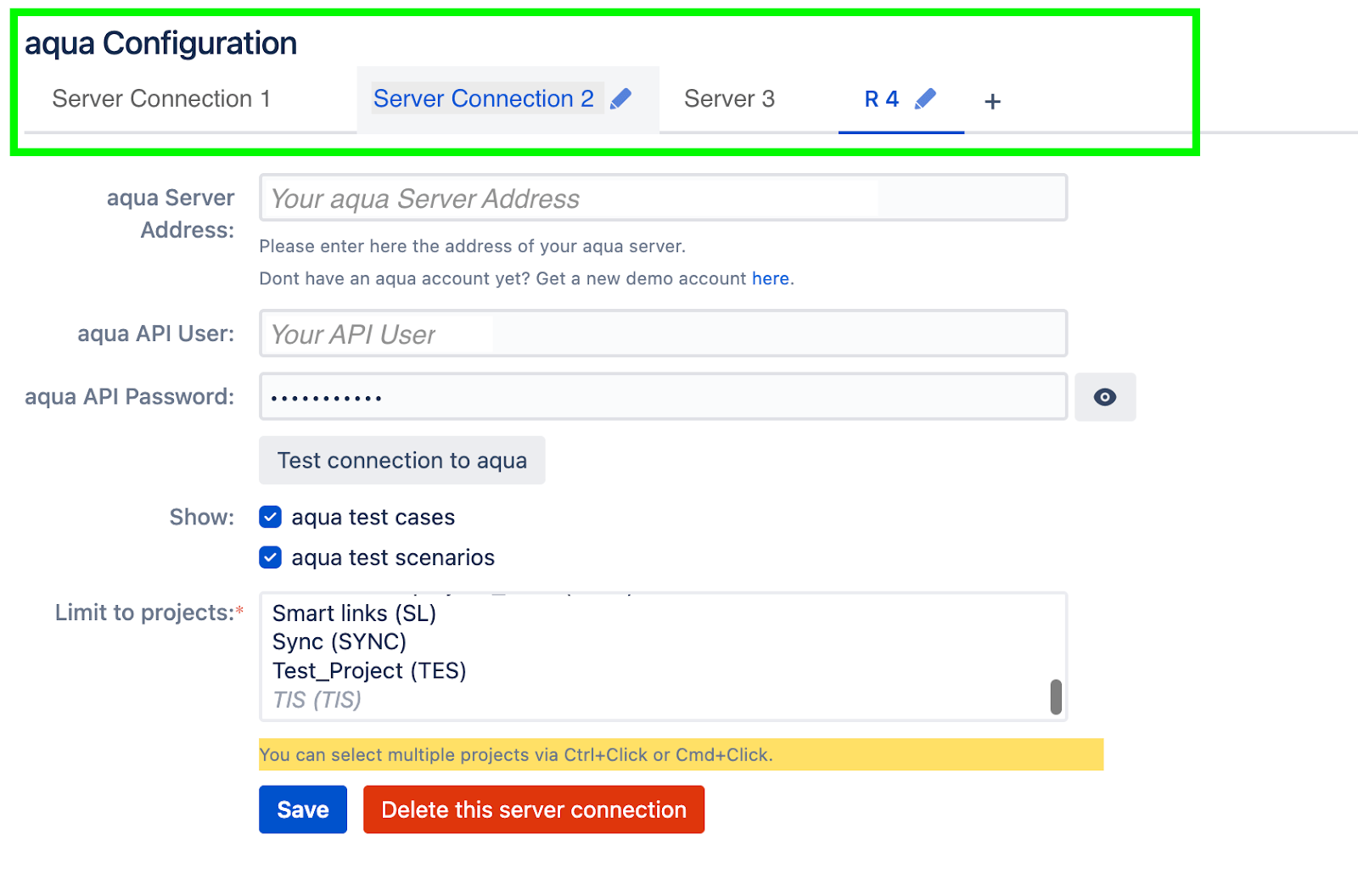
Connect multiple aqua environments (Data Center):
Until now, the Jira Plugin could only be connected to a single aqua instance. For the Data Center, you can now configure multiple server connections that are linked to specific Jira projects, independently named, and manageable without affecting the others.
Clearer test status at a glance (Data Center):
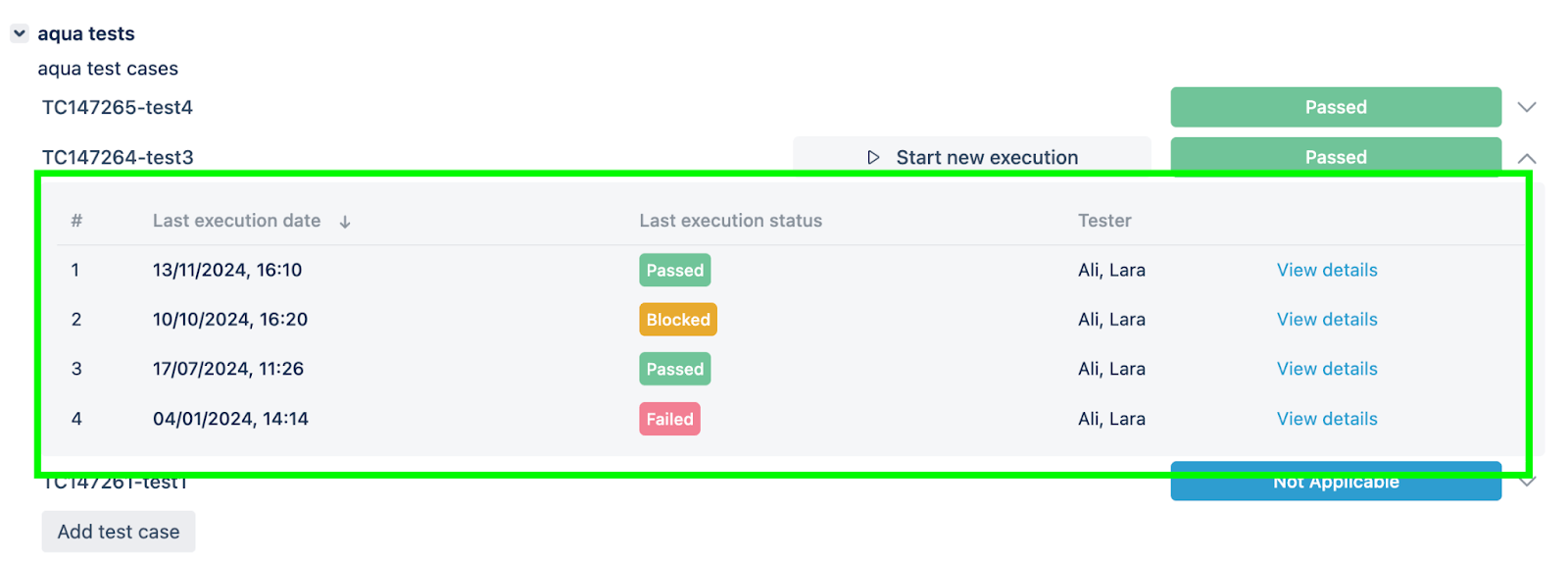
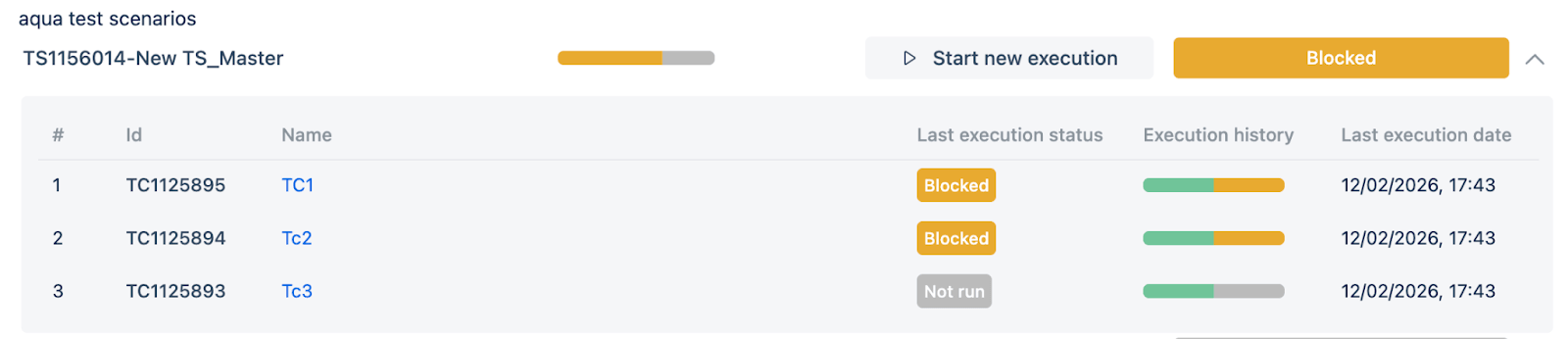
If you are using the Data Center Plugin, we redesigned the way test results appear inside your Jira tickets. Instead of scrolling through a long list of individual execution entries, you now see a clean, collapsed summary showing the current status and a test case count. Expand it to see per-test-case results with dates and testers. For test scenarios, the view aggregates statistics across all contained test cases, making it easy to understand testing progress without ever leaving Jira.
Platform migration to Forge:
We’ve completed the first step in adopting Atlassian’s Forge platform, the modern foundation that Atlassian is building the future of its app ecosystem on. This ensures the aqua Jira Plugin for Cloud stays aligned with the direction Atlassian is heading and remains on a fully supported, forward-looking path. Nothing changes for you in terms of how the plugin works today.
Optimised request handling:
We’ve improved how the plugin communicates with aqua, reducing unnecessary requests and making the integration more efficient and stable under load.
Jira Sync Improvements
Jira sync fixes in this release:
Jira sync keys mapping logic has been improved, resolving an error that previously prevented creating a new sync
Jira sync no longer fails to update deleted field values in aqua
Jira sync no longer hangs due to archived version handling
Azure DevOps Sync: Custom Rich Text Fields Now Supported
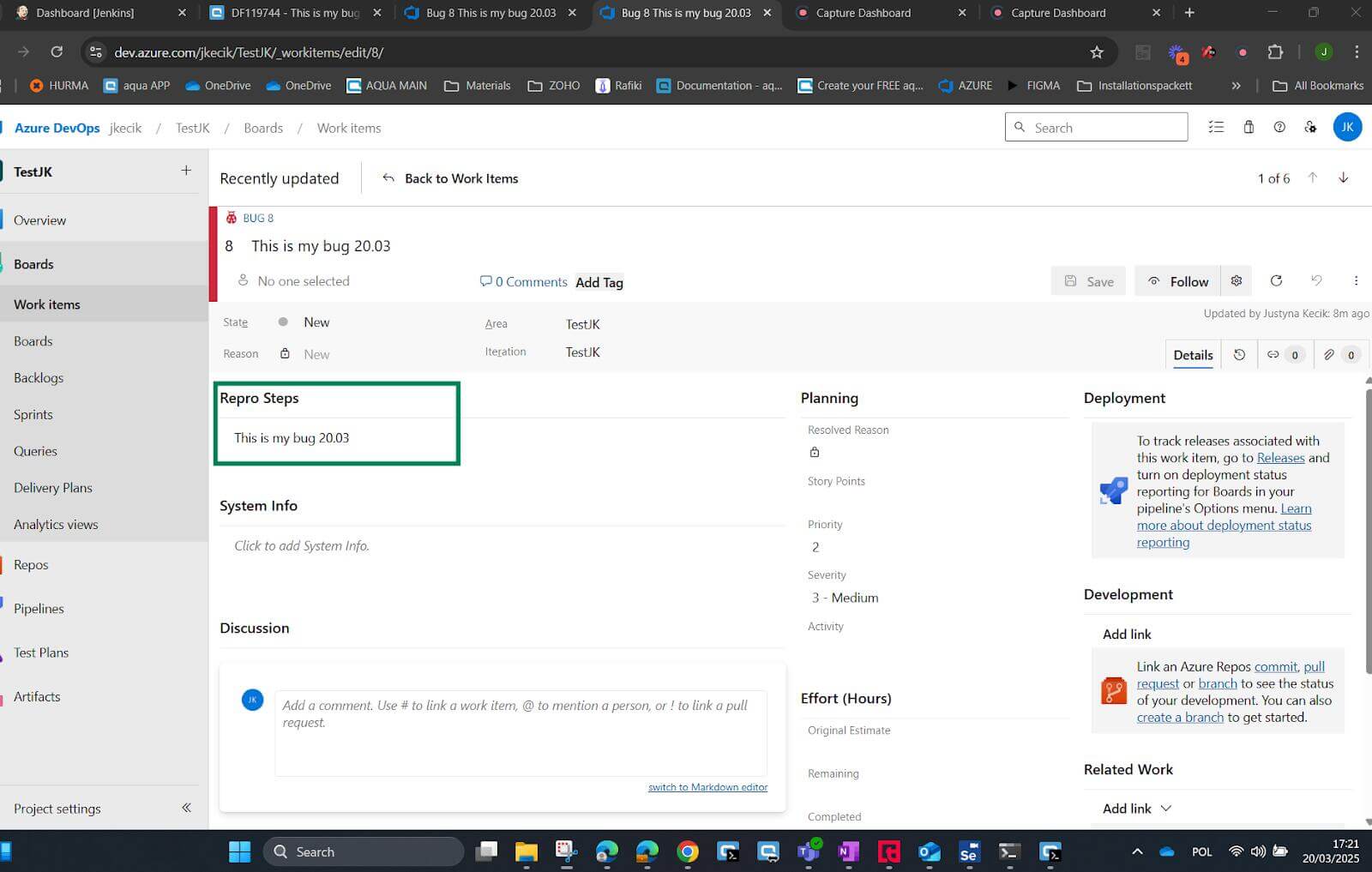
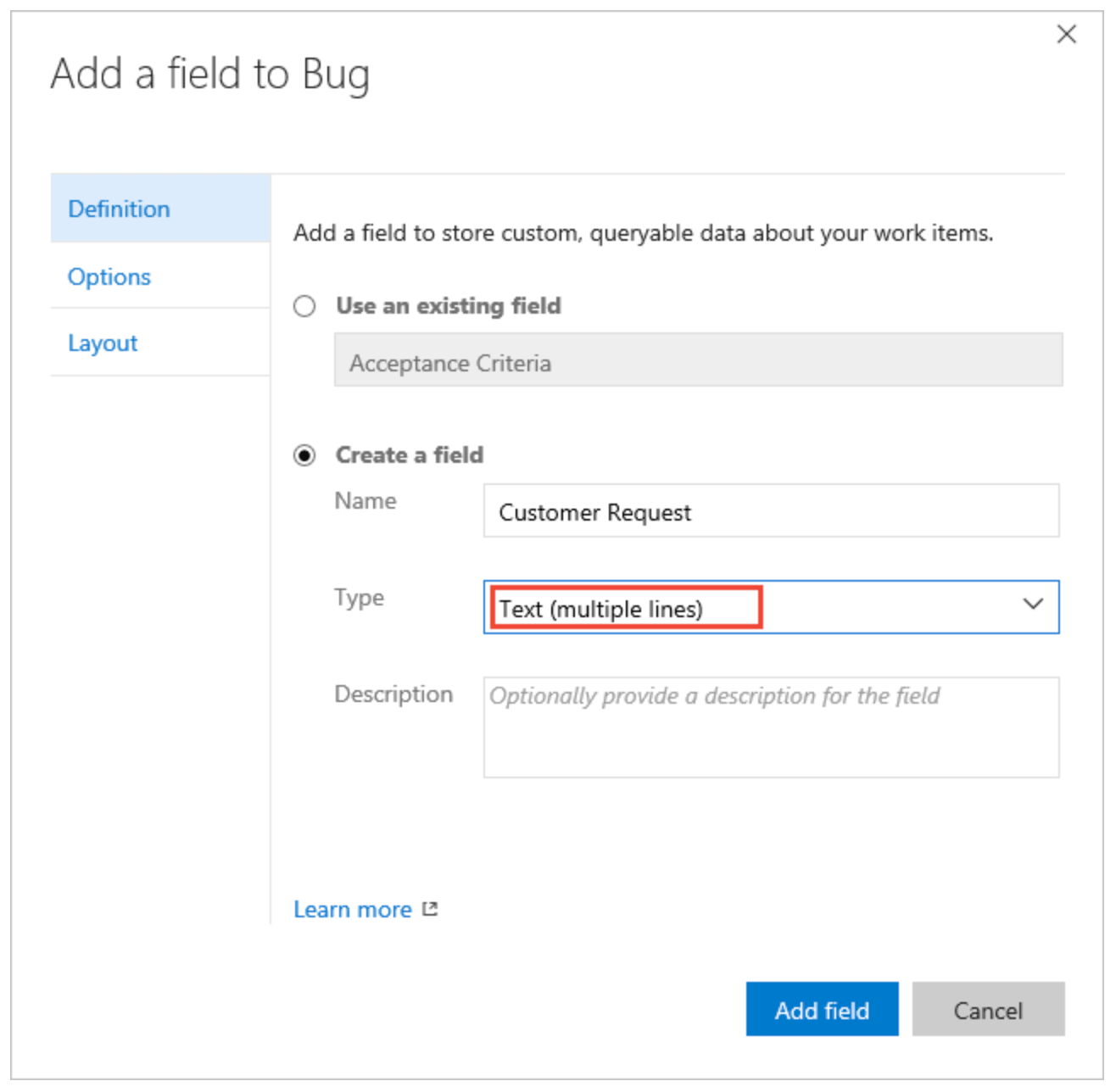
Previously, the Azure DevOps sync covered a fixed set of fields. Any additional multi-line fields in Azure DevOps, such as Repro Steps, System Info, or Acceptance Criteria, had to be maintained manually in both systems.
With this release, custom Rich Text fields now sync bidirectionally between aqua and Azure DevOps. The sync works based on name matching: when a multi-line field in Azure DevOps has exactly the same name as an RTF field in aqua, the two fields sync automatically. No additional configuration is needed. New matching fields are picked up on each sync call, so there is no need to reconfigure the sync when fields are added or changed.
How to set it up:
To synchronise the item type Bug in Azure DevOps with a field called “Repro Steps”:
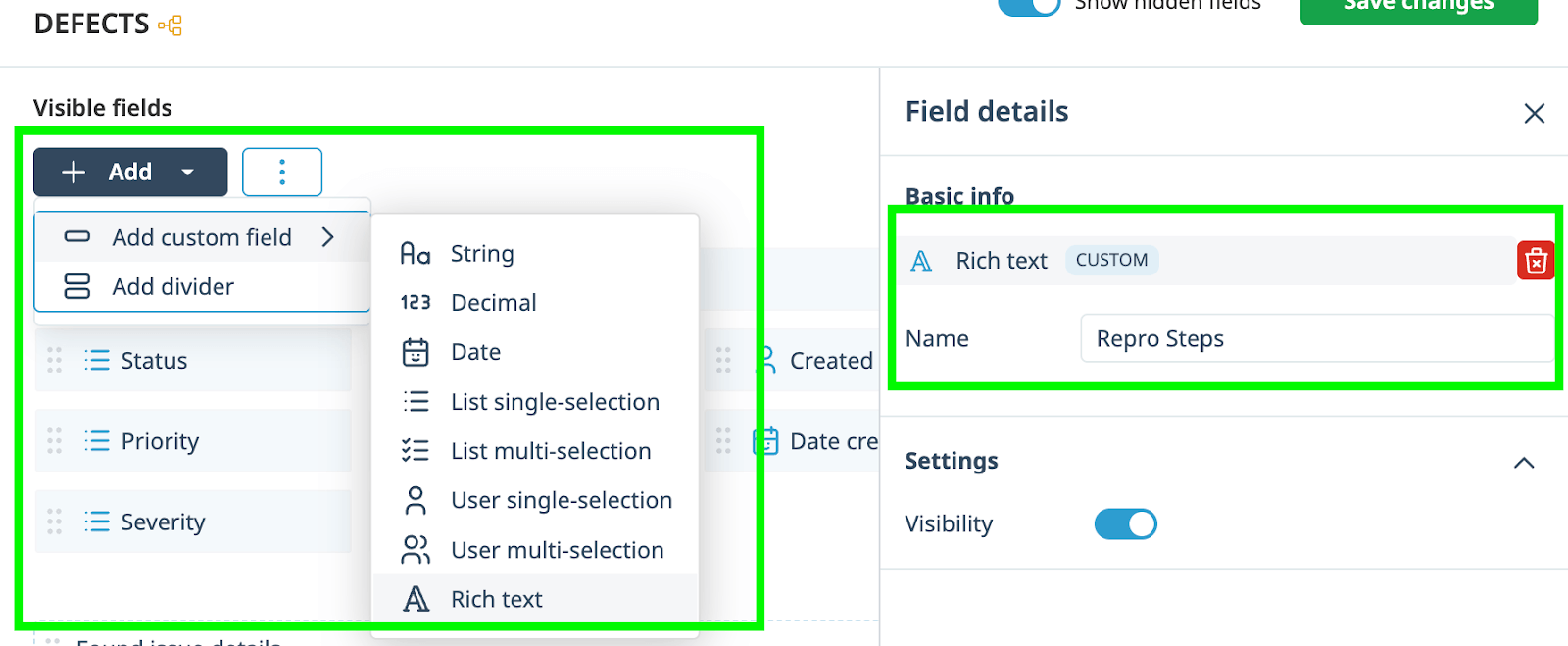
In your aqua Defect template, create a custom RTF field named “Repro Steps” (the name must match exactly)
Once created, the field will sync automatically for all Bugs mapped to Defects
The same applies to any other multi-line field. Identify which Azure multi-line fields you want to sync, create matching custom RTF fields in aqua with the exact same names, and sync will happen automatically.
Azure sync fixes in this release:
Sync errors that occurred after resetting an Azure sync have been fixed
An issue where it was not possible to save a new sync when one of the sync items was disabled has been resolved
Smarter Test Coverage Reporting in Dashboards
Previously, dashboard charts for test scenarios showed only the overall scenario-level status. This created a reporting problem. For example, if you had five test scenarios and one of them was complete, the dashboard showed 20% completion, regardless of how many test cases each scenario contained. A scenario with 20 test cases counted the same as one with 5, which gave leadership and stakeholders an inaccurate picture of actual testing progress.
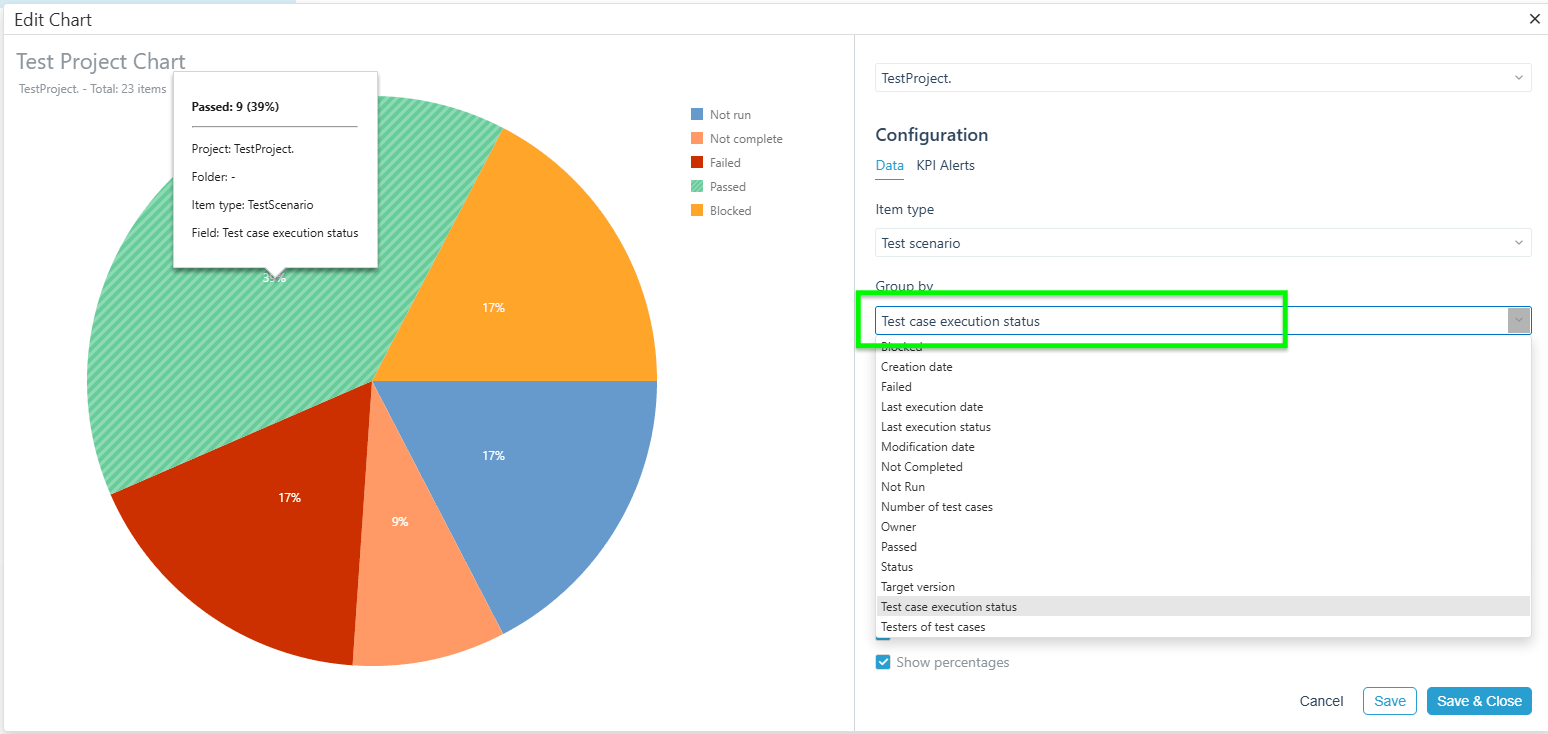
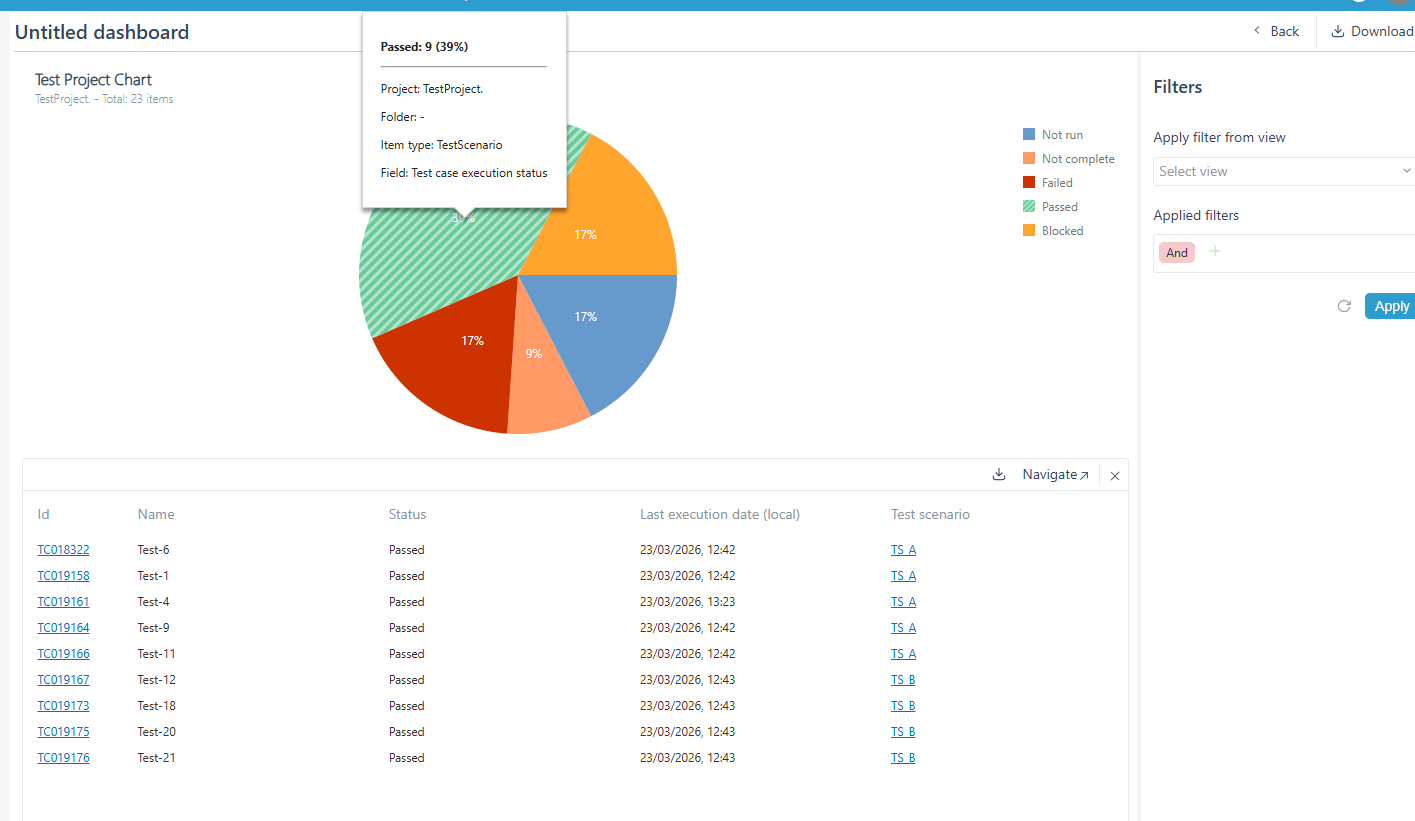
With this update, dashboards can now display metrics based on individual test case execution status within test scenarios. The metrics aggregate the execution results of all test cases contained across the selected scenarios. Now, based on the example above, a dashboard would show 50% completion (20 out of 40 test cases), not 20%.
Clicking into the chart drills down to show individual test case results and which scenario each test case belongs to. Existing dashboard configurations that use scenario-level status continue to work unchanged.
Dashboard fixes in this release:
Dashboard filter no longer cuts off the Apply and Save buttons
Calendar weeks in stacked bar charts are now displayed correctly
Platform Fixes and Improvements
Performance and infrastructure
Save actions in modules such as user administration, template configuration, and workflow and field rules no longer take an unexpectedly long time to complete
The Microsoft SQL Server ODBC driver has been updated to address known security vulnerabilities (on-premise)
Test cases and test execution
A few rough edges in the testing workflow have been polished away:
Copying a test scenario no longer strips labels from the original
Resuming an in-progress execution no longer shows a confusing “Item not found” error message
Known issue, Gherkin generation:
Generating multiple test cases at once with BDD as the output format currently produces only one test case, which may not be correctly structured as Gherkin. A fix is already in progress and will ship in a patch release shortly after this one. Generating a single Gherkin test case works as expected, as does all other test case generation across input types and output formats.
Templates and custom fields
Configuring custom fields in the template editor is now more predictable. We’ve also resolved several issues that caused settings to silently revert:
Decimal places no longer reset after saving
Date fields of the Long Date and No Time types now save correctly
User and workflow administration
A handful of fixes for teams managing users and workflows:
Bulk password reset is back in the actions menu for selected users
The user table scales correctly when paginating
Attempting to set an invalid username now gives clear feedback instead of silently discarding the change
Status field values can now be renamed without errors
Enhancement of the aqua product is Martin’s main responsibility and biggest mission. His expertise covers ITIL Process Consulting, Change Management, Quality Assurance, Quality Management, and Requirements Management. Martin works in QA services for regulated industries for more than 18 years being an irreplaceable leader at…
Pavel, a Quality Assurance Consultant and Author, brings deep expertise to solving complex testing challenges. His background in software development has helped organizations transform their QA practices from reactive to proactive. Beyond consulting, Pavel develops best practice guides and case studies for aqua cloud that…
Home » Product updates » Product Release 25.127 & 26.29: Password Policy, aqua Intelligence & Jira Plugin Updates
Do you love testing as we do?
Join our community of enthusiastic experts! Get new posts from the aqua blog directly in your inbox. QA trends, community discussion overviews, insightful tips — you’ll love it!
We're committed to your privacy. Aqua uses the information you provide to us to contact you about our relevant content, products, and services. You may unsubscribe from these communications at any time. For more information, check out our Privacy policy.
X
🤖 Exciting new updates to aqua Intelligence are now available! 🎉