Have you ever opened page 2 of a product list and seen items you just scrolled past on page 1? This happens when the list is sorted by a column with repeated values, such as price or date. The database then has no fixed order for equal rows, so the same product can land on two pages while another disappears. Bugs like this slip into production because pagination rarely gets its own test plan. With structured test cases, your team checks each page against a clear expected result and finds these problems before release. Below are 50+ pagination test cases, from basic navigation to API tokens, along with common bugs and automation examples.
Pagination testing shows whether large datasets split into pages without lost or duplicated records. These checks cover the UI and the backend layers behind it, such as the API and database.
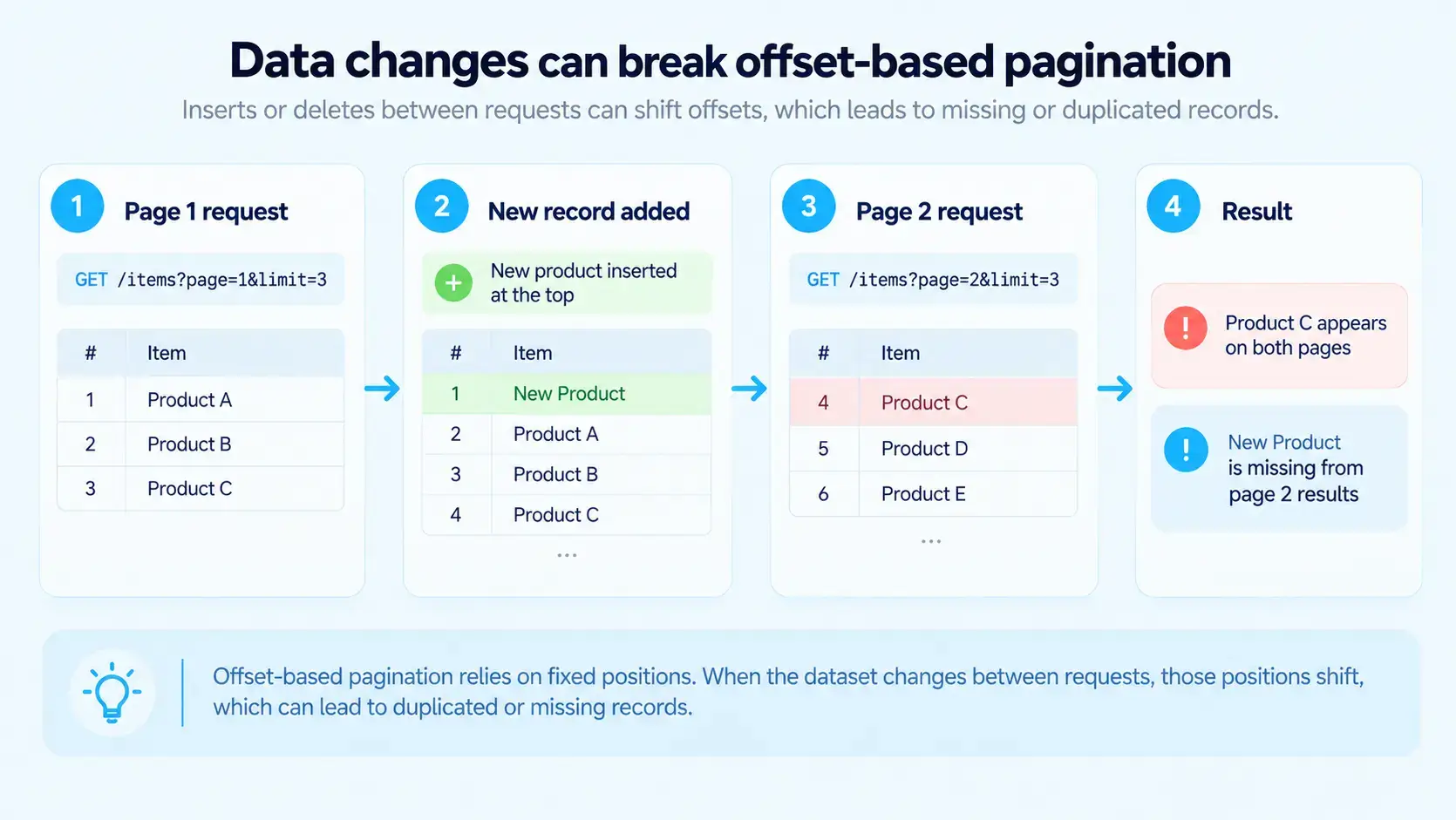
Offset-based pagination uses page numbers and limits, so records can repeat or go missing when data changes mid-session.
Common bugs include duplicated records across pages and incorrect page counts. Empty final pages and slow responses at high page numbers are frequent too, usually because of poor offset handling.
Boundary tests must cover edge values such as zero records and page numbers above the total.
Microsoft’s Azure REST API guidelines require the same sort order on all pages of a list. Without a secondary sort key for tied values, records can move between pages on repeated requests.
What Is Pagination Testing?
Pagination testing is the process of verifying that a system correctly splits large datasets into smaller pages while keeping data integrity intact.
Pagination has to keep the UI, API, database query, and application state aligned. Your frontend displays page numbers, and behind the scenes your API calculates offsets or manages continuation tokens. At the same time, your database runs queries with limit and ordering clauses, and your application state tracks the user’s current position. When these layers lose synchronization, records get duplicated or go missing, and page counts stop matching the data.
Microsoft’s Azure REST API guidelines require services to keep the same sort order on all pages of a list. The same guidelines warn that records may be skipped or duplicated across pages when the collection changes, unless the service takes a snapshot. For that reason, pagination testing has to cover the whole stack across multiple requests, including filtered and sorted ones.
AI-generated image.
Types of Pagination
Pagination works on two levels: a backend strategy that retrieves each batch of data and a frontend pattern that presents it to the user. Your team should identify both, because a numbered page UI can run on top of a cursor-based API, and each level fails in different ways.
Backend Pagination Strategies
The backend strategy determines how the server finds the next batch of records, which directly affects consistency and deep-page performance:
Offset-based pagination. The client requests a page number and a limit, such as ?page=3&limit=20, and the database translates this into LIMIT and OFFSET clauses. This model is simple to build and lets users jump to any page directly. However, records added or deleted mid-session shift the offsets, which causes duplicates or skipped items. Performance also drops on high page numbers because the database still reads and discards all rows before the offset. Your tests should therefore focus on page count math and boundary values.
Keyset (seek) pagination. The client sends the sort values of the last record it received, and the database continues from there with a query such as WHERE (created_at, id) > (?, ?) ORDER BY created_at, id LIMIT 20. Because an index locates the starting point, deep pages load about as fast as the first page. The method needs a unique, deterministic sort key, though, and users can’t jump to an arbitrary page number. For that reason, your tests should check tie-breaking on duplicate sort values and response times on deep pages.
Cursor-based pagination. The server returns an opaque token, and the client sends it back to fetch the next batch. Depending on the implementation, the token may encode the keyset values of the last record or a reference to a server-side snapshot. Google APIs use a nextPageToken field for this, and GitHub’s GraphQL API uses an endCursor value. Cursor pagination can reduce offset-shift problems when it relies on deterministic ordering, yet inserts and deletes can still produce unexpected results. Testing therefore centers on token validation and the documented consistency contract.
Pagination alone needs 50+ test cases, and the other features of your application add hundreds more for your team to write and maintain. aqua cloud keeps these test assets in one place, so your team can group cases into reusable scenarios and apply bulk edits after requirement changes. With nested test cases, you define common pagination checks once and reuse them across features. When you update the shared steps, the change applies wherever they appear. On top of that, aqua Intelligence generates pagination test cases from your requirements in seconds. Because the AI is grounded in your project’s own documentation, the output follows your terminology and context. aqua also syncs with Jira in both directions and connects to Confluence for documentation. Your Jenkins and Azure DevOps pipelines connect as well, and 10+ native automation integrations cover JMeter, SoapUI, Ranorex, PowerShell, and UnixShell. Test scripts can work with MSSQL and Oracle databases or aqua’s REST API, while Capture records each test execution with video and screenshots.
Pagination alone needs 50+ test cases, and the other features of your application add hundreds more for the team to write and maintain. aqua cloud, an AI-powered test and requirement management platform, keeps these test assets in one place, so your team can group cases into reusable scenarios and apply bulk edits after requirement changes. When you update the shared steps, the change applies wherever they appear. Because the AI is grounded in your project’s own documentation, the output follows your terminology and context. aqua also syncs with Jira in both directions and connects to Confluence for documentation. Jenkins and Azure DevOps pipelines connect as well, and 10+ native automation integrations cover JMeter, SoapUI, Ranorex, PowerShell, and UnixShell. Test scripts can work with MSSQL and Oracle databases or aqua’s REST API, while Capture records each test execution with video and screenshots.
Centralize your test case management and reach 100% test coverage with aqua
The frontend pattern determines how users move through the data and where navigation or accessibility issues can appear:
Numbered page controls. Users see Previous and Next buttons along with page numbers, so they can jump to a specific page. This pattern pairs well with offset pagination because it needs a total page count. This way, tests focus on page count math and on the URL state after a reload.
Infinite scroll. Content loads automatically as the user nears the bottom of the list. Technically, this is still pagination, only without visible page controls. Your tests need to cover the scroll trigger and the loading state. Also confirm that the list keeps the user’s position after the user opens an item and navigates back.
Load more button. Users click a button to append the next batch of records to the list they already see. This hybrid shares traits with numbered pages and infinite scroll. As a result, you test the button states and the consistency of the growing list, e.g., that no record appears twice after several clicks.
If the UI and the API use different approaches, test each layer against its own set of pagination test cases.
Look up offset pagination. Use a separate property in the response for the results, and typically metadata property for info on how many pages there are. You could also add in additional params for filtering search results, ordering etc.
Pagination test cases need to cover functional flows and API behavior, plus the points where UI states and edge cases intersect. When you learn how to write test cases for pagination, remember that test cases for pagination functionality address several stack layers at once. The groups below start with the fundamentals and then move on to API and performance checks.
Basic Pagination Test Cases
These pagination manual test cases cover the core moves between the first and the last page. A failure here makes later state and API results unreliable, so run this group first:
TC-PAG-01: Load the first page. Open a dataset with more records than one page can hold. Page 1 should show the configured number of records and appear as active, with Next enabled and Previous disabled. With 95 records and a page size of 20, you should see records 1–20.
TC-PAG-02: Click Next. From page 1, click Next and confirm that page 2 becomes active with records 21–40. Compare record identifiers between both pages as well, because different-looking content can still contain duplicates from page 1.
TC-PAG-03: Click Previous. Go back from page 2 to page 1. If the dataset hasn’t changed and pagination is deterministic, you should see exactly the records you saw initially.
TC-PAG-04: Select a specific page number. Jump directly to page 4 and verify that it loads the correct slice of data. This case exposes offset calculation errors that sequential Next clicks can hide.
TC-PAG-05: Reach the last page. With 95 records and a page size of 20, the dataset has five pages. The last page should show 15 records, mark page 5 as active, and disable the Next and Last controls.
TC-PAG-06: Display total record count. If your interface shows “Showing 1–20 of 95,” verify that both numbers update correctly as you move between pages. Miscalculated totals confuse users quickly and reduce their trust in the data.
Page Navigation Test Cases
Once basic clicks work, test how navigation handles state changes and real user behavior. Each test case for pagination navigation below shows whether your application keeps the user’s position consistent:
TC-NAV-01: First page button. If your UI has a First control, click it from page 7 and confirm that you land on page 1 with the correct initial records.
TC-NAV-02: Last page button. Jump to the final page from page 1 and verify that the data and control states match the last page.
TC-NAV-03: Rapidly click Next. Click Next several times in quick succession. The app should debounce the clicks or process concurrent requests in order, so it neither queues a dozen requests nor skips pages.
TC-NAV-04: Navigate while a request is pending. Start loading page 4, then click page 2 before page 4 finishes. The stale page 4 response must not overwrite the page 2 data the user requested.
TC-NAV-05: Browser back button. Go from page 1 to page 2 to page 3, then click the browser Back button. You should land on page 2, and a second Back click should return you to page 1.
TC-NAV-06: Refresh current page. Refresh the browser on page 5. You should stay on page 5, unless your app intentionally resets to page 1 on reload, and the spec should document that behavior.
TC-NAV-07: Direct URL access. If the page number is encoded in the URL, such as /products?page=7, open that URL directly. Page 7 should load immediately without forcing the user through pages 1–6.
TC-NAV-08: Return to the list after opening a record. On page 4 with a filter applied, scroll down, open a record, and click Back. The list should restore page 4 together with the active filter and the previous scroll position. This case differs from TC-NAV-05, because the state has to persist through a route change to another view.
Boundary and Edge Case Test Cases
Boundary values expose page count and offset errors, e.g., an empty extra page when the record count equals the page size. These pagination test cases example scenarios target record counts around the page size and invalid page numbers:
TC-EDGE-01: Zero records. Load an empty dataset. The page should display a proper empty state, and labels such as “Page 1 of 0” or active pagination controls must not appear.
TC-EDGE-02: Exactly one record. With a single record in the dataset, verify that you get one page containing that record and that all navigation controls are disabled.
TC-EDGE-03: Records equal to page size. With 20 records and a page size of 20, the system should show exactly one page and no empty second page.
TC-EDGE-04: Records one over page size. With 21 records and a page size of 20, you should get two pages, and page 2 should contain the single remaining record.
TC-EDGE-05: Two full pages. Test 40 records with a page size of 20. The result should be exactly two full pages with no extra empty third page.
TC-EDGE-06: One record under two pages. With 39 records, you should still get two pages, and page 2 should show 19 items.
TC-EDGE-07: Page number above total pages. Request page 47 when only 10 pages exist. The response should match the documented contract, e.g., an empty collection or a clear error message. A 500 error or metadata that reports page 47 as valid counts as a failure.
TC-EDGE-08: Page zero. Request page 0. The app should apply its documented rule for invalid page numbers, and it must never crash or return misleading metadata.
TC-EDGE-09: Negative page number. Request page -1. The expected result matches the page zero case, so the response should follow the same documented rule.
TC-EDGE-10: Extremely large page number. Request page 999999999. Your system should reject the value or cap it at a defined maximum, so the server never tries to calculate an extremely large offset.
Page Size Test Cases
Many interfaces let users choose how many records appear per page. Each size change forces a recalculation of offsets and page counts. Your test cases for pagination therefore need to cover the switch and the page the user lands on:
TC-SIZE-01: Change page size from default. Start with 10 records per page and switch to 25. Up to 25 records should now display, and the total page count should recalculate correctly.
TC-SIZE-02: Change page size from a later page. Open page 8 of 100 records at 10 per page, then switch to 50 per page. Since only two pages now exist, the app should reset you to page 1 or move you to the page that contains your previous view.
TC-SIZE-03: Minimum page size. Select the smallest allowed size, often 5 or 10, and confirm that records and controls display correctly.
TC-SIZE-04: Maximum page size. Switch to the maximum allowed size, such as 100. The page should load without performance issues or layout breaks.
TC-SIZE-05: Invalid page sizes. If users can enter custom sizes, try 0 or a negative number first, and then a value above the maximum. The app should reject these inputs with a validation message or fall back to a sensible default.
TC-SIZE-06: Persist page size preference. If the app remembers user choices, change the page size and reopen the view later. The selection should persist according to the product spec.
TC-SIZE-07: Page size larger than total records. With 15 records, set the page size to 50. You should get one page with all 15 records, and the navigation controls should stay disabled.
Sorting and Filtering Pagination Test Cases
Sorting and filtering can change both record order and page count, so failures often appear only after several state changes. The following test cases for pagination functionality cover each change on its own and in combination:
TC-SORT-01: Sort ascending from page 1. Sort a numeric column ascending. Page 1 should contain the lowest values, and the following pages should continue that order.
TC-SORT-02: Sort descending from page 1. Switch to descending sort. The highest values should now appear first, and the order should hold across pages.
TC-SORT-03: Change sort direction mid-pagination. Sort ascending, go to page 3, and then switch to descending. The app should load page 1 of the new sort with the highest values.
TC-SORT-04: Verify sort persists across pages. Sort by price ascending and move from page 5 to page 6. Prices should stay in ascending order with no reset to the default sort.
TC-SORT-05: Sort with tied values. Give many records the same sort value, such as 30 products priced at $10. A stable secondary sort should keep them on the same pages across repeated requests.
TC-FILTER-01: Apply filter from page 1. Filter the dataset, e.g., by “status: active.” Only matching records should appear, and both the total count and the page count should update.
TC-FILTER-02: Apply filter from page 5. While on page 5 of unfiltered data, apply a filter that returns only two pages of results. The app should move you to the valid page your spec defines, often page 1.
TC-FILTER-03: Navigate filtered results. After filtering, move from page 1 to page 3. The filter should stay active on each page without reverting to unfiltered data.
TC-FILTER-04: Remove filter. Clear the filter and verify that the full dataset and the original page count return.
TC-FILTER-05: Combine filter and sort. Sort a filtered result set and page through it. The filter and the sort order should both stay applied on each page.
TC-FILTER-06: Filter producing zero results. Apply a filter that matches no records. You should see a proper empty state, and the controls should no longer show “Page 1 of 5.”
Microsoft’s Azure guidelines require one sort order across all pages of a list, and tied values break that rule without any error message. When your database returns equal-value records in an undefined sequence, those records can change position between requests. Test data with large groups of identical sort values exposes the resulting duplicates quickly.
Search Pagination Test Cases
Search functions create temporary filtered datasets, so they need their own pagination checks. Besides that, search queries pass user input into the URL and the backend query, which adds encoding risks:
TC-SEARCH-01: Search from page 1. Run a search query that returns several pages of results, such as 83 records at a page size of 20. The first page should show relevant results, and the page count should read five.
TC-SEARCH-02: Paginate through search results. Move from search results page 1 to page 2 and then to page 3. The results should stay consistent with the original query.
TC-SEARCH-03: Search returning one page. Enter a query that returns 12 results at a page size of 20. You should get a single page with no empty second page.
TC-SEARCH-04: Search returning zero results. Search for a string that matches no records. The page should show a proper “no results” state with pagination controls hidden or disabled.
TC-SEARCH-05: Change search query mid-pagination. On page 3 of the results for “laptop,” change the query to “keyboard.” The new search should load page 1 of its own results without keeping you on page 3.
TC-SEARCH-06: Combine search with sort. Sort the results of a “sneakers” search by price and page through them. The query and the sort order should both stay applied.
TC-SEARCH-07: Special characters in search. Search with quotes or ampersands in the query. Pagination of those results should work correctly despite URL encoding and query parsing.
UI Pagination Test Cases
Pagination controls tell users where they are in a dataset, so a styling or layout defect misleads them directly. AI-based tools for UX/UI testing can compare screenshots of these controls between releases and flag layout changes in the cases below:
TC-UI-01: Active page styling. The current page should stand out visually, e.g., through a highlight or bold text. Color alone isn’t enough, because users with color vision deficiencies need another cue.
TC-UI-02: Disabled control styling. When Previous is disabled on page 1, it should look disabled and ignore clicks.
TC-UI-03: Page number truncation. With 500 pages, the UI can’t show all 500 numbers. Verify that truncation such as “1 … 48 49 50 … 500” works correctly and that the ellipses behave logically.
TC-UI-04: Loading states. While a new page loads, the UI should display a spinner or skeleton screen. Otherwise, users keep looking at stale data and can’t tell whether their click registered.
TC-UI-05: Layout stability. Clicks on pagination controls should not cause abrupt content shifts or layout reflows.
TC-UI-06: Long page numbers. Test how your UI displays “Page 1234 of 5678.” The label should fit its container without overflow or broken alignment.
Accessibility Pagination Test Cases
With accessibility checks, you confirm that keyboard and screen reader users can move through pages as reliably as mouse users. According to the WebAIM Million 2026 report, 95.9% of one million home pages had detected WCAG 2 failures, and 30.6% contained empty buttons. Icon-only Previous and Next buttons without accessible names fall into that empty-button category. For that reason, the cases below map to specific WCAG 2.2 success criteria:
TC-A11Y-01: Keyboard reachability. Move through the pagination controls with the Tab key only. Each control should receive focus and work with the keyboard alone, as WCAG 2.2 criterion 2.1.1 requires.
TC-A11Y-02: Logical tab order. Focus should move from Previous through the page numbers to Next, in the same order the controls appear on screen. A mismatch between visual order and focus order fails criterion 2.4.3.
TC-A11Y-03: Accessible names. Inspect the controls with a screen reader or the browser’s accessibility tree. Icon-only buttons need names such as “Next page,” and the wrapping <nav> element should carry a label like “Pagination.”
TC-A11Y-04: Current page marker. The active page link should carry aria-current="page", and the attribute should move to the new link after each page change. Screen readers then announce the current page without any reliance on color.
TC-A11Y-05: Disabled state. On the first page, Previous should be exposed as disabled through the disabled attribute or aria-disabled="true". A control that only looks gray still reaches screen reader users as active.
TC-A11Y-06: Focus after a page change. After a click on page 3, focus should land on a predictable element, e.g., the results heading or the pagination control itself. If focus drops to the top of the document, keyboard users lose their place.
TC-A11Y-07: Status announcements. For load more buttons and infinite scroll, new results should trigger an announcement through an aria-live region, such as “20 more products loaded.” Criterion 4.1.3 covers these status messages.
Responsive Pagination Test Cases
Desktop pagination controls often break on mobile screens, so these checks belong in your regular regression runs. They cover viewport sizes along with accessibility settings that change text and control dimensions:
TC-RESP-01: Mobile viewport. Load pagination on a narrow phone screen. The controls should stay usable without overflow or horizontal scrolling.
TC-RESP-02: Horizontal orientation. Rotate the device to horizontal orientation and confirm that pagination still works without layout issues.
TC-RESP-03: Touch targets. On touch devices, pagination buttons should be large enough to tap accurately. Apple’s Human Interface Guidelines set the minimum tap target at 44×44 points.
TC-RESP-04: Reduced page number display. Mobile layouts often show a shorter row of page numbers, such as “1 2 3 … 50.” Verify that the condensed version navigates correctly.
TC-RESP-05: Browser zoom. Zoom the browser to 200% or more. Pagination should remain functional and readable at that level.
TC-RESP-06: Large system fonts. With large accessibility fonts enabled, pagination text should stay readable and keep the layout intact.
API Pagination Test Cases
With API tests, your team checks the pagination contract directly, without the UI in between. A frontend can hide API defects, e.g., when it removes duplicate records on the client side. Field names such as limit and total_count vary between APIs, so map them to your own specification:
TC-API-01: Default page size. Send a request without a limit parameter. The response should return the documented default number of items and report that size in its metadata.
TC-API-02: Custom page size. Request ?limit=50 and verify that the response contains 50 items when enough records exist.
TC-API-03: Maximum page size. Request a limit above the documented maximum, such as ?limit=10000. The API should cap the value or return a 400 error, and the metadata should show the applied limit.
TC-API-04: Total count accuracy. Compare total_count with the number of matching records in the database. With a filter applied, the field should report the filtered total.
TC-API-05: Navigation flags. On the first page, hasPreviousPage should be false, and on the last page, hasNextPage should be false. Both flags should be true on any page in between.
TC-API-06: Final page token. On the last page, nextPageToken should be empty or absent, so a client loop knows when to stop.
TC-API-07: Malformed cursor. Send a token with altered or random characters. The API should return a 400 error with no records.
TC-API-08: Expired cursor. If tokens expire, send one past its lifetime. The response should contain the documented expiration error, and the client should be able to restart from the first page.
TC-API-09: Cursor reused after a filter change. Generate a cursor for status=active, then send it with status=inactive. Many cursor systems encode the query state in the token, so the API should reject the request or start a new traversal.
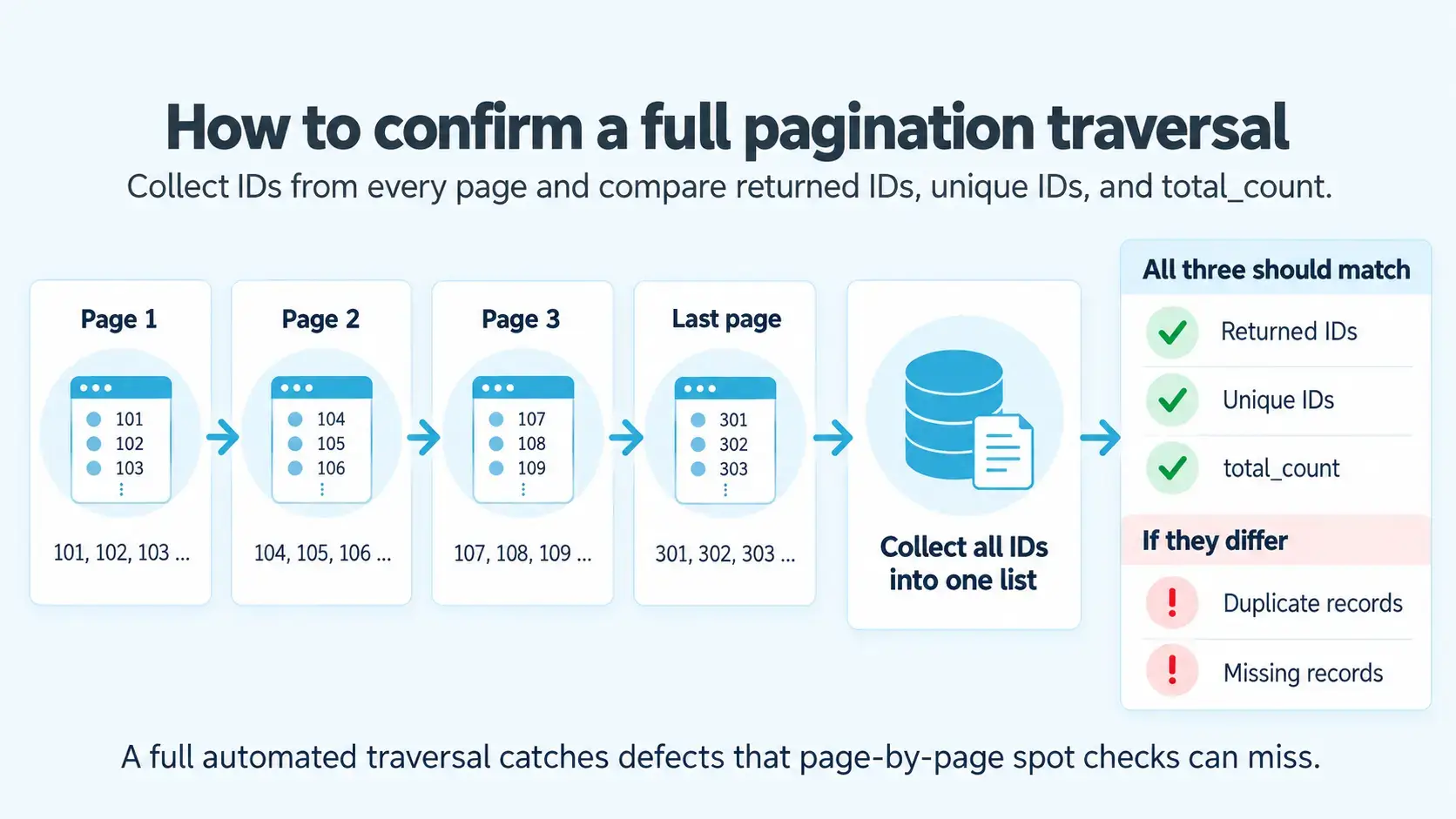
TC-API-10: Complete traversal. Follow the next-page tokens or links until the final page and collect all record IDs. The number of returned IDs should equal the number of unique IDs and match total_count.
TC-API-11: Server-side sort across pages. Request ?sort=price and compare the last item of page 1 with the first item of page 2. The order should hold across each page boundary, including records with tied values.
TC-API-12: Metadata consistency. Check that totalPages equals ceil(total_count / pageSize). The item count on each page should also match pageSize, with the last page as the only exception.
Dynamic Data and Concurrent Changes Test Cases
Production data changes while users move through pages, so these pagination test cases simulate writes between requests. The expected result depends on the consistency contract your API documents. If your API serves a snapshot, any duplicate or missing record counts as a defect:
TC-DYN-01: Insert a record between page requests. After page 1 loads, insert a record that sorts before the current position and request page 2. With offset pagination, the last record of page 1 moves to page 2 and appears twice, so the result must match the documented behavior.
TC-DYN-02: Delete a record already seen. After page 1 loads, delete one of its records and request page 2. Offset pagination then skips one unseen record, which your test should detect through ID tracking.
TC-DYN-03: Delete a record ahead of the cursor. Delete a record that belongs on a later page before the client reaches it. The deleted record should not appear, and the traversal should continue without errors.
TC-DYN-04: Delete the last-seen record. Delete the final record of the current page, then request the next page. A keyset-based cursor should still continue from the correct position because it compares sort values.
TC-DYN-05: Update a sort key during traversal. While the client is on page 2 of a list sorted by price, change the price of a record on page 3. Depending on the new value, the record may appear twice or never, so the result must match the documented contract.
TC-DYN-06: Add records with identical sort values. Insert several records with the same sort value as existing ones during traversal. A unique tie-breaker, such as the record ID, should keep their order deterministic across requests.
TC-DYN-07: Full traversal under concurrent writes. Run a background process that inserts and deletes records while the client walks through the whole dataset. Afterward, compare the collected IDs with the documented guarantee, e.g., no duplicates for a snapshot-based API.
If no consistency contract exists yet, your team should define one before you write the expected results.
Permission and Tenant Scoping Test Cases
Pagination queries must apply access rules before they count and slice records. Otherwise, the total count or the size of a page can reveal that restricted records exist. For that reason, run these pagination test cases as users with different access levels:
TC-PERM-01: Restricted rows on later pages. Log in as a user with limited access and page through the whole dataset. Restricted records should never appear, including on the last page and on deep pages.
TC-PERM-02: Total count of visible records. Compare total_count for a restricted user with the number of records that user can open. If the count includes hidden records, the API leaks their existence.
TC-PERM-03: Page size after permission filtering. Check that each full page for a restricted user contains the configured number of records. Short pages in the middle of a dataset indicate that the system removes restricted rows after it slices the page.
TC-PERM-04: Tenant isolation. In a multi-tenant system, page through a large dataset as a user of tenant A. Neither the records nor the counts should include data from tenant B, even on deep pages.
TC-PERM-05: Cursor bound to its owner. Send a cursor issued to one user with another user’s credentials. The API should reject the request, because a cursor can encode the query and access scope of its original owner.
Performance and Scalability Test Cases
Performance cases measure how response time changes with page depth and load. Since a fixed 500 ms threshold fits only some systems, judge these pagination test cases against your SLA or a measured baseline:
TC-PERF-01: First page versus a deep page. Measure the response time for page 1 and for a page near the end of a large dataset. With offset pagination, the deep page often responds much slower, so compare both values with your SLA.
TC-PERF-02: Maximum page size. Request the largest allowed page and record the response time and payload size. Both values should stay within the documented limits.
TC-PERF-03: Large filtered dataset. Apply a filter to your largest test dataset and page through the results. Response times should stay within the baseline, which also shows whether the filter columns have suitable indexes.
TC-PERF-04: Large sorted dataset. Sort a large dataset by a column without an index and request a deep page. If the response time exceeds the SLA, the database needs an index or a different pagination strategy.
TC-PERF-05: Concurrent pagination requests. Send pagination requests from many simulated users at once, e.g., with JMeter. Latency should stay within the SLA, and each response should still contain the correct records.
Negative Test Cases for Pagination
Negative pagination test cases stress the system with invalid inputs and unexpected failures. Public URLs and APIs accept parameters that anyone can edit by hand, so the server has to reject invalid values without crashing or exposing data:
TC-NEG-01: Non-numeric page parameter. Send ?page=abc and verify that the system follows its documented behavior, e.g., a 400 error or the first page.
TC-NEG-02: Decimal page number. Try ?page=3.5. Your app may round the value down or reject it, and in both cases it must stay stable.
TC-NEG-03: Malicious parameter values. Send special characters or an SQL fragment in the page and limit parameters. The API should reject the input with a 400 error, and the database query should use bound parameters.
TC-NEG-04: Extremely large numeric input. Request page 2147483647, the maximum 32-bit signed integer, or a larger value. Your system should cap or reject the number without errors or slowdowns.
TC-NEG-05: Missing required parameters. Omit the page or limit parameter where the API requires it. The response should contain a meaningful error message.
TC-NEG-06: Network failure mid-pagination. Simulate connection loss while page 4 loads. The app should show an error or offer a retry, and page 4 must not appear as loaded.
TC-NEG-07: Timeout. Delay the server response past the timeout limit and verify that the user gets a clear error message.
TC-NEG-08: Server error (500). Make the backend return a 500 error on a pagination request. The frontend should report the failure to the user and hide partial or stale data.
TC-NEG-09: Unauthenticated request. Request a page without credentials or with an invalid access token. The API should return 401 Unauthorized with no partial data in the response.
TC-NEG-10: Forbidden request. Request a page with valid credentials for a user who lacks permission to the resource. The API should return 403 Forbidden, and the response should not reveal the total count.
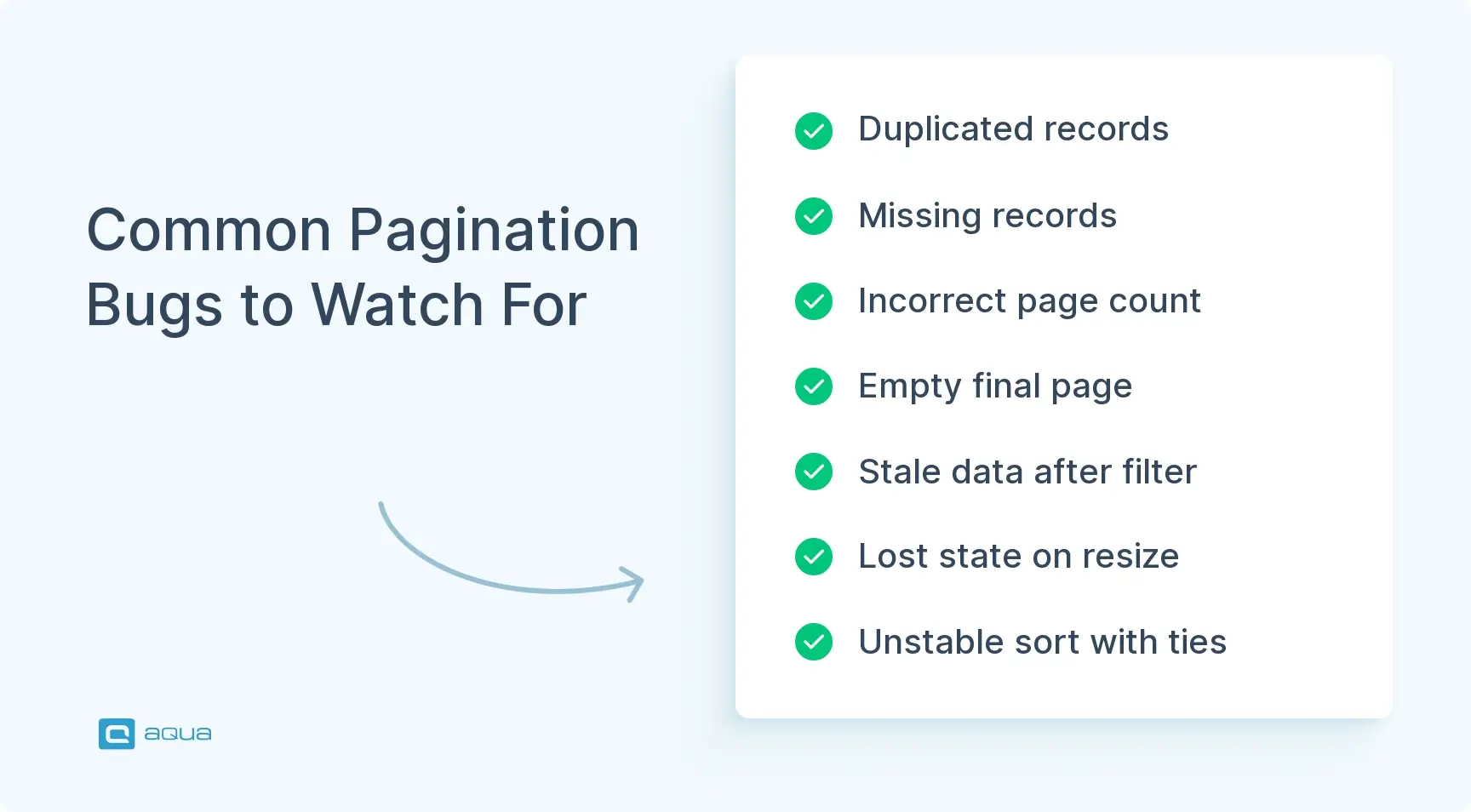
Common Pagination Bugs to Look For
AI-generated image.
The defects below are the ones the pagination test cases above are built to expose:
Duplicated records. Record 20 appears on both page 1 and page 2. The usual cause is an off-by-one error in offset calculations or unstable sorting of records with identical values.
Missing records. Record 60 never appears on any page. This bug often comes paired with duplication, because a double-counted record pushes another one out of the sequence.
Incorrect page count. The app claims six pages while only five contain data, or it shows “Page 5 of 4.” The cause is typically a rounding error in the ceil(total_records / page_size) calculation.
Empty final page. The last page displays zero records, although a few records remain. Improper boundary handling or a wrong offset on the final request causes this.
Stale data after filter. Old unfiltered data stays visible after the user applies a filter, because the filter didn’t trigger a data refresh.
Lost state on page size change. On page 8, the user changes from 10 to 50 records per page, and the app breaks or shows an empty page. In this case, the position was never recalculated for the new size.
Sort not persisting. After an ascending sort and a move to page 3, the data reverts to the default order. The sort parameter wasn’t carried through the pagination request.
Unstable sorting with equal values. Records that share the same sort value, such as price, move between pages on repeated loads. A missing secondary sort key causes this.
Race conditions with rapid clicks. Five fast clicks on Next produce out-of-order responses, so the UI shows page 2 data while it claims you’re on page 5.
Off-by-one errors. A request for page 2 returns data for page 1 or page 3. Usually, the frontend and backend disagree on zero-based and one-based indexing.
Cursor token corruption. A modified continuation token causes silent failures or wrong results without a clear error message.
Performance degradation on high pages. Response time grows with the page number, so deep pages load far slower than page 2. This pattern is common with offset-based pagination, where the database reads and discards all rows before the offset.
Broken browser navigation. The Back button returns to the wrong page, or a refresh resets the user to page 1 unexpectedly.
Inaccessible controls. Keyboard users can’t reach the pagination buttons, or screen readers don’t announce the current page.
Mobile layout overflow. Pagination controls overflow the screen or require horizontal scrolling on narrow viewports.
When one of these defects appears, log it in a bug tracking tool with the page number and the active sort or filter. Your developers can then reproduce the exact request, since most of these bugs depend on state from earlier pages.
Best Practices for Pagination Testing
The highest-value checks in comprehensive pagination test cases focus on record identity, boundaries, deep pages, consistency guarantees, and combined state changes:
1. Track Record IDs Across Pages
Collect the IDs from each loaded page and check that returned IDs equal unique IDs and match total_count. A difference of one record means a duplicate or a missing item.
2. Cover Six Boundary Values per Limit
For a page size of 20, test datasets with 0, 1, 19, 20, and 21 records, plus the maximum allowed value. These six points expose off-by-one errors that typical values such as 50 or 95 miss.
3. Test Deep Pages on Production-Size Data
PostgreSQL documentation notes that rows skipped by OFFSET are still computed inside the server, so large offsets get slow. Therefore, compare the 95th percentile response time of page 1 and the last page against your SLA.
4. Define the Consistency Contract First
Microsoft’s Azure REST API guidelines tell services to document that records may be skipped or duplicated across pages. Your team should record which outcome your API allows before it runs the dynamic data cases.
5. Automate Traversal and Explore Combinations Manually
Automate full traversal and reserve manual sessions for state combinations, such as a filter on page 8 plus a page size change.
6. Run Accessibility Checks in Each Release
Since June 28, 2025, the European Accessibility Act applies to e-commerce and banking services in the EU, and national regulators can issue fines. Pair axe-core scans in CI with a short manual keyboard and screen reader pass before each release.
As for which API endpoints to apply it to, judge it based on the amount of data (rows, items, etc) the endpoint can return. I generally apply it globally across all my endpoints but set default sensible values such that a default number of rows are returned at a time if the API request doesn't specify the paging parameters.
Automated pagination test cases walk through all pages and collect record IDs along the way. At the end, the number of returned IDs must equal the number of unique IDs, and both must match the expected total.
The Playwright example below drives the UI and checks the network response alongside the DOM. That way, the test shows whether a defect comes from the API or from rendering. For the test to run, the rows and the total count element need data-testid attributes. The page also needs a “Next page” button, and the API response needs an items array:
import { test, expect, type Page } from '@playwright/test';

const rowIds = (page: Page) =>
  page.getByTestId('row').evaluateAll((rows) => rows.map((r) => r.getAttribute('data-id')!));

test('UI pagination shows each record exactly once', async ({ page }) => {
  await page.goto('/products');
  const total = Number(await page.getByTestId('total-count').innerText());
  const next = page.getByRole('button', { name: 'Next page' });
  const seen = await rowIds(page);
  let current = 1;

  while (await next.isEnabled()) {
    const [response] = await Promise.all([
      page.waitForResponse((r) => r.url().includes('/api/products') && r.ok()),
      next.click(),
    ]);
    current += 1;
    await expect(page.locator('[aria-current="page"]').toHaveText(String(current));

    const ids = await rowIds(page);
    const apiIds = (await response.json()).items.map((i: { id: string }) => i.id);
    expect(ids).toEqual(apiIds); // the DOM shows what the API returned
    seen.push(...ids);
  }

  expect(seen.length).toBe(new Set(seen).size); // no duplicates
  expect(seen.length).toBe(total);              // no missing records
});
The API example follows nextPageToken until the final page and applies the same ID assertions. It relies on the baseURL from your Playwright config. In addition, a request limit stops the loop if the API keeps returning tokens, which is a defect in its own right:
test('API cursor traversal returns each record exactly once', async ({ request }) => {
  const seen: string[] = [];
  let token: string | undefined;
  let total = 0;
  let requests = 0;

  do {
    if (++requests > 500) throw new Error('Traversal did not reach the final page');
    const res = await request.get('/api/products', {
      params: token ? { limit: 50, pageToken: token } : { limit: 50 },
    });
    expect(res.status()).toBe(200);
    const body = await res.json();
    total = body.total_count;
    seen.push(...body.items.map((i: { id: string }) => i.id));
    token = body.nextPageToken || undefined;
  } while (token);

  expect(seen.length).toBe(new Set(seen).size); // no duplicates
  expect(seen.length).toBe(total);              // no missing records
});
Both tests fit into a CI pipeline, e.g., in Jenkins or Azure DevOps, so pagination regressions show up on each build. In aqua cloud, your team can then link these automated runs to the matching pagination test cases and their requirements.
Conclusion
Pagination looks like a row of page numbers, yet it depends on the UI and backend staying in sync as filters and sorts change. The pagination test cases in this guide cover that contract from basic clicks to API token handling. With them, your team can prove that each eligible record appears exactly once in the right place. Add these cases to your suite, and duplicated or missing records will show up in test runs before they reach production.
With 50+ pagination test cases on your list, the next task is to keep them current across the whole application. Manual documentation of each case takes time. With aqua cloud, an AI-driven test and requirement management platform, and aqua Intelligence, you can generate detailed test cases from your requirements in seconds. Since the AI draws on the documentation uploaded to a project, the output matches your specific context and terminology. Full traceability connects each requirement to its tests and defects, and dashboards show where duplicated records or missing boundary checks still need attention. Manual and automated tests stay in one platform, which connects to your CI/CD through Jenkins and Azure DevOps. For test execution, Ranorex, JMeter, SoapUI, PowerShell, and UnixShell belong to 10+ native automation integrations. MSSQL and Oracle database connectors and the REST API round out that group. Confluence connects for shared documentation. Finally, Capture adds video and screenshots of each test run to the record.
Save 12.8 hours a week with aqua Intelligence, an RAG-driven AI that can operate on project documentation
What are the most important pagination test cases?
The most important pagination test cases check navigation between the first and last pages. They also cover boundary values such as zero records or an out-of-range page number. Finally, your team should confirm that no record is duplicated or missing across pages.
How do you test pagination functionality on a website?
To test pagination functionality on a website, move through the dataset with Next and direct page-number clicks while you compare record IDs. After that, check browser Back and refresh behavior, then confirm that controls work on mobile screens.
What are the negative test cases for pagination?
Negative test cases for pagination send invalid input, such as ?page=abc or a negative page number. They also simulate failures like network loss or a 500 server error. For cursor-based APIs, they cover fabricated and expired tokens, which should return clear errors.
How do you test pagination with sorting and filtering?
To test pagination with sorting and filtering, apply either one on a later page and verify that the app moves you to a valid page. Next, confirm that both settings stay active across pages and that tied sort values keep a stable secondary order.
How do you test pagination in an API?
To test pagination in an API, send requests with boundary and invalid parameters, then check status codes and metadata such as total_count. Next, follow the page tokens to the end and compare collected record IDs. For dynamic data, add or delete records between requests.
Pavel, a Quality Assurance Consultant and Author, brings deep expertise to solving complex testing challenges. His background in software development has helped organizations transform their QA practices from reactive to proactive. Beyond consulting, Pavel develops best practice guides and case studies for aqua cloud that…
Enhancement of the aqua product is Martin’s main responsibility and biggest mission. His expertise covers ITIL Process Consulting, Change Management, Quality Assurance, Quality Management, and Requirements Management. Martin works in QA services for regulated industries for more than 18 years being an irreplaceable leader at…
Nurlan, a QA Coordinator & Quality Standards Officer, takes pride in orchestrating seamless QA operations. His expertise in coordinating QA-focused projects and integrating QA solutions has consistently yielded top-tier client satisfaction. Aside from a full-time QA coordinator, Nurlan's role involves creating compelling content that educates…
Join our community of enthusiastic experts! Get new posts from the aqua blog directly in your inbox. QA trends, community discussion overviews, insightful tips — you’ll love it!
We're committed to your privacy. Aqua uses the information you provide to us to contact you about our relevant content, products, and services. You may unsubscribe from these communications at any time. For more information, check out our Privacy policy.
X
🤖 Exciting new updates to aqua Intelligence are now available! 🎉