Testing Terminology: 100+ Essential QA Terms and Definitions
Severity and priority often appear side by side in a bug report, yet they answer different questions. When your team members use such terms differently, misunderstandings delay work. For example, you ask for a regression run, a developer hears “retest,” and the fix ships after one passed test case. New team members struggle too, since ISTQB definitions and your team’s habits can differ. With shared software testing terminology, your team members attach the same meaning to each term and avoid these mix-ups. Below are 100+ terms in 12 categories, each with a short definition and a practical note.
Software testing terminology is a shared QA vocabulary based mainly on the ISTQB glossary. Precise terms keep QA engineers and developers aligned during defect triage and release decisions.
The guide covers 100+ terms in 12 categories. Among them are test design techniques like boundary value analysis and automation concepts such as flaky tests.
Verification and validation often get confused, and so do smoke and sanity testing. Since smoke and sanity definitions differ between companies, agree on your team’s meaning early.
Agile and DevOps added shift-left testing and continuous testing to the vocabulary. As a result, QA work now starts at requirements review and continues into production monitoring.
Metrics like defect removal efficiency and code coverage show how effective your testing is. Still, the trend across several releases tells you whether your testing improves.
What Is Software Testing Terminology?
Software testing terminology is the set of standard terms QA engineers use to describe testing activities and their results. Most of these terms come from the glossary of the ISTQB (International Software Testing Qualifications Board), which also underlies its certification exams.
In practice, this vocabulary affects three moments in your team’s daily work:
Defect triage: Your team uses severity and priority labels to decide which fixes go into the current release.
Test planning: With a clear split between test scenarios and test cases, your team members know how much detail to write before execution.
Release decisions: Terms like “exit criteria” and “escaped defects” give product managers measurable grounds for a go or no-go call.
An ISTQB certificate is optional for using these terms. Still, the full ISTQB glossary is free online, so you can check any term that this guide does not cover.
A shared glossary helps only when your whole team applies it the same way. aqua cloud, an AI-powered test and requirement management platform, gives your test cases and defect reports one common structure. Customizable workflows hold your own definitions of severity and priority, so your team members apply the same label to the same problem. In addition, aqua’s domain-trained AI, grounded in your requirements and glossaries through RAG, writes test cases in your project’s language. Bidirectional Jira sync keeps defect statuses identical in both tools, while Confluence links test documentation to your specs. On top of that, JMeter and SoapUI bring performance and API test results into aqua, and Capture records test runs with video and screenshots.
Boost your software testing efficiency by 80% without compromising quality
Some of the most frequent QA terms come in pairs with similar names, like QA and QC. For that reason, the definitions below point out where each pair differs.
Software testing: The process of running a system under controlled conditions and comparing its actual behavior with expected results.
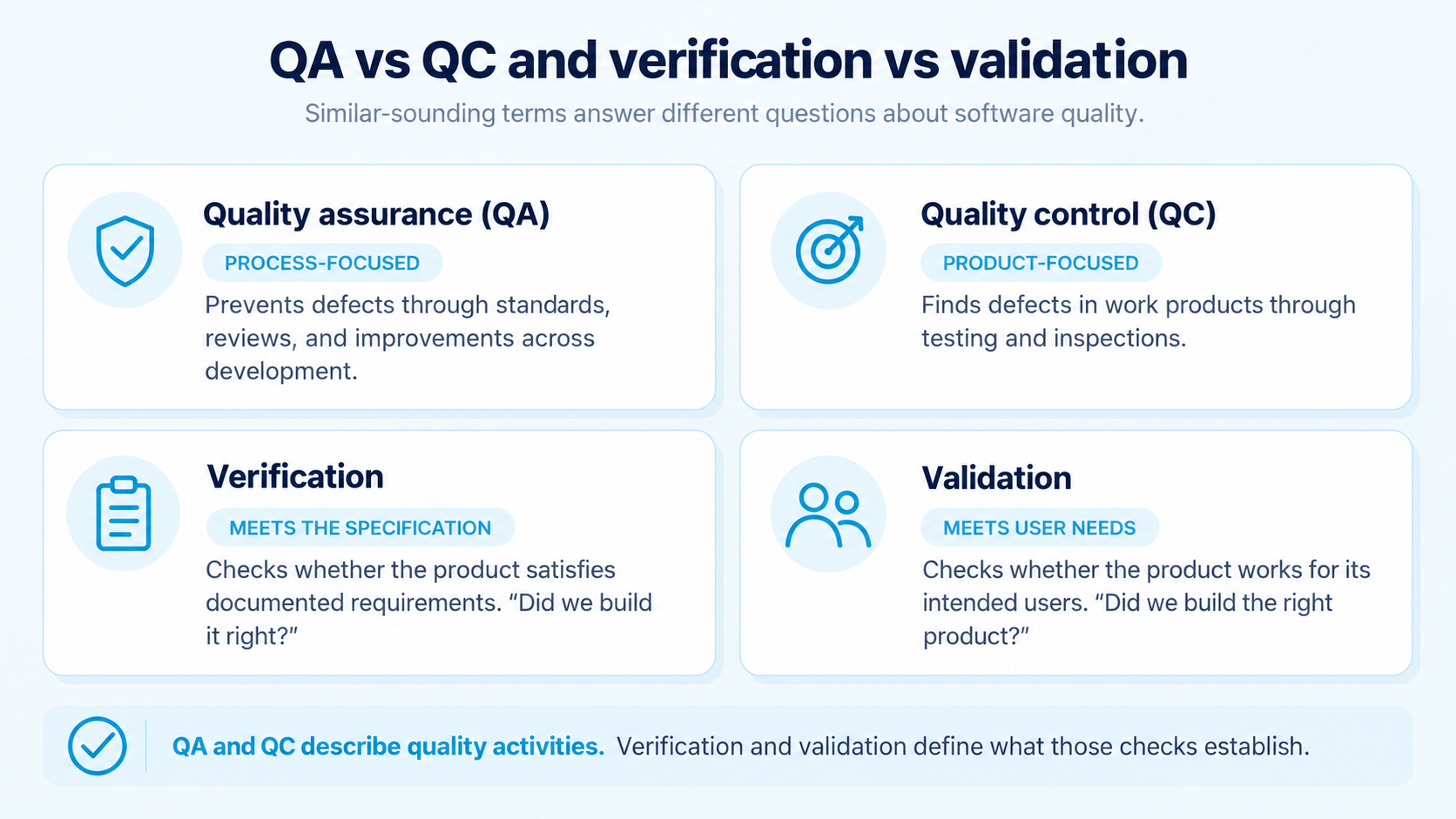
Quality assurance (QA): Process-focused work that prevents defects throughout the development lifecycle. Requirements reviews and coding standards both count as QA work.
Quality control (QC): Product-focused work that finds defects in completed work products. Testing is the main QC activity, and code inspections belong here as well.
Verification: A check that the product meets its documented requirements and specifications. The question behind it is “Did we build the product right?”
Validation: A check that the product meets real user needs in its intended environment. Here the question is “Did we build the right product?”, so a feature can pass verification and still fail validation.
Test artifact: Any work product created during testing, such as test plans or defect reports.
Expected result: The behavior defined in the requirements or another test basis for a given input. A test gets its pass or fail status by comparison with this result.
Actual result: The behavior the system shows during test execution. When it differs from the expected result, you log a defect.
Software Testing Life Cycle Terminology
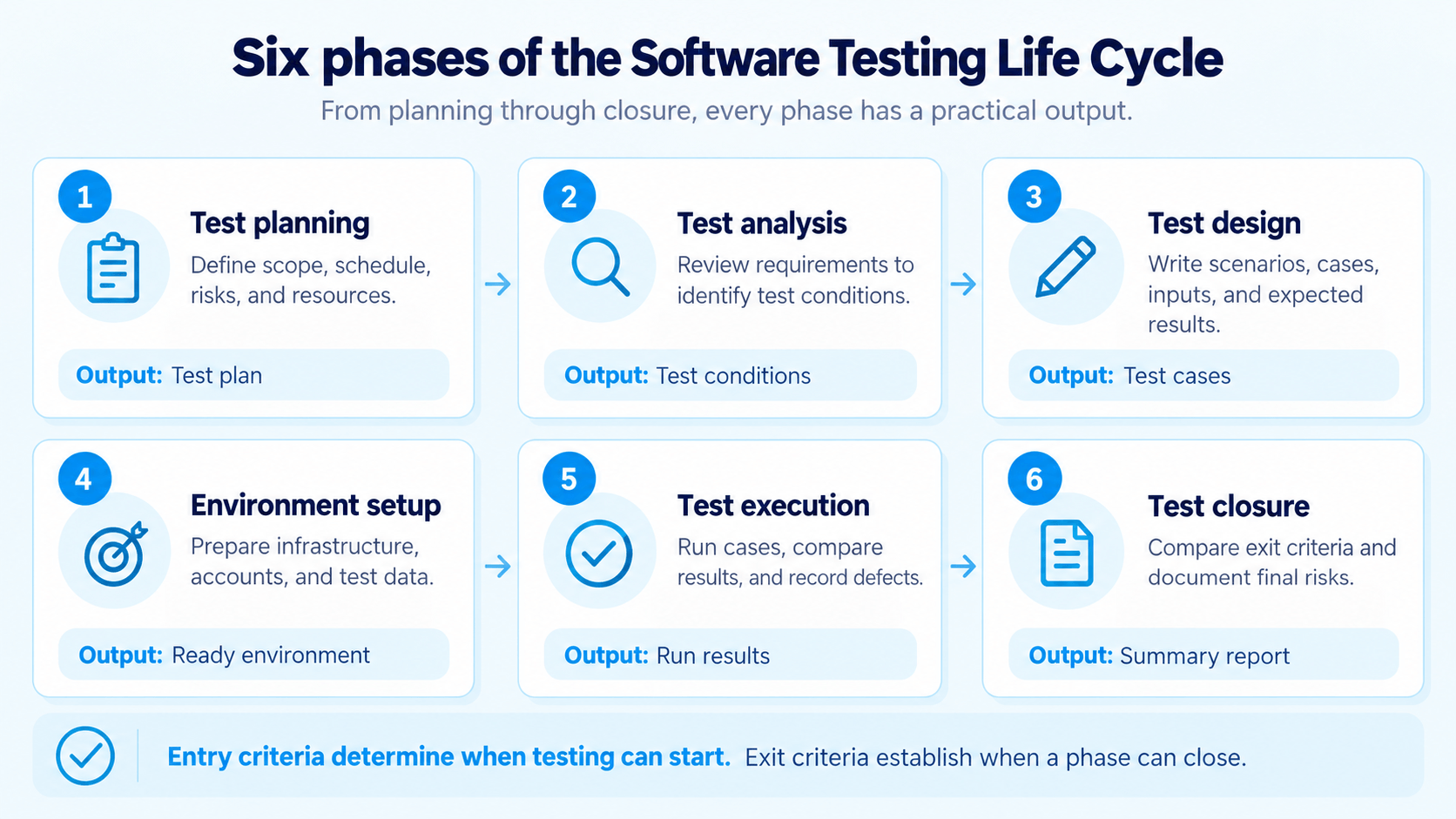
AI-generated image.
The software testing life cycle (STLC) is the sequence of phases testing goes through, from planning to closure. Each phase has its own outputs, such as the test plan after planning or the test summary report after closure.
Test planning: Your team defines the test scope and schedule. For releases with several modules, this includes the software integration testing workflow, meaning the order in which modules get combined and tested.
Test analysis: QA engineers review requirements and acceptance criteria to find testable conditions. Ambiguous requirements get clarified here, before they produce defects.
Test design: For each test condition, QA engineers write test scenarios and detailed test cases with inputs and expected results. Techniques from the functional testing section below, such as boundary value analysis, are applied in this phase.
Test environment setup: Your team prepares the infrastructure and test data needed for execution. If tests depend on specific user roles or database states, this phase is where they get configured.
Test execution: Testers run test cases and record actual results. Mismatches go into defect reports, and each test gets a status such as passed or blocked.
Test closure: Your team compares results against exit criteria and archives the artifacts. The test summary report and lessons learned are then used in the next cycle’s planning.
Two more terms mark where each phase begins and ends:
Entry criteria: Conditions that must hold before a phase starts, such as a stable build and ready test data.
Exit criteria: Conditions that must hold before a phase ends, like a pass rate target or zero open high-severity defects. They give your team a measurable basis for a release decision.
In Agile sprints, the phases overlap, so test design and execution often happen in the same week. Even then, phase names help you show stakeholders where testing stands.
No one uses the same terms the same way. I've just stopped using them. I just use more general terms. So instead of saying I'm gonna do a smoke test, I'll just say I'm gonna do a quick high level check of things. Or something like that.
A single test belongs to a type and a method at the same time. Its type says what you test, such as functionality or performance. The method, in turn, says how you test it, for example manually or with automated scripts.
By focus
Functional testing: Tests of features and business logic against specified requirements, like tax calculation in a shopping cart.
Non-functional testing: Tests of quality characteristics such as performance and security.
By execution
Manual testing: Test execution by a person without scripts. Manual work suits exploratory and usability checks, where human judgment matters most.
Automated testing: Test execution through scripts and tools. Regression suites and CI/CD pipelines are its main use cases.
By code execution
Static testing: Reviews and analysis of code or documents without running the software. Code reviews and linters are typical examples.
Dynamic testing: Testing with the application running and its behavior observed. Most test execution, from UI clicks to API calls, falls into this group.
By code visibility
Black-box testing: Testing from the outside, based on requirements only and without knowledge of the code. You test from the user’s point of view.
White-box testing: Tests designed from the internal code structure. Developers use this method to cover specific branches and statements.
Gray-box testing: A mix of both, with partial internal knowledge such as database schemas or API documentation. Testers use this knowledge to target integration points directly.
Testing Levels Terminology
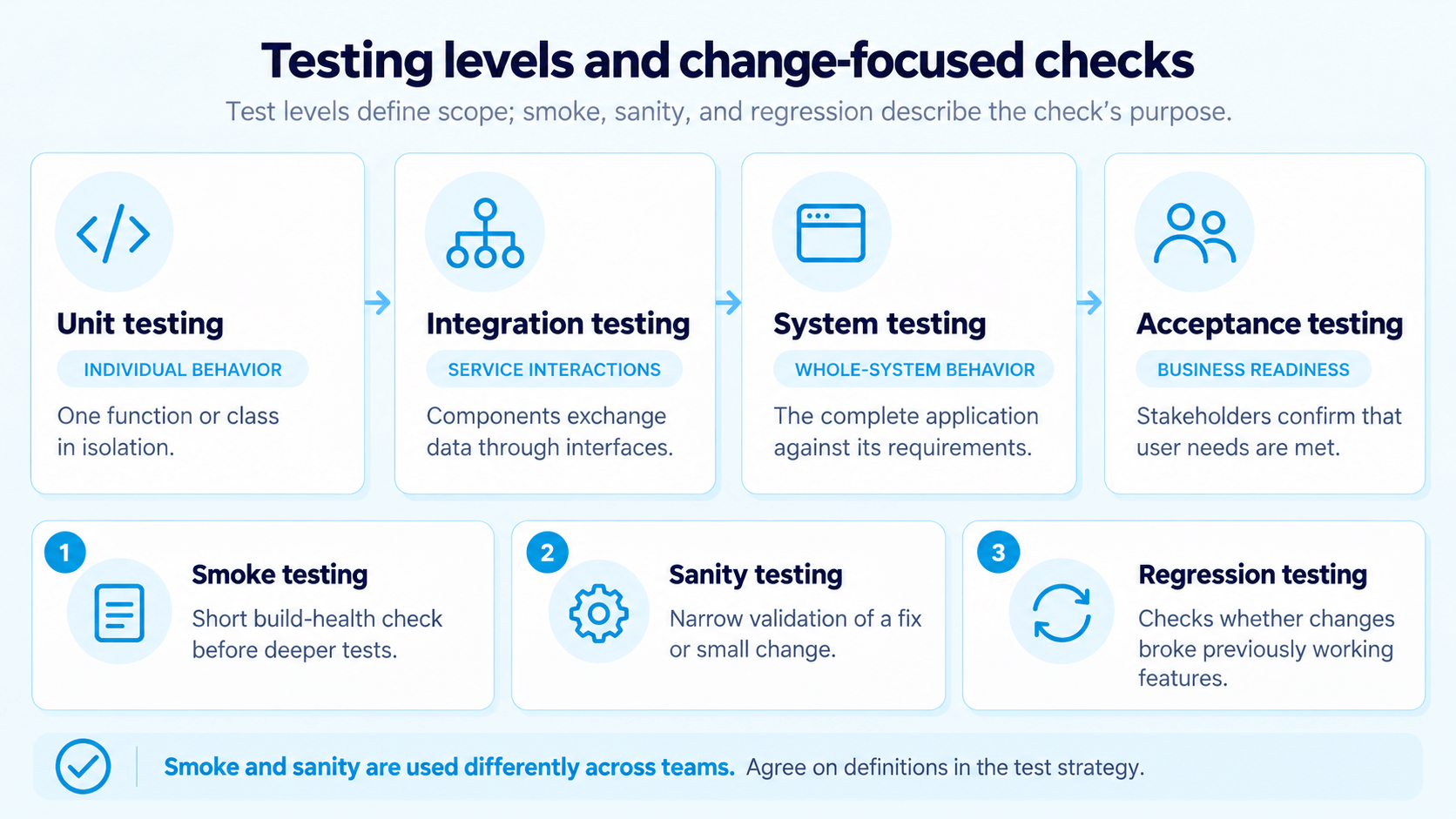
AI-generated image.
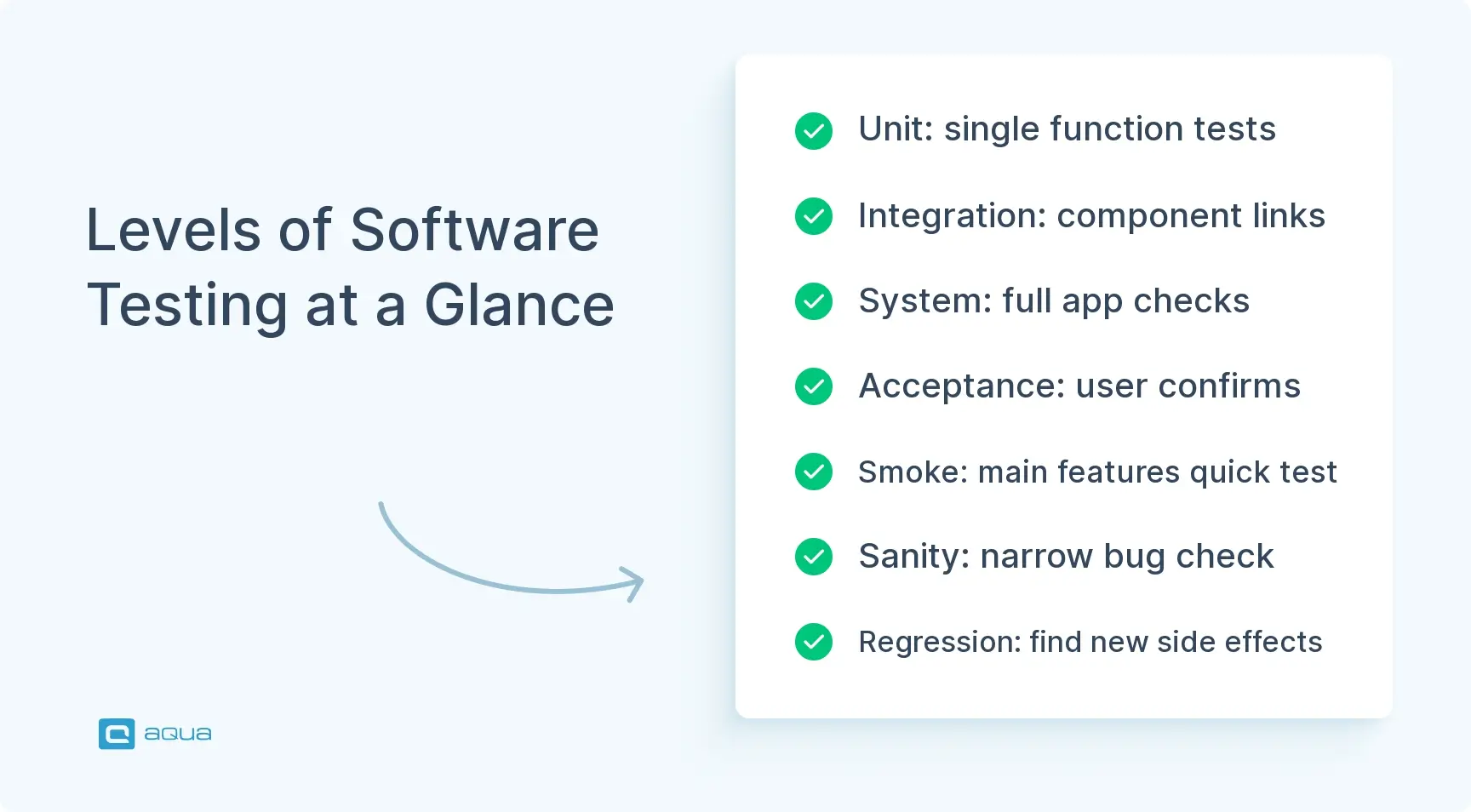
Each testing level covers a larger part of the system than the level below it, from single functions up to the full application. Developers often own the lower levels, while QA engineers and business users run system and acceptance tests.
Unit testing: Tests of individual functions or classes in isolation, usually written by developers. Mocks and stubs replace dependencies so each unit runs on its own.
Integration testing: Tests of how components or services work together through their interfaces. A typical integration testing workflow starts with unit-tested modules and combines them step by step.
System testing: Tests of the complete application against its requirements in a production-like environment. Both functional and non-functional checks happen at this level.
Acceptance testing: Testing in which business stakeholders confirm that the system meets their needs before release. In user acceptance testing (UAT), real users run the tests, often in a dedicated UAT tool.
Alpha testing: Acceptance testing by internal staff at the developer’s site, before any external user sees the product.
Beta testing: Acceptance testing by a limited group of external users in their own environments. Feedback from beta users shows how the product behaves on real devices and data.
Smoke testing: A short run of tests covering the main functions of a new build. If the smoke test fails, the build usually goes back to developers before deeper testing starts.
Sanity testing: A narrow check of one bug fix or small change and the functions around it. Compared with a full regression run, sanity testing is less formal and narrower in scope.
Regression testing: Re-execution of previously passed tests after a code change to find newly broken features. Regression suites grow with each release, which makes them strong automation candidates.
Definitions of smoke and sanity testing differ between companies. Some use “smoke” for build checks and “sanity” for post-fix checks, while others swap the meanings, so write your team’s definitions into the test strategy.
Functional Testing Terminology
To design functional tests, QA engineers rely on test design techniques. The ISTQB Foundation Level syllabus v4.0 names four black-box techniques, and all of them appear below, together with error guessing from its experience-based group.
Positive testing: Tests with valid inputs and expected user flows, such as a form submission with correct data.
Negative testing: Checks with invalid inputs or unexpected actions, such as a negative order quantity. You confirm that the system rejects the input with a clear error message.
Boundary value analysis (BVA): Test design around the edges of valid input ranges. You test the minimum and maximum valid values plus the nearest invalid values, since off-by-one errors cluster at the limits.
Equivalence partitioning: Division of inputs into groups the system should treat the same way, with one test value per group. This technique reduces the number of test cases while still covering each input class.
Decision table testing: Test design based on combinations of conditions and the resulting actions. Business rules with several inputs, like shipping costs based on weight and destination, are the typical use case.
State transition testing: Tests of how a system moves between defined states after events. Order statuses such as “pending” and “shipped” are a typical object, since each status allows different actions.
Use case testing: Test scenarios derived from use cases or user stories. These tests follow a complete user goal, such as a checkout from cart to payment.
Error guessing: Test design based on the tester’s experience with typical defects. Experienced testers target known weak spots, like empty fields and date formats.
Non-Functional Testing Terminology
Non-functional tests measure quality characteristics like response time and security. The ISO/IEC 25010 standard defines these characteristics in its product quality model, and most terms below map to one of them.
Performance testing: Tests of response time and stability under load. Three subtypes are common:
Load testing: Runs under the expected peak number of users. Tools like Apache JMeter simulate thousands of concurrent users for these runs.
Stress testing: Testing above normal capacity to find the breaking point and see how the system recovers.
Scalability testing: Measurement of how throughput changes when your team adds servers or other resources.
Security testing: Checks of access control and data protection against attacks such as SQL injection. The OWASP Top 10 lists the most critical web application security risks and gives your team a first set of test areas.
Usability testing: Observation of real users while they complete tasks in the interface. Your team notes where users hesitate or make mistakes.
Compatibility testing: Tests across browsers and devices, like Chrome and Safari on desktop and mobile.
Reliability testing: Long test runs that measure how consistently the system works over time. Memory leaks and intermittent errors often appear only after hours of operation.
Accessibility testing: Assessment of whether people with disabilities can use the product, usually measured against the WCAG guidelines. In the EU, the European Accessibility Act made accessibility mandatory for many digital services in June 2025.
Test Documentation Terms
Your team writes the first documents below before testing starts, such as the test plan and test strategy. The last ones, like the test summary report, come after execution and record the results.
Test plan: A project or release document with the scope and schedule of testing. Risk assessment and resource planning are also part of it.
Test strategy: A high-level document with testing principles and standards across several projects. For systems with many interfaces, it can include an integration testing workflow diagram with the order of module integration.
Test scenario: A one-line description of what to test, such as “Verify password reset for registered users.” Since scenarios list no steps, they work well for early planning and exploratory sessions.
Test case: A specification with numbered steps and expected results for one test condition.
Test suite: A group of related test cases executed together, like a smoke suite or a nightly regression suite.
Test data: The inputs and records that tests need, such as user accounts and database entries. Stored apart from test cases, test data can change without any rewrite of test steps.
Test script: An automated test written in code, often with Selenium or Playwright. Each script repeats the steps of a manual test case in executable form.
Traceability matrix: A mapping of requirements to test cases and defects. With it, you can see which requirements have no tests yet. Modern requirements management software can build this matrix from links between requirements and tests.
Test summary report: A closing document with execution results and defect statistics. Stakeholders use it to judge release readiness and open risks.
In practice, a requirement leads to a test scenario, which then gets one or more test cases. When the actual result differs from the expected one, you log a defect and link it to that test case. With good test case management, this chain stays connected, so a requirement change shows you which test cases need an update.
Defect and Bug Tracking Terminology
A developer who picks up a defect report needs to know what went wrong and how soon to fix it. The first two groups below follow that order, and the third covers how defects get closed.
Where defects come from
Error: A human mistake, like a misread requirement, that introduces a defect.
Defect (bug): A flaw in code or documentation that can cause incorrect behavior. Many companies use “defect” in formal tracking and “bug” in conversation, with the same meaning.
Failure: The visible result of a defect at runtime, such as a checkout button that does not respond. Users report failures, and your team then looks for the defect behind them.
Root cause: The underlying reason a defect appeared, such as a missing review step. A fix at root-cause level can prevent similar defects in later releases.
How urgent they are
Severity: The technical impact of a defect, from critical, like data loss, to minor, like a typo. QA engineers usually set severity when they log the defect.
Priority: The business urgency of a fix, usually set by product owners based on release plans and user impact. That is why a cosmetic defect on the homepage can get high priority with low severity.
Defect triage: A regular meeting where your team reviews new defects and assigns priority and an owner to each.
How they get closed
Defect life cycle: The statuses a defect moves through, typically from New to Closed, with steps such as Assigned and Fixed in between. Your team can add statuses like Reopened to match its workflow.
Retesting (confirmation testing): Re-execution of the failed test after a fix to confirm that the defect is gone. After a successful retest, your team usually runs the regression suite around the changed code.
Regression defect: A defect in a feature that worked before a recent change.
Test Automation Terminology
Automated tests are written in a framework and then run in a CI/CD pipeline after each commit. The three groups below follow that order, with test stability as the last group.
Frameworks and Script Design
Test automation framework: The libraries and conventions behind your automated tests. Selenium and Playwright are common choices for browser tests, and many QA engineers use REST Assured or Postman for API tests.
Assertion: A statement in a test script that compares an actual value with the expected one. Without assertions, a script runs steps but proves nothing.
Page Object Model (POM): A design pattern that keeps page locators and actions in separate classes. When the UI changes, you update one class, and the test code stays the same.
Data-driven testing: One test script executed with many input sets from a file or database. Your team adds new cases by adding data rows, with no new code.
Mocking and stubbing: Replacement of real dependencies with controlled substitutes. Stubs return fixed responses, while mocks also verify how the code under test called them.
CI/CD Pipelines
Continuous integration (CI): The practice of building and testing code automatically after each commit. Jenkins and GitHub Actions are widely used CI servers.
Continuous testing: Automated tests at each stage of the delivery pipeline, from commit to deployment.
Headless testing: Browser tests without a visible user interface. Headless runs are faster and fit CI servers that have no display.
Test Stability
Flaky test: An automated test that passes and fails on the same code. Timing issues and unstable test data are the usual causes, and Playwright Trace Viewer helps you trace them through screenshots and network logs.
Test data management: Creation and cleanup of isolated data for automated tests.
Yeah, the thing about software QA is that there isn't a concrete standardized terminology. I believe ISTQB is one solution, but not everyone can take that syllabus or even agree with it.
Integration tests target the interfaces between components, and in web applications these interfaces are usually HTTP APIs. That is why API terms and integration terms appear together in this section.
API (application programming interface): A contract that defines how software components exchange data, usually through HTTP endpoints. REST APIs typically use JSON payloads, and GraphQL APIs use queries and mutations.
API testing: Tests of API responses and error handling, including access rules. Because API tests run faster than UI tests, developers get feedback earlier.
System integration testing (SIT): Tests of the interaction between complete systems, such as a CRM and a billing platform. A system integration testing workflow usually starts with interface checks between pairs of systems and ends with full business transactions.
Endpoint: A specific URL that exposes one API operation, like POST /orders to create an order. The endpoint list in your API documentation is a good basis for API test coverage.
Request payload: The data sent to an API, usually in JSON or XML. Payload tests include missing fields and wrong data types.
Response payload: The data an API returns, along with the status code and headers. You compare its content with the expected values and schema.
Status code: An HTTP code that shows the result of a request, such as 200 for success or 401 for missing authorization. A wrong status code can break client error handling even when the data looks correct.
Schema validation: A check that responses follow the agreed structure for field names and data types.
Contract testing: Verification that an API consumer and provider agree on request and response formats. Tools like Pact let you run these tests without a full end-to-end environment.
Workflow integration testing: Tests of a complete business process across several services, like an order that triggers payment and stock updates. Your team checks whether data stays consistent at each handoff.
If several services take part in one business process, draw a software integration testing workflow diagram before your team writes the tests. With all interfaces and their order on one page, you can start with the highest-risk handoffs, such as payment and authentication.
Agile and DevOps Testing Terminology
In Scrum, a sprint lasts one month or less, so testing happens inside the same short cycle as development. DevOps then adds deployment and production monitoring to that cycle, and several terms below come from there.
Sprint testing: Testing of new stories and fixes within the same sprint. Testers often design tests while developers still write the code.
Shift-left testing: Earlier involvement of testing in the lifecycle, such as requirement reviews and unit tests during coding.
Shift-right testing: Testing in production through monitoring and real user feedback. Feature flags and synthetic monitoring keep the risk of these tests low.
Test-driven development (TDD): A practice where developers write a failing unit test before the production code. After that, they write code until the test passes and refactor it.
Behavior-driven development (BDD): Requirements written as Given-When-Then scenarios in plain language. Tools like Cucumber or SpecFlow execute these scenarios as automated tests, so business stakeholders can read the test suite.
Definition of Done (DoD): The checklist a user story must pass before your team calls it complete. Typical items are code review and passing automated tests.
Acceptance criteria: Testable conditions a story must meet, such as “User receives a confirmation email within 2 minutes of the order.” Clear criteria give testers the expected results for their test cases.
Exploratory testing: Test design and execution at the same time, without a predefined script. Experienced testers use it to find edge cases that scripted tests do not cover.
Continuous deployment (CD): Automatic release to production of code changes that pass all pipeline tests. For CD, your team needs a reliable automated suite and a fast rollback, since a defect can reach users soon after the commit.
Feature flag (feature toggle): A runtime switch that turns a feature on or off without a new deployment. Feature flags support gradual rollouts and quick rollback when a problem appears.
Test Metrics and QA Terminology
Metrics give your stakeholders numbers for release decisions. Since a single value says little on its own, compare each metric across several releases.
Coverage Metrics
Test coverage: The share of requirements or functions exercised by tests. Low coverage signals risk, while high coverage still does not guarantee a defect-free product.
Code coverage: The percentage of code executed by automated tests. Statement coverage counts executed lines, and branch coverage counts decision paths taken.
Test automation coverage: The share of test cases that run automatically. This number shows how much of your regression testing can run without manual effort.
Defect Metrics
Defect density: The number of defects per size unit, often per thousand lines of code.
Defect removal efficiency (DRE): The share of defects found before release. You calculate it as defects found in testing divided by the sum of testing and production defects.
Escaped defects: Defects found in production after release.
Speed and Progress Metrics
Test execution rate: The number of test cases executed per day or sprint. With this rate, you can estimate how long the remaining test cycle will take.
Pass/fail rate: The share of passed tests among all executed tests. A falling pass rate across builds signals growing instability.
Mean time to detect (MTTD): The average time between the introduction of a defect and its detection.
Mean time to repair (MTTR): The average time between defect detection and a working fix.
A target of 100% code coverage can lead to shallow tests written for the number, so use these metrics to set testing priorities. Test management platforms such as aqua cloud show them on dashboards, where you can compare values across releases.
Clear terms help most when the artifacts behind them stay in one place. aqua cloud, an AI-driven test and requirement management solution, keeps test plans and test cases together, with traceability from requirements to defects. As a result, your team sees which requirement a regression defect belongs to without a search across tools. aqua’s AI, grounded in your project documentation through RAG, generates test cases with your established terms in seconds. For your pipelines, Jenkins and Azure DevOps connect aqua to builds and work items. aqua also offers 12+ native automation integrations, such as Ranorex and UnixShell. The REST API and MSSQL or Oracle database support then connect the rest of your toolchain. Capture integration is supported as well.
Centralize your QA vocabulary and save up to 97% of your test documentation time
Software testing terminology matters most where your team makes decisions, such as defect triage and release reviews. Start with the pairs that cause confusion in your team, like smoke versus sanity testing or retesting versus regression testing. After that, write the agreed definitions into your test strategy, so new team members can look them up in one place.
What are the most common terms used in software testing?
The most used software testing terminology covers test design and defect tracking. In daily QA work, you hear terms like test case and regression testing most often, while defect triage adds severity and priority.
What is the difference between QA and QC in software testing?
In software testing terminology, QA is process-focused and prevents defects through standards and reviews. QC is product-focused and finds defects in finished work, mainly through testing and inspections.
What is the difference between a test case and a test scenario?
A test scenario describes what to test in one line, such as password reset for registered users. In contrast, a test case adds the exact steps and expected results needed to execute that check.
What is the difference between severity and priority in testing?
Severity describes the technical impact of a defect, and QA engineers usually set it. Priority describes how urgently the business needs a fix, so a low-severity typo on a checkout page can still get high priority.
What is the difference between retesting and regression testing?
In retesting, you rerun the failed test after a fix to confirm that one defect is gone. With regression testing, your team reruns a wider set of passed tests to find side effects of the change.
Enhancement of the aqua product is Martin’s main responsibility and biggest mission. His expertise covers ITIL Process Consulting, Change Management, Quality Assurance, Quality Management, and Requirements Management. Martin works in QA services for regulated industries for more than 18 years being an irreplaceable leader at…
Nurlan, a QA Coordinator & Quality Standards Officer, takes pride in orchestrating seamless QA operations. His expertise in coordinating QA-focused projects and integrating QA solutions has consistently yielded top-tier client satisfaction. Aside from a full-time QA coordinator, Nurlan's role involves creating compelling content that educates…
Pavel, a Quality Assurance Consultant and Author, brings deep expertise to solving complex testing challenges. His background in software development has helped organizations transform their QA practices from reactive to proactive. Beyond consulting, Pavel develops best practice guides and case studies for aqua cloud that…
Home » Test Automation » Testing Terminology: 100+ Essential QA Terms and Definitions
Do you love testing as we do?
Join our community of enthusiastic experts! Get new posts from the aqua blog directly in your inbox. QA trends, community discussion overviews, insightful tips — you’ll love it!
We're committed to your privacy. Aqua uses the information you provide to us to contact you about our relevant content, products, and services. You may unsubscribe from these communications at any time. For more information, check out our Privacy policy.
X
🤖 Exciting new updates to aqua Intelligence are now available! 🎉