Speed Up Test Case Writing with AI: Complete Guide
The test case creation process can make or break your whole testing efforts. The time-consuming nature of this crucial phase often affects your productivity, affecting your release dates and time-to-market goals. But here's a promising solution: you can use AI to create test cases to reduce the manual effort and enhance the efficiency of the testing phase in software development. Are you ready to learn how? This guide shows you how to write test cases with AI and where it makes sense to create test cases with AI without losing control over quality.
aqua’s AI drafts a structured test case from a written requirement in about 13 seconds, compared to roughly 18 minutes for the same test case written by hand.
The biggest weakness in manually written test cases is inconsistency: two testers working from the same requirement often produce different levels of coverage.
AI reads the full requirement text instead of relying on a tester’s memory of similar past work, which is why it catches edge cases that get skipped under deadline pressure.
Teams no longer have to write negative or performance test cases one at a time. A full set can be generated on demand, then trimmed down to what actually matters for the release.
Every AI-generated test case stays editable, which keeps a generated draft open for review before anyone treats it as final.
Here’s how to put AI to work on your own test case backlog 👇
The challenges you face in test case creation
Test case creation slows teams down for a handful of predictable reasons, and most of them show up before the first test case ever gets written. In fact, you will find yourself dealing with various obstacles, including the following ones:
Time Drain: Ever found yourself spending countless hours documenting test cases? This time directly affects your project deadlines and throws a wrench into your time-to-market goals. When you’re juggling multiple tasks, cutting precious hours from the test case creation process becomes crucial.
Complexity and Oversight: Ensuring you’ve covered all bases in your software’s complexity feels like a huge task. The risk of missing crucial scenarios is real, and let’s be honest, it’s a nerve-wracking experience. We’ve all been there, navigating these complexities in test case creation, hoping we haven’t overlooked something critical. You must analyse data comprehensively and spot potential scenarios that might slip through the cracks, which is not always easy.
Resource Drain: Your resources are valuable, and when a substantial chunk of them goes into the manual creation of test cases, it’s more than just a numbers game. It’s about your effort, time, and energy that could be channelled into more strategic tasks. If you are freed from the resource-intensive nature of manual test case creation, you can focus on tasks that truly demand their expertise.
Maintenance Challenges: Software is a moving target, and keeping your test cases updated is an ongoing challenge. The constant back-and-forth of updating and maintaining cases can be draining. To deal with this, you should adapt to these changes seamlessly, potentially minimising the headaches in the process.
Impact on Project Milestones: You’ve probably felt the pressure of project deadlines. When test case creation becomes a bottleneck, the domino effect on your project milestones is hard to ignore. In this case, you need to significantly speed up this phase, breaking down the barriers that often harm your project progress.
Recognising these challenges and understanding how they affect your workflow is key. But how do you deal with them? In the following parts, we are going to talk about a solution that will transform these pain points into areas of enhanced efficiency and productivity for you and your team.
Automation is good, so long as you know exactly where to put the machine.
Eliyahu Goldratt
Business management guru
How can AI make a difference?
over many industries, especially in the past few months, with the rise of GPT solutions.AI makes a difference in test case creation by analyzing historical data and requirements to draft accurate cases in seconds instead of hours. The testing industry is no exception. According to Gartner, by 2025, 30% of enterprises will implement an AI-powered development and testing strategy, compared to 5% in 2021. Additionally, AI-driven tools such as voice assistants and chatbots are becoming integral in automating and streamlining various testing processes.
Now, let’s see how AI-based test case generation will help you deal with the challenges above:
Faster Test Case Creation: AI accelerates the generation of test cases by swiftly analysing historical data and patterns. It quickly processes lots of information and finds recurring structures, common scenarios, and potential test case outlines. AI then uses this to suggest and create new test cases without needing constant guidance. This efficiency means you spend significantly less time on test case management, and focus more on refining strategies without sacrificing speed.
Thoroughness and Precision: AI can examine huge amounts of data. By examining all this information, it makes sure to cover a wide range of situations you can overlook when creating test cases manually. This thorough process makes testing more complete and accurate, providing extra assurance for strong and reliable software.
Resource Efficiency: Using AI for writing test cases liberates your team from repetitive tasks. With AI, instead of manually outlining these cases individually, the system analyses past similar features or functionalities. So, you eliminate the routine and dedicate your expertise to higher-value activities. This optimisation saves time and boosts overall productivity and team morale.
Adaptive Maintenance: AI-driven solutions evolve alongside your software. AI swiftly updates and modifies test cases as your product progresses, eliminating the need for constant manual intervention. This adaptability ensures that your test cases remain relevant and effective throughout the software lifecycle.
Smooth Project Progress: Saving time, resources and energy also affects your progress, especially in the Agile methodologies. Using AI to create test cases means your team completes tasks faster, meets deadlines and achieves project milestones more efficiently. In essence, AI facilitates a quicker and more efficient project progression, benefiting the overall development process for quality assurance.
We’ve talked about how AI ensures thoroughness and catches scenarios you might overlook when creating test cases manually. But how good are you at spotting those missing test cases yourself? Try this quick interactive challenge: you’ll see a simple feature requirement with some existing test cases, and your job is to identify which critical test cases are missing. Select exactly 5, check your answers, and see how many edge cases and security scenarios slipped past you, just like they would in real projects without AI assistance.
🎯 Interactive Challenge: Spot the Missing Test Cases
▼
📋 Feature Requirement
Password Reset Functionality: Users should be able to reset their password by entering their email address. The system will send a reset link valid for 24 hours. Users can click the link and set a new password that meets security requirements (min 8 characters, 1 uppercase, 1 number, 1 special character).
✓ Current Test CasesAlready Covered
TC1: User enters valid email and receives reset link
TC2: User clicks reset link and successfully creates new password meeting all requirements
TC3: User enters new password and confirms it matches
TC4: System displays success message after password reset
❓ Select Missing Test CasesChoose Wisely
Click on the test cases below that you believe are missing from the current coverage. Select exactly 5 test cases that should be included to ensure comprehensive testing:
TC5: User enters non-existent email address
✅ Correct! This negative test case is essential to verify the system handles invalid emails gracefully without revealing whether the email exists (security best practice).
TC6: User successfully logs in with the new password
❌ Not necessary. While login is important, it's part of the authentication feature testing, not password reset functionality. This would be redundant coverage.
TC7: User attempts to use reset link after 24-hour expiration
✅ Correct! This boundary test is critical to ensure the time-based security mechanism works as specified. Expired links must be rejected.
TC8: User enters new password that doesn't meet security requirements (e.g., only 6 characters)
✅ Correct! This negative test validates password validation rules. Without it, you risk deploying weak security that could be exploited.
TC9: User receives email notification in their inbox within 30 seconds
❌ Not a priority. Email delivery timing is typically handled by email service infrastructure testing, not feature-level testing. This is too granular and would make tests brittle.
TC10: User attempts to reuse an already-used reset link
✅ Correct! This security test ensures reset tokens are single-use. Without this, attackers could intercept and reuse reset links, compromising accounts.
TC11: Password reset page displays correctly on Chrome, Firefox, and Safari
❌ Different test category. Cross-browser compatibility is UI/visual testing, not functional test cases for the reset feature. This belongs in a separate UI test suite.
TC12: User enters mismatched passwords in new password and confirm password fields
✅ Correct! This validation test ensures users don't accidentally create a password they can't remember. Essential for good UX and preventing support tickets.
Selected: 0/5
Your Results
0/5
Correctly identified
Incorrectly selected
You missed these
Test Case creation: manual vs aqua’s AI (Practical example)
This section compares manual test case creation with aqua’s AI on the same requirement, side by side. We give you just one example, you can test aqua and decide for yourself how much time you’ll save per day or week.
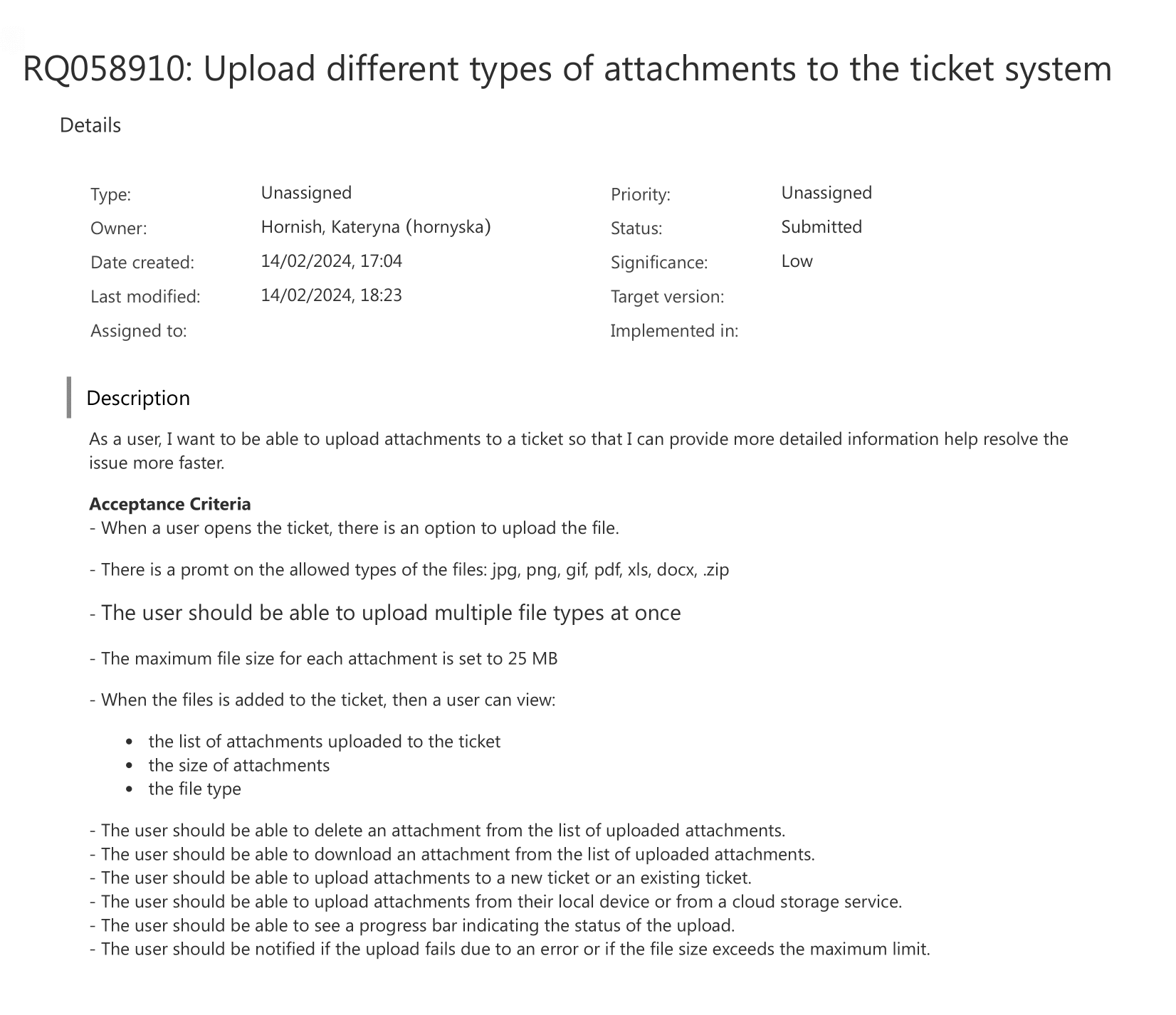
For this example, we opted to focus on the functionality of allowing users to upload various types of attachments to the ticket system:
The emphasis lies in creating a seamless user experience that leads to quick issue resolution. As you can see, we have a description and acceptance criteria to guide aqua’s AI in creating the best possible test case for us. We want a user-friendly interface where users can effortlessly upload files of different formats, images, documents, or archives all in one go. This will save our user’s time and enhance their satisfaction by providing a comprehensive platform for sharing relevant information. After creating the requirement, you just go on and click on “Test It!” and wait for a few seconds.
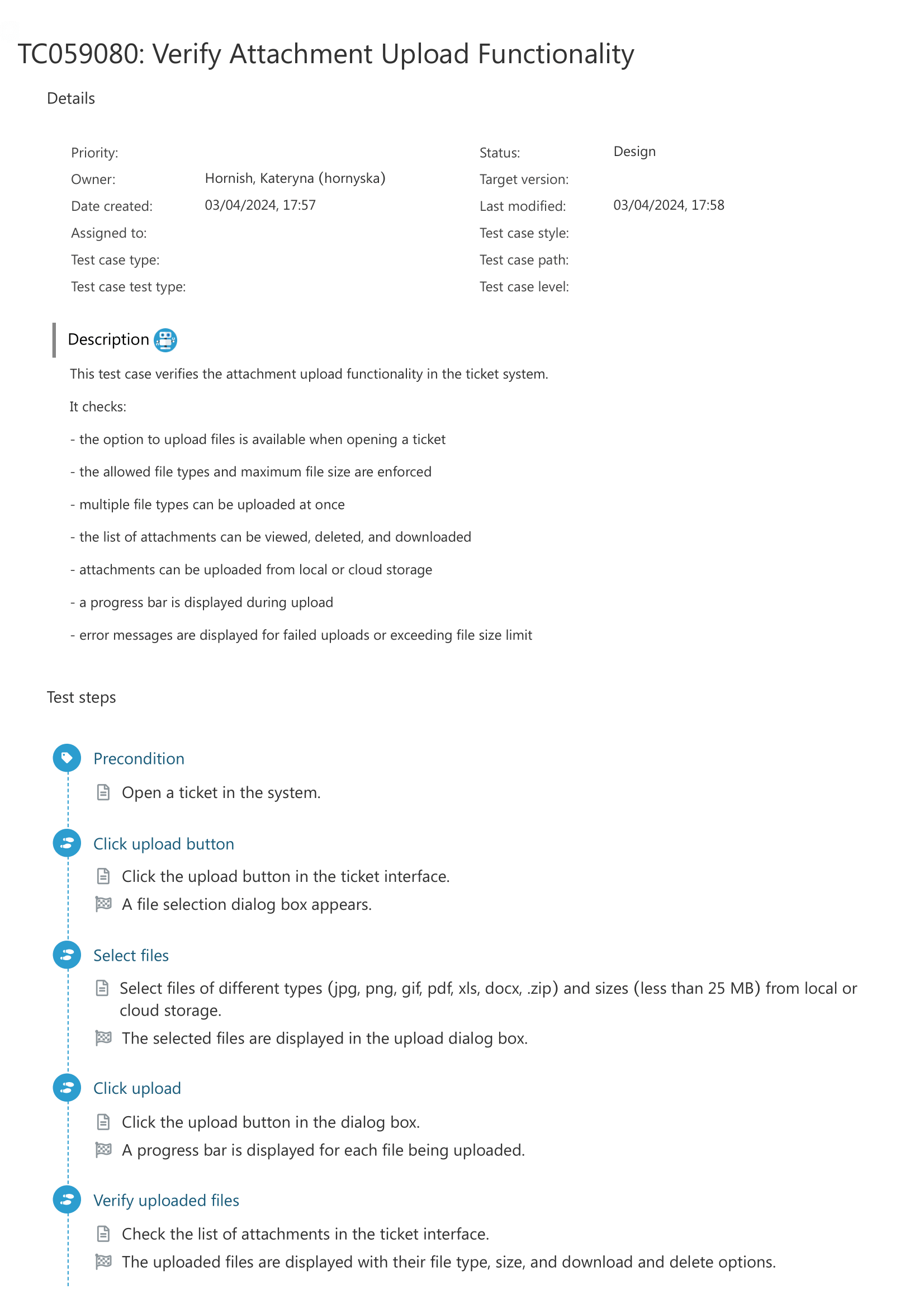
And here is the test case generated by aqua’s AI:
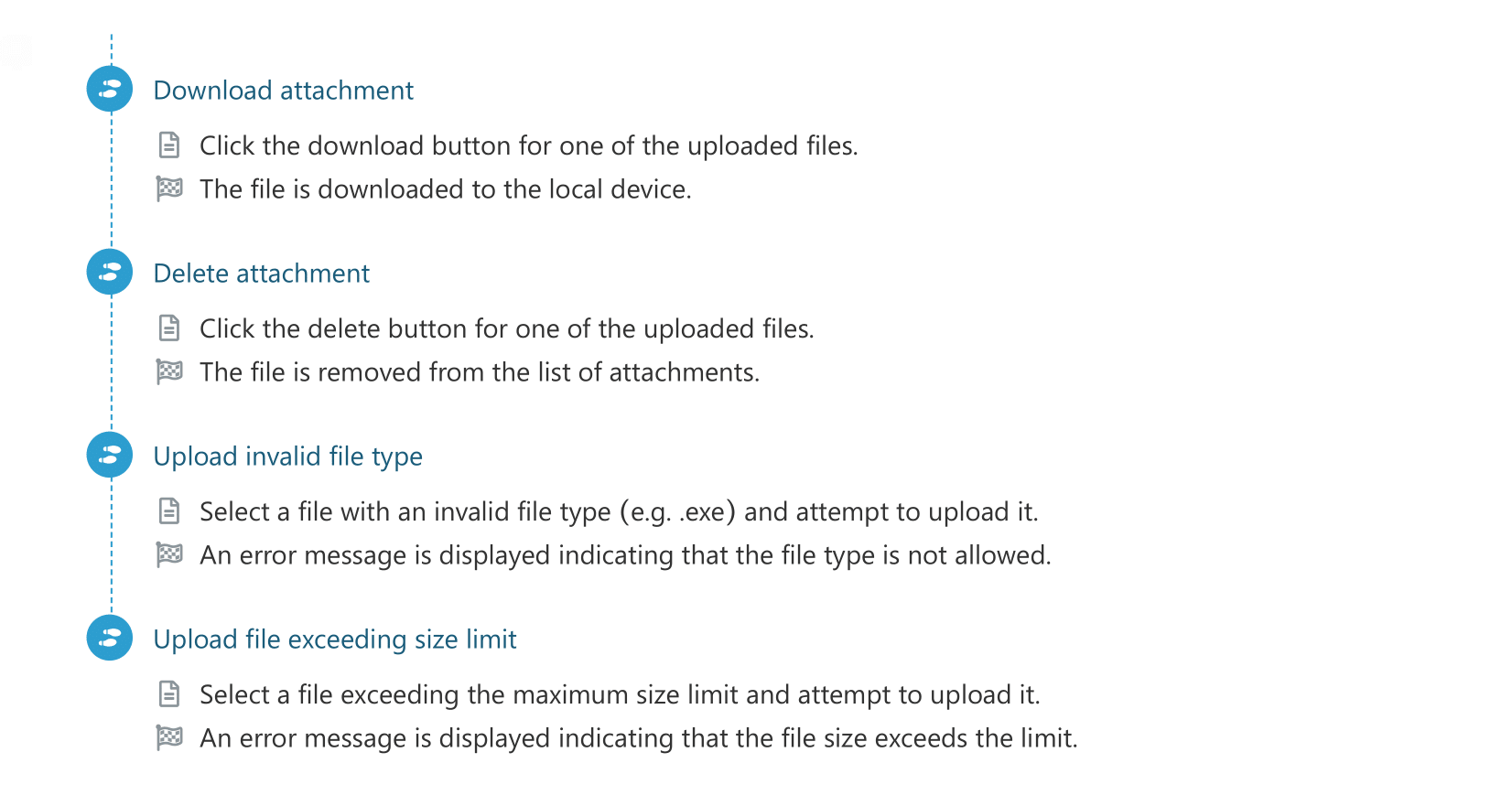
This test case involves a series of actions, including checking file types and sizes, navigating through upload interfaces, and handling potential errors. It covers all aspects of the attachment upload functionality outlined in the requirements. It systematically tests each process step, from initiating the upload to verifying the uploaded files, downloading, and deleting them. Additionally, it includes scenarios for error handling, ensuring that users are appropriately notified in case of invalid file types or exceeding size limits. Overall, the test case generated by aqua provides comprehensive coverage, ensuring the robustness and reliability of the attachment upload feature in the ticket system.
aqua’s AI completes it in just 13 seconds. That gives us a staggering 98% faster results! Here is how we compared it:
The test case example above consisted of 269 words, including the test case itself and the description. It would take approximately 18 minutes to generate it manually, considering each word takes 3 seconds to write, and each step requires at least 30 seconds to contemplate before typing. With aqua? It took less than seconds. It is 98% faster! Now, imagine how much time you will save if you create hundreds of these test cases. We are not talking about hours; we are talking about DAYS here. It doesn’t end here. aqua’s AI also empowers you with customisable options to tailor your output to your exact needs. Want a diverse set of test cases, including negative, positive, functional, and performance tests? Simply enable the corresponding options, and aqua will generate a comprehensive suite to cover all bases. Also, for larger requirements, aqua offers the flexibility to split test cases into manageable chunks, ensuring thorough coverage without overwhelming users. And the best part? These customisations come at no expense to speed or efficiency, making the test case creation process smoother and more efficient.
I've come to realise that the best way to utilise AI test case generation is as a draft. Review it, consolidate duplicates, and keep only the scenarios that add coverage or expose risk. Otherwise, maintenance becomes a nightmare after the first few runs.
Manual vs. AI test case creation: Comparison table
Placement: right after the practical example content (after the paragraph ending “…ensuring the robustness and reliability of the attachment upload feature in the ticket system” and the 98%-faster stat), before the paragraph about customization options.
Aspect
Manual test case creation
AI test case creation (aqua)
Time per test case
Around 18 minutes for a standard case
Under 15 seconds on average
Coverage consistency
Depends on the individual tester’s experience
Draws on patterns across historical data every time
Edge case detection
Easy to miss under deadline pressure
Flags scenarios testers commonly overlook
Maintenance after changes
Manual rewrite of every affected test case
Test cases update alongside requirement changes
Customization
Full control, but time-intensive
Adjustable scope, test types, and chunking after generation
Impressed with all these? aqua will be your ultimate QA ally. With its intuitive interface and AI copilot, aqua streamlines your test case creation, automates workflows, and ensures comprehensive test coverage. Its advanced features, like sophisticated item relations and nested test case support, guarantee comprehensive test coverage without the hassle of repetitive tasks. Plus, aqua facilitates test case reusability, maximising your efficiency. aqua provides robust API connectivity and generates detailed test reports for every test cycle by seamlessly integrating with your existing QA tools. And with aqua’s AI copilot ensuring full-scale assistance without compromising data integrity, you can trust that your whole testing process is in good hands, not just test case creation. Ready to experience all the mentionedtest case management tool benefits?
Save DAYS of your test management activities by enabling aqua AI
AI-generated test cases save real time without asking you to compromise on coverage or accuracy. It speeds up test planning, improves accuracy, and helps you work more efficiently. These are not just words; in this article, we have shown a specific example of how aqua’s AI can save you more than 98% of your time when creating test cases. However, using AI will streamline not just your test case management but also your whole test management process. So, it is up to you to decide: are you ready to cut all the redundant work and focus on what matters the most? If you said “YES!”, then contact us immediately and let us handle it for you.
It’s how you create, organise, execute, and track test cases for better software quality. The process includes:
Test Case Design – Here you define clear, reusable test cases based on requirements.
Test Organisation – Categorising and prioritising test cases for better execution flow.
Test Execution – Here you run tests manually or via automation and log results.
Defect Tracking – This includes identifying, reporting, and linking failed tests to defects.
Test Reporting – Analysing results and generating insights for better decision-making falls into this stage.
Test Case Maintenance – Updating test cases as requirements evolve to keep them relevant.
A TMS like aqua cloud simplifies your entire workflow. It saves up to 98% of your time on test case creation, while keeping everything structured and efficient.
How does AI automate test case creation?
AI starts automating test case creation by analysing system behaviour, code changes, and requirements. Then it identifies potential scenarios, which helps it generate test cases. With a dedicated solution like aqua cloud, you save 98% of your time and effort at this stage. This process directly improves test coverage and reduces the chance of human error.
Which AI tools help with automated test case creation?
When it comes to AI tools in test case creation, there is no rival to aqua cloud. You can generate test cases instantly from requirements, with just one click. Normally, a person spends around 20-30 minutes to generate a test case manually. Aqua cloud does it in a few seconds.
How accurate are AI-generated test cases compared to manually written ones?
AI-generated test cases follow the same structure as manually written ones, with clear steps and an expected result mapped back to the requirement’s preconditions. Accuracy depends on how clear the input requirement is, so reviewing AI output before execution still matters.
Can AI-generated test cases be edited or customized after creation?
Yes. AI-generated test cases stay fully editable after creation, so testers can rework steps or add test types like negative and performance cases as needed. Larger requirements can also be split into smaller, more manageable test case sets.
Robert has several years of experience in process optimisation and test management. He is an expert in defining and implementing workflows by adapting aqua to the clients’ processes.
Nurlan, a QA Coordinator & Quality Standards Officer, takes pride in orchestrating seamless QA operations. His expertise in coordinating QA-focused projects and integrating QA solutions has consistently yielded top-tier client satisfaction. Aside from a full-time QA coordinator, Nurlan's role involves creating compelling content that educates…
Home » Best practices » Speed Up Test Case Writing with AI: Complete Guide
Do you love testing as we do?
Join our community of enthusiastic experts! Get new posts from the aqua blog directly in your inbox. QA trends, community discussion overviews, insightful tips — you’ll love it!
We're committed to your privacy. Aqua uses the information you provide to us to contact you about our relevant content, products, and services. You may unsubscribe from these communications at any time. For more information, check out our Privacy policy.
X
🤖 Exciting new updates to aqua Intelligence are now available! 🎉