Manual data validation becomes out of the question as your datasets grow in size and complexity. In this case, you can not afford a time-consuming process that is prone to errors all the time - which is inevitable in any manual process. But the deciding factor is probably speed - you want to automate this crucial but repetitive process and get it done with it. So how do we do this? In this guide, we will guide you through a simple, yet effective automated data validation process.
Manual data validation can cost organizations up to 25% of their revenue due to errors, with the U.S. economy losing over $3 trillion annually from poor data quality.
Automated data validation eliminates human error, which is inevitable in manual processes that have a 1-5% error rate even with dedicated team members.
AI-powered anomaly detection tools can identify data issues in real-time before they cause significant problems, unlike manual validation which often catches errors too late.
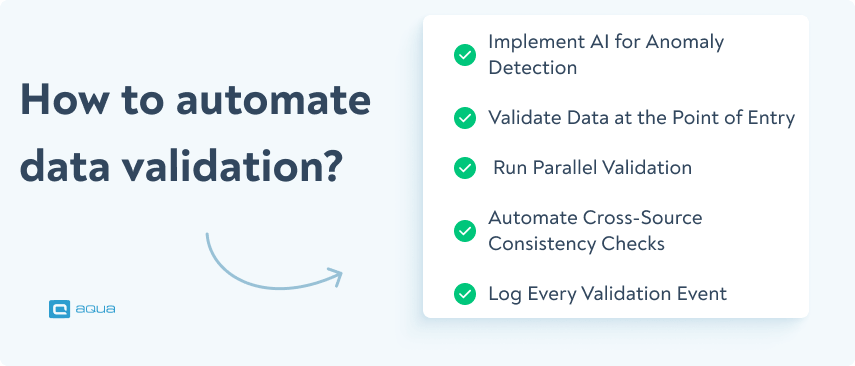
Effective automated data validation requires validating at the point of entry, running parallel validation in staging environments, and automating cross-source consistency checks.
Logging every validation event is critical for compliance in regulated industries like healthcare and finance, helping trace error sources and avoid potential fines.
A single data error can cascade into six-figure losses, with fixing mistakes after release costing up to 100 times more than catching them early. Want to see how automation could save your organization from costly data disasters? Read on 👇
How does manual data entry and validation cause costly problems for your organisation?
Data is the new currency, but bad data will bankrupt the business. Every decision, forecast, and strategy should rely on accurate data, otherwise there will be chaos. The U.S. economy is a great example of this chaos, losing over $3 trillion annually due to poor data quality.
Businesses can lose up to 25% of their revenue from bad data alone. And if you miss any errors of this kind? Fixing a single mistake later will cost the company you work for over $100 per error.To get the full picture, you should multiply it across thousands of records.
Yet, many organisations still rely on manual data validation to catch these mistakes that cost them later on. The problem is that manual processes aren’t built for accuracy, speed or scale.
So in manual data validation your team:
Checks for accuracy by reviewing records one by one
Cross-references data sources
Fixes inaccuracies manually
If your team relies on manual data entry, the chances are, that you will also carry out the data validation process manually.
But reports show you should not do it. How? Let’s look at some factors here about manual data entry and validation:
Human error is inevitable – No matter how perfect you are as a QA engineer, you can’t manually check millions of data points with the same concentration and dedication. It is just not possible. Statistics also show that manual data entry has a 1-5% error rate, even if you rely on your most dedicated team members for the data entry process.
That means that for every 100,000 records, at least 1,000to 5,000 errors could be made. How can you guarantee your manual process with the best QA experts can track all of them?
Now, imagine these errors getting into your customer databases, financial reports or compliance documents. A single mistake in a pricing table will cost your company millions. A typo in regulatory filings? That’s a lawsuit waiting to happen. Yet, manual data validation depends on precisely this flawed process.
Validation rules are applied inconsistently – Not every team follows the same validation rules. In a company, one group can be strict about checking data formats, while the other assumes everything is fine and skips those checks. The more different types of teams you have, the higher the risk of these inconsistencies.
Example: Imagine you are working in an e-commerce company collecting customer data. The marketing team always follow the same format for phone numbers: “+1 (XXX) XXX-XXXX” Then they store this format. Then, the customer support team enters the process and uses the numbers however they receive them—sometimes missing area codes or using different formats. Later, when the system tries to send automated SMS campaigns, half the messages fail. Why? Because of incorrect phone numbers.
It doesn’t scale – As data grows, manual validation quickly becomes a bottleneck. The more data you have, the slower your workflows will be. And because of this same reason, your decision-making will be delayed.
Let’s take a financial institution processing 5 million transactions daily. If each transaction requires manual validation, (and let’s take just 30 seconds for each, best case scenario), that’s around 1.7 million minutes of work—or over 28,000 hours—every single day. Even if you have a large team of 500 analysts working 8-hour shifts, they won’t be able to keep up, let alone scale. And if your team fails in the validation process, the results will be devastating: on Black Friday or holiday sales, it will cost your team millions.
Errors are caught too late – Manual checks mean manual slip-throughs, as we explained before. And if the most feared happens, these problems in your data will make it to your final reports, and databases, and affect your business decisions.
That every CEO’s nightmare happened to Knight Capital Group in 2022. This popular trading firm lost $440 million in 45 minutes, not overnight, not over a week. 45 minutes. Why? Because of a simple, unpredictable software error wasn’t caught in time. It caused thousands of faulty stock trades, and by the time anyone realized it, the firm was already drowning in losses.
It drains resources – Personal attack coming: when you rely on your skilled QA testers to spend hours manually checking data, you waste them. Because they aren’t using their expertise where it truly matters, they just do redundant work that could easily be automated. Instead of improving software quality, identifying critical defects, and further optimising automation, they hate their jobs.
Now is the time to give you the getaway – automated data validation that will save you all these pain points and help you combine the power of automation and manual effort into one. This way, your QA team’s manual contributions will be more strategic rather than redundant.
Before we continue, let’s put theory into practice: allocate your budget across 100 data records and discover whether your instincts would save your company millions, or lead to catastrophic losses.
The Challenge: You have a budget to prevent data validation errors across 100 records. Each record can have errors caught at three different stages, with dramatically different costs depending on your industry.
Your Mission: Allocate your budget wisely to minimize losses. Will you catch errors early, or let them slip into production?
Industry impacts both costs and available budget
Stage 1: Data Entry
$1
Catch errors immediately as data enters the system. Cheapest and fastest to fix.
Stage 2: Validation Phase
$10
Errors found during validation require investigation and correction across systems.
Stage 3: Production
$100
Errors in production cause cascading failures, customer impact, and potential legal issues.
Allocate Your Budget
$50000
Entry Stage:
0 records
Validation Stage:
0 records
No Validation:
100 records
Your Investment
$0
Errors Caught
0/100
Production Losses
$0
Total Cost
$0
⚠️ Your Strategy Analysis
✅ The Optimal Strategy
Industry-Specific Impact
How does automated data validation overcome manual one?
You are given a task to scan a skyscraper for cracks. And you have 2 options: doing it with your hands, brick-by-brick, or you can use a laser scan that spots the cracks in like 2 seconds. What would you choose?
This question is just as rhetorical as this one: do you validate data one-by-one, or use the power of automation to speed it up massively?
In case you still fully don’t get the picture: sometimes even a unit difference in data can crash an entire project, in companies as big as NASA.
In 1999, NASA’s Mars Climate Orbiter was lost due to a unit conversion error. One team used imperial units while another used metric. The company lost 125 million dollars because of this single mistake, and the whole project failed.
Now let’s bring the topic back to QA. There are a lot of heavily regulated and also expensive industries you can work with (financial, healthcare, government) where every single mistake can snowball into a huge financial loss and go into the history books of failures.
Automation comes along and deals with the main problems we mentioned in manual data validation like this:
It frees you from human error because automated systems apply validation rules with perfect accuracy. You can catch issues before they spread.
It works in real-time, so one day you don’t wake up and see your world come crashing down overnight. Everything that needs to be fixed, you see in real-time.
It scales effortlessly, and you don’t need to hire 500 people for this single purpose. Even if you’re dealing with thousands or millions of records.
It keeps validation rules consistent because every dataset is checked against the same strict criteria, with no exceptions.
It frees up QA teams for real problem-solving. Instead of wasting everyone’s time on manual checks, your team will be able to focus on bigger-picture quality improvements.
Now we see the benefits. But how do you apply the automation to data validation perfectly?
How to automate data validation: a step-by-step process
Data-related problems aren’t always obvious. Some issues take time to identify, like a misplaced decimal or an unexpected pattern. They can slip through manual reviews and even basic validation rules. This is where AI shines.
AI-powered anomaly detection tools like Amazon Lookout, DataRobot, or Anodot could be great examples of this.
Example: Let’s assume you are working in an e-commerce platform. When there is a sudden drop in revenue, or a surge in refunds occurs at 2 AM, these tools flag the problem immediately. They do not wait for the morning when the situation gets out of control and don’t need your evaluation of the potential crisis.
For efficient data validation in QA, you need an AI-powered test management system (TMS) that eliminates human factors, keeps your data compliant, and integrates well with your data validation automation tools. This is where we bring aqua cloud to the table.
aqua’s AI automates data validation across thousands of test cases, eliminating human error and ensuring accuracy at scale. It keeps your data 100% secure, with no risk of leaks or third-party exposure. Need massive datasets? aqua can generate unlimited test data with almost no manual validation. It seamlessly integrates with Oracle, MS SQL, and any system via REST API, making data validation effortless. Beyond that, aqua helps you track 100% test coverage, automate requirements, and limitless test data creation, adapting to your needs as they grow.
Easily carry out automated data validation in heavily regulated industries
Catching errors early is one of the most crucial benefits of applying automation in data validation. Above, we mentioned that fixing a bug after release costs up to 100 times more than catching it early. All it needs is incorrect data entering the system.
Example: In the e-commerce platform case, if the company doesn’t validate ZIP codes at checkout, it will ship products to the wrong locations. The result – unpairable damage and dissatisfied customers. That is why you need to rely on automation at the data entry stage.
3. Run Parallel Validation in Staging Environments, Because “It Worked Last Time” Isn’t Enough
Testing data validation in a controlled environment before pushing changes live can also prevent catastrophic failures. Companies that skip these staging environments risk data corruption. It is like launching a spaceship without a test flight. And you definitely need this test flight for the reasons we mentioned above.
Example: Let’s say a global bank updates its fraud detection system to catch suspicious transactions faster. Sounds great, right? But what if the update accidentally starts blocking legitimate payments? Thousands of customers will get their cards declined at the worst possible moment—airports or hospitals. Total disaster. Using tools like Great Expectations, you can see if the new fraud filter is flagging too many normal transactions. These tools tweak it before it ever reaches real customers. If currency conversions are off, AI catches it before millions go missing in a calculation error.
4. Automate Cross-Source Consistency Checks
Many businesses pull data from multiple sources—databases, APIs, and spreadsheets. It increases the chance of having a small problem that can cause major issues.
A Harvard Business Review study found that 47% of newly created records contain errors that can spread across different systems. Automating consistency checks will monitor all datasets all the time and align them correctly.
Example: If a finance team pulls revenue data from multiple regions and the report shows $10M in one system but $9.8M in another, automated validation will flag this before financial reports go out.
5. Log Every Validation Event
Compliance and auditing are critical in industries like healthcare, finance, and SaaS. If you discover a data error, you need to show a clear path showing where it originated and how it was handled.
Regulatory frameworks like GDPR and HIPAA require you to track data processing activities. Without proper logs, you will risk fines, legal issues, and operational setbacks.
Example: A fintech company processing credit scores must log every validation step to comply with financial regulations. If an error occurs, they can trace its source and fix it before it affects customers.
Data Validation Automation Architecture
Understanding how to automate validation at a system level prevents the most common failure modes: validating too late, validating in the wrong layer, or building a validation pipeline that cannot scale.
A mature data validation automation architecture has four layers.
Ingestion layer validation: The first check happens as data enters your system. This is where you validate format, schema compliance, and completeness. If a source sends a malformed payload or a field that should never be null is empty, the ingestion layer catches it before it contaminates downstream systems. Tools like Apache Kafka with schema registries, or cloud-native ingestors with built-in constraint checking, handle this layer.
Transformation layer validation: When data moves through ETL or ELT pipelines, transformation rules can introduce errors. This layer validates that transformations produce the expected output. dbt tests and Great Expectations are the most widely used tools here, letting teams define assertions about column values, row counts, referential integrity, and distribution patterns as code that runs on every pipeline execution.
Storage layer validation: Once data lands in a warehouse or database, ongoing integrity checks verify that constraints are still met and that no unexpected changes have occurred. This includes duplicate detection, referential integrity checks across tables, and schema drift monitoring.
Application layer validation: The final layer is where real-time data validation runs closest to the user. Input validation at form and API level catches data quality issues at the source, before they enter the pipeline at all. This is the cheapest place to automate validation because it prevents bad data from ever being stored.
Connecting these four layers with a centralised alerting and logging system means every validation failure is captured, assigned a severity, routed to the right team, and tracked to resolution. Without that connective layer, validation results live in separate tools and critical failures go unnoticed.
Data Quality Metrics and Validation KPIs
To automate validation well, you need to measure it. These KPIs give your team a factual, consistent way to track data quality health over time.
Data accuracy rate: The percentage of records that match their expected value based on defined business rules. This is your headline data quality number. Track it per dataset and per source system so you know where quality is degrading.
Null rate per critical field: For fields that drive decisions (customer IDs, transaction amounts, timestamps), track how often they arrive as null. A rising null rate is an early warning signal for upstream data issues before they become downstream incidents.
Schema compliance rate: How often incoming data matches the expected schema without requiring transformation or rejection. Schema drift is one of the most disruptive data issues in automated pipelines. Tracking compliance rate surfaces upstream changes before they break downstream processes.
Validation rule failure rate: What percentage of records fail one or more validation rules per pipeline run. Track this over time to distinguish between a data source that is consistently clean and one that requires ongoing intervention. High failure rates that are never addressed indicate rules that are too strict or a source that needs to be fixed.
Real-time data validation alert response time: In pipelines with real-time data validation, how long does it take from alert trigger to acknowledged incident? Unacknowledged alerts lose their value quickly. This metric tells you whether your alerting is actually being acted on.
Data freshness lag: How old is the most recent record in each dataset relative to its expected update frequency? Stale data that passes all validation rules is still bad data if the business expected it to be current.
False positive rate: What percentage of validation alerts flag records that are actually correct? A high false positive rate indicates over-tuned rules. It also erodes team trust in the alerting system, which leads to real issues being ignored. Tracking this separately from the failure rate keeps both signal quality and noise in view.
Final Thoughts
As you can see, automating data validation is a must. We are not talking about convenience—there is a lot at stake. If you care about data integrity, compliance, and reputation, then data validation should not be carried out manually. Whether it’s AI-powered anomaly detection, real-time monitoring, or cross-source checks, using any of these best practices will contribute a lot to making sure your data stays accurate and reliable.
Why is automated data validation better than manual validation?
Manual validation is error-prone, time-consuming, and difficult to scale. Automated data validation detects errors in real time, ensures consistency, and saves valuable resources.
How can I integrate data validation into my existing processes?
Modern test management and data validation tools can be easily integrated into existing workflows. You can use APIs, scripts, or specialized software to validate data automatically.
What types of data validation checks can be automated?
Virtually all repeatable, rule-based validation checks can be automated. The most commonly automated include: schema validation (confirming that incoming data matches the expected structure, field types, and column names), completeness checks (verifying that required fields are never null), range and boundary checks (confirming values fall within acceptable limits), uniqueness checks (detecting duplicate records or keys), referential integrity checks (ensuring that foreign keys resolve to existing records in related tables), format validation (checking that emails, phone numbers, dates, and other structured fields match expected patterns), and distribution drift detection (flagging when the statistical distribution of a field changes significantly from its baseline). Real-time data validation at the ingestion and API layer can also automate validation of individual records as they arrive, rejecting or quarantining malformed data before it enters the pipeline. The checks that generally still require human judgment are those involving business logic, semantic correctness, and contextual plausibility where the right answer depends on domain knowledge rather than a defined rule.
How do you integrate automated data validation into a CI/CD pipeline?
Integrating automated data validation into a CI/CD pipeline means treating data quality checks as first-class tests that run alongside code tests on every commit or deployment. The most common approach is to use a validation framework like Great Expectations or dbt tests and configure them to run as a pipeline stage in your CI/CD tool, whether that is GitHub Actions, Jenkins, GitLab CI, or Azure Pipelines. The pipeline stage runs your defined expectations or assertions against a test dataset or a sample of production data and fails the build if validation rules are not met. This prevents code changes that introduce data quality regressions from reaching production. For teams that need to automate validation at the ingestion layer, schema registry integrations with tools like Apache Kafka or AWS Glue can enforce data contracts at the point of ingestion, blocking non-compliant data automatically. The key principle is the same as with code testing: validation should run on every change, results should be visible in the same dashboard as your test results, and failures should block deployment until they are resolved.
Enhancement of the aqua product is Martin’s main responsibility and biggest mission. His expertise covers ITIL Process Consulting, Change Management, Quality Assurance, Quality Management, and Requirements Management. Martin works in QA services for regulated industries for more than 18 years being an irreplaceable leader at…
Nurlan, a QA Coordinator & Quality Standards Officer, takes pride in orchestrating seamless QA operations. His expertise in coordinating QA-focused projects and integrating QA solutions has consistently yielded top-tier client satisfaction. Aside from a full-time QA coordinator, Nurlan's role involves creating compelling content that educates…
Join our community of enthusiastic experts! Get new posts from the aqua blog directly in your inbox. QA trends, community discussion overviews, insightful tips — you’ll love it!
We're committed to your privacy. Aqua uses the information you provide to us to contact you about our relevant content, products, and services. You may unsubscribe from these communications at any time. For more information, check out our Privacy policy.
X
🤖 Exciting new updates to aqua Intelligence are now available! 🎉