Key takeaways
- Bug tracking for SaaS has evolved from simple defect logging into a system that impacts product quality, customer retention, engineering velocity, and incident response in real time.
- aqua cloud connects bug tracking to test case management and AI-powered test generation, giving teams full requirements-to-defect traceability and cutting resolution time by 35%.
- Jira offers deep customization and structured workflows starting at $10 per user per month, but requires commitment to configuration and can feel heavy for smaller teams.
- Effective bug tracking separates severity from priority, links bugs to customer accounts and ARR exposure, and builds prevention steps so fixed bugs improve the system.
See how the best SaaS teams are closing the loop in 2026 👇
The Importance of Bug Tracking in SaaS
Bug tracking for SaaS touches product quality, customer retention, engineering velocity, and incident response all at once. Effective bug reporting tools in agile cover recording and reporting naturally. However, it should do more than that. Here are actual business issues that should get handled with the use of bug tracking tools:
- Late detection costs: Defects caught in production cost significantly more to fix than those found during QA review.
- Missing business context: Without ARR and account data linked to bugs, severity calls are based on noise.
- Duplicate report overload: No intake standard means customer reports pile up, often 3:1 against unique bugs.
- Stalled handoffs: Missing reproduction steps require multiple back-and-forth cycles before a bug reaches engineering.
- Regression debt: Bugs fixed without attached test coverage return within 2 to 3 releases, compounding the backlog.
A minor UI bug on a rarely-used settings page carries low priority. That same defect on your checkout page or enterprise admin dashboard blocks revenue and retention. Your team can’t assign severity on technical impact alone. ARR exposure, affected customer segments, and workaround availability all matter. The best defect tracking strategies account for this business layer from the moment a bug is filed.
What if your bug tracking system could help you catch issues early on? aqua cloud, an AI-driven test and requirement management platform is build exactly for that. It connects bug tracking directly to test case management, requirements coverage, and AI-powered test generation. aqua’s domain-trained AI Intelligence powered by RAG grounds test coverage in your project’s actual documentation. Test cases reflect your product’s context and workflows. Defect reports carry full traceability to requirements and test runs. aqua Capture collects environment data, screenshots, and reproduction steps automatically. Your team gets instant visibility from test execution to defect resolution, all in one platform. Teams report saving up to 12.8 hours per tester per week and cutting defect resolution time by 35%. aqua connects with your existing stack through native integrations: Jira (bidirectional sync), Jenkins, Azure DevOps, and Confluence. Automation integrations include JMeter, SoapUI, Ranorex, PowerShell, UnixShell, Database MSSQL, Database Oracle, and REST API.
Build a proactive bug tracking system with a trusted test management tool.
How Unmanaged Bug Backlogs Affect Your Team
When bug backlogs grow without structure, the drag spreads across every function:
- Engineering deals with technical errors instead of building features customers want.
- Support handles duplicate reports with no resolution or Estimated Time of Arrival (ETA) to share.
- Product managers lose visibility into what is broken versus background noise.
- Customer success handles communication related to issues that should not have happened in the first place.
At the end of the day, sprint planning slows, and satisfaction scores follow.
Top Bug Reporting Tools for SaaS Companies
aqua cloud
Quick facts:
- Type: Unified test management, bug tracking, and AI-powered QA platform.
- Based in: Germany, serving enterprise QA teams globally.
- Pricing: Role-based plans (Requirements Manager, Test Manager, All-in-One, Test Runner); free trial available.
- Best for: QA and engineering teams needing full requirements-to-defect traceability.
aqua cloud approaches bug tracking differently than standalone issue trackers. Most tools capture defects after users report them. aqua connects bug tracking directly to test case management, requirements traceability, and AI-powered test generation. Your team gets a complete quality intelligence system covering the full path from requirement to test case to defect to resolution.
What sets aqua apart is the traceability model. Every defect links back through the test case that caught it, the requirement it relates to, and the release cycle it belongs to. Product managers see which requirements carry open defects. Engineers know what needs fixing and why it matters. Customer success teams can communicate clearly about affected customers and fix timelines. Visual bug reporting for SaaS is handled by aqua Capture, which automatically records screenshots, video, and full environment details during test execution. Defects arrive with evidence already attached, so triage begins from full context.
The gap is frankly enough is test and requirement management that would take the best of all the tools, and unify in a single environment for a simplified workflow. As I know, aqua cloud is one of the few tools on the market to offer that kind of capability along with AI features.
aqua offers monthly and annual subscriptions, all of which include the core platform, aqua Capture, and continuous support. License types are role-based: Requirements Manager, Test Manager, All-in-One for full ALM coverage, and Test Runner for execution-focused access. Guest licenses for stakeholders who need read-only access are included at no additional cost in all plans. A free trial is available with no credit card required. Full plan details are on the aqua pricing page.
aqua connects with the full range of tools your team already uses:
- Jira (bidirectional sync), Jenkins, Azure DevOps, Confluence.
- JMeter, PowerShell, Database MSSQL, UnixShell.
- SoapUI, Ranorex, Database Oracle, REST API.
- 10+ native automation integrations.
- Capture integration recording test execution with video and screenshots.
Boost bug tracking efficiency by 90% with aqua's capabilities
Jira Software
Quick facts:
- Type: Enterprise project management and issue tracking SaaS.
- Founded: 2002 (Atlassian).
- Pricing from: $10/user/month (Standard); free plan for up to 10 users.
- Best for: Enterprise teams with complex workflows and compliance requirements.
Jira is a widely used issue tracking SaaS platform. Atlassian’s ecosystem gives your team ticket lifecycle management, custom fields, automated workflows, sprint planning, and integration with most tools in your stack. Teams running Confluence and Jira Service Management alongside it get tighter cross-tool traceability.
Linear
Quick facts:
- Type: Developer-focused issue tracking.
- Founded: 2019.
- Pricing from: Free / $8/user/month (Standard) / $16/user/month (Plus).
- Best for: Startups and mid-sized teams prioritizing speed over configurability.
Linear offers a fast, minimal interface for engineering teams that find traditional issue trackers too process-heavy. Keyboard shortcuts, instant search, and low-friction ticket structure make it popular with companies shipping fast. Integrations cover GitHub, Slack, and Figma out of the box.
Tradeoffs become visible at scale. Linear provides limited customization, weaker cross-team reporting, and no native audit logging for compliance requirements. Teams that grow beyond 50 to 100 engineers typically supplement Linear with additional tooling. Strict workflow governance requires more structure than the platform offers natively.
Sentry
Quick facts:
- Type: Error monitoring and application observability.
- Founded: 2012 (Functional Software, Inc.).
- Pricing from: Free / ~$26/month (Team).
- Best for: Teams needing real-time production error visibility.
Sentry captures runtime errors, stack traces, and user impact data automatically from production. Your team sees issues as they occur, with grouping logic that organizes related errors into actionable items. Release tracking shows exactly when a bug appeared and whether a fix resolved it in production.
Sentry’s scope is detection and error organization, not full bug lifecycle management. Your team still needs a separate system for triage workflows, customer communication, and tracking bugs through to resolution. Costs scale with event volume, which grows quickly for high-traffic applications. Most teams run Sentry alongside a dedicated issue tracker rather than replacing one.
GitHub Issues
Quick facts:
- Type: Lightweight native issue tracking.
- Launched: 2008 (native to GitHub platform).
- Pricing: Free with any GitHub repository.
- Best for: Small dev teams working entirely within GitHub.
GitHub Issues keeps bugs, feature requests, and discussions in the same place as your codebase. Labels, milestones, and project boards cover basic triage without a separate tool. For more structure at this stage, purpose-built bug tracking for small teams tools handle intake and triage significantly better.
Limitations become noticeable as teams grow beyond 10 to 15 engineers. GitHub Issues provides minimal workflow automation, no advanced reporting, and few native integrations with observability or support platforms. Non-developer stakeholders find the interface difficult for triage and status tracking.
YouTrack
Quick facts:
- Type: Issue tracking and agile project management.
- Founded: JetBrains (2000); YouTrack launched 2008.
- Pricing from: Free for up to 10 users / ~$4/user/month (Cloud).
- Best for: Teams in the JetBrains ecosystem needing structured agile workflows.
YouTrack offers configurable workflows, smart search, Kanban and Scrum boards, and a free tier for teams up to 10 users. Teams using IntelliJ IDEA or other JetBrains products get tighter integration across their toolchain.
Setup takes longer than the marketing suggests, particularly for teams coming from simpler tools like Linear. Outside of JetBrains-centric environments, YouTrack sees lower adoption than Jira or Linear. That translates to fewer third-party integrations, a smaller support community, and a smaller pool of team members already familiar with the platform.
Tool Comparison: Best Bug Tracking SaaS Options in 2026
| Feature |
aqua cloud |
Jira |
Linear |
Sentry |
GitHub Issues |
YouTrack |
| Type |
Test mgmt + bug tracking |
Issue tracking |
Issue tracking |
Error monitoring |
Issue tracking |
Issue tracking |
| Free tier |
Free trial |
Yes |
Yes |
Yes |
Yes |
Yes (up to 10) |
| Pricing from |
See plans |
$10/user/mo |
$8/user/mo |
~$26/mo |
Free |
~$4/user/mo |
| AI test generation |
Yes |
No |
No |
No |
No |
No |
| Test case management |
Yes |
No |
No |
No |
No |
No |
| Requirements traceability |
Yes |
Partial |
No |
No |
No |
Partial |
| Visual bug capture |
Yes (Capture) |
No |
No |
No |
No |
No |
| Production error monitoring |
No |
No |
No |
Yes |
No |
No |
| Jira integration |
Yes (bidirectional) |
Native |
Yes |
Yes |
Yes |
Yes |
| Compliance / audit trail |
Yes |
Yes |
No |
Partial |
No |
Partial |
| Best for |
Full QA + bug lifecycle |
Enterprise workflows |
Fast-moving startups |
Error detection |
Tiny dev teams |
JetBrains shops |
How to Choose the Right Bug Tracking Tool for Your Team
Picking the right bug tracking SaaS tool is a workflow, culture, and integration decision. The tool that fits a 10-person startup won’t fit a 200-person company with enterprise customers, compliance requirements, and multi-team coordination.
1. Define the Core Problem Your Team Is Solving
Before evaluating features, identify which specific workflow is failing:
- Bugs lost between support and engineering? That is an intake and routing problem to solve before buying anything new.
- Production incidents surfacing too slowly? Add observability integration before switching trackers.
- Backlog too chaotic to prioritize? Define your severity and priority framework first. New software won’t create triage discipline.
If your team struggles with labels, ownership, and status in your current system, a better tool won’t fix that.
2. Audit Your Integration Stack
Map existing connections before evaluating any platform:
- Bug intake: Where do reports currently come from? Slack, Intercom, Zendesk, or direct tickets?
- CI/CD pipeline: Jenkins, GitHub Actions, or Azure DevOps?
- Observability: Sentry or Datadog already in place?
- Documentation: Confluence, Notion, or GitHub Wiki?
A tool that forces your team into two separate systems for bugs versus customer tickets creates more friction than it solves.
3. Match the Tool to Headcount and Growth Stage
Team size determines the level of structure you need:
- Under 15 engineers: GitHub Issues or Linear free tier. For more structure, purpose-built bug tracking for small teams tools offer better intake and triage.
- 15 to 50 engineers: Linear Standard, YouTrack, or aqua cloud free trial. Workflow discipline and ownership models matter at this stage.
- 50 to 200 engineers: Jira Standard or aqua cloud. Component mapping, escalation rules, and audit trails become necessary.
- 200+ engineers: Jira Premium or aqua cloud enterprise. Compliance, cross-team traceability, and advanced reporting are non-negotiable.
4. Calculate Total Cost of Ownership
Per-seat pricing is one line item. Use this formula before committing:
TCO = (license cost x users x 12) + (setup hours x avg. engineer rate) + migration cost + (monthly admin hours x 12 x rate)
Example for a team of 25 at $10/user/month: license costs $30,000/year. Add 60 setup hours at $75/hour ($4,500), data migration ($2,000), and 5 admin hours/month ($4,500/year). Year-one TCO: approximately $41,000.
A free tool requiring heavy custom workflow engineering often costs more in year one. A premium platform with built-in integrations typically delivers better value by month six.
5. Run a Structured Two-Week Trial With Real Data
Vendor demos don’t reflect real friction. Structure your trial this way:
- Week 1: Import 20 to 30 actual bugs from your backlog. Set up your triage workflow. Connect your CI/CD tool and your support platform.
- Week 2: Have QA, engineering, and support each file 5 bugs independently. Measure triage time, field completion, and whether integrations fire correctly.
Get feedback from all three groups. The tool QA loves may frustrate support.
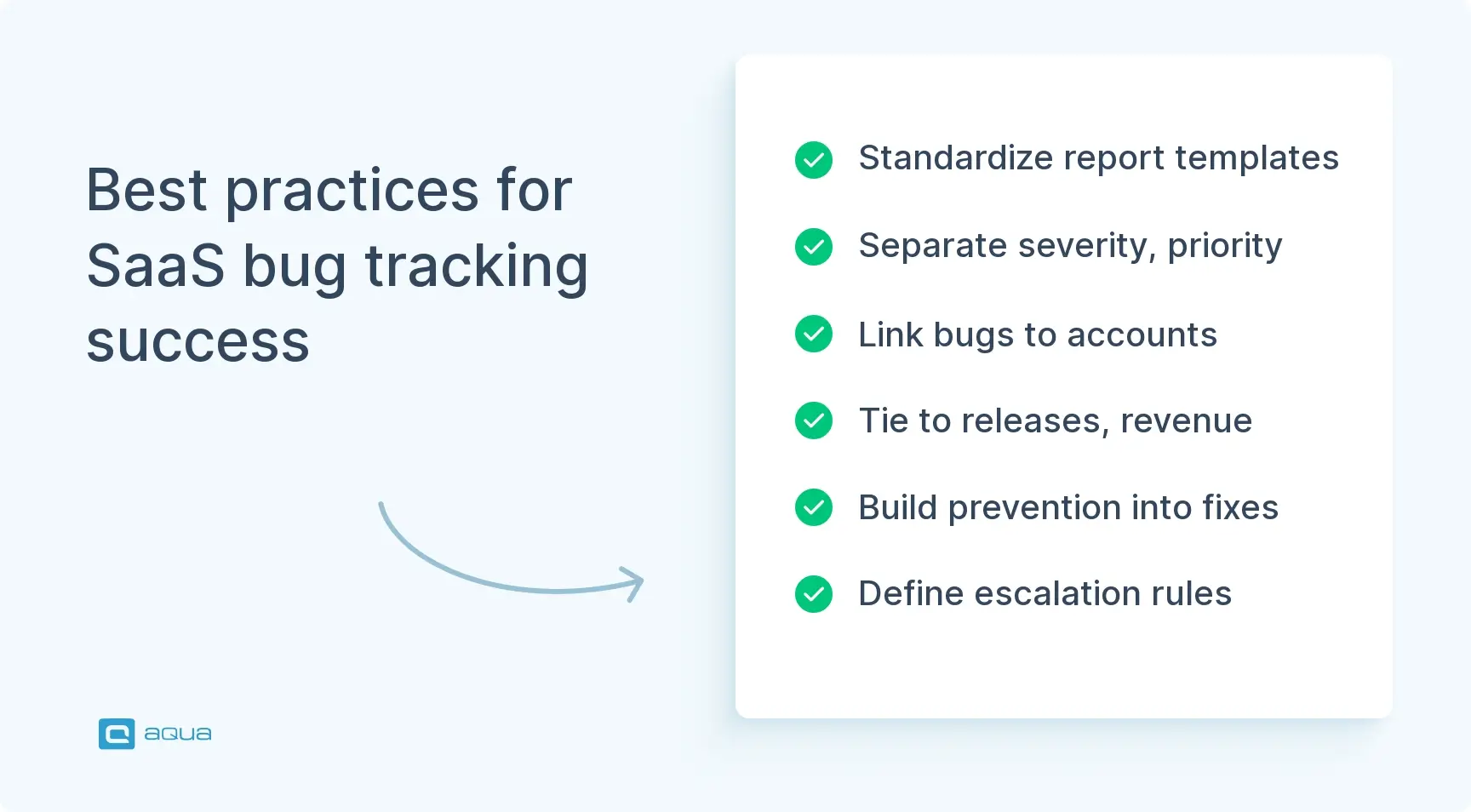
Best Practices for Effective Bug Tracking in SaaS
A strong process prevents problems from hiding, escalating, or recurring. The best SaaS teams treat bug tracking as a feedback loop that improves quality and customer trust over time.
Standardize Your Bug Report Template
Use a short bug reporting template your team will actually complete. Include:
- Product area, environment, browser or device.
- User role, account type, and affected user count.
- Reproduction steps and expected versus actual behavior.
- Business impact and supporting evidence such as screenshots or logs.
When templates run too long, people skip fields or use placeholder text, which creates noise and slows triage.
The most useful bug reports are the ones where you don’t have to ask a single follow up question. In practice that means: a video of exactly what happened, the URL they were on, browser and OS captured automatically, and console logs if something broke in the code.
Affectionate-Sky-74
Posted in
Reddit
Separate Severity From Priority
Severity describes technical impact: how broken is the functionality?
Priority describes business urgency: how fast does this need fixing?
A typo in a legal invoice carries low severity but high priority for enterprise customers. Edge-case crashes in a beta feature carry high severity but low priority if no paying customers use it yet. Define clear levels for both dimensions and train your team to assess them independently. This prevents triage arguments and explains why certain bugs skip the queue.
Build Prevention Into Every Fix
Serious bugs should trigger at least one system improvement: a new automated test, stronger validation logic, improved logging, or a monitoring alert. When bugs get fixed without generating learning, they return as regressions. Add one prevention question to your workflow: “What would have caught this earlier?” The habit compounds.
Connect Bugs to Releases and Customer Evidence
Customer-reported bugs should link to support tickets, account IDs, affected plan types, and ARR exposure. Production bugs should track which release introduced the defect, related feature flags, and whether it is a regression. This traceability drives smarter prioritization during sprint planning and helps your team spot patterns across release cycles.
Define Escalation Rules and Close the Loop
Define escalation paths in advance for authentication failures, billing bugs, enterprise account impact, and production outages. Each needs an incident channel, communication template, SLA, and postmortem requirement. When an issue resolves, close the loop: confirm reproduction and provide status updates. Send a final notification when the fix is live. Update support documentation so the next affected customer gets faster help from the first contact.
Bug tracking tools help manage what’s already broken. But what if you could prevent bugs from reaching production in the first place? That’s where aqua cloud, an AI-powered test and requirement management tool, can help. aqua combines powerful bug tracking with intelligent test management, giving your team full traceability from requirements through test cases to defects, all in one platform. aqua’s domain-trained AI Intelligence with RAG grounding generates project-specific test cases from your actual documentation, ensuring your testing catches issues that matter before customers ever see them. aqua Capture records every test session automatically, so every defect report arrives with evidence attached and triage begins from full context. aqua gives your team the complete bug intelligence ecosystem it needs to protect revenue and retention in 2026. Native integrations bring aqua into your current workflow: Jira with bidirectional sync, Azure DevOps, Jenkins, Confluence, and a full library of automation connectors including SoapUI, JMeter, Ranorex, REST API, and database integrations.
Achieve 35% faster resolution and complete test-to-defect traceability with aqua.
Conclusion
Bug tracking for SaaS is a strategic quality system that protects revenue, customer trust, and team velocity. Success comes from combining the right tool with disciplined triage, strong ownership models, and customer-aware prioritization. Whether your team goes with aqua cloud, Jira, Linear, or Sentry depends on your stage and workflow. Build your bug tracking system as a feedback loop that improves with every fix. Your team will spend less time reacting and more time shipping.