Best UAT Tools for Agile and Enterprise Teams in 2026: Complete List
Not having a suitable User Acceptance Testing (UAT) tool in place is easily among the top critical business mistakes. The problem with choosing also typically involves a lot of complicated feature comparisons and budget negotiations back and forth. If any of that sounds familiar, this guide is for you. It covers which tools actually get adopted, who each one fits, and where each one falls short. With this, your team should be able to build a tool shortlist based on how UAT works in your organization.
The best UAT tool depends on whether acceptance testing is owned by QA or by business stakeholders.
Agile teams benefit most from Jira-native tools like Xray or Zephyr, while enterprise QA organizations need platforms like Tricentis qTest with cross-team governance and reporting.
Requirements traceability, which means connecting requirements, test cases, executions, defects, and approvals, is the most critical capability to evaluate before purchasing a UAT tool.
ERP and packaged application UAT requires specialized tools like Panaya or Opkey that understand business process impact analysis.
Most teams buy the wrong UAT tool because they prioritize features over workflow fit. See which tool matches your actual delivery model 👇
Why Agile and Enterprise Teams Need Dedicated UAT Tools
UAT sits at the intersection of business validation and QA governance. More practically, it’s the final structured checkpoint before a release reaches production, and the point where the most costly gaps tend to appear in your workflow.
Without a dedicated UAT tool, your team tends to deal with the same predictable failures:
Requirements that went untested because no one had a shared coverage view
Defects discovered after release, never formally raised during acceptance testing
Approvals given on verbal confirmation, without documented evidence
Release decisions made without knowing which requirements were actually validated
These are organizational and process failures. And critically, a spreadsheet or general-purpose project management tool won’t address them structurally, no matter how well your team uses it.
The challenge also looks different depending on your team type. For Agile teams, UAT must connect continuously to sprint workflows as features are completed. A tool that operates as a separate handover process at the end of each cycle breaks that connection and creates gaps your QA team will miss. For enterprise teams, the issue is scale: multiple products and delivery models need consistent reporting and auditable governance that holds up under compliance review.
Dedicated UAT tools address both scenarios by linking requirements, execution evidence, defects, approvals, and release decisions inside one governed workflow. Without that connection, UAT becomes the weakest link in your release chain.
For a closer look at how this works inside sprint delivery, see our guide on running UAT in Agile.
Managing UAT across multiple tools and teams requires a platform that connects your requirements to evidence without adding coordination overhead. aqua cloud, an AI-driven test and requirement management solution, supports the full UAT lifecycle. It also offers AI-powered test case generation that works with your documentation, text, chat, and voice notes to maximize your QA effectiveness. Real-time dashboards reveal coverage gaps and release readiness across both manual and automated testing layers, giving leadership a clear view of release status at any point in the cycle. Another great thing about aqua is that it integrates natively with Jira, Jenkins, Azure DevOps, Confluence, JMeter, and works with many of the best UAT tools from the list.
Manage your entire UAT lifecycle with full traceability from requirement to sign-off
It’s safe to claim that not every platform that markets itself as a UAT tool supports the full acceptance testing lifecycle. Before evaluating vendors, it’s worth establishing which capabilities your team genuinely needs, compared to which ones look compelling in a demo but won’t see real adoption in practice.
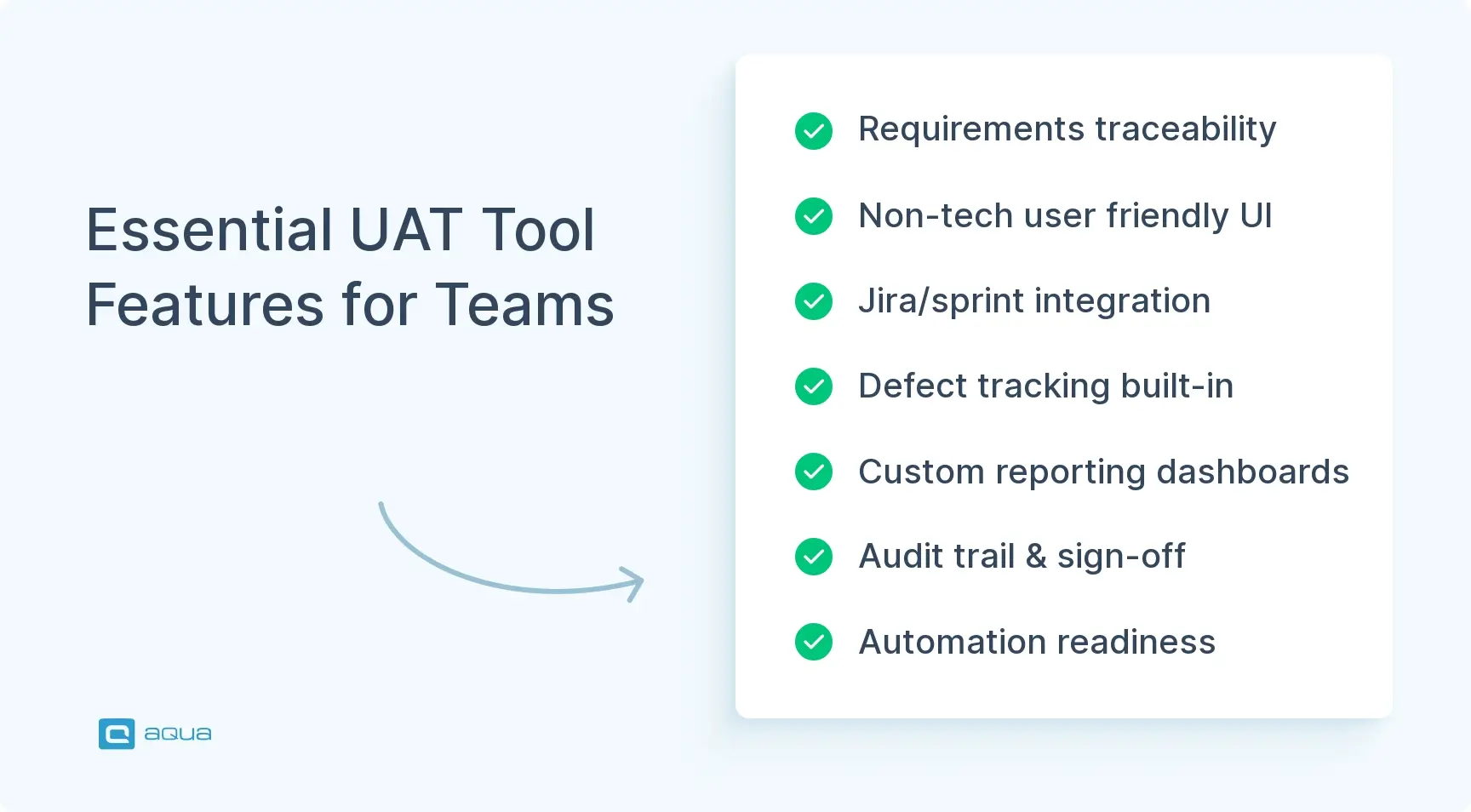
Here’s what to prioritize:
Requirements traceability. Your tool should show which business requirements have UAT coverage, which tests passed or failed against each requirement, and which defects are blocking sign-off. Without traceability, UAT evidence is incomplete, and your release decisions lack a factual foundation.
Business-user execution workflows. If business stakeholders run the acceptance tests, and in most organizations they do, the tool must work for non-technical users. Complex QA interfaces or Jira-only access effectively exclude the people your UAT depends on most.
Agile and sprint integration. UAT evidence should connect to user stories, acceptance criteria, and CI/CD pipelines. A standalone system running in parallel to Jira creates duplication and inconsistency across your team.
Defect capture and tracking. UAT-discovered issues need to become actionable tickets with reproduction context, severity, and ownership. Tools that rely on free-text boxes produce vague defects your QA team can’t reproduce or prioritize.
Reporting and release dashboards. Product owners, QA leads, and compliance officers each need a different view of the same UAT data. A tool that only shows raw test results forces your team to build manual reporting on top, handling coverage summaries and sign-off status in separate documents.
Audit trail and formal sign-off. Regulated teams and enterprise QA organizations need documented evidence of who tested, what passed, what failed, who approved, and when. If you’re in a regulated industry, email-based approvals simply don’t satisfy most compliance requirements.
Automation readiness. Even business-led UAT increasingly includes automated checks alongside manual acceptance flows. The tool should connect to Selenium, CI/CD pipelines, or no-code automation, depending on your team’s maturity level.
Enterprise controls. SSO, role-based permissions, and cross-project visibility matter when UAT governance spans multiple teams, delivery models, or regulatory frameworks across your organization.
How deep you need each of these capabilities depends on whether your UAT is a QA-owned workflow or a business-owned one. Teams that confuse the two tend to buy QA-heavy platforms and then wonder why business users never open them. Use our UAT test plan guide to structure that question before you start evaluating tools.
I mean it's tough with a UAT. But for clients that require it we typically have move cards to a "Client" Kanban board. For clients that understand what they need to do they test how they see fit.
The tools below cover enterprise test management platforms, Jira-native Agile tools, business-user UAT solutions, and ERP and packaged application tools. The right choice depends on your delivery model, your testers’ technical level, and how tightly UAT needs to connect to your engineering workflows.
For a broader comparison with extended scoring details, see the full list of best UAT tools in 2026.
– aqua cloud: Best for requirements-driven UAT, regulated environments, and teams that need traceability across the full testing lifecycle. aqua is a test and requirement management platform, which places it in a broader category than a dedicated UAT tool. That distinction matters more than it might seem. For teams where UAT must connect to formal requirements, produce audit-grade evidence, or scale across multiple squads, that breadth is exactly what you need. aqua covers more of the testing lifecycle than most tools on this list and pairs well with Xray, Zephyr, or TestMonitor when your team needs both governed test management and a dedicated execution interface for business users.
The AI Copilot generates test cases from your requirements or voice notes, so your team spends time executing tests rather than writing them. Environment management keeps runs reproducible, and reusable test components cut duplication across testing layers. For teams moving away from spreadsheet-based UAT, aqua offers a practical entry point into governed acceptance testing without the weight of a legacy ALM suite.
Get audit-ready UAT without the ALM overhead
Try aqua for free
– Tricentis qTest: Best for enterprise QA governance across multiple teams. qTest is built for large organizations that need centralized test management across products and delivery models. It supports Agile, waterfall, and hybrid methodologies, and is used by a range of Fortune 500 companies managing complex testing operations at scale.
However, qTest demands significant QA process maturity before it delivers value. Organizations without established governance structures typically find the platform overcomplicated and slow to configure, and implementation timelines combined with opaque licensing costs are a consistent concern. If you are evaluating it against aqua, this comparison breaks down the differences.
– Xray: Best for Jira-native Agile teams. When Jira is your team’s main system of record, Xray is the strongest test management fit available. Tests live as Jira issues, and the Requirement Traceability report shows coverage through requirements, test runs, and defects. That evidence structure is exactly what your UAT needs when product owners and engineering must agree on release readiness.
That said, Xray is built for QA and engineering users. If your business stakeholders do not have Jira access or avoid the platform altogether, you will need a separate layer for acceptance test execution. That gap is a recurring adoption problem for business-led UAT programs.
– Zephyr: Best for Jira teams needing test management plus automation. Zephyr covers planning, executing, and reporting directly in Jira, with no-code automation options. Zephyr Enterprise adds organization-wide aggregate reporting and is a reasonable fit for teams that want to stay inside Jira while also accessing acceptance criteria validation, release-risk assessment, and SmartBear automation tooling.
It is still worth noting that the product line spans multiple editions with significantly different capabilities. Teams frequently find that the version purchased does not include the features that drove the buying decision, so clarifying edition requirements before signing a contract is not optional.
– PractiTest: Best for flexible traceability and mid-market QA. PractiTest connects requirements, tests, and issues with traceability between each layer. It is relevant for mid-sized organizations and SaaS teams that need structured UAT without a legacy ALM platform.
But PractiTest is not Jira-native, which means teams running acceptance testing inside Jira workflows will face duplication and context-switching between tools. Without a clear process definition agreed upfront, adoption tends to stall before traceability delivers any visible benefit.
– Panaya: Best for enterprise business application UAT across SAP, Oracle, Salesforce, and Workday. Panaya addresses enterprise application UAT with impact analysis and defect management designed for non-technical testers across finance, HR, and procurement. It is certified by SAP, Oracle, and Salesforce and is used by over 3,000 organizations, including a significant share of Fortune 500 companies running large-scale ERP programs.
Nevertheless, Panaya is purpose-built for packaged and ERP application environments. Teams building custom SaaS products or running cloud-native delivery will find the tooling mismatched to their needs and will pay for capabilities they do not use.
– Opkey: Best for packaged application UAT automation. Opkey is built for validating enterprise cloud applications after releases and configuration changes, covering Oracle, Workday, Salesforce, and SAP. Its value is strongest when the core challenge is regression validation across frequent vendor updates, without writing manual test cases from scratch each cycle.
Worth noting, however, is that Opkey is a specialized tool with a narrow scope. It is not designed for general acceptance testing, and small or mid-sized Agile teams working outside packaged application environments will find little practical use for it.
– QMetry: Best for Jira and DevOps-heavy teams. QMetry offers test management with native support for Jira, Jenkins, Azure DevOps, Bamboo, and GitLab CI/CD. It is most useful when acceptance testing must connect to release pipelines as part of a broader DevOps workflow.
Still, it is necessary to flag that QMetry is oriented toward QA and engineering workflows, not business-user execution. Teams where product owners, finance, or operations stakeholders run UAT independently will find the interface creates adoption friction rather than removing it.
– OpenText ALM / Quality Center: Best for regulated legacy enterprise environments. OpenText ALM/QC provides rigorous lifecycle governance with full traceability between requirements, tests, defects, and releases. It remains a defensible choice for organizations where compliance is the primary constraint and UAT must satisfy formal audit review or regulatory validation.
However, the platform carries significant implementation overhead and infrastructure cost, and the interface has not kept pace with modern delivery practices. Agile teams that need fast sprint-level UAT or business-user participation will find it a poor operational fit.
– TestMonitor: Best for business-user UAT lifecycle management. TestMonitor, which now operates under the Cerios brand following a rebrand in late 2025, covers acceptance testing from scope definition through sign-off: tester assignment, execution tracking, defect reporting, and formal approval. The interface is built for mixed teams where both technical and non-technical stakeholders participate, and it replaces the spreadsheet-and-email workflows that many Agile teams still rely on.
But its strength is also its ceiling. Teams that need deep automation orchestration, CI/CD integration, or governance across multiple squads will outgrow it quickly. It is a practical replacement for spreadsheets; it is not a replacement for an enterprise test management platform.
How to Choose the Right UAT Tool for Your Agile or Enterprise Team
Most selection mistakes happen before a single vendor gets evaluated. Teams jump into demos without first deciding what kind of UAT problem they are solving. The right shortlist looks very different depending on whether UAT is owned by QA or by business stakeholders in your organization, and whether formal compliance evidence is required.
Three questions help narrow your shortlist before vendor evaluation begins:
Who runs the tests? If QA engineers execute acceptance tests, tools like Xray, Zephyr, qTest, and QMetry work well. If business users, such as finance, HR, or operations teams, run tests in your organization, those same tools may create adoption barriers. TestMonitor and Panaya are designed specifically for non-technical testers.
How deep does traceability need to go? For informal product feedback, basic pass/fail tracking is enough. Enterprise UAT requires more: which requirements have coverage, which tests failed, which defects block sign-off, and whether requirements changed after testing began. If you’re operating in a regulated industry or managing a large release portfolio, Xray, qTest, PractiTest, OpenText ALM/QC, and aqua cloud are stronger when that depth is required.
Is Jira already central to your workflow? Jira-native tools like Xray, Zephyr, and QMetry work best when Jira is well-configured and your business users have access. If Jira is inconsistently set up or people on your team avoid it, a dedicated tool with Jira integration is often a more practical starting point.
For teams evaluating the balance between manual and automated UAT, our guide on manual vs automated UAT covers the tradeoffs in detail.
The table below offers a starting-point decision framework:
If your team is migrating away from an existing platform, the process of switching UAT tools involves more than a data export. All test data, including requirement links and execution history, needs to migrate cleanly. Any gaps can disrupt active UAT cycles your team is running.
It depends on the make up of your team. Is your team made up of automation developers or mostly non-technical folks.
Agile UAT without a dedicated tool tends to produce the same recurring problems: vague stakeholder feedback, untested requirements reaching production, sign-off given without documented evidence, and defects raised too late to fix within the sprint. A properly integrated UAT tool addresses each of those friction points, and the benefits go well beyond QA efficiency.
Continuous validation across sprints. Your team can run acceptance testing incrementally as features are completed, with UAT tools that connect to Jira sprints and release versions. That keeps validation continuous without disrupting the delivery workflows your team already has in place.
Shared requirements coverage visibility. Product owners and business stakeholders can see which user stories have been tested, which failed, and which remain untested, before the sprint review. For you as a product owner or exec, that means no more release-day surprises about untested scope.
Faster, more reliable defect capture. When UAT tools connect to Jira or GitHub for defect management, testers can raise issues in context: attached to specific test steps, with execution state and reproduction details pre-populated. This produces actionable defects your QA team can actually work with and ensure that your organization doesn’t resort to sending vague stakeholder emails.
Business-stakeholder participation at scale. Tools designed for non-technical users lower the barrier for product managers and business owners to participate in acceptance testing. When your business users can execute test cases without learning a QA platform, coverage improves,
and the quality of feedback your team receives increases significantly.
Auditable sign-off records. Formal documentation of who tested, what passed, what failed, and who approved a release is a compliance requirement in many industries. If you’re a compliance officer or leading a team in a regulated environment, this evidence chain is what makes your sign-off defensible.
Reduced release risk through automation integration. UAT tools that connect to CI/CD pipelines allow automated acceptance checks to run alongside manual UAT, giving your team a combined view of release readiness. This is especially valuable when your team runs frequent releases and full manual regression isn’t practical.
Process consistency across your team. For enterprise QA organizations with multiple Agile squads, a shared UAT tool enforces consistent test case structure and reporting formats. That makes cross-team governance more reliable and gives leadership a cleaner view across projects.
Most likely, your blocker has never been a specific tool or a complicated tool stack. Your business needs an all-in-one environment to centralize your UAT testing efforts. aqua cloud, an AI-powered test and requirement management platform, supports and provides exactly the capabilities you are looking for. Its AI test case generation reduces test creation time by up to 97%. The domain-trained AI Copilot produces test cases that reflect your actual requirements and system architecture. Real-time dashboards reveal coverage and release readiness across manual and automated testing layers, so your team always knows where gaps exist before they become production issues. The Capture integration records test execution with video and screenshots, so every UAT session your team runs produces complete, reviewable evidence. aqua also integrates natively with Jira (bidirectional sync), Jenkins, Azure DevOps, Confluence, JMeter, PowerShell, Database MSSQL, UnixShell, SoapUI, Ranorex, Database Oracle, and 12+ other popular solutions.
Boost UAT efficiency by 80% and ship with confidence
The best UAT tool matches how acceptance testing actually works in your organization. If business users are your primary testers, a QA-heavy platform will go unused. If compliance is non-negotiable for your team, a lightweight feedback widget won’t satisfy an audit.
For most Agile teams, the practical shortlist is: aqua cloud or Xray for full traceability, Zephyr for Jira-integrated automation, TestMonitor for business-user UAT management, and Panaya or Opkey for SAP and packaged application environments. Define who owns UAT and how deep traceability needs to go in your organization. Those two answers narrow your shortlist faster than any feature chart.
Yes. In Agile, acceptance testing runs continuously across sprints as features are completed. Business stakeholders validate work incrementally. This means UAT tools need to connect to user stories and defect workflows rather than operate as a separate end-of-project process.
What are the best test management tools for Agile and DevOps teams?
Xray and Zephyr are the strongest options when Jira is your system of record. QMetry fits well when UAT must connect to CI/CD pipelines across Jenkins and Azure DevOps. aqua cloud suits teams that need requirements traceability and AI-assisted test case generation alongside test management.
How can UAT tools integrate with CI/CD pipelines in Agile environments?
Most tools connect through native plugins or API hooks. Xray, Zephyr, QMetry, and aqua cloud all support Jenkins, GitHub Actions, GitLab CI/CD, and Azure DevOps. Automated acceptance tests can trigger on each commit, with results feeding directly into test coverage dashboards.
What features should enterprise teams look for in UAT tools to support scalability and collaboration?
Cross-project reporting, role-based permissions, SSO, and audit trails are the core enterprise requirements. Your team also needs sign-off workflows that produce compliance-grade evidence. Tools like Tricentis qTest, OpenText ALM/QC, Zephyr Enterprise, and aqua cloud are built for this scale.
How do UAT tools support compliance and audit requirements in regulated industries?
Compliance-ready UAT tools produce a traceability matrix: requirements linked to test cases, executions, defects, and approvals. Tools like OpenText ALM/QC, qTest, aqua cloud, and Xray support this structure. The evidence chain must be exportable and immutable for external audit review.
When should a team consider switching UAT tools?
Switch when business users bypass the tool consistently, defect reports are too vague to act on, or release decisions happen without consulting test coverage data. Teams scaling from one squad to a multi-team program often need a different tool category entirely.
Robert has several years of experience in process optimisation and test management. He is an expert in defining and implementing workflows by adapting aqua to the clients’ processes.
Nurlan, a QA Coordinator & Quality Standards Officer, takes pride in orchestrating seamless QA operations. His expertise in coordinating QA-focused projects and integrating QA solutions has consistently yielded top-tier client satisfaction. Aside from a full-time QA coordinator, Nurlan's role involves creating compelling content that educates…
Pavel, a Quality Assurance Consultant and Author, brings deep expertise to solving complex testing challenges. His background in software development has helped organizations transform their QA practices from reactive to proactive. Beyond consulting, Pavel develops best practice guides and case studies for aqua cloud that…
Home » Best practices » Best UAT Tools for Agile and Enterprise Teams in 2026: Complete List
Do you love testing as we do?
Join our community of enthusiastic experts! Get new posts from the aqua blog directly in your inbox. QA trends, community discussion overviews, insightful tips — you’ll love it!
We're committed to your privacy. Aqua uses the information you provide to us to contact you about our relevant content, products, and services. You may unsubscribe from these communications at any time. For more information, check out our Privacy policy.
X
🤖 Exciting new updates to aqua Intelligence are now available! 🎉