Workflow Testing: A Complete Guide to Testing Business Processes
Developed app components get approved easily, while the workflow built around them still falls apart? As you already know, component-level tests do not validate the handoff between two features. That’s why the defect remains undetected until it starts affecting customers or your own team members. However, this can be addressed with a proper workflow testing system and test management software in place.
Workflow testing validates a business process from trigger to final state. 2025 DORA report
Most teams run API-level coverage for branches with a limited UI set.
Case design follows an explicit state model listing ten transitions.
Invalid transitions and permission violations fail at business-logic level. OWASP Top 10:2025
Assertions read the database and the audit log, because a confirmation page provides no evidence.
Escalation after 48 hours or expiry after 30 days is impractical, so Temporal and Microsoft Power Automate simulate the clock.
This guide covers the workflow testing process end to end: modeling states and transitions, designing positive and negative cases, asserting checkpoints, and testing escalation rules. Applied together, these steps give your team measurable coverage of the process, branch by branch.
What is workflow testing?
Workflow testing validates that a complete sequence of actions produces the expected business outcome. In practice, that means proof that steps run in the correct order and that the workflow reaches the right final state.
An approval workflow test, for example, follows the claim from submission to reimbursement. It verifies routing to the correct manager, the state change on approval, and a single reimbursement record in finance.
Handoffs introduce a distinct defect class. A field is renamed during a handoff, or a status arrives before the associated data exists. An ID can also change format in a way the next stage cannot parse. Component-level tests do not detect these conditions, so workflow testing exposes the resulting integration failures, permission handoff errors, and faulty branching logic.
When workflow testing is most valuable
Workflow testing delivers the most value when a process contains any of the following:
Explicit states, such as Draft, Submitted, or Approved
Business rules, such as amount thresholds or role-based routing
Multiple roles passing work between each other
Asynchronous events, like reminders, escalations, and retries
Multiple systems, including microservices and external APIs
A purchase order can pass stage-level tests from creation through invoice matching. Even so, procure-to-pay fails when approval strips metadata that the receiving system requires.
The cost of that pattern is documented at scale. CISQ’s 2022 report puts the cost of poor software quality in the US at $2.41 trillion, with accumulated technical debt near $1.52 trillion.
The underlying techniques are based on standard test design, which is why ISTQB treats state transition testing as foundational here. Workflows behave like state machines with permitted and forbidden transitions. Decision table testing applies when several conditions interact, such as amount thresholds combined with role-based routing.
Naturally, your team needs to model processes, map coverage to decision points, track execution across paths, and keep traceability when defects appear. aqua cloud, an AI-driven test and requirement management solution, provides that structure. Centralized test case management, nested test steps, parameterization for branch coverage, and detailed status tracking let you design tests around states and outcomes. For multi-step approval flows and exception paths, aqua Intelligence analyzes your requirements and builds complete scenarios in seconds. RAG grounding keeps generated cases tied to your own project documentation. Your workflow tests also stay connected to your delivery toolchain. Bidirectional Jira sync, Jenkins, Azure DevOps, and Confluence integrations keep requirements, builds, and specifications aligned. 12+ other software solutions are supported.
Design workflow tests that find real workflow defects, with aqua's structured approach
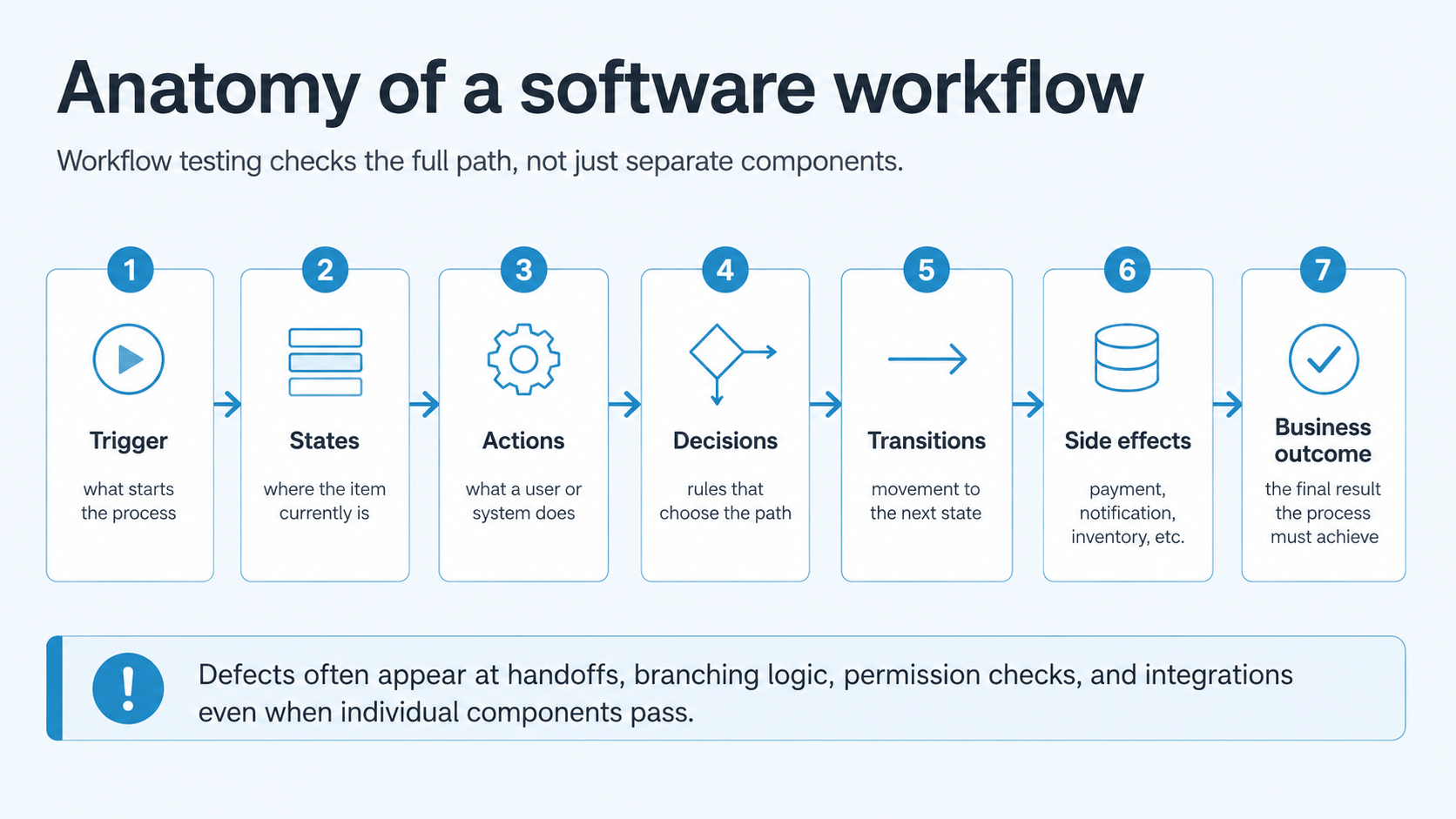
A software workflow is a structured sequence of states, actions, decisions, and transitions that runs from trigger to business outcome. It defines the path data takes through a system, including who touches it, which rules apply, and which side effects follow.
A workflow typically consists of the following elements:
Trigger → states → actions → decisions → transitions → side effects → business outcome
An expense claim moves through Created → Submitted → Manager Review → Finance Review → Reimbursement. Transitions depend on roles, permissions, and decision logic. Claims under €1,000 might need manager approval alone, while claims above that threshold pull finance into the chain. Above €10,000, a director might enter the approval chain.
Two properties make workflows harder to test than individual features.
1. Cross-boundary handoffs
Workflows span microservices, applications, and human-to-automated steps, so each boundary introduces a potential failure point:
Renamed or remapped fields
Mismatched data formats or encodings
Out-of-sync timing between stages
2. Encoded business rules
Your model must declare which transitions are forbidden: draft to Paid without approval, rejected to fulfilled without reopening. OWASP treats circumvention of workflows as a business-logic security issue, so an endpoint that allows identity-verification requirements to be bypassed is a vulnerability.
Types of workflow testing
Workflow tests are usually classified by execution layer, and four common types are applicable to most implementations.
Type
Best used for
Manual workflow testing
New or changing workflows, exploratory scenarios, usability-heavy processes
Cross-service orchestration, business logic, retries, and backend state
Hybrid workflow testing
A small amount of UI validation combined with faster API-level execution
Most implementations are hybrid, so the testing workflow combines several layers. API-level runs cover the bulk of branches, rejection paths, and retries, since they execute in seconds and remain stable despite UI changes. A limited set of UI runs verifies that screens reflect the correct state. Manual testing applies where a workflow continues to change frequently, since scripting a process that changes weekly costs more than executing it manually. Holding all three layers in one repository, as platforms like aqua cloud do, reduces duplicate coverage.
How to perform workflow testing
AI-generated image.
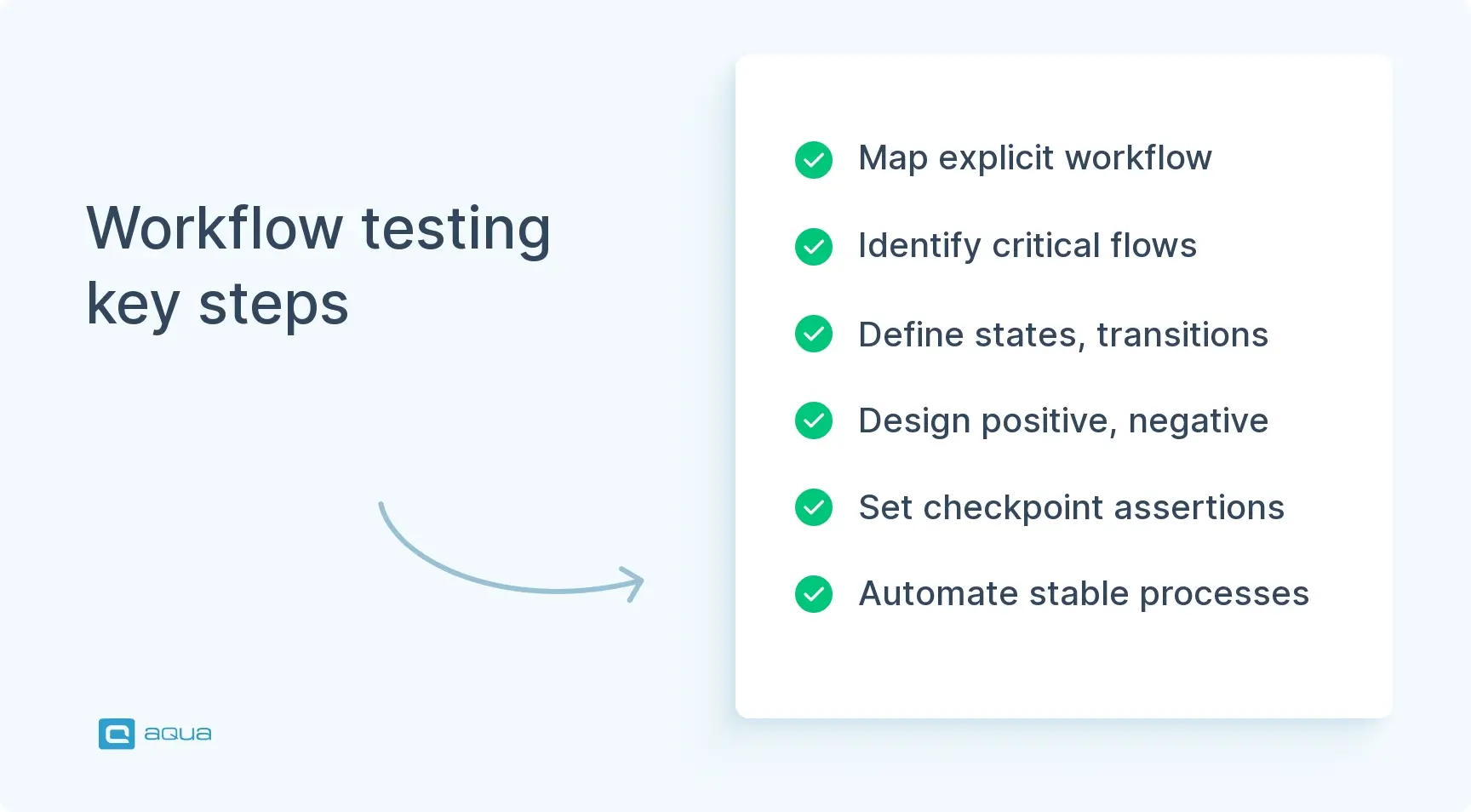
The workflow testing process runs in eight steps, from an explicit model through case design, execution, and permanent regression coverage.
1. Map the workflow
Workflow testing starts with an explicit model, since a BPMN diagram, state diagram, or plain flowchart all serve equally well. Regardless of the selected format, the model documents your entry point, actions, decisions, states, and exits. System and human handoffs are recorded on it as well.
Without an explicit workflow model, your team writes cases around individual screens, leaving the underlying process untested. ISTQB model-based testing guidance already incorporates state transition, decision table, and use-case techniques, so workflow modeling applies established methods to business processes. The resulting model then defines the scope of coverage.
Mapping also forces conversations with stakeholders, which is why the model belongs alongside your requirements management records. Disagreements about the process become visible on the diagram before they appear in test results.
2. Identify business-critical workflows
Testing all conceivable workflows with equal depth is unrealistic, so prioritize by business impact and risk. Prioritized workflows fall into a few categories:
Account lifecycle, such as registration and account recovery
Revenue paths, like checkout and subscription renewal
Payment processing and reconciliation
Cross-application processes in ERP or supply-chain systems
Prioritization can be based on three criteria:
Failure cost: how much damage a broken run causes
Business exposure: revenue, compliance, or customer trust at stake
Complexity: external integrations and multiple roles in the chain
The same ranking guides automation. Stable, repetitive, high-impact workflows are strong automation candidates, while flows that change frequently across sprints create excessive maintenance.
3. Break the workflow into states and transitions
An explicit state model replaces a generic ticket such as “Test expense approval”:
Alternative transitions require the same treatment, since manager rejection, employee cancellation, and finance requests for more information all need a documented path. That structure makes coverage gaps immediately visible: a model with ten transitions against a suite covering three identifies the remaining work.
State modeling also sets up your negative tests, since a state machine needs proof that forbidden transitions are refused.
Identify critical business workflows. For our org, we identified around 24 E2E workflows. Automate those as golden paths. Cover the rest with integration tests around flows, APIs, and triggers.
Business rules map to condition sets, which then convert into test cases. The three approval tiers produce several condition sets before exception paths are added.
Decision tables suit this work well, because the number of combinations grows quickly once several conditions interact. Laid out in a table, those combinations reveal previously uncovered condition sets.
Branches include exception paths too: integration timeouts, approvals that never arrive, and two managers approving at the same moment. Those alternative routes should be tested independently, since they rarely appear in the happy-path model.
5. Design positive and negative tests
The positive test verifies that the workflow can complete. Negative tests should then cover six categories:
Skip a required stage
Repeat a stage designed to run once
Execute steps out of order
Act with the wrong role
Send invalid data between stages
Cancel halfway through
OWASP recommends testing whether users can skip, repeat, or reorder actions. Documented patterns include a user reaching the account-opening endpoint without identity verification, and a customer applying the same single-use discount twice.
Negative coverage extends to failure states. After a failed payment, an order should not remain in “Processing” indefinitely, and an unavailable external service should produce a clean timeout.
6. Prepare workflow-specific test data
A workflow modifies data over time, so static datasets are insufficient. Datasets need to reflect initial state → intermediate state → final state. They should also cover the boundaries around each approval threshold, so €1,000 and €10,000 both need values on either side.
Realistic combinations are as important as realistic values, since the number of line items and the submitter’s role both change routing.
Edge cases fall into the same category. Zero-value transactions, negative quantities, and missing optional fields all qualify as workflow tests when they affect routing or downstream integrations.
7. Execute and assert checkpoints
Assertions run at intermediate stages of execution, before the final screen. Checkpoint assertions cover five elements:
State: the record holds the expected status
Data: field values remained intact across the handoff
Role and owner: the correct actor holds the item
Integration result: the downstream call returned the data required by the subsequent stage
Side effect: the payment, notification, or inventory change actually happened
When a 25-step workflow fails at the end, checkpoint data identifies the transition that introduced the defect. Checkpoints also expose a common false positive, where the UI reports “Success” while the business action never occurred. For flaky tests, the same data shows where the race condition originates, which avoids repeated executions to reproduce it.
8. Feed production defects back into regression
Any workflow failure that reaches production should be converted into a permanent regression scenario. Over time, the suite then documents both intended behavior and the edge cases that previously caused failures.
Beyond defect prevention, regression coverage preserves organizational knowledge. When a developer leaves your team, for instance, the suite retains the context behind those scenarios. New members can then read the tests to understand how the workflow should behave. Executable coverage of this kind preserves behavior more reliably than documentation that goes unmaintained alongside the implementation.
Workflow testing best practices
These workflow testing best practices reduce rework while keeping a suite executable on release cadence.
1. Branch and exception-path coverage
Production workflows contain decision points, fallbacks, and alternative routes. An expense claim can run through manager approval, manager plus finance, or all three tiers, and a payment can succeed, retry, or fail permanently. When a model documents ten paths and the suite covers two, the remaining eight reach production untested.
2. Outcome-level assertions
A confirmation page provides no evidence that payment was captured, inventory was reduced, or a notification was sent. Reliable assertions read the underlying record: a database query, an audit log entry, an integration response, or a delivered email. Weaker assertions produce a false positive, where the run passes although the business action never occurred.
3. State transition modeling
Valid transitions get their own cases, and forbidden ones get cases proving refusal. Because a workflow behaves as a finite state machine, N-1 switch coverage over the transition table becomes measurable. State-based design also covers cases that ad hoc test design often misses.
4. Decision tables for multi-condition logic
Amount thresholds, user roles, time windows, and inventory levels interact combinatorially, so the rule set grows faster than manual case design can track. A decision table enumerates the condition-action pairs systematically, and ISTQB recommends the technique for exactly this reason.
5. Boundary-aware test data
Workflows modify records across stages, so datasets need values on both sides of a rule. A €999 claim and a €1,001 claim exercise different branches when €1,000 sets the approval threshold, so boundary-value analysis forms part of workflow data preparation.
6. Per-stage checkpoints
Assertions on state, data, and side effects belong at the end of a stage as well as at the end of a run. Checkpoint data then identifies the failing transition directly, which is faster than bisecting a full sequence after the final screen.
7. Layered automation
Long UI scripts are expensive to maintain, so a layered automation strategy reduces that overhead:
Layer 1, business and state rules: fast tests close to the code
Layer 2, orchestration with mocked dependencies: branching, retries, and timeout behavior
Layer 3, real API and integration boundaries: auth, contracts, data, and external behavior
Layer 4, UI workflow: the highest-value user journeys only
Workflow engines document the same separation. Conductor covers definition validation, then orchestration against mocked tasks, then real execution against workers. Similarly, Microsoft Logic Apps supports mocked triggers and actions, so a workflow result can be asserted independently.
8. Simulated clocks
Reminders after 24 hours, escalations after 48 hours, and expiry after 30 days are impractical to test in real time. Temporal provides workflow test environments that advance time automatically. Microsoft Power Automate supports static outputs as well, so delayed action results become testable within a normal run.
9. Business-logic security coverage
Single-use discounts applied twice and self-approved restricted requests are security defects, so workflow testing spans functional QA and business-logic security. Security Magazine noted that the CISQ total includes losses from cyberattacks against vulnerabilities already present in production code.
10. Requirement-to-test traceability
A test management solution records which business requirement a test validates, which variations are covered, and whether the release is ready. Without that link, coverage questions and post-change impact analysis stay unanswerable.
Small, stable regression suite — core business workflows that every customer relies on. This should stay relatively small, run on every build, and be highly reliable.
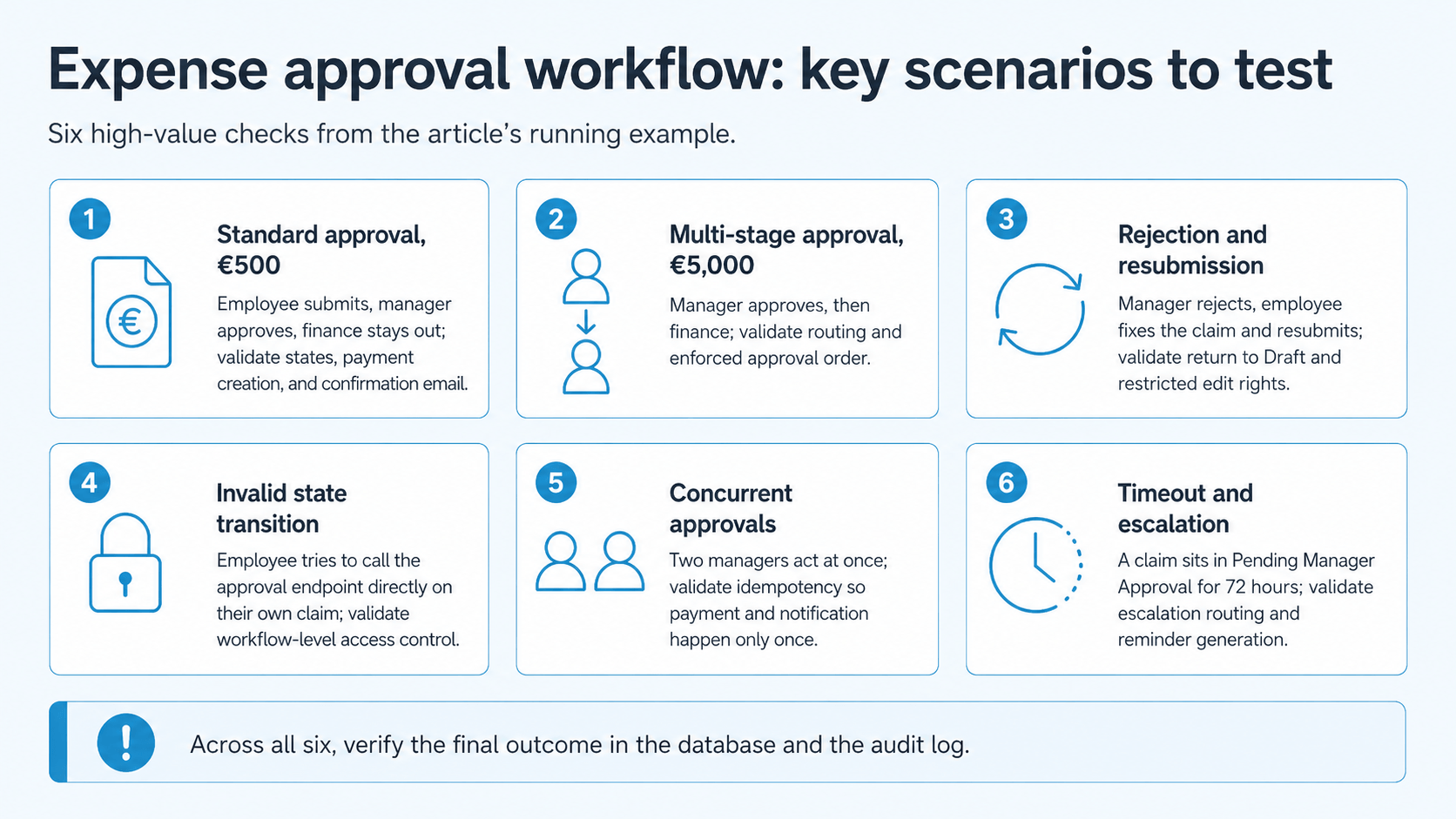
Expense approval is the running example for this guide, since it involves three approval tiers, two reviewer roles, and an audit requirement. The workflow runs from employee submission through manager review, optional finance review, payment, and notification.
Six scenarios below cover the highest-priority paths.
#
Scenario
What happens
What the test validates
1
Standard approval, €500
Employee submits with a valid receipt, manager approves, finance stays out of the chain
State changes from Draft to Submitted to Approved to Paid, plus payment creation and confirmation email
2
Multi-stage approval, €5,000
Manager approves, then finance signs off because the amount exceeds €1,000
Correct routing to finance, enforced approval sequence, final state reflecting both approvals
3
Rejection and resubmission
Manager rejects a claim with no receipt, employee adds it and resubmits
Return path to Draft, retention of the rejection comment, edit permissions restricted to Draft
4
Invalid state transition
Employee calls the approval endpoint directly on their own claim
Role-based access control enforced at workflow level, including direct API calls
5
Concurrent approvals
Two managers approve the same claim simultaneously
Idempotent handling, with payment and notification triggered exactly once
6
Timeout and escalation
A claim stays in Pending Manager Approval for 72 hours
Escalation routing to the supervisor and reminder generation, run on shortened timers
Scenario 6 requires a workaround, since waiting 72 hours during regression execution is impractical. Either a time-skipping environment or a shortened timer in a controlled environment gives you the same coverage in seconds.
Across all six scenarios, the assertion checks the recorded outcome in the database and the audit log.
AI-generated image.
Positive and negative workflow test cases
Positive tests verify that the workflow completes under valid conditions. Negative cases, by contrast, target the more expensive production defects: circumvented approvals, duplicate payments, and corrupted handoff data.
Positive cases follow the intended paths:
An expense moves from Draft to Submitted to Approved to Paid
A purchase order runs from Created to Approved to Received to Invoiced
A support ticket travels from Open to Assigned to Resolved to Closed
Verification in all three covers data integrity, role permissions, and the expected side effects.
Negative cases cover actions the workflow was not designed to accept, and structured test case management keeps both sets linked to the same workflow model.
Negative category
What your test attempts
Expected system behavior
Invalid state transitions
Move a draft straight to Paid, or fulfill a rejected order without reopening it
Transition refused, state unchanged, error logged
Permission violations
Approve your own expense, or open an order belonging to another customer
Request denied at API level with a clear authorization error
Out-of-order execution
Receive goods before the purchase order is approved
Sequence enforced, action blocked with an explanatory message
Duplicate operations
Submit an approval twice, or retry a payment call
Idempotent handling, exactly one payment and one inventory change
Role handoff failures
Deactivate the employee account after rejection, or fail a notification send
Graceful degradation with a retry path and a visible error state
Missing preconditions
Submit an expense with no receipt, or create an order without a shipping address
Validation at entry, no partial workflow instance created
Concurrency conflicts
Two approvers act on the same item within the same second
Locking or optimistic concurrency control, single recorded approval
For a full expense approval suite, your positive cases would cover €100, €5,000, and €15,000 claims across the three approval tiers. Your negative cases would cover self-approval, skipped manager approval, a missing receipt, a negative amount, edits to a paid claim, and double approval attempts. Combined coverage verifies that the system works under correct use and fails safely under incorrect use.
Workflow testing vs end-to-end testing
Workflow testing is a business-process-focused form of end-to-end testing. The terminology overlaps heavily across the industry, and no universal definition separates the two cleanly, so the practical difference lies in focus.
End-to-end testing confirms that a system works from start to finish across the full stack, from UI to database. A typical E2E test walks a customer through checkout, from cart to shipping details, payment, order confirmation, and the confirmation email.
Workflow testing focuses specifically on process logic. A workflow test of checkout covers guest and registered users, split payments, backordered items, and international shipping, with each decision point routing correctly.
The table below sets out how the four related practices differ.
Practice
Primary focus
Question it answers
End-to-end testing
Technical integration across the full stack
Do the UI, API, database, and services cooperate?
Workflow testing
Business-process correctness
Does the process enforce its own rules from trigger to outcome?
Integration testing
Communication between two components
Does the payment service exchange data correctly with the order service?
User acceptance testing
Stakeholder approval
Does this meet our business needs?
Workflow integration testing falls between the two. It combines individual service integrations and extends them with state management, decision logic, and role enforcement.
ISTQB does not define workflow testing as a separate test level, so treat it as a design lens for E2E coverage. Applications built mostly from stateless CRUD operations gain little from it. By contrast, systems that orchestrate multi-step, multi-role processes obtain a clearer coverage structure.
API workflow testing and AI workflow testing
Distributed architectures and automated decision-making have produced two specialized variants of workflow testing: API workflow testing and AI workflow testing.
API workflow testing validates business processes that execute across multiple endpoints and services. An order fulfillment workflow might call inventory check, payment processing, warehouse allocation, shipping label generation, and notification services in sequence. Your tests confirm that these services cooperate, hold consistent state across distributed transactions, and degrade cleanly when one service or dependency becomes unavailable.
Dependency management creates most of the difficulty here. Status codes alone verify only a fraction of the process, so your assertions need to cover:
Data flowing correctly between services
Asynchronous operations completing in the right order
Retries producing no duplicate actions
Compensating transactions executing after a failure
Contract testing verifies that a service honors its interface commitments. API workflow testing extends that by validating the orchestration logic tying those services together.
AI workflow testing addresses workflows that include machine learning models or rule engines. Traditional workflow testing assumes deterministic behavior, whereas AI components introduce probabilistic outcomes, evolving models, and context-dependent decisions that make fixed assertions unreliable.
A customer service workflow might route tickets with an AI classifier. Beyond confirming that high-priority tickets reach senior agents, validation extends to the classifier’s confidence thresholds and fallback behavior. Uncertain cases must fall back to a defined handling path, and model drift must not invalidate the routing rules.
Shadow testing to compare AI decisions against known outcomes
Canary deployments to validate model changes before full rollout
Drift monitoring to detect prediction changes that alter workflow behavior
Fallback testing to confirm graceful degradation when AI components fail
Both variants depend heavily on observability. A failed distributed workflow needs tracing to identify the responsible service, while unexpected AI decisions need logged inputs and confidence scores. For that reason, checkpoint validation matters even more here. Teams in regulated environments also run a penetration testing workflow against the same endpoints.
You have already mapped the workflow, identified the branches, and designed both positive and negative cases? The next step is selecting a platform that manages that complexity without adding maintenance overhead. aqua cloud, an AI-powered test and requirement management software, is built exactly for this purpose. Requirements, test cases, and defects are stored in one place with full traceability. Your team sees which business rules have coverage and which paths remain uncovered. Model multi-step scenarios with nested test cases and shared steps, parameterize data for boundary testing, and track results at checkpoint level. aqua Intelligence, grounded in your own project documentation through RAG, generates context-aware cases for complex approval chains in seconds. Execution connects to your stack through 10+ native automation integrations, including JMeter, Ranorex, SoapUI, REST API, PowerShell, UnixShell, and MSSQL and Oracle databases. Capture then records every run with video and screenshots.
Achieve 100% workflow coverage with intelligent test management, powered by aqua
A workflow test confirms that invalid transitions are refused and that side effects occur exactly once. The audit trail also has to match what happened in the database.
A reliable workflow testing process begins with an explicit model. Cases then follow the states and branches, outcomes are validated at checkpoints, and production failures are added to the regression suite. Teams running multi-step, multi-role processes benefit most, since their defects carry both functional and security consequences.
Workflow testing validates that a complete business process produces the correct outcome from trigger to final state. It checks state transitions, role handoffs, and the side effects each stage triggers, so your team finds defects that component-level tests do not cover.
What are some examples of workflow testing?
Common workflow testing examples include expense approval, procure-to-pay, customer onboarding, subscription renewal, and support ticket routing. Each involves multiple roles, explicit states, and threshold-based decisions, which makes process-level validation essential for reliable business outcomes.
How do you create workflow test cases?
Start from a documented model of states, transitions, and decision points. Derive one positive case per valid path, then add negative cases covering invalid transitions, permission violations, duplicate operations, and out-of-order execution. Checkpoint assertions belong at the end of each stage.
Can workflow testing be automated?
Yes, although layered automation works best in practice. Automate business rules close to the code and validate service handoffs at API level. Reserve full UI runs for your highest-value workflows to control maintenance costs.
What is the difference between workflow testing and end-to-end testing?
End-to-end testing confirms the full stack cooperates from start to finish. Workflow testing narrows the focus to process logic, including forbidden transitions and role-based routing. Both use similar scenarios, though workflow testing designs coverage around decision points.
How do you test time-dependent workflows without waiting?
Use virtual time-skipping environments, shortened timers in controlled test environments, or mocks that simulate delayed actions. Temporal ships a workflow test environment that advances time automatically, while Microsoft Power Automate supports static outputs for simulated action results.
What are the biggest challenges in workflow testing?
Test data management ranks first, since workflows modify records across stages. Long UI scripts also carry heavy maintenance, asynchronous steps introduce flakiness, and coverage stays hard to prove without traceability between requirements, test cases, and defects.
Pavel, a Quality Assurance Consultant and Author, brings deep expertise to solving complex testing challenges. His background in software development has helped organizations transform their QA practices from reactive to proactive. Beyond consulting, Pavel develops best practice guides and case studies for aqua cloud that…
Enhancement of the aqua product is Martin’s main responsibility and biggest mission. His expertise covers ITIL Process Consulting, Change Management, Quality Assurance, Quality Management, and Requirements Management. Martin works in QA services for regulated industries for more than 18 years being an irreplaceable leader at…
Nurlan, a QA Coordinator & Quality Standards Officer, takes pride in orchestrating seamless QA operations. His expertise in coordinating QA-focused projects and integrating QA solutions has consistently yielded top-tier client satisfaction. Aside from a full-time QA coordinator, Nurlan's role involves creating compelling content that educates…
Home » Test Automation » Workflow Testing: A Complete Guide to Testing Business Processes
Do you love testing as we do?
Join our community of enthusiastic experts! Get new posts from the aqua blog directly in your inbox. QA trends, community discussion overviews, insightful tips — you’ll love it!
We're committed to your privacy. Aqua uses the information you provide to us to contact you about our relevant content, products, and services. You may unsubscribe from these communications at any time. For more information, check out our Privacy policy.
X
🤖 Exciting new updates to aqua Intelligence are now available! 🎉