Oftentimes, an application can pass tests in a development environment, then fail once a customer enables a legacy configuration flag in deployment. Support tickets follow, and the cause is often not obvious. This happens because production environments run under a wider range of operating systems and feature flags than development environments typically cover. Configuration testing exists to identify these problems before they reach production. This guide covers what it includes, why it matters for your team, and how a risk-based strategy helps identify which combinations are worth testing, rather than testing every possible one.
Configuration testing verifies software behavior across parameter combinations such as database versions, authentication modes, and feature flags.
Combinatorial explosion drives the difficulty, since ten parameters with four values each produce over a million combinations. Your team therefore prioritizes high-risk interactions, like security settings and past incident triggers.
Configuration defects depend on several factors at once, for example PostgreSQL 17 combined with a legacy flag and restricted permissions. Testing each factor alone does not detect the interaction.
The NIST guidance on combinatorial testing covers the ACTS tool, which generates pairwise and t-way test sets with constraints. That gives interaction coverage without exhaustive execution.
Transition testing validates behavior during state changes, like feature flag rollouts and database upgrades. Some configuration defects appear only mid-transition, so static-state testing leaves those cases untested.
What Is Configuration Testing?
Configuration testing verifies that software works correctly across different combinations of configuration parameters. It tells you whether an app handles PostgreSQL 16 and 17, and whether it holds up when switching from password auth to OIDC.
The configuration testing meaning goes beyond confirming the code can start. It’s about knowing the system keeps its required behavior, performance, and security across every setting your team has promised customers. Understanding configuration management in software testing starts with knowing where these parameters actually come from, so you know where to look when something breaks.
These parameters come from several sources worth tracking:
The application itself: feature flags, timeout values, logging levels
The runtime environment: language version, CPU architecture, system libraries
Infrastructure: replica count, load balancer settings, cloud region
Each dimension adds complexity on its own. Stack a few together, though, and a system that passes functional tests in a default environment can still fail once a customer enables a legacy compatibility flag inside a three-replica setup nobody tested. That’s exactly what software testing configuration exists to detect before users find it first.
The core challenge is combinatorial explosion. Ten configuration parameters with four possible values each produce over a million combinations, far beyond what a team can realistically cover. So the real work becomes identifying which combinations carry actual risk. That usually means the ones touching security or changing data storage, plus anything that’s already caused an incident before.
Configuration testing managed manually, across dozens of parameters and environment combinations, quickly becomes overwhelming. What’s needed is a system that organizes test cases while tracking which configurations have been tested and where the highest risks live. aqua cloud, an AI-powered test and requirement management platform, gives your team exactly that through centralized test case management built for complex scenarios. Test Execution Labels document OS, browser, and database version for each of your test runs, giving your team a clear record of what’s actually been covered. When you need comprehensive coverage generated fast, aqua’s domain-trained Intelligence AI, powered by RAG grounding on your project’s own documentation, creates test cases and test data in seconds that stay relevant to your specific configuration parameters. Jira connects through bidirectional sync, with Confluence and Azure DevOps extending that connectivity so your existing workflows stay intact.
Achieve 100% configuration coverage with AI that understands your project
Configuration Testing vs Compatibility Testing vs Configuration Validation
Configuration testing, compatibility testing, and configuration validation get used almost interchangeably, but they answer different questions. Configuration testing and compatibility testing overlap in places, since both touch settings a product needs to support. Treating them as one strict category can leave parts of a product unchecked, so it helps to separate them clearly.
Aspect
Configuration testing
Compatibility testing
Configuration validation
Primary question
Does behavior stay correct when settings change?
Does the product work with supported external platforms?
Is the configuration syntactically and structurally valid?
OIDC plus PostgreSQL 17 plus restricted permissions
Safari on macOS
Invalid Terraform variable value
Configuration testing specifically means running software with real configuration values and watching what happens. Configuration validation works differently: it usually stops at checking whether a file or manifest is structurally sound before the system ever runs it. That distinction matters, since a config file can pass validation cleanly and still produce broken behavior once an application actually starts using it.
Why Configuration Testing Matters
Dev and test environments tend to stay uniform, running one OS and one database version with shared defaults. Production rarely looks the same. It spans older installations and customer-managed infrastructure across multiple regions, and that difference is exactly where risk accumulates.
That mismatch creates several consequences your team will feel directly:
Hidden interaction bugs. A defect might only surface with PostgreSQL 17, a legacy flag enabled, and restricted database permissions happening together on a setup nobody controls directly. Each factor alone would look fine in isolation.
Customer trust erosion. A customer’s setup failing while support insists everything works fine internally damages credibility fast. A solid test management solution gives your team evidence instead of guesswork when that conversation happens.
Fewer incident escalations. Configuration failures your team detects early mean fewer 3 a.m. pages and fewer tickets that spiral into engineering fire drills.
Faster, safer rollouts. Once you’ve already validated the environments customers actually use, shipping changes carries a lot less uncertainty.
Compliance and security exposure. Misconfigured settings can expose admin endpoints or leave default credentials active, both of which represent real audit and attack risk.
Lower rollback risk. Feature flag rollouts and database upgrades are where most failures start. Validating those transitions directly means fewer emergency rollbacks for your team.
Configuration testing gives you clarity on exactly where a product’s operational boundaries sit. If you’re a C-level exec reading a postmortem, that clarity is what separates “we tested this and missed an edge case” from “we never tested this at all,” and those two conversations land very differently with a board or with customers.
Configuration Risks and Testing Approaches
Different configuration risks call for different testing approaches. Running several of these together gives a team much stronger coverage than relying on any single type alone.
Default configuration testing
This confirms that your documented defaults match what actually ships, and that new releases don’t shift defaults without notice. Defaults tend to be the most widely used and least visible setting in your product, so a silent change here has the potential to affect every customer at once.
Configuration precedence testing
This tells you which source wins when values conflict: compiled defaults, config files, environment variables, or runtime changes. A frequent defect here is documentation describing one precedence order while your code follows another.
Boundary and invalid-value testing
This covers zero, negative, minimum, and maximum values, along with non-numeric junk and missing values. The goal is confirming your system rejects or normalizes bad input. Silent acceptance of bad values is the outcome you’re testing to prevent.
Transition testing
This validates behavior across state changes, such as moving from disabled to enabled or from password auth to SSO. A static, unchanging system rarely reveals these defects. Many surface only when the configuration actually shifts.
Upgrade and downgrade testing
This spans upgrades with unchanged config, skipped intermediate releases, and rollback after partial migration. What matters for your team is whether migration preserves intent, beyond preserving syntax alone.
Security configuration testing
This looks for default credentials, debug mode left active, exposed admin endpoints, and permissive access rules that a customer or attacker shouldn’t be able to find in your system first. OWASP ranks Security Misconfiguration as A02 in its 2025 Top 10, reflecting how often insecure defaults and incorrect cloud settings expose systems to attack.
Configuration drift testing
This compares source-controlled manifests against what’s actually deployed. Drift makes test results unreliable because the environment’s true effective configuration is no longer known, which means your tests end up running against a version of reality that doesn’t exist anymore.
What Configurations Matter for Your Team
Without a clear model of what to cover, your testing effort tends to concentrate on whichever environments are easiest to spin up. That means repeating similar combinations while missing the interactions that actually carry risk for you. Here’s what a useful model should cover for your team.
Application configuration This includes feature flags, business-rule switches, timeout values, and retry policies. Feature flags deserve extra scrutiny from your team, since two flags can behave correctly on their own and still conflict once both are enabled.
Runtime configuration This covers language version, garbage-collection mode, and CPU architecture. Runtime upgrades often shift default behavior quietly, so a certificate accepted last month might get rejected today, with no code change on your side at all.
Infrastructure configuration This includes CPU and memory limits, replica count, and load balancer settings. These carry weight beyond an ops team’s daily concerns, too. CPU throttling and memory pressure affect correctness directly, which matters if you’re the one explaining a slowdown to leadership.
Dependency configuration This spans database engine and version, transaction isolation, and identity-provider protocol. Testing upgrade paths between supported versions matters just as much to your team as the versions themselves.
Client configuration This covers browser engine, device type, and screen size. Playwright projects offer one way to run identical tests across browsers and locales without duplicating your team’s effort.
For each parameter, documenting the allowed values, default, and owner gives a team a shared reference point. It also helps to describe parameters in business terms your stakeholders will actually recognize, especially when presenting coverage to people outside QA. Instead of AUTH_MODE=2, something like “SAML authentication with automatic account provisioning” tells QA, support, and customers what’s actually being configured. This is where product configuration testing becomes genuinely useful for the business, beyond just being technically correct, and it’s also where solid requirements management practices tend to overlap with configuration testing, since both rely on the same shared, business-readable documentation.
The Configuration Testing Process
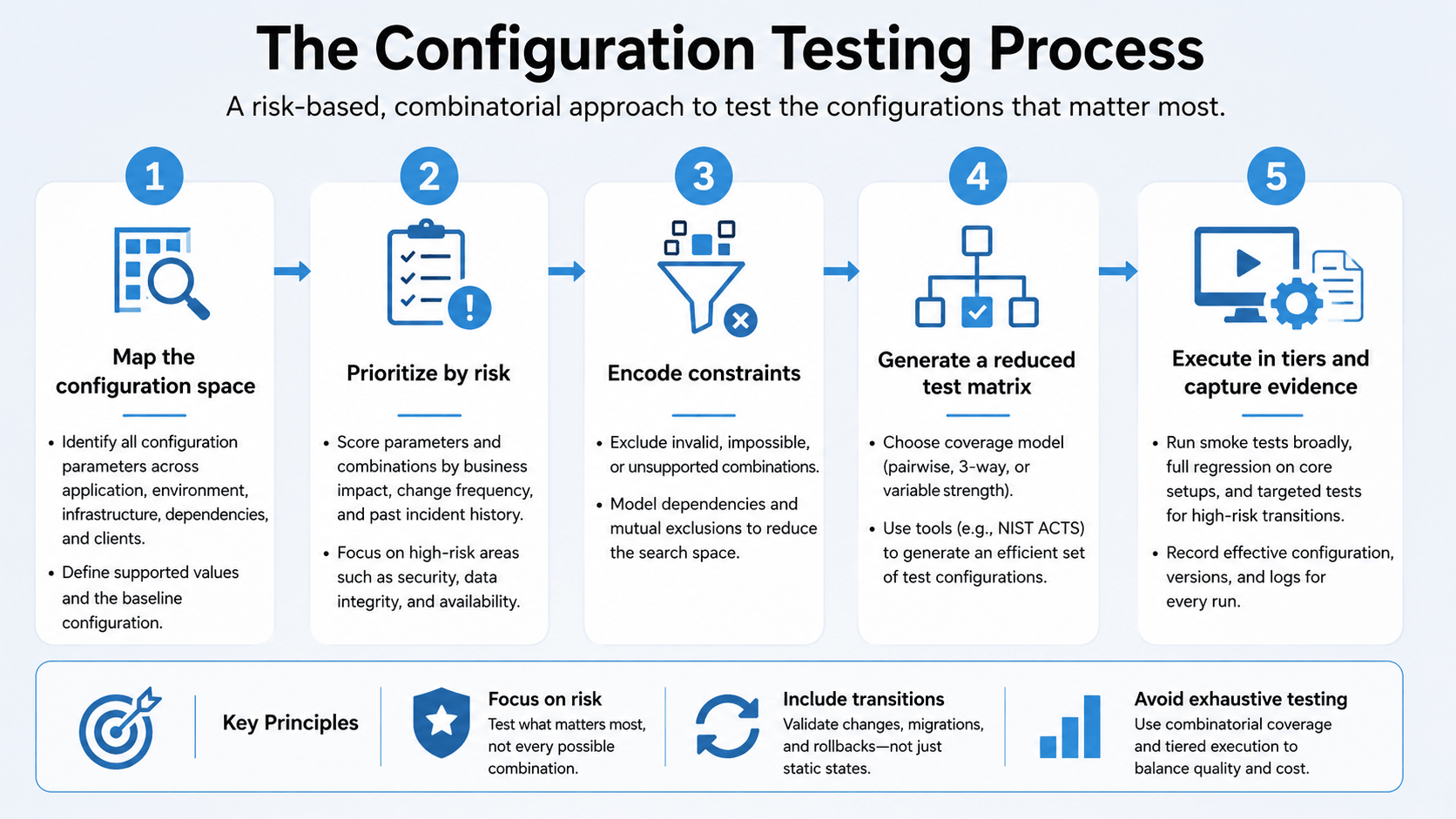
Image generated by AI Tool
A reliable process balances risk, coverage, and cost across a series of stages your team can walk through in order.
Defining the supported configuration space
This means documenting what your product officially supports: fully supported, supported with limitations, or unsupported. That documentation carries more weight when it reflects your customer usage data and production telemetry, since what’s easy to reproduce in a lab environment often misses where the real risk sits for your business.
Identifying configuration parameters
These come from your product docs, environment-variable definitions, and deployment manifests. Your incident reports and customer installation guides are worth checking too, since they often surface parameters nobody thought to document.
Classifying parameters by risk
Higher priority naturally goes to parameters that affect security or change data storage, since a failure there carries the most weight for your business. Parameters that interact with many other settings also carry elevated risk, even when each one looks harmless on its own.
Defining constraints
This means encoding which combinations can’t exist for your product, like Safari on Windows or a feature flag that depends on another being active first. Without constraints, a matrix generates impossible environments and wastes your infrastructure budget on configs that will never occur in practice.
Selecting a coverage model
Baseline testing works for your most common production setup, while pairwise or higher-strength combinatorial testing suits more complex systems. NIST’s ACTS tool generates t-way test sets with constraints and variable-strength models built in.Pairwise coverage isn’t automatically enough for every parameter, though. It tends to work well for a large set of relatively independent, low-risk parameters, while parameters tied to security, permissions, storage, or past incidents usually call for 3-way or higher coverage. Variable-strength coverage makes sense for your team when a small handful of parameters carries most of the risk. NIST points out that pairwise testing does not catch every interaction fault. Some defects only appear when three or more factors combine, which is exactly why ACTS supports constraints and variable-strength test sets.
Defining expected behavior
For each configuration, you decide whether the system should run normally, run with limitations, or reject the config outright. Whether the process stays alive isn’t enough to confirm on its own, since an app can start while silently ignoring a critical setting.
Automating environment provisioning
Environments built from version-controlled definitions, like Docker Compose files or Terraform modules, stay consistent and reproducible for your team. Static validation combined with behavioral testing confirms your infrastructure functions as intended, beyond simply deploying.
Generating a matrix from the model
Matrix strategies like GitHub Actions matrix builds create job runs from variable combinations. For large models, a reduced pairwise or risk-based set keeps your pipeline manageable and stops runtime from ballooning.
Executing tests in tiers
Smoke tests across every generated config, plus full regression on the baseline, give your team broad coverage without high cost. Security and migration tests round this out for the setups that need deeper scrutiny.
Collecting evidence
The config identifier, dependency versions, and logs for every run make up the evidence your team relies on later. What matters most is the state after overrides and interpolation apply, since that’s what the system actually runs on.
Configuration Testing Example: Building a Risk-Based Test Matrix
A worked example makes the process easier to apply to your own product. Five parameters commonly show up in a real testing plan for a product like yours: database version, authentication method, a legacy feature flag, replica count, and permission model.
Parameter
Values
Database
PostgreSQL 16, PostgreSQL 17
Authentication
Password, OIDC, SAML
Feature flag
Legacy mode on, legacy mode off
Replica count
1, 3
Permission model
Standard, restricted
Multiplying every value against every other value gives 2 × 3 × 2 × 2 × 2, or 48 possible configurations. Testing all 48 rarely makes sense, so a risk-based matrix narrows that number down to what actually matters:
Baseline configuration: the most common production setup, tested first and tested fully.
Unsupported constraints: combinations ruled out, like SAML paired with a database version already deprecated for customers.
Pairwise set: a reduced matrix where every pair of values appears together at least once, generated with a tool like ACTS.
Targeted 3-way cases: deeper coverage specifically around authentication, permissions, and the legacy flag, since those touch security and data access.
Transition cases: sequences like moving a customer from Password to OIDC, not the before and after states in isolation.
Expected result: for each combination, whether the system should run normally, degrade gracefully, or reject the configuration outright.
Working through even a small example like this turns risk-based coverage into something a team can actually build and reuse. It’s exactly the kind of model ACTS was designed to generate at scale.
Consider a layered strategy that includes: a small, stable regression suite, configuration-aware testing, risk-based release testing. Releases get additional tests based on things like what changed, architectural dependencies, customer impact, production usage, etc.
Customer-specific validation – Define a handful of representative “configuration archetypes” (highly restricted permissions, heavy workflow customization, lots of feature flags enabled, etc.) that exercise the major behavior differences.
Common Tools for Configuration Testing
Smart combinations of existing platforms cover most of what your team needs across environments, dependencies, and client variation. Here are some of the common choices here:
Docker Compose: defines isolated multi-service test environments and activates environment-specific services through profiles. Running docker compose config renders the effective model, letting you validate variable interpolation before execution.
Terraform:terraform validate checks syntax and internal consistency, terraform plan evaluates configuration against specific variables and provider context, and terraform test provisions temporary infrastructure, runs assertions, and tears it down again.
GitHub Actions matrix strategies: create multiple job runs from combinations of OS, runtime versions, and deployment profiles. GitHub expands whatever matrix it’s given, but it won’t reduce an exhaustive matrix down to pairwise or t-way coverage on its own, so a reduced set from ACTS needs to be passed in as explicit entries.
Playwright projects: run identical tests across browsers and viewport sizes without duplicating test logic.
NIST ACTS: generates t-way test sets with constraints, giving high-risk parameters stronger interaction coverage.
Kubernetes node conformance tests: validate whether a node behaves as a conformant Kubernetes node, useful for node-level platform checks but not a replacement for application-specific configuration testing.
Feature flag platforms like LaunchDarkly and Unleash: manage flag states and track which combinations run in production.
Infrastructure-as-code validators like Checkov and tfsec: detect misconfigurations statically before deployment, best paired with behavioral tests.
Where aqua cloud Fits Into Your Configuration Testing Stack
Docker Compose, Terraform, and ACTS generate and provision configs, but none of them track what’s actually been tested against your supported matrix. aqua cloud handles that part, giving your team one place to see coverage instead of piecing it together from separate tool logs:
Test Execution Labels: tag runs by OS, database version, or feature-flag state
Parameterized test cases: reuse one scenario across your whole matrix
aqua Intelligence: an AI software testing layer that generates test cases from your own project docs
Native integrations: Jenkins, GitHub, Azure DevOps, and Jira stay in sync
Turn a generated test matrix into 100% traceable, reportable coverage
Best Practices for Effective Configuration Testing
The following practices separate configuration testing that detect real problems for you from testing that just creates a false sense of confidence.
Testing transitions as well as static states
Many defects appear during enablement or migration. Your system sitting still rarely shows where the real risk is. Changing a default value counts as a transition too, and even with schema compatibility intact, it can break production deployments broadly.
Prioritizing production-weighted coverage
A suite with high theoretical coverage but low production relevance has your team spending effort on rare combinations. Telemetry showing which configs customers actually run helps direct that effort where it matters.
Encoding constraints explicitly
An unconstrained matrix generates invalid combinations and makes results harder to interpret. What can’t coexist in the product is worth documenting explicitly, since that keeps the matrix grounded in what can actually happen for your team. A system that rejects invalid combinations clearly, starting in a defined, predictable state, avoids the worst outcome. Silent acceptance of bad values tends to surface as a much bigger problem later.
Capturing effective configuration, not declared
A value in a config file can get overridden by an env var or a remote flag. What the system actually sees after every override applies matters more than what’s written in the source file. Results built on this effective state also lose meaning once a deployed environment drifts from what’s declared. Comparing source-controlled manifests with deployed resources on a regular schedule keeps that mismatch from growing unnoticed.
Isolating test environments
Reusing contaminated environments lets state from one run bleed into the next. That makes configurations appear valid or invalid incorrectly, which quietly undermines your whole test suite.
Using tiered execution and maintaining the support matrix
Running your entire regression suite against every config isn’t sustainable. Smoke tests broadly, plus full regression on the baseline, keep coverage wide without the cost exploding. Your supported configurations shift as platforms and customer usage evolve too, so reviewing that support matrix regularly keeps your testing effort aimed at the right priorities.
Consider: Where is the implementation complexity and risk? Which configurations are most common in the wild? Where can I apply automation to evaluate more aspects of configuration more quickly? How can the implementation be improved to make it easier to test?
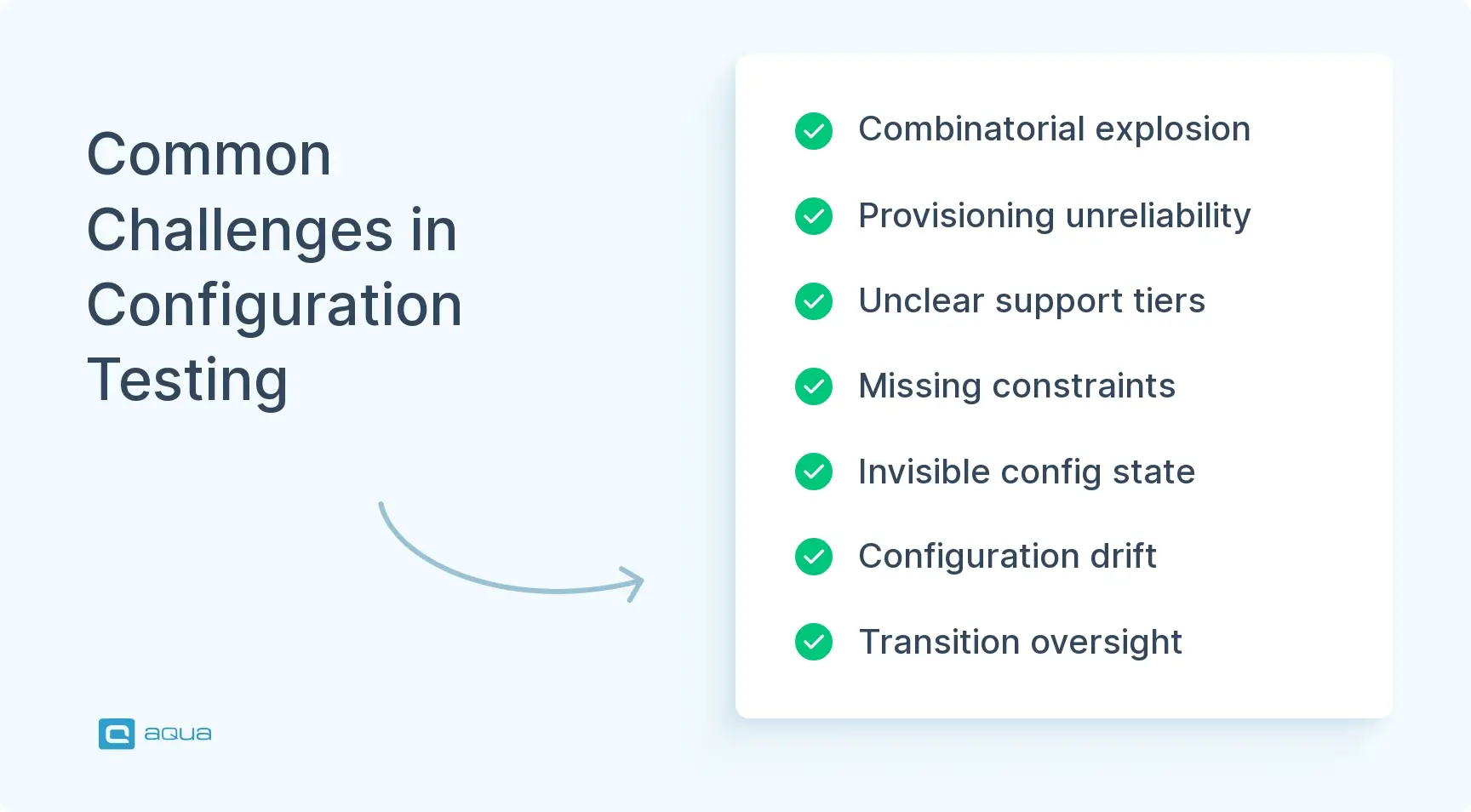
Configuration testing runs into predictable obstacles. Recognizing them ahead of time helps your team design around the friction instead of getting surprised by it mid-project.
Challenge
What it looks like
Combinatorial explosion
Ten parameters with four values each create over a million combinations, far more than any team can cover
Environment provisioning reliability
Manual setup steps or scripts that break randomly limit how well a test suite scales
Unclear support boundaries
Without documented support tiers, testing effort covers either everything or almost nothing
Missing constraints
Unconstrained matrices generate impossible configs, like Safari on Windows
Invisible effective configuration
Testing against declared config while the system reads overridden values produces false passes
Configuration drift
Deployed environments that no longer match your manifests make test results unreliable
Transition blindness
Teams test static configs but skip flag rollouts and migrations
Security misconfiguration detection
Finding exposed endpoints or permissive settings requires deliberate adversarial testing
Evidence loss
Missing config values and logs turns your debugging into guesswork
Treating all configs equally
Ignoring production usage and defect history spreads effort thin across low-value coverage
How to Measure Configuration Testing Coverage
Choosing which combinations to test only solves half the problem for you. The other half is knowing whether what’s been tested is actually enough, and that’s where a handful of coverage metrics come in.
Supported configuration coverage: the share of documented supported configurations that have actually been tested, calculated as tested configurations divided by documented ones.
Production-weighted coverage: how much of real production usage is represented by the configurations your team has tested, drawn from telemetry instead of assumption.
Interaction coverage: how thoroughly tests cover 2-way, 3-way, or higher-level parameter interactions, beyond individual values in isolation.
Transition coverage: the share of important enablement, migration, upgrade, downgrade, and rollback paths your team has actually exercised.
Invalid-configuration coverage: how much of the forbidden, conflicting, and malformed combination space tests check, confirming the system fails safely instead of silently.
NIST defines combinatorial coverage through t-way combinations and covering arrays, so simply counting how many environments were run tells you very little on its own. Tracking these five metrics together gives your team a much clearer picture of where coverage actually stands.
Tracking configuration testing across spreadsheets makes it hard to know what’s actually been validated. aqua cloud, an AI-driven test and requirement management solution, provides centralized test management, traceability, and integration across the QA ecosystem. With aqua, test execution is tracked with custom labels that capture OS, runtime version, and infrastructure setup, showing your team exactly which configurations have been covered and where coverage is missing. aqua Intelligence uses your project’s own documentation to generate context-aware test cases and test data for complex config interactions. Native integrations extend this across the stack, including Jenkins, JMeter, PowerShell, UnixShell, SoapUI, and Ranorex, plus database testing on MSSQL and Oracle and Capture for recording test execution with video and screenshots, alongside 10+ other native automation integrations built to fit your existing pipeline.
Boost QA testing efficiency by 80% with aqua’s Intelligence
Configuration testing serves as your frontline defense against variability. Your application running across a sprawling mix of operating systems and feature flags carries risk in every untested transition, and any one of them can turn a clean test run into a production incident. An accurate model of your configuration space, combined with explicit constraints, keeps effort away from impossible combinations. Prioritizing risk over exhaustive coverage keeps your failures reproducible when they do happen.
What is the difference between configuration testing and compatibility testing?
Configuration testing and compatibility testing overlap, but they answer different questions. Configuration testing examines how changes in settings and dependencies affect system behavior. Compatibility testing focuses on whether a product interoperates correctly with supported browsers, operating systems, and devices.
What types of configurations are typically tested?
Application config like feature flags, runtime config like language version, infrastructure config like memory limits, and client config like browser and device type. Coverage of the interactions between these categories matters just as much as the individual variables.
When is configuration testing performed in the software development lifecycle?
Configuration testing happens at multiple stages. Early development validates default configs, pre-release testing runs risk-based coverage across high-priority configs, and post-release monitoring detects configuration drift once in production.
How large should a configuration test matrix be?
There’s no fixed number, since the right size depends on how many parameters a product exposes and how much risk each one carries. Pairwise coverage for most parameters, plus targeted combinatorial depth for the ones touching security, tends to strike a reasonable balance.
Can configuration testing be automated end to end?
Much of it can. Environment provisioning and test execution automate well with tools like Terraform and GitHub Actions. Risk classification still depends on human judgment, since it relies on product knowledge no tool can infer on its own.
Pavel, a Quality Assurance Consultant and Author, brings deep expertise to solving complex testing challenges. His background in software development has helped organizations transform their QA practices from reactive to proactive. Beyond consulting, Pavel develops best practice guides and case studies for aqua cloud that…
Robert has several years of experience in process optimisation and test management. He is an expert in defining and implementing workflows by adapting aqua to the clients’ processes.
Nurlan, a QA Coordinator & Quality Standards Officer, takes pride in orchestrating seamless QA operations. His expertise in coordinating QA-focused projects and integrating QA solutions has consistently yielded top-tier client satisfaction. Aside from a full-time QA coordinator, Nurlan's role involves creating compelling content that educates…
Join our community of enthusiastic experts! Get new posts from the aqua blog directly in your inbox. QA trends, community discussion overviews, insightful tips — you’ll love it!
We're committed to your privacy. Aqua uses the information you provide to us to contact you about our relevant content, products, and services. You may unsubscribe from these communications at any time. For more information, check out our Privacy policy.
X
🤖 Exciting new updates to aqua Intelligence are now available! 🎉