When they say Application Programming Interfaces (APIs) are the backbone of many business operations, it is not a bluff: 83% of all web traffic comes from APIs. This stat from Akamai shows how vital APIs are, creating the necessity for API testing. Without proper testing, APIs will fail. This will cause security breaches, service disruptions, data loss, and eventually, damage the reputation of your company. In this complete guide, we cover everything regarding API testing so you can avoid these consequences.
API testing validates that endpoints return correct data, behave reliably under load, and hold up against security threats, all without touching the UI layer.
Effective api testing strategies combine functional, performance, security, and integration testing to cover the full range of conditions an API will face in production.
Automation is central to any scalable api testing tutorial: connecting tests to CI/CD pipelines ensures issues are caught at the code change level, not after deployment.
Tracking the right metrics, such as error rate, response time, and test coverage per endpoint, tells you whether your API is genuinely ready to ship.
Following these principles in practice is what separates a reliable API from one that fails under real-world conditions. Read on for the full breakdown 👇
What is API testing?
API testing is the process of evaluating application programming interfaces to confirm they function correctly, perform reliably under different conditions, and hold up against security threats.
In simple terms, APIs allow different software systems to communicate. And proper API testing ensures these data communication pathways are smooth and secure.
Purpose of API Testing:
Validation: Ensures APIs return the expected results and data.
Reliability: Confirms that APIs perform consistently under various conditions.
Security: Identifies vulnerabilities to protect against potential breaches.
Performance: Measures how APIs handle different loads and respond to requests.
What API Testing is Not:
UI Testing: It doesn’t involve the user interface or how users interact with the application visually.
End-to-End Testing: While API testing is a part of end-to-end testing, it focuses only on the API layer, not the entire workflow.
Now that we have defined the concept, let’s focus on the importance of this testing.
It's better to test at API level since API likely doesn't change as often as the UI. Also, API tests will likely run faster than UI tests since it is "text" based.
somethingmichael
Posted in Quality Assurance Reddit thread, 8 months ago
Importance of API testing
A well-structured API testing strategy directly determines how much risk your team carries into each release. Let’s look at this real-life scenario that happened just recently: On June 28, 2024, ChatGPT and its API experienced a breakdown. For almost an hour, users trying to access ChatGPT faced errors. Businesses using ChatGPT for customer service couldn’t assist their clients, and developers relying on the API saw their applications fail. It took some time to fix the issue, but by then, many users were frustrated and the trust in the service was shaken.
What does this scenario teach us? First, never ever fully rely on AI in your job. Secondly, and most importantly, continuously test your APIs before and after deployment to ensure they function correctly and reliably.
Per TotalUptime research, an average service outage will cost you 7900$ per minute. You can calculate how much it cost OpenAI a few weeks ago. Although your business is probably not as big as ChatGPT (we wish it is up there in the near future though), you should still have your APIs tested for these reasons:
Prevent potential disruptions
Ensure smooth functionality
Safeguard against security vulnerabilities.
Types of API testing
API testing has different types, each one serving different purposes. These types test API from different aspects and perspectives while serving the same goal: having secure, smooth APIs. Below are the different types of API testing.
Functional Testing
Functional testing verifies that the API performs its intended functions correctly according to the specifications. It ensures that the API endpoints return the expected results and behave as designed. For example, testing an API endpoint for user authentication checks if it correctly verifies credentials and returns the appropriate success or error message.
Performance Testing
Performance testing assesses how the API handles various conditions, including response time and throughput. It determines if the API can manage expected traffic without performance issues. An example would be measuring how an API endpoint that processes transactions handles a high volume of simultaneous requests to ensure it processes transactions within acceptable time limits.
Security Testing
Security testing identifies vulnerabilities and assesses the API’s security posture against unauthorised access, data breaches, and other potential threats. This involves testing for common security issues like SQL injection, cross-site scripting (XSS), or improper access controls to ensure the API is secure from potential attacks.
Integration Testing
Integration testing verifies that the API integrates smoothly with other systems or services. It ensures that data flows correctly between components and that interactions are smooth. For instance, testing an API that interacts with a payment gateway ensures transactions are processed correctly and that payment information is accurately transmitted.
Validation Testing
Validation testing confirms that the API returns data in the expected format and meets the requirements outlined in the API documentation. It ensures compliance with the defined specifications. For example, testing an API that retrieves user profile information checks if it returns user details in the correct JSON format as specified by the API documentation.
Load Testing
Load testing evaluates the API’s ability to handle a specific volume of requests and its performance under expected load conditions. It helps you ensure the API can manage anticipated traffic. An example would be simulating 1,000 simultaneous users querying product information through an API endpoint to assess how well it performs under high load.
Stress Testing
Stress testing subjects the API to extreme conditions or loads to determine its breaking point and how it handles stress or failure conditions. It helps you assess the API’s robustness. For instance, deliberately sending an overwhelming number of requests to an API endpoint observes how it behaves when pushed beyond its capacity and how it recovers from potential crashes.
Runtime and Error Detection
Runtime and error detection focuses on identifying and addressing errors that occur during the API’s execution. It ensures the API operates smoothly and handles errors effectively. Monitoring an API during execution to detect runtime errors like exceptions or timeouts ensures it handles these issues gracefully with appropriate error messages.
Penetration Testing
Penetration testing simulates attacks on the API to identify and address security vulnerabilities. It aims to exploit weaknesses and assess the API’s defences against potential threats. By performing a penetration test, you uncover vulnerabilities like insecure endpoints or weak authentication mechanisms to exploit them in a controlled environment.
Contract Testing
Contract testing ensures that the API adheres to predefined contracts or specifications, such as response formats, status codes, and data structures. It helps you verify consistency and compatibility. Testing an API to check if it consistently returns the expected response fields and status codes as defined in the API’s contract ensures that it aligns with the specified requirements.
aqua cloud centralises functional, security, performance, and integration tests under a single platform.
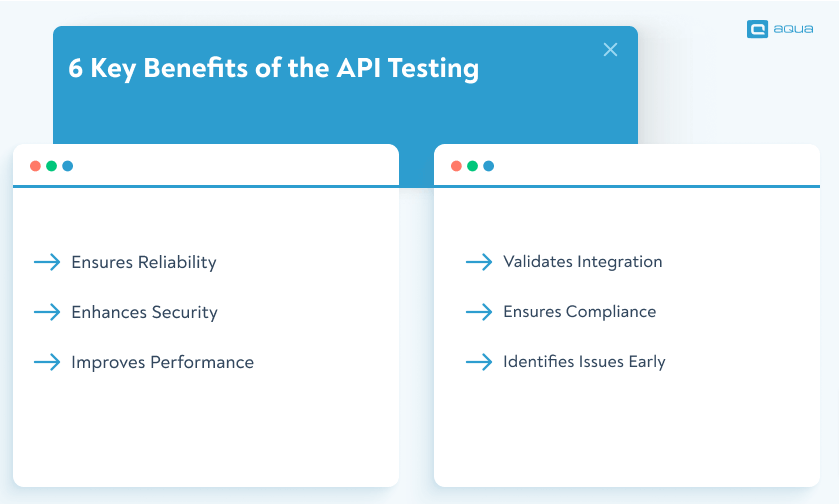
We already know what happens when we ignore API testing or carry out subpar testing strategy. This time, we focus on the benefits to point out what API testing brings to your overall testing process:
Ensures Reliability: API testing verifies that your API consistently performs as expected. It helps you provide dependable functionality for users and integrated systems.
Enhances Security: It identifies vulnerabilities and security issues early, protecting your API from potential threats and unauthorised access.
Improves Performance: API testing assesses response times and handles loads effectively. This way, you ensure the API can manage traffic and perform efficiently under different conditions.
Validates Integration: It confirms that the API integrates smoothly with other services and systems, ensuring seamless data flow and interactions.
Ensures Compliance: Checks that the API adheres to specifications and contracts, maintaining consistency and meeting documented requirements.
Identifies Issues Early: Detects errors and potential problems before deployment, reducing the risk of issues affecting users and systems in production. This is also beneficial for agile testing practices.
You can maximise these benefits using a test management system (TMS). A perfect example of this TMS is aqua cloud.
Are you looking for the ultimate helper in API testing and a central hub for managing your entire QA process? Look no further than aqua cloud. Being the first tool in QA to provide AI-powered features, aqua cloud bring German quality to your testing efforts. By using aqua, you can streamline your API testing processes and ensure comprehensive test management:
Centralised Test Management: aqua collects all your tests, including API tests, in one place. This centralisation simplifies test management and provides a clear overview of test coverage and results.
API Requests and Testing: With aqua cloud, you can send requests via its API to check the functionality of the API under test. This way, you directly interact with the API.
Automated Results Documentation: Once the API tests are executed, aqua cloud captures and documents the results. This automation ensures that test outcomes are consistently recorded and accessible for analysis.
Enhanced Visibility: By integrating API testing into aqua cloud, you gain better visibility into your test results and processes, enabling you to quickly identify and address issues.
Improved Efficiency: The ability to manage and document API tests within aqua cloud reduces manual effort, speeds up testing cycles, and helps maintain a high level of accuracy in test results.
These are not even half of what makes aqua cloud special. aqua takes away the pain of testing by doing the following:
AI-powered testing cycle: Simple requirements, test case, test data creation with AI. Just 3 CLICKS and you cover most part of your testing cycle.
100% traceability: Ability to trace every requirement and ensure each requirement is accounted for, tested, and validated.
Seamless bug-reporting: aqua’s integration with the visual bug recording tool Capture makes collaboration with the devs a breeze.
AI-Copilot: Having AI as your guide along the way, making sure you streamline test execution, identify issues faster, and ensure thorough coverage with minimal manual effort.
aqua helps you deliver superior software testing results and achieve greater efficiency with all these features. Ready to transform every step of your testing efforts?
Benefit from more than just an API testing tool: optimise 100% of your efforts
The difference between a weak and a strong api testing strategy comes down to how systematically each concern, such as functionality, performance, security, and integration, is addressed before deployment. Two things first: attention to detail and thoroughness in the testing process. Effective API testing examples go beyond just verifying basic functionality. they include comprehensive strategies to ensure reliability, performance, and security. By applying the best practices below, you can enhance the quality of your API testing and deliver more reliable and secure integrations:
Define Clear Objectives: Set specific goals for what you want to achieve with your API tests. Include functional requirements, performance metrics, and security concerns.
Automate Where Possible: Use automated testing tools to run tests more efficiently and frequently. Ensure quick feedback and early detection of issues. We will have a separate section for this practice.
Test for Different Scenarios: Cover a lot of scenarios, including edge cases, error conditions, and varying input parameters, to ensure the API handles all possible situations correctly.
Monitor Performance: Include performance testing to assess how the API handles load, stress, and scalability, and identify potential bottlenecks.
Validate Security Measures: Perform security testing to identify vulnerabilities and ensure the API is protected against common threats and unauthorised access.
Use Realistic Data: Test with realistic data to simulate actual usage conditions. Make sure the API behaves correctly with the types of data it will encounter in production.
Document Test Cases and Results: Keep detailed records of test cases, scenarios, and outcomes. Combine the efforts of analysis, reporting, and future testing efforts.
Integrate with CI/CD Pipelines: Include API testing in your Continuous Integration/Continuous Deployment (CI/CD) pipelines for continuous validation and quicker release cycles.
Review and Update Regularly: Regularly review and update your API tests to reflect changes in the API, new features, and evolving requirements.
Now, let’s put these best practices into an illustrated example to make sure you fully understand each one of them practically.
Experience API testing firsthand with our interactive playground below. Try different endpoints, toggle between testing types, and see how real APIs respond to various scenarios – it’s the best way to understand the concepts we’ve just covered.
🚀 Interactive API Testing Playground (Click to open)
▼
API Request Builder
Response & Analysis
Ready to test
-
Click "Send Request" to see API response...
Performance Metrics
Response Time:-
Throughput:-
Error Rate:-
Testing Insights
Select a test type and send a request to see detailed insights...
Step-by-Step Process of Testing an API: A Use Case
Imagine you’re part of a team at a tech company about to launch a new API designed for managing cloud resources. Your goal is to ensure the API is functional, reliable, and secure before it goes live. Here’s how you’d approach it:
First, define your testing objectives. You need to establish what you aim to verify, such as provisioning servers, tracking resource usage, and managing security settings. This includes specifying what success looks like for each feature.
Next, create detailed test cases. Develop specific scenarios to test the API’s capabilities, like creating virtual machines, querying resource data, and configuring security. Your test cases will outline the expected inputs, processes, and outcomes.
Then, set up your testing environment. Prepare virtual resources and mock data to simulate real-world conditions. Deploy the API in this environment to closely replicate the production setup.
After that, execute functional tests. Test core functionalities like server provisioning and data queries. Verify that the API performs as expected under various conditions.
Following this, perform performance testing. Simulate high traffic and multiple simultaneous requests to see how the API handles load. Measure response times and ensure stability.
Next, conduct security testing. Check for vulnerabilities such as unauthorised access or insecure data handling. Test for common security issues to ensure the API is protected.
Then, validate data and error handling. Test API to see how it manages different data inputs and error scenarios. Ensure that it handles these situations gracefully and provides appropriate feedback.
After testing, review and document the results. Create detailed reports on what worked, what didn’t, and any issues encountered. This documentation will help your team address problems and improve the API.
Finally, integrate testing into your CI/CD pipeline. Automate tests to run with every code change. This ensures continuous validation and helps catch issues early in the development process.
Regularly update your test cases to reflect new features and changes in the API. Keeping tests current ensures ongoing coverage and quality.
By following these steps, you ensure that your cloud management API is thoroughly tested and ready for a successful launch.
How do you automate API testing?
Automating API testing means using tools and frameworks to execute test cases consistently without manual input, which increases coverage and removes the variability that comes with manual runs. Although not perfect, this approach has a higher chance of increasing efficiency, consistency, and coverage while reducing human error. Here’s how you effectively automate API testing:
Choose the Right Automation Tool: Select a tool that fits your needs, such as Postman for API requests, JUnit for Java-based testing, or Selenium for broader automation. The tool should support API testing and integrate with your development environment.
Define Test Cases and Scenarios: Clearly outline what you want to test. Create detailed test cases that cover the functional, performance, security, and integration aspects of your API. Include various input conditions and edge cases.
Create Automated Test Scripts: Write scripts using your chosen tool or framework. These scripts will perform API requests, validate responses, and handle errors. Use scripting languages like JavaScript, Python, or Java, depending on your tool.
Set Up Continuous Integration (CI): Integrate your automated tests into the CI pipeline. Tools like Jenkins, GitLab CI, or Travis CI can automatically trigger tests with each code change, ensuring that new changes don’t break existing functionality.
Schedule Regular Test Runs: Configure your automation setup to run tests at regular intervals or during specific events. These events might include nightly builds or pre-release stages. This way, you ensure ongoing validation and catch issues early.
Monitor and Report Results: Implement monitoring to track test execution and results. Use the reporting features of your testing tool to generate detailed reports and logs. Review these reports to identify and address any issues.
Maintain and Update Tests: Regularly update your automated tests to reflect changes in the API, such as new features or modifications. Ensure that tests remain relevant and continue to provide accurate coverage.
With API test automation, you enhance test coverage and speed up the detection of issues. But what are the best tools to apply API testing efficiently? Let’s look at some industry leaders.
Best API Testing Tools
Here are some of the top API automation testing tools available:
aqua cloud: aqua is still a strong choice to start. It is an AI-powered test management system that integrates with various testing tools and manages all test types, including API tests. It allows you to send requests via its API to check functionality and document results.
Apart from these, aqua brings 10 years of experience and successful use cases from different industries, especially heavily regulated ones. With aqua, you streamline your whole testing cycle with AI-powered test cases, requirements, and test data generation, you achieve 100% traceability and coverage, missing no gap behind. aqua’s seamless integrations with automation tools like Selenium, SoapUI, JMeter or Jenkins will help you automate different phases of the testing cycle while remaining in one centralised, easy-to-use hub. With Capture integration, you also ensure 100% visual, video-proof bug reports, maximising the communication between the QA and dev teams.
Rely on AI-powered solution to streamline 100% of your testing cycle
Postman: Widely used as manual and automated API testing software. It offers a user-friendly interface and powerful features for testing APIs.
SoapUI: Ideal for both REST and SOAP API testing. It provides comprehensive testing capabilities, including functional, performance, and security testing.
JMeter: Primarily known for performance testing but also supports functional API testing. It’s highly extensible with plugins.
RestAssured: A Java library for testing RESTful APIs. It integrates well with Java-based test frameworks like JUnit and TestNG.
Swagger: Provides API documentation and testing. It’s useful for both defining and testing APIs with an easy-to-use interface.
Here is a detailed comparison of these tools for API testing:
Tool
Type
User Interface
Integration
Supported Protocols
Performance Testing
Security Testing
Extensibility
Scripting
Documentation
Postman
Manual & Automated
User-friendly GUI
CI/CD, GitHub, Jenkins
REST, GraphQL, SOAP
No
Basic Security Features
High
JavaScript
Basic
SoapUI
Manual & Automated
Comprehensive GUI
CI/CD, Jenkins
REST, SOAP
No
Comprehensive
High
Groovy, Java
Comprehensive
JMeter
Performance & Functional
Graphical Interface
CI/CD, Jenkins
HTTP, HTTPS
Yes
Limited
High
Java
Limited
RestAssured
Automated
Code-based
Java-based frameworks
REST
No
Basic
High
Java
No
Swagger
Documentation & Testing
Web-based GUI
CI/CD, SwaggerHub
REST, SOAP
No
No
Limited
None
Comprehensive
Katalon Studio
Manual & Automated
User-friendly GUI
CI/CD, Jenkins
REST, SOAP
Yes
Basic
High
Groovy, Java
Basic
Common API Testing Challenges and How to Solve Them
Even teams with solid api testing strategies run into recurring problems that slow them down or reduce the reliability of results. Most are predictable and solvable with the right approach.
1. Unstable test environments. When the environment behaves differently between runs, results become unreliable and failures are hard to diagnose.
Solution: Use dedicated staging environments with consistent configurations and mock external dependencies, so tests reflect the API itself rather than surrounding infrastructure.
2. Inconsistent test data Tests that rely on shared or live data produce inconsistent outcomes and can interfere with each other across runs.
Solution: Maintain isolated, version-controlled datasets for each scenario. In aqua, test data can be managed and reused across test cases, keeping runs independent and results trustworthy.
3. Authentication handling in automation. Token expiry, session management, and multi-step auth flows cause false failures when automation scripts do not account for these states dynamically.
Solution: Build token refresh logic into your test setup to prevent failures caused by expired credentials or session timeouts.
4. Poor test documentation. Without clear records of what was tested and what failed, diagnosing regressions takes significantly longer and fixes get delayed.
Solution: Log request and response data for every run and store results with traceability links back to requirements. This is a core principle in any practical api testing tutorial and gives your team the context needed to act quickly.
API Testing Metrics and Coverage
Tracking the right metrics turns raw results into release decisions. Any solid api testing strategy should define these upfront.
1. Response time. How long the API takes to return a result. Measured in milliseconds per request.
Formula: Average response time = Total response time / Number of requests
Track this across builds. A steady increase signals performance degradation before it reaches users.
2. Error rate. The share of requests returning unexpected or failed responses.
Formula: Error rate = (Failed requests / Total requests) x 100
A rising error rate on previously stable endpoints signals a regression. Investigate before the build progresses.
3. Endpoint coverage. The percentage of API endpoints covered by at least one test, including both happy path and negative scenarios such as invalid inputs and unauthorised access.
Formula: Endpoint coverage = (Tested endpoints / Total endpoints) x 100
Gaps in coverage are where production defects tend to hide.
4. Code coverage from API tests. How much backend logic is exercised through the API layer, expressed as a percentage of lines or branches hit.
Formula: Code coverage = (Lines executed during API tests / Total lines) x 100
Combine this with endpoint coverage for a complete picture of what is genuinely tested.
Tracking all of these in a centralised tool like aqua gives your team clear visibility into test health, coverage gaps, and release risk in one place.
Conclusion
In summary, effective API testing is crucial for maintaining the functionality, security, and performance of your applications. Now that you learned about the various types of API testing, and the best practices, you are ready to start a robust strategy for your business too. Using advanced tools like aqua cloud, you can ensure comprehensive coverage and reliable integrations. With a solid API testing strategy, you’ll not only prevent potential disruptions but also enhance your overall software quality and user satisfaction. Remember, continuous testing and automation are key to staying ahead in today’s fast-paced development environment. So, are you ready to transform your testing approach? Explore the power of aqua cloud for free and take your testing to the next level.
API testing is the process of evaluating APIs to ensure they function correctly, reliably, and securely. It involves testing the endpoints of an API to verify that it returns the expected responses and performs as intended under various conditions. By using API testing tools, you can test API functionality, security, and performance to ensure smooth and secure data communication between different software systems.
What are the 4 Methods of API Testing?
The four primary methods of API testing are:
Functional Testing: Verifies that the API performs its intended functions and returns the correct results according to its specifications.
Performance Testing: Assesses how the API handles various loads and conditions, measuring response times and throughput.
Security Testing: Identifies vulnerabilities and potential security risks, ensuring the API is protected against unauthorized access and data breaches.
Integration Testing: Checks how the API integrates with other systems or services, ensuring seamless data flow and interaction.
What is API Testing Done For?
API testing is done to:
Validate Functionality: Ensure that the API performs as expected and returns the correct data.
Assess Reliability: Confirm that the API consistently operates under different conditions and loads.
Enhance Security: Detect vulnerabilities and protect against potential security threats.
Evaluate Performance: Measure how the API handles various traffic levels and responds to requests.
Ensure Integration: Verify that the API integrates smoothly with other systems and services.
Does API Testing Need Coding?
Yes, API testing often involves coding, especially when automating tests. API test automation typically requires writing scripts using programming languages such as JavaScript, Python, or Java, depending on the API automation testing tools used. For manual testing, coding may not be required, but understanding the API’s functionality and endpoints is essential.
Is API Testing Manual or Automated?
API testing can be both manual and automated. Manual API testing involves manually sending requests and analyzing responses using tools like Postman. Automated API testing uses API automation testing tools to execute predefined test cases automatically, improving efficiency and consistency. A combination of both methods is often used to ensure comprehensive testing coverage.
Is API Testing Easy?
The complexity of API testing depends on the API’s design and the testing requirements. While some aspects of API testing, such as basic functional tests, may be straightforward, others, like security and performance testing, can be more complex. Using API testing software and following an API testing tutorial can help simplify the process and make it more manageable.
Does QA Do API Testing?
Yes, QA professionals often conduct API testing as part of their responsibilities. They use various API testing tools and methods to ensure that APIs meet quality standards and perform correctly. API testing is a critical part of the QA process, as it helps identify and address issues before APIs are integrated into larger systems or released to end-users.
How do you test API error responses and negative scenarios?
Send requests with invalid inputs, missing required fields, incorrect authentication tokens, and out-of-range values. Verify that the API returns the correct HTTP status codes and meaningful error messages. Negative scenarios should be treated with the same rigor as happy path tests.
What is the difference between API testing and contract testing?
API testing checks whether an endpoint behaves correctly in isolation, covering functionality, performance, and security. Contract testing verifies that the API conforms to a shared agreement between provider and consumer, such as agreed response formats and status codes, ensuring both sides stay compatible as each evolves independently.
How should you manage test data for reliable API automation?
Use isolated, version-controlled datasets that are reset between test runs to prevent interference between cases. Avoid shared or live production data. Where possible, generate test data programmatically as part of the test setup so each run starts from a known state.
Stefan is an entrepreneur who deeply believes in technology. With his company, andagon Group, he’s been empowering businesses around the world to build better software through their quality assurance services and products since 2001. Stefan has cultivated a knack for tailoring aqua to seamlessly integrate…
Pavel, a Quality Assurance Consultant and Author, brings deep expertise to solving complex testing challenges. His background in software development has helped organizations transform their QA practices from reactive to proactive. Beyond consulting, Pavel develops best practice guides and case studies for aqua cloud that…
Nurlan, a QA Coordinator & Quality Standards Officer, takes pride in orchestrating seamless QA operations. His expertise in coordinating QA-focused projects and integrating QA solutions has consistently yielded top-tier client satisfaction. Aside from a full-time QA coordinator, Nurlan's role involves creating compelling content that educates…
Join our community of enthusiastic experts! Get new posts from the aqua blog directly in your inbox. QA trends, community discussion overviews, insightful tips — you’ll love it!
We're committed to your privacy. Aqua uses the information you provide to us to contact you about our relevant content, products, and services. You may unsubscribe from these communications at any time. For more information, check out our Privacy policy.
X
🤖 Exciting new updates to aqua Intelligence are now available! 🎉