Login pages carry more traffic than any other screen in a digital product, and these gateways are often the first target attackers probe. Most test suites verify credentials and passwords, with a few complementary checks limited to data protection and cybersecurity regulations. Other defects reach production when left untested, so an extensive list of test cases for the login page should be written and executed to cover every possible scenario.
Your login page faces brute force, credential stuffing, session hijacking, and user enumeration, so it needs deeper coverage than any other screen in your product.
Generic errors like “Invalid credentials” block user enumeration, while messages such as “Account does not exist” confirm valid usernames to attackers for free.
Rate limiting has to trigger after repeated failures while still accepting the correct password, otherwise attackers can lock your legitimate users out on purpose.
Session identifiers must change after authentication. A reused session ID lets an attacker pre-set a session, wait for your user to log in, then hijack it.
OWASP ASVS 5.0 requires one-time codes to work only once, so replay of an intercepted OTP inside its validity window counts as a failed test.
Below you get 80 test cases for login page validation in one table, with IDs, expected results, and priorities you can paste straight into your test management tool. After the checklist, you will delve into the categories where the expected result needs explaining, from session security through WebAuthn, PKCE, and account recovery.
What Makes a Solid Login Test Case?
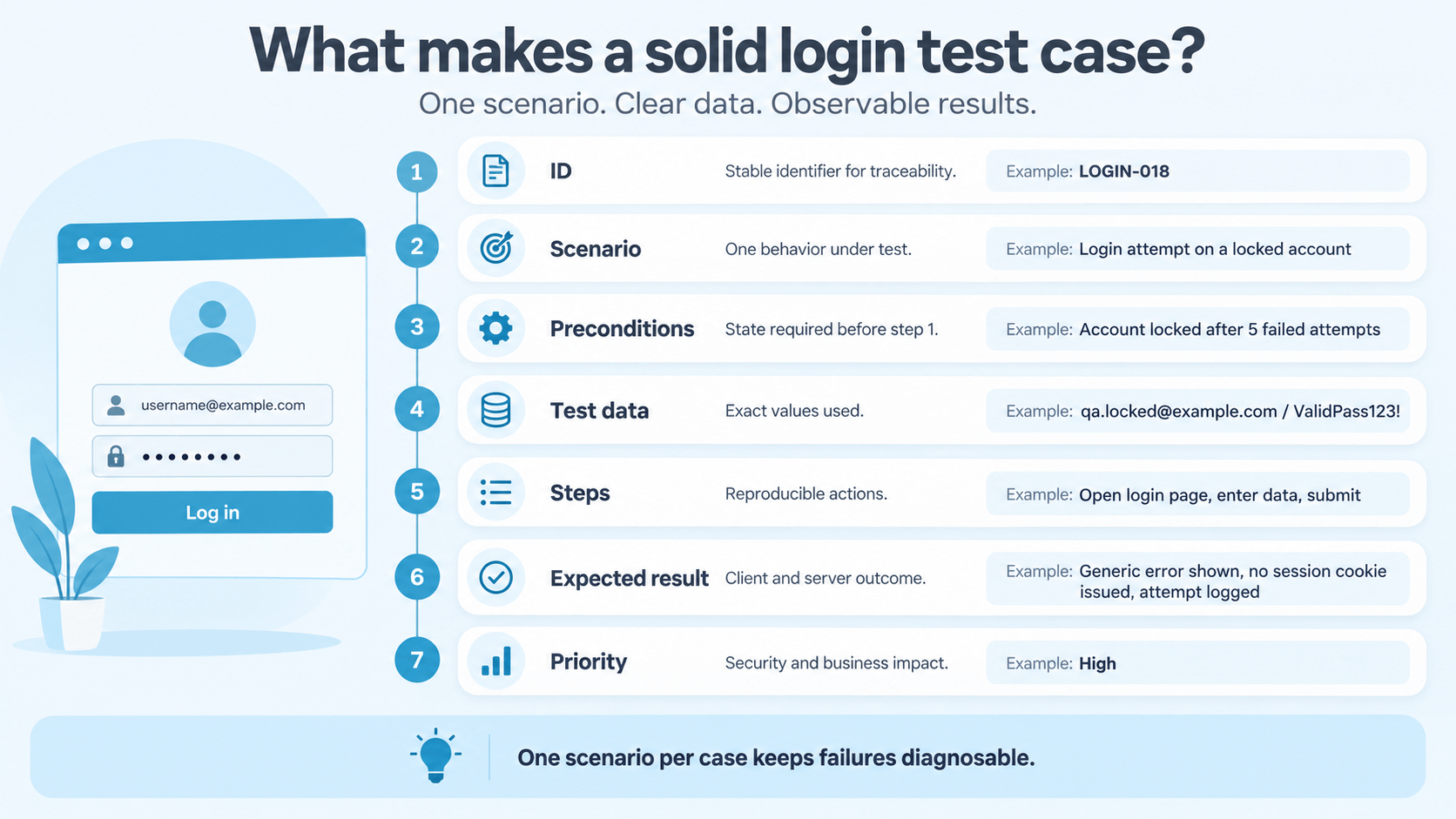
A solid login test case names one scenario, states its preconditions and data, and defines an outcome your team can verify on the client and the server.
Element
What it holds
Login example
ID
Stable identifier for traceability
LOGIN-018
Scenario
One behavior under test
Login attempt on a locked account
Preconditions
State required before step 1
Account locked after 5 failed attempts
Test data
Exact values used
qa.locked@example.com / ValidPass123!
Steps
Reproducible actions
Open login page, enter data, submit
Expected result
Client and server outcome
Generic error shown, no session cookie issued, attempt logged
Priority
Security and business impact
High
One scenario per case keeps your failures diagnosable, because when a run goes red, the ID alone tells your team which behavior broke. Anyone working out how to write test cases for login page scenarios should start from this structure, and our guide on how to create test cases covers the format in full.
Your team may have to spend hours documenting all necessary login cases by hand, then even more time is needed to map each one back to a requirement. aqua cloud, an AI-driven test and requirement management platform, has AI Intelligence that can generate the whole authentication suite from your existing requirements in seconds. Since the domain-trained model can be trained on your own project documentation, every case matches your architecture and terminology. Credential checks and WebAuthn scenarios sit in one workspace, traceable from requirement through execution. Your team reaches 100% coverage of its authentication paths and can prove it during review. Reusable nested cases keep shared login steps consistent, so a single edit propagates everywhere at once. Testers on your team save up to 12 hours per week each. Sync with Jira in both directions, and trigger runs from Jenkins or Azure DevOps. Connect your security tooling over the REST API, then record each execution as video and screenshots with the free Capture extension.
Save 12.8 hours per test per week with aqua’s AI-driven QA capabilities
Here is the full checklist, grouped by category and ordered by the sequence your team would run it. These sample test cases for login page coverage mix positive and negative scenarios, with priorities that assume a customer-facing product with password login, MFA, and at least one federated option.
ID
Category
Test case
Expected result
Priority
LOGIN-001
Functional
Valid credentials on an active account
Session created, user reaches the destination
Critical
LOGIN-002
Functional
Login after requesting a protected internal URL
User returns to the originally requested page
High
LOGIN-003
Functional
Return URL tampered to an external domain
Redirect refused, user stays on your domain
Critical
LOGIN-004
Functional
Form submitted twice in quick succession
Single session created
Medium
LOGIN-005
Functional
Back button pressed after logout
Protected page not restored from cache
High
LOGIN-006
UI
Password field on page load
Value masked by default
High
LOGIN-007
UI
Show and hide password toggle
Value revealed and hidden on demand
Medium
LOGIN-008
UI
Enter key pressed in the password field
Form submits as if the button were clicked
Medium
LOGIN-009
UI
Tab order across fields, links, and button
Focus follows a logical order
High
LOGIN-010
UI
Password manager autofill
Both fields populate, no script blocks the fill
Critical
LOGIN-011
UI
Button state during submission
Button disabled, loading state visible
Medium
LOGIN-012
UI
Focus placement after a validation error
Focus moves to the failing field
High
LOGIN-013
Negative
Wrong password, existing user
Generic rejection, no session, counter increments
Critical
LOGIN-014
Negative
Unknown username
Response text and status identical to LOGIN-013
Critical
LOGIN-015
Negative
Empty username field
Field validation fires, no request sent
Medium
LOGIN-016
Negative
Empty password field
Field validation fires
Medium
LOGIN-017
Negative
Disabled account with correct password
Generic rejection, no state leak
High
LOGIN-018
Negative
Locked account with correct password
Policy-defined response, no session
High
LOGIN-019
Negative
Deleted account
Response identical to an unknown user
High
LOGIN-020
Negative
Account awaiting email confirmation
Confirmation prompt, no protected access
High
LOGIN-021
Validation
Maximum-length username and password
Server enforces the documented limit
High
LOGIN-022
Validation
maxlength removed in browser dev tools
Server rejects oversized input
High
LOGIN-023
Validation
Leading and trailing spaces in credentials
Trimming policy applied consistently
Medium
LOGIN-024
Validation
Non-Latin characters, e.g. Cyrillic or Arabic
Valid users authenticate, encoding holds
Medium
LOGIN-025
Validation
SQL syntax in the username field
Generic failure, no database error shown
Critical
LOGIN-026
Validation
Script payload in the username field
Payload rendered as text, never executed
Critical
LOGIN-027
Enumeration
Error text across every failure type
One generic message for all
Critical
LOGIN-028
Enumeration
HTTP status codes across failure types
Identical status for unknown user and wrong password
High
LOGIN-029
Enumeration
Response timing across failure types
No consistent, exploitable difference under repeated controlled measurement
High
LOGIN-030
Abuse
Consecutive invalid passwords on one account
Throttling engages at the documented attempt
Critical
LOGIN-031
Abuse
Correct password submitted during throttling
Access granted per policy, e.g. after a step-up check
High
LOGIN-032
Abuse
One common password sprayed across accounts
Cross-account detection triggers
High
LOGIN-033
Abuse
Attempts from rotating source IPs
Controls hold beyond IP-based limits
High
LOGIN-034
Abuse
Throttling on OTP and recovery endpoints
Same limits as the login form
High
LOGIN-035
Session
Session ID recorded before and after login
Identifier rotated at authentication
Critical
LOGIN-036
Session
Session cookie attributes
Secure, HttpOnly, explicit SameSite
Critical
LOGIN-037
Session
Logout request
Session invalidated server-side
Critical
LOGIN-038
Session
Idle and absolute timeout
Session expires per policy
High
LOGIN-039
Session
Password change with other sessions active
Other sessions ended
High
LOGIN-040
Session
Account disabled during an active session
Session cut on the next request
High
LOGIN-041
Transport
Login page and form loaded over HTTP
Redirect to HTTPS, no credentials in clear
Critical
LOGIN-042
Transport
Credentials in query parameters
Never present in URL, history, or logs
Critical
LOGIN-043
Bypass
Protected page and API route with no session
Request rejected server-side
Critical
LOGIN-044
Bypass
Client-side flags edited, e.g. isLoggedIn
No effect on access
Critical
LOGIN-045
MFA
Correct OTP after a valid password
Full session granted
Critical
LOGIN-046
MFA
Same OTP reused inside its validity window
Second use rejected
Critical
LOGIN-047
MFA
Expired OTP
Rejected with a reissue option
High
LOGIN-048
MFA
Request crafted to skip the MFA step
Rejected server-side
Critical
LOGIN-049
MFA
Backup code used twice
Second use rejected
High
LOGIN-050
MFA
MFA removal through the recovery flow
Verification matches the enrollment standard
Critical
LOGIN-051
Passkey
Replayed WebAuthn challenge
Assertion rejected
Critical
LOGIN-052
Passkey
Expired or stale challenge
Assertion rejected
Critical
LOGIN-053
Passkey
Wrong RP ID or mismatched origin
Assertion rejected
Critical
LOGIN-054
Passkey
Altered credential ID in the response
Signature verification fails
Critical
LOGIN-055
Passkey
User verification required but absent
Authentication refused
High
LOGIN-056
Passkey
Revoked credential presented at login
Rejected, revocation honored
High
LOGIN-057
Passwordless
Valid magic link opened once
Session created, link consumed
High
LOGIN-058
Passwordless
Magic link opened after expiry
Rejected with a reissue option
High
LOGIN-059
Passwordless
Magic link reused after a successful login
Rejected
Critical
LOGIN-060
Passwordless
Truncated or altered link token
Rejected, no partial match accepted
Critical
LOGIN-061
SSO
Successful identity provider callback
Session created only after full validation
Critical
LOGIN-062
SSO
Missing or invalid state token
Callback rejected
Critical
LOGIN-063
SSO
Authorization code submitted twice
Second attempt rejected
Critical
LOGIN-064
SSO
Invalid or reused OIDC nonce
Callback rejected
Critical
LOGIN-065
SSO
Wrong PKCE code_verifier at token exchange
Token exchange rejected
Critical
LOGIN-066
SSO
Modified redirect URI
Strict matching rejects the request
Critical
LOGIN-067
SSO
Provider account disabled after linking
Access refused at next login
High
LOGIN-068
Recovery
Reset requested for unknown vs existing email
Identical response and timing
Critical
LOGIN-069
Recovery
Reset token used a second time
Rejected
Critical
LOGIN-070
Recovery
Reset token presented after its expiry window
Rejected
High
LOGIN-071
Recovery
Reset link edited to target another account
Rejected
Critical
LOGIN-072
Recovery
Old password after a completed reset
Rejected
High
LOGIN-073
Accessibility
Full login flow with keyboard only
Flow completes, focus indicator visible
Critical
LOGIN-074
Accessibility
Paste into password and OTP fields
Paste allowed, or an accessible alternative offered
Critical
LOGIN-075
Accessibility
Full OTP pasted into split input boxes
Every box populates from one paste
High
LOGIN-076
Accessibility
Validation error with a screen reader active
Error announced and linked to its field
High
LOGIN-077
Accessibility
200% zoom on a 320 px viewport
Layout holds, controls stay reachable
Medium
LOGIN-078
Performance
Concurrent logins at peak volume
Latency and error rate within target
High
LOGIN-079
Reliability
Identity provider stalls mid-flow
Defined timeout, clear error page
High
LOGIN-080
Reliability
Network drops during submission
Connection error reported accurately
Medium
Copy the table into your tool, delete the rows for capabilities you do not ship, and then work through the sections below for the categories where the expected result needs context.
Core Functional Test Cases for the Login Page
Two functional areas produce most of the incidents that reach your production environment.
Return URL handling splits into two cases. LOGIN-002 confirms your user lands on the internal page originally requested, while LOGIN-003 confirms a tampered or external URL gets refused. Since these are different failures with different fixes, they stay separate.
Concurrency. A double-clicked submit button in LOGIN-004 and a back button after logout in LOGIN-005 both produce states that a single scripted run never reaches, yet your users hit them daily.
UI and UX Test Cases for the Login Form
Form behavior earns its own category, because these defects reach every one of your users while breaking nothing on the server.
Password manager autofill, LOGIN-010. Scripts that block autofill push people toward passwords they can retype from memory, which are weaker by definition.
Focus placement after an error, LOGIN-012. Keyboard and screen reader users need focus on the failing field so they can correct a typo without hunting for it.
Button state, LOGIN-011. When your form has no disabled state during submission, you get the duplicate requests covered by LOGIN-004.
When we wrote a login script, we had probably 10-15 test cases. Could probably hit 40-50 depending on the app.
Input Validation Test Cases: Where Attackers Probe Your Assumptions
These possible test cases for login page hardening prove that malformed input fails safely at your server, and not only in the browser.
Removing maxlength in dev tools takes ten seconds, so any limit your UI enforces alone is decorative.
Injection cases belong in a dedicated security suite, separate from your login smoke tests, since mixing the two makes both harder to maintain.
Validation text leaks state. A message flagging an invalid username format during a wrong-password attempt confirms to an attacker that the account exists.
Testing Wrong Credentials Without Helping Attackers
AI-generated image.
Enumeration leaks through four channels, so your team compares all of them side by side.
Error text. OWASP recommends one generic message covering unknown users, wrong passwords, and disabled accounts.
HTTP status codes. A 404 for missing users against a 401 for wrong passwords is enumeration one layer down.
Response timing. An instant rejection for an unknown user against 200 ms for a real password check becomes measurable across thousands of attempts.
Redirect behavior. Different destinations or response sizes give the same information away.
Record the visible message alongside the raw network response for each account state, then repeat every run to average out network noise. Because identical timing is impossible in practice, LOGIN-029 targets the absence of a consistent, exploitable difference.
Brute-Force, Password Spraying, and Credential Stuffing Test Cases
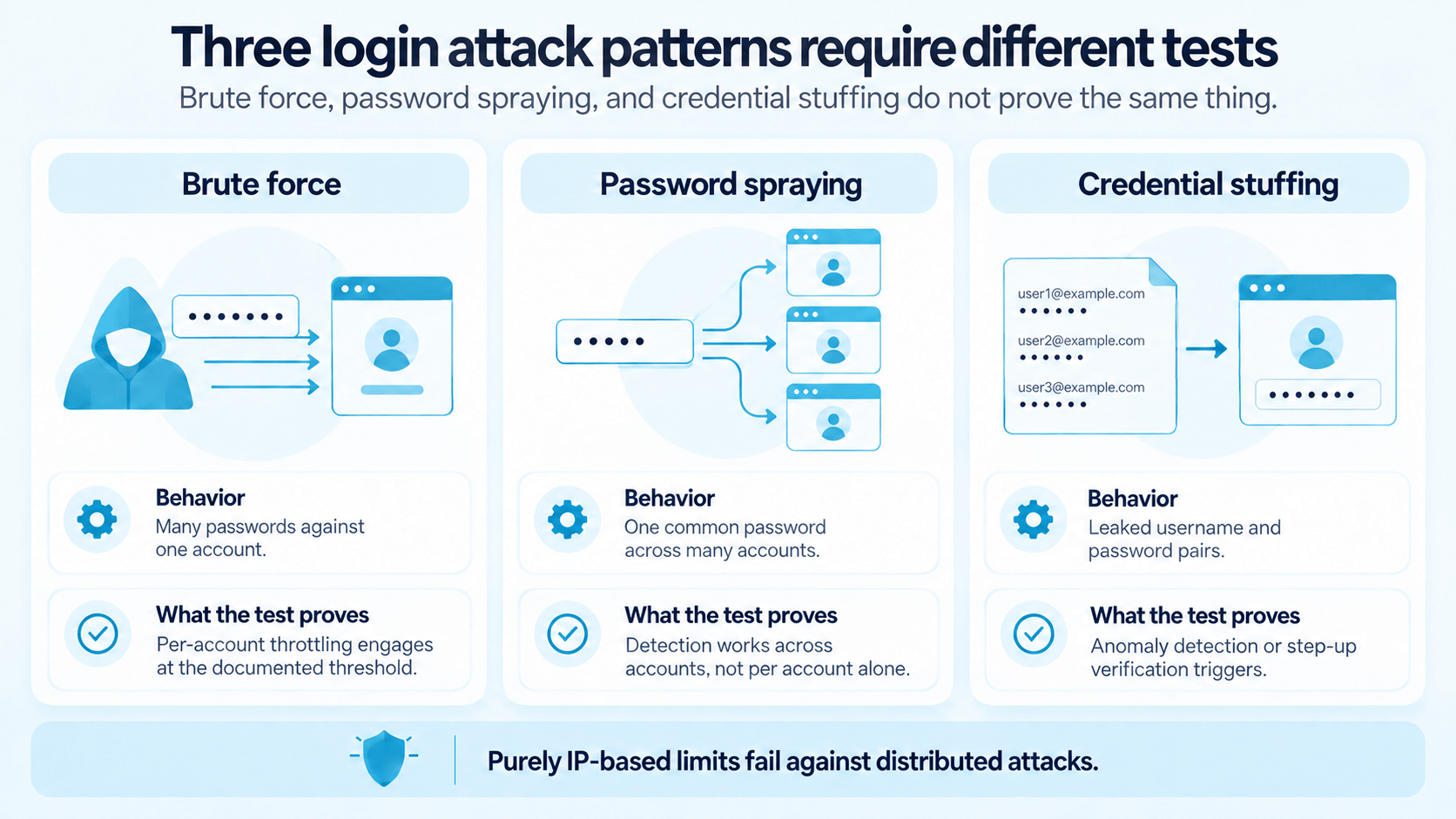
These three patterns trigger different defenses, so they need separate cases against controlled accounts in a dedicated environment.
Attack pattern
How it behaves
What your test proves
Brute force
Many passwords against one account
Per-account throttling engages at the documented threshold
Password spraying
One common password across many accounts
Detection works across accounts, not per account alone
Credential stuffing
Leaked username and password pairs
Anomaly detection or step-up verification triggers
OWASP warns that purely IP-based controls fall to distributed attacks, which is exactly what LOGIN-033 measures for you. LOGIN-031 then covers the opposite risk: if five bad passwords lock any account for an hour, a script and a list of email addresses can lock out your entire user base.
Session and Transport Security Test Cases
Session fixation succeeds when the identifier survives authentication, so LOGIN-035 records your anonymous session ID and compares it after login. Among all test cases for login page in software testing, this cluster catches the defects that static review misses most often.
Attribute
Expected value
Why the assertion exists
Secure
Set
Cookie never travels over plain HTTP
HttpOnly
Set
Client-side scripts cannot read the session token
SameSite
Explicit Lax or Strict
Browser defaults have shifted over time and still vary
Expiry
Matches session policy
Idle and absolute timeouts behave as documented
Transport cases stay simple by comparison: open your login page over HTTP, submit the form over HTTP, rewrite the form action, and confirm credentials never appear in query parameters, since URLs land in browser history, server logs, and analytics pipelines.
Authentication Bypass Test Cases
A working login screen says nothing about the resources behind it, because web interfaces routinely redirect anonymous users while the underlying API answers unauthenticated requests. Request /account, /admin, and every API route your frontend calls with no session at all, then repeat the run with edited client-side state such as isLoggedIn in local storage or a modified role parameter.
Multi-Factor Authentication Test Cases
Replay protection has a published requirement behind it: OWASP ASVS 5.0 states that lookup secrets, out-of-band codes, and TOTPs are successfully usable only once.
LOGIN-046. Authenticate with a code, then immediately retry the same value before expiry. Success on that second attempt is a defect with a standard reference attached.
LOGIN-050. Our experts advise testing MFA removal with the same identity checks your enrollment required, since an emailed link with no verification hands your second factor to anyone holding the mailbox.
Method downgrade. Switching from a hardware key to SMS should require authorization, because attackers always target the weakest factor you allow.
Passkey and WebAuthn Test Cases
Your security-relevant passkey cases sit in the ceremony itself, where the server verifies the challenge, the origin, and the signature.
Never mock the callback. Frontend automation that fakes a successful WebAuthn response proves nothing, since LOGIN-051 through LOGIN-055 all assert server-side validation.
Conditional UI. When your form offers passkeys inline with the password field, confirm it detects available credentials, degrades cleanly when the device is unreachable, and never blocks password entry.
Sessions stay identical. Every case from LOGIN-035 to LOGIN-040 applies to your passkey logins unchanged.
Magic Link and Passwordless Test Cases
Magic links move the security boundary to the email channel and the token, so treat each link as a single-use credential with an expiry.
Token issuance also needs a documented policy your case can assert. When your user requests a second link while the first one remains valid, either the old token dies immediately or both stay usable until expiry, and LOGIN-057 through LOGIN-060 verify whichever behavior your product promises.
Social Login and SSO Test Cases
A “Continue with Google” button moves credential handling to an identity provider while leaving session security with your app, so the protocol failures never appear in browser-only tests.
State, nonce, and PKCE. LOGIN-062 covers CSRF protection on the callback, LOGIN-064 rejects an invalid or reused OIDC nonce, and LOGIN-065 fails the token exchange when the PKCE code_verifier does not match the original challenge.
Code replay. LOGIN-063 submits the same authorization code twice, which your token endpoint must refuse.
Strict redirect URI matching. Loose matching leaves you with an open redirect waiting for traffic.
SAML attribute mapping. Provisioned accounts need correct group and role claims, plus defined behavior when the provider session expires ahead of yours.
Federated logout. Mismatched expectations here generate support tickets your team answers for months afterward.
Accessibility Test Cases for Login Pages
These cases support WCAG 2.2 AA conformance and may also be required by accessibility rules applying to your product, including Accessible Authentication (Minimum).
W3C documents blocked paste as failure F109, so a password field that forces manual entry fails unless you provide an accessible alternative. Split OTP boxes create the same barrier when a pasted code populates only the first box.
Automated scanners detect missing labels and broken ARIA attributes, although they cannot confirm what a screen reader actually announces. Manual runs with NVDA, JAWS, or VoiceOver therefore stay in your scope.
Plain language applies to your error text as well. “Wrong username or password” serves everyone, while “Authentication failed due to invalid credentials provided during the login attempt” serves nobody.
Performance and Reliability Test Cases
Run these in a controlled environment with dedicated accounts, because a load test against production triggers your own rate limiting and distorts every number you collect.
Authentication latency at the median and 95th percentile, plus your error rate during a traffic spike.
Identity provider response time, MFA delivery latency, and session store throughput under concurrent logins.
Failure behavior: a slow account database times out with a clear message, an MFA provider outage leaves your backup codes usable, and a dropped connection never surfaces to your user as “wrong password”.
How to Split Login Test Cases Across Automation Layers
Assign each case to the cheapest layer that can prove it, since running 80 scenarios through a browser is slow and brittle.
Layer
What it covers
Share of the 80
UI smoke
Valid login, invalid credentials, field validation, logout, recovery entry point
Cookie attributes, status codes, bypass attempts, token replay, PKCE and WebAuthn validation
30–35 cases
Accessibility
Automated scans plus manual assistive technology runs
5 cases plus manual passes
One change saves your team more time than any other: stop logging in through the UI before every test. Instead, create authenticated state through API calls or reusable fixtures, keep a small suite exercising your login interface itself, and let everything else start from an authenticated session. Documenting 80 cases by hand costs days, which is why an ai test case generator working from your own requirements has become part of the workflow.
What Are the Test Cases for Login Page You Cannot Skip?
AI-generated image.
Five clusters carry the highest damage when they fail on you.
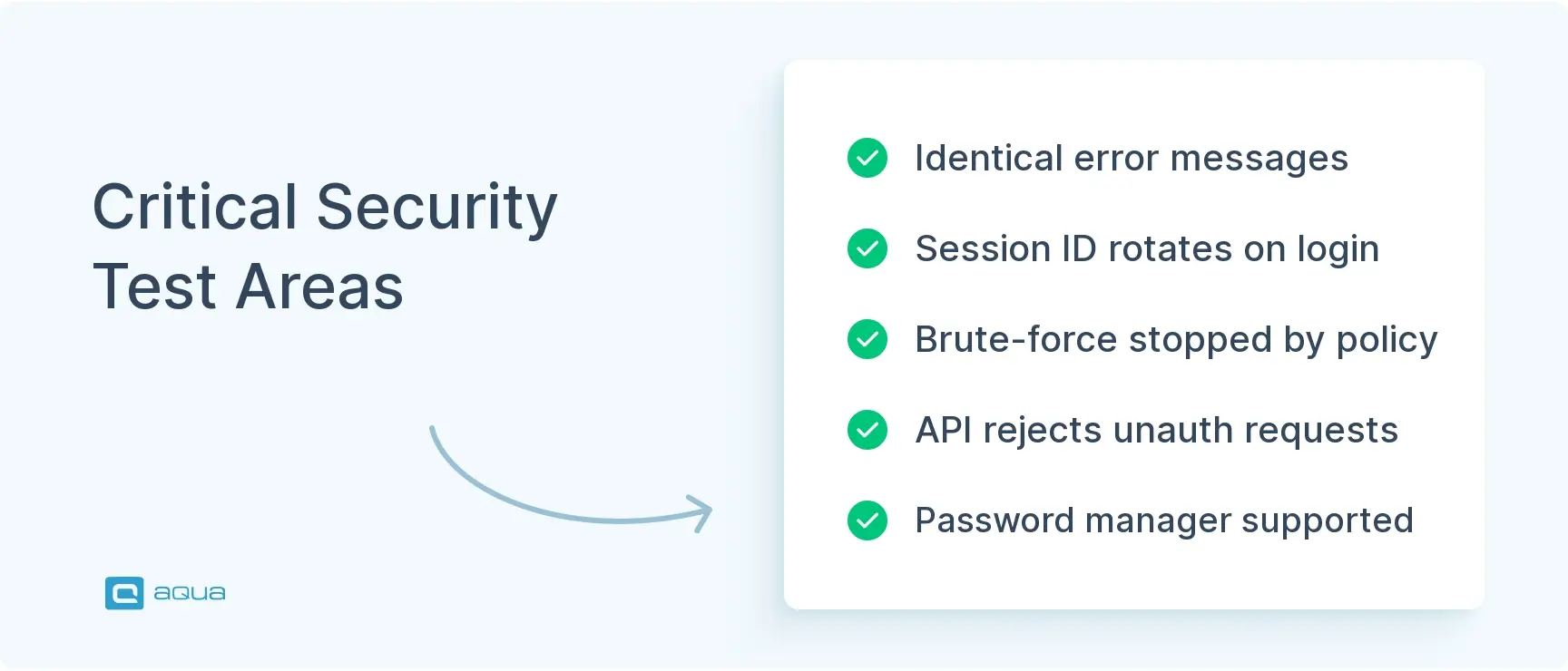
LOGIN-027 to LOGIN-029. A single difference in text, status, or timing hands attackers your user list.
LOGIN-043. A working login screen and an open API endpoint coexist far more often than your team expects.
LOGIN-035 and LOGIN-037. Without ID rotation and server-side logout, planted or stolen sessions stay valid.
LOGIN-030 and LOGIN-031. Proof that brute force gets stopped while your legitimate users stay unlocked.
LOGIN-010 and LOGIN-074. Authentication does not block password managers or copy and paste without providing an accessible alternative.
Test Cases for Login Page Examples You Can Copy
Each example of test cases for login page documentation below shows the detail a single checklist row expands into for your suite.
LOGIN-013: Invalid password
Scenario: Registered user submits a wrong password
Preconditions: Active account, correct username, password WrongPass999!
Steps: Open login page enter username enter wrong password submit
Expected result: Generic “Invalid credentials” error, no session cookie, failure counter increments, response text and HTTP status identical to an unknown-user attempt
Priority: Critical
LOGIN-030: Throttling threshold
Scenario: Rate limiting engages at the configured number of failures
Preconditions: Active account, policy set to 5 attempts
Steps: Submit an incorrect password 5 times submit the correct password wait out the cooldown submit the correct password again
Expected result: Throttling engages on attempt 5, correct password handled per policy during cooldown, access restored afterward, counter reset on success
Priority: Critical
Keep your expected results this specific, because a case reading “verify locked account behavior” with no threshold data stalls whoever inherits it. You will find more formats in our test case template collection.
Personally I go with, Expected Result - Action - Parameter / Conditions. "Incorrect Username / Password Prompt" - "Logging In" - "Invalid Password". Think it's common to use a reverse order, since that'd basically be the given - when - then structure for some stuff, but my brain simple.
How Many Test Cases Are Needed for Login Page Testing?
Coverage scales with the authentication methods a product ships, so the total depends on its architecture and regulatory exposure. A password-only form with no federation requires roughly 40 cases. Adding MFA, SSO, passkeys, and magic links brings the suite to all 80 in the checklist above.
Capability shipped
Cases it adds
Running total
Password login, functional and negative
20
20
UI behavior and input validation
12
32
Enumeration, throttling, session, transport
18
50
MFA with OTP and backup codes
6
56
Passkeys and magic links
10
66
Social login or enterprise SSO
7
73
Accessibility, performance, reliability
7
80
These figures are planning estimates and not a quota. Fifty shallow cases confirming that a Login button renders will miss a session fixation defect, while the six session cases in this checklist detect it on the first run.
Three factors adjust the total. Products in payments or healthcare add documented evidence for SOC 2 or PCI DSS, which raises both the case count and the traceability auditors expect. Linking that evidence to requirements inside aqua cloud prevents rebuilding the paper trail every cycle. Test cases for registration page flows belong to a separate suite and stay outside this count. Unsupported capabilities, such as SAML provisioning or hardware keys, come out of the table entirely, because coverage of unreachable scenarios demonstrates nothing.
At 80 scenarios spanning security and accessibility coverage, manual test management is becoming increasingly difficult. aqua cloud, an AI-powered test and requirement management solution, stores and orchestrates every authentication case in one system. Since aqua Intelligence uses RAG grounding on your real requirements, its accuracy is much higher compared to similar models available on the market. Dashboards show which of your auth paths remain uncovered, while audit trails stay ready for SOC 2 or PCI DSS review. aqua cloud holds ISO 27001 certification and meets DORA requirements. Every plan also includes free Guest licenses with unlimited seats, so your reviewers and auditors read results at no extra cost. Drive load checks through JMeter, run API scenarios in SoapUI, and launch UI suites with Ranorex. Script setup in PowerShell or UnixShell, then query MSSQL and Oracle directly for account states. Keep specs aligned in Confluence and choose from 10+ native automation integrations.
Generate authentication test cases where 42% need zero editing and hit 100% coverage
Authentication is the one component every user hits and the first target of automated traffic. The 15 Critical rows in the checklist cover enumeration, session rotation, throttling, and bypass, which makes them the first sprint. Six to eight UI cases are enough for the form itself, while account states and cookie assertions run faster at API and protocol level. Each architectural change extends the list: passkeys add LOGIN-051 to LOGIN-056, OIDC adds the nonce and PKCE cases, and every audit cycle converts those expected results into evidence.
Test cases for a login page are documented scenarios verifying authentication behavior, covering valid and invalid credentials, account states, session creation, MFA, and accessibility. Each states preconditions, test data, steps, and a verifiable expected result.
How do you write test cases for login page scenarios?
Start from a risk category, name one scenario, and record preconditions, exact test data, reproducible steps, and the expected client and server outcome. Assign a priority, then tie your assertions to behavior so redesigns do not break them.
What are positive and negative test cases for login page testing?
What are the most important test cases for a login page?
Identical responses across account states, protected routes rejecting anonymous requests, session ID rotation with server-side logout, throttling that matches policy, and password manager support. Each failure here causes immediate damage to security or access.
Why is security testing important for login pages?
Every authorization, encryption, and logging control depends on knowing who sent the request. Weak throttling gives attackers unlimited guesses, enumeration hands them a target list, and a bypass on one API route exposes data entirely.
What should every login page test case include?
An ID, one scenario, preconditions, exact test data, reproducible steps, and an expected result covering both client and server outcomes. Assertions describe behavior over markup, so a redesign does not invalidate the case.
What should password reset test cases cover?
Reset coverage includes identical responses for unknown and registered emails, single-use tokens, expiry enforcement, rate limiting on your recovery endpoint, links that cannot target another account, and old passwords failing once the reset completes.
Which login page test cases should be automated?
Automate 6 to 8 UI cases for your critical journeys, push account states and input combinations to API tests, and handle cookies, status codes, and token replay at protocol level. Assistive technology checks stay manual.
Pavel, a Quality Assurance Consultant and Author, brings deep expertise to solving complex testing challenges. His background in software development has helped organizations transform their QA practices from reactive to proactive. Beyond consulting, Pavel develops best practice guides and case studies for aqua cloud that…
Nurlan, a QA Coordinator & Quality Standards Officer, takes pride in orchestrating seamless QA operations. His expertise in coordinating QA-focused projects and integrating QA solutions has consistently yielded top-tier client satisfaction. Aside from a full-time QA coordinator, Nurlan's role involves creating compelling content that educates…
Robert has several years of experience in process optimisation and test management. He is an expert in defining and implementing workflows by adapting aqua to the clients’ processes.
Join our community of enthusiastic experts! Get new posts from the aqua blog directly in your inbox. QA trends, community discussion overviews, insightful tips — you’ll love it!
We're committed to your privacy. Aqua uses the information you provide to us to contact you about our relevant content, products, and services. You may unsubscribe from these communications at any time. For more information, check out our Privacy policy.
X
🤖 Exciting new updates to aqua Intelligence are now available! 🎉