13 Best User Acceptance Testing (UAT) Tools: Ultimate List
Software launches fail when teams skip the most important question: can real people actually use this thing? User Acceptance Testing puts your product in front of actual users before it goes public. Most teams manage this with spreadsheets and email chains, creating chaos where feedback gets lost and critical issues slip through. UAT tools organise this entire process, tracking user feedback and managing test scenarios so teams can fix problems before customers discover them. We've tested the leading options to show you which tools actually work.
User Acceptance Testing (UAT) validates software with real users after technical testing to confirm it meets business requirements and user expectations.
Tools used for UAT testing organize the testing process by providing central management of test cases, clear communication channels, accountability tracking, and faster issue resolution.
The right UAT tool depends on your testing type (Alpha, Beta, Operational, Regulatory, or Contract) and specific team requirements.
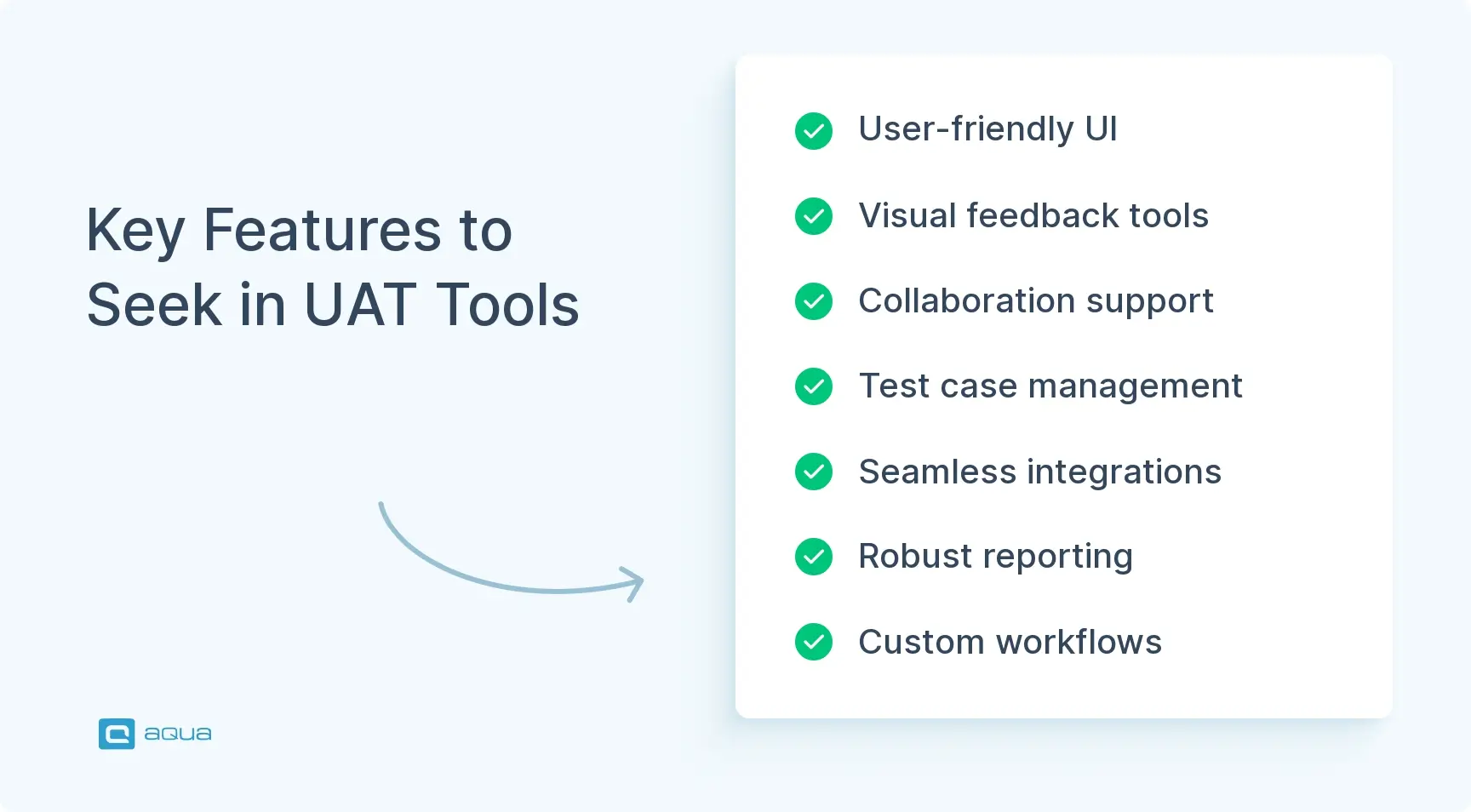
Essential UAT tool features include a user-friendly interface for non-technical stakeholders, visual feedback capabilities, collaboration features, and seamless integration with existing workflows.
Most tools for UAT testing offer free trials, making it crucial to involve actual stakeholders in the evaluation process to ensure the selected tool works for both non-technical users and developers.
Choosing the wrong UAT tool can transform your testing into chaos, while the right one catches critical issues before they become public embarrassments. Discover which tools actually deliver results in the full article below 👇
What is User Acceptance Testing (UAT)?
User Acceptance Testing happens after your technical testing is complete. Real users test the software to verify it handles their actual tasks in real-world scenarios. This isn’t about finding technical bugs anymore. It’s about confirming the software meets business requirements and user expectations.
UAT answers one crucial question: “Does this software do what users need it to do?”
So what makes UAT different from other testing phases?
Who conducts it: End users, stakeholders, or client representatives. Not developers or QA teams
When it happens: After system and integration testing, but before production release
What it focuses on: Business processes and user workflows rather than technical functionality
Success criteria: Based on business requirements and user acceptance criteria in testing, rather than just passing test cases
UAT validates that the software delivers value to people who’ll use it every day. It bridges the gap between technical requirements and real-world usability
Often, the completion of UAT is tied to the customer approving the delivery of the product. It tends to be a set of agreed points that need to be delivered, which are determined at the contract stage. UAT would be performed by creating a suite of tests that demonstrate the delivery of each of the agreed-upon points to the customer.
Running UAT without proper tools creates unnecessary chaos. You end up with scattered feedback across emails, incomplete test coverage, and bugs that slip through to production. UAT tools solve these problems by organising the entire testing process.
They address the most common testing challenges:
Better organisation: Central place to manage test cases, track progress, and document results instead of drowning in spreadsheets and emails
Clearer communication: Users can report issues with screenshots, annotations, and context rather than vague descriptions that confuse developers
Improved accountability: See who’s tested what, which requirements are covered, and where gaps exist
Faster resolution: Bugs get automatically routed to the right people with all necessary details for quick fixes
Without dedicated UAT tools, teams miss critical feedback and release software that doesn’t meet user needs. The right tool transforms UAT from a bottleneck into a valuable development asset.
Types of User Acceptance Testing
Before choosing the right UAT tool, you need to understand which type of testing you’re running. Different UAT approaches require different tool features and capabilities.
Alpha Testing
Alpha testing happens in-house with internal teams who didn’t build the software. It’s your internal reality check before external users see the product.
Who does it: Internal staff not involved in development
When: After system testing but before beta testing
Environment: Controlled in-house environment
Goal: Catch obvious issues before external users find them
Beta Testing
Beta testing involves real external users trying the software in their actual work environments.
Who does it: Real end-users or customers
When: After alpha testing, before final release
Environment: Users’ actual work environments
Goal: Gather real-world feedback and find issues that don’t appear in controlled testing
Operational Acceptance Testing
This focuses on whether your IT team can actually support the software once it goes live.
Who does it: IT operations staff
When: Runs parallel with other UAT activities
Focus: Backup/recovery, maintenance procedures, security, and performance
Goal: Ensure the system can be properly supported in production
Regulatory Acceptance Testing
For regulated industries, this testing verifies that the software meets all compliance requirements.
Who does it: Compliance specialists and legal teams
When: Before release in regulated industries
Focus: Industry standards and regulatory compliance
Goal: Verify the software meets all legal requirements
Contract Acceptance Testing
This confirms the software meets all criteria specified in client-vendor contracts.
Who does it: Client representatives
When: Before final delivery
Focus: Contract specifications and requirements
Goal: Ensure all contractual obligations are fulfilled
Each testing type has specific tool requirements. Alpha testing needs internal collaboration features, while beta testing requires external user access and feedback collection. Let’s explore which of the best UAT testing tools handle these different scenarios effectively.
Top User Acceptance Testing Tools
Now that you understand the different UAT approaches, let’s explore the tools that can handle each scenario effectively. The right tool depends on your testing type, team size, and technical requirements.
Tool
Primary Focus
Best For
Key Features
Pricing Model
aqua cloud
AI-powered test management
Modern teams needing intelligent UAT
AI test case generation, customised reporting, comprehensive test management
Test planning, execution, exploratory testing, test automation
Azure DevOps add-on
Applause
Crowdtesting
Diverse user testing needs
Access to global testing community, managed testing services
Custom pricing
aqua cloud
aqua cloud combines AI-powered test management with comprehensive UAT capabilities, making it the go-to solution for modern testing teams who want intelligence built into their testing process.
Key Features:
AI-generated test cases based on requirements and user stories
Customised reporting with insights and recommendations
Real-time collaboration tools for distributed teams
Integration with popular development tools and CI/CD pipelines
Comprehensive visual defect management with native Capture integration with automated workflows
Ideal For: Teams that want to use AI to make their UAT process more efficient and intelligent, while maintaining full control over test planning and execution.
With aqua’s AI Copilot, you can transform plain-language requirements into complete UAT scenarios in seconds, ensuring nothing gets missed in your testing coverage. What’s more, aqua’s intuitive dashboards provide real-time visibility into your UAT progress, helping teams make informed go/no-go decisions based on actual data rather than gut feelings. Integrations with popular frameworks like Jira, Confluence, Azure Devops and UAT automation tools including Selenium, Jenkins, Ranorex give you the freedom to get the best of both worlds. With full traceability between requirements, test cases, and issues, you’ll always know exactly where your UAT stands.
Save up to 97% of your time while achieving 100% test coverage with aqua cloud
Direct integration with Jira, Trello, and other tools
Screenshot annotations and markup tools
Video recording for reproducing complex issues
Ideal For: Teams looking to eliminate the friction between finding bugs in UAT and getting them into the development backlog.
LambdaTest
LambdaTest is an AI-powered cloud testing platform that allows teams to perform both manual and automated UAT across browsers and devices.
Key Features:
Live interactive testing on 3000+ browsers
Automated screenshot testing
Responsive testing across different screen sizes
Local testing for staging and development environments
Integration with CI/CD pipelines
Ideal For: Teams that need both manual exploratory testing and automated UAT testing tools during the validation process.
BugHerd
BugHerd makes it incredibly easy for clients and stakeholders to provide feedback directly on websites during UAT.
Key Features:
Point-and-click feedback directly on websites
Task board for organizing and prioritizing feedback
Browser plugin for quick access
Visual feedback with screenshots and annotations
Task assignment and status tracking
Ideal For: Client-facing UAT where non-technical stakeholders need to provide detailed feedback.
UserTesting
UserTesting focuses on gathering qualitative user feedback through recorded testing sessions, providing deep insights during UAT.
Key Features:
Video recordings of real users testing your application
Panel recruitment based on your target audience
Structured test plans and scenarios
Analysis tools for user feedback
Highlight reels of key moments
Ideal For: Teams that need to understand not just if users can complete tasks, but how they feel about the experience.
QA Touch
QA Touch is an all-in-one testing platform that combines test case management, bug tracking, and test execution.
Key Features:
Test case management with reusable test steps
Bug tracking and management
Test execution tracking
Requirements mapping
Collaboration tools for testing teams
Ideal For: Small to mid-sized teams looking for a comprehensive but affordable testing solution.
Selenium
Selenium is an open-source automation framework that can be used to automate repetitive UAT scenarios, freeing up human testers for more exploratory testing.
Key Features:
Cross-browser automation
Support for multiple programming languages
Integration with CI/CD pipelines
Extensive community support
WebDriver protocol for browser automation
Ideal For: Teams with technical resources who want to automate portions of their UAT process.
Testpad
Testpad offers a lightweight, checklist-based approach to testing that’s flexible enough for changing UAT requirements.
Key Features:
Checklist-style test scripts
Collaborative testing capabilities
Simple, intuitive user interface
Test result sharing and reporting
Flexible test organization
Ideal For: Agile teams that need a flexible approach to UAT without heavy process overhead.
Userlytics
Userlytics specializes in remote user testing, providing detailed insights into how users interact with your application.
Key Features:
Remote user testing platform
User experience metrics and analysis
Video and audio recordings of test sessions
Task completion analysis
Demographic filtering for testers
Ideal For: Teams focused on usability aspects during UAT who need detailed user interaction data.
TestMonitor
TestMonitor specializes in structured, risk-based testing approaches for UAT.
Key Features:
Risk-based testing methodology
Requirements traceability
Intuitive user interface
Client-friendly test case creation
Comprehensive reporting
Ideal For: Teams working with external clients who need to demonstrate UAT coverage and results.
Azure Test Plans
Azure Test Plans is Microsoft’s testing solution integrated with Azure DevOps, providing end-to-end testing capabilities.
Key Features:
Test planning and execution within Azure DevOps
Manual and exploratory testing tools
Test automation integration
Traceability to work items
Rich reporting capabilities
Ideal For: Teams already using Azure DevOps who want integrated UAT management.
Applause
Applause offers crowdtesting services, providing access to real users for UAT across diverse demographics and devices.
Key Features:
Access to the global testing community
Real-world device coverage
Managed testing services
Functional and usability feedback
Demographic targeting options
Ideal For: Teams needing diverse user perspectives during UAT, especially for consumer applications.
Each tool serves different UAT scenarios and team needs. Consider your testing type, team size, technical requirements, and budget when making your choice. The next section will help you navigate these decisions with a practical selection framework.
Key Features to Look For in UAT Tools
You’ve seen the tool options, but choosing the wrong one can turn your UAT process into a nightmare. The difference between a successful UAT and a chaotic mess often comes down to having the right features that actually support how real teams work. Here’s what separates the tools that deliver from the ones that disappoint.
User-Friendly Interface
Your UAT tool will be used by non-technical stakeholders, so complexity kills participation.
Look for: Clean interfaces with intuitive navigation that anyone can understand
Avoid: Tools requiring extensive training or technical expertise
Why it matters: Complex tools reduce participation and lead to incomplete feedback
Visual Feedback Capabilities
Screenshots and annotations eliminate confusion between testers and developers.
Look for: One-click screenshot capture, annotation tools, and video recording
Why it matters: Visual feedback saves time and prevents miscommunication about issues
Collaboration Features
UAT requires constant communication between testers, developers, and stakeholders.
Look for: Real-time commenting, @mentions, and task assignment
Ideal feature: Instant notifications when issues are reported or status changes occur
Why it matters: Fast communication leads to quicker issue resolution and keeps everyone engaged
Test Case Management
Organised test scenarios ensure comprehensive coverage of your application.
Look for: Test case creation, organisation, and reuse capabilities
Ideal feature: Requirements traceability to link test cases with business needs
Why it matters: Structured testing prevents missed functionality and provides clear coverage metrics
As you consider which UAT tool is right for your team, it’s worth asking: what if one solution could combine the best features you’ve seen across multiple platforms? aqua cloud offers exactly that comprehensive approach to UAT with its AI-powered test management system. Unlike basic tools that only handle one aspect of testing, aqua provides end-to-end capabilities from requirements management and test case generation to visual bug reporting and comprehensive analytics. The platform’s AI Copilot can generate complete test scenarios from your requirements in seconds, saving up to 97% of the time typically spent on test case creation. For UAT specifically, aqua excels with its stakeholder-friendly interface, allowing non-technical users to participate easily while maintaining the structure QA professionals need. With seamless integration to tools like Jira and Azure DevOps, and a seamless, native Capture bug-reporting extension, plus custom workflows that match your existing processes, aqua transforms it into a strategic advantage for delivering software your users will actually love.
Turn your UAT from a bottleneck into a competitive advantage with aqua clou
Your UAT tool should connect with your existing development workflow.
Look for: Connections to bug trackers, project management tools, and development platforms
Ideal feature: Two-way synchronisation that keeps all systems updated automatically
Why it matters: Seamless integration eliminates manual data entry and reduces errors
Reporting and Analytics
Clear progress tracking helps stakeholders make informed decisions about release readiness.
Look for: Customizable dashboards and progress reports
Ideal feature: Visual indicators showing test completion rates and issue trends
Why it matters: Transparent reporting keeps everyone informed about UAT status and bottlenecks
Customisation Options
Every team has different processes, and your tool should adapt to yours.
Look for: Configurable workflows, custom fields, and status options
Ideal feature: Ability to match the tool’s terminology and processes to your team’s existing practices
Why it matters: Tools that fit your process get adopted faster and used more effectively
Automation Support
While UAT is primarily manual, automation can handle repetitive verification tasks.
Look for: Integration with test automation frameworks or built-in automation features
Ideal feature: Mixed workflows that combine manual exploration with automated checks
Why it matters: Automation handles routine verification, freeing testers for valuable exploratory work
Focus on tools that excel in the features most critical to your team’s UAT approach. A tool that’s perfect on paper but doesn’t fit your team’s workflow will create more problems than it solves.
Conclusion
The best UAT tool is the one your team actually uses consistently. Start with your biggest pain point and test a few options that address it directly. Most tools offer free trials, so involve your actual stakeholders in the evaluation process. The tool that works smoothly for non-technical users while keeping developers happy is worth more than the one packed with features nobody understands. Good UAT catches real user problems before they become public embarrassments, and the right tool makes that process feel natural rather than forced.
What's the difference between UAT and system testing?
System testing verifies that the software works correctly as a complete system, focusing on technical requirements. UAT verifies that the software meets business needs and user expectations in real-world scenarios. System testing is typically done by QA professionals, while UAT involves actual end-users.
Can UAT be automated?
Parts of UAT can be automated, especially repetitive scenarios or regression tests. However, the core value of UAT comes from real users interacting with the software as they would in production. A hybrid approach works best: automate what makes sense, but keep humans in the loop for exploratory testing and subjective evaluation. Many automated UAT testing tools can help balance this hybrid approach effectively.
How long should UAT take?
The duration depends on your project’s complexity, but typically UAT takes 1-4 weeks. Rushing UAT is risky: users need time to thoroughly test all features and workflows. Build adequate time into your project plan for UAT execution and potential fixes.
Who should participate in UAT?
Ideally, actual end-users who will use the software in their daily work. If that’s not possible, business stakeholders or subject matter experts who understand user needs can participate. The key is that testers should not be the same people who built the software.
When in the development lifecycle should UAT occur?
UAT should happen after system testing and integration testing, but before release to production. In Agile methodologies, mini-UAT cycles might occur at the end of each sprint, with a more comprehensive UAT before major releases
What documentation is needed for UAT?
At minimum, you need a UAT test plan outlining the scope, schedule, and participants; test scenarios covering key user workflows; and acceptance criteria that define what “success” looks like. Your UAT automation tools should help manage and organise this documentation.
Embodying the essence of a QA Coordination Maestro, Paul has excelled in curating and implementing quality strategies tailored to the nuances of each project. His expertise in the market of QA and Test Management solutions has contributed to a vast portfolio of successfully managed TMS…
Nurlan, a QA Coordinator & Quality Standards Officer, takes pride in orchestrating seamless QA operations. His expertise in coordinating QA-focused projects and integrating QA solutions has consistently yielded top-tier client satisfaction. Aside from a full-time QA coordinator, Nurlan's role involves creating compelling content that educates…
Home » Testing with AI » 13 Best User Acceptance Testing (UAT) Tools: Ultimate List
Do you love testing as we do?
Join our community of enthusiastic experts! Get new posts from the aqua blog directly in your inbox. QA trends, community discussion overviews, insightful tips — you’ll love it!
We're committed to your privacy. Aqua uses the information you provide to us to contact you about our relevant content, products, and services. You may unsubscribe from these communications at any time. For more information, check out our Privacy policy.
X
🤖 Exciting new updates to aqua Intelligence are now available! 🎉