DevOps vs Scrum: Key Differences, Similarities, and How They Work Together
You can easily note that Scrum and DevOps solve different problems. Scrum organizes what your team builds and when it inspects the result. DevOps covers how that result gets tested, deployed, and operated. Yet many teams fail to sort the methodologies out and build any functioning management system at all.
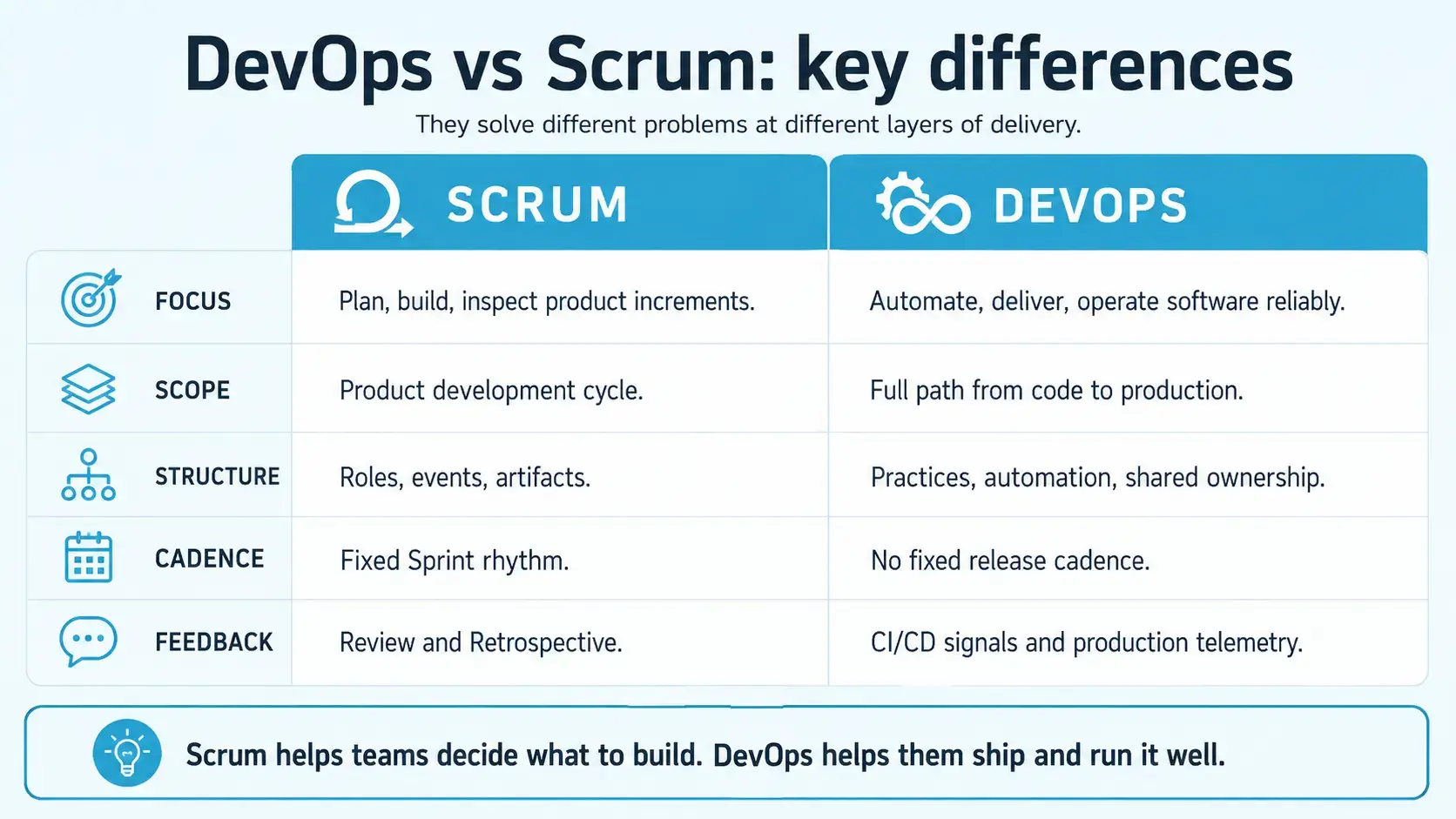
Scrum organizes product development through defined roles, events, and artifacts. DevOps focuses on automating delivery and shortening feedback loops from code to production.
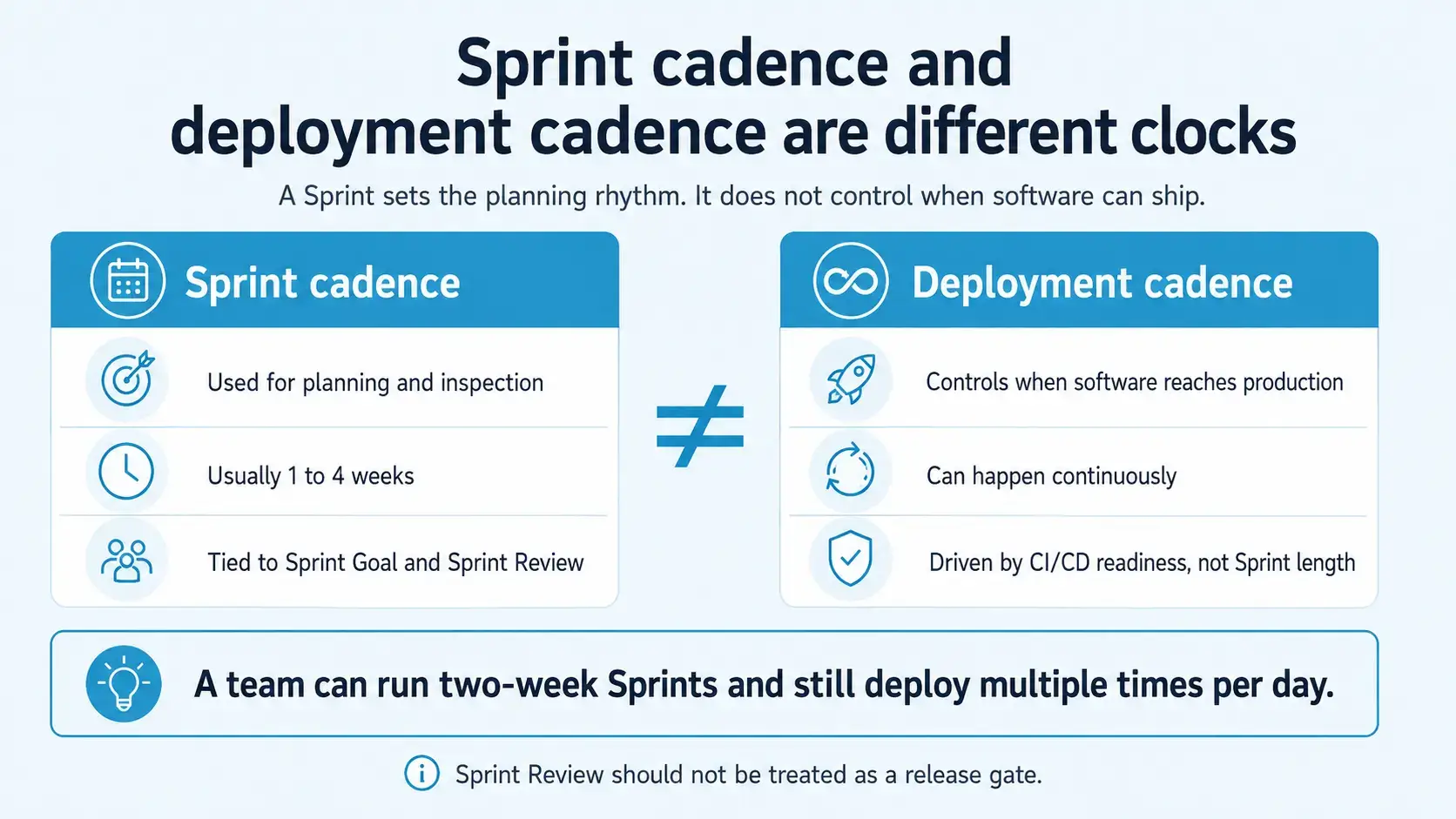
Scrum’s Sprint cadence does not dictate deployment cadence. Your team can deploy several times a day while running two-week Sprints, since Sprint Review was never a release gate.
Scrum leaves the technical side unspecified, so DevOps practices such as CI/CD, infrastructure as code, and continuous monitoring fill that role.
Scrum answers what to build next through Product Backlog management. DevOps answers how to deliver it reliably through automation and operational practices.
The two work best in combination, because Scrum sets goals and keeps decisions visible, while DevOps makes delivery fast and recoverable.
The DevOps vs Scrum question requires only proper consideration and implementation. This guide covers what each approach handles, where the two overlap, and how your team can run both without one blocking the other.
DevOps and Scrum Similarities
Scrum and DevOps were both created in response to long release cycles and late feedback. Scrum addressed the problem at the level of planning and team structure, while DevOps addressed it at the level of build, release, and operations. Because the diagnosis was the same, the two share five recurring patterns:
Similarity
Scrum
DevOps
Incremental change
Product Increments
Small code changes and deployments
Fast feedback
Reviews and Retrospectives
CI/CD and production telemetry
Collaboration
Cross-functional Scrum Team
Shared Dev and Ops ownership
Continuous improvement
Inspection and adaptation
Monitoring and operational learning
Quality
Definition of Done
Automated testing and reliability practices
The overlap runs deeper than shared vocabulary. Both approaches assume small batches beat large ones, because a small batch exposes problems while the context stays fresh in your team’s memory. Both also treat feedback as an input to the next decision, whether it arrives from a stakeholder at Sprint Review or from a latency alert overnight. That common ground explains why DevOps Scrum adoption works well in sequence: your team has already loosened role boundaries in one, so doing the same in the other meets far less resistance.
DevOps vs Scrum: Key Differences
Image generated by AI Tool
Both approaches aim at delivering value, and they diverge almost everywhere after that. The comparison below shows where your team should expect DevOps to carry the weight and where Scrum takes over.
Aspect
Scrum
DevOps
What it is
Lightweight framework for organizing product development
Set of practices and cultural principles for improving software delivery and operations
Primary focus
Planning, creating, and inspecting product Increments
Automating, streamlining, and monitoring the path from code to production
Scope
Product development cycle (backlog → Sprint → Increment)
Full software lifecycle (plan → develop → deliver → operate)
Deployment frequency, lead time, change fail rate, recovery time
Sprint Cadence and Deployment Cadence Are Two Different Clocks
The table above draws clean lines, and one of them causes more confusion in your team than the rest: Scrum’s Sprint cadence holds no authority over your deployment cadence.
One of the most persistent misconceptions about DevOps and Scrum holds that Scrum means releasing only at the end of a Sprint. The Scrum Guide says the opposite, though. Increments can go to stakeholders before the Sprint ends, and Sprint Review should never act as a release gate. Your team could therefore deploy five times per day while running two-week Sprints, with both practices fully intact.
Sprint cadence controls planning, goals, and inspection rhythms. Deployment cadence, by comparison, controls when releasable software reaches production. Once your team stops tying the second clock to the first, most of the DevOps versus Scrum tension disappears on its own.
Image generated by AI Tool
What Is DevOps?
DevOps is a set of cultural principles and technical practices that shorten the loop between writing code and running it in production. Microsoft defines DevOps as the combination of development and operations, uniting people, process, and technology across planning, development, delivery, and operations. In practice, that definition pulls roles that once worked apart, including quality engineering and security, into one delivery flow alongside your developers.
Underneath all of this sits a slow feedback loop. In older setups, developers handed finished code to an operations team, who then worked out how to deploy it, monitor it, and keep it running. As a result, handoffs added delay, and production incidents ended in finger-pointing. DevOps answers that by giving your whole team shared responsibility for the full lifecycle, from planning through delivery and into operation. Automation carries much of the weight here, although transparency and continuous learning from real production behavior matter equally.
Main Goals of DevOps
The cultural side of DevOps gets discussed far more often than its objectives, which is part of why teams disagree about what adopting it actually means. Four aims sit underneath the practice, and your team can attach a measurement to all of them:
Shorten lead time for changes. DevOps targets the interval between a commit and that code serving users, because a long interval delays feedback and raises the cost of correcting course.
Make releasing an unremarkable event. The aim is a deployment path rehearsed often enough that shipping on a Tuesday afternoon needs no war room and no sign-off chain.
Design for recovery. DevOps accepts that failures will reach production and optimizes for how quickly your team detects, diagnoses, and restores service.
Distribute ownership of the running system. Development, operations, QA, and security share accountability for production behavior, which removes the handoff points where responsibility used to disappear.
Microsoft’s Well-Architected guidance places shared ownership, accountability, and continuous improvement at the center of DevOps culture. Speed alone was never the point, in other words. The deeper aim is a system that fails gracefully, recovers quickly, and teaches your team something afterward.
Combining Scrum’s structured product development with the rapid delivery practices of DevOps exposes one recurring problem: keeping quality testing synchronized. Your team needs test management thorough enough for Sprint Reviews and fast enough for multiple daily deployments. aqua cloud, an AI-powered test and requirement management solution, was built for exactly that pressure. The platform’s domain-trained aqua Intelligence, grounded with RAG on your own project documentation, generates test cases in seconds that understand your product context, so your team stops filtering generic suggestions that miss domain specifics. Meanwhile, your Sprint Goals and Product Backlog items keep full traceability, and automated execution with real-time dashboards gives both your Scrum and DevOps sides something concrete to inspect. On the delivery side, aqua plugs testing directly into your pipeline through native integrations with Jenkins, Azure DevOps, JMeter, PowerShell, and UnixShell, backed by 12+ native automation integrations.
Boost your testing efficiency by 80% with aqua’s AI capabilities
The six practices below form a dependency chain, so each one relies on the practices above it. Your team either builds and tests on commit or it does not, and that difference appears in delivery metrics within a quarter. Continuous delivery built on weak integration only ships defects faster:
Version control as the single source of truth. Application code, configuration, pipeline definitions, and infrastructure declarations all sit in Git. That gives your team one place to review changes, one history to bisect during an incident, and one mechanism for rollback.
Continuous integration. Developers merge small changes frequently, often several times per day, while automated builds and tests validate the change immediately. The economics here are well documented: merge conflicts and integration defects grow in cost with the age of the branch, so short-lived branches keep divergence cheap to resolve.
Continuous delivery. The same automation extends further, moving validated changes through a pipeline that can release them to production with minimal manual intervention. Microsoft identifies CI/CD as foundational practices that reduce manual errors and increase release velocity. The discipline worth enforcing is keeping your main branch releasable at all times.
Infrastructure as code. Servers, networks, and configurations become version-controlled, repeatable declarations that tools such as Terraform or Ansible execute. Configuration drift between staging and production disappears, and your team stops losing triage time to environment differences.
Monitoring and observability. Monitoring answers questions your team already knew to ask, such as error rates and latency against a threshold. Observability goes further, letting your engineers interrogate a system about failure modes nobody predicted, which matters once your architecture spreads across services.
Shared ownership. Developers help operate what they write, take part in the on-call rotation, and review incidents afterward. Feeding operational pain back to the people who can remove it in code is the mechanism that makes the other five practices stick.
Benefits of DevOps
Delivery speed, failure scope, engineering capacity, environment parity, product evidence, and audit readiness all move once the practices hold. Several of these outcomes appear in areas the rollout did not target directly:
Features reach customers sooner. Release cycles compress from quarters to days or hours, so a competitive response no longer waits for the next planned release window.
A smaller blast radius per release. A ten-line change is far easier to diagnose and revert than a three-month batch, which pulls your change failure rate down.
Capacity returned to your engineers. Automation absorbs repetitive builds, environment setup, and regression runs, and the hours recovered go into design, analysis, and refactoring.
Reproducible environments. A new engineer can stand up a working stack on their first day, and reproducing a customer-reported defect stops depending on who set up which machine.
Evidence for backlog decisions. Telemetry shows which features see real use and where latency hurts, so your Product Owner orders work against production data.
A traceable delivery history. Version-controlled code, configuration, and pipeline definitions give your team an audit trail for compliance reviews and for honest postmortems.
What Is Scrum?
Scrum is a lightweight framework for generating value through adaptive solutions to complex problems. That definition comes straight from the Scrum Guide, and it stays broad on purpose. What Scrum does give your team is a structured set of events, roles, and artifacts for planning, creating, inspecting, and adapting work in short cycles called Sprints. Two ideas hold the framework together: empiricism, meaning knowledge comes from experience, and lean thinking, meaning your team removes waste and focuses on what matters.
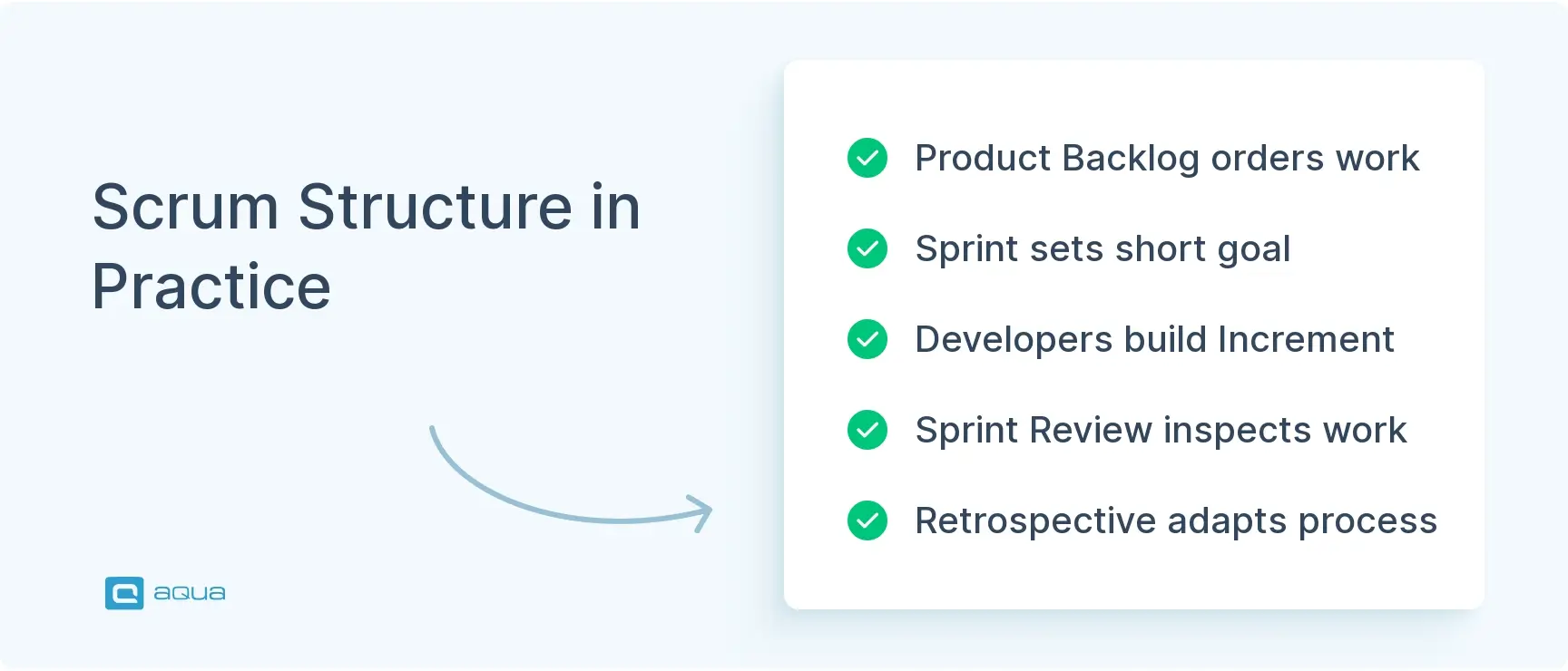
The framework becomes concrete once you follow a single Sprint from start to finish. The stages feed one another, and the loop repeats without a defined end date:
The Product Backlog holds all the work your team might do, ordered by value.
During Sprint Planning, your team selects items for the coming Sprint and agrees on a Sprint Goal.
Over the next one to four weeks, most commonly two, your team builds a working Increment that meets the Definition of Done.
At Sprint Review, your team inspects the Increment with stakeholders and discusses what comes next.
At Sprint Retrospective, your team adapts its own process before the cycle repeats.
Notice what Scrum doesn’t necessarily emphasize: how your team writes code, tests software, or deploys systems. Those decisions remain yours, and teams working with Scrum in Agile testing fill that space with practices the framework never names.
If I was a Scrum Master that was running a DevOps team, and could not switch to Kanban, here is how I would approach a Scrum sprint: Plan 50% capacity for known work and leave the other 50% for last min/triage type requests. This allows for some planning but also adapts to the team's environment. This 50/50 split could change based on the amount of triage vs planned work, and it would take a few sprints to get to a sweet spot.
Scrum defines three accountabilities. These are responsibilities someone must hold, and they do not map neatly onto job titles in your organization.
Product Owner. This person maximizes the value of the product by managing the Product Backlog. They decide what gets built next, clarify requirements, and make sure your team understands the Product Goal. Importantly, Scrum names a single person here, which prevents conflicting priorities and endless debates. A Product Owner never tells your Developers how to build something, although they stay accountable for what gets built.
Scrum Master. Whoever holds this accountability establishes Scrum as defined in the Scrum Guide and helps your team become more effective. Coaching, facilitating events, removing impediments, and protecting the team from outside interruptions all sit here. Beyond that, a Scrum Master works as a servant leader who creates conditions for self-management, with no authority to assign tasks.
Developers. The broad term matters. Scrum.org clarifies that “Developer” covers anyone on your team building the product: coders, testers, designers, or data engineers. Beyond drafting the Sprint Backlog, your Developers own quality and adapt their plan daily.
Scrum Events and Artifacts
The three accountabilities meet inside five formal events, which give the Sprint its rhythm. Scrum assigns a defined purpose to all of them, and none exists to produce a report for management:
The Sprint. The container event, one to four weeks long, inside which all other events happen.
Sprint Planning. Your team decides what to accomplish through the Sprint Goal, selects supporting Product Backlog items, and drafts an initial plan.
Daily Scrum. A 15-minute synchronization point where your Developers inspect progress toward the Sprint Goal and adapt the plan for the next 24 hours. The event serves the people doing the work, which rules out its use as a management status update.
Sprint Review. Your team presents the Increment to stakeholders, inspects what was accomplished, and discusses what to build next. The Product Backlog often changes as a result.
Sprint Retrospective. Your team reflects on its process and identifies improvements to carry into the next Sprint.
Taken together, these events create regular opportunities for transparency, inspection, and adaptation, which are Scrum’s three pillars.
Where the events structure time, the artifacts structure information. Scrum defines three of them, and all three carry a commitment that makes progress inspectable:
Product Backlog. An ordered list of everything the product might need. It never reaches completion, evolving as your product and market change. Its commitment is the Product Goal.
Sprint Backlog. The plan for the current Sprint, covering the Sprint Goal, selected items, and a flexible task breakdown. Its commitment is the Sprint Goal.
Increment. A concrete stepping stone toward the Product Goal. Its commitment is the Definition of Done, a shared understanding of what “complete” means for your team.
Benefits of Scrum
Scrum returns value when your team treats the events as working sessions with real decisions attached to them. Teams that clear that bar tend to report a consistent set of improvements:
Regular inspection and adaptation. Built-in events like Sprint Review and Retrospective push your team to reflect, learn, and change course.
Clear accountability. Product Owner, Scrum Master, and Developers hold distinct responsibilities, which reduces confusion about who owns what.
Focus on value. The Product Goal and Sprint Goal connect daily work to meaningful outcomes, so task completion stops being the measure of success.
Transparency. Artifacts and events make progress, blockers, and quality visible to everyone.
Cross-functional collaboration. Developers with different specialties work toward a shared goal, and work stops bouncing between departments.
Reduced risk. Short Sprints create frequent decision points, so your team can change direction as new information arrives.
How Scrum and DevOps Work Together
DevOps and Scrum complement each other, and the practical proof shows up in how your team runs a single Sprint. Scrum organizes product development: deciding what to build, setting goals, inspecting progress, and adapting based on stakeholder feedback. DevOps then extends that structure with technical practices and cultural principles that make rapid, reliable delivery possible. Between them, the two cover more of the value stream than either does alone. Scrum.org and the DevOps Institute have both addressed this convergence, describing the approaches as contributions toward the same objective: delivering value. Planning cadence and test execution have to stay in step for that convergence to hold.
The DevOps Scrum Process, Step by Step
The DevOps Scrum process stays abstract until you trace one Sprint through both systems. The sequence below assumes a two-week Sprint and a pipeline capable of deploying on demand:
Your Scrum team starts a Sprint with a Sprint Goal and selects Product Backlog items.
Developers work in small changes, committing code continuously to version control.
A CI pipeline automatically builds and tests the incoming commits.
An item meets the Definition of Done, which might require passing automated tests, clearing security checks, and producing a deployable artifact. The item is now releasable.
A CD pipeline deploys it to production immediately, even mid-Sprint.
Production telemetry monitors how the deployment behaves. If something breaks, your team detects it quickly and rolls back.
At Sprint Review, stakeholders inspect the Increment and give feedback that influences the Product Backlog.
At Sprint Retrospective, your team reflects on delivery and might decide to improve test coverage or reduce deployment lead time.
This workflow combines Scrum’s product feedback loop with the delivery and operational feedback loop from DevOps. Scrum answers, “What should we build next?” DevOps answers, “How do we get it to users reliably?” Neither one replaces the other, and the reason becomes visible in what they leave out. Scrum stays silent on CI/CD, infrastructure as code, and monitoring strategies, while DevOps stays silent on prioritizing work, inspecting stakeholder needs, and setting Product Goals. Put to work together, Scrum supplies transparency and goal-setting, and DevOps supplies the technical muscle for frequent deployment and reliable operation. Tooling has to span both loops, which is why platforms such as aqua cloud tie test execution to Sprint artifacts and to the pipeline at the same time.
Where Each One Stops
Both approaches have hard edges, and knowing them saves your team from expecting the wrong thing from the wrong place.
Scrum requires an Increment to meet the Definition of Done, then leaves you alone with the question of how to achieve automated testing, environment provisioning, or rollback. Those mechanisms come from a deliberate DevOps testing strategy, which your team builds outside the framework.
The reverse limit applies to DevOps, which optimizes your delivery pipeline without deciding what deserves to flow through it. So when your team evaluates DevOps vs Scrum software solutions, keep that asymmetry in mind. A team can deploy 20 times per day with excellent monitoring and fast recovery, and build the wrong product anyway when nobody clarifies customer problems, orders the backlog, or inspects value. For that reason, Scrum adds explicit mechanisms for product management and stakeholder collaboration that DevOps leaves undefined.
When to Use Scrum, DevOps, or Both
Knowing how the two fit together leaves your team with one more decision: where to start. The answer depends on which problem hurts most at the moment, so match your situation against the table below:
Your situation
What to use
Requirements and priorities change frequently
Scrum
Your team struggles to decide what should be built next
Scrum
Releases are manual, slow, or unreliable
DevOps
Dev and Ops work apart, with no shared ownership
DevOps
Sprints run well, but releases take days
Scrum + DevOps
A SaaS team needs frequent releases and frequent product feedback
Scrum + DevOps
Deployment is fast, yet your team repeatedly builds low-value features
Add Scrum product discipline to DevOps
The pattern underneath that table is diagnostic. Symptoms about what your team builds point toward Scrum, while symptoms about how the work reaches users point toward DevOps. Once both sets of symptoms show up together, sequencing matters more than the choice itself.
My current role is like a kanban/scrum split. My DevSecOps team uses Kanban, but we operate within a greater Scrum system. Kind of like a fly on the wall. It works well for us.
For a team starting from scratch, Scrum usually comes first, since a delivery pipeline will happily optimize the flow of the wrong work. Established teams with a healthy backlog tend to gain more from DevOps investment, because their constraint sits after the Definition of Done. In both cases, the second approach lands more easily once the first has settled into a rhythm.
One caution applies to either order. Your team gains little from installing Scrum events or CI tooling while leaving the shared ownership underneath untouched, since both approaches depend on people changing how they work together. The artifacts and the pipelines carry none of that weight on their own.
Understanding that Scrum and DevOps complement each other is one thing. Implementing both successfully asks for tooling that supports the full span: Sprint Planning decisions about what to build, automated testing inside your CI/CD pipeline, production monitoring, and Retrospectives about delivery improvements. aqua cloud is purpose-built for this convergence. Your Scrum team keeps Product Backlog traceability and Sprint Goal visibility, while continuous integration and automated regression testing run quietly in the background. On top of that, aqua Intelligence adds domain-trained test generation with RAG grounding on your actual project documentation, which makes a generated test case relevant to your specific product and saves your team up to 97% of test creation time. When you run two-week Sprints but deploy five times per day, your test management has to keep pace with both rhythms. aqua does that through bidirectional Jira sync, Confluence, REST API, Ranorex, SoapUI, MSSQL and Oracle database connections, and Capture, which records test execution with video and screenshots.
Deploy at DevOps speed while keeping Scrum transparency native, RAG-enabled AI
The “DevOps vs Scrum” framing sets up a choice nobody has to make. Scrum organizes how your team plans, creates, and inspects product work, while DevOps improves how that work moves through delivery into reliable operation. Since the two operate at different layers and answer different questions, most software teams benefit from running both. Your real task is understanding what each one solves, then wiring them together so your Sprint rhythm and your deployment pipeline stop competing for attention.
What is the main difference between DevOps and Scrum?
Scrum organizes product development through roles, events, and artifacts such as Sprints and Product Backlogs. DevOps covers practices and cultural principles for automating delivery and shortening the feedback loop from code to production. Scrum helps your team decide what to build; DevOps helps you ship it reliably.
Can Scrum and DevOps be used together?
Yes. Scrum provides structure for planning and inspecting product work, while DevOps provides technical practices like CI/CD, infrastructure as code, and monitoring that accelerate delivery. Many software teams run Sprints while deploying continuously throughout them. The two approaches fit together without friction.
Is DevOps better than Scrum?
Neither one wins, because they solve different problems. DevOps excels at reducing deployment lead time and increasing reliability. Scrum excels at organizing complex product development and making sure your team inspects value with stakeholders. Comparing them resembles asking whether a hammer beats a saw.
Does DevOps replace Scrum?
No. DevOps leaves Product Backlog management, goal-setting, and stakeholder inspection undefined. Scrum leaves CI/CD pipelines, infrastructure automation, and production monitoring undefined. They address different layers of software delivery, so DevOps can strengthen your Scrum team’s delivery capability without replacing its product-management structure.
How do you measure whether Scrum and DevOps are working together?
Pair Sprint Goal achievement and stakeholder feedback with the four DORA measures: deployment frequency, lead time for changes, change failure rate, and failed deployment recovery time. In DORA’s 2025 data, roughly 16% of organizations deploy on demand.
Does your team need a separate DevOps team?
Most engineering leaders treat a standalone DevOps team as an anti-pattern, since it recreates the separation DevOps removes. Shared ownership inside your Scrum team works better, with a platform team offering self-service tooling once your organization scales.
Where does testing fit when your team runs Scrum and DevOps?
Testing belongs in your Definition of Done and inside your CI/CD pipeline at the same time. Automated regression suites run on new commits, while exploratory and acceptance testing happen during the Sprint, before any Increment reaches Sprint Review.
Pavel, a Quality Assurance Consultant and Author, brings deep expertise to solving complex testing challenges. His background in software development has helped organizations transform their QA practices from reactive to proactive. Beyond consulting, Pavel develops best practice guides and case studies for aqua cloud that…
Nurlan, a QA Coordinator & Quality Standards Officer, takes pride in orchestrating seamless QA operations. His expertise in coordinating QA-focused projects and integrating QA solutions has consistently yielded top-tier client satisfaction. Aside from a full-time QA coordinator, Nurlan's role involves creating compelling content that educates…
Robert has several years of experience in process optimisation and test management. He is an expert in defining and implementing workflows by adapting aqua to the clients’ processes.
Home » Best practices » DevOps vs Scrum: Key Differences, Similarities, and How They Work Together
Do you love testing as we do?
Join our community of enthusiastic experts! Get new posts from the aqua blog directly in your inbox. QA trends, community discussion overviews, insightful tips — you’ll love it!
We're committed to your privacy. Aqua uses the information you provide to us to contact you about our relevant content, products, and services. You may unsubscribe from these communications at any time. For more information, check out our Privacy policy.
X
🤖 Exciting new updates to aqua Intelligence are now available! 🎉